Posts with «arduino» label

Hidden Bookshelf Door Shows Incredible Motion

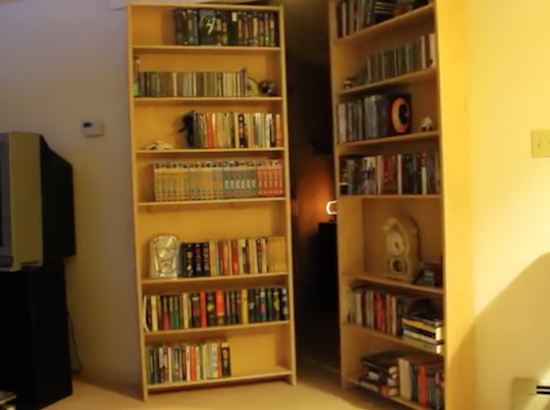
Who didn’t dream of a hidden door or secret passage in the house when they were kids? Some of us still do! [SPECTREcat] had already built a secret door in a fully functioning bookcase with a unique opening mechanism. The intriguing mechanism allows the doors to start by sliding slightly away form one another before hinging into the hidden space. Their operation was, however, was manual. The next step was to automate the secret door opening mechanism with electronics.

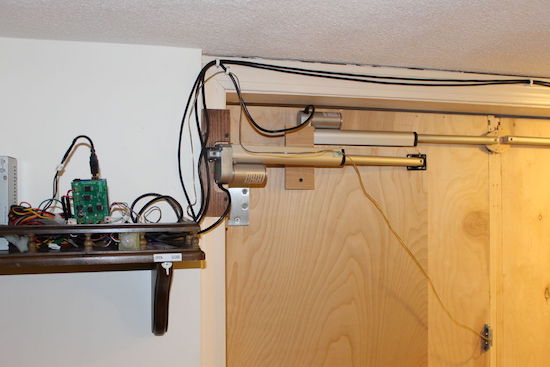
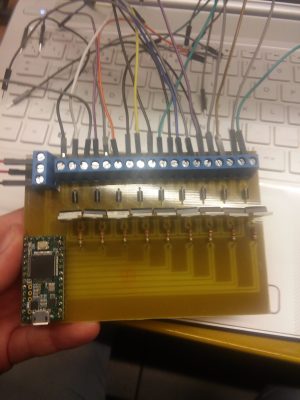
The project brain is an off-the-shelf Arduino Uno paired with a MultiMoto Arduino shield to drive 4 Progressive Automations PA-14 linear actuators. These linear actuators have 50lb force, allowing the doors to fully open or close within 10 seconds and maintain a speed that wouldn’t throw the books off the bookcases.

Not wanting to drill a hole through the bookshelf for a switch or other opening mechanisms, [SPECTREcat] added a reed switch that is activated on the other side by a DVD cover with a magnet inside. In addition to that, there is a PIR sensor on the inside room to automatically close the doors if no motion is detected for 2 hours. Dont worry, there’s also a manual switch inside just in case.

Using one of the items on the shelf to trigger the secret passage is a classic move. He could also have used a secret knock code, like the Secret Attic Library Door we covered in the past. Check out the video below to see the hinge and slide movement in action.


Filed under: home hacks

Brain Controlled Tracked Robot

[Imetomi] found himself salvaging a camera from a broken drone when he decided to use it in a new project, a tracked robot with a live video feed from the mounted camera.

… I had a cheap Chinese drone that was broken, but its camera seemed to be operating and when I took apart my drone I found a small WiFi chip with a video transmitter. I (decided) that I will use this little circuit for a project and I started to buy and salvage the parts.

Being a tracked robot, it can negotiate most types of terrain and climb hills up to 40 degrees. It is powered by two 18650 lithium-ion batteries with a capacity of 2600 mAh and the remote control is based on the HC-12 serial communication module. You can control it with a joystick and watch the camera’s live-stream in a virtual reality glass. That’s pretty neat but it’s not all.

[Imetomi] also used a hacked Nacomimi Brainwave Toy to make a brain controlled version of his robot. The brainwaves are detected using sensors placed on the scalp. To actually control it the operator has to focus on the right hand to move right, focus on the left hand to move left, blink to move forward and blink again to stop. There is also an ultrasonic sensor to help navigation so the robot doesn’t bump into things. It’s not very precise but you can always build the joystick version or, even better, make a version with both controls.

We covered an Arduino brain computer interfaces way back in 2009 and the suggestion we made was a brain controlled beer bot. But this is quite cool too. You can find the build instructions here. If you build one, lets us know how the brain control works for you.

[via arduino.cc]


Filed under: robots hacks

Dot² isn’t your typical coffee table

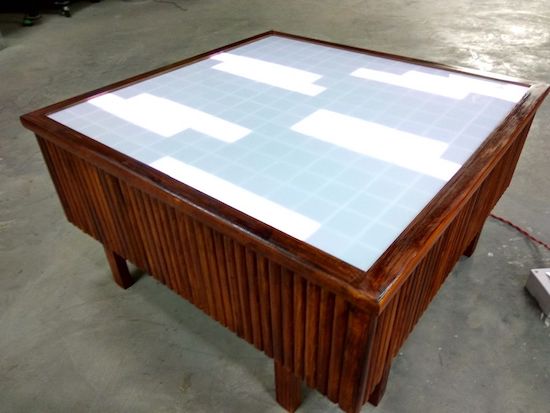
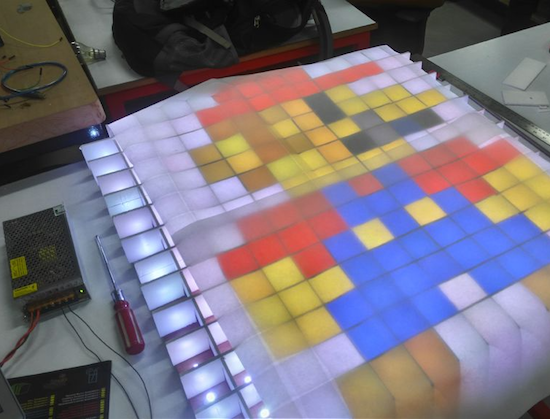
Coffee tables are useful for putting coffee, food, or perhaps way too much junk on, but it’s 2017—we can do better than that! Akshay Baweja certainly has at least with Dot², an interactive piece of furniture that can run animations, display lighting effects, and play old-school games.

The Arduino Mega-based table features a matrix of 296 LEDs that shine up through sections of diffused acrylic, and uses a grid of foam board strips to keep each light in a square. Dot² can be controlled either by a PC running GLEDIATOR software, or via a smartphone using a Bluetooth connection and its own custom app.

The outside doesn’t look too shabby either. With an interesting wood pattern on the side, even when off it seems like there could be something more lurking just below the table’s glass!

Want to build one of your own? Head over to this incredible project’s Instructables page to get started. And, if you’d like to know more about how it’s controlled, check out Baweja’s app here or GLEDIATOR’s site for the computer software he used.

Measuring Magnet Strength with a Dual Sensor Gauss Meter

ever wondered how strong your magnets really are?

Read more on MAKE

The post Measuring Magnet Strength with a Dual Sensor Gauss Meter appeared first on Make: DIY Projects and Ideas for Makers.

MAKE » Arduino 20 Jan 14:00

DIY Thermal Imaging Done Low-Tech Style

[Niklas Roy] has always wanted to try out thermal imaging and saw his opportunity when he received one of those handheld IR thermometers as a gift. But not content with just pointing it at different spots and looking at the temperatures on the LCD display, he decided to use it as the basis for a scanning, thermal imaging system that would display a heat map of a chosen location on his laptop.

DIY thermal imaging system

He still wanted to to be able to use the IR thermometer as normal at a later date so cutting it open was not an option. Instead he firmly mounted a webcam to it pointing at the LCD display. He then wrote software on his laptop to process the resulting image and figure out what temperature was being displayed.

Once he got that working, he next put the thermometer on a platform with servos connected to an Arduino for slowly rotating it in the horizontal and vertical directions, also under control of the software on his laptop. Each time the thermometer measures the temperature of a spot, the software decodes the temperature on the LCD display and then tells the Arduino to use the servos to point the thermometer at the next spot to be measured. Each measurement takes a little time, so scanning an entire location as 70×44 spots takes around a half hour. But the end result is a heat map drawn on the laptop, done by a device that is low-tech. [Editor’s Snark: Because attaching a webcam and processing the images is “low-tech” these days.] He can overlay the heat map on a normal photo to see at a glance where the hot spots are.

The software he wrote is available on GitHub and the video below shows it in action. We’ve got to admit, it’s pretty awesome to watch. You can even see the heat map being filled in one measurement at a time.

[Niklas] is somewhat of a regular here on Hackaday and his projects span an impressive range of creative ideas. Check out his massive music construction machine, or his RC beer crate delivery robot, or his supersized DIY pinball machine. Whatever you do [Niklas], keep those creative juices flowing!


Filed under: misc hacks

A 3D-printed e-drum pad

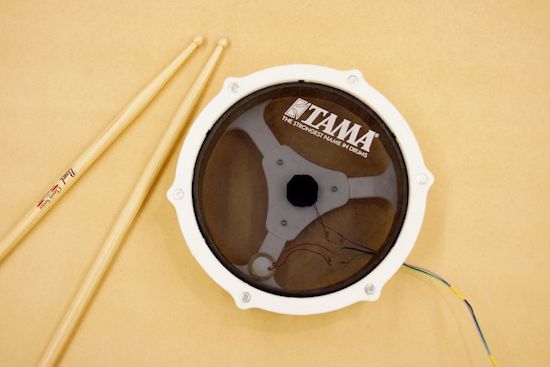
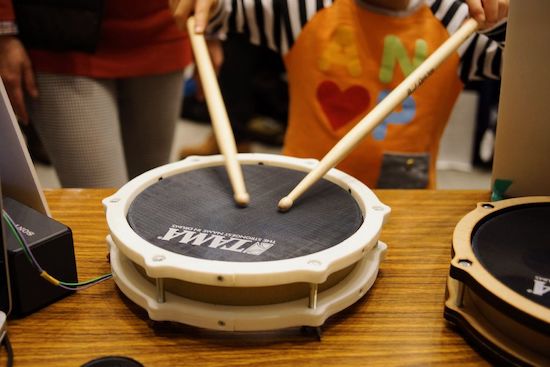
After making his first drum with a laser cutter, Ryo Kosaka redesigned it as a 3D-printed structure so more people could build it.

If you’d like to practice playing the drums, but would rather not disturb your family, roommate, neighbors, dog, etc., then an electronic version is probably a good idea. Since you’re reading our blog, making one would be even better!

Although details on how it was interfaced software-wise with the Arduino Uno aren’t included in his log, the drum itself looks quite good. It’s 3D-printed out of several individual pieces, which are glued together using thick paper to help hold everything intact. The sectioned design means that you only need a 120mm x 120mm print area to produce this 8-inch drum pad.

Kosaka also goes into how to set up the piezo sensor for drum use in his write-up, which should be quite useful for this design, or even something derived from it. You can check out the project page for more details as well as Thingiverse for the print files. Additionally, Kosaka recommends this Rockband controller to MIDI Instructable or this one featuring a homemade electronic drum kit.

Interactive geodesic LED dome = extreme geometric fun!

We’ve all seen geodesic domes in one form or another, whether as a modern experiment, as housing from a bygone era, or perhaps as a gigantic structure in Orlando (technically a geodesic sphere). Jon Bumstead apparently wasn’t satisfied with current dome options, and instead created his own, integrating elements from programmable LED tables to make it interactive.

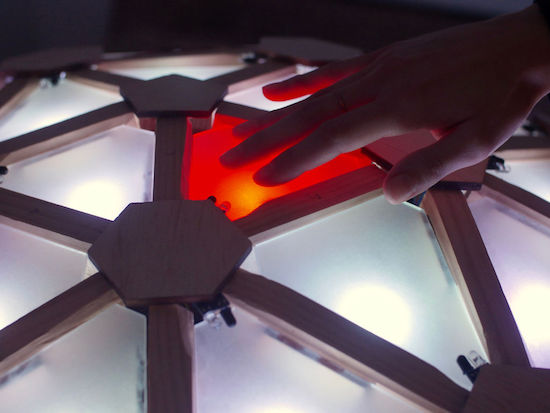
The resulting build is quite spectacular. Each triangular section able to be lit up with an RGB LED, and further information is output to five MIDI signals in order to produce sound. This means that up to five people can play the dome as an instrument simultaneously. If that wasn’t enough, the Arduino Uno-based dome is programmed to play a version of Simon or Pong, and can be set up to display a light show!

I constructed a geodesic dome consisting of 120 triangles with an LED and sensor at each triangle. Each LED can be addressed individually and each sensor is tuned specifically for a single triangle. The dome is programmed with an Arduino to light up and produce a MIDI signal depending on which triangle you place your hand.

Pretty cool, right? Head over to the project’s Instructables page to see more, or if you’d like information on constructing the dome itself, check out Domerama.

Emulate a Commodore 64 keyboard with a modern PC and an Arduino

Using an Arduino, Adam Podstawczynski is able to translate keystrokes on his notebook to character inputs on a C64.

If you enjoy using a Commodore 64, but either don’t like (or perhaps don’t have) its keyboard, Podstawczynski’s project could be a great solution. His build runs a Python script on a PC, Mac, or Linux computer, which maps Commodore keys to a series of binary digits. It then sends this data over USB to an Arduino Mega, which in turn uses an MT8088 crosspoint switch to interface with the mainboard of a C64, allowing for hardware keyboard emulation.

This setup can act as a simple keyboard interface from the computer, or could be employed as a macro generator for demonstration purposes. It could even enable you to input an entire BASIC program on your PC, then send it to the C64 as desired!

Check out Podstawczynski’s page for more info on this work in progress.

The Peeqo Robot Communicates Using Only Animated GIFs

animated GIFs work great and are very expressive

Read more on MAKE

The post The Peeqo Robot Communicates Using Only Animated GIFs appeared first on Make: DIY Projects and Ideas for Makers.

Control a tracked robot with your mind (or joystick)

Whether you choose to control this vehicle with your mind or a joystick, the camera mounted on it will give you a new view of the world.

Maker “Imetomi” was inspired to create a tracked robot after he was able to salvage a camera off of a cheap drone. This became the basis of his FPV setup, which he fitted onto a little tracked vehicle. Although this would have been enough for most people, in addition to building a joystick-based controller, he also made it work with a brainwave headset.

Imetomi now has something that he can drive around virtually, spying on passersby, as long as it stays within the VR transmitter’s 50-meter range. Be sure to check out the video below, where the small bot shows of its impressive all-terrain capabilities, and read his Instructables write-up here.