Posts with «arduino» label

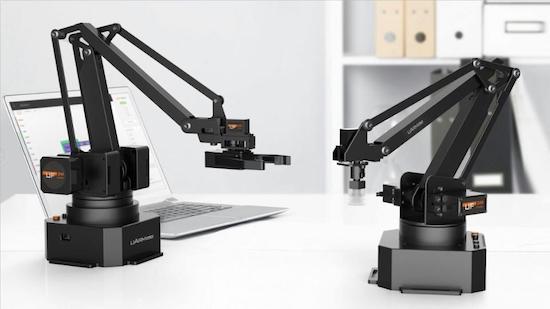
uArm Swift is an open-source robotic assistant for your desktop

Need a hand? The UFACTORY team has got you covered with the uArm Swift, an open-source robotic assistant for your desktop.

The four-axis uArm Swift is a smaller and sleeker version of the company’s original device from 2014. Based on an Arduino Mega, the robot is capable of lifting 500 grams (1.1 pounds) with a working range of 5 to 32 centimeters (2 to 12.6 inches).

UFACTORY has launched two different models of the consumer-friendly arm on Indiegogo. Whereas the basic model is perfect for beginners and those looking to tinker around with robotics, the Swift Pro is designed for a more experienced Maker crowd with a stronger motor, more precision, and greater versatility. It also boasts position repeatability down to 0.2mm.

With a little programming, the Pro can perform a wide range of tasks from 3D printing to laser engraving to picking up and moving game pieces. You can even create your own actions through the team’s Blockly-based graphical software, uArm Studio, as well as control your Swift either directly from a keyboard-and-mouse setup, by making gestures, or over Bluetooth from the uArm Play mobile app.

The Swift is extendable with three different end-effectors (suction cup, metallic gripper, and universal holder) and a built-in socket for selected Seeed Grove modules. But that’s not all. Attach an OpenMV Cam and the robotic arm can detect faces, colors, and markers.

If you’re looking for an affordable and portable robotic arm, be sure to check out UFACTORY’s Indiegogo campaign.

Make your reflex punching bag interactive with Arduino

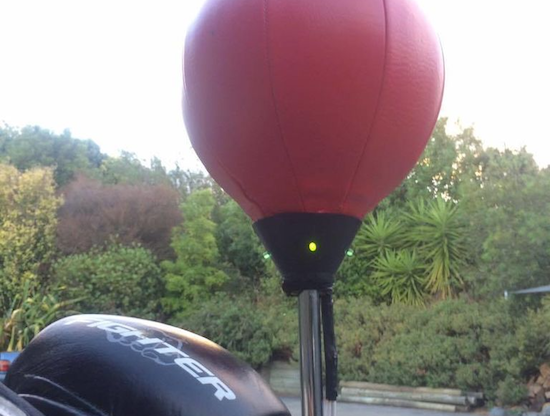
A traditional reflex bag is meant to help improve your punch accuracy and timing. However, Carl Gordon decided to make his a bit more interactive and gamified using an Arduino Uno.

As you can see in the video below, his setup adds four LEDs to the device to tell the user which side of the bag to punch, and an accelerometer to let the Arduino in the base of the stand know when it is actually hit. This means that the person using it has to further work on his or her movement skills, adding a whole new dimension to the workout.

Gordon claims that it’s “10x more fun to use and now feels like more of a game than an exercise!” You can find out how to build your own on the project’s Instructables page.

Slow Motion Frame Will Be the New Magic Mirror

[Paul] created a frame that uses an Arduino and LEDs to create a slow motion illusion of a delicate item (like a flower or a feather). The effect is striking as you can see in the video below.

[Paul] had seen similar projects (both one-offs and sold as a product), but wanted to do his own take on it. The principle is simple: The device vibrates the objects at one frequency and strobes LEDs at a slightly different frequency (80 and 79.5 Hz, in this case). The difference between the frequencies (the beat frequency) is what your eye perceives as a very slow (0.5 Hz, here) motion.

Once you know the secret behind the device, it is not very complicated to create. The woodworking for the frame is the bulk of the work. An Arduino excites an electromagnet to vibrate the subject items. It also pulses the LED strips to achieve the strobe effect. It’s simple, striking, and a show piece. It seems like everyone has been building their own magic mirror project, but we proffer this awesome concept as the next big thing everyone should try on their own workbench. Let’s check out a few other examples to get you thinking.

One of [Paul’s] inspirations was Time Frame, which appears in the second video, below. You can find its code on GitHub. It also uses an Arduino to create the same effect. The other inspiration was Slow Dance, which we covered earlier. We’ve also seen a similar trick played with water droplets.


Filed under: Arduino Hacks, led hacks

IR thermometer hacked into an IR camera

Using several clever hacking techniques, Niklas Roy can make thermal images using a “simple” thermometer.

True IR (infrared) cameras are still too expensive for many of us, but if you’d just like to know the temperature of something at a distance, IR thermometers aren’t that costly. In theory, if you were to take readings in a grid, color code them, and overlay these readings on an image, you would have a manual IR picture. If you can accomplish this manually, the obvious next step is, why can’t a computer?

Per Roy’s clever hack, yes, this is absolutely possible. His device uses a computer along with an Arduino and two servos to trace a grid with a thermometer. It reads the display at these different points using a webcam, then resolves everything into a nice picture. When overlaid with an actual image, it becomes a low (70 x 44 pixel) resolution thermal image.

You can find out more about this project on Roy’s homepage!

MalDuino — Open Source BadUSB

MalDuino is an Arduino-powered USB device which emulates a keyboard and has keystroke injection capabilities. It’s still in crowdfunding stage, but has already been fully backed, so we anticipate full production soon. In essence, it implements BadUSB attacks much like the widely known, having appeared on Mr. Robot, USB Rubber Ducky.

It’s like an advanced version of HID tricks to drop malicious files which we previously reported. Once plugged in, MalDuino acts as a keyboard, executing previous configured key sequences at very fast speeds. This is mostly used by IT security professionals to hack into local computers, just by plugging in the unsuspicious USB ‘Pen’.

[Seytonic], the maker of MalDuino, says its objective is it to be a cheaper, fully open source alternative with the big advantage that it can be programmed straight from the Arduino IDE. It’s based on ATmega32u4 like the Arduino Leonardo and will come in two flavors, Lite and Elite. The Lite is quite small and it will fit into almost any generic USB case. There is a single switch used to enable/disable the device for programming.

The Elite version is where it gets exciting. In addition to the MicroSD slot that will be used to store scripts, there is an onboard set of dip switches that can be used to select the script to run. Since the whole platform is open sourced and based on Arduino, the MicroSD slot and dip switches are entirely modular, nothing is hardcoded, you can use them for whatever you want. The most skilled wielders of BadUSB attacks have shown feats like setting up a fake wired network connection that allows all web traffic to be siphoned off to an outside server. This should be possible with the microcontroller used here although not native to the MalDuino’s default firmware.

For most users, typical feature hacks might include repurposing the dip switches to modify the settings for a particular script. Instead of storing just scripts on the MicroSD card you could store word lists on it for use in password cracking. It will be interesting to see what people will come up with and the scripts they create since there is a lot of space to tinker and enhanced it. That’s the greatness of open source.

You can watch the prototype in action in the video:


Filed under: Arduino Hacks, peripherals hacks, security hacks

Arduino Video isn’t Quite 4K

Video resolution is always on the rise. The days of 640×480 video have given way to 720, 1080, and even 4K resolutions. There’s no end in sight. However, you need a lot of horsepower to process that many pixels. What if you have a small robot powered by a microcontroller (perhaps an Arduino) and you want it to have vision? You can’t realistically process HD video, or even low-grade video with a small processor. CORTEX systems has an open source solution: a 7 pixel camera with an I2C interface.

The files for SNAIL Vision include a bill of materials and the PCB layout. There’s software for the Vishay sensors used and provisions for mounting a lens holder to the PCB using glue. The design is fairly simple. In addition to the array of sensors, there’s an I2C multiplexer which also acts as a level shifter and a handful of resistors and connectors.

Is seven pixels enough to be useful? We don’t know, but we’d love to see some examples of using the SNAIL Vision board, or other low-resolution optical sensors with low-end microcontrollers. This seems like a cheaper mechanism than Pixy. If seven pixels are too much, you could always try one.

Thanks [Paul] for the tip.


Filed under: Arduino Hacks, video hacks

I finally figured out automated builds… for Arduino!

Currently I’m the main maintainer of node-hid, the Node.js package that lets you talk to USB HID devices like blink(1).  I recently cribbed automated build config from node-serialport so now node-hid is automatically built for Mac, Linux, & Windows and Node 4.x,6.x,7.x.   It’s pretty amazing to have these robots doing my bidding.  But did [...]
Todbot 23 Jan 22:56
arduino  

Bookcase automatically opens to reveal secret lair

A secret lair isn’t much fun if it’s a pain to get into, so Instructables user SPECTREcat decided to automate his hidden doors using an Arduino Uno. This drives four linear actuators via a MultiMoto shield, which both pull and turn the bookshelf in such a way that the books stay in place.

When opening, the doors first pull apart with one set of actuators, then turn with the other two to allow enough space for a person to pass through. Instead of drilling a hole through the maple plywood shelves, SPECTREcat chose to use a reed switch that’s activated on the other side by a magnet taped inside a DVD cover.

Beyond that, there’ s a PIR sensor that automatically closes the doors if motion isn’t detected for two hours. There’s also an emergency ingress/egress feature in the event of a power failure.

Looking for a hidden bookcase of your own? You can find more on the project’s electronics here, and see how the doors were constructed mechanically in this separate write-up.

Robo-Flute Whistles MIDI

We aren’t sure this technically qualifies as music synthesis, but what else do you call a computer playing music? In this case, the computer is a Teensy, and the music comes from a common classroom instrument: a plastic recorder. The mistaken “flute” label comes from the original project. The contraption uses solenoids to operate 3D printed “fingers” and an air pump — this is much easier with a recorder since (unlike a flue) it just needs reasonable air pressure to generate sound.

A Teensy 3.2 programmed using the Teensyduino IDE drives the solenoids. The board reads MIDI command sent over USB from a PC and translates them into the commands for this excellent driver board. It connects TIP31C transistors, along with flyback diodes, to the solenoids via a terminal strip.

On the PC, a program called Ableton sends the MIDI messages to the Teensy. MIDI message have three parts: one sets the message type and channel, another sets the velocity, and one sets the pitch. The code here only looks at the pitch.

This is one of those projects that would be a lot harder without a 3D printer. There are other ways to actuate the finger holes, but being able to make an exact-fitting bracket is very useful. Alas, we couldn’t find a video demo. If you know of one, please drop the link in the comments below.

We have seen bagpipe robots (in fact, we’ve seen several). We’ve also seen hammering shotguns into flutes, which is certainly more melodious than plowshares.


Filed under: Arduino Hacks, ARM, musical hacks

Newton’s Cradle for Those Too Lazy to Procrastinate

Desk toys are perfect for when you don’t want to work. There’s a particularly old desk toy called the Newton’s cradle. If you don’t know the name, you’d still recognize the toy. It is some ball bearings suspended in midair on strings. If you pull back, say, two balls and let them swing to impact the other balls, the same number of balls on the other side will fly out. When they return, the same number will move on the other side and this repeats until friction wears it all down.

We think [JimRD] might be carried away on procrastination. You see, he not only has a Newton’s cradle, he has automated it with an Arduino. According to [Jim], this is his third attempt at doing so. You can see the current incarnation in the video, below.

There are two servos. One pulls back the balls and releases them and the other stops the balls in anticipation of the next operation. The servo that pulls the balls back is clearly magnetic. At first, we thought it was an electromagnet and that deenergizing it released the balls. That’s not the case. Instead, the servo arm has a permanent magnet, but foam decouples it from the ball so that if the arm pulls far enough away, the ball can escape.

Because of the differences in magnets, ball bearings, and other factors, if you try to duplicate this, you’ll probably have to experiment a little with the angles and speeds in the code. The ball stop servo is probably unnecessary, as long as you don’t mind waiting for the thing to wind down on its own.

If you don’t have a cradle, you could always make one yourself. We’d probably avoid using light bulbs, though.


Filed under: Arduino Hacks