Posts with «arduino» label

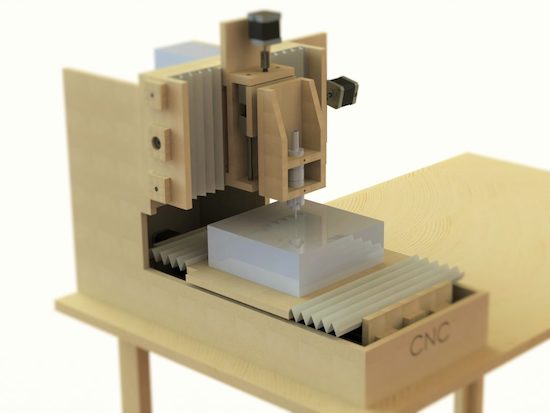
Homemade MDF desktop CNC router for €200

Using an Arduino Uno with a CNC shield,  Thimo Voorwinden has made his own CNC out of MDF for just over €200 ($212).

CNC routers really open up what the type of item you can make, but tend to be expensive. Voorwinden’s homemade version, however, features a work area of 200mm x 250mm x 100mm. As shown in the results video below, it’s accurate enough to cut two pieces of MDF so that they can nest securely inside of one another. Impressively, the whole assembly was created using basic tools.

Two interesting features on this build are that the workpiece is fastened down with wood screws into the Y-axis gantry, and that it employs an offset motor with a flexible shaft to transfer power to the cutting head. 12 bearing blocks and 8mm diameter steel rod are used to keep everything lined up.

You can see more of this project in Voorwinden’s write-up, including several other videos as well.

Giant interactive crossword puzzle uses over 130 Arduino

In what is perhaps the most Arduino boards used together, 130 Arduino Nanos, (plus an Arduino Mega), 130 RFID readers, and 750 RGB LEDs power this interactive crossword puzzle.

As you might suspect, bringing a giant crossword puzzle to life was lot of work. If you’d like to know how much, you can see the process laid out in the video below. Like many great hacks, this project starts out with a lot of prep, making sure the mechanical pieces go together as they should. Everything is then wired and programmed, and on day six, it finally goes out the door, destined for the National Museum in Warsaw, Poland.

Each letter has an RFID tag. Under the table are custom made circuits with Arduino Nano, RFID reader, and WS2812B. There is 130 of those circuits and the are connected by I2C interface together to Arduino Mega 2560, which is the main brain. So basically, the table recognizes letters and takes proper actions.

  • When there is no letter: LED are dimmed white
  • When letter is good: LED are green
  • When letter is bad: LED are red
  • When whole word is completed: LED play colorful animation
The main controller (Arduino Mega) communicates with a PC via RS-232. This PC plays special graphic visualization on the wall. When the whole crossword is completed, the whole table begins doing disco + sound effects.

It’s quite a colorful display, and it looks like the kids playing with it in the “Anything Goes” exhibition love it! You can see more about this project in Robert Mordzon’s write-up.

Save the date for Arduino Day 2017: April 1st

For the fourth year, we invite the open source community to join us in celebrating Arduino’s birthday on Saturday, April 1st!

Arduino Day is a 24-hour-long worldwide event – organized by our team and the community – where people interested in Arduino can get together, share their experiences, and learn more about the platform through all sorts of activities, tailored to local audiences. Participation is open to anyone, from young Makers and students to professional engineers and designers.

More than 330 were held by Arduino enthusiasts across the globe in 2016. This year, we are hoping to make that number 500! If you want to organize Arduino Day festivities of your own, please fill out the online form and submit your proposal here by March 11th.

In the coming weeks, be sure to visit the official website to learn more or find an event in your area. And don’t forget to post, engage, and follow along on social media using the hashtag #ArduinoD17!

The Smartest Computer Was On Star Trek

There have been a lot of smart computers on TV and movies. We often think among the smartest, though, are the ones on Star Trek. Not the big “library computer” and not the little silver portable computers. No, the smart computers on Star Trek ran the doors. If you ever watch, the doors seem to know the difference between someone walking towards it, versus someone flying towards it in the middle of a fist fight. It also seems to know when more people are en route to the door.

Granted, the reason they are so smart is that the doors really have a human operating them. For the real fan, though, you can buy a little gadget that looks like an intercom panel from the Enterprise. That would be cool enough, but this one has sound effects and can sense when someone walks into your doorway so they can hear the comforting woosh of a turbolift door.

Of course, for the real hacker, that’s not good enough either. [Evan] started with this $25 gadget, but wanted to control it with an Arduino for inclusion in his hackerspace’s pneumatic door system. He did a bit of reverse engineering, a bit of coding, and he wound up in complete control of the device.

The internals of the device were mostly straightforward with some PIR sensors, switches, LEDs, and some epoxy blobs that produce the sound and control the logic. [Evan] had to be a little creative since the red alert sound, once started, would not stop for some time. The solution? Let the Arduino cut power to the board when it wants silence.

The code is available on GitHub. There were a few other tricks required, including removing a PIR sensor chip and adding a USB to serial adapter. Once you can treat the whole thing as an I/O device, you could probably do a lot of interesting projects easily. And of course, this sort of offering would be perfect as an entry in the Hackaday Sci-Fi contest.

For some reason, we don’t see as many original series hacks as we do for the Next Generation. We have, though, seen at least one other swoosh door. On the other hand, if you fly against that door while being thrown by a Captain Kirk style body slam the door will still open. We can’t vouch for it, but this video has an interesting analysis of the door noise that reminded us of a modern version of playing our old LPs backward.


Filed under: Arduino Hacks

Huge Interactive Crossword

Give kids some responsible and challenging tasks, and you’d be surprised at the results. The “Anything Goes” exhibit at the National Museum in Warsaw was aimed as a museological and educational experiment. A group of 69 children aged 6–14 was divided into teams responsible for preparing the main temporary exhibition at the museum. Over six months, they worked on preparing the exhibition during weekly four-hour meetings. They prepared scripts, provided ideas for multimedia presentations, and curated almost 300 works for display. One of those was [Robert Mordzon]’s Giant Interactive Crossword.

The build is in two parts. The letter tiles, which have embedded RFID tags, obviously look like the easiest part of the build. The table, looking at the video (after the break), probably needed a lot more effort and labour. It is built in two halves to make construction easier. There are a 130 boxes that need to be filled in with the right letters to complete the crossword. Each box contains a bunch of electronics consisting of an Arduino Nano, a RFID Reader and a bunch of sixteen WS2812B LEDs, all assembled on a custom PCB. Do the math, and you’ll figure out that there’s 2080 LEDs, each capable of sipping 60 mA at full brightness. That’s a total current requirement of almost 125 amps at 5 V. Add in all the Arduino’s, and [Robert] needed a beefy 750 W of power, supplied via four switch mode power supplies.

Each Arduino Nano is a slave on the I²C bus. The I²C master is an Arduino Mega 2560, which in turn communicates with a computer over serial. When a box is empty, the LEDs are dim, when a wrong letter is placed, they turn Red, and when the right letter is placed, they turn Green. If a word gets completed, a special word animation is played. This information is also passed on to the computer, which then projects an animation related to the word on a giant wall screen. Upon the crossword getting completed, the table erupts in to a sound (via the computer) and light “disco” show and also reveals the main motto of this section of the exhibit – “Playing the Hero”.


Filed under: Arduino Hacks

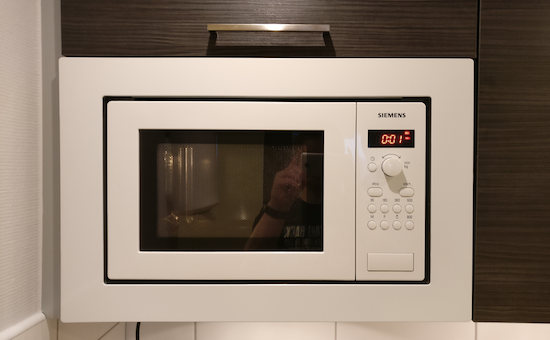
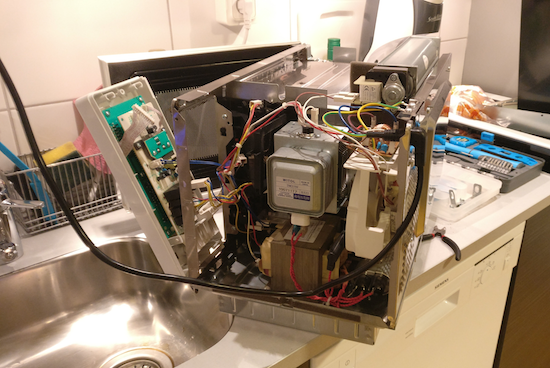
Replace a microwave’s beeping with the Windows XP startup sound

When your microwave is done with its food, it generally beeps… and beeps… and beeps. Though you definitely want to know when your frozen burrito is edible, if you get to it right when it wants, things can get quite annoying. Tim Gremalm decided to do something about it, and replaced the buzzer in his appliance with an Arduino Nano, an amplifier, and small speaker.

His initial speaker/amplifier combination wasn’t loud enough so he replaced it with more appropriate options. After this hack, he now has something that can play a more pleasing tone—in his case, the Windows XP startup sound—and do so only once!

You can see more of this project on Gremalm’s page, as well as check out his code here or this Arduino program that inspired his code. It’s a neat hack, and a great example of what can be done with an Arduino, but you probably shouldn’t mod your microwave unless you really know what you’re doing!

Use Arduino, Sensors, Servos, and LEDs To Create Life-Like Behavior

Voroni moves in a smooth and organic way, thanks to some creative thinking.

Read more on MAKE

The post Use Arduino, Sensors, Servos, and LEDs To Create Life-Like Behavior appeared first on Make: DIY Projects and Ideas for Makers.

Ikea Standing Desk Goes Dumb to Smart on LIN Bus

IKEA’s products are known for their clean, Scandinavian design and low cost, but it is their DIY or “assemble it yourself” feature that probably makes them so popular with hackers. We seem to receive tips about IKEA hacks with a consistent regularity. [Robin Reiter] has a Bekant Sit/Stand motorized table with buttons to raise and lower the surface, but it doesn’t have any memory presets. That’s a shame because it requires a lot of fiddling with the up/down buttons to get it right every time. It would be nice to press a button, go grab a Coffee, and come back to find it adjusted at the desired height. With a little bit of hacking, he was able to not only add memory preset buttons, but also a USB interface for future computer control.

The existing hardware consists of a PIC16LF1938 micro-controller with two buttons for movement control and a LIN bus  protocol which communicates with the automotive grade motors with integrated encoders that report position values. After a bit of sniffing around with his oscilloscope and analyzer, he was able to figure out the control codes for the motor movements. For some strange reason, however, the LIN signals were inverted, so he had to introduce a transistor signal inverter between the PIC master and the Arduino Nano that would act as a slave LIN node. Software was made much easier thanks to an Arduino library developed by [Zapta] for the LIN Bus signal Injector, The controls now have four buttons — two to replicate the original up/down movements, and the other two to act as memory presets.

The code, schematic and a simple wiring layout are posted on Github, in case there are others out there who’d like to replicate this hack. Check out the video after the break where he gives a walk through the code.


Filed under: hardware, home hacks

A Blissful Microwave

[Tim] had a problem with his microwave. The buzzer was exceptionally annoying, and once his hot pockets or pizza rolls were done, the buzzer wouldn’t shut off. A two-kilohertz tone infected his soul. It was the only sound echoing in a Boschian nightmare of reheated frozen food.

Unlike an existential ennui, an annoying buzzer in a microwave is something anyone can fix. [Tim] just took a pair of pliers to the buzzer and ripped it off the PCB. This left him with another problem — how to tell when his food was done. This was solved by putting the Windows XP startup sound in his microwave.

With the buzzer out of the way, [Tim] took an Arduino nano and loaded it up with the Windows XP startup sound. There isn’t much Flash on the Arduino, but it could hold an 18kB sample, enough to play the startup sound at 8kHz. The sound itself is PCM audio and easily stuffed into a sketch.

The Arduino listens for the 2kHz tone generated by the microwave and sends the XP startup sound through a tiny class D amplifier. After mounting a speaker inside the microwave, [Tim] has a very vaporwavemicrowave.

[via Hackaday.io]


Filed under: home hacks
Hack a Day 10 Feb 09:01

Modular portable conveyor belt

When teaching Industrial Automation to students, you need to give them access to the things they will encounter in industry. Most subjects can be taught using computer programs or simulators — for example topics covering PLC, DCS, SCADA or HMI. But to teach many other concepts, you  need to have the actual hardware on hand to be able to understand the basics. For example, machine vision, conveyor belts, motor speed control, safety and interlock systems, sensors and peripherals all interface with the mentioned control systems and can be better understood by having hardware to play with. The team at [Absolutelyautomation] have published several projects that aim to help with this. One of these is the DIY conveyor belt with a motor speed control and display.

This is more of an initial, proof of concept project, and there is a lot of room for improvement. The build itself is straightforward. All the parts are standard, off the shelf items — stuff you can find in any store selling 3D printer parts. A few simple tools is all that’s required to put it together. The only tricky part of the build would likely be the conveyor belt itself. [Absolutelyautomation] offers a few suggestions, mentioning old car or truck tyres and elastic resistance bands used for therapy / exercise as options.

If you plan to replicate this, a few changes would be recommended. The 8 mm rollers could do with larger “drums” over them — about an inch or two in diameter. That helps prevent belt slippage and improves tension adjustment. It ought to be easy to 3D print the add-on drums. The belt might also need support plates between the rollers to prevent sag. The speed display needs to be in linear units — feet per minute or meters per minute, rather than motor rpm. And while the electronics includes a RS-485 interface, it would help to add RS-232, RS-422 and Ethernet in the mix.

While this is a simple build, it can form the basis for a series of add-ons and extensions to help students learn more about automation and control systems. Or maybe you want a conveyor belt in your basement, for some reason.


Filed under: Arduino Hacks, hardware