Posts with «arduino» label

Listening for Hand Gestures

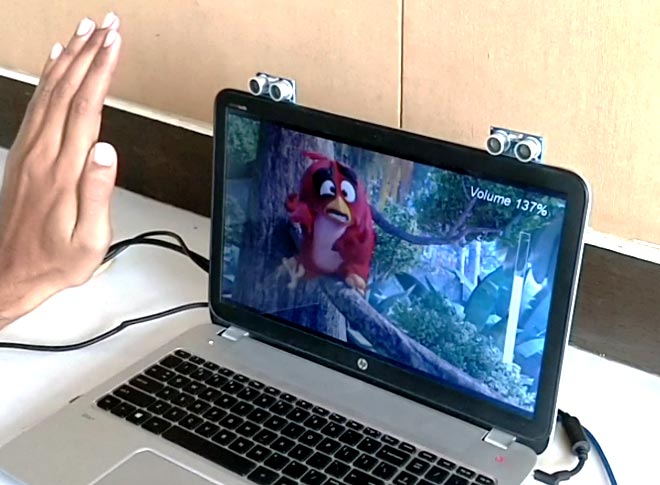
[B. Aswinth Raj] wanted to control a VLC player with hand gestures. He turned to two common ultrasonic sensors and Python to do the job. There is also, of course, an Arduino. You can see a video of the results, below.

The Arduino code reads the distance from both sensors — one for the left hand and the other for the right. This allows the device to react to single hand gestures that get closer or further away from one sensor as well as gestures involving both hands. For example, raising your left hand and moving it closer or further away will adjust the volume. The right hand controls rewind and fast forward. Raising both hands will start or stop playback.

Of course, since the Arduino is reading the gestures you could change them to suit you. We might have mounted the sensors further back (or, perhaps, added more sensors) so you could use trigonometry to triangulate the hand’s exact position. Well, perhaps not exact, but you could get an idea of the hand’s motion from right to left as well as forward and backward.

On the host computer side, Python receives serial data from the Arduino and then simulates keystrokes to get the desired result. Of course, this is also highly customizable.

By coincidence, we did a similar project a few years ago using one sensor and the Arduino’s ability to appear like a USB keyboard. We’ve also seen 8 sensors making piano music.


Filed under: Arduino Hacks
Hack a Day 02 Nov 03:00

An Arduino-controlled geodesic greenhouse and chicken coop

Danish industrial design student Mikkel Mikkelsen decided to do something a little different this spring, and constructed a self-sufficient geodesic greenhouse dome. His dome, which was planned using this online calculator, now stands roughly 13 feet tall, providing space for crops, along with an annex for chickens.

While this seems like a very “back to nature” project, he didn’t forget to include modern conveniences via an automation system that uses both an Arduino Nano and a Mega. The chickens can come and go through an automatic door, while ventilation windows on the top of the dome can be opened as needed. Even plant watering is controlled automatically.

The dome is also equipped with a GSM module that allows Mikkelsen to check on things using his phone via SMS, as well as a potentiometer for manually varying the watering levels and a speaker that is triggered upon entering the greenhouse.

Be sure to check out Mikkelsen’s elaborate Instructables write-up for more info on the build.

Add Intuitiveness to OpenSCAD With Encoders

The first time I saw 3D modeling and 3D printing used practically was at a hack day event. We printed simple plastic struts to hold a couple of spring-loaded wires apart. Nothing revolutionary as far as parts go but it was the moment I realized the value of a printer.

Since then, I have used OpenSCAD because that is what I saw the first time but the intuitiveness of other programs led me to develop the OpenVectorKB which allowed the ubiquitous vectors in OpenSCAD to be changed at will while keeping the parametric qualities of the program, and even leveraging them.

All three values in a vector, X, Y, and Z, are modified by twisting encoder knobs. The device acts as a keyboard to

  1. select the relevant value
  2. replace it with an updated value
  3. refresh the display
  4. move the cursor back to the starting point

There is no software to install and it runs off a Teensy-LC so reprogramming it for other programs is possible in any program where rotary encoders may be useful. Additional modes include a mouse, arrow keys, Audacity editing controls, and VLC time searching.

Here’s an article in favor of OpenSCAD and here’s one against it. This article does a good job of explaining OpenSCAD.

[Editor’s note: This is a Hackaday writer’s hack, hence the “I” in place of the usual “we”. We all love custom peripherals though, and a good number of us love OpenSCAD, so you could probably read it either way, but we don’t want to take credit for [Brian]’s work.]


Filed under: 3d Printer hacks, Arduino Hacks

Automate Halloween with the Stack-O-Lantern memory game

While Halloween has come and gone, it’s not too early to start brainstorming for next year’s jack-o’-lantern hack. Perhaps you’re thinking about lighting a pumpkin with an Uno-powered array of LEDs, or activating a shield to play scary recorded noises. If, however, you’d like inspiration for something more involved, the New Scientist team’s Arduino-controlled nine-pumpkin rig shows off lots of creative ideas.

The system holds candy in a hacked cereal dispenser, which is released through a long clear plastic tube. But instead of giving away treats for free, it’s activated by an interactive memory game involving four pumpkins on the sides of the assembly.

Trick-or-treaters must tap each pumpkin’s aluminum foil switches in sequence. If replicated in the correct order, they are rewarded with candy. If not, visitors are “treated” to a spray of silly string!

You can read more about New Scientist‘s project in this article, and see it in action below!

Capturing a complex TV commercial with Arduino

Ever wonder how studios like Oslo-based Flambert get perfectly timed (and complex) shots of “disasters,” such as the destruction of a birthday party setting seen in the Coop Obs! commercial below?

While the moving camera position was handled by a robotic arm, food jumping off of the table is coordinated by a series of 18 pneumatic actuators controlled by an Arduino.

The pneumatic equipment is cleverly concealed by a tablecloth, making the food appear to fly off the table with no trigger other than the hostess of the party initially slipping. Another clever innovation was making the table with two interchangeable tops, so one could be set up while the other was being shot, saving a huge amount of time during filming.

“We decided to build a table consisting of high-pressure valves with nine individual triggers and 18 air pressure points that could shoot items into the air with extreme precision. We recommended a combination of high-speed camera movements, and triggers to set off and capture the chaos. All this was controlled by an Arduino unit, that again was controlled by a motion-controlled robot.”

Arduino Blog 31 Oct 21:55
arduino  featured  

Hackaday Prize Entry: Arduino Video Display Shield

The Arduino is the standard for any introduction to microcontrollers. When it comes to displaying video, the bone stock Arduino Uno is severely lacking. There’s just not enough memory for a framebuffer, and it’s barely fast enough to race the beam. If you want video from an Arduino, it’s either going to be crappy, or you’re going to need some magic chips to make everything happen.

[MagicWolfi]’s 2017 Hackaday Prize entry consists of an video display shield that would be so easy to use that, according to the project description, it could be a substitute for the classic Blink sketch.

The project centers around the VLSI VS23S010D-L chip, which packs 1 Megabit SPI SRAM with serial and parallel interfaces. An integrated video display  sends the composite video signal to display, with the mode depending on how many colors and what resolution is desired: for instance, at 640×400 you can display 16 colors. As he describes it, not 4K video but definitely Joust. The chip expects 3.3 V logic so he made use of a MC74LVX50 hex buffer to tailor the Arduino’s 5 V. Currently he’s working on revision two of the shield, which will include SPI flash memory.

You can follow along with the project on Hackaday.io or the current shield design can be found in [MagicWolfi]’s GitHub repository.


Filed under: The Hackaday Prize

MOVI Adds Voice Control to Arduino Projects

MOVI is designed to provide onboard speech recognition and synthesis, making it easy to add voice control to your Arduino based project.

Read more on MAKE

The post MOVI Adds Voice Control to Arduino Projects appeared first on Make: DIY Projects and Ideas for Makers.

SimpleSumo Bots Teach More than Fighting

[MechEngineerMike] wrote in to share the enthusiasm over SimpleSumo, a series of open source, customizable robots he designed for mini-sumo battling and much more. For the unfamiliar, mini-sumo is a sport where two robots try to push each other out of a ring. [Mike]’s bots are simplified versions designed for education.

[Mike] was inspired by a video of some kids building mini-sumo bots who were doing anything and everything to personalize them. He vowed to make his own affordable, easy-to-build bots with education firmly in mind. His other major requirement? They had to be as easily customizable as that one potato-based toy that eventually came with a bucket of parts. As of this writing, there are 34 interchangeable accessories.

[Mike]’s first idea was to build the bots out of custom 3D-printed building blocks. He soon found it was too much work to print consistent blocks and switched to a modular cube-like design instead. SimpleSumo bots can do much more than just fight each other. [Mike] has written programs to make them flee from objects, follow lines, find objects and push them out of the ring, and beep with increasing frequency when an object is detected.

The bots are completely open source, but [Mike] sells kits for people who can’t print the parts themselves. He’s made a wealth of information available on his website including links to outside resources about mini-sumo, Arduino, programming, and 3D design. How about a complete series of assembly videos? First one is after the break.  Don’t know how to build a battle ring? He’s got that covered, too.

For a sumo bot that’s more brains than brawn, check out Zumo Red, the smart sumo.


Filed under: how-to, robots hacks

An Arduino vibe bowl screw feeder

Vibratory bowls, which feed small parts up a long curved ramp, are essential elements in many types of automated manufacturing. While the video seen here doesn’t get into how the bowls themselves are made, a crucial part of the setup is the ramp on the end, which controls how items exiting the bowl are aligned.

In the clip below, NYC CNC’s John Saunders machines a feed ramp and proceeds to integrate an Arduino Uno after the 21:00 mark, which uses a photo interrupt sensor to count how many parts have exited the bowl.

Once the proper number has been attained, it can then switch things off as needed using a PowerSwitch Tail. It’s a great setup for testing out the design before being put to use. Code and parts for the project can be found here.

Turn your raspberry pi robot into internet controlled telepresence robot.

Hi guys, 

My name is Jill, and I've been working on an open telepresence platform (letsrobot.tv) for any kind of robot you can think of, and i wanted to open it up to more people. It's kind of a cross between telepresence and live-streaming. You can basically hook up any robot that can run our software to the site for anyone on the internet to control. We have an API & documentation to help you get started.

read more