Posts with «arduino» label

Neon skulls illuminate to the MIDI beat

LEDs, whether single-color or programmable, have enabled makers to create a wide variety of vibrant projects at a reasonable price. Neon sign projects, which require sophisticated glass making techniques as well as high voltage for control aren’t as common, but do still have their adherents. Some have even experimented with making them sound reactive.

Up until now, sound control meant using a microphone to detect audio signals and flash accordingly. David Garges, however, is using an Arduino Leonardo equipped with an Olimex MIDI shield to individually activate three neon skulls, crafted by artist Dani Bonnet. 

His setup can be programmed via MIDI directly, or can use beat analysis software to activate the proper lights depending on audio output. 

There has been much desire in the Neon Art community for clean and responsive musical interaction with high-voltage Neon Signs. Currently, the existing infrastructure uses a microphone to detect audio and flash accordingly. Unfortunately, due to this method of processing the Neon always responds with a small delay. Clapping and shouting can also disrupt the interaction when using an on-board microphone.

This project solves that problem by transmitting musical data via MIDI protocol to a controller which activates then activates Neon Tubes accordingly. I have designed and built a system that takes a slightly different approach but accomplishes what the Neon Art community desires.

This project offers two performance modes: one that allows for electronic artists to perform seamlessly using MIDI instruments, and one that allows DJs to feed BPM analysis to the system to synchronize the Neon flashing with actual recorded music which enables Real-Time Audio-Controlled Neon.

Be sure to check out the demo in the video below!

DIY Wire Bender Gets Wires All Bent Into Shape

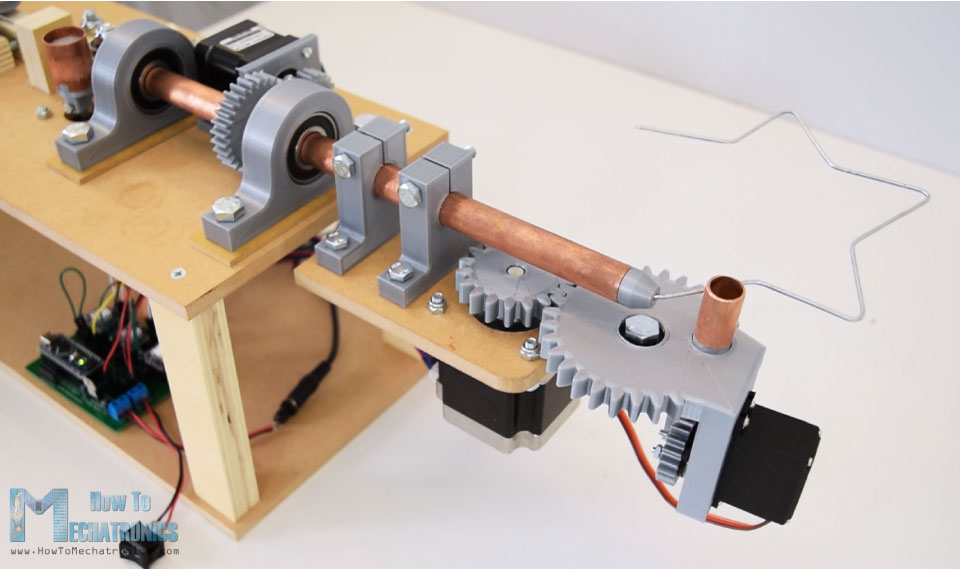
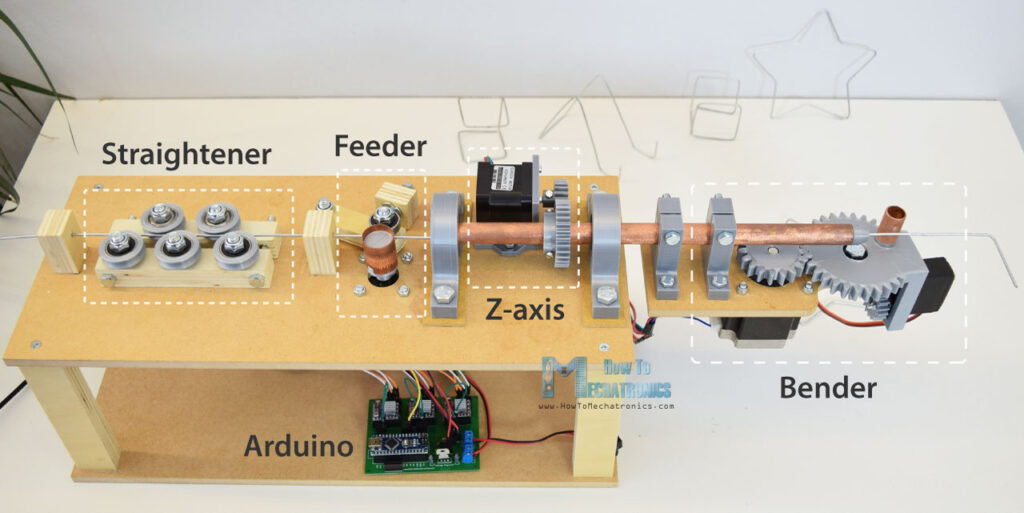
It’s been a while since we’ve shown a DIY wire bending machine, and [How To Mechatronics] has come up with an elegant design with easy construction through the use of 3D-printed parts which handle most of the inherent complexity. This one also has a Z-axis so that you can produce 3D wire shapes. And as with all wire bending machines, it’s fun to watch it in action, which you can do in the video below along with seeing the step-by-step construction.

One nice feature is that he’s included a limit switch for automatically positioning the Z-axis when you first turn it on. It also uses a single 12 volt supply for all the motors, and the Arduino that acts as the brains. The 5 volts for the one servo motor is converted from 12 using an LM7805 voltage regulator. He’s also done a nice job packaging the Arduino, stepper motor driver boards, and the discrete components all onto a single custom surface mount PCB.

Wire straightener and feeder

The bender isn’t without some issues though, such as that there’s no automatic method for giving it bending instructions. You can write code for the steps into an Arduino sketch, which is really just a lot of copy and paste, and he’s also provided a manual mode. In manual mode, you give it simple commands from a serial terminal. However, it would be only one step more to get those same commands from a file, or perhaps even convert from G-code or some other format.

Another issue is that the wire straightener puts too much tension on the wire, preventing the feeder from being able to pull the wire along. One solution is to feed it pre-straightened wire, not too much to ask for since it’s really the bending we’re after. But fixing this problem outright could be as simple as changing two parts. For the feeder, the wire is pulled between copper pipe and a flat steel bearing, and we can’t help wondering whether perhaps replacing them with a knurled cylinder and a grooved one would work as the people at [PENSA] did with their DIWire which we wrote about back in 2012. Sadly, the blog entries we linked to no longer work but a search shows that their instructable is still up if you want to check out their feeder parts.

As for the applications, we can think of sculpting, fractal antennas, tracks for marble machines, and really anything which could use a wireframe for its structure. Ideas anyone?

Hack a Day 15 Oct 06:00

Flash: Arduino Vidor FPGA Instructions Hit France

If you speak French and you have an Arduino Vidor 4000, you are in luck because there’s some good news. The good news is there’s finally some inside information about how to configure the onboard FPGA yourself. The bad news though is that it is pretty sparse. If your high school French isn’t up to the task, there’s always Google Translate.

We knew some of this already. You’ll need Quartus, the FPGA design tool from Altera — er, Intel — and we know about the sample project on GitHub, too. Instead of using conventional Verilog or VHDL, the new information uses schematic capture, but that’s OK. All the design entry winds up in the same place, so it should be easy to adapt to the language of your choice. In fact, in part 2 they show both some schematics and some Verilog. Google Translate does have a little trouble with code comments, though. If you want something even stouter, there’s an example that uses Verilog to output a video frame.

The real question has been: how do you get the bitstream into the FPGA without surgery on the board? There’s a Java application (Zip download) that builds a .H file for you. Including that in your sketch will cause the Arduino to load the FPGA for you. There are still not a lot of details about how that works — we think there’s almost an FPGA bootloader that stays loaded and then gets the rest of the configuration like this.

In addition, there is a warning at the end:

Under no circumstances should you reconfigure the PA20 port of the SAMD21 output. This one is already used as output by the FPGA.

We can imagine that there are other gotchas, so if you start experimenting you are taking some chance of blowing up or bricking your Arduino.

Still, this is great news! We’ve been itching to play with the onboard FPGA and this should answer enough questions to work out the rest of the details. All the examples, including a DVI output example, are linked on one download page.

If you are wanting to learn more about the hardware, we covered it. We also have some FPGA boot camps that would help you get started with FPGAs in general.

Hack a Day 14 Oct 15:00
arduino  arduino hacks  fpga  max10  news  quartus  vidor  

Dymo Rides Again With This Dot-Matrix Label Embosser

For a five-year-old future Hackaday scribe, there could be no greater day than that on which a Dymo label maker appeared in the house. With its spinny daisy-wheel to choose a character and its squeezy handle to emboss the letter into the plastic tape, there would follow a period of going nuts kerchunking out misspelled labels and slapping them on everything. Plus the things look like space guns, so there would have been a lot of pew-pewing too.

This Dymo dot-matrix label maker bears no resemblance to our long-lost label blaster, but it’s pretty cool in its own right. The product of collaborators [Felix Fisgus] and [Timo Johannes] and undertaken as a project for their digital media program, the only thing the labeler has in common with the Dymos of old is the tape. Where the manual labelers press the characters into the tape with a punch and die, their project uses a dot-matrix approach. Messages are composed on an old PS/2 keyboard through an Arduino and a 16×2 LCD display, and punched onto the tape a dot at a time. The punch is a large darning needle riding on the remains of an old CD drive and driven by a solenoid. When it comes time to cut the label, servo driven scissors do the job. It’s a noisy, crazy, Rube Goldberg affair, and we love it. Check it out in action in the video below.

We applaud [Felix] and [Timo] for carrying the torch of embossed label making. It’s a shame that we’ve turned to soulless thermal printers to handle most of our labeling needs; then again, we’ve seen some pretty neat hacks for those too.

Announcing Arduino’s Coordinated Vulnerability Disclosure Policy

A little less than a month ago, I joined Arduino as their Chief Information Security Officer. I’ve been in touch with the team for the past couple of months and feel incredibly lucky to be part of such a talented and driven group of people.

We’re working hard on developing a robust, well-rounded security program that fits our organisation and busy improving our security posture across all departments. I am a true believer that it all starts from introducing a strong culture of security awareness — where employees feel confident and empowered to take action against security issues.  

Today, I’m thrilled to announce the first release of Arduino’s Coordinated Vulnerability Disclosure (CVD) Policy.

We used some great references when putting it together and we’d like to give them a shout out here: HackerOne’s VDP guidelines, CEPS’ report on “Software Vulnerability Disclosure in Europe,” and the US DoJ Cyber Security unit’s VDP framework. We also took into consideration recent Senate testimony of experts in vulnerability disclosure in the role hackers can play in strengthening security, Dropbox’s announcement on protecting researchers and 18F’s own policy. I even wanted to publicly thank Amit Elazari Bar On, a doctoral law candidate (J.S.D.) at UC Berkeley School of Law and a Lecturer at UC Berkeley School of Information Master in Cybersecurity program for her useful advices and for providing the amazing “#legalbugbounty” standardisation project.

We’re also happy to announce that all of the text in our policy is a freely copyable template. We’ve done this because we’d like to see others take a similar approach. We’ve put some effort in to this across our teams and if you like what you see, please use it. Similarly, if you have improvements to suggest, we’d love to hear from you.

What is CVD?

Coordinated vulnerability disclosure (CVD) is a process aimed at mitigating/eradicating the potential negative impacts of vulnerabilities. It can be defined as “the process of gathering information from vulnerability finders, coordinating the sharing of that information between relevant stakeholders, and disclosing the existence of vulnerabilities and their mitigation to various stakeholders, including the public.”

Figure 1: Relationships among actors in the CVD process. Source: “The CERT Guide to Coordinated Vulnerability Disclosure,” Software Engineering Institute, Carnegie Mellon University

Why is it important for us?

At Arduino, we consider the security of our systems and products a top priority. No technology is perfect, and Arduino believes that working with skilled security researchers across the globe is crucial in identifying weaknesses in any technology. We want security researchers to feel comfortable reporting vulnerabilities they’ve discovered, as set out in this policy, so that we can fix them and keep our information safe.

If you believe you’ve found a security issue in our products or services, we encourage you to notify us. We welcome working with you to resolve the issue promptly.

This policy describes how to send us vulnerability reports and how long we ask security researchers to wait before publicly disclosing vulnerabilities.

Where can I find it?

A copy of the policy is published on our Vulnerability Disclosure Policy page. The official document lives in GitHub. If you would like to comment or suggest a change to the policy, please open a GitHub issue.

Thank you for helping keep Arduino and our users safe!

— Gianluca Varisco

When in Rome: Join us at Europe’s Biggest Maker Faire!

We’re just days away from Maker Faire Rome — The European Edition, where we will be partnering with Microchip in Pavilion 8.  This year’s booth will be broken up into three areas:

  • Education: The Arduino Education team will be exhibiting the flagship CTC 101 program and the Engineering Kit. Starting at 11am, there will be 15-minute demos every hour that address the ways Arduino can be implemented as a learning tool from primary schools all the way up to universities.
  • Makers: We have been working on a pair of new projects to highlight the key specs and possible use cases of the Uno WiFI. Moreover, visitors will have the opportunity to meet the winner of the Arduino /Distrelec Robotics & Automation Contest.
  • Internet of Things: This section will be focused around a smart greenhouse connected to the Arduino IoT Cloud, along with two demos of the MKR Vidor 4000. Finally, we will be showcasing some practical demos on how startups and companies have turned to Arduino to bring their products and services to market.

The Arduino booth will also include a special station dedicated to the Arduino Store, where will be giving away 500 discount vouchers for online purchases on a first come, first serve basis.

But that’s not all! Members of the Arduino team can be found throughout Maker Faire Rome’s program all weekend long. The schedule is as follows:

Friday, October 12th

10:30am: Opening Conference (Pavilion 10 – Room 1/Sala Alibrandi): Massimo Banzi, Arduino co-founder, will join Maker Faire’s opening conference ‘Groundbreakers: Pioneers of the Future’ with the talk Democratizing Industry 4.0. Register here.


2:30pm – 5:30pm
(Room 17 SC3): Debugging with Arduino: A hands-on workshop with Microchip’s Wizard of Make, Bob Martin, and Arturo Guadalupi, Arduino Hardware Design Engineer, which will explore advanced debugging techniques for Arduino sketches. More info here.


2:30pm – 3:30pm
 (Pavilion 9 – Room 11): CTC: Bring Open-Source into Your Classroom: In partnership with Campus Store Academy, this informative workshop will walk you through implementing Arduino in the classroom with Arduino CTC 101. Register here.

Saturday, October 13th

11:30am – 12:30pm (Pavilion 7 – Room 7): Arduino MKR Vidor: Democratizing FPGA: Led by Martino Facchin, Arduino Senior HW Engineer, this session will discuss how the MKR Vidor combines the power and flexibility of an FPGA with the ease of use of Arduino. More info here.

11:45am – 12:45pm  (Pavilion 9 – Room 11): In partnership with Campus Store Academy, this informative workshop will walk you through implementing Arduino in the classroom with Arduino CTC 101. Register here.

2:15pm – 3:15pm (Pavilion 7 – Room 7) Arduino IoT Cloud: The  Internet of Things Revolution: Luca Cipriani, Arduino CIO, will focus on the potential of the Arduino IoT Cloud, the latest developments in the Arduino ecosystem, as well as how to build connected objects in a quick, easy, and secure manner. More info here.

4:15pm – 5:15pm ( Pavilion 9 – Room 13): Arduino Engineering Kit: Advanced Programming and Learning Applications: In collaboration with Campus Store Academy, this workshop is concentrated on helping tomorrow’s engineers approach mechatronics and automated control. Register here.

5:45pm – 6:45pm ( Pavilion 9 – Room 11): STEAM with Arduino: In collaboration with Campus Store Academy, this session will introduce you to the Arduino Starter Kit Classroom Pack and how Arduino is being used as a flexible learning tool. More info here.

Sunday, October 14th

2:45pm – 3:45pm: Shape Your Future with MATLAB and the Arduino Engineering Kit: In collaboration with the MathWorks team and Jose Garcia, HW Engineer at Arduino, this talk will feature live demos of a robot designed and controlled with Arduino and MATLAB. More info here.

4:15am – 5:45pm (Pavilion 9 – Room 11): CTC: Bring Open-Source into Your Classroom: In partnership with Campus Store Academy, this informative workshop will walk you through implementing Arduino in the classroom with Arduino CTC 101. Register here.

Want to learn more? The entire agenda and all other important information is available on Maker Faire Rome’s website. Planning to attend? Save on admission using the code: MFR18EBGMT.


CasioKeyBot plays electronic keyboard with automated fingers

Electronic keyboards have been around for many years, taking human input and translating it into a variety of sounds. In a strange twist on this technology, Igor Angst has decided to substitute a robot in to push the synthesizer’s keys, using a laser-cut finger setup controlled by an Arduino Uno.

The MIDI sequence/notes to be played are provided by a computer running ALSA (Advanced Linux Sound Architecture), and interpreted by a C program that translates it into USB serial signals that the Uno can use. It then actuates its wooden fingers, playing a pleasing tune along with apparently keyboard-provided accompaniment in the video below.

I really like the crappy sound of those ‘80s toy keyboards. Unfortunately, I am a lousy live keyboarder and I only have so many hands. So I thought about adding MIDI capability to my good old Casio SA-21. The simplest way to do this is obviously building a robotized hand with 8 servo motors controlled by an Arduino microcontroller, which in turn receives its commands through the serial-over-USB interface sent by a tiny C application that connects to the ALSA sequencer world of my Linux live music setup.

Laser cutter files are available on the project’s write-up and code can be found on GitHub.

Twinky, the Arduino robot assistant

In the middle of a project, you may find that what you’re making is similar to something that’s been done before. Such was the case with Adrian Lindermann when he started constructing his “Twinky” robot and found the Jibo social bot had a similar design. 

Like any good hacker, he pressed ahead with his build, creating a small yellow companion that can respond to voice commands via a SpeakUp click module, along with pressure on its face/touchscreen.

Control is provided by an Arduino Mega, and Twinky can interact with other devices using a Bluetooth module. The robot’s head can even turn in order to point the display in the needed direction, and it’s able to play sound through an audio amplifier and speaker. 

IT CAN SPEAK! PLAY MUSIC, SET TIMERS, ALARMS, TURN ON/OFF THE LIGHTS OR OTHER APPLIANCES. IT HAS A CALCULATOR AND A WEATHER STATION! DATE & TIME, BLUETOOTH 4.0, EVERYTHING WITH VOICE COMMANDS!!! And also with a touchscreen, it has one little motor so it can turn around when one of the two microphones hear you talk or make a noise.

For more on this wonderful little robot, check out the project’s write-up and and build files here.

SENSEation Shows The Importance of Good Physical Design

Sensor network projects often focus primarily on electronic design elements, such as architecture and wireless transmission methods for sensors and gateways. Equally important, however, are physical and practical design elements such as installation, usability, and maintainability. The SENSEation project by [Mario Frei] is a sensor network intended for use indoors in a variety of buildings, and it showcases the deep importance of physical design elements in order to create hardware that is easy to install, easy to maintain, and effective. The project logs have an excellent overview of past versions and an analysis of what worked well, and where they fell short.

One example is the power supply for the sensor nodes. Past designs used wall adapters to provide constant and reliable power, but there are practical considerations around doing so. Not only do power adapters mean each sensor requires some amount of cable management, but one never really knows what one will find when installing a node somewhere in a building; a power outlet may not be nearby, or it may not have any unoccupied sockets. [Mario] found that installations could take up to 45 minutes per node as a result of these issues. The solution was to move to battery power for the sensor nodes. With careful power management, a node can operate for almost a year before needing a recharge, and removing any cable management or power adapter meant that installation time dropped to an average of only seven minutes.

That’s just one example of the practical issues discovered in the deployment of a sensor network in a real-world situation, and the positive impact of some thoughtful design changes in response. The GitHub repository for SENSEation has all the details needed to reproduce the modular design, so check it out.

Measure noise levels in your home with the Hello Light

After realizing that asking his kids to keep the noise down was meaningless without some sort of standard, maker Jeremy S. Cook decided to construct the “Hello Light.”

This cylindrical device measures sound with an electret microphone and an Arduino Nano, then commands a set of RGBW lights to progressively light up depending on the noise level.  

In the end, the Hello Light eventually ended up as more of a game to see who could trigger the flashing volume limit warning—not particularly effective for its intended purpose. It does, however, make a fun interactive decoration, and also features a random lighting mode, and a slowly blinking white light setting.

Code for the project is available on GitHub, and the build process can be seen in the clip below.