Earlier this week, I showed you [Naim Busek's] kickstarter for his turn signal helmet. In that article I explained that, while the helmet is a neat idea, I was really interested in what [Naim] had told me about his power consumption. To put it the shortest way, he has made his arduino sleep so efficiently, it can be waiting for input longer than the battery’s optimum shelf life.
After that article, [Naim] wrote in to give me the details on what he did to achieve such an efficient system. You can read his entire explanation, un altered here.
Have been searching off and on for a particular app note that I wanted to share with you but could not for the life of me find it. Seeing your post I bit the bullet and spent the last few hours searching and finally located it. The document is Designing With Logic from Texas Instruments. The interesting part is Figure 5 (will explain why a little later).
A dive into the low power operation of Arduino hardware
Started with the basics. Made sure all LED driver pins were in the off state by default. The removed the load resistors for all of the feedback LEDS I could not switch off like the one connected to VCC that wastes power any time the battery is connected. As an implementation note, I actually turned SMT resistor sideways and left them connected by one pad. Makes it easy to reinstall it if I want them later.
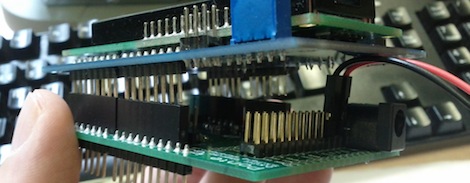
I had planned to not use the onboard voltage regulator from the beginning because the quiessent current it use is huge 100+ uA. The shield I designed and built used a lower current (50mA vs. 250mA) regulator since I was planning to use it only for the control electronics and sensors. The high current LEDs would run directly off of the higher voltage without any regulation. Since the micro and sensors draw 12-15mA max when fully on 50mA was way more than enough.
The expected current draw for my system was:
- Voltage regulator: ~5-6uA
- ATMega328p: ~1uA
- CMA3000 (@10Hz w/ wakeup): ~10uA
Total: ~16uA
Note: The testing below was done on both an Arduino Pro Mini and an Arduino Fio with similar results. The bike helmet prototype was built on top of an Arduino Fio.
To get the device into low power I started with the Arduino example sleep sketch and went through the guidelines from the datasheet to try and figure out why it was drawing so much power. The Arduino was using ~420uA when the chip is while the data sheet claims
Knowing that I went ahead and bypassed disconnected the supply from Arduino battery input, connected it to the input of my ultra low quiescent voltage regulator and connected the output of that directly to the Arduino VCC. Current system draw went UP to ~155uA. WTF???
Next thing I looked for was pullups on the digital lines for I2C and/or SPI. Not just pins configured as outputs and driven the wrong way but also looking at what weak pullups were intentionally (or accidentally) enabled. I have seen this catch out a number of Arduino developers. If the output value of a pin is configured high, when it is switched to being an input it does not just switch to being a high impedance input. If the digital output register is set a weak pullup (for the AVR Rpu = 20-50kOhms) is enabled on that pin. If a peripheral then decides to make that signal on that input low, the system suddenly sees an increase of VCC/Rpu of current that would not be there if the pullup were not enabled. Whenever I see a system that is some weird multiple of VCC/Rpu off of where it’s sleep current is supposed to be I will look for an input pullup that should not be enabled. In this case with a 3.3V rail a pullup would cause 60-150uA draw. Reviewed all of my code, probed the pins and did not find anything configured wrong. Happy that I didn’t screw anything up but unhappy that i Still have 140uA (of 150uA) disappearing into the ether and sucking my battery dry.
Then I started looking for some of the more obscure types of failures that could be causing this. One of those things that I discovered (then had a crash course on how to fix) is something call “back-powering of digital output pins” or sometimes “pin powering” or “port powering” of a device. Now back to Designing With Logic. Looking at Figure 5, if a chip that has digital I/O is powered down (VCC disconnected) then voltage is applied externally to that I/O that voltage can cause D1 on the input or D3 on the output to reverse bias, allow current to flow and feed the internal VCC of the chip with that voltage (minus a diode drop). Then really weird things can start happening. Most current digital chips can easily run at 1.8V (0.9V for some of the newer ones) so if a an external pin is driven at 3.3V and enough current can sneak through the diode, the part will happily keep running on the 2.7-3.0V it gets internally. Found this out the hard way with a peripheral that would never shut down and reset. Was right on the edge and drew too much current to startup by back powering but once running would happily keep running by back powering. Gave it 3.3V and it turned on took it away and it just kept on running. Was super confusing, since could turn it on but not off???
While the output of the regulator is not a digital I/O pin I got to thinking that something might still be going on with the output circuitry. So I cut the output trace from the regulator on the Fio (I just removed the regulator completely from the Pro Mini) and the current draw dropped to 34uA. This gave me a more than 10x decrease in sleep current for a 10x battery life increase. Running off of 1900mAHr AA batteries it should sleep, still doing 10Hz sampling to detect motion, for 6-7 years. With the 9V batteries in my prototype at 590mAHr it is just shy of two years.
At this point I moved forward with the kickstarter comfortable that I could hit the lifetime targets I had set. The current was still about double my back of the envelope calculations but was not going to be a showstopper. It was still weighing on me that there was something in the system that I did not know exactly how and why it was happening. Just yesterday when I was thinking about this again, I found the spark fun tutorial Adventures in Low Power Land. While I had independently done the same initial steps while going through this process I did not get to the point of looking at the brown out detection (BOD) and changing the fuses. Given that the BOD consumes 15-20uA I am now very happy with my 34uA sleep meaning that with BOD disabled I should be at 14-19uA. :) For 1900mAHr battery that gives a 10-12 year sleep time. That is well beyond the 5-7 year shelf life of a normal alkaline battery. Any time I am exceeding the storage the storage life and approaching the self depletion time of the battery I am very happy. :)
Filed under:
arduino hacks,
HackIt