Posts with «arduino» label

A light-up Newton’s cradle for your desk

Newton’s cradles consist of a series of suspended spherical masses, and are normally started by pulling one ball back. The outer balls then click back and forth for an interesting distraction. 

To make things even more interesting, “TecnoProfesor” made his own version using ping pong balls and RGB LEDs. As the outer balls sway, they light up in sequence, along with the inner three balls that stay largely in one place.

Power here isn’t provided by kinetic energy, but everything moves via a pair of servo motors. An Arduino Mega is used to control the light/motion simulator, while a button and potentiometer allow the user to change between two modes and variable swing frequency.

Arduino Blog 03 Jun 18:54

Getting started with the new Arduino Nano Every

The original Arduino Nano occupies a special place in many makers’ hearts. The tiny footprint (48*18 mm), reliability and tons of examples makes the Nano perfect for wearables, drones — in fact any project made to last.

The Nano is back! The new entry-level Arduino Nano Every manages to pack in even more features at an even lower price – just $9.90 / €8.00 without headers — and is backwards compatible with the original. Dario Pennisi led the development of the Arduino Nano Every. We sat down with him to learn more.

Why did you decide to create the Arduino Nano Every?

Searching for “Arduino Nano project” yields millions of results. But you also find people complaining about boards not working. Of course these boards are usually clones (not genuine Arduino boards)! Clones can be cheaper but reliability issues can mean you need to pay for more, or are frustrated trying to get them to work.

This is why we made the Arduino Nano Every. It’s reliable, affordable and more powerful. We’ve used a quality USB chip so people won’t have connection or driver issues. The newer ATmega4809 microcontroller fixes limitations of older ATmega328p based boards – you can add a second hardware serial port! As well as more peripherals and memory, the Configurable Custom Logic (CCL) is a great way to get beginners more interested in hardware. Finally, the separate processor handling the USB interface makes it possible to implement USB classes such as Human Interface Device (HID) instead of just the classic CDC/UART.

We see the Arduino Nano Every at the heart of wearable projects; in experiments, in prototypes or in a full cosplay setup! Sensors and motors can be connected without too much fuss which means it’s great for robotics, drones and 3D printing too. Not only is it a great choice for makers – in buying a genuine Arduino they will be supporting us in continuing to contribute to open source for the whole community to benefit from.

Can you tell us the three key features of Nano Every?

  • New processor with more memory and new peripherals, still 5V capable. The added memory will unleash creativity and open to more complex applications and the new peripheral set, which includes a second serial port, will finally allow communicating at the same time with a PC and with peripherals such as a wireless interface or a GPS.
  • The new power supply architecture based on a high efficiency DC-DC converter allows powering the board at up to 21V and to drive output peripherals with up to 950mA without overheating
  • Castellated contacts and flush bottom side allow soldering the Nano Every directly on a board as a traditional SMT component, opening the possibility to reduce final product size and helping the use in volume applications

So the processor is the same as the Uno WiFi R2 and it has more Flash and more RAM. The sketches made for the Nano are going to run on the Every as they are? Is it truly a replacement with zero modification in any Nano based project? Please elaborate.

Actually the ATmega4809 we use on Uno WiFi R2 and Nano Every is not directly compatible with ATmega328p, however we’ve implemented a compatibility layer which translates low level register writes without any overhead so the result is that most libraries and sketches, even those accessing directly GPIO registers, will work out of the box

Why you decided to offer the board with no headers supplied or soldered in the basic package?

Not only are new Nano boards are offered without headers, they all are totally flat on the bottom side and offer castellated pads on the sides, so you can actually solder them on your PCB as a standard SMT component using a normal pick & place machine.

The price is really aggressive, did you compromise on Arduino quality standards to achieve this?

We’ll never give up on Arduino quality standards and we’re still manufacturing in Italy making sure that our ethical values are strictly followed. The lower price point on these products has been achieved thanks to a careful optimization on purchasing prices and by trimming our margins as we believe that it’s important to give makers the quality they deserve at competitive prices.

The Arduino Nano Every is now available for pre-order on the Arduino online store with headers or without headers mounted (estimated shipping date: mid-June 2019).

Drag And Drop Files On Select Arduino Boards

Historically, getting files on to a microcontroller device was a fraught process. You might have found yourself placing image data manually into arrays in code, or perhaps repeatedly swapping SD cards in and out. For select Arduino boards, that’s no longer a problem – thanks to the new TinyUSB library from Adafruit (Youtube link, embedded below).

The library is available on Github, and is compatible with SAMD21 and SAMD51 boards, as well as Nordic’s NRF52840. It allows the Arduino board to appear as a USB drive, and files can simply be dragged and dropped into place. The library can set up to use SPI flash, SD cards, or even internal chip memory as the storage medium.

Potential applications include images, audio files, fonts, or even configuration files. Future plans include porting the TinyUSB library to the ESP32-S2 as well. Being able to drag a settings file straight on to a board could make getting WiFi boards online much less of a hassle.

We’ve seen other nifty USB libraries before, VUSB is a great option if you need USB on your AVR microcontroller. Video after the break.

Hack a Day 30 May 03:00

Augmented office chair provides hands-free drone control

Multi-rotor drones are normally controlled using handheld devices, but what if you wanted to instead operate them with your whole body? Flight Chair, developed by researchers at Simon Fraser University in Canada, allows you to do just that, and is envisioned for use with emergency personnel observing a scene.

The chair is augmented with ultrasonic sensors to detect when a user leans forward, backward, left, and right, commanding the drone to do the same, while a gyroscopic sensor detects when the chair is swiveled to adjust its heading. 

Altitude adjustment is handled by a T-shaped foot panel, leaving one’s hands free to do other tasks. Sensor values are collected by an Arduino Mega, which passes this to a drone server over a USB connection.

In future, emergency services will increasingly use technology to assist emergency service dispatchers and call taker with information during an emergency situation. One example could be the use of drones for surveying an emergency situation and providing contextual knowledge to emergency service call takers and first responders. The challenge is that drones can be difficult for users to maneuver in order to see specific items. In this paper, we explore the idea of a drone being controlled by an emergency call taker using embodied interaction on a tangible chair. The interactive chair, called Flight Chair, allows call takers to perform hands-free control of a drone through body movements on the chair. These include tilting and turning of one’s body.

More details on the team’s prototype design be found in their research paper here

RC wheelbarrow racing with James Bruton, Ivan Miranda, and Tom Stanton

We’ve seen Arduino boards used in a wide variety of situations, but this may be the first time one has been implemented to control an RC wheelbarrow. 

In the video below, YouTubers James Bruton, Tom Stanton, and Ivan Miranda have taken on a ‘barrow racing challenge,’ where each competitor must modify a wheelbarrow for remote racing purposes.

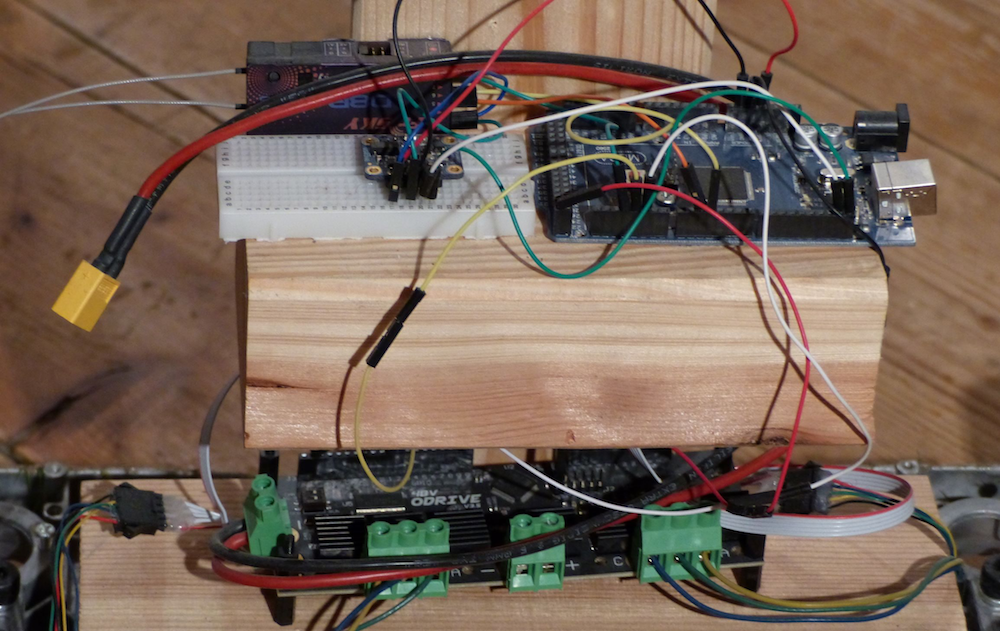
Miranda and Stanton went with air-powered designs, while Bruton instead chose differential steering, adding a pair of wheelchair wheels to the main wheel that he modified to swivel on a caster. Bruton’s user interface is provided by a generic RC transmitter, and an Arduino Mega translates these signals into the proper left/right wheel speeds. 

‘Race’ results are quite entertaining, and include a variety of wheelies, crashes, and even some improvisation to deal with the day’s rainy conditions!


Star Wars-themed Mastermind with an Arduino Mega

Mastermind is a game where one player attempts to guess a secret combination of colored pegs. It normally requires a second player to act as the judge, giving hints in the form of secondary pegs as to whether the other participant is on the right track. Maker “luisdel” decided to put a new spin on things using an Arduino Mega to display RGB LEDs on a Star Wars-themed play field. This automation allows players to directly compete, rather than taking turns.

In action, each player uses a series of buttons to enter light codes, with 10 tries at guessing the correct combination. No human judge is needed, so it’s a race to see who can unlock this critical sequence first and save—or further subjugate—the galaxy!

These are adverse times for rebellion. Although the Death Star has been destroyed, the Imperial troops are using free hardware and Arduino as a secret weapon.

That is the advantage of free technologies, any person (either good or bad) can use them.

In a hidden base located on the planet Anoat, they are building a 3D printer capable of replicating Imperial Destroyer.

The only solution to defeat the Empire is that a group of rebels commanded by Luke Skycuartielles and Obi-Wan Banzi, defeat the imperial troops and get the key that will give access to the plans to destroy the secret weapon.

This key consists of 4 colors and you have 10 attempts to get it deciphered. There are only four rules:

1. The colors can be repeated

2. A white light indicates that you have hit the right color and position

3. A violet light indicates that you have hit the color but not the position

4. If there is no light you have not guessed the color or the position.

You must hurry since at the other extreme, the evil Darth Ballmer will try to get the key before you. In that case, you will not be able to find out what it is and you will not have access to the plans of the secret weapon. Your mission will have failed.

Little Padawan, may the force accompany you to decipher the key and thus be able to save the galaxy.

Arduino Blog 28 May 14:08

Fetch is a mesmerizing ferrofluid display!

You’ve seen LED matrices, E Ink, CRTs, and likely a variety of other display methods, but chances are you’ve never seen anything like the ferrofluid matrix display by ‘Applied Procrastination.’ 

This student team from the University of Oslo has created a 252-pixel ferrofluid panel, dubbed “Fetch,” manipulating the inky black substance suspended in a saltwater brine with an array of electromagnets.

The video below, however, shows only an early 6×6 prototype powered by an Arduino and motor driver. While certainly not as impressive as the yet-to-be-revealed final result, watching the fluid move via this small matrix and even under ‘manual’ magnet control is still incredible. 

More details on the build—and of course, the large display—is forthcoming, so you may want to subscribe to or bookmark their channel to see what comes next!

Creating A Sonic Landscape With Glitching CD Player

CDs were a great advancement in audio quality when they were first put on the market. There’s no vinyl-style degradation of the medium if it’s played over and over, and there’s no risk of turning them into a giant pile of ribbon while rewinding like a cassette tape. The one downside was that if you were to take them on the move you needed special hardware and software to prevent the inevitable skipping. If you look at the skipping not as a downside, though, but as a way to produce interesting music, you might end up with a pretty unique piece of hardware.

[Dmitry] is known for his interesting art installations, and the latest one uses parts from three 1988 Sony D2 CD players that have been reassembled in order to take advantage of a skipping and glitching CD. The modified equipment is able to play during pause or rewind thanks to a processor modification, and can also change the rotational speed of the disc. There are other pieces of hardware included for more fine control of glitching and skipping of the audio being read off of the CD.

The new device functions as a working musical instrument, although [Dmitry] says that it is more useful for deconstructing the information stored on the disc, and exploring the medium itself. Of course if you have enough motivation, you can find sounds from almost anywhere on (or in) the planet too.

Hack a Day 28 May 06:00

Back To Basics With An Arduino And An EEPROM

There are plenty of techniques and components that we use in our everyday hardware work, for which their connection and coding is almost a done deal. We are familiar with them and have used them before, so we drop them in without a second thought. But what about the first time we used them, we had to learn somewhere, right? [TheMagicSmoke] has produced just what we’d have needed then for one component that’s ubiquitous, the I2C EEPROM.

These chips provide relatively small quantities of non-volatile memory storage, and though they are not the fastest of memory technologies they have a ready application in holding configuration or other often-read and rarely written data.

Since the ST24C04 512-byte device in question has an I2C bus it’s a straightforward add-on for an Arduino Mega, so we’re shown the wiring for which only a couple of pull-down resistors are required, and some sample code. It’s not the most complex of projects, but it succinctly shows what you need to do so that you too can incorporate an EEPROM in your work.

If learning about I2C EEPROMs piques your interest, perhaps you’d like to read a previous look we made at them.

Hack a Day 25 May 12:00
arduino  eeprom  i2c  i2c eeprom  parts  

Getting to know the new Arduino Nano 33 IoT

The Nano form factor has been a crowd-pleaser amongst makers for years due to its small footprint and ease of integration into any project. As announced at Maker Faire Bay Area, the Nano 33 IoT is part of the new 3.3V variant of the family, adding a pre-certified ESP32-based WiFi and Bluetooth module that brings sophisticated connectivity to its tiny package. The inclusion of an ECC608A crypto chip provides the security that Arduino users are now used to as opposed to other competing solutions that lack a secure key storage.

Today, we sat down with Dario Pennisi, Arduino hardware and firmware development manager, to learn more about the Nano IoT 33.

What are three key features of this board? How will they impact the experience of our users?

1. Secure WiFi and Bluetooth connectivity with a 6-axis IMU.

2. Pre-certified module with external processor ensures maintaining RF compliance when writing application code versus ESP32 modules where modifying code impacts certification.

3. On-board DC-DC power supply enables the board to be powered up to 21V maintaining high efficiency and offering a lot of current to external devices without overheating. This is a big improvement over other products on the market that have LDO and heat up quite a bit when powered at high voltages.


What are a few applications and why is this board a great option for them?  

1. Add WiFi and Bluetooth connectivity with strong security to all the existing Arduino Nano applications.

2. On-board IMU can be used to wirelessly monitor vibration, orientation, and rotational speed of small objects thanks to its lightweight and compact form factor.

3. Run directly from high voltages from lead or multi-cell Lithium-ion batteries providing 3.3V power supply to peripherals at significant output current.

Which Arduino board is the most similar to the Nano 33?

The Nano 33 IoT is essentially a MKR WiFi 1010, but sacrifices a battery charger and shield compatibility in favor of a miniaturized footprint and lower cost. The Nano 33 IoT is built around the ESP32, which is primarily aimed at WiFi but supports Bluetooth as well, although with higher power consumption than the Nano 33 BLE.