Posts with «arduino» label

Open-Source ARM Development Simplified

The ARM series of processors are an industry standard of sorts for a vast array of applications. Virtually anything requiring good power or heat management, or any embedded system which needs more computing power than an 8-bit microcontroller is a place where an ARM is likely found. While they do appear in various personal computers and laptops, [Pieter] felt that their documentation for embedded processors wasn’t quite as straightforward as it could be and created this development board which will hopefully help newbies to ARM learn the environment more easily.

Called the PX-HER0, it’s an ARM development board with an STM32 at its core and a small screen built in. The real work went in to the documentation for this board, though. Since it’s supposed to be a way to become more proficient in the platform, [Pieter] has gone through great links to make sure that all the hardware, software, and documentation are easily accessible. It also comes with the Command Line Interpreter (CLI) App which allows a user to operate the device in a Unix-like environment. The Arduino IDE is also available for use with some PX-HER0-specific examples.

[Pieter] has been around before, too. The CLI is based on work he did previously which gave an Arduino a Unix-like shell as well. Moving that to the STM32 is a useful tool to have for this board, and as a bonus everything is open source and available on his site including the hardware schematics and code.

Designing a low-cost, open source ventilator with Arduino

Desperate times call for desperate measures, and while making your own medical equipment isn’t normally advisable, Johnny Lee’e project explores how to turn a CPAP machine into a ventilator.

The idea is that since these machines are basically just blowers controlled by a brushless DC motor, an Arduino Nano equipped with an electonic speed controller could allow it to act as a one.

Such a setup has been shown to provide more than enough pressure for a ventilator used on COVID-19 patients. This device has in no way been evaluated or approved for medical use, but it does provide a starting point for experimentation.

You can find additional details on Lee’s GitHub page.

Arduino Blog 17 Mar 18:54

Using an Arduino/CNC shield setup for ham radio control

Loop antennas for ham radios use heavy duty variable capacitors for tuning. Since such capacitors need to be physically turned for adjustment, radio enthusiast Jose B.O. made his own remote rig using an Arduino Uno and CNC shield.

The CNC setup allows stepper motors to rotate through a range of angles for frequency selection, and three antennas can be controlled via separate Pololu A4988 driver modules. An optical encoder is used for control, along with buttons for preset frequencies, and a 16×2 I2C LCD display provides visual feedback. Microswitches are implemented to set the upper and lower bounds for the stepper motors.

More info is available in the project’s write-up and the videos below show the system in action.

Arduino Blog 16 Mar 21:13
arduino  ham radio  uno  

This Barometer Looks Mighty Fine, Rain or Shine

Mythological legend has it that Tempestas, the Roman goddess of storms and sudden weather, saved the consul Scipio when his fleet of ships got caught in a storm off of Corsica. In return, she demanded that a temple be dedicated to her.

[SephenDeVos]’ beautiful barometer, dubbed Tempestas II,  demands nothing of the viewer, but will likely command attention anyway because it looks so cool. If the weather is anything but clear and sunny, the appropriate sun-obscuring weather actor, be it clouds, more clouds, rain, or lightning will swing into place, blocking out the blue sky in layers, just like real life.

There’s a total of five weather-serving servos, and they’re all controlled by an Arduino Nano through a 16-channel PWM driver. The Nano gets the news from a BMP280 barometric pressure/temperature sensor and drives the servos accordingly.

Nine layers of nicely-decorated Plexiglas® hide the clouds and things in the wings while it’s nice outside. We totally love the way this looks —  it’s even pretty on the back, where the sun don’t shine. This one is new and ongoing, so it seems likely that [Sephen] will post the code before the sun sets on this project. In the meantime, check out the demo after the break.

We don’t see too many barometers builds around here — maybe there’s too much pressure. This one tells you to lay off the coffee when the pressure’s too low.

Slippy Slapper Uselessly Uses All the Arduinos

Want to take that annoyingly productive coworker down a notch? Yeah, us too. How dare they get so much done and be so happy about it? How is it possible that they can bang on that keyboard all day when you struggle to string together an email?

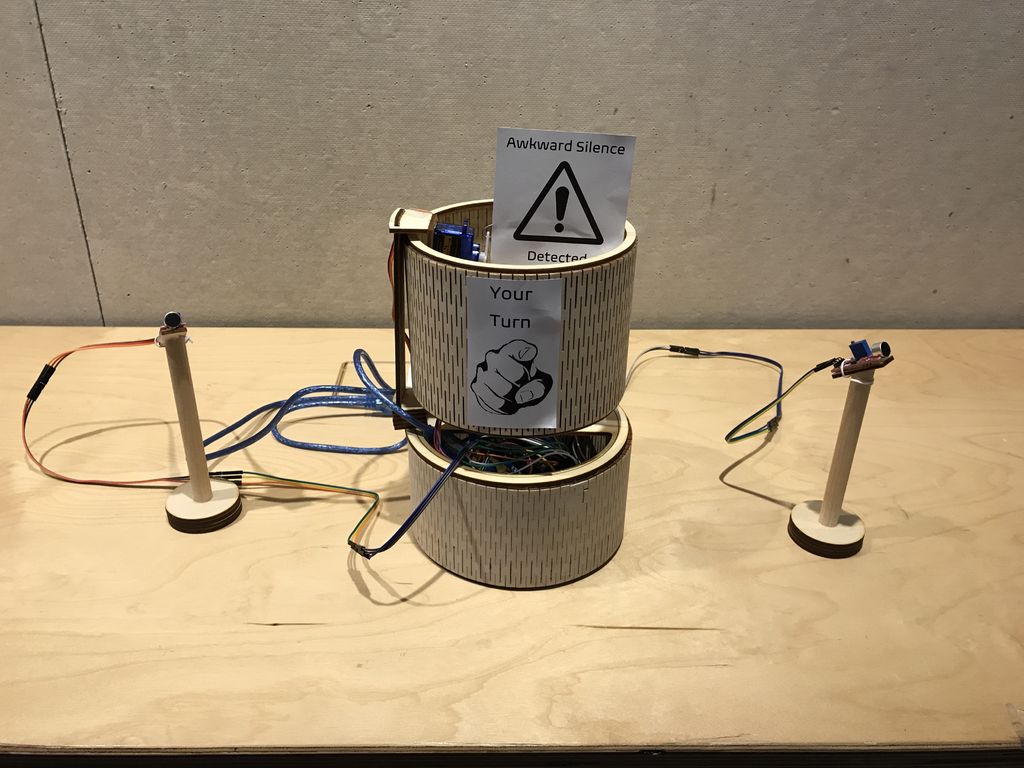
The Slippy Slapper is a useless machine that turns people into useless machines using tactics like endless distraction and mild physical violence. It presses your buttons by asking them to press buttons for no reason other than killing their productivity. When they try to walk away, guess what? That’s another slappin’. Slippy Slapper would enrage us by proxy if he weren’t so dang cute.

You’re right, you don’t need an Arduino for this. For peak inefficiency and power consumption, you actually need four of them. One acts as the master, and bases its commands to the other three on the feedback it gets from Slippy’s ultrasonic nostrils. The other three control the slappin’ servos, the speakers, and reading WAV files off of the SD card. Slap your way past the break to see Slippy Slapper’s slapstick demo.

Need to annoy a group of coworkers all at once? Slip a big bank of useless machines into the conference room while it’s being set up.

Vocal Effects On The Arduino Uno

When one thinks of audio processing, the mind doesn’t usually leap to an 8-bit micro. Despite this, if you’re looking for some glitchy fun, it’s more than possible, as [Amanda Ghassaei] demonstrates with the Arduino Uno in this 2012 throwback project.

The build is designed for vocal effects, based on the idea of granular synthesis. This is where audio samples are chopped up into small chunks, called “grains”, and manipulated in various ways to make fun sounds. Controls on the box allow the nature of the sound created to be modified by the user.

[Amanda]’s project serves as a great example of what it takes to run audio processing on the Arduino Uno. There’s a guide to using the on-board ADC as a microphone input, as well as the construction of a resistor ladder DAC for output. As a neccessity, this also requires discussion of how to write directly to the ATMEGA’s IO ports, rather than using the slower digitalWrite() function typically used in Arduino projects. There’s plenty of value here for anyone learning to do audio on a microcontroller platform.

Overall, it’s a fun project that serves as a good primer for those keen to dive into digital sound processing. Of course, those looking to kick things up a gear would do well to check out the Teensy Audio Library, too. Video after the break.

Pingo, the motion-detecting ping pong ball launcher

If you want to “enhance your athletic training regimen,” or perhaps just have a bit of fun with robotically launched ping pong balls, then be sure to check out the Pingo apparatus shown in the video below. This robot moves back and forth on four DC motor-powered wheels, searching for targets with an ultrasonic rangefinder.

When something comes into view, Pingo adjusts its ping pong launching tube’s angle to match the target distance, then loads a ball and flings it into the air with a pair of spinning disks. 

The device is controlled by an Arduino Mega and uses a half-dozen DC motors, a pair of steppers, and even a servo to accomplish its mission.

Arduino Blog 11 Mar 20:32
arduino  mega  robots  

Custom Tibia Keyboard For a Leg Up In the Game

[Elite Worm] wrote in to tell us about a cool little keyboard designed to make playing a certain game a whole lot easier. One of the ways you can move your character is with the numpad in directional mode plus Control and Shift, but those are too far apart to drive blindly with one hand. This is all the motivation [Elite Worm] needed to build a custom keyboard with only the essentials.

The keyboard is controlled by an Arduino Pro Micro, which is fairly standard for this type of build — it’s usually that or a Teensy. [Elite Worm] used Cherry MX browns for a nice tactile feel, and added LEDs for a purple-white under-glow. We love the way the printed keycaps turned out, and are impressed because tolerances are notoriously tight for those fruity switch stems.

Starting to think of a few uses for a small custom keypad? This thing is wide open, and [Elite Worm] will even send you the PCB files if you ask nicely. See if you can get past the break without your mouse, and check out the build video while you wait.

Want more flexibility? Just use more switches!

This pair of Arduino glasses stops you from touching your face

Touching your face is a subconscious behavior that we all do, and it is also an easy way to pick up illnesses like the coronavirus and flu. However, like many infectious diseases, proper hygiene can help reduce your risk. With this in mind, Nick Bild designed a simple solution in the form of a modified pair of glasses to provide a subtle reminder not to go near your eyes, mouth, and nose.

The project, which Bild calls Sentinel, consists of an ultrasonic sensor mounted on top of the bridge and an Arduino Nano along the temple. Whenever a hand (or object) is detected in close proximity to the face, a red warning LED lights up in the wearer’s peripheral vision.

The Watchman is a 3D-printed robot head that follows your face with realistic eyeballs

When you step out in public, you’ll often be filmed by a number of cameras and perhaps even be analyzed by tracking software of some kind. The Watchman robot head by Graham Jessup, however, makes this incredibly obvious as it detects and recognizes facial movements, then causes a pair of eyeballs to follow you around.

The 3D-printed system — which is a modified version of Tjhazi’s Doorman — uses a Raspberry Pi Camera to capture a live video feed, along with a Raspberry Pi Zero and a Google AIY HAT for analysis.

This setup passes info on to an Arduino Uno that actuates the eyeballs via a 16-channel servo shield and a number of servos. The device can follow Jessup up, down, left, and right, making for a very creepy robot indeed!