Posts with «arduino» label

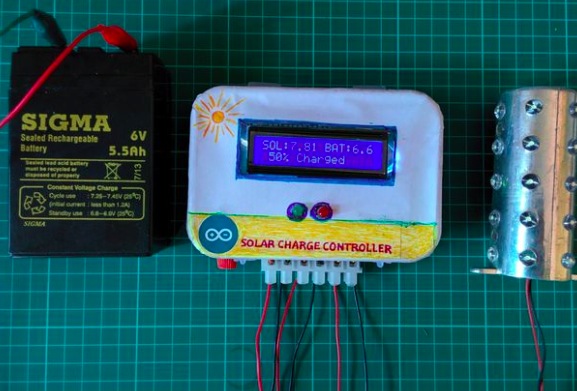
A solar charge controller made with Arduino

Instructables user deba168 is an electrical engineer based in India. He posted a tutorial to solve a common problem in his country:

In India most of the people are living in rural area where national grid transmission line is not reached till now.The existing electric grids are not capable of supplying the electricity need to those poor people. So renewable energy sources (photo voltaic panels and wind-generators) are the best option I think. I know better about the pain of village life as I am also from that area. So I designed this DIY solar charge controller to help others as well as for my home.You can’t believe, my home made solar lighting system helps a lot during the recent Cyclone Phailin.

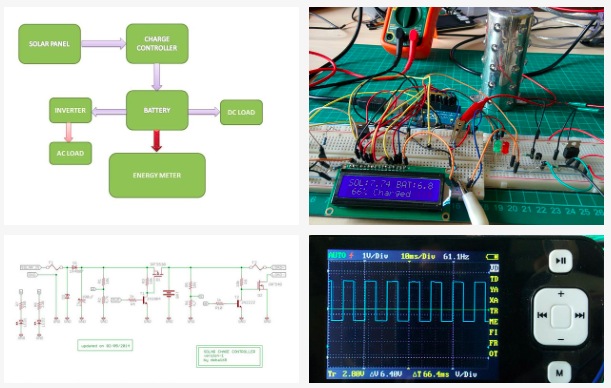
He then  made a charge controller  running on the Arduino Uno and with an important task: to protect the rechargeable battery of photovoltaic systems. It regulates the voltage and current coming from the solar panels and it’s placed between a solar panel and its battery . It is used to maintain the proper charging voltage on the batteries so as the input voltage from the solar panel rises, the charge controller regulates it,  preventing any over charging. It works on the principle of PWM which improves efficiency of the solar PV systems.

You can follow all the steps on his page but first take a look at the video:

The Smallest ATtiny85 Based USB Board

“Possibly the smallest ATtiny85 based ‘duino derivative”. Indeed! When Olimex announced the Olimexino 85s as the smallest Arduino ever, [Tim] took that as a challenge. His very small Arduino based USB devboard is quite a bit smaller than the Olimexino!

The Nanite 85 was carefully designed to be both small and functional. Not only is it 20% smaller than the Olimexino, but also sports a reset button! One of the coolest aspects of this design is that it has the same pinout and size as a DIP ATtiny85. This means that you can use the Nanite 85 for developing your code with the USB bootloader, and then you can directly replace it with a standard (pre-programmed) ATtiny85. The major downside to using this device over the aforementioned devices, is that it does not include a voltage regulator for powering the device via USB (or battery), the device is simply hooked directly to the 5V rail from the USB connector.

We can’t help but be impressed with this well-thought-out design. It is also easy to assemble since it uses larger surface mount components. If smaller components were used, even more features (such as a regulator) could be included. Do you have an even smaller USB Arduino? The race is on for the smallest Arduino ever!


Filed under: Arduino Hacks
Tell Time and Blink an LED on Your Wrist with WatchDuino

Is your hipster wrist having a hard time waiting for the debut of the iWatch? There’s a new open hardware/software project out that could help calm your nerves. The WatchDuino is exactly what it sounds like, an Arduino-based wrist watch.

The component list is short and inexpensive. The meat and potatoes consist of an ATMega328, crystal, Nokia LCD screen and LiPo battery. The USB-rechargeable battery lasts about a week before needing to be such. Besides presenting the Time and Date in both analog or digital formats (as you would expect) there is an alarm and timer. Additionally, there are 2 games, Pong and Snake. Any lack of features is made up for the fact that the software is open and can be modified and added to by the community. We’re sure the development of this watch will be quick and significant.

Confirming the coolness of this project is the fact that it won 1st place in the 2014 BIICODE  Programming Competition. If the WatchDuino is right up your alley, the documentation can be found here. Go make one!

Thanks [Javier]


Filed under: Arduino Hacks
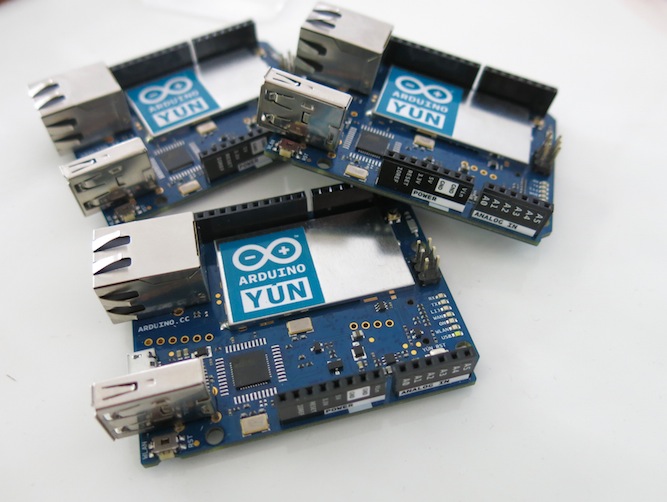
Time to Expand your Yún disk space and install Node.js

Following the new Yún image, we are happy to announce two new features of the Arduino Yún.

  • The first feature is a tutorial we’ve written that allows you to use a micro SD card as a replacement for the Yún’s internal flash memory. Using this, you can expand your Yún’s free disk space from the original 7 Megabytes to the Gigabytes of your SD card.

Having more disk space allows you to make more complex projects, like activating webcams and saving pictures taken with it. In addition, by using an external SD card you avoid using the internal flash memory, thus extending the life of your Yún.

To upgrade your Yún to gain these features, follow the steps of the tutorial and report back to the Arduino Yún forum if you have any issues or questions.

  • The second new feature is the availability of Node.js as an installable package. In order to install Node.js on your Yún, use the Arduino IDE to upload the YúnSerialTerminal example or access your Yún via SSH.

Be sure your Yún has access to the internet, then type the following commands:

opkg update
opkg install node

And voilà! You’ve got Node.js on your Yún.

Try it out with the following command: 

node -e “console.log(‘Hello Yún’)”

If you are a Node.js fan, you probably want to use your favourite modules. Unfortunately, not every Node.js module is “pure javascript”, so some modules won’t work on the Yún. We are solving this by preparing packages for the most common native Node.js modules: we have already prepared node-serialport (opkg install node-serialport) and noble is on the way. If you miss your favourite one and want it added to the list, please consider joining us in developing the Yún.

Arduino Blog 06 May 11:46

Arduino Workshop – A Hands-On Introduction with 65 Projects

Over the last few years you may have noticed a few of my Arduino tutorials, and during this time many people have mentioned that I should write a book. And now thanks to the team from No Starch Press this recommendation has morphed into my first book – “Arduino Workshop“:

Now into the fourth print run, “Arduino Workshop” is one of the few books on the market that can take the reader from zero knowledge to understanding the Arduino development platform, and working with a huge array of add-ons and technologies. You don’t need to buy any other preliminary book – this starts from the absolute beginning. And a huge “thank you” to all those who have purchased and supported the book so far – and it’s now available in Traditional Chinese, Korean, German and Polish.

Arduino Workshop” offers a professionally edited and curated path for the beginner to learn with and have fun. It’s a hands-on introduction to Arduino with 65 projects – from simple LED use right through to RFID, Internet connection, wireless data, working with cellular communications, and much more. Plus the reader also learns about electronics, good coding and other interesting topics.

Each project is explained in detail, explaining how the hardware and Arduino code works together. Plus we teach you how to read and understand circuit schematics and use this clear method of describing circuits which prepares the read for further electronics learning.

The reader doesn’t need any expensive tools or workspaces, and all the parts used are available from almost any electronics retailer. Furthermore all of the projects can be finished without soldering, so it’s safe for readers of all ages.

The editing team at No Starch Press, our technical editor Marc Alexander and myself have worked hard to make the book perfect for those without any electronics or Arduino experience at all, and it makes a great gift for someone to get them started. After working through the 65 projects the reader will have gained enough knowledge and confidence to create many things – and to continue researching on their own.

Or if you’ve been enjoying the results of my thousands of hours of work here at tronixstuff, you can show your appreciation by ordering a copy for yourself or as a gift. If you’re still not sure, review the table of contents, index and download a sample chapter from the Arduino Workshop website.

Arduino Workshop is available from No Starch Press in printed or DRM-free eBook (PDF, Mobi, and ePub) formats. And the eBooks are also included with the printed orders from No Starch Press so you can get started immediately. 

Autographed copies are available from Tronixlabs

Furthermore for readers outside of the United States wishing to save on postage, Arduino Workshop is available from many stores in various countries, for example:

And you can also find Arduino Workshop for sale from all the popular booksellers around the globe such as Amazon, Barnes and Noble, and so on.

Have fun and keep checking into tronixstuff.com. Why not follow things on twitterGoogle+, subscribe  for email updates or RSS using the links on the right-hand column, or join our forum – dedicated to the projects and related items on this website. Sign up – it’s free, helpful to each other –  and we can all learn something.

The post Arduino Workshop – A Hands-On Introduction with 65 Projects appeared first on tronixstuff.

Tronixstuff 06 May 08:01

Arduino Workshop – A Hands-On Introduction with 65 Projects

Over the last few years you may have noticed a few of my Arduino tutorials, and during this time many people have mentioned that I should write a book. And now thanks to the team from No Starch Press this recommendation has morphed into my first book – “Arduino Workshop“:

Now into the fourth print run, “Arduino Workshop” is one of the few books on the market that can take the reader from zero knowledge to understanding the Arduino development platform, and working with a huge array of add-ons and technologies. You don’t need to buy any other preliminary book – this starts from the absolute beginning. And a huge “thank you” to all those who have purchased and supported the book so far – and it’s now available in Traditional Chinese, Korean, German and Polish.

Arduino Workshop” offers a professionally edited and curated path for the beginner to learn with and have fun. It’s a hands-on introduction to Arduino with 65 projects – from simple LED use right through to RFID, Internet connection, wireless data, working with cellular communications, and much more. Plus the reader also learns about electronics, good coding and other interesting topics.

Each project is explained in detail, explaining how the hardware and Arduino code works together. Plus we teach you how to read and understand circuit schematics and use this clear method of describing circuits which prepares the read for further electronics learning.

The reader doesn’t need any expensive tools or workspaces, and all the parts used are available from almost any electronics retailer. Furthermore all of the projects can be finished without soldering, so it’s safe for readers of all ages.

The editing team at No Starch Press, our technical editor Marc Alexander and myself have worked hard to make the book perfect for those without any electronics or Arduino experience at all, and it makes a great gift for someone to get them started. After working through the 65 projects the reader will have gained enough knowledge and confidence to create many things – and to continue researching on their own.

Or if you’ve been enjoying the results of my thousands of hours of work here at tronixstuff, you can show your appreciation by ordering a copy for yourself or as a gift. If you’re still not sure, review the table of contents, index and download a sample chapter from the Arduino Workshop website.

Arduino Workshop is available from No Starch Press in printed or DRM-free eBook (PDF, Mobi, and ePub) formats. And the eBooks are also included with the printed orders from No Starch Press so you can get started immediately. 

Autographed copies are available from Tronixlabs

Furthermore for readers outside of the United States wishing to save on postage, Arduino Workshop is available from many stores in various countries, for example:

And you can also find Arduino Workshop for sale from all the popular booksellers around the globe such as Amazon, Barnes and Noble, and so on.

Have fun and keep checking into tronixstuff.com. Why not follow things on twitterGoogle+, subscribe  for email updates or RSS using the links on the right-hand column, or join our forum – dedicated to the projects and related items on this website. Sign up – it’s free, helpful to each other –  and we can all learn something.
Tronixstuff 06 May 08:01

An Emotion robot for long-distance lovers

If you live far away from your lover, this project could make you feel the presence and the emotional state of your partner without making voice calls.

El Niño is the prototype of a set of physical avatars for casual communication built on Arduino Uno. The system designed by a duo of designer of the Faculty of Arts & Design, Bauhaus-Universität Weimar, helps enhancing the emotional connection and awareness between people in long distance relationships by providing a low-threshold channel for exchanging simple messages:

Two stationary anthropomorphic robots are used as tangible user interfaces that can mimic human emotions by displaying symbolic facial expressions on low-resolution screens, in order to reflect the emotional state of the user. The system allows its users to casually express their emotions over a distance through dedicated networked objects. El Niño is currently a functional work-in-progress prototype. The system was built and designed using a combination of open source hardware and a 3D-printed enclosure.


Find out more on the project on Weng Xinyu website.

Cadence Meter Proves Wearable Development Is All About Just Doing It


The tech involved in the fitness world really empowers athletes, whether they’re serious or not, to improve their performance by providing empirical evidence. The Striker project focuses on cadence, which is the frequency of strides when running, or revolutions when pedaling. It uses a force sensitive resistor in the shoe to measure footfalls or power strokes.

The concept behind the device is solid, and there are consumer-grade devices already on the market that are capable of performing the same functions. In fact, a Garmin device is used to help measure the accuracy of the system. But we love to see bootstrapped projects, and this one distinguishes itself not only in finished product, but in the process itself. To us it screams: “What are you waiting for, build a prototype and then iterate!”.

The larger image above shows the earliest working version which is just a piece of fabric that wraps around the forearm to hold a 4-digit 7-segment display. The wire following the arm of the wearer snakes all the way down to the shoe to connect with the force sensor. The image to the right is the first wireless version of the readout. But the project has already seen at least two more versions after this one, mostly using SparkFun components.

We think this is but one example of the kind of stuff we want to see as contenders for The Hackaday Prize. The project uses Open Design and it’s arguably a connected device because the sensor and readout connect to each other (but ideally you’d want to add more connectivy to get at the data). The open nature of the build could lead to leaps forward in the technology by affording talented people wider development access.


Filed under: wearable hacks

3D-Printed Smart Watch Wins Our Arduino Challenge, Heading to Maker Faire Rome

Arduino-compatible brain, Bluetooth LE connectivity, 3D-printed case, and open-source design.

Read more on MAKE

MAKE » Arduino 02 May 22:21

Sugarcube, a grid based music controller with accelerometer


Once again Amanda Ghassaei sent a cool project she’s been working on lately as an extension of the work she’s been doing on the monome project. Sugarcube is an open source, grid-based, standalone MIDI instrument  self-contained and relatively cheap to make. It communicates via a MIDI output with other electronic MIDI instruments and software environments like Ableton and MaxMSP.

An Arduino Uno generates all of its MIDI data and drives LEDS, buttons, a 2 axis gyroscope, a 3 axis accelerometer,  two potentiometers, and the whole device is powered by a lithium-polymer battery making it pretty portable.

She published detailed  documentation on Instructables to make one yourself   and shared a bunch of videos to discover its main features:

Basically this project is:

A portable, Arduino-powered, grid-based MIDI controller that boots up into a variety of apps to do lots of things with sound. The controller has 16 backlit buttons, used as both inputs and outputs to give the controller some visual feedback. 2 potentiometers give analog control, depending on the app the pots are assigned to tempo, MIDI velocity, pitch, and scrolling (making the avaible grid space larger than 4×4). An x/y accelerometer and an x/y gyroscope add some playful, gestural control to the device; most of the apps implement a “shake to erase” control and several respond to tilt in various ways.

It boots up into 7 different apps, though it has the potential to boot up into 16 total. This device is primarily a MIDI controller, but I’ve also written an app that allows you to pull the button and analog data into MaxMSP and to control audio.

With this project, I was interested in making a device that was a little more self-contained and relatively cheap to make (lots of buttons = lots of $). In keeping more with the concept of the tenori-on, this controller does all its app processing itself, it does not rely on a computer to process button presses/analog controls into MIDI. This means you can plug it directly into a synth or any device that understands MIDI and you’re good to go, no computer required. It runs off a beefy LiPo battery that keeps it running for days on a charge, so it’s fairly portable as well. In keeping with the monome side of things, it’s totally open source and can be adapted to your particular audio setup/needs. All the Arduino code is up on github, along with a MaxMSP patch that decodes data from the controller into something usable in Max.