Posts with «arduino» label

Open Source 3D Printed Rocket Engine controlled by Arduino

Fubar Hackerspace (New Jersey) member Graham has been working on an open source liquid fuel rocket engine with regenerative cooling and precise flow control built on Arduino Uno.  In order to test it he’s also built a cool rig for testing propellant flow control:

My project is building Open Source 3D Printed Rocket Engines with Arduino microcontrollers. As an individual interested in building liquid fueled rocket engines as a hobby I quickly realized there were almost no resources online or forums to share or learn from others. I decided to combine my interests in Software, hardware and open source projects to develop and build a functioning liquid fueled rocket engine. However, unlike most other projects it had to be open source and easily re-produced.

In order to ensure it was as open source as possible I used the Arduino Uno board and IDE to develop software to safely control the engine. To meet the easily reproducible requirement I decided that 3D printing was the right approach rather than labor/time intensive traditional machining.

The end result is an engine that can easily be reproduced or modified. This gives others interested in this hobby a starting point for best practices, safety, etc… so that future projects aren’t starting out from scratch.

All of my design files and software are on GitHub  and a detailed description of the write-up is on the FUBAR labs makerspace wiki 

Here’s the video of the testing of the 3D Printed GOX/Ethanol Injector:

Arduino Blog 27 Feb 09:58

Open Source 3D Printed Rocket Engines controlled by Arduino

Fubar Hackerspace (New Jersey) member Graham has been working on an open source liquid fuel rocket engine with regenerative cooling and precise flow control build on Arduino Uno.  In order to test it he’s also built a cool rig for testing propellant flow control:

My project is building Open Source 3D Printed Rocket Engines with Arduino microcontrollers. As an individual interested in building liquid fueled rocket engines as a hobby I quickly realized there were almost no resources online or forums to share or learn from others. I decided to combine my interests in Software, hardware and open source projects to develop and build a functioning liquid fueled rocket engine. However, unlike most other projects it had to be open source and easily re-produced.

In order to ensure it was as open source as possible I used the Arduino Uno board and IDE to develop software to safely control the engine. To meet the easily reproducible requirement I decided that 3D printing was the right approach rather than labor/time intensive traditional machining.

The end result is an engine that can easily be reproduced or modified. This gives others interested in this hobby a starting point for best practices, safety, etc… so that future projects aren’t starting out from scratch.

All of my design files and software are on GitHub  and a detailed description of the write-up is on the FUBAR labs makerspace wiki 

Here’s the video of the testing of the 3D Printed GOX/Ethanol Injector:

Arduino Blog 27 Feb 09:58

Arduino Synth Guitar Really Rocks

[Gr4yhound] has been rocking out on his recently completed synth guitar. The guitar was built mostly from scratch using an Arduino, some harvested drum pads, and some ribbon potentiometers. The video below shows that not only does it sound good, but [Gr4yhound] obviously knows how to play it.

The physical portion of the build consists of two main components. The body of the guitar is made from a chunk of pine that was routed out by [Gr4yhound’s] own home-made CNC. Three circles were routed out to make room for the harvested Yamaha drum pads, some wiring, and a joystick shield. The other main component is the guitar neck. This was actually a Squire Affinity Strat neck with the frets removed.

For the electronics, [Gr4yhound] has released a series of schematics on Imgur. Three SoftPot membrane potentiometers were added to the neck to simulate strings. This setup allows [Gr4yhound] to adjust the finger position after the note has already been started. This results in a sliding sound that you can’t easily emulate on a keyboard. The three drum pads act as touch sensors for each of the three strings. [Gr4yhound] is able to play each string simultaneously, forming harmonies.

The joystick shield allows [Gr4yhound] to add additional effects to the overall sound. In one of his demo videos you can see him using the joystick to add an effect. An Arduino Micro acts as the primary controller and transmits the musical notes as MIDI commands. [Gr4yhound] is using a commercial MIDI to USB converter in order to play the music on a computer. The converter also allows him to power the Arduino via USB, eliminating the need for batteries.

[Thanks Wybren]


Filed under: Arduino Hacks, musical hacks

Cellular Connectivity Comes to Microcontrollers With The Spark Electron

Meet Electron from Spark, the new board that puts GSM cellular connectivity directly on the microcontroller. With its onboard cellular antenna, this diminutive board will offer a huge range of deployment options and alleviate the hassle of using a custom cellular breakout board with your micro controller projects. They’re offering two […]

Read more on MAKE

Arduino v. Arduino

Arduino LLC is suing Arduino Srl (the Italian version of an LLC). Sounds confusing? It gets juicier. What follows is a summary of the situation as we learned it from this article at Heise.de (google translatrix)

Arduino LLC is the company founded by [Massimo Banzi], [David Cuartielles], [David Mellis], [Tom Igoe] and [Gianluca Martino] in 2009 and is the owner of the Arduino trademark and gave us the designs, software, and community support that’s gotten the Arduino where it is. The boards were manufactured by a spinoff company, Smart Projects Srl, founded by the same [Gianluca Martino]. So far, so good.

Things got ugly in November when [Martino] and new CEO [Federico Musto] renamed Smart Projects to Arduino Srl and registered arduino.org (which is arguably a better domain name than the old arduino.cc). Whether or not this is a trademark infringement is currently being heard in the Massachussetts District Court.

According to this Italian Wired article, the cause of the split is that [Banzi] and the other three wanted to internationalize the brand and license production to other firms freely, while [Martino] and [Musto] at the company formerly known as Smart Projects want to list on the stock market and keep all production strictly in the Italian factory.

Naturally, a lot of the original Arduino’s Open Source Hardware credentials and ethos are hanging in the balance, not to mention its supply chain and dealer relationships. However the trademark suit comes out, we’re guessing it’s only going to be the first in a series of struggles. Get ready for the Arduino wars.

We’re not sure if this schism is at all related to the not-quite-open-source hardware design of the Yun, but it’s surely the case that the company is / the companies are going through some growing pains right now.

Thanks [Philip Steffan] for the pointer to the Heise.de link. (And for writing it.)


Filed under: Arduino Hacks, news, slider
Hack a Day 25 Feb 12:00

Connecting a telegraph with 21st century networks

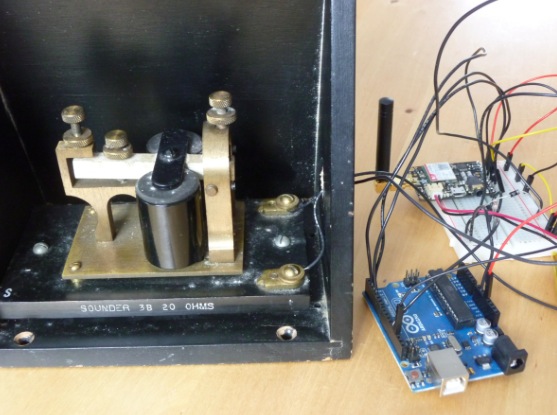
Twitter telegraph is a project by Devon Elliot making telegraph sounder tap out Twitter messages using Arduino Uno. It’s an interesting attempt to connect technology rooted in the 19th- and early 20th-centuries with 21st-century networks:

A local architectural heritage project spawned a wider interest in railways and roundhouses. One of the related technologies of railways in the 19th century was the telegraph. Having acquired an old telegraph sounder, we wondered if it could tap out Twitter messages.

An Arduino UNO was used to test and control the telegraph sounder. The coils on the telegraph were tested with power drawn from the Arduino’s 3.3V and 5.0V pins. Momentarily powering the telegraph from the Arduino confirmed that the coils still worked, and the device made satisfying clicks in response from the electromagnetic action of the coils.

With it confirmed that the telegraph is still operable, the Arduino UNO was then used to control the sounder. Mark Fickett’s Arduinomorse library was a quick route to controlling the telegraph in Morse code timing. Using that library, string characters are converted into Morse code, and a digital pin on the Arduino goes high and low, as if to turn an LED on and off. That pin became the control pin for the telegraph, and simple circuit was built using a transistor, resistor and diode to control the telegraph without damaging the Arduino’s digital pins. This circuit is common for connecting relays to Arduinos.

The final step was adding an Adafruit FONA to the Arduino. The FONA connects to cellular phone networks, and the Arduino UNO can interact with it by sending and receiving actions to and from the FONA. In this case, the FONA connects to the cellular network and the Arduino checks the FONA periodically to see if there are any SMS messages available. If there are, the Arduino starts to read through them, convert them to Morse code, and tap them out on the telegraph.

The completed device can be operated from batteries if necessary, providing operation anywhere a cellular signal can reach. The cellular connection provides wireless connectivity with the FONA handling the connection, rather than the Arduino.

To package it up, the Arduino UNO and FONA were attached to a piece of acrylic. That board was then mounted under the telegraph sounder’s resonator. Four holes were pre-existing in the resonator’s base and used for mounting, so no permanent alterations were made to the historic components.

See it in action:

Arduino Blog 24 Feb 23:39

OK Google, Open Sesame

There are a myriad of modern ways to lock and unlock doors. Keypads, Fingerprint scanners, smart card readers, to name just a few. Quite often, adding any of these methods to an old door may require replacing the existing locking mechanism. Donning his Bollé sunglasses allowed [Dheera] to come up with a slightly novel idea to unlock doors without having to change his door latch. Using simple, off the shelf hardware, a Smartwatch, some code crunching and a Google Now app, he was able to yell “OK Google, Open Sesame” at his Android Wear smartwatch to get his apartment  door to open up.

The hardware, in his own words, is trivial. An Arduino, an HC-05 bluetooth module and a servo. The servo is attached to his door latch using simple hardware that looks sourced from the closest hardware store. The code is split in to two parts. The HC-05 listens for a trigger signal, and informs the Arduino over serial. The Arduino in turn activates the servo to open the door. The other part is the Google Now app. Do note that the code, as he clearly points out, is “barebones”. If you really want to implement this technique, it would be wise to add in authentication to prevent all and sundry from opening up your apartment door and stealing your precious funky Sunglasses. Watch a video of how he put it all together after the break. And if you’re interested, here are a few other door lock hacks we’ve featured in the past.


Filed under: Android Hacks, hardware

Is The Arduino Yun Open Hardware?

According to [Squonk42], nope. And we think he’s probably right.

The Yun is an Arduino Leonardo with an Atheros AR9331 WiFi SoC built in. It’s a great idea, pairing the Arduino with a tiny WiFi router that’s capable of running OpenWRT.  But how is this no longer Open Source Hardware? Try getting an editable board layout. You can’t.

Or at least [Squonk42] couldn’t. In Sept. 2013, [Squonk42] posted up on the Arduino forums requesting the schematics and editable design files for the Arduino Yun, and he still hasn’t received them or even a response.

Now this dude’s no slouch. He’s responsible for the most complete reverse-engineering of the TP-Link TL-WR703N pocket router, which is, not coincidentally, an Atheros AR9331-based reference design. And this is where the Arduini ran into trouble, [Squonk42] contends.

[Squonk42]’s hypothesis is that Arduino must have done what any “sane” engineer would do in this case when presented with a super-complex piece of hardware and a potentially tricky radio layout: just use the reference design (Atheros AP-121). That’s what everyone else in the industry did. And that’s smart, only the rest of the consumer electronics industry isn’t claiming to be Open Source Hardware while the reference design is protected by an NDA.

So it looks like Arduino’s hands are tied. They, or their partner Dog Hunter, either signed the NDA or downloaded the PDF of the reference design that’s floating around on the Interwebs. Either way, it’s going to be tough to publish the design files under a Creative Commons Attribution Share-Alike license.

Is this a change of strategy for the Arduino folks or did they just make a mistake? We won’t know until they respond, and that answer’s a year and a half in coming. Let’s see what we can do about that. And who knows, maybe Arduino can lean on Atheros to open up their reference design? It’s already an open secret at best.

But before you go out lighting up your righteous Open Source Hardware pitchforks and sharpening up your torches, read through [Squonk42]’s case and then dig through the primary sources that he’s linked to make up your own mind. You’ll make your case more eloquently if you’re making it yourself.

Good luck, [Squonk42]! We hope you at least get your answer. Even if you already know it.


Filed under: Arduino Hacks

Maximize Your Solar Charging With a DIY Arduino Controller

Here’s how to build a buck converter using an Arduino Nano (as well as another 28 listed components) to supply the maximum power that you can to your PV cell. This is known as maximum power point tracking, abbreviated MPPT. Photovoltaic (PV) cells produce different amounts of current and voltage depending […]
MAKE » Arduino 23 Feb 23:01

A collective instrument capturing breathe with paper windmills

Cata Sopros is interactive sound installation running on Arduino Uno and created by Elas Duas, a multidisciplinary studio based in the city of Guimarães (Portugal). If you translate the title from portuguese it means: Breathe Catchers. In fact the project is a collective musical instrument made with paper windmills transforming the users’ breathe into sounds:

The windmills have inbuilt electret microphones that were connected to an Arduino Uno. The sensor data was then sent to MaxMSP and the sounds were played with Ableton Live. The video was shot at the cloister of the beautiful Alberto Sampaio museum in Guimarães, Portugal.

Enjoy the video: