Posts with «arduino» label

Switch Mains Power with an ESP8266

Before we begin, we must begin with an obligatory disclaimer: handling mains voltage can be very dangerous. Do not do so unless you are qualified! You could burn your house down. (Without the lemons.) That being said, [TJ] has created an interesting dev board for controlling mains voltage over WiFi with the now-ubiquitous ESP8266 module. At only 50mm x 25mm, it is easily small enough to fit inside a junction box!

Called the MPSMv2, the core of the project is the ESP8266 module. The dev board itself can support anything with GPIO pins, whether it’s an Arudino, Raspberry Pi, or anything else with those features. Flashing the NodeMCU firmware is pretty much all that needs to be done in order to get the device up and running, and once you get the device connected to your WiFi you’ll be able to control whatever appliances you want.

The device uses a triac to do the switching, and is optically isolated from mains. Be sure to check out the video after the break to see the device in action. All in all, this could be a great way to get started with home automation, or maybe just do something simple like build a timer for your floor lamp. Anything is possible!


Filed under: home hacks, wireless hacks

Play Robotic Bongos using your Household Plants

[Kirk Kaiser] isn’t afraid to admit his latest project a bit strange, being a plant-controlled set of robotic bongos. We don’t find it odd at all.  This is the kind of thing we love to see. His project’s origins began a month ago after taking a class at NYC Resistor about creating music from robotic instruments. Inspired to make his own, [Kirk] repurposed a neighbor’s old wooden dish rack to serve as a mount for solenoids that, when triggered, strike a couple of plastic cowbells or bongo drums.

A Raspberry Pi was originally used to interface the solenoids with a computer or MIDI keyboard, but after frying it, he went with a Teensy LC instead and never looked back. Taking advantage of the Teensy’s MIDI features, [Kirk] programmed a specific note to trigger each solenoid. When he realized that the Teensy also had capacitive touch sensors, he decided to get his plants in on the fun in a MaKey MaKey kind of way. Each plant is connected to the Teensy’s touchRead pins by stranded wire; the other end is stripped, covered with copper tape, and placed into the soil. When a plant’s capacitance surpasses a threshold, the respective MIDI note – and solenoid – is triggered. [Kirk] quickly discovered that hard-coding threshold values was not the best idea. Looking for large changes was a better method, as the capacitance was dramatically affected when the plant’s soil dried up. As [Kirk] stood back and admired his work, he realized there was one thing missing – lights! He hooked up an Arduino with a DMX shield and some LEDs that light up whenever a plant is touched.

We do feel a disclaimer is at hand for anyone interested in using this botanical technique: thorny varieties are ill-advised, unless you want to play a prank and make a cactus the only way to turn the bongos off!


Filed under: Arduino Hacks, musical hacks
Hack a Day 17 Apr 03:00

Arduino Vs. Arduino: The Reseller’s Conundrum

Over the last few months, the internal struggles between the various founders of Arduino have come to a head. This began last November when Arduino SRL (the Italian version of an LLC) sued Arduino LLC for trademark infringement in Massachusetts District court. To assuage the hearts and minds of the maker community, Arduino SRL said they were the real Arduino by virtue of being the first ones to manufacture Arduino boards. A fork of the Arduino IDE by Arduino SRL – simply an update to the version number – was a ploy to further cement their position as the true developers of Arduino.

This is a mess, but not just for two organizations fighting over a trademark. If you’re selling Arduinos in your web store, which Arduino do you side with?

[Nate] from Sparkfun is answering that question with a non-answer.

Currently, Arduino SRL is the only source of Arduino Unos. Sparkfun will continue to buy Unos from SRL, but they’re not necessarily siding with Arduino SRL; people demand blue Arduinos with Italy silkscreened on the board, and Sparkfun is more than happy to supply these.

There are, however, questions about the future of Arduino hardware. The Arduino software stack will surely be around in a year, but anyone that will be purchasing thousands of little blue boards over the next year is understandably nervous.

This isn’t the first time Sparkfun has faced a challenge in Arduino supply. In 2012, when the Arduino Uno R3 was released, all the documentation for their very popular Inventor’s Kit was obsoleted overnight. In response to these supply chain problems, Sparkfun created the RedBoard.

Sparkfun has always offered to pay royalties on the RedBoard to Arduino LLC, just as they do with the Arduino Pro and Pro Mini. Effectively, Sparkfun is on the fence, with offers to manufacture the Arduino Zero, Uno, Mega, and Due coming from the LLC.

The reason for this is consumers. If someone wants an Arduino SRL-manufactured board, they’ll buy it. If, however, a customer wants to support Arduino LLC, that option is on the table as well.

It’s not a pretty position to be in, but it does show how someone can support one Arduino over another. In a year or two, there will only be one Arduino, but until then, if you have a preference, at least Sparkfun is giving you a choice.

Credit to Sparkfun for the great Spy vs. Spy image. Why don’t you sell googly eyes?


Filed under: Arduino Hacks, news

Let’s make robots exploring lake depths

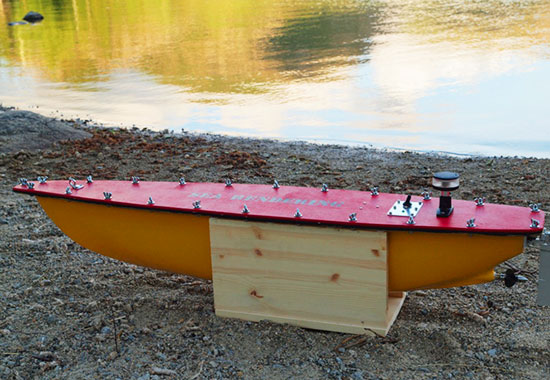
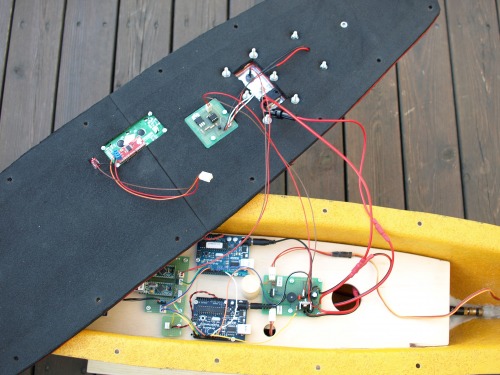
Sea Renderings is a water robot made by Geir Andersen in 2010 with the aim of measuring water depths in lakes and running on Arduino Duemilanove:

The purpose of this robot is to have it log water depths along a predefined set of waypoints. It stores its data on memory sticks or on SD cards. The estimated runtime is about 24 hours and with a top speed of 3km/h it will travel roughly 72km. With a log entry for every 10m this would give us over 700 depth measurements with full GPS reference.

Geir’s project page is hosted at Let’s Make Robots,  a free and volunteer based initiative produced and maintained by members of the robot building  community. You can have a look at the documentation and some of the illustrations showing the output of the measurements done at Lake Riskedalsvatnet in Norway.


Arduino Blog 14 Apr 21:50

One Arduino


Arduino

is an "open source physical computing platform based on a simple microcontroller board". It is also a "development environment for writing software for the board" (Source: Arduino.cc). The first Arduino was born in 2005 in the classrooms of Interactive Design Institute in Ivrea, Italy. A nice presentation which shows a timeline of "how Arduino came to be" can be found here.
 
Arduino has been a very successful concept and creation. Ten years on, it has become one of, if not, the most popular prototyping and development platforms in the world. It has found it's way into the hearts of many makers, artists, programmers, developers and inventors. It has been used for millions of projects: from automatic garage door openers and tea makers to flamethrowers, robots, lighting displays and sound production. In fact, I cannot think of anything that the Arduino hasn't been used for.
 
But as you are pretty well aware, there has been a recent rift between the original founders of Arduino.
There is no need to go over the details here because it has been covered many times already on other sites. But if you would like to get up to speed on the Arduino Trademark dispute, I would suggest you read the following articles:
 
  1) Massimo Banzi's interview on Make
  2) Federico's letter to the makers on Arduino.org
  3) Court Transcripts from the United States Courts Archive
  4) What's in a name: The battle for the soul of Arduino - on ZD Net
  5) Arduino vs Arduino: Part II on Hackaday


My Letter to Arduino LLC/SRL


Why can't you get along? Why the deception? Why the greed?
 
Who does this benefit? It is a lose-lose battle, not only for Arduino SRL/LLC but for the whole Arduino community. We all love Arduino. We love the idea, the mission and the dream. We like to make things... We don't care who "the original" Arduino was or is. It doesn't matter. We just want...

We don't want different versions of the Arduino IDE (1.6.3 vs 1.7.0).
Some may say that you should redo the IDE altogether, but that is an entirely different topic :)

Can't you see what this is doing?
It is hard enough for tutorial makers and forum dwellers to keep up with the ever evolving IDE as it is. Making two different versions of the "same IDE" adds about 10 layers of confusion and complexity ! And for what ??? This will be confusing for the newbie, confusing for the helpers, the developers, for everyone.

I am guessing that my words will have no influence over your decisions. But I hope it does !
I plee with both of you to stand by your infinity symbol and work through your differences. Say what you need to say, but get back together and regroup - as ONE ARDUINO.

Your rift is likely to reverberate through to the Arduino Community aswell. Some people will side with Arduino LLC, some with Arduino SRL. And while some people will take a stance of indifference, there will be some that just look elsewhere.
 
I don't know if revealing the results of my poll will benefit the cause or add salt to the wounds, But I asked the question, and you probably want to know the answer. Who does the Arduino Community support right now?
 
The infographic below shows the results of the poll I posted a week ago:

This poll was posted on the Arduino Tutorial Google+ community page . I tried to be as unbiased as possible. People were only allowed to vote once (enforced by log in). Each voter would have been presented with the organisations in random order. And results were not published until now. The results above are accurate as of 14th April 2015 at 9am (in Australia)
 

As you can clearly see, Arduino LLC is highly favoured.
 
My personal preference is not captured by that infographic. I agree with the bald engineer, I would prefer #OneArduino. I would like the Arduino Community to stand united. I also want the Arduino founders to stand united! Please, work through your issues, stop being greedy and stop the deception. Arduino is more than a product. It is the heart of a greater movement.

This war is pointless - please STOP !

Kind Regards
Scott C


One Arduino


Arduino

is an "open source physical computing platform based on a simple microcontroller board". It is also a "development environment for writing software for the board" (Source: Arduino.cc). The first Arduino was born in 2005 in the classrooms of Interactive Design Institute in Ivrea, Italy. A nice presentation which shows a timeline of "how Arduino came to be" can be found here.
 
Arduino has been a very successful concept and creation. Ten years on, it has become one of, if not, the most popular prototyping and development platforms in the world. It has found it's way into the hearts of many makers, artists, programmers, developers and inventors. It has been used for millions of projects: from automatic garage door openers and tea makers to flamethrowers, robots, lighting displays and sound production. In fact, I cannot think of anything that the Arduino hasn't been used for.
 
But as you are pretty well aware, there has been a recent rift between the original founders of Arduino.
There is no need to go over the details here because it has been covered many times already on other sites. But if you would like to get up to speed on the Arduino Trademark dispute, I would suggest you read the following articles:
 
  1) Massimo Banzi's interview on Make
  2) Federico's letter to the makers on Arduino.org
  3) Court Transcripts from the United States Courts Archive
  4) What's in a name: The battle for the soul of Arduino - on ZD Net
  5) Arduino vs Arduino: Part II on Hackaday


My Letter to Arduino LLC/SRL


Why can't you get along? Why the deception? Why the greed?
 
Who does this benefit? It is a lose-lose battle, not only for Arduino SRL/LLC but for the whole Arduino community. We all love Arduino. We love the idea, the mission and the dream. We like to make things... We don't care who "the original" Arduino was or is. It doesn't matter. We just want...

We don't want different versions of the Arduino IDE (1.6.3 vs 1.7.0).
Some may say that you should redo the IDE altogether, but that is an entirely different topic :)

Can't you see what this is doing?
It is hard enough for tutorial makers and forum dwellers to keep up with the ever evolving IDE as it is. Making two different versions of the "same IDE" adds about 10 layers of confusion and complexity ! And for what ??? This will be confusing for the newbie, confusing for the helpers, the developers, for everyone.

I am guessing that my words will have no influence over your decisions. But I hope it does !
I plee with both of you to stand by your infinity symbol and work through your differences. Say what you need to say, but get back together and regroup - as ONE ARDUINO.

Your rift is likely to reverberate through to the Arduino Community aswell. Some people will side with Arduino LLC, some with Arduino SRL. And while some people will take a stance of indifference, there will be some that just look elsewhere.
 
I don't know if revealing the results of my poll will benefit the cause or add salt to the wounds, But I asked the question, and you probably want to know the answer. Who does the Arduino Community support right now?
 
The infographic below shows the results of the poll I posted a week ago:

This poll was posted on the Arduino Tutorial Google+ community page . I tried to be as unbiased as possible. People were only allowed to vote once (enforced by log in). Each voter would have been presented with the organisations in random order. And results were not published until now. The results above are accurate as of 14th April 2015 at 9am (in Australia)
 

As you can clearly see, Arduino LLC is highly favoured.
 
My personal preference is not captured by that infographic. I agree with the bald engineer, I would prefer #OneArduino. I would like the Arduino Community to stand united. I also want the Arduino founders to stand united! Please, work through your issues, stop being greedy and stop the deception. Arduino is more than a product. It is the heart of a greater movement.

This war is pointless - please STOP !

Kind Regards
Scott C


Casa Jasmina with Opendesk @ Milan Design Week

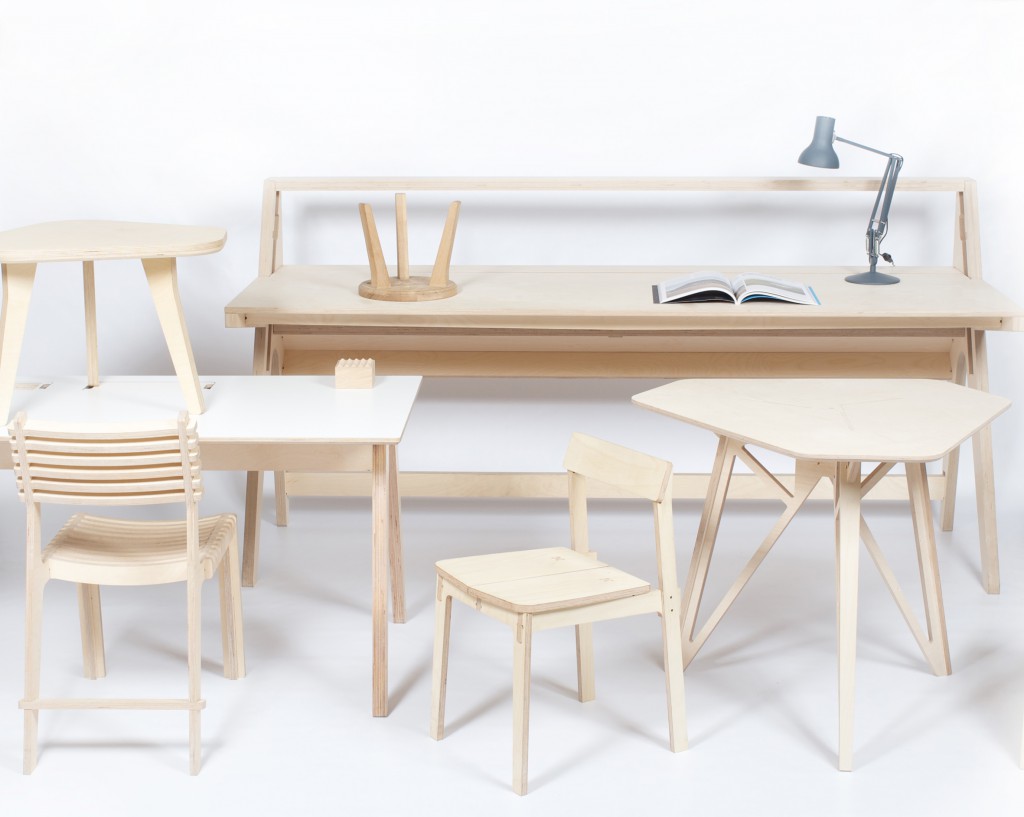
Casa Jasmina and Arduino are proud to announce a collaboration with Opendesk at Atelier Clerici during Fuorisalone 2015.

Atelier Clerici will host an independent project curated by Space Caviar and Z33, with a daily program of exhibitions and activities aimed at questioning the future of design in relation to architecture, technology and global context of living.

Opendesk, the online platform for open and smart design, will join Atelier Clerici with ‘Open Making Platform’ a series of events exploring issues related to open source design as a global and, at the same time, local practice. The program of  ‘Open Making Platform’ will include an exhibition of smart open designs made by local Italian makers and two workshops: ‘Design for Open Making’ (Wed April 15th, 11.30 am – 1.30 pm)and ‘Smart Furniture’ (Fri April 17th, 2 – 5.30 PM), in collaboration with Arduino.

Arduino and Casa Jasmina invite you to take part to the meetup and informal workshop focusing on the integration of open source connected technologies into everyday objects. Friday’s event will include a presentation by Bruce Sterling about the Casa Jasmina project.

Register for the event here.

Altair 8800 Front Panel For An 8080 Emulator

It appears a very important anniversary passed by recently without anyone realizing. The January 1975 issue of Popular Electronics featured the Altair 8800 on the cover, otherwise known as the blinky box that launched a revolution, the machine that made Microsoft a software powerhouse, and the progenitor of the S-100 bus. The 40-year anniversary of the Altair wasn’t forgotten by [dankar], who built a front panel emulator with the help of some much more modern components.

The build unofficially began with an Intel 8080 emulator written for an Arduino. The 8080 is the brains of the Altair, and while emulators are cool, they don’t have the nerd cred of a panel of switches and LEDs. The hardware began as a bunch of perfboard, but [dankar] wired himself into a corner and decided to make a real schematic and PCB in KiCAD.

Despite the banks of LEDs and switches, there really isn’t much to this front panel. Everything is controlled by shift registers, but there is a small amount of SRAM in the form of an SPI-capable 23LC1024. This comes in handy, because [dankar] is running CP/M 2.2 on this front panel emulator from disk images saved on an SD card. Everything you would want from a computer from 1975 is there; an OS, BASIC, and enough I/O to attach some peripherals.


Filed under: classic hacks
Hack a Day 13 Apr 03:00

Hackaday Links: April 12, 2015

Everyone loves Top Gear, or as it’s more commonly known, The Short, The Slow, And The Ugly. Yeah, terrible shame [Clarkson] ruined it for the rest of us. Good News! A show featuring drones will be filling the Top Gear timeslot. And on that bombshell…

More Arduino Drama! A few weeks ago, Arduino SRL (the new one) forked the Arduino IDE from Arduino LLC’s repo. The changes? The version number went up from 1.6.3 to 1.7. It’s been forked again, this time by [Mastro Gippo]. The changes? The version number went up to 2.0. We’re going to hold off until 2.1; major releases always have some bugs that take a few weeks to patch. Luckily the speed of the development cycle here means that patch should be out soon.

Need an ESP8266 connected to an Arduino. Arachnio has your back. Basically, it’s an Arduino Micro with an ESP8266 WiFi module. It also includes a Real Time Clock, a crypto module, and a solar battery charger. It’s available on Kickstarter, and we could think of a few sensor base station builds this would be useful for.

[Ben Heck] gave The Hacakday Prize a shoutout in this week’s episode. He says one of his life goals is to go to space. We’re giving that away to the project that makes the biggest difference for the world. We’re not sure how a [Bill Paxton] pinball machine fits into that category, but we also have a Best Product category for an opportunity to spend some time in a hackerspace… kind of like [Ben]’s 9 to 5 gig…

[Jim Tremblay] wrote a real time operating system for a bunch of different microcontrollers. There are a lot of examples for everything from an Arduino Mega to STM32 Discovery boards. Thanks [Alain] for the tip.

45s – the grammophone records that play at 45 RPM – are seven inches in diameter. Here’s one that’s 1.5 inches in diameter. Does it work? No one knows, because the creator can’t find a turntable to play it on.

Are we betting on the number of people who don’t get the joke in the first paragraph of this post? Decide in the comments.


Filed under: Hackaday Columns, Hackaday links

Arduino BeatBox

Create your very own Arduino BeatBox !

Home-made capacitive touch sensors are used to trigger the MP3 drum sounds stored on the Grove Serial MP3 player. I have used a number of tricks to get the most out of this module, and I was quite impressed on how well it did. Over 130 sounds were loaded onto the SDHC card. Most were drum sounds, but I added some farm animal noises to provide an extra element of surprise and entertainment. You can put any sounds you want on the module and play them back quickly. We'll put the Grove Serial MP3 module through it's paces and make it into a neat little BeatBox !!


Key learning objectives

  • How to make your own beatbox
  • How to make capacitive drum pad sensors without using resistors
  • How to speed up Arduino's Analog readings for better performance
  • How to generate random numbers on your Arduino


Parts Required:

Making the drum pads


Fritzing Sketch


Grove Connections


Grove Connections (without base shield)


Arduino Sketch


  1
2
3
4
5
6
7
8
9
10
11
12
13
14
15
16
17
18
19
20
21
22
23
24
25
26
27
28
29
30
31
32
33
34
35
36
37
38
39
40
41
42
43
44
45
46
47
48
49
50
51
52
53
54
55
56
57
58
59
60
61
62
63
64
65
66
67
68
69
70
71
72
73
74
75
76
77
78
79
80
81
82
83
84
85
86
87
88
89
90
91
92
93
94
95
96
97
98
99
100
101
102
103
104
105
106
107
108
109
110
111
112
113
114
115
116
117
118
119
120
121
122
123
124
125
126
127
128
129
130
131
132
133
134
135
136
137
138
139
140
141
142
143
144
145
146
147
148
149
150
151
152
153
154
155
156
157
158
159
160
161
162
163
164
165
166
167
168
169
170
171
172
173
174
175
176
177
178
179
180
181
182
183
184
185
186
187
188
189
190
191
192
193
194
195
196
197
198
199
200
201
202
203
204
205
206
207
208
209
210
211
212
213
214
215
216
217
218
219
220
221
222
223
224
225
226
227
228
229
230
231
232
233
234
235
236
237
238
239

/* =================================================================================================
      Project: Arduino Beatbox
       Author: Scott C
      Created: 9th April 2015
  Arduino IDE: 1.6.2
      Website: http://arduinobasics.blogspot.com/p/arduino-basics-projects-page.html
  Description: This project uses home made capacitive sensors to trigger over 130 MP3 sounds
               on the Grove Serial MP3 player. 
               
               The ADCTouch library is used to eliminate the resistors from the Capacitive sensing circuit. 
               The code used for capacitive sensing was adapted from the ADCTouch library example sketches. 
               You can find the ADCTouch library and relevant example code here:
               http://playground.arduino.cc/Code/ADCTouch
               
               "Advanced Arduino ADC" is used to improve the analogRead() speed, and enhance the
               drum pad or capacitive sensor response time. The Advanced Arduino ADC code 
               was adapted from this site:
               http://www.microsmart.co.za/technical/2014/03/01/advanced-arduino-adc/
               
               
=================================================================================================== */
  #include <ADCTouch.h>
  #include <SoftwareSerial.h>
  
  
  //Global variables
  //===================================================================================================
  int potPin = A4; //Grove Sliding potentiometer is connected to Analog Pin 4
  int potVal = 0;
  byte mp3Vol = 0; //Variable used to control the volume of the MP3 player
  byte oldVol = 0;
  
  int buttonPin = 5; //Grove Button is connected to Digital Pin 5
  int buttonStatus = 0;
  
  byte SongNum[4] = {0x01,0x02,0x03,0x04}; //The first 4 songs will be assigned to the drum pads upon initialisation
  byte numOfSongs = 130; //Total number of MP3 songs/sounds loaded onto the SDHC card
  
  long randNumber; //Variable used to hold the random number - used to randomise the sounds.
  
  int ledState[4]; //Used to keep track of the status of all LEDs (on or off)
  int counter = 0;
  
  SoftwareSerial mp3(3, 4); // The Grove MP3 Player is connected to Arduino digital Pin 3 and 4 (Serial communication)
       
  int ref0, ref1, ref2, ref3; //reference values to remove offset
  int threshold = 100;
      
  // Define the ADC prescalers
  const unsigned char PS_64 = (1 << ADPS2) | (1 << ADPS1);
  const unsigned char PS_128 = (1 << ADPS2) | (1 << ADPS1) | (1 << ADPS0);


  //Setup()
  //===================================================================================================
  void setup(){
    //Initialise the Grove MP3 Module
    delay(2500); //Allow the MP3 module to power up
    mp3.begin(9600); //Begin Serial communication with the MP3 module
    setPlayMode(0x00);                        //0x00 = Single song - played once ie. not repeated. (default)
    
    //Define the Grove Button as an INPUT
    pinMode(buttonPin, INPUT);
    
    //Define the 4 LED Pins as OUTPUTs
    pinMode(8, OUTPUT); //Green LED
    pinMode(9, OUTPUT); //Blue LED
    pinMode(10, OUTPUT); //Red LED
    pinMode(11, OUTPUT); //Yellow LED
    
    //Make sure each LED is OFF, and store the state of the LED into a variable.
    for(int i=8;i<12;i++){
      digitalWrite(i, LOW);
      ledState[i-8]=0;
    } 
    
    //Double our clock speed from 125 kHz to 250 kHz
    ADCSRA &= ~PS_128;   // set up the ADC
    ADCSRA |= PS_64;    // set our own prescaler to 64
    
    //Create reference values to account for the capacitance of each pad.
    ref0 = ADCTouch.read(A0, 500);
    ref1 = ADCTouch.read(A1, 500); //Take 500 readings
    ref2 = ADCTouch.read(A2, 500);
    ref3 = ADCTouch.read(A3, 500);
    
     //This helps to randomise the drum pads.
     randomSeed(analogRead(0));
  }


  // Loop()
  //===================================================================================================
  void loop(){
     
    //Take a reading from the Grove Sliding Potentiometer, and set volume accordingly
    potVal = analogRead(potPin);
    mp3Vol = map(potVal, 0, 1023, 0,31); // Convert the potentometer reading (0 - 1023) to fit within the MP3 player's Volume range (0 - 31)
    if((mp3Vol>(oldVol+1))|(mp3Vol<(oldVol-1))){ // Only make a change to the Volume on the Grove MP3 player when the potentiometer value changes
      oldVol = mp3Vol;
      setVolume(mp3Vol);
      delay(10); // This delay is necessary with Serial communication to MP3 player
    }
    
    //Take a reading from the Pin attached to the Grove Button. If pressed, randomise the MP3 songs/sounds for each drum pad, and make the LEDs blink randomly.
    buttonStatus = digitalRead(buttonPin);
    if(buttonStatus==HIGH){
      SongNum[0]=randomSongChooser(1, 30);
      SongNum[1]=randomSongChooser(31, 60);
      SongNum[2]=randomSongChooser(61, 86);
      SongNum[3]=randomSongChooser(87, (int)numOfSongs);
      randomLEDBlink();
    }
    
    //Get the capacitive readings from each drum pad: 50 readings are taken from each pad. (default is 100)
    int value0 = ADCTouch.read(A0,50); // Green drum pad
    int value1 = ADCTouch.read(A1,50); // Blue drum pad
    int value2 = ADCTouch.read(A2,50); // Red drum pad
    int value3 = ADCTouch.read(A3,50); // Yellow drum pad
    
    //Remove the offset to account for the baseline capacitance of each pad.
    value0 -= ref0;       
    value1 -= ref1;
    value2 -= ref2;
    value3 -= ref3;
    
    
    //If any of the values exceed the designated threshold, then play the song/sound associated with that drum pad.
    //The associated LED will stay on for the whole time the drum pad is pressed, providing the value remains above the threshold.
    //The LED will turn off when the pad is not being touched or pressed.
    if(value0>threshold){
      digitalWrite(8, HIGH);
      playSong(00,SongNum[0]);
    }else{
      digitalWrite(8,LOW);
    }
    
    if(value1>threshold){
      digitalWrite(9, HIGH);
      playSong(00,SongNum[1]);
    }else{
      digitalWrite(9,LOW);
    }
    
    if(value2>threshold){
      digitalWrite(10, HIGH);
      playSong(00,SongNum[2]);
    }else{
      digitalWrite(10,LOW);
    }
    
    if(value3>threshold){
      digitalWrite(11, HIGH);
      playSong(00,SongNum[3]);
    }else{
      digitalWrite(11,LOW);
    }
  }
      
   
  // writeToMP3:
  // a generic function that simplifies each of the methods used to control the Grove MP3 Player
  //===================================================================================================
  void writeToMP3(byte MsgLEN, byte A, byte B, byte C, byte D, byte E, byte F){
    byte codeMsg[] = {MsgLEN, A,B,C,D,E,F};
    mp3.write(0x7E); //Start Code for every command = 0x7E
    for(byte i = 0; i<MsgLEN+1; i++){
      mp3.write(codeMsg[i]); //Send the rest of the command to the GROVE MP3 player
    }
  }
  
  
  //setPlayMode: defines how each song is to be played
  //===================================================================================================
  void setPlayMode(byte playMode){
    /* playMode options:
          0x00 = Single song - played only once ie. not repeated.  (default)
          0x01 = Single song - cycled ie. repeats over and over.
          0x02 = All songs - cycled 
          0x03 = play songs randomly                                           */
    writeToMP3(0x03, 0xA9, playMode, 0x7E, 0x00, 0x00, 0x00);  
  }
  
  
  //playSong: tells the Grove MP3 player to play the song/sound, and also which song/sound to play
  //===================================================================================================
  void playSong(byte songHbyte, byte songLbyte){
    writeToMP3(0x04, 0xA0, songHbyte, songLbyte, 0x7E, 0x00, 0x00);            
    delay(100);
  }
  
  
  //setVolume: changes the Grove MP3 player's volume to the designated level (0 to 31)
  //===================================================================================================
  void setVolume(byte Volume){
    byte tempVol = constrain(Volume, 0, 31); //Volume range = 00 (muted) to 31 (max volume)
    writeToMP3(0x03, 0xA7, tempVol, 0x7E, 0x00, 0x00, 0x00); 
  }
  
  
  //randomSongChooser: chooses a random song to play. The range of songs to choose from
  //is limited and defined by the startSong and endSong parameters.
  //===================================================================================================
  byte randomSongChooser(int startSong, int endSong){
    randNumber = random(startSong, endSong);
    return((byte) randNumber);
  }
  
  
  //randomLEDBlink: makes each LED blink randomly. The LEDs are attached to digital pins 8 to 12.
  //===================================================================================================
  void randomLEDBlink(){
   counter=8;
   for(int i=0; i<40; i++){
     int x = constrain((int)random(8,12),8,12);
     toggleLED(x);
     delay(random(50,100-i));
   }
     
    for(int i=8;i<12;i++){
      digitalWrite(i, HIGH);
    }
    delay(1000);
    for(int i=8;i<12;i++){
      digitalWrite(i, LOW);
      ledState[i-8]=0;
    }
  }
  
  
  //toggleLED: is used by the randomLEDBlink method to turn each LED on and off (randomly).
  //===================================================================================================
  void toggleLED(int pinNum){
    ledState[pinNum-8]= !ledState[pinNum-8];
    digitalWrite(pinNum, ledState[pinNum-8]);
  }


Arduino Code Discussion

You can see from the Arduino code above, that it uses the ADCTouch library. This library was chosen over the Capacitive Sensing Library to eliminate the need for a high value resistor which are commonly found in Capacitive Sensing projects).
 
To increase the speed of the Analog readings, I utilised one of the "Advanced Arduino ADC" techniques described by Guy van den Berg on this Microsmart website.
 
The readings are increased by modifying the Arduino's ADC clock speed from 125kHz to 250 kHz. I did notice an overall better response time with this modification. However, the Grove Serial MP3 player is limited by it's inability to play more than one song or sound at a time. This means that if you hit another drum pad while the current sound is playing, it will stop playing the current sound, and then play the selected sound. The speed at which it can perform this task was quite impressive. In fact it was much better than I thought it would be. But if you are looking for polyphonic playability, you will be dissapointed.
 
This Serial MP3 module makes use of a high quality MP3 audio chip known as the "WT5001". Therefore, you should be able to get some additional features and functionality from this document. Plus you may find some extra useful info from the Seeedstudio wiki. I have re-used some code from the Arduino Boombox tutorial... you will find extra Grove Serial MP3 functions on that page.
 
I will warn you... the Grove Serial MP3 player can play WAV files, however for some reason it would not play many of the sound files in this format. Once the sounds were converted to the MP3 format, I did not look back. So if you decide to take on this project, make sure your sound files are in MP3 format, you'll have a much better outcome.
 
I decided to introduce a random sound selection for each drum pad to extend the novelty of this instrument, which meant that I had to come up with a fancy way to illuminate the LEDs. I demonstrated some of my other LED sequences on my instagram account. I sometimes use instagram to show my work in progress.
 
Have a look at the video below to see this project in action, and putting the Grove Serial MP3 player through it's paces.
 

The Video


First there was the Arduino Boombox, and now we have the Arduino Beatbox..... who knows what will come next !
 
Whenever I create a new project, I like to improve my Arduino knowledge. Sometimes it takes me into some rather complicated topics. There is a lot I do not know about Arduino, but I am enjoying the journey. I hope you are too !! Please Google plus one this post if it helped you in any way. These tutorials are free, which means I survive on feedback and plus ones... all you have to do is just scroll a little bit more and click that button :)


If you like this page, please do me a favour and show your appreciation :

 
Visit my ArduinoBasics Google + page.
Follow me on Twitter by looking for ScottC @ArduinoBasics.
I can also be found on Pinterest and Instagram.
Have a look at my videos on my YouTube channel.


However, if you do not have a google profile...
Feel free to share this page with your friends in any way you see fit.