Posts with «arduino» label

MKR1000 giveaway of the week on Instagram is Amped Atelier

We’re excited to announce the winner of this week’s Instagram giveaway, who will be receiving an Arduino MKR1000 and an Arduino t-shirt for sharing this #ArduinoD16 picture. With Maker Faire Bay Area quickly approaching, it is only fitting to have a winner from San Francisco — congratulations to Amped Atelier!

We spent #arduinod16 #genuinod16 as part of a technology fashion show showcasing our mimic dresses powered by @arduino.cc

A photo posted by Amped Atelier (@amped_atelier) on

Think your pic is a winner? You have one more week to submit it:

– Follow our official Arduino.cc account on Instagram

– Share your photos on your account on Instagram using the hashtag #ArduinoD16 and #GenuinoD16, and be sure to mention us at @arduino.cc

– Every Thursday, from April 7th to May 26th, we are going to choose one of your images (posted starting April 2nd) and announce the winner of an Arduino or a Genuino MKR1000, as well as one of our t-shirts or mugs right here on the blog.  That’s a total of of eight lucky people! Easy enough, right?

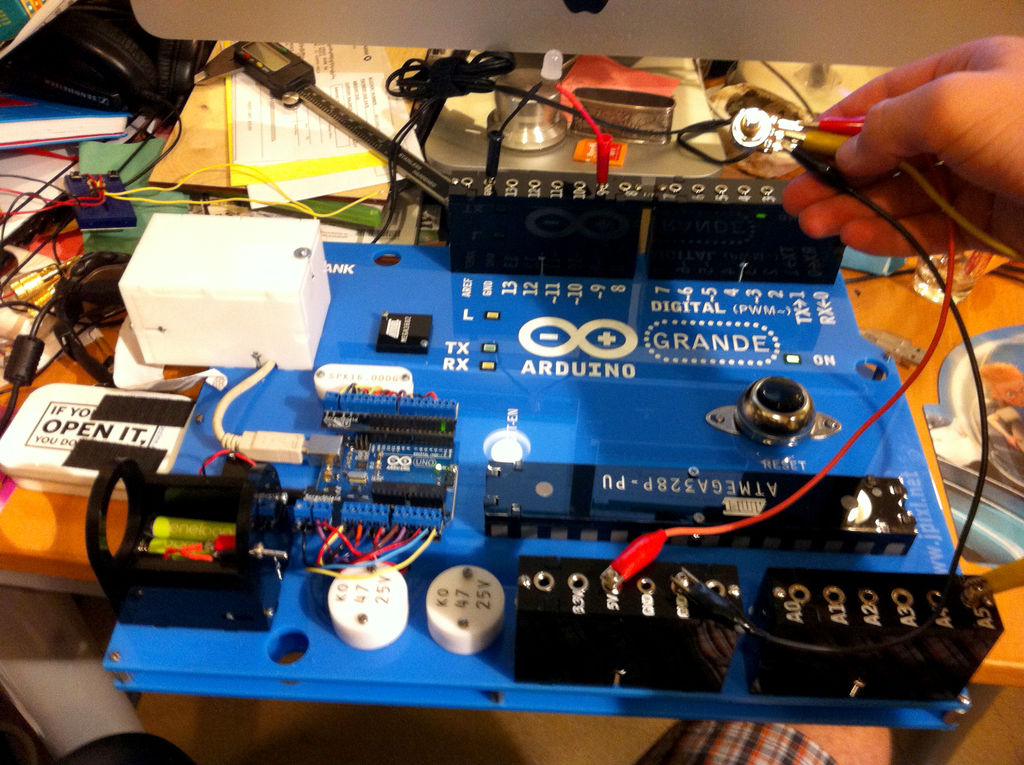
The Arduino GRANDE is six times larger than an Uno

While countless Makers love Arduino, none may love the boards as much as our friend John Edgar Park. In the spirit of Maker Faire Bay Area, we decided to take another look at what is surely the largest one we’ve ever come across. Introducing the “Arduino GRANDE.”

I love Arduino! But the boards are so tiny that they can be difficult to hug. And not so easy to see, either, if you’re a student sitting at the back of a classroom. So why not solve both problems by building a really huge, fully-functioning Arduino that’s six times larger than real life?


Bringing this fully-functional device to life required 3D modeling software, laser-cut acrylic, a few LEDs and buttons, some wiring and connectors, and a tiny (in comparison at least) Arduino Uno for a brain. After making its original debut several years ago, Park has now published a how-to tutorial of his project.

The first step I took in building this was to build a 3D model in Rhino. I based it on the Arduino Uno dimensions, and then started creating the parts based upon my real-world materials and scale. (Since I’m using an Epilog Zing 16 laser cutter with a bed size of 16″ x 12″, my maximum dimensions were dictated for me. So, this is actually a 5.6x larger-than-real-life Arduino.)

The chip is just for show, but the power jack will eventually hide the batteries, and the USB port will be made functional by the addition of a panel mount USB jack.

Insert the banana jacks into the female header blocks and then thread the nuts on to hold them in place. A dab of Loctite will prevent them from loosening up later.

On each banana jack, solder a length of wire sufficient to route through the board to the real Arduino. Push the wires through to the underside of the board at the header location, then insert and assemble the header blocks with screws and nuts which will be held captive in the acrylic t-slots.

The reset button (originally sold as a doorbell) needs to have two long lengths of wire soldered to it, which are then fed through the board to route to the real Arduino. The same goes for the panel mount rectangular LEDs.

Attach a real Arduino Uno to the board, and then run all of the header, reset, and LED wiring to it, and plug in the USB cable. You can use a ScrewShield to prevent wires from falling out. Full disclosure, I’m one of the creators of the ScrewShield and will make a little bit of money if you buy one.

Hide a 4xAAA battery pack inside the [cardboard] barrel plug, and then run it through a switch to GND and Vin on the Uno to power the Arduino GRANDE.

You can now upload a test sketch and try things out! I wired banana plugs to resistors, 10mm LEDs, potentiometers, speakers, buzzers, servo motors, and other typical components to plug into the GRANDE.

As for what the GRANDE’s applications, the possibilities are endless! It can be used as an an interactive, educational tool for Arduino classes, carried around like a boombox playing chiptunes, or even expanded upon with GRANDE scale shields! You can check out the entire project on Instructables.

Wearable device gives you an extra robotic hand

Have you ever thought about what it’d be like to have a few extra fingers? Sang-won Leigh has, which is why he has developed programmable robotic joints that are worn around your wrist to instantly give you an extra pinky, a third thumb, or even another hand. These cyborg-like devices, called Robotic Symbionts, consist of 11 motors that can detect brain signals sent to the forearm’s brachioradialis muscle and rearrange themselves to suit different tasks. Since these muscles aren’t used to move your human hand, anyone can learn to employ their Robotic Symbiont fairly quick.

According to its paper, the motors are linked together using LEGO parts, each of them with a 180-degree motion range. Cables from each motor are connected to an Arduino.

Physical interfaces with actuation capability enable the design of wearable devices that augment human physical capabilities. Extra machine joints integrated to our biological body may allow us to achieve additional skills through programmatic reconfiguration of the joints. To that end, we present a wearable multi-joint interface that offers “synergistic interactions” by providing additional fingers, structural supports, and physical user interfaces. Motions of the machine joints can be controlled via interfacing with our muscle signals, as a direct extension of our body.

What’s neat is that the robotic joints are controlled independently from the wearer’s actual hand and can be configured for various use cases, such as a grip to hold things below the wrist, a palm to grab large objects, an extra thumb to flip a page of a book while holding it open, a support for note taking, or even a joystick for computer games. You can read all about the project here.

(Photo: MIT’s Fluid Interfaces Group)

Discover the latest Arduino build for ARM Linux

As many of you already noticed, we recently released a new “Linux ARM” version of the Arduino IDE available for download on our website together with the usual “Linux 32bit” and “Linux 64bit.”

This release enables you to run the Arduino Software (IDE) on many of the mini PC boards based on ARM6+ processors currently on the market, including Raspberry Pi, C.H.I.P., BeagleBone, UDOO… just to name a few.


The Linux ARM release has been strongly supported by our community and we would like to thank all the people that helped to make this happen: GitHub handles @CRImier, @NicoHood, @PaulStoffregen, @ShorTie8, and to everyone that patiently tested and reported problems.

If you are interested (and brave!), you can read the full story and explore the complete list of collaborators below:

https://github.com/arduino/Arduino/pull/3549
https://github.com/arduino/arduino-builder/issues/105
https://github.com/arduino/Arduino/pull/4457
https://github.com/arduino/Arduino/pull/4517

Disclaimer: The release is “experimental,” meaning that it mostly works but some boards do not work or may not produce the desired result… enjoy imperfection and give us feedback on Github!

Illuminate Your Walls with Beehive-Inspired Modular Lighting

Honeycomb patterns inspired the design behind this light fixture. The modular design means the shape can be reconfigured.

Read more on MAKE

The post Illuminate Your Walls with Beehive-Inspired Modular Lighting appeared first on Make: DIY Projects and Ideas for Makers.

Improved Digital Caliper Interfacing, Including 3D Printed Connector

[MakinStuff] wrote in to let us know about a project he did for new and improved interfacing to the ubiquitous cheap Chinese digital calipers. Interfacing to this common caliper model is well-trod ground, but his project puts everything about interfacing and reading the data in one place along with some improvements: a 3D printed connector that makes mating to the pads much more stable and reliable, a simple interface circuit for translating the logic levels, and an interrupt-driven sample Arduino sketch to read the data. Making the sketch interrupt-driven means the Arduino never sits and waits for input from the calipers, making it easier have the Arduino do other meaningful work at the same time, ultimately making it easier to incorporate into other projects.

The connector has spaces to insert bare wires to use as contacts for the exposed pads inside the calipers. Add a little hot glue and heat shrink, and you’ll never have to fiddle with a hacked-together connection again.

This common caliper model has been hacked and re-purposed in interesting ways. We’ve seen them used as a Digital Read Out (DRO) on a lathe as well as being given the ability to wirelessly log their data over Bluetooth.


Filed under: tool hacks

One Dollar Board Targets Students

The Raspberry Pi was made to be inexpensive with an eye toward putting them into schools. But what about programs targeted at teaching embedded programming? There are plenty of fiscally-starved schools all over the world, and it isn’t uncommon for teachers to buy supplies out of their own pockets. What could you do with a board that cost just one dollar?

That’s the idea behind the team promoting the “One Dollar Board” (we don’t know why they didn’t call it a buck board). The idea is to produce a Creative Commons design for a simple microcontroller board that only costs a dollar. You can see a video about the project, below.

Despite being licensed under Creative Commons, there isn’t much detail available that we could find. It appears the board uses an 8 pin Atmel CPU (and the FAQ indicates that the board will use the Arduino IDE). We’re guessing that it’s essentially a Digispark / Adafruit Trinket / ATtiny85 with V-USB installed.

The crowdfunding campaign page lists the following details:

  • CPU: 8-bit
  • GPIO (input and output ports): 6
  • USB Interface: Yes
  • Memory: Flash 8 kBytes (expandable to 256 kBytes)
  • Spaces for expansions: WiFi ESP8266, Memory 24C256, H bridge L293
  • Voltage: 5V
  • Indicator LEDs: 2
  • Reset Button: Yes
  • Fitting Spaces: 4 (compatible with Arduíno UNO or similar)
  • Quick Guide: The English board comes with a printed guide in other languages.

If it is an ATTtiny85-based design, two of those “GPIO” pins will be eaten up by the USB programmer, and maybe two more by the indicator LEDs. And some of that 8 kB of flash is consumed by the bootloader. In short, it’s not going to be able to do everything all at once. Still, it could be just the thing for getting your feet wet.

But the real story is the price. The dollar price tag doesn’t include shipping or taxes, of course, but even getting the price down that low is impressive. Time will tell if the market has an appetite for a dollar board. If we had to guess, the real value will be in ready-made course material.

There are plenty of educational boards out there, but few (if any) cost a buck.


Filed under: Arduino Hacks, ATtiny Hacks, Crowd Funding

SMOMID is a Mega-powered MIDI guitar

Nick Demopoulos is a guitarist, sound designer and musician. He is also a Maker and the creator of the “SMOMID” — an Arduino Mega-based MIDI instrument that resembles a touch-sensitive guitar with several joysticks and other sensors. Not only does it just look cool, it can even flash LEDs in sync with the music being played for some wild effects and visual feedback for the performer.

This instrument was created out of necessity because despite the fact that the guitar is the most popular instrument in the world, there are almost no guitar-like midi controllers commercially available. The SMOMID is not a guitar, nor is it a substitute for a guitar, but rather it is a new and unique interface. Like all musical instruments, it has its strengths and weaknesses, and requires patience and practice to master.

Its software allows the performer to control numerous aspects of a performance, including the playing of melodies and harmonies, the direction and pattern of a melody, controlling beats, controlling bass lines, triggering samples, manipulating audio files, and more. All aspects of a performance can be controlled from the grid on the fret board and the buttons on the instrument body. Additionally several custom made synths can be chosen as sounds and several tunings are available. The instrument can be played like a fretted guitar, like a fretless guitar, with twelve notes to the octave, or other variations like twenty four or forty three notes to the octave. In addition to emitting sound, the SMOMID also emits light that is rhythmically in sync with the music the instrument is then creating. The lights also provide visual feedback for a performer that can indicate if an effect is engaged, the rhythm of a delay or the section of a composition among other facets of a performance. The SMOMID connects to any device or software that can receive MIDI information via a USB cable and is bus-powered.

You can read all about the project here, and check out some SMOMID performances below!

Win free hardware in the world’s largest Maker survey

As the Maker Movement continues to grow, do you ever find yourself wondering which platforms are used the most? Which programming languages are developers’ favorites? Which online tools do beginners frequent? Which boards do hobbyists prefer? Rather than second guessing, Hackster.io has partnered with today’s top hardware and community leaders, including Arduino, to collect, analyze and share real data with the largest Maker survey on Earth.

This is your opportunity to have your voice heard, so we as a whole can build better products, smarter services and fitting events for people like you. Whether you’re a seasoned engineer or just starting out, a lifelong hobbyist or a parent, the survey’s questions will help support the global community we all call home.

Take the survey now! (And you could also win one of 100+ free boards!)

Massimo Banzi explores the meaning of the IoT

Back at Arduino Day 2016, Massimo Banzi explored the true meaning of the Internet of Things in a more philosophical, approachable way. During his presentation, the Arduino co-founder touched upon the current state of the industry, some guiding principles, as well as what the future may entail.

“A lot of people are trying to build products that are connected, but not a lot of stuff makes a lot of sense right now. There’s a lot of strange stuff happening. It’s the beginning of an industry,” Banzi explained. “There’s a couple of misconceptions. A lot of people tend to equate the Internet of Things with smart thermostats for your home, and it’s much more than that. The part of the IoT that right now is impacting and can impact your life the most is the least sexy one.”

You can watch the entire talk below: