Posts with «arduino» label

Jean-Luc PYcARD is a Pocketable Python Development Platform

It’s a good thing that a ridiculous pun and a screenprint of Jean-Luc Picard on the bottom of the board is enough to qualify for the 2017 Hackaday Sci-Fi Contest, because [bobricius]’s Python-plus-Arduino card and environmental sensor potpourri is very cool.

The PCB design itself is great. It’s got a gigantic LED array, cutout for a wrist strap, and an onboard USB plug so you can program it just by sticking it in your computer; it shows up as a USB mass storage device when you plug it in. The files that show up on the “drive” are Micropython code that you can edit, save, and then run directly on the device. You can hardly beat that for convenience.

And there’s a full complement of sensors: not one but two temperature and humidity sensors, including our recent favorite BME280, which also reads barometric pressure. (We suspect that makes it a tri-corder.) There’s a real-time clock, a buzzer, and some buttons. Want to add more sensors? I2C ports are broken out for your convenience.

Besides having Star Trek flair, this board would give the various educational platforms a run for their money: Micro:bit, we’re looking at you. Very cool indeed!


Filed under: Microcontrollers

Power a 1980s MicroVox with an Arduino Uno

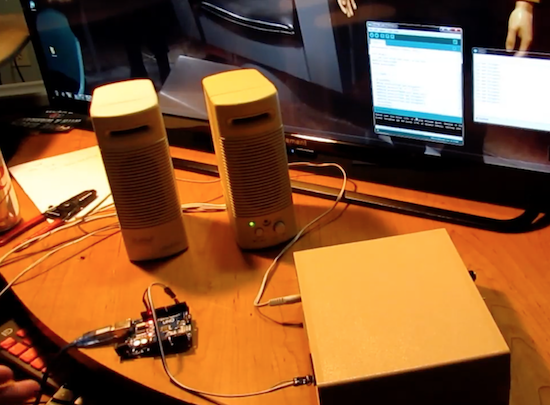
After digging through an extremely complete manual, Monta Elkins used an Arduino Uno to make a MicroVox speech synthesizer do his bidding.

The bad thing about obsolete gear is that it is generally very hard to hook up to modern equipment. The great thing for Makers, though, is that many of the devices from one’s childhood (or before) can now be driven with inexpensive tools such as Arduinos. Some of them, like the 1982-vintage MicroVox model that Elkins got his hands on, even include a manual with schematics and components listed.

After going over his new find and the enclosed manual, the video really hits a highlight around 13:45, when he powers it on to hear it burp out “ready” in a deep monotonous tone that may bring back memories of the robotic future you remember fondly. He finally hooks up the Uno just after that, and gets it to spit out an “interesting” catch phrase just after 16:30.

You can read more about the project on Hackaday and see other projects by Elkins on his YouTube channel here!

Arduino Blog 23 Feb 22:11

Keep the Peace in the Bedroom with a Snore Stopping Sleep Mask

Despite what my wife says, I have absolutely no evidence that I snore. After all, I’ve never actually heard me snoring. But I’ll take her word for it that I do, and that it bothers her, so perhaps I should be a sport and build this snore-detecting vibrating sleep mask so she can get a few winks more.

Part wearable tech and part life hack, [mopluschen]’s project requires a little of the threadworker’s skill. The textile part of the project is actually pretty simple, and although [mopluschen] went with a custom mask made from fabric and foam shoulder pads, it should be possible to round up a ready-made mask that could be easily modified. The electronics are equally simple – an Arduino with a sound sensor module and a couple of Lilypad Vibe boards. The mic rides just above the snore resonating chamber and the vibrators are right over the eyes. When your snore volume exceeds a preset threshold, the motors wake you up.

Whether this fixes the underlying problem or just evens the score with your sleep partner is debatable, but either way there’s some potential here. And not just for snore-correction – a similar system could detect a smoke alarm and help rouse the hearing impaired. But if the sewing part of this project puts you off, you should probably check out [Jenny List]’s persuasive argument that sewing is not just for cosplayers anymore.


Filed under: misc hacks, wearable hacks

MicroVox Puts the 80’s Back into Your Computer’s Voice

[Monta Elkins] got it in his mind that he wanted to try out an old-style speech synthesizer with the SC-01 (or SC-01A) chip, one that uses phonemes to produce speech. After searching online he found a MicroVox text-to-speech synthesizer from the 1980s based around the chip, and after putting together a makeshift serial cable, he connected it up to an Arduino Uno and tried it out. It has that 8-bit artificial voice that many of us remember fondly and is fairly understandable.

The SC-01, and then the SC-01A, were made by Votrax International, Inc. In addition to the MicroVox, the SC-01 and SC-01A were used in the Heath Hero robot, the VS-100 synthesizer add-on for TRS-80s, various arcade games such as Qbert and Krull, and in a variety of other products. Its input determines which phonemes to play and where it shines is in producing good transitions between them to come up with decent speech, much better than you’d get if you just play the phonemes one after the other.

The MicroVox has a 25-pin RS-232 serial port as well as a parallel port and a speaker jack. In addition to the SC-01A, it has a 6502 under the hood. [Monta] was lucky to also receive the manual, and what a manual it is! In addition to a list of the supported phonemes and words, it also contains the schematics, parts list and details for the serial port which alone would make for fun reading. We really liked the taped-in note seen in this screenshot. It has a hand-written noted that says “Factory Corrected 10/18/82”.

Following along with [Monta] in the video below, he finds the serial port’s input buffer chip datasheet online and verifies the voltage levels. Next he opens up the case and uses dips switches to set baud rate, data bits, parity, stop bits and so on. After hooking up the speakers, putting together a makeshift cable for RX, TX and ground, and writing a little Arduino code, he sends it text and out comes the speech.

The SP-01 wasn’t the only speech chip from the 1980s we’ve come across. [Marquis de Geek] used the SP0256 to make what he calls a homemade Stephen Hawking. And Votrax themselves had their own speech box, the Type ‘N Talk which [Jan] used to give voice to old text adventure games with an Android phone and VIC-20. The sound from this one really is remarkable, sounding pretty much the same as modern-day Siri.


Filed under: classic hacks

7 Lessons from Building a GoPro Auto-Panorama Device

Trick your GoPro into taking pictures with a recording

Read more on MAKE

The post 7 Lessons from Building a GoPro Auto-Panorama Device appeared first on Make: DIY Projects and Ideas for Makers.

Turn an old mixer into a MIDI input fader with Arduino

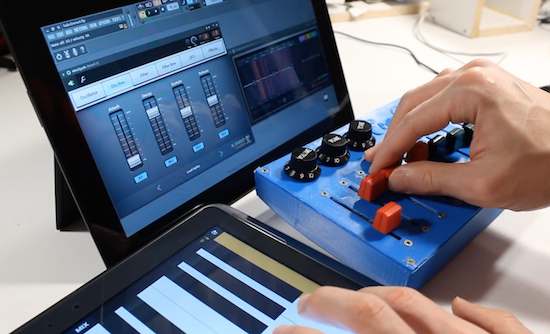
Using an Arduino as an HID, Evan Kale turned a “gently used” analog mixer into a computer interface.

Older audio equipment may not have the interfaces that you need to make totally electronic music, but they can be very well-built, so are perhaps worth salvaging. In the video below, Kale salvages potentiometers from an old mixer, then hooks them up to a Pro Micro. This allows the Arduino to take these 12 inputs, and output them as a USB MIDI signal.

Along the way, Kale points out a few very important hacking tricks, including that the library may have a printer ready for you to use, and that analog slider pots many times are logarithmic (or close to it) and need to be calibrated. Also, around 5:25 he introduces viewers to analog multiplexers which can give you eight analog inputs at the cost of three digital and one analog pin.

You can check out more of Kale’s Arduino-based hacks on his YouTube channel here!

Smaller Cheaper Arduino

Well, honestly, [Michael Mayer’s] STM8 Arduino (called Sduino) isn’t actually much to do with the Arduino, except in spirit. The STM8 is an 8-bit processor. It is dirt cheap and has some special motor control features that are handy. There’s a significant library available for it. However, it can be a pain to use the library and set up the build.

Just like how the Arduino IDE provides libraries and a build system for gcc, Sduino provides similar libraries and a build system for the sdcc compiler that can target the STM8. However, if you are expecting the Arduino’s GUI or a complete knock off of the Arduino library, you won’t get that.

That being said, you do get a lot of compatible libraries. The command line Makefile is simple to set up and use. Why not use a “normal” Arduino? The STM8 is not only inexpensive, but you can make use of the specialized hardware for things like quadrature decoding. In addition, the low power modes are super low.

Don’t let the Makefile put you off. The standard Blink sketch looks identical to an Arduino version. Here’s the required Makefile:

BOARD_TAG = stm8sblue
include ../../sduino/sduino.mk

That’s it. Not too hard.

There’s support for a simple breakout board that is inexpensive, as well as the ESP-14 pictured at the top of this article which has an ESP8266 and an STM8 controller onboard. For about $3 you get an STM8003 CPU and the WiFi capability. Hard to beat that. [Elliot Williams] just gave that board a try and found the ESP-14 to be “weird”. He may be right, but this gives you an easy way to use it.

Support for the STM8 version of the Discovery board is supposedly forthcoming.


Filed under: Arduino Hacks, Microcontrollers
Hack a Day 21 Feb 16:31

M2 by Macchina joins At Heart!

We’re excited to announce the latest member of Arduino’s AtHeart program. M2 by Macchinanow live on Kickstarter–is an open-source, versatile development platform for hacking and customizing cars.

M2’s design is compact, modular, wirelessly connectable, and built on the popular Arduino Due. The device can be wired under the hood for a more permanent installation or plugged into the OBD2 port, enabling you to do virtually anything with your vehicle’s software. 

Macchina, a Minnesota-based company, has partnered with Arduino, Digi and Digi-Key to develop M2, and believes that its highly-adaptable hardware will most benefit hot rodders, mechanics, students, security researchers, and entrepreneurs by providing them access to the inner workings of their rides.

M2 accommodates a wide variety of wireless options thanks to its Digi XBee form-factor socket, allowing you to easily connect your car to the Internet, smartphone, satellites, or the cloud using BLE, WiFi, GSM, LTE, and other modules.

The platform can be programmed using the latest Arduino IDE, and is compatible with a number of software packages. Moreover, given its open-source nature, potential applications are bounded only by the collective imagination of the coding community.

Interested? Check out Macchina’s Kickstarter page to learn more or pre-order your M2 today!

Make sure guests never miss your house with these numbers

If you’d like for someone to visit you, it’s quite helpful if you have the house number displayed somewhere on your premises. Rather than simply rely upon someone reading the numbers as they drove by, “Superbender” has decided to do something a bit different make his home stand out.

During the day, you can identify Superbender’s residence by the giraffe mailbox, but to help point the house out by night, he came up with the glowing Arduino Uno solution seen in the video here.

The numbers were cut on a scroll saw and RGB LED strips were added in the back to enable them to illuminate. The setup allows for one color per night, or the numbers can change every three seconds in “party mode.”

The software was tested on an Uno, then transferred to an ATmega328P in a DIY control board. You can read more about this project on Instructables and watch a demo of it below!

Hit Snooze by Shooting This Alarm Clock with Nerf Darts

Haven't you ever wanted to shoot your clock?

Read more on MAKE

The post Hit Snooze by Shooting This Alarm Clock with Nerf Darts appeared first on Make: DIY Projects and Ideas for Makers.