Posts with «arduino» label

A Disc Shooter For When Rubber Bands Or Nerf Darts Aren’t Enough

There are times in everybody’s life when they feel the need to shoot at things in a harmless manner. For those moments there are rubber bands and Nerf darts, but even then they feel like mere toys. If that is the point at which you find yourself, then maybe [Austin]’s home-made electric disc shooter can help.

Operation of the shooter is simple enough. A stack of 3D-printed plastic discs is loaded into a tubular magazine, from which individual disks are nudged by a motor-driven cam controlled by the trigger. Once the disc leaves the magazine it reaches a vacuum cleaner belt driven by a much more powerful motor, that accelerates the disc to ejection velocity.

The video below the break shows the gun’s construction, as well as a sequence involving the destruction of plenty of balloons, soda cans, and food items. The 3D-printed ammunition seems to us to be the weak link as in our experience it is inevitable that there is a high ammunition loss rate with these type of weapons, but maybe [Austin] has a line on some cheap filament. Either way, his disc gun looks like the kind of toy that could provide an entertaining diversion for many readers.

If disc shooters are too tame for you, there is always the Great Coil Gun War.


Filed under: toy hacks
Hack a Day 26 Aug 03:00

Hackaday Prize Entry: CPAP Humidifier Monitor Alarm

CPAP (Continuous Positive Airway Pressure) machines can be life-changing for people with sleep apnea. [Scott Clandinin] benefits from his CPAP machine and devised a way to improve his quality of life even further with a non-destructive modification to monitor his machine’s humidifier.

With a CPAP machine, all air the wearer breathes is air that has gone through the machine. [Scott]’s CPAP machine has a small water reservoir which is heated to humidify the air before it goes to the wearer. However, depending on conditions the water reservoir may run dry during use, leading to the user waking up dried out and uncomfortable.

To solve this in a non-invasive way that required no modifications to the machine itself, [Scott] created a two-part device. The first part is a platform upon which the CPAP machine rests. A load cell interfaced to an HX711 Load Cell Amplifier allows an Arduino Nano to measure the mass of the CPAP machine plus the integrated water reservoir. By taking regular measurements, the Arduino can detect when the reservoir is about to run dry and sound an alarm. Getting one’s sleep interrupted by an alarm isn’t a pleasant way to wake up, but it’s much more pleasant than waking up dried out and uncomfortable from breathing hot, dry air for a while.

The second part of the device is a simple button interfaced to a hanger for the mask itself. While the mask is hung up, the system is idle. When the mask is removed from the hook, the system takes measurements and goes to work. This makes activation hassle-free, not to mention also avoids spurious alarms while the user removes and fills the water reservoir.

Non-invasive modifications to medical or other health-related devices is common, and a perfect example of nondestructive interfacing is the Eyedriveomatic which won the 2015 Hackaday Prize. Also, the HX711 Load Cell Amplifier has an Arduino library that was used in this bathroom scale refurb project.


Filed under: Arduino Hacks, Medical hacks, The Hackaday Prize

Hackaday Prize Entry: CPAP Humidifier Monitor Alarm

CPAP (Continuous Positive Airway Pressure) machines can be life-changing for people with sleep apnea. [Scott Clandinin] benefits from his CPAP machine and devised a way to improve his quality of life even further with a non-destructive modification to monitor his machine’s humidifier.

With a CPAP machine, all air the wearer breathes is air that has gone through the machine. [Scott]’s CPAP machine has a small water reservoir which is heated to humidify the air before it goes to the wearer. However, depending on conditions the water reservoir may run dry during use, leading to the user waking up dried out and uncomfortable.

To solve this in a non-invasive way that required no modifications to the machine itself, [Scott] created a two-part device. The first part is a platform upon which the CPAP machine rests. A load cell interfaced to an HX711 Load Cell Amplifier allows an Arduino Nano to measure the mass of the CPAP machine plus the integrated water reservoir. By taking regular measurements, the Arduino can detect when the reservoir is about to run dry and sound an alarm. Getting one’s sleep interrupted by an alarm isn’t a pleasant way to wake up, but it’s much more pleasant than waking up dried out and uncomfortable from breathing hot, dry air for a while.

The second part of the device is a simple button interfaced to a hanger for the mask itself. While the mask is hung up, the system is idle. When the mask is removed from the hook, the system takes measurements and goes to work. This makes activation hassle-free, not to mention also avoids spurious alarms while the user removes and fills the water reservoir.

Non-invasive modifications to medical or other health-related devices is common, and a perfect example of nondestructive interfacing is the Eyedriveomatic which won the 2015 Hackaday Prize. Also, the HX711 Load Cell Amplifier has an Arduino library that was used in this bathroom scale refurb project.


Filed under: Arduino Hacks, Medical hacks, The Hackaday Prize

Check the time on this large and inexpensive “Titan Clock”

When you, perhaps after being late for an important event one too many times, decide to build a wall clock, there are many DIY options from which to choose. But none may be as massive or unique as the aptly named “Titan Clock.”

To justify this particular design, hacker “ProtheanSoft” lists several of its advantages, such as its large size, energy efficiency (runs on a smartphone charger), thinness (only 18mm thick with casing), and of course, affordability.

The Titan Clock—which can be assembled for less than $50—consists of RGB LEDs, inexpensive craft materials like foamcore board, acrylic and aluminum sheets, as well as recycled components including the diffuser from a broken LCD monitor or TV to generate a uniform glow for each segment. 

ProtheanSoft’s project uses an Arduino Nano for control, along with with a DS3231 RTC module for accurate timekeeping. In this version, the Arduino is programmed to display the time and change color every hour based on a predetermined table.

Interested in creating your own? You can find more details on the build here, as well its code and a wiring diagram on GitHub.

Hacking Together A Smart Glove to Count High Fives at World Maker Faire

Hacking Together A Smart Glove to Count High Fives at World Maker Faire

Hackaday Prize Entry: E.R.N.I.E. Teaches Robotics and Programming

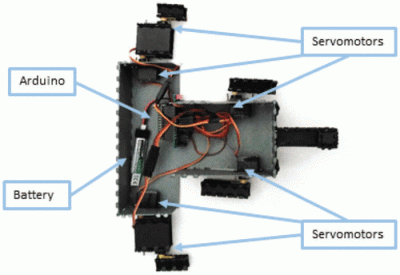
[Sebastian Goscik]’s entry in the 2017 Hackaday Prize is a line following robot. Well, not really; the end result is a line following robot, but the actual project is about a simple, cheap robot chassis to be used in schools, clubs, and other educational, STEAM education events. Along with the chassis design comes a lesson plan allowing teachers to have a head start when presenting the kit to their students.

The lesson plan is for a line-following robot, but in design is a second lesson – traffic lights which connect to a main base through a bus and work in sync. The idea of these lessons is to be fairly simple and straightforward for both the teachers and the students in order to get them more interested in STEM subjects.

What [Sebastian] noticed about other robot kits was that they were expensive or complicated or lacked tutorials. Some either came pre-assembled or took a long time to assemble. [Sebastian] simplified things – The only things required after the initial assembly of the chassis are: Zip-ties, electrical tape and a few screws. The PCB can’t be disassembled, but the assembled PCB can be reused.

The hardware [Sebastian] came up with consists of some 3mm material that can be laser cut (acrylic or wood) and a sensor board that has 5 IR LEDs and corresponding IR sensors. The chassis can be put together using nothing more than a Phillips screwdriver, and the sensor PCBs are well documented so that soldering them is as easy as possible. An Arduino is used as the brains of the unit.

[Sebastian] has come up with a great project and the idea of a platform like this with a couple of lesson plans included is a great one. He’s released the hardware under an Open Hardware license as well so others can share and add-on. Of course, there are other line following robots, like this miniature one created with analog circuitry, and there are other open source robots for teaching, like this one. But [Sebastian]’s focus on the lesson plans is a really unique way of approaching the problem – one that will hopefully be very successful.


Filed under: robots hacks, The Hackaday Prize

Hackaday Prize Entry: E.R.N.I.E. Teaches Robotics and Programming

[Sebastian Goscik]’s entry in the 2017 Hackaday Prize is a line following robot. Well, not really; the end result is a line following robot, but the actual project is about a simple, cheap robot chassis to be used in schools, clubs, and other educational, STEAM education events. Along with the chassis design comes a lesson plan allowing teachers to have a head start when presenting the kit to their students.

The lesson plan is for a line-following robot, but in design is a second lesson – traffic lights which connect to a main base through a bus and work in sync. The idea of these lessons is to be fairly simple and straightforward for both the teachers and the students in order to get them more interested in STEM subjects.

What [Sebastian] noticed about other robot kits was that they were expensive or complicated or lacked tutorials. Some either came pre-assembled or took a long time to assemble. [Sebastian] simplified things – The only things required after the initial assembly of the chassis are: Zip-ties, electrical tape and a few screws. The PCB can’t be disassembled, but the assembled PCB can be reused.

The hardware [Sebastian] came up with consists of some 3mm material that can be laser cut (acrylic or wood) and a sensor board that has 5 IR LEDs and corresponding IR sensors. The chassis can be put together using nothing more than a Phillips screwdriver, and the sensor PCBs are well documented so that soldering them is as easy as possible. An Arduino is used as the brains of the unit.

[Sebastian] has come up with a great project and the idea of a platform like this with a couple of lesson plans included is a great one. He’s released the hardware under an Open Hardware license as well so others can share and add-on. Of course, there are other line following robots, like this miniature one created with analog circuitry, and there are other open source robots for teaching, like this one. But [Sebastian]’s focus on the lesson plans is a really unique way of approaching the problem – one that will hopefully be very successful.


Filed under: robots hacks, The Hackaday Prize

Motorgan is an electromagnetic organ

What do you get when you combine three small motors with a guitar pickup and a touch keypad? That would be the Motorgan by Moscow-based media artist Dmitry Morozov (aka ::vtol::). The result is a unique Arduino Mega-controlled instrument that looks and sounds like he somehow combined a V8 engine with a pipe organ.

The electromagnetic/electromechanical organ uses two differently sized PC cooling fans, as well as a gear motor to produce various sounds. A separate keypad is used for each motor, and each of the 24 keys can be tuned with a potentiometer, which reportedly allows one to “make any kind of music.”

The speed of each motor is controlled by voltage changes via touch keyboard with 24 keys. Keyboard is split into three parts (registers) for each motor, so it’s possible to play chords/polyphonic lines by taking one note from each register. Electromagnetic fields produced by motors are picked up with a single coil guitar pickup.

As you might suspect, it’s not exactly an easy instrument to play, but the results are certainly stunning, or perhaps you might even say “shocking.” Be sure to check out ::vtol::’s latest project in the video below!

Arduino Blog 22 Aug 20:22

Over-engineered, Arduino-powered closet lights

If you’re faced with a closet that doesn’t have any lights inside, you simply could go and find puck lights at most retail stores. But, if you’re Dillon Nichols, you buy a set of lights, and enhance them with a wired power supply and automatic Arduino control.

To accomplish this, Nichols decoded the infrared remote control signal to his puck lights using an Arduino Leonardo, then set up things up to sense the door’s opening via a physical switch and signal the lights accordingly. Now when he opens the closet, lights automatically shine down and fade out when it’s closed.

He also added a timer, so that they turn off after 10 minutes automatically if he forgets to shut the door. Looking for an over-engineered, non-permanent solution for yourself? You can check out his detailed write-up here and find the code for his build on GitHub.