Posts with «arduino» label

A Keyboard To Stomp On

Macros are useful things. They allow one to execute a series of commands with a single keypress. There exists a wide variety of hardware and software solutions to create and use macros to improve your workflow, and now [Evan] has brought the open-source ManyKey into the fray, along with a build tutorial to boot.

The tutorial acts as a great introduction to ManyKey, as [Evan] walks through the construction of a macro keyboard designed to be operated by the feet. Based around the Arduino Leonardo and using off-the-shelf footswitches commonly used in guitar effects, it’s accessible while still hinting at the flexibility of the system. Macros are programmed into the keyboard through a Python app which communicates over serial, and configurations are saved into the Arduino’s onboard EEPROM. The ManyKey source is naturally available over at GitHub.

[Evan] tells us he uses his setup to run DJ software with his feet while his hands are busy on the turntables. That said, there’s all manner of other applications this could be used for. Efficiency is everything, and we love to see keyboard projects that aim to improve workflow with new ideas and custom builds – this shortcut keyboard makes a great example.


Over The Air Updates For Your Arduino

An Arduino and a data radio can make a great remote sensor node. Often in such situations, the hardware ends up installed somewhere hard to get to – be it in a light fitting, behind a wall, or secreted somewhere outdoors. Not places that you’d want to squeeze a cable repeatedly into while debugging.

[2BitOrNot2Bit] decided this simply wouldn’t do, and decided to program the Arduinos over the air instead.

Using the NRF24L01 chip with the Arduino is a popular choice to add wireless communications to a small project. By installing one of these radios on both the remote hardware and a local Arduino connected to the programming computer, it’s possible to remotely flash the Arduino without any physical contact whatsoever using Optiboot.

The writeup is comprehensive and covers both the required hardware setup for both ends of the operation as well as how to install the relevant bootloaders. If you’re already using the NRF24L01 in your projects, this could be the ideal solution to your programming woes. Perhaps you’re using a different platform though – like an Arduino on WiFi? Don’t worry – you can do OTA updates that way, too.

Flying the Friendly Skies with A Hall Effect Joystick

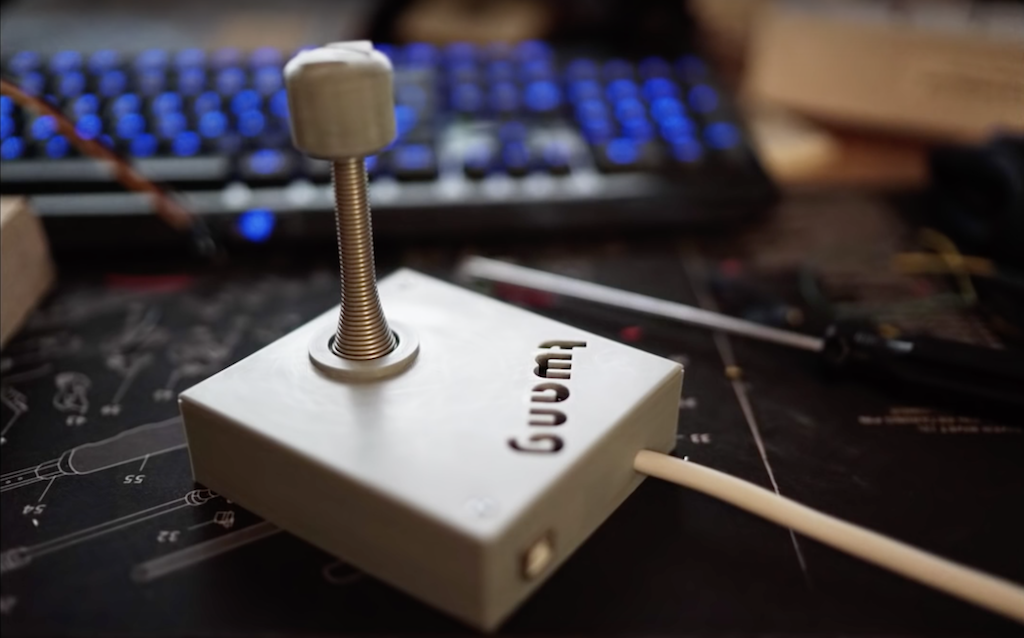
There are plenty of PC joysticks out there, but that didn’t stop [dizekat] from building his own. Most joysticks mechanically potentiometers or encoders to measure position. Only a few high-end models use Hall effect sensors. That’s the route [dizekat] took.

Hall effect sensors are non-contact devices which measure magnetic fields. They can be used to measure the position and orientation of a magnet. That’s exactly how [dizekat] is using a trio of sensors in his design. The core of the joystick is a universal joint from an old R/C car. The center section of the joint (called a spider) has two one millimeter thick disc magnets glued to it. The Hall sensors themselves are mounted in the universal itself. [Dizekat] used a small piece of a chopstick to hold the sensors in position while he found the zero point and glued them in. A third Hall effect sensor is used to measure a throttle stick positioned on the side of the box.

An Arduino micro reads the sensors and converts the analog signal to USB.  The Arduino Joystick Library by [Matthew Heironimus] formats the data into something a PC can understand.

While this is definitely a rough work in progress, we’re excited by how much [dizekat] has accomplished with simple hand tools and glue. You don’t need a 3D printer, laser cutter, and a CNC to pull off an awesome hack!

If you think Hall effect sensors are just for joysticks, you’d be wrong – they work as cameras for imaging magnetic fields too!

Hack a Day 18 Jan 09:00

Arduino Sumo Robot

Primary image

What does it do?

sumo robot


Before we start

What is the sumo robot?

It is a self-control robots with specific dimensions and features, it is also designed in a Hostile shape which qualify it to participate in the contests and competitions with other robots.

Cost to build

Embedded video

Finished project

Number

Time to build

Type

URL to more information

Weight

read more

Light up the elements with this periodic table display

If you took chemistry at any point in your life, you were exposed to the periodic table, which organizes different atomic structures by their atomic number. It’s an amazing chart, demonstrating just how much “stuff” our world is made up of!

To show off the element collection he shares with his girlfriend, elemental hacker “Maclsk” built a light-up periodic table display with square cubes where each sample could be stored.

What makes this really amazing is that the display uses WS2812B LEDs to light each cube individually. This allows it to produce fun color effects and even categorize the collection by different aspects, like element group, discovery year, or their state at certain temperatures.

Modes are selected via a Bluetooth phone app. Be sure to see it in action in the video below!

Remember Your Birthday For Fifty Years

Our Coin Cell Challenge competition has turned up some amazing entries, things that we wouldn’t have thought possible from such meagre power sources. Take [Vishnu M Aiea]’s entry for instance, a device which he claims can light up as a birthday reminder every year for up to fifty years.

At its heart is a modified Arduino Nano clone that draws a measured 608 nA from a CR2450N. From the specification of the cell he has calculated the 50 year maximum figure, as well as a possible 29 years for a CR2032 and 64 years for a CR2477. He does however note that this does not take self-discharge into account, but you can probably afford a new battery in a decade or so.

The Arduino clone carefully selected for its “P” version low-power processor has had its serial bridge IC removed to achieve this power consumption, as well as a voltage regulator and some discrete components. Interestingly he notes that the ATMega168P is even more frugal than its 328 cousin, so he’s used the former chip. A selection of internal flags are set for minimal power consumption, and the internal oscillator is selected to use as low a clock speed as possible. There is an Intersil ISL1208 low power RTC chip mounted on a piece of stripboard to provide the timing, and of course an LED to provide the essential birthday alert.

When the LED lights for the big day there’s always the hope you’ll receive another coin cell, this time powering an edge-lit musical birthday card.


RFID-controlled dry cleaner machine displays glowing leaves

While you may not give dry cleaning conveyors much thought, Andrew Quitmeyer and Madeline Schwartzman’s “Replantment” exhibition at the Pratt Manhattan Gallery uses them in an entirely new way, along with glowing silicone molds of leaves from all over the world.

The machine detects when an RFID tag attached to a laundry ticket is nearby, then moves over a lighting arrangement to display the multitude of glowing leaves.

An Arduino and a SparkFun Simultaneous RFID Reader are used for control, with relays taking the place of a foot switch to start and stop the conveyor motors.

You can check it out in action below, or if you are in the New York area, you can see the artwork in person until February 17th.

Robotic playing card dealer made with cardboard

Ruben, aka “Ruubz0r,” a mechanical engineering student, was tasked with building a smart object. As he enjoys card games, he decided to make a playing card distributor.

The resulting device uses a single servo to slide cards off of a deck, along with a stepper motor and ultrasonic sensor to aim it at the human recipient. An Arduino Uno provides the brains of the operation.

The system is made out of wood and cardboard, and while it may not be ready for casino use, it’s a great example of what can be done with readily available materials. Check it out in action in the video seen here!

This Week in Making: Build Your Own Speakers, Construct a Lightsaber, and More

This week, 3D print your own speaker system, build a device that will allow you to open your door with your hand, or construct a lightsaber.

Read more on MAKE

The post This Week in Making: Build Your Own Speakers, Construct a Lightsaber, and More appeared first on Make: DIY Projects and Ideas for Makers.

Automatically open doors with Arduino!

Tired of doing the mundane task of opening your door? This hack from Sieuwe Elferink takes care of that for you, using an Arduino Uno for control.

When someone comes within 50 cm of an ultrasonic sensor attached to the door, the Arduino uses an H-bridge relay to power a windshield wiper motor, which opens and closes it via a linkage setup. Another sensor is implemented on the opposite side of the door, allowing hands-free travel both ways!

Want to build your own? You can find instructions here, while code is available on GitHub.