Posts with «arduino» label

Sorter Uses Cardboard to Organize Card Hoard

If you collect trading cards of any kind, you know that storage quickly becomes an issue. Just ask [theguymasamato]. He used to be really into trading cards, and got back into it when his kids caught the bug. Now he’s sitting on 10,000+ cards that are largely unorganized except for a few that made it into sleeve pages.  They tried to go through them by hand, but only ended up frustrated and overwhelmed. Then he found out about [Michael Portera]’s Pi-powered LEGO card sorter and got all fired up to build a three-part system that feeds cards in one by one, scans them, and sorts them into one of 22 meticulously-constructed cardboard boxes.

[theguymasamato]’s card sorter is the last stop for a card after the feeder has fed it in from the pile and the scanner has scanned it. The sorter lazy Susans around on a thrust bearing, which is driven by a 3D printed drive wheel attached to a stepper. The stepper is controlled with an Arduino.

Here’s where it gets crazy: the drive wheel and timing belt are made from the flutes of corrugated cardboard. As in, he used that wavy bit in the middle as gear teeth. Every one of those cardboard teeth is fortified with wood glue, a time-consuming process he vows to never repeat. Instead, [theguymasamato] recommends using shims to shore them up as he did in the card feeder. The whole thing was originally going to be made from cardboard. It proved to be too mushy to support the thrust bearing, so [theguymasamato] switched to MDF.

Right now, the sorter is homed via button press, but future plans for the device include an IR break beam switch. We’re excited for the scanner and can’t wait to see the whole system put together. While [theguymasamato] works on that, position yourself past the break to watch the build video.

A university research project for Arduino community members by a community member

Back in December, we received an email from a university student named Lucrezia Alfonsi regarding her dissertation research. Lucrezia’s goal is to to understand what motivates our community to use Arduino, share knowledge, and produce open source innovations. Not only would we love to help Lucrezia, we always like hearing about our users’ involvement with open hardware and software.

The survey, which can be found here, will be up until February 20th and the results will be posted later on our blog. By answering Lucrezia’s report, we hope to provide our community with rich insights into the experiences and inspirations of our users.

Hi, I’m Lucrezia Alfonsi, a Bocconi University MSc student. Right now, I’m writing my MSc thesis and I would like to ask your help completing the survey I have prepared for last research steps – it takes only 10 minutes, the data are anonymously tracked and the results will be elaborated only for academic purposes.

“I strongly believe in ‘doing well, by doing good’ and I immediately associate this with the motivation that moves Arduino Community members to improve and innovate everyday”; this is what I think, how I started my email to Arduino, and why I decided to focus my thesis on individual attitudes and motivational factors that lead open-source software and hardware communities, like Arduino Community. This is my genuine interest in the new and the right moment to challenge it.

Here, you can find the direct link to the questionnaire I built appropriately; I think this research can give something interesting back. Feel free to take a look and decide if you would like to bring your precious contribution.

Arduino Blog 24 Jan 15:11

Color Sensor Demystified

When [millerman4487] bought a TCS230-based color sensor, he was expecting a bit more documentation. Since he didn’t get it, he did a little research and some experimentation and wrote it up to help the rest of us.

The TCS3200 uses an 8×8 array of photodiodes. The 64 diodes come in four groups of 16. One group has a blue filter, one has green and the other has a red filter. The final set of diodes has no filter at all. You can select which group of diodes is active at any given time.

Sixteen photodiodes have blue filters, 16 photodiodes have green filters, 16 photodiodes have red filters, and 16 photodiodes are clear with no filters. The four types (colors) of photodiodes are interdigitated to minimize the effect of non-uniformity of incident irradiance. All photodiodes of the same color are connected in parallel. Pins S2 and S3 are used to select which group of photodiodes (red, green, blue, clear) are active.

The output of the array is a frequency that corresponds to the light intensity measured by one bank of photodiodes. You’ll need to make several pulse input measurements to compute the color and [millernam4487] provides code for it. You may, however, need to calibrate the device before you get good results.

We’ve looked at color sensors before, of course. They can even unlock doors.

Hack a Day 23 Jan 19:30

Make a mini CNC drawing machine

For an easy plotter design that you can build with only simple hand tools, be sure to check out this tiny project from Mr Innovative. The machine features a pair of stepper and lead screw assemblies to maneuver a pen in an X/Y plane, along with a clever string and servo setup to handle retraction.

An Arduino Nano and two L293D ICs mounted to a custom PCB are used to control the device, though a breadboard could certainly substitute for the PCB in a pinch. Drawings are translated into the proper format via Inkscape and Processing. 

More details on the miniature machine, including code, can be found in Mr Innovative’s write-up.

Remote weather station gets LoRa upgrade

After deploying a remote weather station over two years ago, self-proclaimed ugly pirate Tecwyn Twmffat needed a better wireless communication solution. 

Originally, his installation used a GPRS modem to transmit data over the cellular network, and while this normally worked quite well, the module would get booted off the network during updates. Additionally, its solar panel power supply couldn’t keep up with the system during the darker months of December and January.

To solve both problems, he turned to a MKR WAN 1300 board to transmit data to a base station within range of WiFi and mains power. The base station then takes care of placing these readings on the wider Internet, which can be seen here as a series of gauges.

Now in its third version and having been tested for over two years, my weather station gets upgraded for better low power performance and data transfer reliability.

Power consumption – not a problem in the months other than December and January, but in these very dark months the solar panel, although rated at 40 Watts, was unable to keep up with the demand of the system … and most of the demand came from the 2G FONA GPRS module which transmits the data directly to the interwebs.

The next problem was with the FONA GPRS module itself, or more probably the cell phone network. The device would work perfectly for weeks / months, but then suddenly stop for no apparent reason. Apparently the network does try to send some kind of ‘system update info’ which, if not accepted, causes the device to get booted off the network, so GPRS is not really a maintenance free solution for data transmission. It’s a shame because when it did work, it worked really nicely.

This upgrade uses the low power LoRa protocol to send the data to a Raspberry Pi local server, which then will sends it on to the interwebs. In this way, the weather station itself can be low power on a solar panel and the ‘heavy lifting’ part of the process, done somewhere within WIFI range on mains power. Of course, if you have a public LoRa gateway within range, the Raspberry Pi would not be required.

Building up the weather station PCB is easy as the SMD components are all quite large (1206) and everything on the PCB works 100%. Some of the components, namely the wind instruments, are quite expensive but can sometimes be found secondhand on eBay.

Arduino Tachometer Clock Fires on All Cylinders

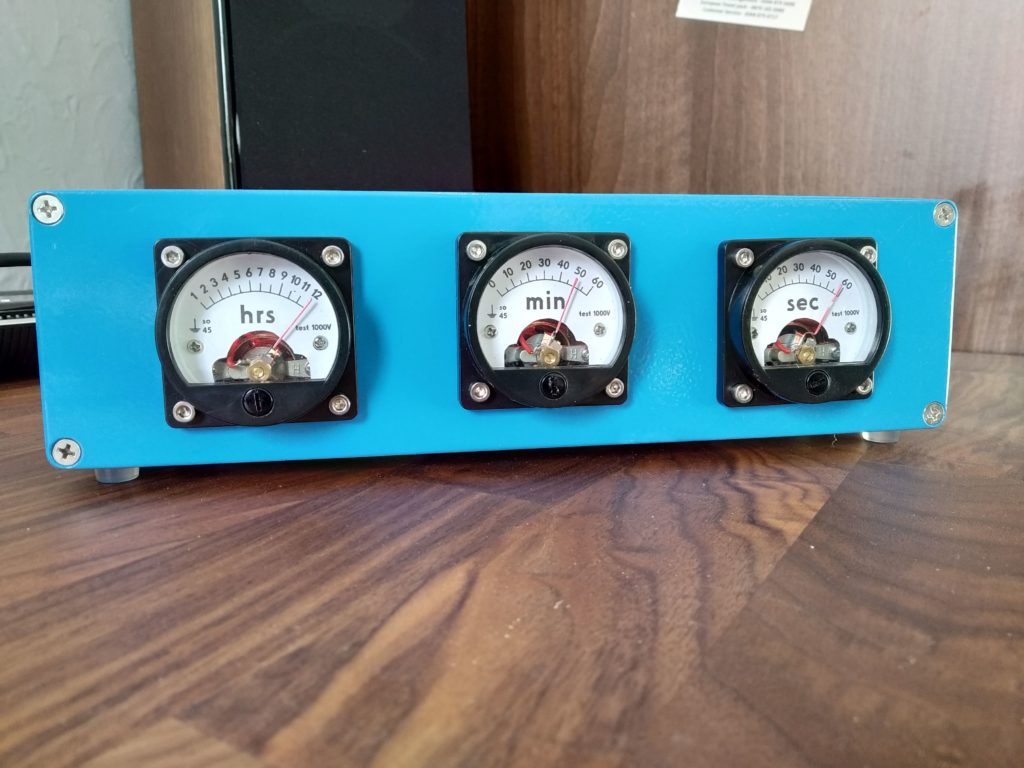
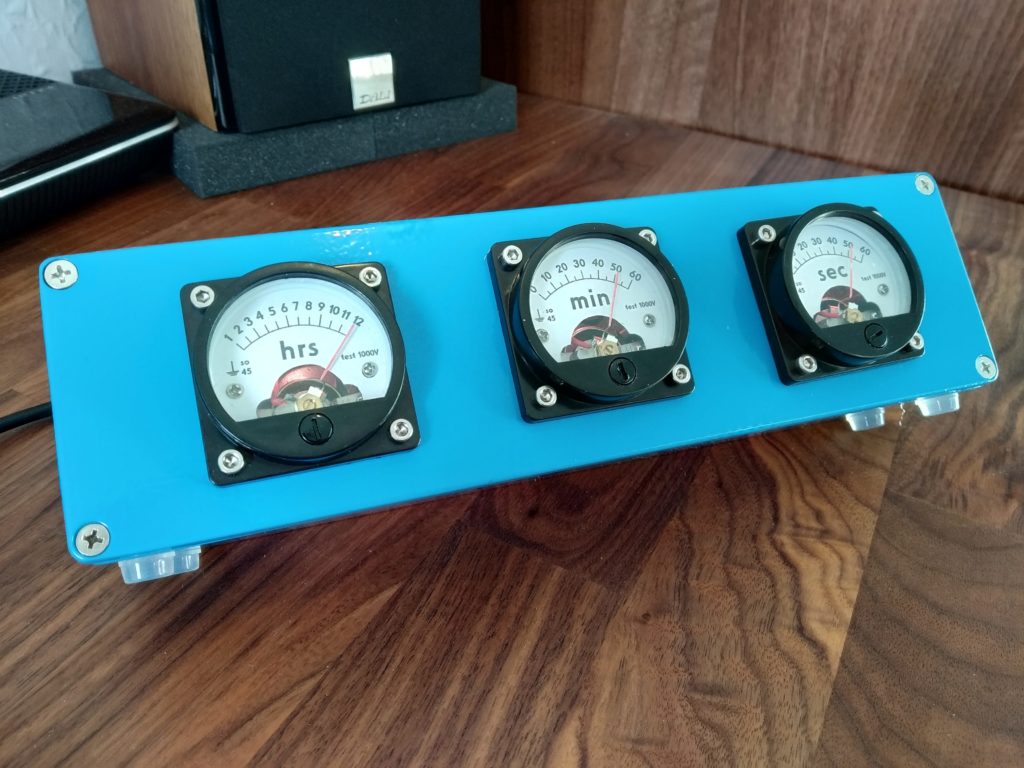
We’re certainly no strangers to unique timepieces around these parts. For whatever reason, hackers are obsessed with finding new and interesting ways of displaying the time. Not that we’re complaining, of course. We’re just as excited to see the things as they are to build them. With the assumption that you’re just as enamored with these oddball chronometers as we are, we present to you this fantastic digital tachometer clock created by [mrbigbusiness].

The multi-function digital gauge itself is an aftermarket unit which [mrbigbusiness] says you can get online for as little as $20 from some sites. All he needed to do was figure out how to get his Arduino to talk to it, and come up with some interesting way to hold it at an appropriate viewing angle. The mass of wires coming out of the back of the gauge might look intimidating, but thanks to his well documented code it shouldn’t be too hard to follow in his footsteps if you were so inclined.

Hours are represented by the analog portion of the gauge, and the minutes shown digitally were the speed would normally be displayed. This allows for a very cool blending of the classic look of an analog clock with the accuracy of digital. He’s even got it set up so the fuel indicator will fill up as the current minute progresses. The code also explains how to use things like the gear and high beam indicators, so there’s a lot of room for customization and interesting data visualizations. For instance, it would be easy to scrap the whole clock idea and use this gauge as a system monitor with some modifications to the code [mrbigbusiness] has provided.

The gauge is mounted to a small project box with some 3D printed brackets and bits of metal rod, complete with a small section of flexible loom to cover up all the wires. Overall it looks very slick and futuristic without abandoning its obvious automotive roots. Inside the base [mrbigbusiness] has an Arduino Nano, a DS1307 RTC connected via I2C, a voltage regulator, and a push button to set the time. It’s a perfectly reasonable layout, though we wonder if it couldn’t be simplified by using an ESP8266 and pulling the time down with NTP.

We’ve seen gauges turned into a timepiece before, but we have to admit that this is probably the most practical realization we’ve seen of the idea yet. Of course if you want to outfit the garage with something a bit more authentic, you can always repurpose a Porsche brake rotor.

A carbon fiber bike filament winder controlled by Arduino

Bryan Kevan wanted to build his own bicycle, but wasn’t satisfied with purchasing a frame—or even ready-made tubing. He instead chose to create the frame from raw strands of carbon fiber

The overall bike build is shown here, which necessitated him designing a variety of jigs, including a CNC wrapping machine.

His device uses an Arduino Uno, along with a pair of driver boards, to carefully roll strands of carbon fiber on a PVC mandrel in an overlapping pattern. Epoxy was dripped on the assembly during the process, resulting in CF rods that were lighter and much cheaper than purchased rods. 

After quite a bit more work assembling everything together, Kevan now has a bike frame that is truly made to his specs!

An RFID-powered seating chart for your wedding

Seating charts at weddings and other formal events are usually handled by small cards at each table, but Gabrielle Martinfortier had other plans. 

For her big event, she along with help from her now-husband and friends constructed a seating arrangement on a 3’ x 4’ wood canvas, equipped with a 7” TFT display and an RFID reader. An Arduino Mega serves as the brains of the device, taking advantage of its expanded IO capabilities to control an LED assembly over each table on the chart.

Wedding guests simply had to present the card they received with the invitation, then their proper table was lit. As seen in the video below, this eliminated seating confusion, and provided a bit of extra entertainment for those involved. 

I wanted to make something special for my wedding tables chart, and I thought this was a good way of making it personal, as it reflects my love (addiction) for electronic projects.

So the plan was to make a big wood panel with the plan of the room on it, including, of course, the tables and their names (they are plant names, in French). The guests received a card with an RFID sticker on it along with their invitation. On the back of the card was written (in French) something like “This card is of great importance, keep it safe and carry it on you at the wedding.” I didn’t want them to know what it was for until the wedding.

The chart has several elements  a TFT display, an RFID reader, a green LED and a red LED, a push button and one strip of 3 LEDs for each table. When the RFID tags are scanned, the green LED turns on if it is recognized, and a personalized message is displayed on the screen, including the name of the table where the guest is seated. In addition, the LED strip associated with the table is turned on, shedding light on the table on the room’s plan. If the card is misread or unrecognized, the red LED is turned on with an “access denied” message on the screen. The button is for those who did not succeed in not losing or forgetting the card. It displays a message on the screen, asking them to go to the bar and say something like “I am not reliable,” in exchange of which they get a backup chart to find their seat.

I changed a few things along the way: I wanted to paint the wood panel but changed my mind because I was scared I’d make a mess and have to start over with a new panel. Since I have a circuit machine I decided to make the writings and drawings with vinyl.

I also had a 20×04 character LCD screen in the beginning, but I upgraded to a 7″ TFT screen because it’s bigger and not as limiting in terms of message length.

This robot is eggsactly what you need to cook breakfast

Normally, boiling an egg involves heating water in a saucepan, then dropping an egg inside to be properly heated. James Bruton, however, now has a bit of help in the form of his breakfast-making robot. 

The device uses two servos, along with a motor/encoder/screw assembly to rotate and lower the egg into place. It then takes it out after six minutes, and tips it out into a secondary container.

As of now, temperature is manually controlled, but it’s tracked with a DS18B20 temperature sensor to initiate the egg lowering procedure. An Arduino Uno takes care of the lifting screw assembly, while an Arduino Mega handles everything else.

This Arduino-powered piano can play just about any MIDI file

After letting his Arduino languish in a drawer for some time, Brandon Switzer decided to take it out and start experimenting. While he could have started off small, Switzer chose to instead create his own player piano system, completing it at a cost of around $650.

While the details of the project aren’t explicitly spelled out, you can see a time-lapse of this amazing build in the video below. As you can imagine, it took a massive amount of breadboard space to get all the electronics laid out, and a similarly impressive number of solenoids to activate all of the keys. 

Additionally, he had to do plenty of mechanical work, including the cringeworthy job of actually drilling into a what appears to be a functional piano!

In early August 2017 I was looking to partake in some kind of engineering project that would be fun and also help me learn new things. For a long time I had an Arduino Uno that had been sitting in a drawer, and for the first time I took it out to experiment with it and create something new.

For a long time I had been inspired by player pianos — it’s something about the way the keys move on their own that make them so wonderful. I wanted to create something like that — something that didn’t only work but also impressed the viewer — for a cheap cost.

One of my goals in creating this was to show that it’s possible to replicate amazing things for little money, and I think I proved this. While a player system from Yamaha or Pianodisc cost upwards of $10,000, I built my own system for a measly $650. Not only that, but once you buy your $10,000 player piano, you have to purchase extra apps and songs if you actually want to play something on it. Overall I’m very satisfied with the way the piano turned out, and I’m excited to use it in the future.