Posts with «arduino» label

EasyLights

I was working on my Picaxe 28x2 robot from http://letsmakerobots.com/ and I wanted lights and I needed more sensors. I had four input pins left. With the 28x2 you can make the pins anything that you need. I went back to electronics to find some answers. I looked up shift registers on http://www.jameco.com/ and I bought the latest CD74HC164 serial in parallel out. This is why I made Easy Lights. For two pins you get eight lights. Yes there is a little flicker. It is a shift register. Each time the lights change you have to shift in all eight lights.

read more

Controlling a robot from javascript (g+ hangouts application)

Hi guys

I'm trying to create a google+ hangouts application to let us to control a robot (like magabot, for example), directly from there.

I already created the interface of the application, it is actually pretty simple, if you want to have a look it is hosted here: http://magabot.cc/hangouts/magabot-hangouts/.

read more

An Arduino Based Quadruped Robot

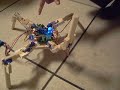
Sure, we see hexapods all the time at [HAD], but moving around with four legs can be more tricky kinematics-wise. This Instructable shows you how to make one out of balsa wood.

Although one might not think of balsa to make their robot out of [vexedpheonix] explains that this was chosen because it’s extremely light and easy to work with. Since he was trying to keep costs down, the cheapest servos available were used. These weren’t all that powerful, so the lighter the body the better! According to the included bill of materials, he was able to keep the entire robot build under $100.

According to the article, the hardest part was making four copies of the same leg. We might suggest using a CNC router, but building one would obviously add a huge layer of complication to the project!

Thanks for the tip on this one [SteveT]! Be sure to check out the video of this little robot waving one of it’s legs or trying to walk after the break!


If you’d rather see a hexapod in action, why not check out this one!


Filed under: arduino hacks, robots hacks

Line robot sensor

Hey guys, i want to build a line following robot and I was scouring ebay for some sensors


I found these but I wasn't sure if they would work, as I haven't done this before. They're pretty cheap.

Let's Make Robots 27 May 05:14
arduino  ir  line  module  picaxe  robot  sensor  

Moppy lets you play your floppy drives

Get ready to join a band. Just follow the guide over at the Moppy project page and you’ll have your very own floppy drive instrument.

The name is a mashup between Musical and Floppy. By using an Arduino UNO as a translator, you can command an array of floppy drives with a musical keyboard (think piano). The head on each floppy drive is controlled by a stepper motor which will put out some sweet sounds if driven at just the right frequency. The lower notes tend to fair a bit better than the high range. One great example of this is the Imperial March theme as heard after the break.

Once you get the base system up and running, it’s time to think of some alternate interfaces. Sure, you can obvious things like toy keyboards. But wouldn’t it be more fun to make it fruit controlled?


Filed under: musical hacks
Hack a Day 26 May 18:01

How rough your last mountain bike ride was?

Using an Arduino board with a data logging shield that holds an SD card for storage, an accelerometer on the front fork and some method of recording wheel speed, it’s possible to collect data about your bike ride. Then, when at home, a Python script captures the data dump and graphs it.


Wdm006 also says:

I’m in the process of building an ABS and active suspension system for mountain bikes. The first task after initial modeling and design work was to gather a lot of data for more specific design.

Original post can be read here.

Via:[Hackaday]


Arduino, GPS and Display i2C…


En este nuevo tutorial Arduino by ARDUTEKA, estudiamos a fondo los módulos GPS, en concreto los módulos diseñados por LIBELIUM, para aprender a extraer y comprender todas las tramadas de datos que recibimos de los GPS y posteriormente, tratar esa información para mostrar en un display con bus i2C datos como la latitud, longitud, altura y hora UTC…


[Via: Arduteka]


How to make a controlled Arduino Robot via Bluetooth by using an Android Device

Can you Please teach me How to make a controlled Arduino Robot via Bluetooth by using an Android Device :D 


I found some Application in Play Store about the Bluetooth controller, it is called Bluebots ,a Bluetooth remote control for robot. (see below)

https://play.google.com/store/apps/details?id=blue.bots.free.matt&feature=search_result#?t=W251bGwsMSwxLDEsImJsdWUuYm90cy5mcmVlLm1hdHQiXQ..

read more

Let's Make Robots 25 May 11:40

Arduino tells you how rough your last mountain bike ride was

If you want to see what kind of abuse you’re causing your body when out on those single-track rides this system is just the thing. It’s an Arduino data logger that [Wdm006] takes along on the rides with him. When he gets back home, a Python scripts captures the data dump and graphs it. It may sound like a neat trick, but he’s got something planned for that information.

The enclosure mounts to the stem of his bike. It houses an Arduino board with a data logging shield of his own design. That shield holds an SD card for storage, and breaks the other pins out as screw terminals. Right now there’s an accelerometer on the front fork, and some method of recording wheel speed. This is the research phase of an anti-lock brake system (ABS) he plans to build for mountain biking. No word on what hardware he’ll use for that, but we can’t wait to see how it comes out.


Filed under: transportation hacks

LayerOne badges stop bullets; drive away

We love badges. And we’ve really got to thank [Charliex] for taking the time to write a huge post about this year’s LayerOne badges, especially since they’ve got their backs up against the deadline for pulling everything together in time.

Here it is, the stock badge on the left, with an add-on shield on the right. Now the original intent was to make this badge the chassis of an RC car. [Charliex] chewed through his development time trying to source toy cars that could be gutted for parts that would mount easily on the badge. This looked promising at first, but turned out to be folly. Instead what we have here is an Arduino compatible board with an RF transmitter which can be cut off and used separately if you wish. Attendees will be able to use the badge to take control of the toy cars (cases of them have been shipped to the conference), with the option to use the USB functionality to facilitate automation.

So what about stopping bullets? There is a bug in the module [Charliex] used to export the board design from Eagle. They came back from the fab house as 0.125″ substrate. That’s pretty beefy!

The conference is this weekend… better get on that!


Filed under: cons
Hack a Day 24 May 19:01
arduino  badge  badges  cons  layerone  rc  remote control  rf  shield