Posts with «arduino» label

Analog IR Temperature gauge


Introduction:
The IRTEMP module from Freetronics is an infrared remote temperature sensor that can be incorporated into your Arduino / microcontroller projects. It can scan a temperature between -33 to +220 C, and can be operated using a 3.3 to 5V power supply. It can be powered directly from the Arduino 5V pin.  This module can also provide an ambient temperature reading if required.
The Servo used in this project is a SG-5010 standard servo which will be utilised to display the temperature reading from the IRTEMP module.


Parts Required:
Freetronics Eleven or any compatible Arduino.
Freetronics IRTEMP module
MG-995  or SG-5010 Standard servo
Mini Breadboard 4.5cm x 3.5cm
Protoshieldand female header pins (not essential - but makes it more tidy)
9V Battery and Battery Clip
Wiresto connect it all together

Gauge parts:
Paper (to print the face of the gauge), and some glue to stick it to the wood.
MDF Standard panel (3mm width) - for the top and base of the gauge.
Galvanized bracket (25x25x40mm)
Timber screws: Hinge-long threads csk head Phillips drive (4G x 12mm)


The Video:


The Arduino Sketch:


     The above sketch was created using Fritzing.


Arduino Code:
You can download the Arduino IDE from this site.

The IRTemp gauge requires a driver library to be installed into the Arduino IDE.
The latest IRTemp driver library can be found here.

 1
2
3
4
5
6
7
8
9
10
11
12
13
14
15
16
17
18
19
20
21
22
23
24
25
26
27
28
29
30
31
32
33
34
35
36
37
38
39
40
41
42
43
44
45
46
47
48
49
50
51
52
53
54
55
56
57
58
59
60
61
62
63
64
65
66
67
68
69
70
71
72
73
74
75
76
77
78
79
80
81
82
83
84
/* -------------------------------------------------------
Analog IR Temperature Gauge: written by ScottC on 1st Dec 2012.
http://arduinobasics.blogspot.com/2012/12/arduino-basics-analog-ir-temperature.html


* Some of the code was adapted from a sketch by Andy Gelme (@geekscape)
* For more information on using the IRTEMP
see www.freetronics.com/irtemp

* IRTemp library uses an Arduino interrupt:
* If PIN_CLOCK = 2, then Arduino interrupt 0 is used
* If PIN_CLOCK = 3, then Arduino interrupt 1 is used
---------------------------------------------------------*/

#include "IRTemp.h"
#include <Servo.h>

Servo servo1;
static const byte PIN_DATA = 2;
static const byte PIN_CLOCK = 3; // Must be either pin 2 or pin 3
static const byte PIN_ACQUIRE = 4;

static const bool SCALE=false; // Celcius: false, Farenheit: true

/* Used to capture the temperature from the IRTEMP sensor */
float irTemperature;
int temp;

/* The minimum and maximum temperatures on the gauge. */
static const int minTemp = -45;
static const int maxTemp = 135;


/* The servo minimum and maximum angle rotation */
static const int minAngle = 0;
static const int maxAngle = 175;
int servoPos;

IRTemp irTemp(PIN_ACQUIRE, PIN_CLOCK, PIN_DATA);


/*----------------------SETUP----------------------*/

void setup(void) {

servo1.attach(9); // turn on servo
}


/*-----------------------LOOP-----------------------*/

void loop(void) {
irTemperature = irTemp.getIRTemperature(SCALE);
printTemperature("IR", irTemperature);

/* If you want the ambient temperature instead - then use the code below. */
//float ambientTemperature = irTemp.getAmbientTemperature(SCALE);
//printTemperature("Ambient", ambientTemperature);

}

/*-----------printTemperature function---------------*/

void printTemperature(char *type, float temperature) {

temp=(int) temperature;
servoPos = constrain(map(temp, minTemp,maxTemp,minAngle,maxAngle),minAngle,maxAngle);

if (isnan(temperature)) {
//is not a number, do nothing
}
else {

/* To test the minimum angle insert the code below */
//servoPos = minAngle;

/*To test the maximum angle, insert the code below */
//servoPos = maxAngle;

/* Rotate servo to the designated position */
servo1.write(servoPos);
}
}

The code above was formatted using hilite.me

Notes:
Ambient temperature: If you want to get the ambient temperature from the IRTEMP module, then have a look at lines 58-59.
Servo Angles: You will notice on line 36, the maximum servo angle used was 175. This value was obtained through trial and error (see below).

Calibrating the servo angles
You may need to calibrate your servo in order to move through an angle of 0 to 180 degrees without straining the motor.Change the minAngle on line 35to a safe value (for example: 10), and the maxAngle on line 36 to a value like 170. Remove the comment tag (//) on line 76, and then run the sketch. Lower the minAngle until it reaches the minimum value on the gauge, making sure that the servo doesn't sound like it is straining to keep it in position.

Add the comment tag (//) back in, and then take out the comment tag for line 79. And follow a similar process, until you reach the maximum value on the gauge. Once again, make sure that the servo is not making a straining noise to hold it at that value. Make sure to add the comment tag back in, when you have finished the calibration.

In this example, the servo's minAngle value was 0, and maxAngle value was 175 after calibration, however, as you can see from the video, the physical range of the servo turned out to be 0 to 180 degrees.


The Temperature Gauge Picture

The following gauge was created in Microsoft Excel using an X-Y chart.  Data labels were manually repositioned in order to get the desired numerical effect.


Inventing networking protocols for dozens of Arduinos

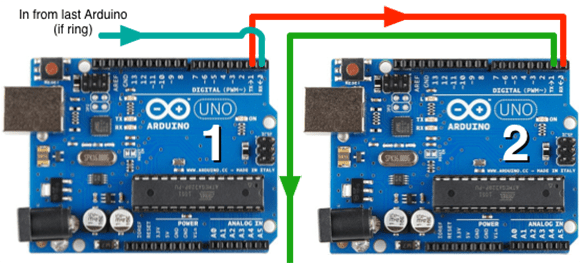
When you don’t want to use I2C or SPI, and MIDI and DMX are old hat, [Scott] comes along and invents a very strange networking protocol that is just daisy chaining a few Arduinos together with serial connections.

Strange as it may seem, this networking protocol actually makes a whole lot of sense. [Scott] is working on an animatronic birdhouse in the vein of Disney’s Imagineers and needed to network a whole bunch of Arduinos without using up precious IO pins.

The networking stack [Scott] came up with capitalizes on the hardware UART in each Arduino by simply daisy-chaining several boards together. By adding an FTDI breakout at the beginning of the chain, [Scott] can control dozens of Arduinos straight from a terminal

[Scott] isn’t using off-the-shelf Arduinos for this project – a few months ago he found 100 Arduino-compatible stepper motor controllers while dumpster diving at his job, giving him more than enough nodes to come up with some pretty crazy networking protocols. It’s a great use of the hardware he has on hand, and a very clever solution to controlling dozens of microcontrollers at once.

Check out [Scott]‘s demo after the break.


Filed under: arduino hacks
Hack a Day 03 Dec 13:00

Naughts and Crosses (Tic Tac Toe)

This challenge is simple. Build a robot that can play naughts and crosses (Tic Tac Toe) against a person. It does not matter how. points are awarded for originality with bonus points if it can win or be drawn every time.

You can use any processor from a picaxe 08M to an IBM BlueGene/Q super computer. You must post video of the robot playing again a human for 3 games in a row.

The due date is 1st of February, 2013.

There will be 3 prizes:

  1. DAGU Spider cotroller
  2. DAGU Micro Magician V2
  3. DAGU Mini Driver

I will judge the contest.

Arduino Blog: "Kickstarter, Trademarks and Lies"... Huh?

A few days ago Massimo Banzi posted on the Arduino Blog, "Kickstarter, Trademarks and Lies."  Banzi's issue is one of trademark, and that Kickstarter offered no way to file a claim or moderate a dispute.  This seems to be a key component of online marketplaces that Kickstarter-- a victim of its own success-- just hasn't gotten to yet.

Kickstarter remained silent, but in addition to the public, smARtDUINO founder Dimitri Albino took the opportunity to chime in in the comments section Banzi noted that this was the first time he had been in any contact with Albino, and the comments continued as Albino defended the project and himself.  But too many people spoke up, defending and attacking both sides, and Albino unfortunately did not stay above the fray.

I saw the Kickstarter weeks ago, and it seemed obvious then that Albino went too far with the title: "smARtDUINO: Open System by former ARDUINO's manufacturer." On top of the heavy coattail-riding, there's too much, "we're better, we know," as if he invented miniaturization and modular connectors.  It's obnoxious.  I hoped there would be some contact from the Arduino team and some editing on Albino's part, but unfortunately Banzi could find no recourse other than posting publicly.

Pixar-style lamp project is a huge animatronics win

Even with the added hardware that lamp still looks relatively normal. But its behavior is more than remarkable. The lamp interacts with people in an incredibly lifelike way. This is of course inspired by the lamp from Pixar’s Luxo Jr. short film. But there’s a little bit of most useless machine added just for fun. If you try to shut it off the lamp shade is used to flip that switch on the base back on.

[Shanshan Zhou], [Adam Ben-Dror], and [Joss Doggett] developed the little robot as a class project at the Victoria University of Wellington. It uses six servo motors driven by an Arduino to give the inanimate object the ability to move as if it’s alive. There is no light in the lamp as the bulb has been replaced by a webcam. The image is monitored using OpenCV to include face tracking as one of the behaviors. All of the animations are procedural, making use of Processing to convey movement instructions to the Arduino board.

Do not miss seeing the video embedded after the break.

[via Gizmodo]


Filed under: robots hacks

BubbleBot

Primary image

What does it do?

Navigates via Ultrasound, annoys the dogs

This is the most complete robot I've ever made.  That's because I intentionally killed it right after I made the video:

I was so sick of this thing that I did what anyone would do: I stuck an X-acto knife in his head.

BubbleBot started life as an RC Car:

Cost to build

$45,00

Embedded video

Finished project

Number

Time to build

Type

URL to more information

Weight

read more

Motor Controller

Aahhmm...Behalf of my Majestic Awesomeness, 

I would like to ask a QUESTIONs that bothers me always when thinking about the Purpose of Motor Controller. 

I was reading about the Lessons in How to Make a Robot in http://www.robotshop.com/gorobotics/articles/how-to-make-a-robot-lesson-1 

then I found out that we need Motor Controller in order to control the Actuators.

Micocontroller and Motor Controller must work together in order to operate a Robot.


read more

Trouble with arduino/processing

I've been trying to teach myself Arduino and Processing, and I've been hitting a few problems. I had a previous post Here, but it was getting a bit crowded with code, so I thought I'd start a new post.

read more

Yellow Jet


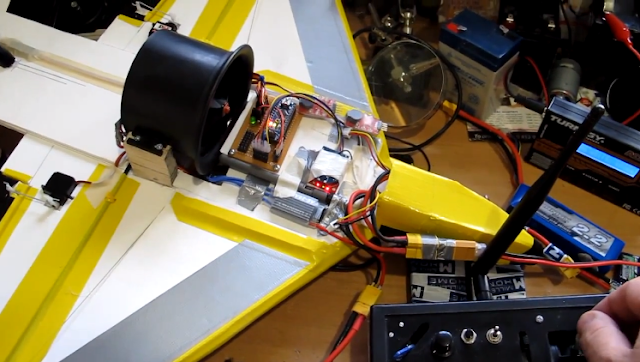
[nickatredbox] has a passion in building planes. Here the details of another work:

Yellow Jet 758 Grams with remaining Coroplast 2 X 7.4 V 1300 mAh batteries Arduino Nano RX Xbee with antenna, servos and misc hardware. Chamfered the top on the leading edges. All control surfaces cut and hinged. ESC mounted

Elevator mechanism for EDF jet carbon rod and ballpoint pen ink reservoir seems quite stiff with low backlash

See the video here http://www.youtube.com/watch?v=_Z9wEU6c1F0&hd=1

This plane flew pretty poorly unfortunately, but the controller worked well the EDF lacked thrust

You can find more on the [website]

Holiday 2012 Gift Guide: Arduino

If you want to buy a present for the person just starting with Arduino, or provide the next exciting project that will bring a smile to any Arduino enthusiast, or even yourself, here is my list of great Arduino gifts.

Read the full article on MAKE