Posts with «arduino» label

Farmbot and why documentation’s vital to open source projects

Farmbot is the first open source cnc farming machine with the aim to create an open and accessible technology aiding everyone to grow food and to grow food for everyone. It runs on open source hardware like Arduino Mega 2560 and  involves a community of contributors on the wiki and forum where you can find documentation, schematics, assembly guides, troubleshooting tips and many more on all currently supported and old FarmBots.

Documentation has been a key element of the project since the beginning and Farmbot founder, Rory Aronson at the 2015 Hackaday SuperConference, gave a talk about why great documentation is the key to building a community of hackers who continue to build upon open source technologies:


Arduino Blog 16 Dec 21:32

Do Not Build This Knife-Wielding Chopping Machine

Simone Giertz designed an incredibly dangerous automatic food-chopping machine using a kitchen knife and servo motors.

Read more on MAKE

The post Do Not Build This Knife-Wielding Chopping Machine appeared first on Make: DIY Projects, How-Tos, Electronics, Crafts and Ideas for Makers.

From Aerospace to Weaving, Houston Mini Maker Faire Is an Inventors’ Paradise

Houston Mini Maker Faire attendees had a chance to create scientific creatures, assemble a clock, take a peek through augmented reality, and much more.

Read more on MAKE

The post From Aerospace to Weaving, Houston Mini Maker Faire Is an Inventors’ Paradise appeared first on Make: DIY Projects, How-Tos, Electronics, Crafts and Ideas for Makers.

You Can Build Arduino multi-device Networks with Temboo

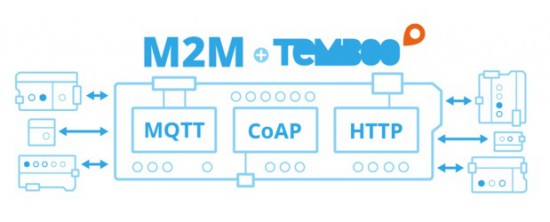
Is there a cool Internet of Things idea that you’ve wanted to try out with your Arduino, but just haven’t had time for?  Building a network that integrates multiple sensors and boards into one cohesive application can be time-consuming and difficult.  To make it a bit easier, Temboo just introduced new Machine-to-Machine programming that lets you connect Arduino and Genuino boards running locally in a multi-device network to the Internet.  Now, you can bring all the power and flexibility of Internet connectivity to Arduino applications without giving up the benefits of using low power, local devices.

Our friends at Temboo now support three M2M communication protocols for Arduino boards: MQTT, CoAP, and HTTP. You can choose which to use based on the needs of your application and, once you’ve made your choice, automatically generate all the code you need to connect your Arduinos to any web service. You can also save the network configurations that you specify, making it easy to add and subtract devices or update their behavior remotely.

With Temboo M2M, you can program flexible distributed device applications in minutes. From monitoring air quality and noise levels in cities to controlling water usage in agricultural settings, networked sensors and devices enable all sorts of powerful IoT applications. You can see it all in action in the video below, which shows how they built an M2M network that monitors and controls different machines working together on a production line.

Arduino Blog 15 Dec 17:02

Ball Balancing Arduino-Style

If you have a good sense of balance, you can ride a unicycle or get on TV doing tricks with ladders. We don’t know if [Hanna Yatco] has a good sense of balance or not, but we do know her Arduino does. Her build uses the ubiquitous HC-SR04 SONAR sensor and a servo.

This is a great use for a servo since a standard servo motor without modifications only moves through part of a circle, and that’s all that’s needed for this project. A PID algorithm measures the distance to the ball and raises or lowers a beam to try to get the ball to the center.

Servos like this usually operate in radio control vehicles and they are very easy to drive. A pot coupled to the shaft generates a pulse that the servo internally compares to a pulse from the microcontroller. If the pulse is wider than the reference pulse, the motor drives in one direction. If the pulse is narrower than the reference, the motor operates in the other direction. Just how much it drives depends on how much difference there is between the two pulses. When the pulses match, the servo motor stops moving. This pulse arrangement is very simple to drive from a logic output on an Arduino or other microcontrollers.

The build details are a bit sparse, but you can see in the video the general layout, and she links to a similar project that inspired this one if you are looking for more details.

You can do the same trick in two dimensions if you prefer. Or perhaps you’d like to try using a time of flight sensor, instead.


Filed under: Arduino Hacks
Hack a Day 15 Dec 00:00

Enter the World’s Largest Arduino Maker Challenge

Massimo Banzi, CEO of Arduino.cc created a video to to invite you to the World’s Largest Arduino Maker Challenge in collaboration with  Microsoft and Hackster.io. Participate with your IoT idea and take the chance to win twice! We are giving away 1000 new Arduino MKR1000 (US only) and Genuino MKR1000 (Outside US) boards , for the first time ever, and other amazing prizes like Maker Faire trips, Adafruit gift certificates and a video production about you and your work.

Watch the video and register as a participant!

Arduino Blog 14 Dec 14:57
arduino  featured  genuino  iot  mkr1000  

Encryption for Arduino with Spritz

Hackaday.io user [Abderraouf] has written an implementation of the new(ish) Spritz cipher and hash for Arduino. While we’re not big enough crypto-nerds to assess the security of the code, it looks like it’s going to be pretty handy.

Spritz itself is a neat cipher. Instead of taking in fixed blocks of data and operating on them, it allows you to process it in (almost) whatever chunks it comes in naturally, and then extract out the encrypted results piecewise. It works both as a two-way cipher and as a one-way hash function. It looks like Spritz is a one-stop-shop for all of your encryption needs, and now you can run it on your Arduino.

In case you are afraid of new implementations of new ciphers (and you should be), Spritz’s pedigree should help to put you at ease: it was developed by [Ron Rivest] to be a successor to his RC4 algorithm, and it incorporates a lot of the lessons learned about that algorithm over the past. This doesn’t exclude subtle flaws in the implementation of the library (no offence, [Abderraouf]!) or your work downstream, but at least the underlying algorithm seems to be the real deal.

[Abderraouf] links it in his writeup, but just for completeness, here’s the Spritz paper (PDF). What crypto libraries do you currently use for Arduino or microcontroller projects? We’ve been fans of XXTEA for ages, but more because it’s simple and small than because it’s secure. Spritz may be simple enough to implement easily, and still more secure. Sweet.


Filed under: Arduino Hacks, security hacks

DIY Minion robot made with scrap and Arduino

Primary image

What does it do?

Runs around avoiding obstacles... and falling sometimes :)

     Hello!

     I guess you guys already know that I have a little baby. Even though he's small, he's already very watchful seeing the robots running around the house (we had much fun together with the mBot and his lights). So I made this buddy thinking it would be fun for him as well.

     Currently I have not worked much with scraps, but I have a lot of them at my lab.

Cost to build

Embedded video

Finished project

Complete

Number

Time to build

Type

URL to more information

Weight

read more

Let's Make Robots 11 Dec 16:45
arduino  diy  minion  

Making a Vintage Star Wars AT-AT toy walk with an Arduino

Dave Stein is a software engineer during the day and a tinkerer on Arduino projects in his free time after work. He submitted on the blog his first Arduino project with the goal of powering his old AT-AT Walker toy (mid 1980s) with Arduino Uno and make it walk and perform some of the functions we see in the Star Wars movies.

AT-AT (All Terrain Armored Transport) are four-legged combat walkers 22.5mt (73.8ft) tall of the Galactic Empire, one of its most famous military symbols introduced  in “Star Wars V: The Empire strikes back”, and we may see them again in the next weeks on “Star Wars: The Force Awakens” the upcoming episode of the saga opening December 18th.

The AT-AT walker toy updated by Dave is controlled by a wired Xbox 360 controller that interfaces with a computer and transports a signal to the Arduino Uno for walker movement:

The left and right triggers move the walker forward and backward while the right stick moves the head horizontally. If you have ever played with this toy you may remember it was clumsy and difficult to move. In my project I wanted to learn about and conquer the difficulties of quadrupedal movement. The realization process for my project involved a massive amount of trial and error, research, and failures. I have to say that I failed many more times than I succeeded with configuring the servos with the Arduino. I went down many long roads to learn about prototyping with the breadboard, soldering, and redesigns of the final product. The most difficult part of the project aside from adjusting the gait of the walker for balance and movement was providing enough power to the servos without frying the microcontroller or any of the components. I was finally able to overcome these difficulties by implementing the Adafruit servo shield.

Check AtAt Project website for all info, parts list and upcoming tutorial!

Robot Listens to Commands–Literally

Where you might see a can, [Adam Kumpf] sees a robot. [Adam’s] robot (named [Canny]) doesn’t move around, but it does have expressive eyebrows, multicolored eyes, and a speaker for a mouth. What makes it interesting, though, is the fact that it receives audio commands via the headphones it wears. You can see [Canny] in action in the video below.

The headphones couple audio tones to [Canny’s] microphone using AFSK (audio frequency shift keying). [Canny] uses an opamp to bring the microphone level up and then uses a 567 PLL IC to decode the audio tones. [Adam] selected two clever frequencies for the mark and space (12345 Hz and 9876 Hz). In addition to being numerically entertaining, the frequencies are far enough apart to be easy to detect, pass through the headphones with no problem, and are not harmonically related.

The 567 IC detects only one of the tones. Ignoring one tone is not always great for noise rejection, but for this use should be more than adequate and cuts the parts count down. To avoid false commands, the data contains markers, lengths, and checksums. The 567 feeds the Arduino, which handles all the robot control.

How do you create the sounds that go to the headphones? You use a Web page. Of course, you could generate the low baud rate tones in other ways, too. AFSK modems are common in Ham radio circles, and there are certainly plenty of modem designs. Then again, there is something pleasing about the simplicity of this circuit. The appeal of [Canny] doesn’t hurt any, either.


Filed under: Arduino Hacks, robots hacks
Hack a Day 10 Dec 09:01