Activision wants Blizzard employees to return to the office in July

Amid ongoing unionization efforts at the company, Activision will soon require Blizzard employees to spend the majority of their week working out of the company’s offices. An Activision spokesperson told Engadget employees with the company’s publishing unit will be required to work from the office at least three days per week starting April 10th. On July 10th, the same policy goes into effect for Blizzard Entertainment employees. Staff at Activision’s King mobile division have been working a full five days out of the office since last July.

“Activision Blizzard has been returning teams to the office over the past year, and on February 13th, we updated our future-of-work plan,” the spokesperson said. “In close partnership with each leadership team, we customize a plan based on what’s best for our business and our teams. We look forward to the increased real-time, in-person collaboration and opportunities this change will foster.”

Today, Activision and Blizzard announced a return to office plan to employees. It begins April/June, depending on the studio. The company WILL see a large Reduction In Force if this occurs. In this thread, I'm going to explain why this is a terrible idea. 1/14

— Non Biners, Drive Ins, and Dives💙 (@LeastMyHairIsOk) February 14, 2023

Information on the company’s return-to-office plan was first shared earlier this week by @LeastMyHairIsOk, a Twitter user who says they work at Blizzard’s customer support department (via Game Developer). In a Twitter thread, they said the “majority” of Activision Blizzard employees “have no interest” in returning to the office. The worker went on to predict Activision will see a workforce drain if it moves forward with the plan. On top of ongoing worries about COVID-19, @LeastMyHairIsOk alleges the company has failed to address employee concerns about the cost of living in many of the cities where Activision has offices and studios. Specifically, they claim leadership has repeatedly denied requests from “lower earning departments” to include yearly cost-of-living adjustments as part of salary negotiations. “Our most recent meetings from last month suggest that there are no plans for this to change this year,” they added.

Activision Blizzard did not immediately respond to Engadget’s questions about its salary policies.

Details on Activision’s return to office plan come amid allegations of union-busting. In January, the Communication Workers of America (CWA) withdrew a petition for a union election at Proletariat, a Blizzard support studio that’s currently working on World of Warcraft: Dragonflight. A CWA spokesperson accused studio head Seth Sivak of holding captive audience meetings that allegedly "demoralized and disempowered" pro-union workers enough that they felt the vote wouldn’t be fair.

Verizon expands its 2Gbps Fios to New York’s five boroughs

Verizon says its Fios 2 Gig plan, its fastest broadband service, is now available across New York City’s five boroughs. However, your mileage may vary since the company hasn’t clarified what portion of the areas are covered. A year ago, it began rolling out the service in “select areas” of NYC.

The Fios 2 Gig plan is part of Verizon’s fiber-optic network, which can be faster and more reliable than cable internet. The plan technically starts at $95 per month, but depending on your setup, your monthly fee could be as high as $120. That’s because the lower price is only available for existing Verizon Wireless customers on specific plans (5G Do More, 5G Play More, 5G Get More or One Unlimited for iPhone plans) who sign up for autopay. (Skipping autopay will add another $10 to your bill.) There’s also a $99 setup fee.

In addition, the company says the advertised pricing is only valid through April 12. However, it does promise a four-year price guarantee if you’re a new customer who hasn’t subscribed to Verizon Home Internet in the last 180 days.

The service’s wired download and upload speeds are symmetrical, and Verizon says you can typically expect between 1.5Gbps and 2.3Gbps for a wired connection. (As always, wireless streaming will be lower.) In addition, the Fios 2 Gig plan includes a router rental with up to three WiFi extenders, although you’ll have to request those — and self-setup customers only get up to two extenders. However, the company will let you rent or purchase additional ones.

In short, there is fine print aplenty, so read carefully before signing up.

'Horizon Forbidden West' is coming to PS Plus Extra and Premium on February 21st

Sony has revealed the games it's bringing to the PlayStation Plus Extra and Premium tiers this month and the latest slate of additions is a doozy. The obvious headliner is Horizon Forbidden West, one of the few major first-party PS5 games to date. The terrific sequel to Horizon Zero Dawn debuted a year ago and it was one of the top 10 best-selling games of 2022 in the US, according to NPD data (not accounting for digital sales on Switch and Xbox). Both the PS4 and PS5 versions will be available for subscribers to snag.

It's a pretty long game — the main story alone clocks in at around 28 hours. Still, PS Plus Extra and Premium members will have plenty of time to play through Aloy's latest big adventure before the PS5-only Burning Shores expansion arrives on April 19th.

PlayStation Plus Game Catalog lineup for February includes:

➕ Horizon Forbidden West
➕ The Quarry
➕ Resident Evil 7 biohazard
➕ Borderlands 3

…and many more. The full lineup: https://t.co/rvTAW8mlANpic.twitter.com/NFdvowiHe1

— PlayStation (@PlayStation) February 15, 2023

The rest of the February lineup is nothing to sniff at either. You'll soon be able to check out PS4 and PS5 versions of The Quarry, Outriders, Bandai Namco's action RPG Scarlet Nexus, The Forgotten City and Borderlands 3 at no extra cost if you have an Extra or Premium subscription. The PS4 versions of Resident Evil 7: Biohazard, Tekken 7, Ace Combat 7: Skies Unknown, Earth Defense Force 5, Oninaki, Lost Sphear and I am Setsuna will be available as well.

That's not all as Premium subscribers will gain access to PlayStation 1 titles The Legend of Dragoon, Wild Arms 2 and Harvest Moon: Back to Nature with extra features such as up-rendering, rewind, quick save, and custom video filters. The PS4 remake of Destroy All Humans! is on the way to that tier too. All of these games will be available to claim starting on February 21st.

Meanwhile, those on the PS Plus Essential tier can also add a solid batch of games to their library this month. OlliOlli World, Mafia: Definitive Edition, Evil Dead: The Game and Destiny 2: Beyond Light are available to claim until March 6th. On the downside, Sony will ditch the PS Plus Collection, which grants members who have a PS5 access to a whole bunch of PS4 games, on May 9th. Be sure to add those titles to your library before then.

Every actor on our ruined planet will star in Apple TV+'s 'Extrapolations'

Extrapolations, a drama series focusing on the near-future impacts of climate change, is coming to Apple TV+ next month. The streaming service has released the first trailer, which shows off a cast stuffed full of big names. Among the stars featured in the show are Meryl Streep, Sienna Miller, Kit Harington, Daveed Diggs, Edward Norton, Yara Shahidi, Matthew Rhys, Gemma Chan, David Schwimmer, Keri Russell, Marion Cotillard, Forest Whitaker, Tobey Maguire and Murray Bartlett (who was most recently seen in The Last of Us).

The eight-episode series showcases "interwoven stories about love, work, faith and family," Apple says. Extrapolations depicts how people from around the planet are adapting (or perhaps not) to the effects of climate change. It covers a several-decade span in the middle of the 21st century, by which time humans have landed on Mars.

Given the cast and the visual effects-packed trailer, it's clear Apple has spared little expense on this series. The clip shows a future version of Manhattan protected by sea walls and hints at technology that might allow humans to "thrive" in a world further wracked by climate change.

Contagion writer and An Inconvenient Truth producer Scott Z. Burns created the show. The first three episodes of Extrapolations will premiere on Apple TV+ on March 17th, with the remaining five arriving on a weekly basis.

Qualcomm's new phone modem may help overcome 5G's flaws

It's safe to say 5G hasn't lived up to the hype — while it's much easier to find than it once was, the sometimes lackluster performance and reliability won't have you scrambling to upgrade from LTE. Qualcomm may be nudging the technology forward, at least. The company has introduced the Snapdragon X75, billed as the first phone modem ready for 5G Advanced. The new cellular standard promises much-improved throughput, coverage, reliability and traffic juggling. You may see meaningful speed boosts, fewer dropoffs and better performance on busy networks.

Whether or not you need 5G Advanced, the Snapdragon X75 offers some improvements versus earlier chips. Qualcomm claims longer battery life and more consistent performance in tricky locations like elevators and subway trains. The modem can handle 5G/4G dual data on two SIM cards at once. There are also boosts to uploads, including support for Snapdragon Satellite.

Qualcomm is already offering samples of Snapdragon X75 chips to manufacturers, although the first products using the modem aren't expected to arrive until the second half of the year. It's likely to become ubiquitous when it does arrive, though. The company's modems are the de facto choice for Snapdragon-powered Android phones, and are (currently) used in iPhones.

The larger question may be when you'll see the benefits. The 5G Advanced standard isn't due to release until 2024, and it may be a while after that before your carrier adopts the technology. Still, the Snapdragon X75 lays the groundwork for adoption. You might already have an Advanced-compatible phone by the time you can take advantage of the service.

How To Build Jenny’s Budget Mixing Desk

Jenny did an Ask Hackaday article earlier this month, all about the quest for a cheap computer-based audio mixer. The first attempt didn’t go so well, with a problem that many of us are familiar with: Linux applications really doesn’t like using multiple audio devices at the same time. Jenny ran into this issue, and didn’t come across a way to merge the soundcards in a single application.

I’ve fought this problem for a while, probably 10 years now. My first collision with this was an attempt to record a piano with three mics, using a couple different USB pre-amps. And of course, just like Jenny, I was quickly frustrated by the problem that my recording software would only see one interface at a time. The easy solution is to buy an interface with more channels. The Tascam US-4x4HR is a great four channel input/output audio interface, and the Behringer U-PHORIA line goes all the way up to eight mic pre-amps, expandable to 16 with a second DAC that can send audio over ADAT. But those are semi-pro interfaces, with price tags to match.

But what about Jenny’s idea, of cobbling multiple super cheap interfaces together? Well yes, that’s possible too. I’ll show you how, but first, let’s talk about how we’re going to control this software mixer monster. Yes, you can just use a mouse or keyboard, but the challenge was to build a mixing desk, and to me, that means physical faders and mute buttons. Now, there are pre-built solutions, with the Behringer X-touch being a popular solution. But again, we’re way above the price-point Jenny set for this problem. So, let’s do what we do best here at Hackaday, and build our own.

The Physical Goods

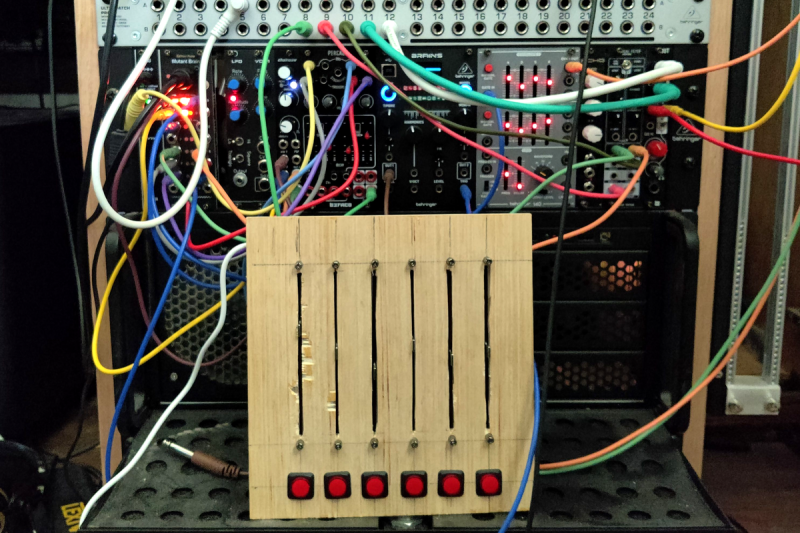
What we need is a microcontroller that has native USB client support, multiple digital I/O pins, and some analog inputs. I went with the Arduino MKRZero for the small size, decent price, and the fact that it’s actually in stock at Mouser. The other items we’ll need are some faders and buttons. I went for the full-sized 100 mm faders, and some LED toggle buttons made by Adafruit. The incidentals, like wire and resistors, was sourced from the local parts bin in the corner.

My first thought was to design and 3D print the panel, but after doing the layout on a scrap piece of plywood, the resulting size proved a bit too large for my printer. So we’re going retro, and making a “wood-grain” mixing desk. This would be a great project for a CNC router, but as I’m not part of that particular cool club yet, it was a drill press, table saw, and oscillating tool to the rescue. The results aren’t quite as pretty as I wanted, but maybe we’ll get a Mark II of this project one day.
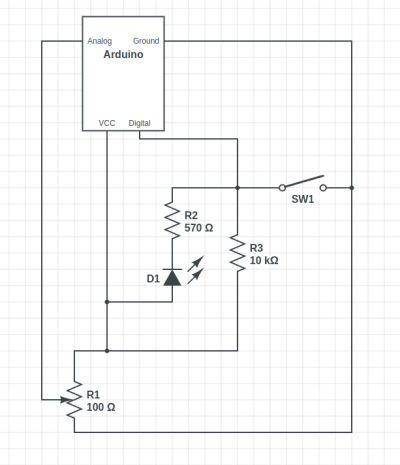
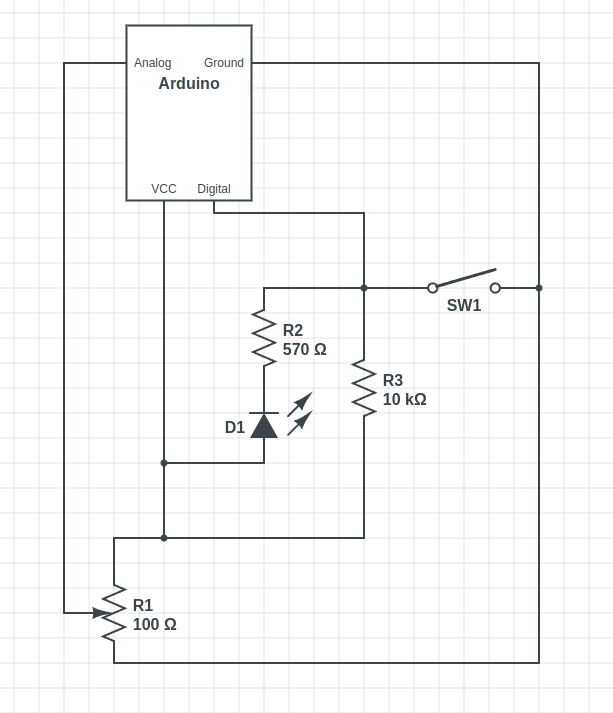
The wiring is relatively straightforward, with a current limiting resistor to protect the LEDs inside the buttons, and a pullup resistor to prevent the digital pin from floating when the button isn’t pushed. Now, that pullup might not be necessary, as I later learned that the Arduino has built-in pullup on its digital pins. And also of note, a 10 Ω resistor is *not* a good choice for a pullup. As Al eloquently put it, that’s a “pull way up resistor”. 10 kΩ is the better choice.

And to finish the build, we’ll need a sketch to run on the Arduino. Thankfully, there’s already a great library for exactly what we want to do: Control Surface. There’s a bunch of ways to set this up, but my sketch is pretty trivial:

#include <Control_Surface.h>
USBMIDI_Interface midi;

CCButtonLatching button1 {11, {MIDI_CC::General_Purpose_Controller_1, CHANNEL_1}, };
CCButtonLatching button2 {10, {MIDI_CC::General_Purpose_Controller_2, CHANNEL_1}, };
CCButtonLatching button3 {9, {MIDI_CC::General_Purpose_Controller_3, CHANNEL_1}, };
CCButtonLatching button4 {8, {MIDI_CC::General_Purpose_Controller_4, CHANNEL_1}, };
CCButtonLatching button5 {7, {MIDI_CC::General_Purpose_Controller_5, CHANNEL_1}, };
CCButtonLatching button6 {6, {MIDI_CC::General_Purpose_Controller_6, CHANNEL_1}, };
  
CCPotentiometer volumePotentiometers[] {
  {A0, {MIDI_CC::Sound_Controller_1, CHANNEL_1} },
  {A1, {MIDI_CC::Sound_Controller_2, CHANNEL_1} },
  {A2, {MIDI_CC::Sound_Controller_3, CHANNEL_1} },
  {A3, {MIDI_CC::Sound_Controller_4, CHANNEL_1} },
  {A4, {MIDI_CC::Sound_Controller_5, CHANNEL_1} },
  {A5, {MIDI_CC::Sound_Controller_6, CHANNEL_1} },
};
void setup() {
    Control_Surface.begin();
}
void loop() {
    Control_Surface.loop();
}

Pipewire to the Rescue

And now on to the meat and potatoes of this project. How do we convince an application to see inputs from multiple devices, and actually do some mixing? The problem here is de-sync. Each device runs on a different clock source, and so the bitstream from each may wander and go out of sync. That’s a serious enough problem that older sound solutions didn’t implement much in the way of card combining. Not long ago, the process of resampling those audio streams to get them to properly sync would have been a very CPU intensive procedure. But these days we all have multi-core behemoths, practical super-computers compared to 20 years ago.

So when Wim Taymans wrote Pipewire, he took a different approach. We have enough cycles to resample, so Pipewire will transparently do so when needed. Pipewire sees all your audio interfaces at once, and implements both the Jack and Pulseaudio APIs. Different distros handle this a bit differently, but generally you need the Pipewire packages, as well as the pipewire-jack and pipewire-pulseaudio packages to get that working.

And here’s the secret: The Jack routing tools work with Pipewire. The big three options are qjackctl, carla, and qpwgraph, though note that qpwgraph is actually Pipewire native. So even if an application can only select a single device at a time, if that app uses the Jack, Pulseaudio, or Pipewire API, you can use one of those routing control programs to arbitrary connect inputs and outputs.
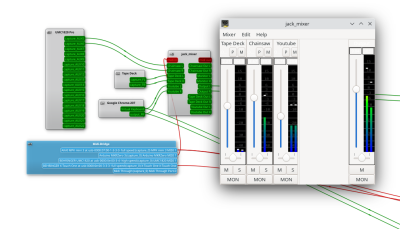
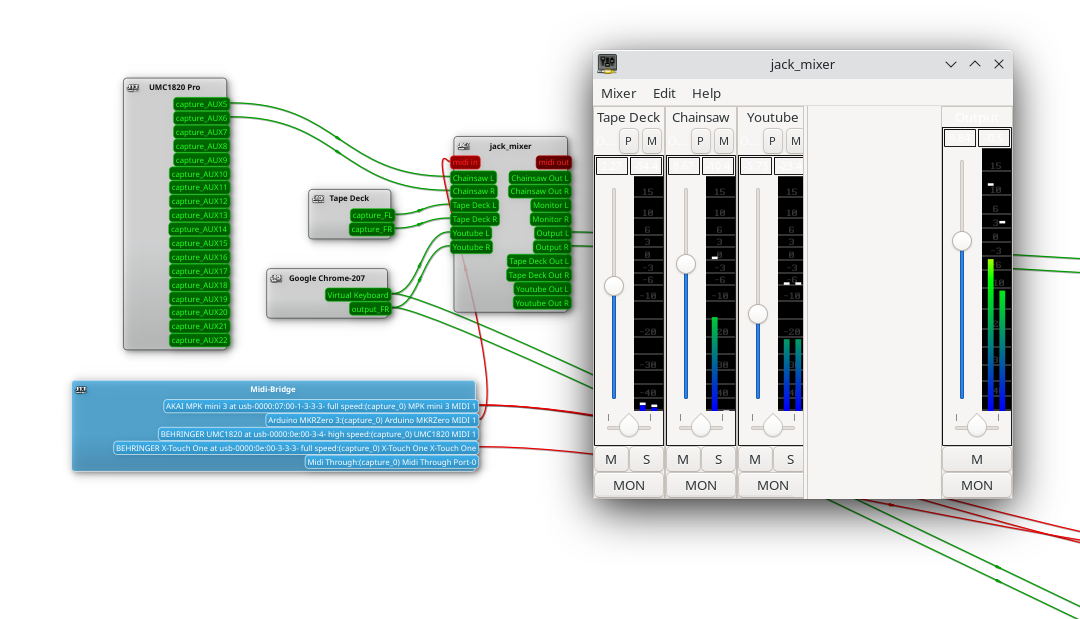
So let’s start with the simplest solution: jack_mixer. Launch the application, and then using your preferred routing controllers, take the MIDI output from our Arduino control surface, and connect it into jack_mixer‘s MIDI input. In jack_mixer, add a new input channel, and give it an appropriate name. Let’s call it “tape deck”, since I have a USB tape deck I’m testing this with. Now the controller magic kicks in: hit the “learn” button for the volume control, and wiggle the first fader on that controller. Then follow with the mute button, and save the new channel. We’ll want to add an output channel, too. Feel free to assign one of your faders to this one, too.

And finally, back to the routing program, and connect your tape deck’s output to jack_mixer input, and route jack_mixer‘s output to your speakers. Play a tape, and enjoy the full control you have over volume and muting! Want to add a Youtube video to the mix? Start the video playing, and just use the routing controller to disconnect it from your speakers, and feed it into a second channel on jack_mixer. Repeat with each of those five cheap and nasty sound cards. Profit!

You Want More?

There’s one more application to mention here. Instead of using jack_mixer, we can use Ardour to do the heavy lifting. To set it up this way, there are two primary Ardour settings, found under preferences: Under the monitoring tab make sure “Record monitoring handled by” is set to Ardour, and the “auto Input does talkback” option is checked. Then add your tracks, set the track input to the appropriate input hardware, and the track output to the master bus. Make sure the master bus is routed to where you want it, and you should be able to live mix with Ardour, too.

This gives you all sorts of goodies to play with, in the form of plugins. Want a compressor or EQ on a sound source? No problem. Want to autotune a source? X42 has a plugin that does that. And of course, Ardour brings recording, looping, and all sorts of other options to the party.

Ardour supports our custom mixing interface, too. Also under preferences, look for the Control Surfaces tab, and make sure General MIDI is checked. Then highlight that and click the “Show Protocol Settings” button. Incoming MIDI should be set to our Arduino device. You can then use the Ctrl + Middle Click shortcut on the channel faders and mute buttons, to put them in learn mode. Wiggle a control to assign it to that task. Or alternatively you can add a .map file to Ardour’s midi_maps directory. Mine looks like this:

 
  <?xml version="1.0" encoding="UTF-8"?>
<ArdourMIDIBindings version="1.1.0" name="Arduino Mapping">
  <Binding channel="1" ctl="16" uri="/route/mute B1"/>
  <Binding channel="1" ctl="70" uri="/route/gain B1"/>
  <Binding channel="1" ctl="17" uri="/route/mute B2"/>
  <Binding channel="1" ctl="71" uri="/route/gain B2"/>
  <Binding channel="1" ctl="18" uri="/route/mute B3"/>
  <Binding channel="1" ctl="72" uri="/route/gain B3"/>
  <Binding channel="1" ctl="19" uri="/route/mute B4"/>
  <Binding channel="1" ctl="73" uri="/route/gain B4"/>
  <Binding channel="1" ctl="80" uri="/route/mute B5"/>
  <Binding channel="1" ctl="74" uri="/route/gain B5"/>
  <Binding channel="1" ctl="81" uri="/route/mute B6"/>
  <Binding channel="1" ctl="75" uri="/route/gain B6"/>
</ArdourMIDIBindings>

The Caveats

Now before you get too excited, and go sink a bunch of money and/or time into a Linux audio setup, there are some things you should know. First is latency. It’s really challenging to get a Pipewire system set up to achieve really low latency, particularly when you’re using USB-based hardware. It’s possible, and work is ongoing on the topic. But so far the best I’ve managed to run stable is a 22 millisecond round-trip measurement — and that took a lot of fiddling with the Pipewire config files to avoid garbled audio. That’s just about usable for self monitoring and live music, and for playing anything pre-recorded, that’s perfectly fine.

The second thing to know is that this was awesome. It’s a bit concerning how much fun it is to combine some decent audio hardware with the amazing free tools that are available. Want to auto-tune your voice for your next Zoom meeting? Easy. Build a tiny MIDI keyboard into your desk? Just a microcontroller and some soldering away. The sky’s the limit. And the future is bright, too. Tools like Pipewire and Ardour are under very active development, and the realtime kernel patches are just about to make it over the finish line. Go nuts, create cool stuff, and then be sure to tell us about it!

Oppo Find N2 Flip hands-on: Fixing the foldable's shortcomings

Samsung, in a few short years, became the foldable phone company. For now. Rivals have either been unable to launch their own smartphone origami projects or simply failed to match against the Z Fold (the horizontal folding one) or the Z Flip (vertical folding ‘flip-phone’.)

Oppo has been taking notes, however. It revealed last year that its second generation of foldable phones would compete with the same form factors as Samsung. Now, while the west won’t be getting the bigger Find N2 Fold, in the UK and Europe, we will get the Oppo Find N2 Flip. I prefer the flip-phone iteration of foldables, so I’m glad this is the one heading out of China.

In many ways, the Find N2 Flip attempts to address some of the shortcomings of existing foldables. (And I’ll say it now: I loved the Galaxy Z Flip 4), but there’s always room for improvement. Oppo’s focus appears to be the external display, which at 3.26 inches, is currently the largest cover screen on a flip smartphone. While this more accurately replicates the orientation of a smartphone screen, don’t expect icons or an Android-style interface like the one found on Samsung's Galaxy Z fold.

Mat Smith/Engadget

You will get a more functional area for previewing shots with the primary cameras, however. The 17:9 ratio makes more sense for framing your photos than on the Galaxy Z Flip, with its horizontal screen. You might think that Samsung’s implementation is better for notifications, but with a bigger outright screen, the Find N2 Flip can display up to six lines of text in your alerts – plenty for text messages and even email previews. There’s more space to peruse notifications, calendar entries and more, too – it can be a finickity task on the Z Flip 4. Oppo offers a handful of pre-programmed replies too, so you can subtly (or lazily) send a response without even opening the Find N2 Flip.

You can quick-launch the camera by double-pressing the volume down button – you just need to make sure the phone is in standby, otherwise, it will just lower the volume. The cover screen also features a cute animated animal mascot – you can pick between a dog, cat, an unidentifiable bird, hamster or rabbit – and they’ll come alive when you activate the front display. It's a cute addition — it'd be nice if there was some Tamagotchi-style features, though, perhaps tagged to your step-count or even the device's battery life. 

One of the quirks of a flip smartphone is the fact that the primary cameras are also your selfie cameras. Like the bigger, China-only, Find N2 Fold, the array on the Flip consists of a 50-megapixel f/1.8 main camera, with an 8-megapixel f/2.2 ultra-wide camera. That’s a higher-res main sensor compared to the Z Flip 4. However, while testing it out for the week, the most noticeable difference has been a 2X zoom toggle, which is admittedly a digital crop – but still, it's a benefit of having such a high-megapixel sensor to begin with.

Another benefit of the more expansive front screen is that you can turn on the preview mode even while someone is taking photos for you, making it easier to ensure that a stranger has managed to fit everyone into your group pic – or ensure they aren’t capturing video instead of a still image. (That has happened to me.) Oppo’s Hasselblad partnership informs its color calibration choices on the cameras again. If you like peppy color filters (I do), you’ll get a handful of these straight from the camera app.

Unfolded, there’s also a 32-megapixel f/2.4 front-facing camera if you’re feeling a little old-fashioned. Like Samsung’s foldables, some apps will adjust to fit if you position the phone with the screen raised at an angle. These include the camera app as well as video call apps and YouTube. The hinge itself isn’t quite as stiff as the Z Flip, so it’s more liable to collapse to flat, but once you figure out the right angle, you’ll be fine. Oppo says the hinge’s range of motion is between 45 and 110 degrees.

The company is also proud of its subtler crease, and that’s down to a more refined hinge. It claims that its second-generation flip phone has a crease that’s 63 percent less visible – which is… specific. It’s easy to scoff because, well, it’s still there, but it’s definitely smoother compared to the flip phones that came before it. Oppo’s new Flexion hinge is also smaller, and its waterdrop design leaves less space between the sides when it’s closed. This is especially notable compared to the Z Flip 4.

Mat Smith/Engadget

Another area where Oppo has made a wise upgrade is when it comes to battery capacity. The Find N2 Flip has a 4,300mAh cell – the biggest we’ve seen so far in this form factor, and closer to the Z Fold 4 than the Z Flip 4 – along with 44W fast charging support. That’s decent, again, for this form factor, but Oppo’s sibling/cousin/frenemy, OnePlus, is already showing off more typical smartphones with support for 100W. Still, it should fully charge in less than an hour, the company claims. (I'll be updating this story after further battery testing). However, just like OnePlus’ latest phone, there’s no wireless charging.

The device will launch in Astral Black and Moonlit Purple and in the UK, it will be priced at £895 (roughly $1,083), which would put it around the same price as the Galaxy Z Flip 4. For now, there are no plans to bring either Find N2 devices to the US.

Traeger's redesigned Ironwood grills pack touchscreen controls and more efficiency

When Traeger overhauled its Timberline pellet grills last year, the company undertook a complete redesign of its flagship model. It introduced a truckload of new features that made cooking on and cleaning the grills much easier. Today, Traeger revealed a retooled version of its Ironwood series, the WiFi-connected pellet grills that sit in the company's midrange. While it did bring a lot of the upgrades from the new Timberline to these more affordable options, there are still premium tools reserved for the more expensive model. 

First, the Ironwood is now equipped with a touchscreen controller like the Timberline. This display puts critical information in an easier to read format on the grill. Of course, the company's WiFire tech is onboard as well, allowing you to control and monitor the Ironwood from anywhere via the Traeger app. This includes adjusting grill temperature, monitoring food temperature, setting alerts/timers and watching pellet supply levels (there's a dedicated pellet sensor). You can also control Ironwood and other Traeger grills with Alexa or Google Assistant if you'd rather go the hands-free route. The app is a wealth of culinary knowledge with over 1,600 recipes and cooking guidance from the company's pros. Like previous Traeger pellet grills, the new Ironwood is capable of everything from low-and-slow smoking to high-heat searing, including baking, roasting, braising and grilling. 

Inside, Traeger has taken steps to make the new Ironwood more efficient. The company says its Smart Combustion tech "maintains incredibly precise temperatures" while an EvenFlow heat shield evenly distributes heat over the entire cooking area. There's also an insulated double wall construction to help prevent unwanted fluctuations in temps. The combination of Traeger's existing Super Smoke mode and its Downdraft exhaust system keep wood smoke circulating around the cooking chamber. Plus, the company says its FreeFlow firepot now assists with that task of keeping smoke moving during a cook. 

On the bottom, the so-called EZ-Clean grease and ash keg that debuted on the Timberline is here as well, sending both liquid run-off and pellet debris to one place for easy removal and cleaning. Like the Timberline, the pellet hopper is cleaned out from the front on the new Ironwood, making it much easier to swap out pellets between cooks when you need to switch to a different variety. 

You'll notice the most difference between the Ironwood and Timberline on the outside. Not only do the grill lids have a different look, but the Ironwood keeps the four-leg base Traeger grills traditionally have. The new Timberline sits on more of a cart, with an enclosed cabinet, casters and small exterior shelves. What's more, the Timberline has an induction burner on the left side where that area on the Ironwood is just a shelf. The Ironwood does offer Traeger's ModiFire system of accessories though, thanks to a "Pop-And-Lock (PAL)" rail that allows you to snap on an assortment of shelves, storage bins, tool hooks and more — and it allows you to position those items exactly where you need them. The Ironwood only comes with two wired food probes where the Timberline ships with a set of Meater wireless probes. However, you can purchase them separately as the Ironwood does support them. A two-pack costs $230.

The Ironwood and Ironwood XL are available now from Traeger and other retailers in the US and Canada for $1,799 and $1,999 respectively (616 square inches of cooking space vs. 924). While you'll have to sacrifice some features, that's much less than the Timberline which clocks in at $3,499 and $3,799. 

‘The Mageseeker’ is a League of Legends RPG from the studio behind ‘Moonlighter’

2023 will be another big year for fans of Riot Games and League of Legends. This morning, the studio announced it will release not one but three games from its Riot Forge publishing label before 2024. The slate opens with The Mageseeker: A League of Legends Story, a new action RPG from Digital Sun Games, the studio behind 2018’s Moonlighter. TheMageseeker casts you as Sylas, everyone’s favorite rogue Damacian mage, as he attempts to lead a revolution against the kingdom that imprisoned him. Riot is billing the game as a “2D hi-bit” title, meaning it features a pixel art style that takes advantage of modern rendering techniques. Judging from the trailer Riot shared, TheMageseeker looks like it draws inspiration from games like Hyper Light Drifter and Titan Souls. It will arrive this spring on PC and consoles.

Sometime this summer, Riot will then release Convergence: A League of Legends Story. Double Stallion, a Montreal-based studio that’s best known for its work on Speed Brawl, has been working on the game since at least 2019. It stars Ekko, one of the League champions who makes an appearance in Netflix’s Arcane animated series, in a 2D action platformer. This being a game about Ekko, expect to use time manipulation to solve some of the challenges and puzzles Convergence throws at you.

Lastly, there’s Song of Nunu: A League of Legends Story. This spinoff comes courtesy of Rime creator Tequila Works and will arrive sometime in the fall. Of the three games that Riot shared release dates for today, Song of Nunu is probably the one I’m most excited to play since Nunu and Willump are such a loveable pair and Tequila Works has a consistent track record. Both Convergence and Song of Nunu will be available to play on PlayStation 4, PS5, Xbox One, Xbox Series X/S and PC via Steam, GOG and the Epic Games Store when they arrive later this year.

Apple's MLS Season Pass will stream games in 1080p

Apple already announced a lot of the details on its MLS Season Pass, the company's biggest entry into live sports streaming yet. However, the company and the league still had a few details they hadn't yet revealed. As the start of the new season draws closer, the two collaborators announced more info today, including streaming and audio quality in addition to scheduling, the number of games and studio show formats

In what will be a disappointment for some, Apple will stream every game in 1080p. That's the same quality the company offered for its weekly Major League Baseball games last year. However, it's an improvement for MLS as every game wasn't available in 1080p previously. The plan is to have more cameras on the field at each match, so despite a lack of 4K, the comprehensive nature of the visuals should be better than what fans are used to seeing. All MLS regular season and Leagues Cup matches will also be streamed with Dolby 5.1 audio as well as alternate broadcast options like local radio. 

One key thing that will be a welcome change for MLS fans is that the league has standardized game start times and scheduling. With a few exceptions, games will be on Saturday or Wednesday nights and they'll start at 7:30PM local time. There are some Sunday matches scheduled and a few afternoon games, but since MLS is dealing primarily with one broadcaster now, it had the ability to make things a lot easier to follow. Fans can expect at least 13 matches every Saturday or Wednesday night and they'll start at one of four times: 7:30PM Eastern, Central, Mountain or Pacific.

Billy Steele/Engadget

This schedule change also makes it easier to plan studio programming. Apple and MLS will offer three options: a preview show (MLS Countdown), a post-game show (MLS Wrap-up) and continuous "whiparound" coverage for the entire five hours games take place (MLS 360). A typical Saturday will begin with MLS Countdown 30 minutes prior to the east coast games kicking off. There will also be 15-minute installments of Countdown before the Central, Mountain and Pacific time zone matches begin. During the entire night, MLS 360 will offer coverage of key moments (goals) as they happen with live look-ins of in-progress matches with studio commentary. Finally, Wrap-up will air when all the games have concluded as a recap of all of the day's action.

In total, Apple and MLS will offer up almost 1000 games through Season Pass. That's every regular season game, the All Star Game and MLS Cup playoffs. Then there's the 77 matches of the Leagues Cup that will include every team from MLS and Mexico's Liga MX (group stage and knockout rounds). Season Pass will also stream 250 live MLS Next Pro matches from league-affiliated development teams, including playoffs and the championship game. There will also be over 100 games from the MLS Next youth level, some of which are tournaments or qualifying tournaments, with MLS club academies on display here. 

As Apple has said before, MLS Season Pass will be available everywhere you find the Apple TV app. That includes the web, Apple TV (4K, HD and 3rd generation), iPhone, iPad and Mac as well as Samsung, Vizio, LG, Sony, Panasonic and Hisense smart TVs. You'll also find it on Roku, Fire TV, Android TV and Google TV streaming devices and it's available on PlayStation and Xbox consoles. Comcast in the US, Sky in the UK, Free in France, Magenta TV in Germany and B TV in Slovakia are TV providers that offer access. 

The 2023 season starts February 25th, but MLS Season Pass has already launched. There's plenty of on-demand content to prepare you for the season if you want to sign up now. The streaming plan costs $15 per month or $99 for the season. If you're an Apple TV+ customer, you'll get the discounted rates of $13/month or $79 a season. There will be a number of free games during the season, including every match on opening weekend. For a list of what you'll be able to watch without a subscription for the first month, check the MLS schedule here. Some games will also air on FOX and FS1.