It's easy to look at every new macOS release and wonder where the upgrades actually are. Unlike iOS and iPadOS, Apple doesn't often push for bold and visible changes on the desktop (last year's Stage Manager was a surprising addition, but even that was brought over from iPadOS). Instead, most of the enhancements to the Mac experience are usually under the hood — don't forget, the company completely rebuilt macOS for its new Apple Silicon chips.
So it goes with macOS Sonoma, an update that doesn't truly make itself known until you see its new high-res video screensavers (something the Apple TV has done for years), or try to drag over a widget to your desktop. If widgets are a highlight in a new OS, you know it's a slow year.
This isn't a knock against Sonoma, exactly. It shouldn't be a surprise to anyone that Apple is saving its bolder UI concepts for iPhones, iPads, and the Vision Pro. Macs are computers that don't even have touchscreens yet! Playing it safe makes the most sense.
Photo by Devindra Hardawar/Engadget
So let's talk about screensavers. While not exactly Earth shattering, Apple's new aerial footage looks great in macOS Sonoma. It adds a dose of elegance to an already refined operating system — having footage from Hawaii or Patagonia pop up in the middle of the workday is like a mini-vacation. (Don't judge me, I know it sounds sad.)
I also liked being able to turn aerial screensavers into wallpapers. Doing so lets them play as videos on your lock screen, but once you log in, the video slows down and smoothly settles on a static image. I'm sure that's done to avoid motion sickness from some users, but I'm hoping Apple or some intrepid hacker unlocks the ability to let the video constantly play on your desktop. I'll risk a bit of squeamishness for more of that slick drone footage.
As for the widgets, well... they're widgets. On your desktop. It's a pretty straightforward concept. I'll admit, being able to quickly see the weather or an upcoming appointment under my windows is easier than popping open the notification tray. But it's not exactly a killer feature. But hey, if you really do love these things, at least you can easily bring over your iOS widgets. And if you also have an iPad, I'm sure it'll be helpful to have all of your widgety goodness across your devices.
Beyond those two features, Sonoma's upgrades are a bit more subtle. If you jump into a video chat, you can use hand gestures to kick off some fun special effects. A double thumbs up triggers fireworks behind you, while a peace sign surrounds you with floating balloons. They're certainly fun at first, but thankfully you can turn them off easily for more professional video chats.
Photo by Devindra Hardawar/Engadget
The new presenter overlay features, on the other hand, are a lot more useful. In supported screen sharing apps, like FaceTime or Zoom, you can place a small or large window of yourself on top of whatever window you're sharing. It's the sort of feature I'm surprised Apple didn't roll out sooner, as it can help to humanize boring video chats. Instead of just sharing a spreadsheet, for example, your colleagues can also see what you think of your data as you're discussing it.
Here are a few other Sonoma updates to keep an eye out for:
Safari supports profiles for different use cases. For example, one profile could house all of the bookmarks and settings that you need for work.
You can also turn any website into a web app with Safari. It's the perfect way to read Engadget without any distractions!
Stickers and Memoji now synchronize with all of your Apple devices over iCloud.
A new Game Mode will prioritize resources while gaming. I didn't notice any major differences with Apple Arcade titles during my testing, though.
Autocorrect should be better too, but again, I didn't notice any major changes.
This article originally appeared on Engadget at https://www.engadget.com/macos-sonoma-preview-widgets-screen-savers-210036486.html?src=rss
You'll want to act quickly if you're shopping for a truly stand-out TV set. Samsung's 2023 Frame TVs are on sale at Amazon for Prime Day, and the discounts are particularly steep for some models. The line now starts at $548 for the bedroom-friendly 32-inch model, but the sweetest deal is for the 55-inch model, which has dropped to a record low of $988 — 34 percent off. You won't get an add-on bezel at those prices, but the savings are large enough that you might not mind.
The appeal of Frame TVs is as clear as ever: it's a set that doubles as artwork when it's not in use. Mount it on your wall (the kit is thankfully included) and it blends into the decor using either professional images or your own. You'll usually have to subscribe to the Samsung Art Store or buy individual works if you want classics, but it could be worthwhile to have a Van Gogh or Vermeer in your living room. The 2023 models have a matte finish that cuts reflections and gives them a canvas-like appearance.
These aren't Samsung's highest-end TVs, so you won't get the crispness of an 8K panel or the vivid contrast of OLED. They still offer an accurate 4K picture, however, and they're full-featured sets with voice assistant control, a game mode and a wide range of apps. At these prices, they're easy choices if you either want a wall-mounted TV or were otherwise resigned to buying an ordinary screen.
This article originally appeared on Engadget at https://www.engadget.com/samsung-frame-smart-tvs-drop-to-as-low-as-548-for-prime-day-2023-201921481.html?src=rss
A Congressional investigation concluded that several tax prep providers shared sensitive filing data with Meta and Google. It follows a 2022 report from The Markup highlighting the practice in which TaxSlayer, H&R Block and TaxAct used Meta’s Pixel tracking tool to harvest info like filing status, approximate adjusted gross income, refund amount, names of dependents and which text-entry fields users clicked on. Meta is already facing a lawsuit connected with the initial reporting.
The panel sent the conclusions to the IRS, FTC, DOJ and Treasury Inspector General for Tax Administration (TIGA), urging the agencies to investigate and prosecute if applicable. “Big Tax Prep has recklessly shared tens of millions of taxpayers’ sensitive personal and financial data with Meta for years, without appropriately disclosing this data usage or protecting the data, and without appropriate taxpayer consent,” the report reads. “The findings of this report reveal a shocking breach of taxpayer privacy by tax prep companies and by Big Tech firms that appeared to violate taxpayers’ rights and may have violated taxpayer privacy law.”
The review found the Meta Pixel tracker also gathered data about “whether taxpayers had visited pages for many revealing tax situations, such as having dependents, certain types of income (such as rental income or capital gains), and certain tax credits or deductions.” In addition, it transmitted the full names, email, country, state, city, zip codes, phone numbers and gender as hashed values. The information was also collected from taxpayers using TaxAct’s Free File service — which is through a partnership with the IRS.
Congressional investigators listed in the report include Senators Elizabeth Warren (D-MA), Ron Wyden (D-OR), Richard Blumenthal (D-CT), Tammy Duckworth (D-IL), Bernie Sanders (I-VT) and Sheldon Whitehouse (D-RI) and Rep. Katie Porter (D-CA).
“The tax prep firms were shockingly careless with their treatment of taxpayer data,” the investigation concluded. “They indicated that they installed the Meta and Google tools on their websites without fully understanding the extent to which they would send taxpayer data to these tech firms, without consulting with independent compliance or privacy experts, and without full knowledge of Meta’s use of and disposition of the data.” The panel also chided Meta and Google for acting “with stunning disregard for taxpayer privacy.”
The report cites laws that say, “a tax return preparer may not disclose or use a taxpayer’s tax return information prior to obtaining a written consent from the taxpayer,” while mentioning that the tax prep companies failed to do that. Although tax-filing companies can legally hand data to “auxiliary service providers in connection with the preparation of a tax return,” the panel said Meta and Google don’t meet that definition since the tracking was used for advertising. Violations can lead to fines of up to $1,000 per instance (likely pocket change for these companies) and up to a year in prison.
This article originally appeared on Engadget at https://www.engadget.com/congressional-report-condemns-tax-prep-companies-for-sending-data-to-meta-google-200254131.html?src=rss
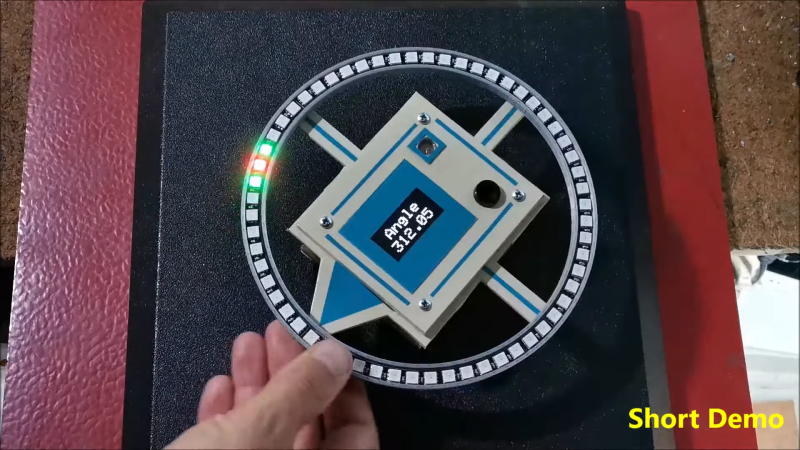
The build uses a HMC5883L magnetometer. While this can detect magnetic fields in three axes, just one is necessary for building a device that operates akin to a traditional compass. The output of the device is read by an Arduino Nano, which is hooked up to a string of WS2812B LEDs and a small OLED display. The LEDs display the bearing of magnetic north, while the OLED screen shows the current angle between the compass’s arrow and magnetic north.
It’s a tidy build that would be a great educational resource for teaching both electronics and navigational skills. We’ve seen similar projects before, like the hilarious Pizza Compass. Video after the break.
Microsoft is doing more to tackle toxicity in multiplayer Xbox games. The company is introducing a feature that allows Xbox Series X/S and Xbox One players to capture a 60-second video clip of abusive or inappropriate voice chat and submit it for moderators to review.
"This feature is purpose-built to support the broadest arena of in-game interactions between players and works across thousands of games that offer in-game multiplayer voice chat, including Xbox 360 backward-compatible titles," Xbox Player Services corporate vice-president Dave McCarthy wrote in a blog post.
Microsoft designed the tool for both ease of use and to minimize the impact on gameplay. When you capture a clip for reporting, it will stay on your Xbox for "24 online hours." You'll have the option to submit it right away or wait until you finish your gaming session. You'll get a reminder before the 24 hours are up. If you opt not to report the clip, your Xbox will automatically delete it.
No one else will have access to the clip unless you submit it. "Xbox is not saving or uploading any voice clips without you, the player, choosing to start the reporting process," McCarthy said. Any clips you capture through the tool will not appear in your recent captures and it won't be possible to download, share or modify them. These clips will only be used for moderation purposes. After the safety team has reviewed your report, you'll receive a notification to tell you whether it took action against an abusive player.
An Xbox spokesperson told Engadget the safety team will use "a range of moderation tools that leverage AI and human moderators" to analyze the clips. Moderators will review audio and video to determine if someone has violated the community standards.
At the outset, the reactive voice reporting system allows a player to report up to three individuals at once. "If a moderator cannot determine who was talking at a given time and associate it with the reported Xbox Live player, the report will be closed as unactionable, no enforcement action will be taken and the captured video will be deleted within 90 days," the spokesperson said.
The advent of cross-platform play muddies the waters here too. The safety team won't take any action in cases of inappropriate voice chat from those who are on other platforms. "The announced reactive voice moderation feature is specifically for reporting Xbox players to the Xbox Safety Team," the spokesperson noted.
It's encouraging to see Xbox tackle the problem of toxic voice chat at a platform-wide level. The PlayStation 5 has had a similar feature since it debuted in 2020.
Several studios have adopted similar approaches in their own games. In 2021, Riot said it would record Valorant voice communications but only listen to them when a report was filed. It started testing the system last July.
Ahead of Overwatch 2 going live last October, Blizzard said it would automatically transcribe a recording of a match's voice chat following a report from a player. The company's chat review tools analyze the transcription for signs of abusive behavior and both the recording and text file are deleted. (Of note, Blizzard and Overwatch 2 may soon be Microsoft properties.)
To begin with, Xbox's voice reporting feature will be available for Alpha and Alpha-skip Xbox Insiders in the English-speaking markets of the US, Canada, Great Britain, Ireland, Australia and New Zealand. Microsoft hopes that insiders will provide feedback to help improve this feature. It plans to continue investing in voice moderation and to support more languages. Xbox will share data and updates on voice chat moderation in its bi-annual transparency report.
This article originally appeared on Engadget at https://www.engadget.com/xbox-makes-abusive-voice-chat-reporting-a-system-wide-feature-190159915.html?src=rss
The immensely popular online game creation platform/thingamajig Roblox is coming to VR, thanks to the Meta Quest platform. Meta CEO Mark Zuckerberg made the announcement, which was followed by an official Roblox blog post. A beta version of the app launches in just a few weeks, according to Zuckerberg, which will be accessible via the Quest platform’s dedicated App Lab.
The beta will be available for the Quest 2 and Quest Pro headsets, so OG Quest owners are out of luck. The recently-announced Quest 3 wasn’t mentioned, but that’s likely because it won’t be out in time for the beta release. A finished version of the game, however, would make for an extremely compelling launch title for the Quest 3, as Roblox boasts more than 66 million daily users across multiple platforms.
To that end, this is going to be a fully cross-platform title, so anything you interact with or make on your phone or console should be accessible in VR, though it depends on the developer. The Roblox team is actively encouraging developers to make experiences in VR with a forthcoming toolset accessible via the Creator Dashboard. You’ll soon see VR as a new device type on this dashboard, along with desktop, mobile, tablet and console.
Meta recently lowered the minimum age to operate a Quest headset from 13 to ten, but this change will not impact Roblox. You have to be at least 13 to use the app in VR. That’s probably for the best, given the addictive nature of the title and associated child safety concerns.
This article originally appeared on Engadget at https://www.engadget.com/roblox-is-coming-to-meta-quest-vr-headsets-181633766.html?src=rss
The Perseverance Rover has found evidence of organic compounds in the Jezero Crater on Mars. Although this isn’t the smoking gun proving once and for all that Mars once hosted life — these compounds could have also developed in nonbiological ways — the results hint at surprisingly complex organic conditions for the “key building blocks for life” on Earth’s neighbor. The study was published in Nature.
The Perseverance Rover, the first to explore the Jezero Crater, has been investigating the area since February 2021. Researchers believe the basin once housed an ancient lake, including a delta from a river that once flowed into it. It’s one of the most likely regions to reveal leftover signs of life on Mars.
Organic molecules like those observed in the Jezero Crater contain carbon and often hydrogen atoms. They’re the core components of life as we know it on Earth, although they can also develop abiologically. “They are an exciting clue for astrobiologists since they are often thought of as building blocks of life,” paper co-author Joseph Razzell Hollis, a postdoctoral fellow at London’s Natural History Museum, said toNewsweek. “Importantly, they can be created by processes not related to life as we know it, and so organic molecules are not evidence of life on their own without sufficient extra evidence that cannot be explained by nonbiological — or abiotic — processes.”
The rover observed the compounds using an instrument — the Scanning Habitable Environments with Raman and Luminescence for Organics and Chemicals (SHERLOC) — that maps organic molecules and minerals on rock surfaces. Significantly, it found organic materials in all ten targets it observed on the crater floor. “Our results support observations by previous robotic missions to Mars that the Red Planet was once rich in organic material, compounds made primarily of carbon and hydrogen, and that some of that organic material can still be detected billions of years later,” co-author Joseph Razzell Hollis, a London-based astrobiologist, toldGizmodo. “Each detection, each observation, gives us a little bit more information that brings us closer to understanding the history of Mars and whether it could have supported life in the past.”
Now that the researchers have observed the molecules, they’ll need a better look at them in Earthbound labs to draw further conclusions about their origins. “If these samples are returned to terrestrial laboratories, a more diverse suite of tools can be used to study the samples, including at higher spatial resolution and with much greater specificity and sensitivity,” the authors wrote. They’ll have to wait for the Mars Sample Return (MSR) mission, which isn’t expected to launch from Earth until at least the late 2020s. Still, the trip should be worth the wait. “So far, the only Martian rocks we’ve ever been able to study on Earth have been meteorites. Getting our hands on intact Mars rocks, carefully stored and protected from contamination, will be invaluable to planetary science,” Razzell Hollis told Newsweek.
This article originally appeared on Engadget at https://www.engadget.com/researchers-find-evidence-of-organic-matter-on-mars-174950850.html?src=rss
Chipotle isn't done experimenting with robots that could make life easier for restaurant staff. The chain has teamed up with robotics company Vebu to test a prototype Autocado robot (yes, that's the name) that cuts, cores and peels avocados to be used in guacamole. Kitchen workers only have to fill the bot with up to 25lbs of ripe avocados and choose a size. After the processing is done, they collect the fruit in a bowl, add remaining ingredients and start mashing.
As Autocado improves, Chipotle expects to cut guacamole prep time in half — no mean feat when it usually takes 50 minutes to make a batch. That could ensure a steady supply of guac while eliminating some of the drudgery for employees. The restaurant also believes the robot could reduce food waste (and thus costs) through more efficient processing.
Autocado is currently limited to a testing center in Irvine, California. This is the start of a "long term partnership" with Vebu, Chipotle adds. The two haven't said what comes next, but the focus will be on collaborative robots that "drive efficiencies" and "ease pain points" for workers. Last year, Chipotle began testing Miso Robotics' Chippy robot to aid in making tortilla chips.
Chipotle is far from alone. McDonald's and other restaurants are trying AI, robots and other automated solutions to streamline their experiences. These moves theoretically help employees concentrate on serving customers and other tasks where humans are still preferable. Of course, there are also lingering concerns among critics that restaurants might use this to automate people out of jobs. They may choose to shrink headcounts and cut costs instead of easing the workload. That isn't guaranteed to happen with Autocado when humans are still necessary, but the long-term future isn't quite so clear.
This article originally appeared on Engadget at https://www.engadget.com/chipotles-guacamole-robot-is-cursed-to-peel-and-core-avocados-for-eternity-174027901.html?src=rss
Just a year ago, Apple announced the biggest software update the iPad has ever seen. iPadOS 16 ushered in Stage Manager, a completely revamped multitasking mode that brought overlapping, resizable windows to the iPad, along with robust external display support (provided you had compatible hardware).
There were a host of other new features, as usual, but Stage Manager in particular brought the iPad closer than ever to a Mac or Windows PC experience. iPadOS 17, on the other hand, is a more subtle update. That’s usually the case, with one year bringing big new features and the next offering tweaks and stability improvements. And while there isn’t one singular headline feature in iPadOS 17, the totality of myriad smaller changes definitely adds up. I’ve been using iPadOS 17 in beta for a few weeks, and now that the public beta is live, you can do the same.
A note on stability: Even though this is a public beta, the “beta” still applies. It’s probably not ideal to install on a machine you rely on for daily use, as you’ll surely run into some bugs and crashes. And it’s always a bit of a crapshoot how well third-party apps work on a beta. All that said, I haven’t run into anything particularly severe. Occasionally, an app will just toss me back to the Home Screen, or you might find some weird UI issues where apps haven’t quite been optimized yet. But over the last few years, Apple has gained a reputation for releasing public betas in solid, usable states, and that’s the case here as well. Just remember that “downgrading” to iPadOS 16 final releases isn’t exactly a simple process.
Stage Manager updates
While Stage Manager opened up some major new multitasking features for the iPad, it was also a lot more rigid than the windows management system you’d find on a Mac. This year, Apple has tweaked things to make it easier to set up your ideal workspace. Previously, apps would snap to a handful of predetermined sizes to fit your display, and the specific placement of each individual window was up to iPadOS to decide. Now, app windows have a lot more granularity in how you can size and place them. For example, I can make the Notes app that I’m typing into right now a tiny window half of my screen’s height and about a quarter of its width. From there, I can make it as tall or wide as I want; there are still specific sizes that it snaps to, but there’s far more flexibility than there was last year.
iPadOS 17 is also a lot more flexible about how you arrange multiple apps, something that wasn’t the case last year. When you added a second app to a space, iPadOS automatically decided where the two windows should go. You could resize them both as you wanted, but it was basically impossible to show two apps side-by-side without any overlap, for example. That’s no longer the case. Now, it’s a simple matter of grabbing the top of a window and dropping it where you want.
These basic controls have been available on Windows and macOS for decades, but it’s still a new paradigm for the iPad. I’m definitely glad that Apple seems to be trusting its users more by giving them more flexibility rather than letting iPadOS make major decisions about how you lay out your screen. Stage Manager is still somewhat of a niche feature, given that lots of iPads can’t run it, but people who want to push their iPads further will definitely appreciate these updates.
Lock Screen and interactive widgets
Probably the most obvious user-facing update is the revamped Lock Screen. It should also be very familiar, because Apple first introduced it on the iPhone a year ago. Basically, you can now set up multiple lock screens, each with its own wallpaper, widgets and design elements (like fonts and color filters). To jump between different styles you’ve set up, you can just press and hold on the Lock Screen and then choose what suits you. Finally, you can also set a specific Focus setting for each Lock Screen, so you can set up a whole profile for work mode or vacation time.
There’s also a great new wallpaper picker – this, too, borrowed from the iPhone. There are some new styles here specifically for the iPad, though, including striking views of every planet in the solar system stem. And in a nod to the iPad’s history, they brought back the original Pyramid Lake wallpaper (shot by photographer Richard Misrach) from the first iPad back in 2010. I’m a sucker for nostalgia and love the photo, so Apple won me over here.
Beyond the aesthetics, having widgets on the Lock Screen makes the iPad’s large display more useful — there’s a ton of space, so why not show more than just the time and your notifications? But widgets are getting a big improvement beyond just being able to drop them on the Lock Screen. At long last, they’re interactive. That means if you have a Reminders widget, you can tap a specific item to check it off without having to open the app. Or, with the Apple Music widget, you can automatically start playing an album or playlist.
Previously, widgets let you tap specific parts to jump to that place in the app, so they weren’t just static information displays, but this takes their functionality a lot further. We’re going to need third-party developers to add this functionality to their widgets to really take full advantage of the feature, but I’m looking forward to seeing how apps incorporate it when iPadOS 17 is out in the wild.
Health
There aren’t many Apple apps on the iPhone that you can’t also get on the iPad. Health was one, but that’s been remedied this year. It’s just what you’d expect: Health data tracked from your iPhone and Apple Watch is available for you to review on the iPad, with a design that’s better suited to the larger screen. While there’s nothing revolutionary here, the Health app can include so much data that it’s actually a bit easier to dig through everything here.
Everything syncs from your iPhone, but so far that sync process hasn’t been the most reliable. Even though the Health app on my iPad says it synced two minutes ago, it hasn't pulled in updated steps data since 7AM this morning. My activity rings from my Apple Watch are similarly hours out of date. I wager this will get settled before iPadOS 17 is finished, though.
Apple announced a handful of features relating to mental health as part of the latest iPad and iOS updates, including a dedicated journaling app and mood trackers in the health app. While the journal app isn’t coming until “later this year,” sometime after iPadOS 17 and iOS 17 officially launch, the mood tracking features are available in the Health app. I’ve long been in the habit of tracking my daily mood, and this isn’t a bad place to do it. It’s pretty simple, with a slider to pick your overall mood and a few follow-up questions, but the idea is for it to be quick and painless so you do it repeatedly. There’s also a mental health questionnaire you can take that claims to assess your anxiety and depression levels that reminds me of questions I’ve answered from a doctor in the past. I did reach out to Apple to find out where they’re sourcing this set of questions from so we can know more about their validity and approach.
Safari, Messages, Notes and more
As always, Apple’s core apps are getting lots of little but potentially meaningful updates. Safari’s biggest new feature is arguably the ability to set up multiple profiles. Each profile can access all your bookmarks, saved passwords and reading list, but it keeps things like logins to sites and tab groups separate. I did the basic “personal and work” profiles, with logins to work-specific tools kept separate. It’s also pretty easy to move things between profiles if you accidentally open windows in your personal profile that you’d rather have with your work tabs. And, of course, this all syncs via iCloud to other devices — I have the macOS Sonoma beta installed as well, and things were shared seamlessly.
Messages is possibly Apple’s most important app, and every year it gets usability tweaks and new features. A bunch of those are focused around audio messages, which I haven’t really had a chance to check out much. One thing I do like, though, is that replying in a thread is a lot easier than it used to be. Now, swiping right on a message opens the reply interface, which is definitely quicker than holding down on a message, waiting for the menu to pop up and selecting the “reply” option.
The search experience has also been upgraded with filters. For example, you can first search for a specific contact, and then search just their conversation for keywords. The results naturally include specific messages as well as relevant links, images and more.
But the update I’ve had the most fun with so far is definitely Stickers. You can now easily create your own stickers from images in your photo gallery. If you tap on a subject in a photo, you can pull it out from the background and save it as a sticker, so you can easily use it again. Live Photos can be turned into live stickers — and let me tell you, the live sticker I made of my dog laying down is adorable and I will spam everyone with it.
Your own stickers can live alongside sticker packs from other apps, emoji and Memoji. And the stickers you’ve created will be available to use in third-party apps, as well. Basically, stickers you create as well as those from apps should be easier to share outside of just Apple’s Messages app, which is a nice change from the previously walled-off approach Apple took.
Notes, quietly one of Apple’s most useful apps, has gotten more improvements this year too. You can now embed PDFs right into a Notes doc and they display full-width, so you can easily browse through a PDF and make notes on it below. You can also naturally mark it up with an Apple Pencil or collaborate on it in a note shared with other people.
PDF support system-wide has been improved. For example, opening a PDF document from the Files app will open it in its own window, provided you’re running Stage Manager. This makes it easier to put a PDF side-by-side with another app while still having full access to the Files app. Auto-filling fields in PDFs has also been improved system-wide; Apple says it’s using an on-device neural network to identify documents that have fields that need to be filled in across the system, and you’ll be able to AutoFill details like names and addresses the same way you can on websites.
Another useful trick is the ability to link directly to a specific note in your library. Other note-taking apps like Bear have had this feature for a while, but it’s undeniably handy to link related notes together so you can easily jump between them instead of having to go back to the sidebar and search for the one you’re looking for.
The rest
This just scratches the surface of iPadOS 17. Lots of new features, like the changes to Messages, work best when other people you know are also running the new software. And other things, like the journal app, won’t be available to try for months to come. Finally, there are plenty of iOS 17 features like Facetime updates and a smarter keyboard will be in iPadOS 17 as well. If you want to give this all a shot months before Apple finalizes everything, you can install the iPadOS 17 public beta now. But as always, think hard about whether you’re up for some instability before you take the plunge.
This article originally appeared on Engadget at https://www.engadget.com/ipados-17-preview-a-smoother-multitasking-experience-for-those-who-really-need-it-173022677.html?src=rss
Gone are the days when you contort yourself to try the latest iOS version before its official debut. Apple has released the iOS 17 public beta, and it’s easy to install the preview on your iPhone. So long as you know what you’re getting into, you can explore major features months before the finished software arrives this fall. These instructions should also work for the iPadOS 17 beta, too.
Before you start: iOS 17 beta requirements and risks
Apple
To begin, you’ll need to be sure your hardware supports iOS 17. Apple requires at least a 2018 or newer iPhone, including the XR, XS and second-generation SE. Notably, this release ends support for the iPhone 8 and X — if you own one of these older models, you’ll simply have to buy a new handset to run the updated platform.
The iPadOS 17 public beta clearly has different requirements. You’ll need at least a sixth-generation iPad, third-generation iPad Air, fifth-generation iPad mini, the 10.5-inch iPad Pro, any 11-inch iPad Pro or the second-generation 12.9-inch iPad Pro.
Whatever you’re installing, remember that this is pre-release code. The iOS 17 public beta is better-suited to everyday use than earlier developer versions, but you may still run into bugs, odd behavior or app compatibility issues. You’ll want to wait for the finished software if your phone has apps or data you simply can’t afford to lose. If you’re willing to accept the risks, it’s still a very good idea to backup your data through iTunes or a cloud service (such as iCloud) in case you need to restore your phone at some stage.
How to install the iOS 17 public beta
Apple
Be sure you’ve updated to iOS 16.4 or newer, as you’ll need it to walk through the public beta installation process. You can upgrade through the Settings app, choosing General, and then tapping Software Update. This screen will also tell you which version you’re running.
Once ready, you’ll want to sign up for the Apple Beta Software Program using the Safari web browser on your iPhone. Membership is free; you’ll need to log in using the main Apple ID you use on your phone and enroll that device in the program. Follow prompts, and be sure to read the agreement when it appears.
After that, installing the iOS 17 test is almost as simple as installing ordinary updates. You just have to visit Settings, tap General, tap Software Update and then select a new Beta Updates item underneath Automatic Updates. Be sure that the Apple ID displayed at the bottom is the one you used to join the beta program. You should see the option to install “iOS 17 Public Beta” from that screen. Go back one screen and you should get an offer to download and install the beta.
As with any other iOS upgrade, the installation may take a few minutes to complete and will involve restarts. At the end, the beta will add a Feedback Assistant app to your home screen that helps report bugs.
What you do (and don’t) get with the iOS 17 public beta
Apple
Apple revealed many of iOS 17’s features at the WWDC 2023 keynote in June. However, not all of those elements will be available in the public beta.
Most improvements are intact. Notably, there’s a redesigned phone experience that includes custom contact cards and live voicemail transcripts. A Messages app revamp includes a new sticker interface, simpler replies, audio message transcripts and location-based check-ins. Sharing is easier as well. You can share content just by bringing iPhones close together, and you can now share contacts. The keyboard has improved autocorrection, predictions and voice dictation. You can document your mood in the Health app, and StandBy turns your iPhone into an ad hoc smart display.
However, a few features won’t be present until after iOS 17 arrives. The life-logging Journal app isn’t in the public beta. You’ll also have to wait for AirDrop transfers that continue over the internet, and collaborative Apple Music playlists aren’t yet ready. We’d also expect Apple to make minor interface tweaks and additions in later revisions, and it won’t be surprising if one or two iOS 17 features will only be announced alongside future iPhones that use them.
This article originally appeared on Engadget at https://www.engadget.com/how-to-install-the-ios-17-public-beta-172319006.html?src=rss