It’s really quite unfortunate that Hackaday/Supplyframe employees and their families are not allowed to place in the 2023 Halloween Hackfest, because our own [Tom Nardi] has thrown down a costume gauntlet with his kids’ proton pack conversion.
Starting with an inert off-the-shelf toy from 2021, [Tom] set out to make the thing more awesome in every way possible. For one thing, it’s blue, and outside of the short-lived animated series The Real Ghostbusters, who ever heard of a blue proton pack? So one major change was to paint it matte black and age it with the old silver rub ‘n buff technique. And of course, add all the necessary stickers.
[Tom] added plenty of blinkenlights, all running off of an Arduino Nano clone and a pair of 18650s. He got lucky with the whole power cell thing, because an 8 x 5050 RGB LED stick fits there perfectly and looks great behind a PETG diffusing lens. He also drilled out and lit up the cyclotron, because what’s a proton pack without that? There’s even a 7-segment LED voltmeter so Dad can check the power level throughout the night.
Finally, he had to do a bit of engineering to make the thing actually wearable by his daughter. A frame made of square aluminium tubing adds strength, and a new pair of padded straps make it comfortable. Be sure to check it out in action after the break.
What’s a Ghostbusters costume without a PKE meter?
Your EV may go a long way between charges, but can it carry dozens of passengers? GreenPower can boast both of those things with its latest electric school bus called "Mega Beast," it announced in a press release spotted by Electrek. A massive 387 kWh battery supplies nearly 300 miles of range and it can carry up to 90 people — around three classrooms full of kids.
The long wheelbase Type D model features "the longest range and has the biggest battery pack in the school bus market," GreenPower said. It uses a lithium iron phosphate (LFP) battery pack that offers high energy density and a longer life span, but a higher initial cost.
Mega Beast is a souped up version of GreenPower's regular 140 mile range, 197.3 kWh Beast ("Beast" stands for "battery electric automotive school transportation"). Along with double the battery size, it offers better hill-climbing power, the company wrote.
Why the need for so much range, when buses usually do just two runs per day? This version is designed for longer range routes at rural schools, for example, or school districts that can't necessarily charge a bus at mid-day. It's also aimed at regions with "extreme weather conditions and schools that also use the all-electric bus for extra-curricular activities."
Large electric school buses with around 100 miles of range can cost $300,000 to $400,000, up to four times the price of a diesel-powered school bus. However, maintenance costs are lower and the US Environmental Protection Agency (EPA) recently launched the Clean School Bus Program providing $5 billion over five years to replace existing school buses with zero-emission and low-emission models. Other companies building electric buses include Daimler via its Thomas-Built Buses division, along with Blue Bird.
This article originally appeared on Engadget at https://www.engadget.com/this-90-passenger-school-bus-has-nearly-300-miles-of-range-044741117.html?src=rss
The antitrust lawsuit Epic Games and Match Group have filed against Google was supposed to go to trial on November 6, but now it looks like the video game developer might go at it alone. Google and Match, the parent company of Tinder, OkCupid and Hinge, have reached an agreement and have agreed to drop all claims against each other. According to Bloomberg and The Wall Street Journal, Google has agreed to return the $40 million Match had place in escrow to cover the service fees it would supposedly owe the Alphabet unit while the dispute is ongoing.
Match also announced in its earning report that its apps will be using Google's User Choice Billing program starting on March 31, 2024. Under the program, users will have the option to choose between Google's and the developer's billing systems when purchasing an app or paying for a subscription. If they choose to use Google's system, then Match will have to pay Google 15 percent for recurring subscriptions and 30 percent for one-off payments. Google's cut is reduced to 11 percent and 26 percent, respectively, for payments that go through the developer's provided alternative. The dating services provider said that the terms they agreed on will offset the additional costs its apps will incur implementing the User Choice Billing program over three years starting in 2024.
Tinder's parent company originally sued Google in 2022, accusing it of violating federal and state antitrust laws. Match said that Google previously assured it that it could use its own payment system. However, when it announced a new policy that would require all Android developers to process payments through the Play Store billing system, Google allegedly threatened to remove its apps from the store if it didn't comply. Match also claimed that the company had been rejecting app updates that maintained the payment system it was using.
Later that year, Match had joined up with Epic Games, and the two consolidated their antitrust lawsuit against their common foe. They even expanded their allegations and accused Google of paying major developers hundreds of millions of dollars to keep their apps in the Play Store. Bloomberg says Epic is now scheduled to face Google in court alone on November 2, and the judge is waiting for both parties to decide whether they want a jury to make the decision for their case. Epic had also sued Apple over the same issue, but in Google's case, the court has to acknowledge that Android users can sideload applications to their devices. The video game developer hasn't dropped any hints that it's also hashing out an agreement with the bigger company, but we'll know for sure if the trial still pushes through on November 2.
This article originally appeared on Engadget at https://www.engadget.com/google-and-match-group-settle-antitrust-case-before-it-goes-to-trial-041158809.html?src=rss
A California jury has found that Tesla was not at fault for a fatal 2019 crash that allegedly involved its Autopilot system, in the first US trial yet for a case claiming its software directly caused a death. The lawsuit alleged Tesla knowingly shipped out cars with a defective Autopilot system, leading to a crash that killed a Model 3 owner and severely injured two passengers, Reuters reports.
Per the lawsuit, 37-year-old Micah Lee was driving his Tesla Model 3 on a highway outside of Los Angeles at 65 miles per hour when it turned sharply off the road and slammed into a palm tree before catching fire. Lee died in the crash. The company was sued for $400 million plus punitive damages by Lee’s estate and the two surviving victims, including a boy who was 8 years old at the time and was disemboweled in the accident, according to an earlier report from Reuters.
Lawyers for the plaintiffs argued that Tesla sold Lee defective, “experimental” software when he bought a Model 3 in 2019 that was billed to have full self-driving capability. The FSD system was and still is in beta. In his opening statement, their attorney Jonathan Michaels also said that the “excessive steering command is a known issue at Tesla.”
Tesla’s defense argued that there was no such defect, and that an analysis cited by the plaintiffs’ lawyers identifying a steering issue was actually looking for problems that were theoretically possible. A fix to prevent it from ever happening was engineered as a result of that analysis, according to the company. Tesla blamed human error for the crash, pointing to tests that showed Lee had consumed alcohol before getting in the car, and argued that there’s no certainty Autopilot was in use at the time.
The jury ultimately found there was no defect, and Tesla was cleared on Tuesday. Tesla has faced lawsuits over its Autopilot system in the past, but this is the first involving a fatality. It’s scheduled to go on trial for several others in the coming months, and today's ruling is likely to set the tone for those ahead.
This article originally appeared on Engadget at https://www.engadget.com/teslas-autopilot-was-not-to-blame-for-fatal-2019-model-3-crash-jury-finds-210643301.html?src=rss
Atari has agreed to buy developer Digital Eclipse. The acquisition, which is expected to close in the coming days, will be worth up to $20 million based on the performance of Digital Eclipse over the next decade. Atari says that by bringing Digital Eclipse under its wing, it "will be able to further support its retro-focused growth strategy."
Digital Eclipse caught the attention of many last year with Atari 50: The Anniversary Collection. That well-regarded compilation pulled together dozens of games from across Atari's 50-year history and placed them in context with the help of marketing and development documents, archival footage and new interviews with former Atari employees. Digital Eclipse built on the "interactive documentary" format with this year's release of The Making of Karateka.
It plans to continue with this Gold Master Series preservation project under Atari's umbrella. It will still have the ability to work with third-party developers and publishers, and there are several non-Atari projects in the works that it has yet to announce.
Atari seems to be on a mission to become a powerhouse in retro gaming and game preservation. It also bought Nightdive Studios, a developer that specializes in remasters, and AtariAge (a community and news site that focuses on Atari) this year. In addition, Atari has been snapping up many gaming franchises from the 1980s and 1990s.
This article originally appeared on Engadget at https://www.engadget.com/atari-is-buying-retro-game-specialist-digital-eclipse-195419696.html?src=rss
Therabody’s Theragun Mini 2.0 massage device is on sale at Target for $170. That’s $30 off the MSRP of $200 and matches a previous record-low for the massage gun, so this early Black Friday deal could be your best chance to snag a muscle-soothing percussive therapy gadget on the cheap.
To that end, the deal’s only accessible today and requires a Target Circle membership. Don’t worry. It’s free to sign up, and once you do you’ll get a coupon code you can clip directly on the product page.
This is the second-generation Theragun Mini, with three massage speeds that offer up to 2,400 percussions per minute. It also ships with a trio of attachments designed for different muscle groups and the Mini boasts a rechargeable battery that gets two hours of use per charge. This massage gun actually made our list of the best fitness devices for college students, but you don’t need your head in a text book to appreciate vibration-based pain relief.
Despite being a smaller and more budget-friendly version of Therabody’s other products, we found that the Mini works nearly as well as its larger counterparts when it comes to easing tight muscles. We appreciated its one-handed design, decreased noise level during use and powerful motor.
This is a battery-powered wireless massage gun that gets around two hours of use per charge. It also connects to a proprietary app via Bluetooth that helps you create custom routines to treat specific ailments. It’s also worth noting that the Mini is also around 30 percent lighter than the company’s other massage guns, which helps with that whole one-handed use aspect. Now you’ll never have to admit weakness by asking someone else to help with muscle tightness.
Target is actually selling a few Therabody products at steep discounts, all of which return to their normal prices once Halloween is over. Beyond the Mini in black or tan, you can snag the company’s eye mask massaging device for 15 percent off.
This article originally appeared on Engadget at https://www.engadget.com/the-theragun-mini-20-drops-to-a-record-low-price-in-early-target-black-friday-deal-183342874.html?src=rss
Even among 2-in-1 PCs, Microsoft’s Surface Laptop Studio offers a unique blend of performance and adaptability. But now on the second model, thanks to refreshed specs plus the addition of a USB-A port and a microSD card reader, it feels like Microsoft has given its mobile workstation the finishing touches it needed all along, resulting in what may be the ultimate all-rounder. Unfortunately with a high starting price and costly upgrades for more RAM and a discrete GPU, the Surface Laptop Studio 2 is hard to recommend for everyone.
Design: Funky but functional
Francis Bacon once said “There is no excellent beauty that hath not some strangeness in the proportion,” which is a sentiment that feels applicable to the Surface Laptop Studio 2. It features a minimalist aluminum chassis (instead of the magnesium frame on the previous model) but in a somewhat unconventional configuration. The laptop’s lid is divided into two halves, which allows the screen to pivot 180 degrees or tilt down into an easel. Meanwhile, its base features a two-tiered design that allows the laptop to keep its vents away from the sides of the system while also providing a hidden magnetic charging spot for a Surface Slim Pen 2 (which sadly, is not included).
The two biggest changes to the Studio 2’s design are the addition of the USB-A port and a microSD card slot. When combined with the existing dual USB-C jacks, you get a solid range of connectivity options. It means you can transfer files from a camera directly to the laptop and you’ll rarely (if ever) have to worry about carrying around extra dongles for peripherals. That said, Surface Laptop Studio 2’s slightly thicker chassis (but only by one or two millimeters) and the change to aluminum does mean an extra third of a pound in weight (4.18 pounds with integrated graphics or 4.37 with a discrete GPU).
Display: Vivid from any angle
The Surface Laptop Studio 2’s screen hasn’t changed much from the previous model, but that’s not a bad thing. Its 14.4-inch panel features the same 2,400 x 1,600 resolution, along with a dynamic refresh rate that can switch between 60Hz and 120Hz depending on what you’re looking at. However, brightness is a touch better at around 500 nits, or 650 nits with HDR turned on. And you still get full Windows Inking support with 4,096 levels of pressure sensitivity.
Performance: More than enough power, but it’ll cost you
Photo by Sam Rutherford/Engadget
For the new model, Microsoft streamlined the Surface Laptop Studio 2’s specs by offering a single processor across every config: an Intel Core i7-13700H. From there you can choose a base model with integrated graphics or upgrade to one with either an RTX 4050 or RTX 4060 GPU. The annoying thing is that, to get that 4060, you also have to get 64GB of RAM, which is overkill for most people. That’s unfortunate because that config costs $3,300. An option with only 32GB of RAM and a lower cost would be appreciated.
That said, it’s hard to complain about its actual performance. The Surface Laptop Studio 2 kept pace with similarly specced gaming laptops including the MSI Stealth 14 Studio and Razer Blade 18 across both benchmarks and real-world tests. While it’s not meant to be a dedicated gaming rig, it also hit 62 fps in Cyberpunk 2077 at 1920 x 1200 with high graphics and ray tracing set to ultra (though that is with NVIDIA’s DLSS turned on).
Battery Life: Surprisingly decent
Photo by Sam Rutherford/Engadget
Even with a discrete GPU, the Surface Laptop Studio 2’s longevity is closer to a standard ultraportable than more short-lived gaming notebooks. On PCMark 10’s OpenOffice battery rundown test, it lasted eight hours and 40 minutes. That’s three hours more than both the MSI Stealth 14 Studio and the Razer Blade 16, which lasted 5:19 and 5:10, respectively. However, more typical ultraportables like ASUS’ Zenbook S 13 fared even better with a time of 10:39.
Wrap-up
The two major knocks against the Surface Laptop Studio 2 are its price and limited configurations that top out with NVIDIA RTX 4060 graphics, which makes it feel more like a great all-rounder than an all-out mobile powerhouse. While there’s no defending its cost, I’m not as bothered by the latter, because there’s a lot of value in a system that offers unmatched adaptability.
Photo by Sam Rutherford/Engadget
With its innovative design, brilliant display, above-average battery life and improved connectivity, the Surface Laptop Studio 2 can handle a lot of different assignments with ease. It’s a great system for editing photos and videos, and stylus support makes drawing or taking notes a delight. When you factor in the excellent keyboard, Windows Hello IR cameras and one of best touchpads on a Windows laptop today (courtesy of Sensel), you get an incredibly versatile mobile workstation. And if we revisit that classic line from Shakespeare, “A jack of all trades is a master of none, but oftentimes better than a master of one,” which is precisely what we have here with the Surface Laptop Studio 2. I just wish it was a bit cheaper.
This article originally appeared on Engadget at https://www.engadget.com/surface-laptop-studio-2-review-the-ultimate-all-rounder-specs-price-180012173.html?src=rss
Google’s budget Pixel 7a was already a more affordable alternative to the flagship Pixel, but with a 25 percent discount on Amazon right now, it’s an absolute steal. The Pixel 7a is down to just $374 from its original price of $500. It’s the lowest we’ve seen it drop yet, beating even the October Prime Day price by $25. The discounted Pixel 7a is unlocked for all carriers, and available in the colors Charcoal, Sea and Snow.
While it may not have everything you’d get in a flagship, the Pixel 7a is still a really solid smartphone. It has a smooth 90Hz display and a Tensor G2 chip, plus 8GB of RAM and 128GB of storage. The battery life is great, too. In our review, where it earned a score of 90, we found the Pixel 7a’s 4,385mAh battery kept it going for an impressive 17 hours and 41 minutes. The Pixel 7a is also the first in Google’s A series to support wireless charging. It’s not groundbreaking, capping out at 7.5 watts, but it’s still a nice convenience.
The Pixel 7a holds up in just about every category, and we ranked it as the best midrange Android smartphone in 2023. It boasts a 64MP camera on the back which does a great job of preserving detail, and shots taken in Night Sight mode even beat Samsung's Galaxy S23 when comparing white balance. The selfie camera is crisp as well, and now capable of shooting video in 4K.
Designwise, the 7a looks a lot like the flagship Pixel 7, though it’s slightly bulkier and has plastic backing. It’s got a 6.1 OLED screen and a water resistance rating of IP67. It’ll also get years of updates, with at least three OS upgrades and five years of security updates. There are some things it’s missing, being a budget phone — like a dedicated zoom lens — but at only $374, that may not be a dealbreaker.
This article originally appeared on Engadget at https://www.engadget.com/the-google-pixel-7a-is-cheaper-than-ever-at-374-in-this-early-black-friday-deal-173045009.html?src=rss
Skating video games are always a good time, especially when paired with high-octane action and violence. Rollerdrome is no exception, allowing players to complete death-defying roller-skating tricks and death-inducing headshots all at the same time. The game’s been an absolute hit since originally releasing for PS4, PS5 and Steam back in August of last year. Now, it’s coming to Xbox as a day one Game Pass title.
Rollerdrome releases for Xbox Series X/S via Game Pass on November 28. It’s also launching as a standalone Windows PC title, which will be available for purchase on the Microsoft Store for $30. As previously mentioned, it’s already playable on PC via Steam, but additional purchase options are never a bad thing.
If you’re unfamiliar with the game, here's a quick primer. Rollerdrome was developed by Roll7, the same team behind the uber-popular skateboarding sim OlliOlli World. The game has all of the tricks and speedy movement you’d expect from a roller-skating simulation, but with a heavy emphasis on action. We called the game “endlessly replayable" and gave it a spot on our list of the best video games of 2022, emphasizing the challenge mode and online leaderboards. We also liked the dystopian vibes, making gameplay resemble the 1970s cult classic dystopian film Rollerball. This was likely intentional on the part of the developers.
The graphics on this third-person skater/shooter are also on-point, with bright, comic-book style visuals. There are plenty of environments to skate through, like an abandoned mall and a desert canyon. Each play area is littered with ramps, gaps and breakable windows, all of which can be leveraged for tricks. There’s also plenty of baddies to murder with weapons ranging from shotguns to grenade launchers.
This is a busy November for Game Pass. In addition to Rollerdrome, the subscription service gets the Yakuza-adjacent Like A Dragon Gaiden: The Man Who Erased His Name on November 9, along with the creature-hunting sim Wild Hearts. The Stardew-alike life sim Spirittea releases on November 13 with another farming sim, Coral Island, coming on November 14.
This article originally appeared on Engadget at https://www.engadget.com/skatingmurder-sim-rollerdrome-is-coming-to-xbox-game-pass-171355085.html?src=rss
Today Microsoft has begun rolling out its Windows 11 2023 update (also know as version 23H2), which adds some minor features on top of Copilot and its other AI-powered apps announced in September. Now, you may be asking yourself, "Didn't Microsoft just release a major Windows 11 update?" And you would be correct. But it turns out that release, which launched on September 26th, was basically just an AI preview meant for last year's Windows 11 22H2 update. Consequently, Copilot didn't actually reach most Windows users over the past few weeks (I eventually got it in a test laptop, but my home desktop is still Copilot-less).
It's fair to be confused, because Microsoft's handling of Copilot has been baffling from the start. We first heard it was arriving as "Windows Copilot" back in May, where it essentially put the AI features we saw on the Edge Copilot and similar tools right into the heart of Windows. Copilot ended up being the star of Microsoft's most recent Surface event, where the actual hardware took second place to the company's AI ambitions.
So if you've been dying to get your hands on Copilot, be sure to start refreshing Windows Update. Additionally, the Windows 11 2023 update transforms the built-in Chat app into Microsoft Teams, which will sit in your task bar by default. You'll also be able to find Windows 11 components under a new "System" label in the Start menu's "All apps" section (something I rarely visit these days). Those System Components will also be under a new page in the Settings app under the System section.
This article originally appeared on Engadget at https://www.engadget.com/microsofts-windows-11-2023-update-rolls-out-bringing-copilot-ai-to-more-users-170049845.html?src=rss


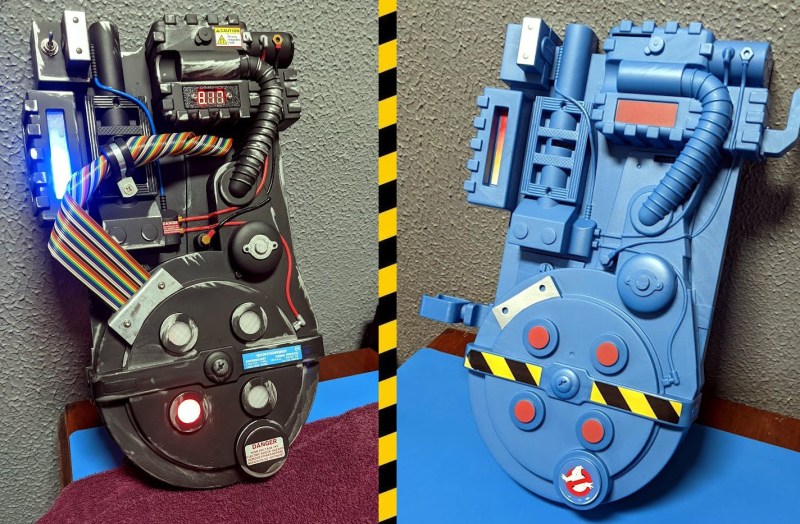
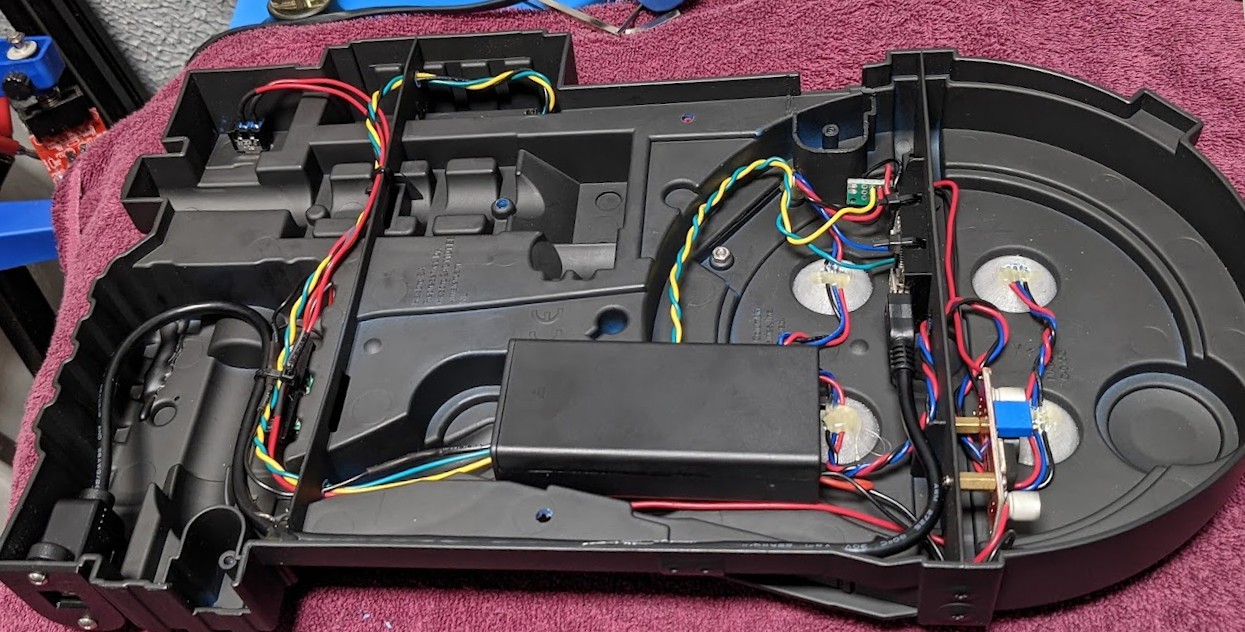 Starting with an inert off-the-shelf toy from 2021, [Tom] set out to make the thing more awesome in every way possible. For one thing, it’s blue, and outside of the short-lived animated series The Real Ghostbusters, who ever heard of a blue proton pack? So one major change was to paint it matte black and age it with the old silver rub ‘n buff technique. And of course, add all the necessary stickers.