Intel just broke another speed record when it comes to desktop CPUs. The company just introduced the Core i9-14900K CPU, which can reach up to 6.2GHz without overclocking, making it the fastest desktop processor available to consumers. The company did the same thing last year, but that chip maxed out at 6GHz.
In addition to the record-breaking CPU speed, the i9-14900KS boasts a 24 cores/32 threads architecture and 36 megabytes of Intel’s proprietary Smart Cache technology, which shares the cache memory between the various cores. Intel says this will allow for “powerful performance in gaming and content creation workloads.”
The chip also makes use of Intel’s Thermal Velocity Boost tool, which is a feature in 11th Gen and later Intel Core chips that ups the clock frequency by 100 MHz when the temperature is below a threshold of 70 degrees C, or 158 degrees F. In other words, make sure your cooling system is on point.
As for metrics, the company promises that gamers will experience up to 15 percent better performance and that content creators should enjoy a 73 percent performance uptick when engaging in compute-intensive workflows. The i9-14900KS is compatible with Z790 and Z690 motherboards, but Intel recommends the latest BIOS to ensure the best results.
The Core i9-14900KS is available right now and starts at $700. It’s available at traditional retailers as a boxed product and will be integrated into systems from original equipment manufacturer (OEM) partners in the near future. Intel continues to focus on raw speed, rather than AI, which has been noticeable throughout this year’s product announcements.
This article originally appeared on Engadget at https://www.engadget.com/intels-latest-desktop-cpu-hits-62ghz-without-overclocking-breaking-another-speed-record-193839340.html?src=rss
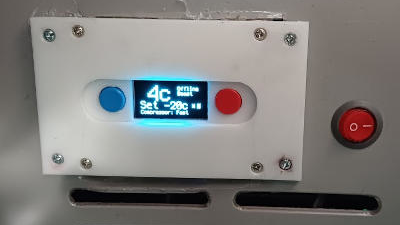
Recently [nibbler]’s Evakool 55L vehicle fridge started to act strangely, reporting crazy temperature errors and had no chance of regulating. The determination was that the NTC thermistor was toast, and rather than trying to extricate and replace this part, it was a lot easier to add a new one at a suitable location
Bog-standard fridge internals
A straight swap would have been boring, so this was a perfect excuse for an overboard hack. Reverse engineering the controller wouldn’t be easy, as the data wasn’t available, as is often the case for many products of this nature.
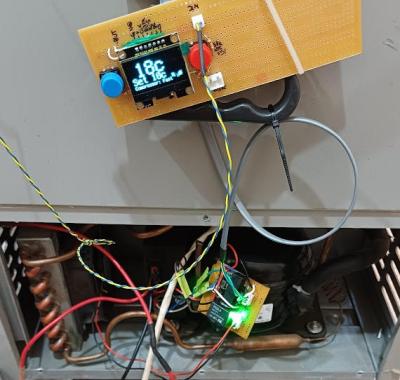
While doing a brain transplant, the hacker way, we can go overboard and add the basics of an IoT control and monitoring system. To that end, [nibbler] learned as much as possible about the off-the-shelf ZH25G compressor and the associated compressor control board. The aim was to junk the original user interface/control board and replace that with a Raspberry Pi Pico W running CircuitPython.
For the display, they used one of the ubiquitous SH1106 monochrome OLED units that can be had for less than the cost of a McDonald’s cheeseburger at the usual purveyors of cheap Chinese electronics. A brief distraction was trying to use a DS18B20 waterproof thermometer probe, which they discovered didn’t function, so they reverted to tried and trusted tech — a simple NTC thermistor.
Testing testing
The final puzzle piece was to interface the Pico to the compressor controller. The controller expected a variable resistance to control the speed, for which they could have used a digitally controlled potentiometer. However, after failing to tame this particular beast, an easier solution was to build a small PCB with a few relays and some fixed resistors and call it a hack.
An annoyance was the lack of interrupt support in CircuitPython. This meant that interpreting the fault codes from the controller would be a bit tricky. The solution was to wedge in another microcontroller, a small Arduino. Its job is to sit there, listen for commands on the serial port, control the relay board to drive the compressor, listen for any error codes, and pass those back to the Pico. Of course, this could have all been done directly on the Pico, just not with CircuitPython, and a lot more learning would have been needed.
Recteq revealed five new smart pellet grills in October, including unique dual-chamber and griddle options. Now, the company is back with two more models: a larger version of the recently overhauled Flagship 1100 and a built-in design for outdoor kitchens.
The Flagship XL 1400 has all of the updates that were announced with the Flagship 1100 last fall, including the updated Wi-Fi-enabled controller and sturdier leg design. The key difference on this new version is increased cooking capacity. The Flagship XL 1400 has 1,437 square inches of grilling space, with a second grate situated above the main cooking surface. Recteq also increased the size of the pellet hopper, which can now hold a massive 60 pounds of fuel when full. Depending on which brand you use, that's at least three bags of pellets — way more than even the longest brisket cook will require.
Like the Flagship 1100, this XL version does more than low-and-slow smoking as it has a temperature range of 180-650 degrees Fahrenheit. And the Wi-Fi connectivity means you can adjust cooking temps and monitor internal food temperatures from your phone. The Flagship XL 1400 is available now for $1,599.
Recteq Flagship XL 1400
Recteq
Permanent outdoor kitchens have become increasingly popular spaces for socializing at home. These typically include a grill that's been mounted into some type of fixed counter or cabinetry, but there aren't a lot of options if you want to do that with a pellet grill. Most people simply remove the legs or cart for a pellet model to make it work in these setups, but Recteq has a new option that's specifically designed for outdoor kitchens.
The E-Series Built-In 1300 is a fully stainless steel smart pellet grill with 1,300 square inches of cooking space. This model also packs Recteq's recently updated Wi-FI controller with dual-band connectivity and compatibility with the company's app. Like the SmokeStone griddle, the E-Series Built-In has a front-fill hopper for easy access and removable secondary cooking grates. The company says an a-frame-shaped drip pan makes grease drainage more efficient and a cast iron deflector helps evenly distribute the heat.
Like the company's other pellet grills, the E-Series Built-In is more than just a smoker, which means it can be the cornerstone of an outdoor kitchen without needing another grill. This model can run at 180-700 degrees Fahrenheit, which will accommodate everything from barbecue to searing. Grills like this that are permanently installed are typically quite pricey, and the E-Series Built-In 1300 is no exception. It's $3,499, which is $900 more than the company's 2,535-square inch "BFG" unit, previously the most expensive option in the Recteq arsenal.
This article originally appeared on Engadget at https://www.engadget.com/recteq-adds-flagship-xl-and-built-in-models-to-its-smart-pellet-grill-lineup-181449204.html?src=rss
It's that time of year once again. The Steam spring sale is now live. It's typically not as extensive as the summer and winter editions, and there's no Steam Deck discount this time, unfortunately, but there are still plenty of deals worth paying attention to.
Like a Dragon: Infinite Wealth, which only came out in late January, is already 20 percent off. A bundle of Cyberpunk 2077 and its well-regarded Phantom Liberty expansion is down by 43 percent while the base game is half off. Grand Theft Auto V has dropped by 63 percent for the 15 people out there who don't already own it, while you can save 40 percent on Mortal Kombat 1.
That's barely scratching the surface of the huge sale, which includes thousands of games. If there's something you've had on your wishlist for a while, it's worth taking a peek to see if there's a discount on it. The Steam spring sale runs until March 21.
This article originally appeared on Engadget at https://www.engadget.com/the-steam-spring-sale-is-here-to-raid-your-wallet-175109711.html?src=rss
Series like Final Fantasy Tactics, Fire Emblem and Tactics Ogre (which got a lovely remaster in 2022) tend to dominate the conversation around SRPGs. And rightly so. However, with its latest release – Unicorn Overlord – developer Vanillaware is taking cues from older titles in a way that pays tribute to the classics while also providing something fresh and engaging for 2024. And after being completely engrossed by this beautiful mash-up of old and new, Unicorn Overlord feels like a must-play for strategy game fans.
Vanillaware isn’t shy about where it drew inspiration for Unicorn Overlord. Instead of typical grid-based battlefields, the game plays a lot like Ogre Battle 64, which has you commanding a handful of smaller squads that you maneuver around the map to intercept enemy forces and capture strongholds. Each squad has a captain who lends a passive bonus with party sizes that grow to five over the course of the game. But because you don’t have direct control over individual characters during fights, you need to be crafty about setting them up for success.
Screenshot by Sam Rutherford/Vanillaware
Strategy is dictated not only by the position of each squad but also by which classes you choose and the actions you set (e.g. setting a command to attack the lowest health enemy or only hitting an opponent that’s already been debuffed). This results in gameplay that feels like fantasy football but for war. Look at you, you’re the general now. Except it’s better because you can see how well your art of war plays out, like when your archers take out flying enemies such as gryfons and wyverns that are naturally susceptible to their attacks.
But the strategizing doesn’t stop there, because outside of combat, there are other ways to manipulate battles. You can commandeer siege units like catapults and ballistas to rain damage down on opposing units before they get close. Alternatively, you can spend Valor points (which are earned by defeating enemies) to buff friendly combatants (haste, extra stamina, etc.) or soften up foes with targeted strikes like a cavalry charge. Then there’s all the various equipment and loot you’ll gather, which adds another layer of customization to your army.
Screenshot by Sam Rutherford/Vanillaware
On top of straightforward spec bumps, you can give units additional turns or alter their abilities by adding poison damage to a spear or other weapon. And when you get everything set up just right, the results are devastating. One of my favorite combos was giving an archer and swordsman fire-based attacks to afflict a burn on enemies. Then I followed this up with a mage that ignites every burning opponent with additional party-wide damage at the end of a fight and I think you can see where this is going. Honestly, I’ve lost track of the amount of time I’ve spent looking at menus to tweak ascactions and equipment. But min-maxing each squad’s potential is a ton of fun all by itself.
Meanwhile, another feature Unicorn Overlord borrows from franchises like Fire Emblem is its Rapport mechanic. Characters in the same squad will grow closer over time, offering upgraded stats over time. Alternatively, you can improve rapport by sharing meals or giving gifts, and after enough bonding, you’ll get a cutscene that dives deeper into two people’s relationship. On top of that, the main character, Alain, can develop a romance allowing you to choose your best girl (or boy, in some cases, though I haven’t had the chance to try that out myself).
Screenshot by Sam Rutherford/Vanillaware
Unicorn Overlord’s roster is massive too. It felt like every other battle I added a new member to my ranks, and before I even explored 50 percent of the map, I had more than 30 unique story characters. And if that’s not enough, you can also recruit mercenaries, which is arguably a more strategic decision as that lets you customize a unit’s growth (e.g. Keen types get extra crit while all-rounders receive more balanced stats and so on).
I also want to call out Unicorn Overlord’s visual design, which is flat-out gorgeous. It’s a clear homage to the 2D sprite-based graphics of old-school SRPGs, but it’s been polished up for modern HD screens. Portraits and character models are incredibly detailed and the animations are a joy to watch even after the 1000th time. Granted, Vanillaware occasionally succumbs to the trope of girl armor in games where male characters have huge sheets of metal protecting them while some female characters are much more scantily clad. Why does the witch class wear a bikini? We may never know, though this has been Vanillaware’s style for the last 20 years, so it’s not exactly a surprise. Really, my gripe with this is that there should be a few more himbos to balance things out.
Screenshot by Sam Rutherford/Vanillaware
As for more general cons, the main one is that the game’s plot is a bit generic. It’s not bad, it’s just based on a familiar setup centered around disenfranchised Prince Alain (who probably not coincidentally looks a lot like Magnus from Ogre Battle 64, right down to the blue hair) and his quest to liberate his nation from the clutches of evil emperor Galerius. That said, there are still plenty of touching moments to keep the plot from getting too dull.
The other potential issue is that some may find the game a bit too easy. To start, there are three difficulty levels, plus an even harder setting once you beat the game. However, the amount of strategizing you can do means you can almost always have an advantage in battle, so depending on how you look at it, the game is hurting itself for having such a high level of control and customization. Though in my opinion, that’s a good problem to have.
Screenshot by Sam Rutherford/Vanillaware
The most important thing about Unicorn Overlord is that it feels like a passion project from start to finish. Its visuals are wonderfully hand-crafted, and by adopting and then updating features and gameplay from Hall of Fame strategy titles, the game feels like a love letter to the genre as a whole. Heck, the CEO of Vanillaware even went so far as to pay for the game’s development out of pocket after its budget ran out. So while Unicorn Overlord might not appeal to everyone, tactics fans just got a new instant classic.
This article originally appeared on Engadget at https://www.engadget.com/unicorn-overlord-review-a-must-play-for-tactics-fans-173259209.html?src=rss
If you happen to find yourself at a loose end this weekend, it might not be a bad idea to fire up the Apple TV app and check out some Major League Soccer action. All 14 of this weekend's games will be available to watch for free in English and Spanish, so you won't need an MLS Season Pass subscription.
Apple Vision Pro users will be able to check out MLS games on a virtual screen that appears to be up to 100 feet wide. The Apple TV app is also available on smart TVs, set-top boxes, game consoles and of course on Apple's own devices.
Among the games you'll be able to watch are Inter Miami's visit to DC United. Ticket prices for Miami games have gone through the roof since Lionel Messi, arguably the greatest player of all-time, joined the team last year. So, getting to watch the match for free is nothing to complain about. (Messi is likely to miss the game due to injury anyway, so you might be glad you didn't spend up to four figures on a ticket.) I'll most likely be watching my local team CF Montreal playing away at Chicago Fire, which takes place at the same time as the Miami match on Saturday afternoon.
This article originally appeared on Engadget at https://www.engadget.com/apple-tv-will-stream-every-mls-game-for-free-this-weekend-170045330.html?src=rss
There are plenty of portable headphone amps out there that plug directly into instruments like electric guitars and basses, but Boss just kicked things up a notch. The company has announced the Katana:GO headphone amp and it’s a doozy, with a combination of features I’ve never seen together in one little box.
Just like rival products, this thing plugs into the input jack of a preferred instrument and includes a headphone jack to hear what’s going on. Guitar players can choose from ten amp models and bassists get three amp models, each pulled from the pre-existing Katana line of modeling amplifiers. Boss Katana amps are known primarily for their surprisingly great selection of tones, and it looks like the company managed to squeeze those same models into a headphone amp. Rival products are certainly convenient, but don’t always sound that great.
There are 60 effects to choose from, with all of the reverbs, delays and, of course, choruses musicians have come to expect from Boss. These are also the same effects featured in the larger and pricier combo amps.
So, there are good amp tones and a robust lineup of effects. What sets the Katana:Go apart from, say, the Mustang Micro? First of all, there’s a built-in tuner, which is always a welcome addition. The Katana:GO also includes spatial audio tech to mimic a live setup, further enhancing its usefulness as a practice amp. It remains to be seen how realistic this sounds, but Boss says it lets users position a virtual amp in different locations to give the impression of playing on stage or “jamming in a room with friends.” I’ve used many of these amps before and have found the “in your face” nature of the headphone signal rather off-putting, so I’m intrigued by this feature.
The amp has 30 preset slots, for creating and saving unique tones, and integrates with the company’s Tone Exchange service. This allows users to trade presets like Pokémon. Okay, not quite like Pokémon, but you get the gist.
Boss
The Katana:GO even doubles as an actual USB audio interface. Just plug it into a computer, smartphone or tablet and record straight into a DAW. Finally, there’s a dedicated mobile app, with the ability to jam along to songs from streaming sites or a personal library. This is especially handy for getting that daily practice session in, and there’s a looping feature for nailing down difficult segments.
Just like the other headphone amps on the market, it folds up neatly and easily fits into a standard gig bag. The Boss Katana:GO costs $120 and, incidentally, is the same price as the Mustang Micro, which doesn’t double as an audio interface or include a built-in tuner. It’s available to purchase right now.
This article originally appeared on Engadget at https://www.engadget.com/the-pocket-sized-boss-katanago-headphone-amp-doubles-as-an-audio-interface-163901677.html?src=rss
8BitDo’s nostalgic Retro Mechanical Keyboard is on sale for an all-time low price today. The Nintendo-esque accessory ships in NES or Famicom-inspired colorways, and it includes two giant red buttons that would look right at home playing Mike Tyson’s Punch-Out!! or Excitebike. Usually, it’s $100, but you can grab the keyboard for $85 right now from Amazon.
The 8BitDo Retro Mechanical Keyboard supports custom key mapping and works wired or wireless. The “N Edition” takes cues from the NES with an off-white / dark gray / black color scheme. The “Fami Edition” draws inspiration from the Japanese Famicom with a white and crimson color palette.
Both variants have dials and a power indicator with old-school appeal, fitting their retro motif. The Fami Edition pays homage to the Famicom’s 1980s regional availability (and Nintendo’s home country) with Japanese characters below their English ones.
The keyboard’s Super Buttons are bundled accessories you can customize for any action you like. You could assign them as shortcuts to save documents, close windows, attack in games or anything else you feel like. The buttons connect to the keyboard via a 3.5mm jack.
The keyboard lasts an estimated 200 hours on a single (four-hour) charge. It has 87 keys and supports Bluetooth, 2.4GHz wireless and USB modes. While only officially compatible with Windows and Android, the accessory also works with macOS.
This article originally appeared on Engadget at https://www.engadget.com/8bitdos-nes-inspired-mechanical-keyboard-is-on-sale-for-an-all-time-low-price-161843047.html?src=rss
Google says it's upgrading the default Safe Browsing mode in Chrome to offer better protection against malicious websites. Until now, this mode has used a locally stored list to check whether a site or file may be dangerous. The list updates every 30-60 minutes but Google says that a malicious website only exists for 10 minutes on average.
To combat that, Google is drawing from a feature in Safe Browsing’s Enhanced protection mode to check sites against a server-side list of known unsafe sites in real-time. The Enhanced protection mode is opt-in, but Google found that these real-time checks offer "significant value," so it's bringing them to the standard version of Safe Browsing.
The company notes that Safe Browsing is used on more than 5 billion devices and it helps protect against the likes of phishing, malware and unwanted software. The mode evaluates north of 10 billion URLs and files day. Chrome shows users more than 3 million warnings for potential threats through this feature on the daily. However, Google believes that real-time URL checks will help it to block 25 percent more phishing attempts.
Google says it's keeping privacy in mind as Safe Browsing doesn't share the URLs of sites you visit with the company. Chrome says this feature employs hashing and encryption. A privacy server strips out any details that might identify a user before forwarding encrypted hash prefixes to the Safe Browsing server to check against the list of sketchy sites.
The company still recommends that users adopt the Enhanced protection mode as it offers additional safeguards. The Safe Browsing option only checks against a list of sites that are already known to be unsafe. Enhanced protection looks at additional factors and uses machine learning to identify risky sites that Safe Browsing hasn't yet confirmed as potentially malicious. Freshly created sites and those that mask their true behavior may not be picked up on by Safe Browsing’s detection systems right away.
The new Safe Browsing feature is available now on the latest desktop and iOS versions of Chrome now. It's coming to the Android app later this month.
Meanwhile, Google says it recently updated Chrome's Password Checkup feature on iOS. Along with alerting you to compromised passwords, it will now warn you about weak and reused credentials.
This article originally appeared on Engadget at https://www.engadget.com/google-says-chromes-safe-browsing-mode-now-offers-better-protection-against-bad-sites-160054102.html?src=rss
Anker USB-C chargers are up to 43 percent off on Amazon, with prices ranging from $16 to $68. There are a bunch of chargers available, from entry-level devices to the company’s premium models.
Perhaps the most notable discount is for the Nano 2. This is one of the company’s mid-range chargers and costs $32 as part of this sale, which is a whopping 43 percent off. This 65W charger boasts three ports, with power distributed efficiently between each connected device. It’s tiny, roughly the size of a charging case for earbuds, and features two USB-C connections and one standard USB-A connection.
The budget-friendly Nano 3 is also on sale for $16, which is a discount of 20 percent. This model offers a similar experience to the Nano 2, but with just a single USB-C port. The baddest Anker charger of them all, the Prime, is part of this promotion. It’s on sale for $68, instead of $87. This 100W charger will make short work out of depleted devices. It features a trio of ports, two USB-C and a single USB-A, and includes the company’s ActiveShield 2.0 system to ensure safe charging. It also happens to be much smaller than a standard MacBook charger, which is nice.
The sale extends beyond traditional chargers. There are power stations here with numerous inputs, hubs and, of course, cables to get everything connected. Some of the discounts are pretty steep, up to 50 percent in a couple of cases. Chargers and cables may not be exciting, but they sure are necessary.