Only a month after revealing the Pro Cinema LS12000 laser projector, Epson is bringing much of the same tech to a cheaper model. The Home Cinema LS11000 4K PRO-UHD also uses multi-array laser diodes as the light source (which Epson says will last for up to 20,000 hours), as well as pixel-shifting technology and a three-chip LCD system.
The company claims its precision shift glass plate can refract light accurately to deliver an "exceptionally sharp and clear picture" with a 3,840 x 2,160, 8.29 million-pixel image at a display size of up to 300 inches. It says the Epson Picture Processor can handle resolution enhancement, frame interpolation, color, contrast and HDR imagery in real time. The projector supports HDR10, HLG and HDR10+, though there's no mention of Dolby Vision.
The LS11000 can output 4K images at 120 fps with input lag times below 20 milliseconds, according to Epson. That could make it a solid choice for large-display gaming, though the lag might not quite cut it for high-performance players who need to minimize input latency. There are two HDMI 2.1 ports on the rear, one of which has eARC/ARC and Dolby Atmos support.
At 2,500 lumens, the LS11000 isn't quite as bright as the 2,700-lumen LS12000. It has a lower contrast ratio of 1,200,000:1 compared with the LS12000's 2,500,000:1. For those key tradeoffs, you'll save $1,000 by opting for the LS11000. Epson's latest laser projector costs $3,999 and it will ship later this month.
Slack has furnished its iPad app with a much-needed update. The highlight of the release is a redesigned interface that introduces a two-column layout to the app. If you’re already familiar with the desktop version of Slack, you know what to expect. You have access to a sidebar that allows you to quickly access different channels and direct messages, with the content of those conversations appearing in a separate right-hand pane. Slack suggests the layout makes it easier to multitask and stay productive.
Complementing the new layout are a handful of enhancements to the sidebar. For instance, you can now long-press on a channel to access a contextual menu that allows you to do things like copy a link to it. Slack has also made it so that your section preferences will sync between the desktop and iPad versions of the app, so your sidebar will stay consistent between devices. Lastly, the update features a few accessibility enhancements. As just one example, Slack has added improved support for Apple’s VoiceOver screen-reading feature.
The timing of the update could not have been better. This week, following a delay late last year, Apple released its new Universal Control feature. Once you installed iOS 15.4 and macOS Monterey 12.3 on your devices, you can use a single keyboard and mouse (or trackpad) to control your Mac and iPad at the same time. In that way, you can use your iPad as a kind of secondary display.
Ever see recipe on TikTok and wish you could quickly buy all the necessary ingredients online? You just might. Instacart has introduced "Shoppable Recipes" that help you snap up ingredients when you see a meal on TikTok and supporting websites. Tap a button and Instacart will both find the needed in-stock items as well as help you arrange delivery. You could spot a dinner idea in the afternoon and have everything you require by the evening without planning a trip to the grocery store.
Support for TikTok recipes is "gradually" rolling out to creators using the Jump feature. Web access will initially launch as part of a team-up with Hearst, which will provide shopping buttons on sites like Country Living and Good Housekeeping. More tie-ins will be announced later in the year, Instacart said.
The strategy isn't subtle. Instacart is clearly hoping the added convenience will persuade you to choose its service over rivals like Uber. To some extent, this is also about extending the brand — the recipe buttons will serve as Instacart ads that might prove influential even if you aren't keen on a given recipe.
Students using Google Classroom won't have to wait until a test to know how well they understand a concept. Google has previewed an upcoming "practice sets" feature in Classroom that lets teachers gauge progress through automatically graded assignments. Pupils can see real-time feedback on their answers, and can ask for hints through explainers and videos. Teachers, meanwhile, will know which students are struggling with a given problem.
Google is currently testing Classroom practice sets with some schools, and plans a beta release sometime in the "coming months." They'll be available to both teachers using the Teaching and Learning Upgrade as well as schools using Google Workspace for Education Plus. The company is encouraging would-be early adopters to register their interest in joining the beta.
Classroom's practice feature won't always be useful. Not every exercise can fit into a web form, after all. When it is relevant, though, it could help teachers devote more attention to individual students or focus lesson time on concepts that stymie the class at large. Kids will ideally be well-prepared for tests, while educators can refine their courses.
Dr. Eugene Parker, a pioneer in the field of heliophysics, has died at the age of 94. In the 1950s, Parker developed a theory that predicted solar winds. As NASA notes, Parker pushed the field forward throughout his career, "advancing ideas that addressed the fundamental questions about the workings of our Sun and stars throughout the universe."
Heliophysics centers on the physics of the Sun and its impact on the Solar System. In 2018, NASA launched the Parker Solar Probe, the first spacecraft it named after a living person. The probe is tasked with observing the outer corona (or atmosphere) of the Sun to improve our understanding of solar winds and space weather. In December, it became the first spacecraft to enter the Sun's upper atmosphere.
“Anyone who knew Dr. Parker, knew that he was a visionary. I was honored to stand with him at the launch of Parker Solar Probe and have loved getting to share with him all the exciting science results, seeing his face light up with every new image and data plot I showed him," Nicola Fox, director of NASA's heliophysics division, said. "I will sincerely miss his excitement and love for Parker Solar Probe. Even though Dr. Parker is no longer with us, his discoveries and legacy will live forever.”
For many people, the first thing they do when they start planning a new trip is to seek inspiration in travel guides, blogs and documentaries. It’s safe to say a podcast probably isn’t top of mind when you start daydreaming about your next escape. But iHeartRadio wants to change that. It’s launching PodGuides, a platform that curates podcasts designed to inspire your next trip.
When you visit the PodGuides website, you’ll find a map with more than 70 destinations pinned to it. Click on one, and you’ll get a curated list of podcasts that highlight what you can see, eat and experience in the place you want to visit. Most destinations include about five to 10 episodes, with productions like Lost and Found and Where to Go featured frequently. You can also find podcasts organized by interests like photography, food and nature hikes. You can listen to all the episodes directly on the website.
PodGuides probably won’t replace a proper travel guide if you’re looking for something exhaustive, but it’s clear that’s not the platform's goal. Instead, think of it as a complement to the resources you already turn to when wanderlust hits. And if nothing, it may help you discover a new podcast to listen to daily.
It’s new-phone season again, between all the announcements at Mobile World Congress last month and the inevitable release of new iPhones and Pixels looming in the fall. Which means you'll be faced with a hard choice: upgrade or stick it out another year with your current device. The annual cycle of new flagship handset releases can be a little tough on your wallet, though, which is why you might want to offset the cost by putting your old device up for sale. But which trade-in service will yield you the biggest bang for your buck? And how much of a pain will it be? We've rounded up some of the leading contenders for offloading your old electronics. Not just phones, either — perhaps you have an old laptop that isn't quite cutting it anymore, or maybe you've got some other stuff sitting in the closet collecting dust.
Trade-in sites
If you're looking for the littlest hassle and want your money as soon as possible, there are plenty of sites that will automate the trade-in process. You'll select your device from a list, get a quote within a minute and send the device back for cash in a matter of days.
Decluttr
Decluttr definitely lives up to its name. Not only can you sell phones from a number of manufacturers, including Apple, Samsung and HTC, but the site also takes lots of physical media, including CDs, DVDs, video games and books. For devices, you'll be asked for a general assessment of its condition, and given a quote immediately. Once you complete your order the site will send you a free shipping label. Decluttr also reaches back pretty far like with sales of the iPhone 6, though it'll offer you only $5 for an 16GB model in good condition.
uSell
uSell operates as a broker, searching other sites for their best offers on a given device and taking care of the rest. Like most buyback sites, it's big on iPhones, but you can still sell off other manufacturers' devices; it really depends on who's buying them at that point. The selection is a bit of a grab bag — newer phones like the Galaxy S21 aren't listed, though you can get a quote for the iPhone 11 ($305 for an unlocked, “flawless” 64GB model). Once you complete your order the site will send you a free shipping kit to send out your phone, and you can get paid for the item via PayPal or an old fashioned check.
ecoATM
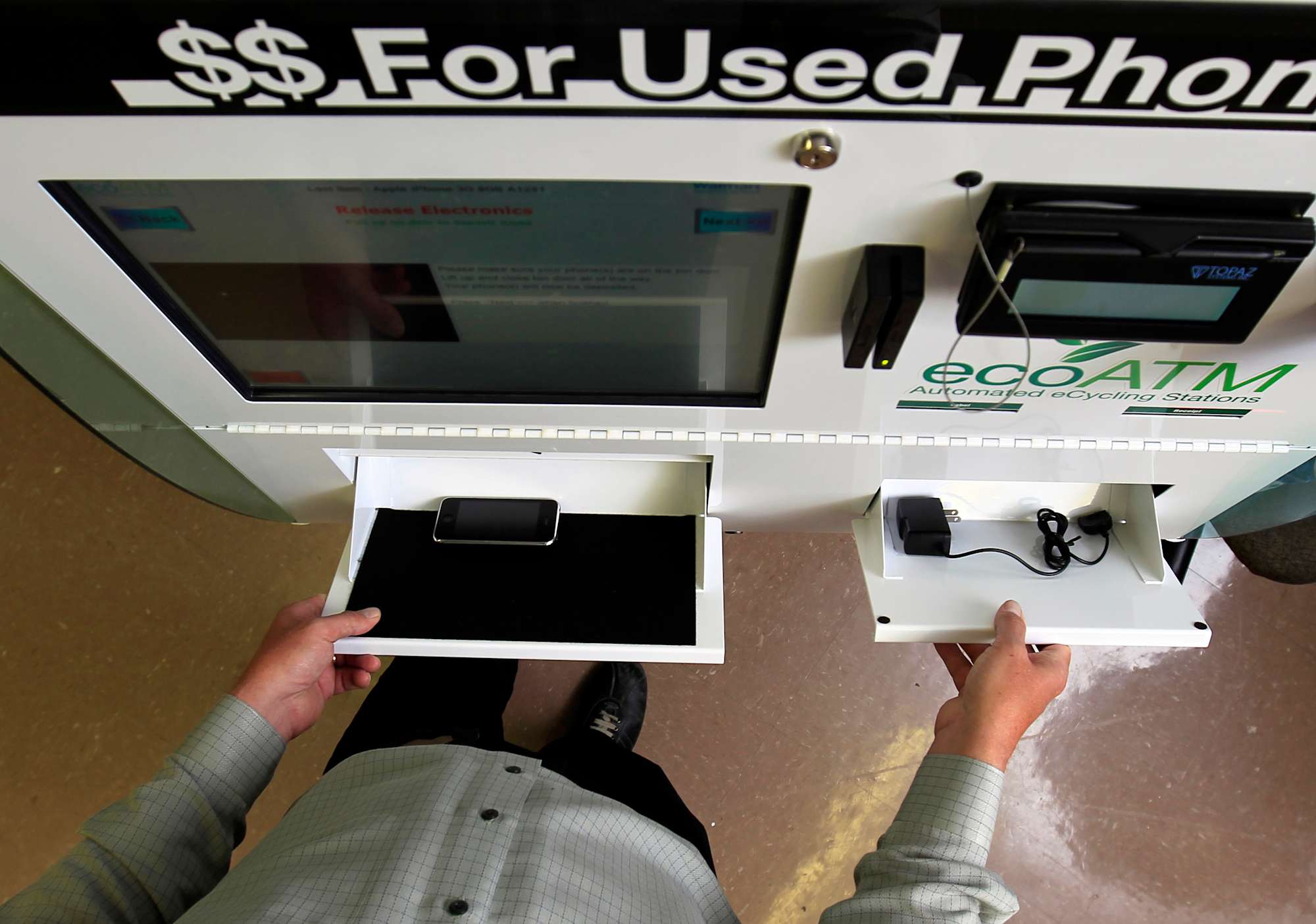
If you don't want to have to worry about packaging up your old device and mailing it off, or would like to receive your payout right away, there's always ecoATM. It's literally there in the name: an automated machine that you place your device into and it examines the handset and pays you on the spot. It accepts the biggest brands (i.e., Apple and Samsung), along with devices from a wide variety of manufacturers, including LG, Motorola and ZTE. If the machine determines that your device isn't worth anything at all, you can still use ecoATM to responsibly recycle your old gadget. You'll find ecoATM kiosks in Walmart stores and malls across the country.
Amazon
While browsing Amazon listings, it’s likely you’ve come across products marked as “refurbished.” Well, if you’ve ever wondered where those come from, a lot of them likely hail from Amazon’s trade-in program. The company will put its own products, like Kindle readers and Fire tablets front and center, but you can also send in phones and gaming products in for an Amazon gift card as well. It’s not great if you want cash, but if you’re looking to upgrade an Amazon device this option is your best bet, as trading in an older device also nets you a 20 percent discount in addition to the store credit.
Apple
This is a good option if you’re looking to upgrade to a newer Apple device. You can trade in iPhones, iPads, Macs and even Apple Watches. That’s notable as wearables are a device category you don’t often see on trade-in sites. Apple will even take your old Android phone if you were thinking of making the switch. The trade-in values are on par with other sites, and you can get your payout in the form of a gift card instead if you’d rather wait before making a new purchase, put it toward media purchases or even just use it in an Apple Store. Which, by the way, also accepts trade-ins in case you’re not comfortable shipping your old but still expensive device.
It'sWorthMore
The nice thing about It’sWorthMore is that its on-site forms handle a larger variety of gadgets than other sites, incorporating companies such as Microsoft, Sonos and even GoPro in addition to standards like Apple, Samsung and Google. You’ll answer a few standard questions about your device’s condition and whether you still have the original box — obviously, the more you’ve kept from the original packaging, the better. You’ll then get a ballpark estimate of its worth and a prepaid shipping label to print out. Once your device is received you’ll generally receive the assessment and payment via check, PayPal or Zelle within two to three business days.
BuyBackWorld
The appeal of BuyBackWorld is that device assessment is a streamlined process: Instead of having to answer a barrage of detailed questions for your device you can just give it a general assessment and let the site handle the rest. Just like with It’sWorthMore, BuyBackWorld will provide a printable shipping label in your confirmation email but, if you don’t have a printer or boxes to pack your device up, you can always have the site send you a free shipping kit, which can handle every gadget the site takes except desktop computers.
GadgetGone
If you’ve read through the other site descriptions, GadgetGone’s modus operandi should be familiar: To sell a product, you’ll have to answer a few questions about what type of device you have and what condition it’s in, after which the site will generate a prepaid shipping label. At least here you can find brands like OnePlus included among the options, and you can also sell MacBooks and Mac Minis here. The site’s biggest gimmick is that you can also send in photos of your pets; you won’t get any additional money but your fur baby (or scaled or feathered friend) may be featured on social media.
Store trade-ins
Sometimes you need your money right now, or just don't want to trust your device to the vagaries of various shipping companies. There are a few nationwide retailers that accept trade-ins for cash or store credit. Additionally, wireless carriers like Verizon, T-Mobile, AT&T and Sprint will all give you credit toward a new phone.
Best Buy
Best Buy also offers trade-ins both by mail and in-store — with more than 1,000 locations, this might be extremely convenient for you. You fill out the form online and bring that to customer service. It's easy, but there's one big downside: You can get your payout only via a Best Buy gift card. This is great if you spend a lot of money with them anyway, but less good if you really need cash.
GameStop
GameStop is infamous for buying games back at ridiculously low prices and flipping them at near retail, but don't let that stop you from making some quick cash when you need to quickly clear your closet of old electronics and games. And yes, I said cash: GameStop offers store credit, a Visa prepaid card or actual money if you want to take your bounty elsewhere. For example, you can trade in Animal Crossing for the Switch and get $21 in store credit or $17 cash, which isn't bad when new copies are going for $50 on Amazon. GameStop also accepts phones and connected home devices, though the prices aren't going to match what you'd get from an online trade-in site.
Consumer to consumer
Sometimes you prefer to cut out the middleman and get a bit more personal — a transaction where you're selling your device directly to another person instead of letting a faceless site flip it for you as a "refurbished" unit. In those cases, you want a site that's more user-to-user, though a few will still automate certain bits to make your sale as smooth as possible.
Swappa
Swappa is a marketplace site, which means sellers can set their own price. So if you're getting rid of a newer phone, this is probably the best way to go — the iPhone 13 fetches around $729, for example. That's a huge improvement over what you'd get selling through a site like Decluttr, which is offering only $506 for a 128GB unit.
Amazon
When shopping on Amazon, you've probably been tempted by some of those marketplace deals in the past and, chances are, if you list an item on there, someone will give your old device a look. Since almost everyone on earth seems to have an Amazon account, your potential customer base is huge, and it costs only $0.99, plus a percentage based on category, to sell an item through the site. The downsides are that Amazon isn't really optimized for individual sales; you'll be competing with wholesale companies and even bots that will tweak the price of a product automatically in response to the competition.
eBay
eBay is sort of the Wild West of sales sites, but the biggest advantage is that you can sell anything there and hopefully find a buyer, regardless of how old a product is. Even so, the site has come a long way in the past decade or so, adding structured categories that can help lead customers to your product — for phones, you can search by network, color or storage capacity, and even filter for features like 4K video or fingerprint sensors.
In the end, it still works as it always did: You list a product and set an end date for the listing with a minimum price, or just set a "Buy It Now" price if you don't want to wait to see how an auction turns out. Chances are you already have an eBay account with a feedback score, so there's no extra setup required on your part. Your first 50 listings are free every month, and you'll pay 10 percent of the purchase price only if an item sells. The biggest downside is that you're competing with a lot more sellers, and chances are there's always someone willing to undercut you on price.
Cash-back comparison
Ultimately, the site you go with should be whatever's most useful and convenient, but if you just care about how much money you'll end up with, we've priced out a few recent flagship handsets just to give you an idea of what each site offers. We've also thrown in the Xbox One X, because it might be time to sell yours off and finally upgrade to an Xbox Series X.
All phone prices are for the lowest storage capacity, either 64GB or 128GB. The prices are for the unlocked models when available, or the carrier where it's being traded. These are only estimates, and were valid the day this post was written. Prices will fluctuate daily or, in the case of sites like Amazon and eBay, hourly.
Apple iPhone 11 Pro Max
Samsung Galaxy S20+ 5G
Google Pixel 5
Xbox One X (1TB)
Decluttr
$446
$292
$287
$190
uSell
$480
N/A
N/A
$120
ecoATM
$265
$140
$90
N/A
Sprint
$330
$225
$205
N/A
Verizon
$338
$288
$195
N/A
T-Mobile
$360
$225
$190
N/A
AT&T
$330
$290
$200
N/A
Best Buy
$380
$275
$250
$200
GameStop
$369 cash / $461 credit
$252 cash / $315 credit
N/A
$188 cash / $237 credit
Swappa
$594
$540
$280
$245
Amazon
$536
$537
$309
$430
eBay
$445
$525
$300
$150
BuyBackWorld
$450
$300
$175
$125
It'sWorthMore
$463
$303
$203
$180
GadgetGone
$465
$335
$290
$160
If you were looking to sell some games, we've also got a shorter list, because not every site accepts game trade-ins. GameStop will offer you more money than what's listed below if you're a member of its Elite or Elite Pro programs.
Battlefield 2042 (Xbox Series X/S)
Horizon Forbidden West (PS5)
Pokémon Legends Arceus (Switch)
Decluttr
$7.62
$28
$28
GameStop
$1.76 cash / $2 credit
N/A
$26 cash / $33 credit
Amazon
$50
$68
$51
eBay
$10
$46
$53
Once you've picked a site and listed your item, there are a few important things to remember before you ship off your device. The most important, when disposing of a phone or laptop or any other device containing personal data, is to do a full factory reset of your device. That also means turning off "Find My iPhone" and the activation lock on iOS devices. See if you can unlock the phone, too; you'll actually get more money selling a carrier-free device. And finally, make sure you've backed up any important data you may have, like contact info, game save data and, of course, photos. Cash is great, but it won't save your memories.
Images: Mike Blake / Reuters (ecoATM); Alamy (Gamestop); Getty Images for eBay (eBay)
FC Barcelona might be one of the most famous names in soccer, but the club is in bad financial shape. So much so, it couldn't afford to hang on to talisman Lionel Messi, who moved to Paris St Germain last summer. Overall, Barcelona is in debt to the tune of well over $1 billion. The club’s dire finances are being somewhat alleviated, though, with the help of a new sponsor: Spotify.
The audio streaming platform’s name will replace Rakuten on the front of men’s and women's team shirts (and replicas that fans buy) as part of a long-term partnership that starts in July. Spotify says it will work with Barcelona to “create opportunities for the iconic shirt to be a space that celebrates artists from across the world.” The team’s famed stadium will be rebranded as Spotify Camp Nou as well. It’s the first time Barcelona has renamed the stadium after a sponsor.
On top of that, as long as the Barcelona Members Assembly approves the deal next month, Spotify plans to draw attention to artists from around the world with the help of Barcelona, “giving a global stage to players and artists at Spotify Camp Nou.” Spotify believes the partnership and worldwide renown of the club will help it “create a new platform to help artists interact with Barcelona’s global community of fans.” More specifics will be announced later this year.
The first day of spring is right around the corner and if you're looking for some help cleaning up your home, a robot vacuum could do the trick. Even better if you can snag one with self-emptying features, which allow you to basically ignore the robo-vac until you have to clean the base once every month or so. One of our favorites, the Shark AI Robot Vacuum with Base, is $150 off right now at Amazon, bringing it down to $500.
The AV2501AE model is discounted, which is slightly different than the model we included in our guide (RV2502AE) in that it has a black and bronze design. However, both vacuums share a number of key features including self-cleaning brush rolls that help pick up pet hair, LiDAR navigation, UltraClean Mode, obstacle avoidance, Alexa and Google Assistant support and a bagless, HEPA base. The latter helps Shark's robo-vac stand out among most of the competition — you don't have to pay extra for proprietary garbage bags, rather, you simply detach a portion of the base when you need to empty it and then snap it back into place.
In addition to that convenience, Shark's machine impressed us with its cleaning power and its solid mapping skills. The first thing you'll have it do is an "Explore Run," in which it creates a map of your home that you can then label with room names in the companion mobile app. This makes it easy to send the robo-vac to clean only your bedroom when necessary, and you can create no-go zones as well. With a 120-minute run time, the machine can clean a good portion of any home before it needs more juice, and its handy "recharge and resume" feature allows it to power up and get back to cleaning without any additional prompting.
Shark's mobile app is pretty easy to use as well, and it lets you create cleaning schedules, start jobs from anywhere and activate UltraClean Mode when you need all of the suction power possible to clean up big messes. Overall, it's an excellent self-emptying robot vacuum that's competitively priced, especially when discounted like this.
Follow @EngadgetDeals on Twitter for the latest tech deals and buying advice.
Robot vacuums have come a long way over the past few years. They’re smarter, more powerful and (marginally) better at avoiding chair legs than they ever were before, and you don’t have to shell out as much money to get one either. There are also many more robo-vacs available now than there once were, so deciding which to buy isn’t as simple as choosing the latest model from the biggest brand. We tested out many of the newest robot vacuums available now to see how they stack up against each other.
Are robot vacuums worth it?
We tackled this question in our budget robot vacuum guide and the answer is yes, especially if vacuuming is one of your least favorite chores. Robots take the hard work out of cleaning your floors – just turn the thing on and watch it go. Any robot vacuum worth buying is semi-autonomous in that it will suck up dirt around your home until its battery is low and then make its way back to its charging dock. You should only have to interact with it to turn it on, empty its dustbin and untangle it if it were to get stuck somewhere.
That’s not to say robot vacuums are perfect. They’re almost always less powerful and less flexible than standard vacuums. Since most robo-vacs are much smaller than traditional models, they often don’t have the same level of suction you’ll get in an upright machine. Plus, their dustbins are smaller, so they will need to be emptied more frequently. While WiFi-connected robot vacuums give you the flexibility to start a cleaning job from anywhere using an app, targeting a small area of your home can be more complicated. Some robo-vacs have spot-cleaning features that focus the machine’s attention on a specific area, which almost – but not quite – mimics the spot-cleaning you’d be able to do yourself with a regular vacuum.
What to look for in a robot vacuum
iRobt / 1996-2001 AccuSoft Co., All rights reserved
As we explained in our budget guide, WiFi is a key feature for most robot vacuums. Some of the cheapest devices aren’t WiFi connected, though, so if you’re looking at the most affordable devices, it’s best to check for that feature before you buy. WiFi connectivity allows a robot vacuum to do things like communicate with a mobile app, which then allows you to control the device from your phone.
Suction power is another important factor to consider. Unfortunately, there isn’t a standard power scale that all robo-vacs adhere to, so it’s difficult to compare suction power among a bunch of devices. Some companies provide Pascal (Pa) levels and generally the higher the Pa, the stronger the vacuum will be. But other companies don’t rely on Pa levels and simply say their robots have X-times more suction than other robots.
Ultimately, we recommend thinking first about the floors in your home: Do you have carpet throughout, or tile and hardwood, or a mix? Robots with stronger suction power will do a better job cleaning carpets as they can get into the nooks and crannies more easily. Some machines have “max” modes as well, which ups the suction power but also typically eats at battery life faster than the “normal” cleaning mode.
Past a certain price threshold, you’ll find advanced features like home mapping, improved object detection and automatic dustbin disposal. Home mapping is exactly what it sounds like: The vacuum uses sensors to map your home’s layout as it cleans, allowing you to send it to particular rooms or areas in later cleaning jobs. Most robo-vacs have some version of object detection, but some will be better than others at actually avoiding things like chair legs and children’s toys. Some, like iRobot’s j7 series, even go so far as to promise to avoid things like pet poop that can potentially ruin your machine.
Finally, for peak convenience, consider a robot vacuum that comes with a clean base. These are basically garbage bins that are attached to the machine’s charging base. At the end of each job, the robo-vac automatically empties its small dustbin into the large clean base – that means you won’t have to empty the dustbin yourself and you’ll only have to tend to the base once every few weeks. Just keep in mind that most clean bases require proprietary garbage bags – another long-term expense you’ll have to factor into the cost of owning one of these devices.
Engadget picks
Best mid-range robot vacuum: Shark AI Robot Vacuum with Base
Shark
Shark’s $650 RV2502AE AI robot vacuum with Base ticks all of the boxes that a mid-range machine should. It offers reliable performance, its mobile app is easy to use and it produces accurate home maps. On top of that, its base is bagless, which means you won’t have to spend money every few months on garbage bags for your robot vacuum.
Setting up the Shark is as simple as taking it and its base out of the box, plugging the base in and downloading the companion mobile app to finish things up. The machine connects to WiFi, allowing you to control it via the app when you’re not at home, or using Google Assistant and Alexa voice commands. The first journey the Shark makes is an “Explore Run,” during which it produces a map of your home that you can then edit from the mobile app.
The Shark produced a pretty accurate floorplan of my two-bedroom apartment, and I was happy to see a “re-explore” option that I could use if the map wasn’t up to my standards. With a completed map, you’re then asked to label rooms in your home. That way, you can send the Shark to only the bedroom for more direct cleaning jobs, select “no-go” zones and more.
The first few times I ran the Shark robot, I had it clean my whole apartment. I was impressed by how quiet it was – or rather, how much quieter it was compared to other robo-vacs I’ve tried. You’ll have to turn up the volume on your TV if it’s cleaning in the same room, but it’ll be hard to hear when it’s sucking up debris down the hallway. It also did a decent job maneuvering its way around the cat toys I left out on the floor. The device’s object detection feature claims it can avoid things as small as four inches, but I found that it was much better at sensing and moving around the three-foot-long cat tunnel on my floor than the many tiny mouse toys.
But even if Mr. Mouse caught the edge of the Shark’s wheels now and then, the robo-vac took it all in stride. One thing I look for when testing robot vacuums is how much attention they need from me during cleanings. The best ones require no extra attention at all – once they start a job, they’re smart enough to putter around your home, move around objects and return to their base when they’re finished. With Shark’s robo-vac, I never had to tend to it when it was cleaning. Now, I did my due diligence and picked up pieces of clothing and charging cables off the ground before running the Shark (ditto for every other robot vacuum I tested), so those things were never in the way. Most companion apps will actually remind you to do this before starting a cleaning job.
This Shark machine comes with a clean base, so it will empty its dustin after every job – and also during a job if its bin gets full before it’s done. In the latter situation, the Shark will go back to cleaning automatically after it’s freed up its bin. That’s a great feature, but I found the best thing about the base to be its bagless design. Shark’s device is unlike most other robot vacuum clean bases because you don’t have to keep buying proprietary garbage bags to outfit the interior of the base. When you want to empty the base, part of it snaps off and opens to eject debris, and it easily locks back in place when you return it. Not only is this quite convenient, but it also brings the lifetime cost of ownership down since you won’t be buying special bags every few months.
Runner up: Roomba j7
Valentina Palladino / Engadget
iRobot’s Roomba j7 is a great option if you want the latest obstacle avoidance technology from the company in an attractive package. The $600 j7 doesn’t come with a clean base, but you can get the same vacuum with one for $200 extra.
The biggest selling point of the Roomba j7 series is its upgraded AI-driven computer vision which helps it detect and move around objects. This includes pet poop – a robot vacuum’s arch nemesis – and iRobot even promises that it will replace your j7 machine if it runs into pet poop within the first year of ownership.
That’s one feature I was happy I never got to test, as my cat kept all of her activity to her litter box. Otherwise, the Roomba j7 did a good job sucking up dirt and debris around my apartment and it didn’t make too much noise while doing so. All of the robo-vacs I tested at this mid-range level had roughly the same level of suction, so there wasn’t a big difference between them when it came to cleaning power.
Like other robot vacuums, you can set cleaning schedules in the iRobot mobile app so you never have to start a cleaning job on the fly. The app also has a “favorites” section, which lets you create profiles that you’ll use all the time like “clean the living room and the entryway.” And if you prefer to use voice commands, the robot supports Amazon’s Alexa and the Google Assistant.
The Roomba j7 has Imprint Smart Mapping, but unlike the Shark, it took more than one runthrough of my home for it to create a complete map. iRobot’s app distinguishes between a regular cleaning job and a “mapping run,” so make sure you’re choosing the latter the first few times you run the machine.
I tested the j7+, which means I was treated to the roaring sounds of the machine emptying its dustbin into its clean base. The emptying process isn’t as simple as an automatically opening flat that shakes dirt from one garbage can to another – the base actually sucks the dirt from vacuum. This was the case for all of the machines I tried that came with clean bases; they’re all quite loud, but the Roomba j7+ was the loudest of them all. The whooshing sounds last for only five to 10 seconds, but it was shocking the first time it happened. Just keep that in mind if you ever decide to run the robot at night when others are sleeping.
Honorable mention: Anker Eufy RoboVac X8 Hybrid
Anker
You may be unfamiliar with Anker’s robot vacuums, but they’re often more affordable alternatives to the iRobots and Sharks of the world. The $649 Eufy RoboVac X8 Hybrid isn’t a budget machine by any means, but it’s a solid robot vacuum that offers a few key features that many competitors don’t have. Plus, you can often find it on sale for $549 or even $449.
Unlike our other midrange picks, the X8 Hybrid doesn’t come with a clean base, nor is there one you can purchase separately. It’s just a standalone robot vacuum, but the “hybrid” indicates that it’s also a mop. It has both a dustbin for collecting debris and a 250-milliliter water tank that you can fill whenever you want to run a mopping cycle. Plenty of other robot vacuums have this feature, and it could be even more useful than a clean base if you have lots of tile or hardwood floors throughout your home.
Besides that, I was impressed with how easy it was to set up the X8 Hybrid, how accurate its mapping technology was and how many extra features it supports. It has four cleaning modes – auto, room, zone and spot – and four suction levels starting with Pure at the low end and topping out at Max. These features give you a lot of control over where the machine cleans and how powerfully it will do so. The X8 Hybrid was in Pure mode the first time I ran it, and I was surprised by not only how quiet it was but also how thoroughly it cleaned considering it was on the lowest suction setting.
There’s also a “tap and go” feature that lets you pinpoint any spot on your home map in the EufyHome app, sending the robot there to clean. Manual controls are also available, which isn’t something you see on a ton of robo-vacs. This option lets you control the machine almost like a slow and slightly clumsy RC car, giving you more control over where it cleans.
It may not have the name recognition that iRobot or Shark do, but the Eufy RoboVac X8 Hybrid is a solid choice nonetheless, especially if you don’t care to add a clean base into the mix. It’s an even more tempting choice if you can snag it when it’s discounted.
Best high-end robot vacuum: iRobot Roomba s9+
Valentina Palladino / Engadget
The Roomba s9+ is admittedly overkill for most people – but it’s nothing if not one of the best robot vacuums out there. You’ll notice its premium features as soon as you unbox it. The s9+ is the biggest but also the most attractive robo-vac I tried, with a corner-friendly design, copper accents and a 1.5-foot tall clean base. The setup was quick and easy, with the machine taking only a few minutes to connect to my home’s WiFi and the iRobot app.
While the s9+ doesn’t have the Precision Navigation feature that the newer j7 does, it has something called “Careful Driver” that uses a 3D sensor to detect and clean around objects. It seems that the main difference is that the s9+ isn’t specifically wired to avoid pet poop, so keep that in mind if you have furry friends around the house. However, with 40x the suction power of a standard Roomba, the s9+ does a great job cleaning up pet hair.
It’s aso louder than the j7 when it’s cleaning, but not irritatingly so, and I noticed a deeper clean in my carpets thanks to the extra suction. And it changes its cleaning mode automatically when transitioning from, say, a carpeted floor to tile.
Even this $1,000 robot vacuum bumped into a few table legs while cleaning, but it was noticeably better than other machines at navigating around my furniture and correcting itself when it got stuck. It also moves faster than the j7, so it was able to cover a bit more of my apartment before it had to return to the base for charging after about one hour of cleaning. I was also pleasantly surprised to find that the s9+ wasn’t nearly as loud as the j7 vacuum when emptying its dustbin into the clean base.
With the iRobot app experience being the same across all Roombas, the s9+ stands out for its subtle premium features like its elegant design, elegant-looking clean base, superior cleaning intelligence and top-of-the-line suction power. Aside from the extra suction, those are all nice-to-haves rather than must-haves, so most people – including you! – probably don’t need the Roomba s9+. It’s the fanciest robot vacuum iRobot has to offer, but you’ll get a similar level of quality with the Roomba j7 while spending a couple hundred bucks less.
Honorable mention: Roborock S7+
Valentina Palladino / Engadget
Roborock’s high-end S7+ deserves a mention for its cleaning power and number of additional features that many other competitors don’t have. First, the S7+ is a vac-and-mop combo, and its mopping map automatically lifts itself out of the way when the machine reaches the carpet. That means you can have it clean your whole home, vacuuming and mopping in the right spots, without you giving it any extra attention (besides filling its 300ml water tank at the start).
The $950 machine has a longer setup process because its clean base comes in two pieces. You must attach the bottom of the base, where the robo-vac charges, to the garbage-bin upper portion using a few screws and a tool that attaches to the bottom of the base. Roborock provides everything you need to do this in the box, so while it takes a bit more time, it’s still an easy process.
What wasn’t so easy for me at first was connecting the S7+ to the Roborock app. The vacuum had trouble connecting to my home’s WiFi network, but I was able to connect it to the Mi Home app, which is Xiaomi’s main smart home companion app (Xiaomi is an investor in Roborock). There aren’t a ton of differences between the two apps when it comes to robo-vac controls, but the S7+ is designed to work with Roborock’s program. After troubleshooting with a Roborock representative, I was able to fix the problem by factory resetting the vacuum and that allowed me to connect it to the Roborock app properly.
That said, the Roborock app isn’t nearly as polished as those from iRobot, Shark and others. The main page shows your home’s map along with the battery level, cleaning time, cleaning area in feet, and buttons that let you quickly start a cleaning job and empty the dustbin. You’re also able to select specific rooms or zones to clean, but the rest of the control options live in the menu accessible by the three-dot icon at the top-right corner of the app. Things are a little buried, and that might make the S7+ harder for robot-vacuum newbies to use.
When it comes to cleaning, the Roborock S7+ did a great job sucking up dirt around my home. In addition to the usual features like cleaning schedules, zone targeting and others, the vacuum also has things like child lock, which will disable the physical buttons on the machine; different auto-emptying settings to choose from; “pin and go,” which lets you tap on your home map to send the robot to a specific location; and manual direction controls so you can move the machine like a toy car. This isn’t the robot vacuum to get if you want the most polished experience – and you may very well want that if you’re dropping $1,000 on one – but it remains a powerful vac-and-mop machine with a handful of extra perks.
Best budget: Roomba 694
Valentina Palladino / Engadget
iRobot’s $279 Roomba 694 is a great option for most people thanks to its good cleaning power and easy-to-use mobile app. We won’t get too deep into it here since we have a whole guide to affordable robot vacuums with additional recommendations. But suffice to say, the 694 gives you all the essentials you’d expect from a robot vacuum, along with all of the convenience that comes with iRobot’s mobile app.