In the wake of new privacy concerns post-Roe, the FTC has warned companies and data brokers that it would crack down on any misuse of health and location data. The agency stopped short of detailing any new steps to safeguard sensitive reproductive health data but stressed it would hunt down companies that break existing data privacy laws. In a new blog post, the FTC wrote that it was “committed to using the full scope of its legal authorities” to safeguard consumer privacy. It also noted that apps that track periods and fertility, as well as any product that collects health or location data could expose individuals to harm, particularly those seeking abortions.
“The Commission is committed to using the full scope of its legal authorities to protect consumers’ privacy. We will vigorously enforce the law if we uncover illegal conduct that exploits Americans’ location, health, or other sensitive data. The FTC’s past enforcement actions provide a roadmap for firms seeking to comply with the law,” wrote the agency’s acting associate director in the Division of Privacy and Identity Protection Kristin Cohen in the post.
The FTC’s statement arrives only a few days after the Biden administration’s July 8th executive order on abortion access, in which it asked the FTC to take steps to protect abortion data privacy, including launching a task force. In light of the Dobbs ruling, digital privacy groups have warned that police can easily use location tracking and other sensitive data to prosecute those suspecting of having an abortion in states where it is now illegal.
Period-tracking apps are just one of the many tools that law enforcement agencies can use to build a case against a person suspected of having an abortion. As both digital privacy groups have noted, fitness trackers, search histories, GPS map apps and practically any online activity could be fair game for law enforcement in states with abortion bans. Location data can also be misused. The FTC noted a 2017 Massachusetts case where a company sent targeted ads on abortion alternatives to anyone who crossed a “digital fence” outside an abortion clinic.
Perhaps as an example of how aggressive it has been with apps that misused reproduction health data in the past, the FTC also mentioned a settlement it reached last year with popular period-tracking app Flo. The agency had alleged that Flo shared sensitive health data with outside parties, despite promising to keep such information private. As a result, Flo agreed to obtain user consent prior to sharing information with outside parties and to launch an independent privacy review. Flo is hardly the only reproductive health app to share sensitive user data. A May study of 20 different period-tracking apps by VPN company Surfshark found that nine shared data for third-party ads and 10 collected coarse location information.
Twitter’s lawyers have hit back at Elon Musk for his attempt to bail on his $44 billion takeover of the company. The company said Friday, immediately following Musk’s official notice that he wanted to terminate the deal, that it was prepared to pursue legal action against him. Now, in a new filing with the SEC, Twitter goes further, calling Musk’s actions “invalid and wrongful.”
Musk and his lawyers previously accused the company of making “false and misleading” statements about the number of bots and fake accounts on its platform. They claimed, without offering evidence, that number of bots could be “wildly higher” than what Twitter has stated.
Now, Twitter’s lawyers have responded. In a letter to Musk’s attorneys, Twitter denies that it has reneged on its side of the agreement. In fact, it goes on to state that Musk himself has “knowingly, intentionally, willfully, and materially breached the Agreement.” It cites, among other provisions, the clause that stipulates Musk is barred from disparaging Twitter or its employees.
The filing is the latest sign that Twitter is gearing up for what could be a drawn out legal battle with Musk. The company’s board, which is facing a multi-billion dollar hit to Twitter’s share price since the saga with Musk began, has said it will sue Musk in an effort to force him to comply with the deal. The company has even hired a new law firm that specializes in corporate mergers. But whether a legal battle will result in Musk actually owning Twitter is still very much unclear.
After 14 years of development and six months of calibration, the James Webb Space Telescope is finally ready to embark on its mission to probe the depths of our cosmos. On Monday, NASA and President Joe Biden shared the first colored image from the space telescope, showcasing a look at the early days of the universe.
👀 Sneak a peek at the deepest & sharpest infrared image of the early universe ever taken — all in a day’s work for the Webb telescope. (Literally, capturing it took less than a day!) This is Webb’s first image released as we begin to #UnfoldTheUniverse: https://t.co/tlougFWg8Bpic.twitter.com/Y7ebmQwT7j
Assassin’s Creed Liberation HD owners on Steam won’t lose access to the game on September 1st, Ubisoft clarified today after a notice on Valve’s storefront suggested the title would become unplayable later this year. “Current owners of those games will still be able to access, play or redownload them,” a spokesperson for the company told Eurogamer.
The confusion around Liberation HD’s playabilitystems from an announcement Ubisoft made earlier this month. In a move designed to free up resources for its newer and more popular titles, the company said it planned to drop support for online services in 15 games, including Liberation HD. As a result of the decision, online features and downloadable content would become unavailable in most of the affected titles. However, the only game Ubisoft said would be completely unplayable was Spade Junkies due to it being a multiplayer-only experience.
Ubisoft is making a precedent on Steam as Assassin’s Creed Liberation HD will not be accessible following September 1st, 2022. Even if you already bought it, a bar new low for consumers. pic.twitter.com/hRmmb2yM3w
Many thought Ubisoft planned to take things a step further when a Twitter user named Nors3 shared a screenshot on Monday of Liberation HD’s Steam page. “Please note this title will not be accessible following September 1st, 2022,” said one of the notices on the game’s storefront listing. The warning prompted many to accuse Ubisoft of dropping to a new low.
Ubisoft told Eurogamer it’s working with Valve and other platform owners to provide more accurate information on the future of the 15 games affected by its decision. “It has always been our intention to do everything in our power to allow those legacy titles to remain available in the best possible conditions for players, and this is what we are working towards," the company said.
Electric truck maker Rivian is reportedly planning to lay off hundreds of workers. While the company hasn't made a firm decision on mass job cuts, according to Bloomberg, it may shed around five percent of the workforce. With a headcount of more than 14,000, that equates to around 700 employees. Layoffs may be announced in the coming weeks, the report suggests. Rivian declined to comment to Engadget.
The job cuts would primarily be for non-manufacturing positions in areas where Rivian has expanded too quickly. Teams with duplicate functions are said to be among those the company has targeted. The total number of employees at Rivian has more or less doubled over the last year as the automaker increased production.
The automotive industry has been hit hard by supply chain issues and the economic climate, and it seems Rivian is no exception. The company still expects to build 25,000 EVs this year despite production difficulties. Rivian eventually aims to manufacture 600,000 vehicles per year between its existing plant in Normal, Illinois and a second planned factory in Georgia that's expected to open in 2024.
The company has a backlog of tens of thousands of EV orders. It will have to juggle those with the 100,000 delivery vehicles it will build for Amazon by the end of the decade. As such, bolstering production while streamlining operations elsewhere seems a logical move.
The news follows a recent report noting that Rivian hired dozens of former Tesla employees in recent months, according to LinkedIn data. It was reported in late June that Tesla cut around 200 people from its Autopilot team after CEO Elon Musk announced plans to reduce the company's salaried workforce by 10 percent. Musk told employees earlier that month he had a “super bad feeling” about the state of the economy and for them to expect layoffs.
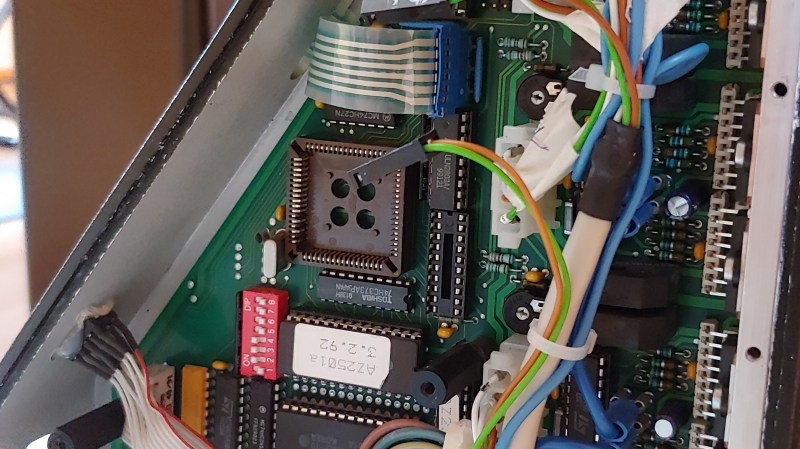
[Sebastian] and [Stefan Shütz] had a ISEL EP1090 CNC machine at home, sitting unused, and they decided to bring it to life. With pretty good mechanical specs, this CNC looked promising – alas, it was severely constrained by its controller. The built-in CPU’s software was severely outdated, had subpar algorithms for motor driving programmed in, and communication with the CNC was limited because the proprietary ISEL communications protocol that isn’t spoken by other devices.The two brothers removed the CPU from its PLCC socket, and went on to wiring a grbl-fueled Arduino into the controller box.
They reverse-engineered the motor driver connections – those go through a 74HC245 buffer between the original CPU and the drivers. Initially, they put an Arduino inside the control box of the CNC and it fit nicely, but it turned out the Arduino’s CPU would restart every time the spindle spun up – apparently, EMC would rear its head. So, they placed the Arduino out of the box, and used two CAT7 cables to wire up the motor and endstop signals to it.
For tapping into these signals, they took the 74HC245 out of its socket, and made an interposer from two small protoboards and some pin headers – letting them connect to the STEP and DIR lines without soldering wires into the original PCB. There’s extensive documentation, GRBL settings, and more pictures in their GitHub repo, too – in case you have a similar CNC and would like to learn about upgrading its controller board!
After this remake, the CNC starts up without hassles. Now, the brothers shall CNC on! Often, making an old CNC machine work is indeed that easy, and old controller retrofits have been a staple of ours. You can indeed use an Arduino, one of the various pre-made controller boards like Gerbil or TinyG, or even a Raspberry Pi – whatever helps you bridge the divide between you and a piece of desktop machinery you ought to start tinkering with.
In 2020, the Wikipedia community was engulfed in scandal when it came out that a US teen had written 27,000 entries in a language they didn’t speak. The episode was a reminder that the online encyclopedia is not a perfect source of information. Sometimes people will attempt to edit Wikipedia entries out of malice, but frequently factual errors come from some well-intentioned individual making a mistake.
That's a problem the Wikimedia Foundation recently partnered with Facebook parent company Meta to address. The two set their sights on citations. The problem with Wikipedia footnotes is that there are almost too many for the platform's volunteer editors to verify. With the website growing by more than 17,000 articles every month, countless citations are incomplete, missing or just plain inaccurate.
Meta developed an AI model that can automatically scan citations at scale to verify their accuracy. It can also suggest alternative citations when it finds a poorly sourced passage. When Wikipedia's human editors evaluate citations, they rely on common sense and experience. When an AI does the same work, it uses a Natural Language Understanding (NLU) transformation model that attempts to understand the various relationships of words and phrases within a sentence. Meta’s Sphere database, consisting of more than 134 million web pages, acts as the system's knowledge index. As it goes about its job of checking the citations in an article, the model is designed to find a single source to verify every claim.
To illustrate the capabilities of the AI, Meta shared an example of an incomplete citation the model found on the Wikipedia page for the Blackfoot Confederacy. Under the Notable Blackfoot people section, the article mentions Joe Hipp, the first Native American to compete for the WBA World Heavyweight title. The linked website doesn’t mention Hipp or boxing. Searching the Sphere database, the model found a more suitable citation in a 2015 article from the Great Falls Tribune. Here’s the passage the model flagged:
In 1989 at the twilight of his career, [Marvin] Camel fought Joe Hipp of the Blackfeet Nation. Hipp, who became the first Native American to challenge for the world heavyweight championship, said the fight was one of the weirdest of his career.
What’s notable about the above passage is that it doesn’t explicitly mention boxing. Meta’s model found a suitable reference thanks to its natural language capabilities. The tool could one day help with Facebook's misinformation problems. “More generally, we hope that our work can be used to assist fact-checking efforts and increase the general trustworthiness of information online,“ the model’s creators said. In the meantime, Meta hopes to build a platform Wikipedia editors can use to verify and correct footnotes systematically.
Twitter is opening its conversation-leaving feature to everyone. Now, all Twitter users will be able to use the service’s “unmention” feature, the company announced.
Twitter describes “unmention” as the ability to leave an unwanted conversation on the platform. When used, it unlinks the user’s handle from the Twitter thread, so they will no longer be tagged in future tweets, and others won’t be able to reply to them from the same thread. Though it won’t prevent others from continuing to jump into the conversation, it will at least shield the person’s replies and notifications.
The feature has been in the works for more than a year. Twitter first teased the idea last summer, saying it was meant to prevent the kind of “unwanted attention” that can often lead to harassment. It started testing it in April, but it was limited to a small group of users on the web only. Now, with the update, anyone will be able to remove themselves from a thread regardless of whether they are using Twitter’s apps or website.
Sometimes you want to see yourself out.
Take control of your mentions and leave a conversation with Unmentioning, now rolling out to everyone on all devices. pic.twitter.com/Be8BlotElX
The update is the latest way Twitter has tried to give users more ways to control how people can interact with them, particularly at moments when they may be more susceptible to harassment. The service has also added reply-limiting features, and has been testing a “safety mode,” which can automatically block problematic accounts.
It's rare for Apple to reshape the way people work on Macs, but that's precisely what the company is trying to do with Stage Manager in macOS Ventura. At first glance, it's just a quick visual way to swap between your recently used applications. But after testing the first Ventura public beta over the past week, I think it may also solve window management issues that have plagued Macs since OS X debuted 21 years ago. Or, maybe, I've just always hated Apple's Dock.
On top of Stage Manager, Ventura also has plenty of upgrades that should make life a bit easier for Apple users. Mail gets the biggest overhaul, but there's also better collaboration with Safari's Tab Groups, as well as much-needed features in Messages. At the very least, it's a far more expansive update than last year's Monterey.
Apple
Stage Manager: Making sense of the Mac madness
In my nearly two decades of using Macs — as a college student, IT support worker and tech journalist — I've never found OS X's Dock to be very useful. Sure, when it was first released, it was a huge visual upgrade over the simplistic taskbars in Windows and Linux. (I remember marveling at the fact that a Dock icon could show a running video.) But on its own, the Dock is a confusing mishmash of shortcuts and running application indicators, something reviews at the time also criticized.
If you want to find a specific Safari window, for example, you have to press Control, click on the Dock icon and then select it from the dropdown. In comparison, the far uglier Windows XP let me zero in on specific apps (and their sub-windows) with a single click on the task bar. Perhaps aware of this usability quirk, Apple introduced Exposé in 2003 as an easy way to see everything you're running all at once. Since then, I've religiously assigned hot corners on every Mac I've used to trigger specific Exposé functions (one corner shows everything that's open, another shows me windows just for my current app, while another brings me right to the desktop). Who needs a confusing Dock when you can get a God's-eye view of your entire system?
Fast-forward almost twenty years, and we have Stage Manager, yet another on-screen tool for jumping between your apps. But while it may just seem like additional screen clutter, its main function is to help you focus by actually decluttering your screen. When you select a recent app from Stage Manager, it centers that app on your screen and makes other windows disappear. Hit the app shortcut again, and you'll cycle through open windows.
While it seems restrictive at first, like an attempt at bringing an iPad-esque workflow onto Macs, Stage Manager also lets you group apps together and, crucially, remembers exactly where you position your windows. While writing this preview, I kept Safari and Evernote grouped together, so I could write and research without worrying about pings from Slack or WhatsApp. You could do something similar with Apple's Spaces virtual desktops feature, but I always found that hard to manage. Stage Manager makes it as easy as hitting a single icon on your screen.
If you're a Mac pro-user already set in your ways, you can ignore Stage Manager entirely (it can be turned on and off from the Title Bar, and disabled in System Preferences). But as someone who's struggled with Apple's attempts at window management over the years, I'm finding it to be a refreshing way to make sense of macOS. You can also automatically hide Stage Manager until you need to use it, just like the Dock. (Personally, I've found it to be most useful when I hide the Dock and leave Stage Manager running on the side.)
Apple
Other updates: Mail, Messages and more
I haven't used a desktop email application in years — it's just easier to hop into multiple Gmail accounts in a browser — but those who do will appreciate Apple's Mail updates in Ventura. For one, the search function has been entirely reworked, so it should be easier to locate a specific message. It's also finally getting some much-needed features, like scheduled send, undo sending, rich-text link embedding and alerts about missing attachments and recipients. Those are the sorts of features that have kept me glued to Gmail's web interface for years, so it's nice to see them finally make their way to the desktop. (But really, I'd love to know what took Apple so long.)
Similarly, I think everyone would appreciate the changes coming to Messages. That includes the ability to edit texts, delete them entirely, and mark them as unread. I wasn't able to test these features much, since they require your friends and colleagues to be running Monterey as well, but we're not expecting any major surprises with how they work. Monterey also treats older versions of macOS similar to Android users — when I edited a message to an iMessage group, my friends received a separate text notifying them of the changes. For me, it just appeared as an edit within the existing message.
Apple
Here are a few other notable changes in Monterey to look out for:
Continuity Camera: It lets you use your iPhone as a high-quality webcam. I haven't been able to get this feature working properly yet, but on paper it's a compelling way to beef up your video chats without investing in a more expensive webcam.
Shared Tab Groups in Safari: An easy way to collaborate with friends when planning for a trip, or any other group activity.
Passkeys in Safari: Instead of passwords, Passkey is a biometric way to authenticate with websites, and it's tied to your iCloud account. I wasn't able to test this yet, but theoretically it's far more secure than traditional passwords.
Strong password editing in Safari: Finally, there's a way to tweak Safari's auto-generated passwords to meet requirements from certain sites.
Collaboration through Messages: This will let you join up with friends to work together in Notes, Keynote and other Apple software, as well as some third-party apps.
Apple's Freeform app for collaboration: This isn't available to test yet, but it looks like an intriguing Apple spin on a whiteboard app.
We're a couple of months out from Apple officially rolling out the next major versions of its various operating systems. However, you can try out iOS 16, iPadOS 16, watchOS 9 and macOS Ventura right now. Apple has released a public beta, a few weeks after it offered up the first developer betas. To access them, you'll need to sign up for the Apple Beta Software Program and follow the directions.
Bear in mind that there may be some bugs that Apple hasn't detected and resolved. Be sure to back up your data before installing any beta (though backing up regularly is always a good practice). You'll have the option to remove your device from the public beta program and revert it to an older version of its OS.
You can get to grips with some of the new features in iOS 16. Among those are a revamped lock screen with more layout and customization options, such as dynamic wallpapers. Notifications and Focus Mode have been revamped too, while you’ll be able to keep on top of things like sports scores and transit rides with Live Activities. Face ID will finally work in landscape orientation and you'll no longer need an Apple Watch to use the Fitness app.
As for iPadOS 16, improved multitasking options will grant you more control over how to resize apps with, for instance, overlapping windows. Some of the features are limited to M1-powered iPads, however. Elsewhere, there's support for external displays, Google Drive-style document collaboration and (later this year) SharePlay features in Game Center.
Apple has made multitasking a key focus for macOS Ventura as well. The Stage Manager tool can group windows on the side of your screen and organize them by app. There will be an undo send option in the Mail app, along with the option to share tab groups in Safari and a new security function called passkeys, which will use Face ID and Touch ID for authentication. You'll also be able to use an iPhone as a webcam for your Mac.
In watchOS 9, Apple is giving the fitness features a significant upgrade. You'll have access to distance and time intervals for workouts. There will also be a way to view which heart rate zones you're in during workouts and sleep. In addition, Apple is promising improved sleep tracking as well as medication reminders.
When it comes to tvOS 16, the updates are light compared with some of the other devices. One key update is the addition of full support for the Matter smart home standard. As seems to be the case on iOS 16, tvOS will support Nintendo's Joy-Con and Switch Pro controllers.


 They reverse-engineered the motor driver connections – those go through a 74HC245 buffer between the original CPU and the drivers. Initially, they put an Arduino inside the control box of the CNC and it fit nicely, but it turned out the Arduino’s CPU would restart every time the spindle spun up – apparently, EMC would rear its head. So, they placed the Arduino out of the box, and used two CAT7 cables to wire up the motor and endstop signals to it.