Posts with «technology & electronics» label

The best 2-in-1 laptops for 2023

The perfect hybrid machine that’s just as good a tablet as it is a laptop still doesn’t exist. But throughout last year, companies like Microsoft, Apple and Google continued to improve their operating systems for machines that do double duty. Windows 11 has features that make it friendlier for multi-screen devices, while Android has been better optimized for larger displays. Plus, with the rise of ARM-based chips for laptops, especially Apple’s impressive M series, prospects for a powerful 2-in-1 with a vast touch-friendly app ecosystem is at an all-time high.

Even the best 2-in-1 laptops still have their limits, of course. Since they’re smaller than proper laptops, they tend to have less-powerful processors. Keyboards are often less sturdy, with condensed layouts and shallower travel. Plus, they’re almost always tablets first, leaving you to buy a keyboard case separately. (And those ain’t cheap!) So, you can’t always assume the advertised price is what you’ll actually spend on the 2-in-1 you want.

Sometimes, getting a third-party keyboard might be just as good, and they’re often cheaper than first-party offerings. If you’re looking to save some money, Logitech’s Slim Folio is an affordable option, and if you don’t need your keyboard to attach to your tablet, Logitech’s K780 Multi-Device wireless keyboard is also a good pick.

While we’ve typically made sure to include a budget 2-in-1 laptop in previous years, this time there isn’t a great choice. We would usually pick a Surface Go, but the latest model is still too expensive. Other alternatives, like cheaper Android tablets, are underpowered and don’t offer a great multitasking interface. If you want something around $500 that’s thin, lightweight and long-lasting, you’re better off this year looking at a conventional laptop (like those on our best budget PCs list).
Chris Velazco / Engadget

When you’re shopping for a 2-in-1, there are some basic criteria to keep in mind. First, look at the spec sheet to see how heavy the tablet is (alone, and with the keyboard). Most modern hybrids weigh less than 2 pounds, with the 1.94-pound Surface Pro 9 being one of the heaviest around. The iPad Pro 12.9 (2022) and Samsung’s Galaxy Tab S8+ are both slightly lighter. If the overall weight of the tablet and its keyboard come close to 3 pounds, you’ll be better off just getting an ultraportable laptop.

See Also:

You’ll also want to opt for an 11-inch or 12-inch screen instead of a smaller 10-inch model. The bigger displays will make multitasking easier, plus their companion keyboards will be much better spaced. Also, try to get 6GB of RAM if you can for better performance — you’ll find this in the base model of the Galaxy Tab S7+, while this year’s iPad Pro and the Surface Pro 8 start with 8GB of RAM.

Finally, while some convertible laptops offer built-in LTE or 5G connectivity, not everyone will want to pay the premium for it. An integrated cellular radio makes checking emails or replying to messages on the go far more convenient. But it also often costs more, and that’s not counting what you’ll pay for data. And, as for 5G — you can hold off on it unless you live within range of a mmWave beacon. Coverage is still spotty and existing nationwide networks use the slower sub-6 technology that’s barely faster than LTE.

Best overall: Surface Pro 9 (Intel)

There’s no beating the Surface series when it comes to 2-in-1s. They’re powerful, sleek tablets running an OS that’s actually designed for productivity. The Surface Pro 9 is Microsoft’s latest and great tablet, and it builds upon the already excellent Pro 8. It features speedy 12th-gen Intel CPUs and all of the major upgrades from last year, including a 120Hz display and a more modern design. It’s the best implementation of Microsoft’s tablet PC vision yet.

Don’t confuse this with the similarly named Surface Pro 9 with 5G, though, which has a slower ARM processor and inferior software compatibility. Built-in cellular is nice and all, but the Intel Pro 9 is a far better PC.

Like most of the other convertible laptops on this list, the Pro 9 doesn’t come with a keyboard cover — you’ll have to pay extra for that. That’s a shame, considering it starts at $1,000. Microsoft offers a variety of Type Covers for its Surface Pros ranging from $100 to $180, depending on whether you want a slot for a stylus. But at least they’re comfortable and well-spaced. You can also get the Surface Slim Pen 2 ($130) for sketching out your diagrams or artwork, which features haptic feedback for a more responsive experience.

Best for Apple users: 12.9-inch iPad Pro

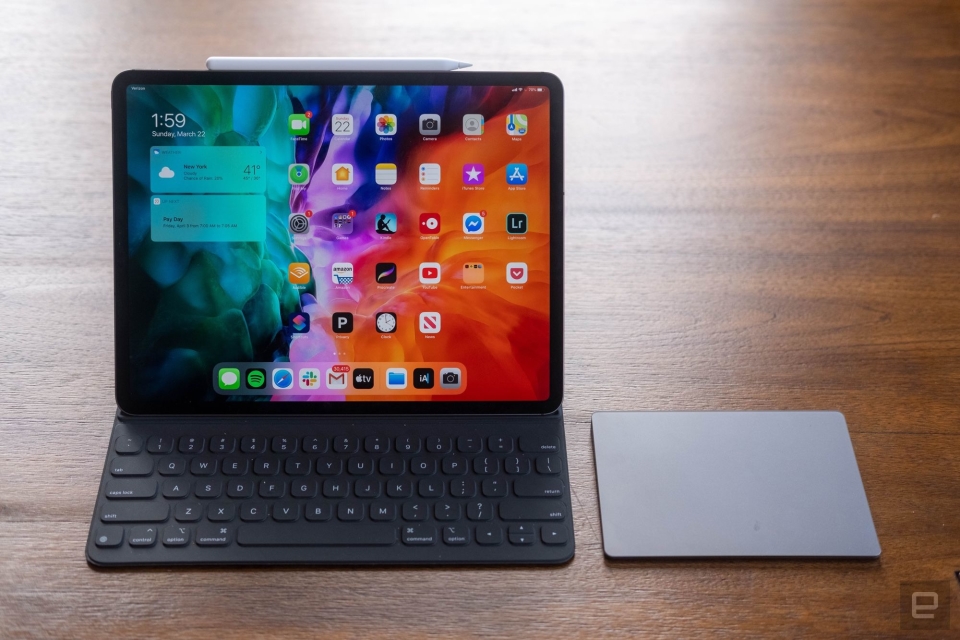
If you’re already in the Apple ecosystem, the best option for you is obviously an iPad. The 12-inch Pro is our pick. Like older models, this iPad Pro has a stunning 12.9-inch screen with a speedy 120Hz refresh rate, as well as mini-LED backlighting. This year, it includes Apple’s incredibly fast M2 chip and more battery life than ever before.

Apple’s Magic Keyboard provides a satisfying typing experience, and its trackpad means you won’t have to reach for the screen to launch apps. But it’ll also cost you an extra $300, making it the most expensive case on this list by a lot. The iPad also lacks a headphone jack and its webcam is awkwardly positioned along the left bezel when you prop it up horizontally, so be aware that it’s still far from a perfect laptop replacement. Still, with its sleek design and respectable battery life, the iPad Pro 12.9 is a good 2-in-1 for Apple users.

Best for Android users: Samsung Galaxy Tab S8+

While Windows is better than iPadOS and Android for productivity, it lags the other two when it comes to apps specifically designed for touchscreens. If you want a tablet that has all the apps you want, and only need it to occasionally double as a laptop, the Galaxy Tab S8+ is a solid option. You’ll enjoy watching movies and playing games on its gorgeous 12.4-inch 120Hz AMOLED screen, and Samsung includes the S Pen, which is great for sketching and taking notes. The Snapdragon 8 Gen 1 chip and 8GB of RAM keep things running smoothly, too.

Last year, Samsung dramatically improved its keyboard case, making the Tab an even better convertible laptop. You could type for hours on this thing and not hate yourself (or Samsung). The battery life is also excellent, so you won’t need to worry about staying close to an outlet. The main caveat is that Android isn’t great as a desktop OS, even with the benefits of Android 12L. And while Samsung’s DeX mode offers a somewhat workable solution, it has plenty of quirks.

Read our Full Review of Samsung Galaxy Tab S8+ 2-in-1 Laptop

Cherlynn Low contributed to this report.

This article originally appeared on Engadget at https://www.engadget.com/the-best-2-in-1-laptops-for-2023-155052641.html?src=rss

Google Meet now offers 1080p video calls

Google Meet is rolling out 1080p resolution to give users a crisper image on their next video call. The update brings the company in-line with its competitors, Zoom and Microsoft Teams, who already offer calls in full HD. Previously, the best quality you could get on a Google Meet video call was 720p. 

The update has limited reach, as it's web-only for now, requires a camera with 1080p capabilities and is limited to two-person meetings. It's also only available for paid Google Meet versions, such as Google Workspace Business Standard or Plus and Enterprise Starter, Standard, Plus and Essential. Google One subscribers can also access the higher resolution if they have at least 2TB of storage on their device.

Qualifying customers will have to upgrade their resolution on Google Meet manually, as it's off by default. The process is pretty simple: When you login to a new Google Meet video call, a popup will appear from the change button (labelled with three vertical dots) stating, "Let people see you in full HD" alongside information about the update. You can then choose to turn it on or dismiss the notification. Either way, you can change your resolution at any time by clicking that button, then settings, video and finally choosing from the resolution dropdown choices.

The option for higher resolution calls follows other recent Google Meet updates, like emoji reactions and automatic transcriptions

Google Meet will roll out 1080p resolution for customers with rapid release domains in the next two weeks and for those with scheduled release domains by May 19th. 

This article originally appeared on Engadget at https://www.engadget.com/google-meet-now-offers-1080p-video-calls-114023670.html?src=rss

The Ayaneo 2S will give the Steam Deck and ASUS ROG Ally some serious competition

In a new presentation, Ayaneo has confirmed that its upcoming Ayaneo 2S Steam Deck-like handheld consoled will be powered by an AMD chip identical to the one in the ASUS Rog Ally, The Verge has reported. The AMD Ryzen 7000 chip is likely the Ryzen 7 7840U, a chip that's supposed to be nigh on the same as the AMD Z1 Extreme found in the Ally. The Ayaneo 2S will also come with a three-pipe cooler and other improvements. 

The Ayaneo 2S looks identical to the Ayaneo 2 we reviewed earlier this year, but has improvements under the hood that address some our key complaints. Namely, the new 7000 series processor with Radeon 780M graphics offers "substantial performance gains in the low TDP 8-15W gold range" compared to the 6800 in the current model. 

That could mean improvements in battery life, which we called "mediocre" in the Ayaneo 2. Aya has also promised slightly reduced temperatures with the Ryzen 7000 processor as well. On top of the new chip, Aya says the console will have an improved fingerprint sensor, a more colorful screen, smoother triggers and a case that's easier to open.

Along with the new Ayaneo 2S, the company is also promising upgrades to existing handhelds. The Ayaneo Air will get a free speaker upgrade, and Ayaneo 2 and Ayaneo Geek buyers will receive a free cooling module that can lower temperatures by 12 degrees. 

The company may offer Ayaneo 2 buyers a future motherboard upgrade as well, and Ayaneo Air Plus buyers will automatically be updated from the 6800U to the 7000 series chip if they haven't received it yet. Offsetting that good news a bit is that Aya indicated it will end its free lifetime warranty plan for the original Ayaneo Founder’s Edition and offer a voucher for a free Ayaneo 2021 instead.

The company also showed off the new Ayaneo Geek 1S, effectively a more basic Ayaneo 2 with a lower-resolution 800p screen, but packing the same Ryzen 7000 processor. The Ayaneo 2S and Geek 1s will arrive to Indiegogo at the end of April and open for orders in mid-May, with shipping set for the end of June. The free cooling and speaker upgrades also arrive in mid-May. Launch of the Ayaneo Slide we saw earlier this year is still unknown, and the Android-based Ayaneo Pocket Air will go into production in July. 

This article originally appeared on Engadget at https://www.engadget.com/the-ayaneo-2s-will-give-the-steam-deck-and-asus-rog-ally-some-serious-competition-081023214.html?src=rss

Bang & Olufsen's modular Beosound A5 portable speaker has a wireless phone charger

Portable speakers aren't really considered luxury items, unless they're made by a company like Bang & Olufsen. The Danish audio outfit is well-known for its lavish take on home entertainment gear, headphones and even Bluetooth speakers. Today, B&O is introducing its latest portable option: the Beosound A5. Built in collaboration with designers GamFratesi, the A5 combines aluminum, wood and paper fiber for a decidedly high-end take on the modern portable speaker. As is the case with all of the company's products, there's a premium price tag to match. 

Bang & Olufsen says the Nordic Weave color option is made with an aluminum top and bottom, a light oak handle and a woven paper fiber grille, inspired by "laid-back Scandinavian summers spent at the beach." There's also a black anthracite aluminum version with a dark oak handle and matching speaker cover that's meant to conjure "the aesthetic of winter woodlands." Despite the seemingly temperamental materials, the company explains that the A5 is IP65 rated water and dust proof, so you should feel free to take it outdoors. That is, of course, if you feel comfortable taking a $1,000 speaker outside.

Another notable aspect of the Beosound A5 is its modular design. B&O says it opted for this construction so that the speaker can be easily repaired with the aim of extending its life. The company also plans to sell additional covers in other materials and colors for customization. The A5 runs on B&O's Mozart software, which allows the company to introduce new features for both audio and connectivity over time — like proximity pairing that's already in the works. Mozart also allows two units to be used in a stereo setup and to integrate the A5 into a multi-room arrangement. 

Bang & Olufsen

The company says the Beosound A5 is its most powerful portable speaker thus far, thanks to a four-driver arrangement and four digital amplifiers that muster 280 watts. B&O explains that's enough to fill larger spaces with 360-degree sound. More specifically, the A5 houses a 5.25-inch woofer, two 2-inch mid-range drivers and a 3/4-inch tweeter. The speaker also offers beamforming audio tech from the high-end Beolab 90 and 50 hi-fi speakers. Bang & Olufsen says this addition "creates an immersive experience far beyond the expectations of a portable speaker." What's more, AirPlay 2, Chromecast and Spotify Connect are all options for audio playback. 

The A5 is capable of 12 hours of playtime on a charge and the top panel doubles as a wireless phone charger. Of course, topping up your handset is sure to impact battery life. Onboard controls give you access to basic audio tweaks or you can make those inside the Bang & Olufsen app. 

The Beosound A5 is available in stores and online starting today. The Nordic Weave color option costs $1,049 (£899/€999) while the Dark Oak version is $1,149 (£999/€1099). 

This article originally appeared on Engadget at https://www.engadget.com/bang-and-olufsen-beosound-a5-070038467.html?src=rss

This OLED screen can fill with liquid to form tactile buttons

Swiping and tapping on flat screens is something we’ve learned to deal with in smartphones, tablets and other touchscreen gizmos, but it doesn’t come close to the ease of typing on a hardware keyboard or playing a game with a physical controller. To that end, researchers Craig Shultz and Chris Harrison with the Future Interfaces Group (FIG) at Carnegie Mellon University have created a display that can protrude screen areas in different configurations. It’s a concept we’ve seen before, but this version is thinner, lighter and more versatile.

FIG’s “Flat Panel Haptics” tech can be stacked under an OLED panel to create the protrusions: imagine screen sections that can be inflated and deflated with fluid on demand. This could add a new tactile dimension for things like pop-up media controls, keyboards and virtual gamepads you can find without fumbling around on the screen. As Gizmodonotes, haptic feedback like Apple’s Taptic Engine produces natural-feeling vibrations but doesn’t help you find onscreen elements by touch alone. For activities like typing and playing games that require rapid-fire response time, a screen with pop-up elements could make things much less frustrating.

The Embedded Electroosmotic Pumps (EEOPs) are arrays of fluid pumps on a thin actuation layer built into a touchscreen device, like a smartphone or car display. When an onscreen element requires a pop-up button, fluid fills a section of the EEOP layer, and the OLED panel on top bends to take that shape. The result is a “button” that sticks out from the flat surface by as much as 1.5 mm, enough to feel the difference. When the software dismisses it, it recedes back into the flat display. The research team says filling each area takes about one second, and they feel solid to touch.

Future Interfaces Group at Carnegie Mellon

If the concept sounds familiar (and you’ve been following consumer tech long enough), this tech may remind you of Tactus’ rising touchscreen keyboard, which ultimately shipped as a bulky iPad mini case. FIG’s prototype can take on more dynamic shapes and sizes, and the research team says their version’s thinness sets it apart from similar attempts. “The main advantage of this approach is that the entire mechanical system exists in a compact and thin form factor,” FIG said in its narration for a demo video. “Our device stack-ups are under 5mm in thickness while still offering 5mm of displacement. Additionally, they are self-contained, powered only by a pair of electrical cables and control electronics. They’re also lightweight (under 40 grams for this device), and they are capable of enough force to withstand user interaction.”

The researchers see this as a tactile equivalent to the way pixels work on displays. “Much like LCD pixels, which modulate light from a common backlight, EEOPs draw from a common fluid reservoir and selectively modulate hydraulic pressure in and out of haptic cells.”

The pop-up buttons in their current form have a limited scope of shapes and sizes, reducing their versatility. But if they can eventually apply the same principle to a layer with more / smaller pop-up buttons (essentially “higher resolution” if we’re extending the “pixels” metaphor), it could open new doors for user interaction, including easier onscreen typing, gaming, in-car controls and even accessibility features like onscreen braille.

This article originally appeared on Engadget at https://www.engadget.com/this-oled-screen-can-fill-with-liquid-to-form-tactile-buttons-204829553.html?src=rss

Microsoft starts rolling out iOS support for Phone Link syncing to all Windows 11 users

Following a limited test that began in late February, Microsoft has begun rolling out iPhone support within its Phone Link app to the wider Windows 11 user base. The software, for the uninitiated, allows you to sync your calls, messages and contacts to your PC. Microsoft has offered Phone Link (in various forms) on Android devices since as far back as 2015. Microsoft expects to roll out iOS support to all Windows 11 users by mid-May.

Once you have access to the feature, the easiest way to link your devices together is to type “Phone Link” into Windows 11’s search bar. Coincidently, that’s also the best way to find out if you have access to the feature too. If you’re like me, you will probably see the option to add an iPhone grayed out, with the icon noting it’s “coming soon.” Once the feature does arrive, it’s also worth noting there are some limitations. As with the Insider test, you can’t use the app to send images and videos from your Windows machine. Group messaging also isn’t supported. Additionally, the software works on a session basis, so your latest messages will only come through when your iPhone and PC are connected. 

Still, even when you consider all those limitations, iPhone-carrying Windows users are sure to appreciate the integration offered by Phone Link, particularly since most people might not be familiar with options like Unison and AirDroid.

This article originally appeared on Engadget at https://www.engadget.com/microsoft-starts-rolling-out-ios-support-for-phone-link-syncing-to-all-windows-11-users-181521677.html?src=rss

LG launches a new 'SuperSlim' Gram laptop with a 15-inch OLED display

LG has officially launched the SuperSlim, the new Gram laptop the company is calling the “thinnest LG Gram ever.” This is not just advertising hyperbole, as the SuperSlim is .43-inches thick and weighs two pounds. That definitely places the laptop in the realm of the ultra-portable. As a comparison, the 2022 Macbook Air is 0.44-inches thick and weighs 2.7 pounds.

The laptop was first teased at this year’s CES, back when it was called the Ultraslim. Not a lot has changed since the original announcement, aside from the name. The SuperSlim boasts decent specs, with an Intel Evo 13th Gen processor and Intel Iris Xe GPU. There is also a 15.6-inch anti-glare OLED display and LG touts a 100 percent DCI-P33 color gamut and VESA DisplayHDR True Black integration. It is worth noting that Apple is rumored to be launching its own 15-inch ultra-portable laptop in the near future. 

LG says the SuperSlim has passed seven tests to ensure military-grade durability, which is a good thing as we have noted some issues with previous Gram laptops surrounding flexibility and build quality. Other standout features include a more compact power adapter than previous Gram laptops, a full HD camera with integrated microphones and a trio of USB-C ports, two of which support Thunderbolt 4 connections.

This emaciated wonder is available now in two SKUs. You can purchase one with 16GB of RAM and a 512GB SSD for $1,700 or a model with 32GB of RAM and a 2TB SSD for $2,000. As a bonus, LG is throwing in a free Gram +view portable monitor with every purchase until May 14th.

This article originally appeared on Engadget at https://www.engadget.com/lg-launches-a-new-superslim-gram-laptop-with-a-15-inch-oled-display-170407209.html?src=rss

The best tech gifts for new moms

There’s a lot to keep track of as a new mom. All of a sudden, you’re scrambling to learn how to care for a tiny person, without sleep and with a lot of new responsibilities. It’s a rough adjustment that takes time, patience and probably at least a few crying jags to get the hang of. If you’re looking for the perfect gift for a new mother, give her time to sleep. If you’re looking for the next best thing, try these helpful gadgets that are designed to make the job at least a little easier.

Hatch Rest+

Having a soft light on during nighttime feeds and diaper changes can be really helpful, especially when you’re sleep deprived. And a lot of experts will recommend using a white noise machine to help babies sleep soundly. Hatch’s Rest line combines both functions into a single device that can be controlled entirely from a smartphone. The Rest, and Rest+, offer 11 colors and sounds that can be combined, favorited, programed and timed to help your baby doze. The Rest+ is more expensive at $90, but adds a clock, battery power and a two-way audio monitor feature. It can also be voice controlled using Alexa. I’ve used it successfully to help sleep train the twins and, when they’re bigger, it can be programmed to help them learn when to wake up. — Amber Bouman, Commerce Writer

Owlet baby monitor and smart sensor

If there is only one piece of tech that makes it into the nursery, it should be a baby monitor. Being able to check on your sleeping infant without waking them is an invaluable gift, and you’ll want one that’s reliable, clear and adds thoughtful features (not just tech for tech’s sake).

Owlet makes a Cam that streams 1080p HD video to an app on your phone. The camera itself can sit on a base or get mounted to a wall. It has a 130-degree wide-angle lens to cover the room, but has to be manually tilted or adjusted so you can’t pan remotely. The video feed has night vision and displays in color during the day. The camera has two-way audio, so you can both hear your little one and speak to them through the device. There’s also background audio so sound from the camera will play over other apps if you have it up and running as well. In addition, it can send you notifications if it senses movement or sound coming from your baby’s crib. The Cam uses AES 128-bit encryption and a TSL connection to WiFi for security, though the feed can be shared with up to five people at a time (assuming you’ve shared your log-in credentials with them).

Lastly, it can be paired with Owlet's wearable sensor, the Smart Sock, which measures an infant’s heart rate and pulse ox. If the baby’s stats take a dive or shoot into irregular levels, you’ll get a very unsubtle alert on your phone — and on the sock’s base station. Because it’s intended to be worn at night and during naps, the Owlet Sock also tracks babies’ sleep habits. All this data is viewable in the app, making it a fairly complete monitoring system. — A.B.

LIFX smart lights

New moms don’t have enough hands to do everything they need to, when it needs to be done. Automating even the smallest task, like turning on and off a light, can be a big help. LIFX’s smart lights make great gifts because they come in all-white or color options, they’re dimmable and they require no connecting bridge or hub. That means your giftee can just screw them into their existing lamps, connect them to WiFi via the mobile app and start using them. They may want to automatically dim the lights in their baby’s room at a certain time, or shift to warmer or cooler light depending on the time of day. They can customize it as much or as little as they want — and if they just can’t be bothered, they can always use Alexa, Siri or Google Assistant voice commands to control these smart lights, too. — Valentina Palladino, Senior Commerce Editor

Kobo Clara 2E

Whether she’s bottle or breast feeding, a new mom has a lot of sitting-around time when the baby’s first born. She could spend time scrolling social media, but “flipping” through a book on an e-reader might be more rewarding. Kobo’s Clara 2E earned the top spot in our guide to e-readers thanks to its eye-friendly warm light, sharp display, intuitive interface and speedy but accurate touch responses. It’s compact and lightweight enough to hold in one hand, which is particularly important for busy new moms, and it can handle getting accidentally drenched. She can buy books through the Kobo store, borrow them from the library or subscribe to Kobo Plus for $10 per month to get unlimited access to a big selection of audio- and e-books. – Amy Skorheim, Commerce Writer

Theragun Mini 2.0

If the new baby has mom feeling knots, a personal massage “gun” like the Theragun Mini 2.0 can provide some temporary relief by gently pummeling away her muscle aches. While not the most forceful device of its kind, this triangular massager is effective enough to ease soreness yet small enough to carry around and outside of the house. We’ve recommended the original Mini in past gift guides; that one has slightly longer battery life and remains a good buy if you’re on a tighter budget, but this model is 20 percent smaller and supports a couple more attachments for targeting different parts of the body. Just be warned neither is exactly quiet. No massage gun is a substitute for proper sleep and nutrition habits, but since those will be in shorter supply for any new mom, it can be a useful tool to have on hand. — Jeff Dunn, Senior Commerce Writer 

Twelve South HoverBar Duo

A tablet might be a new mom’s saving grace when she’s constantly shuffling around the house tending to the needs of a baby. A good stand like the HoverBar Duo can make it easier for her to safely and securely prop up her device without fear of it accidentally being knocked over by a rogue, tiny fist. One of our favorite iPad accessories, the HoverBar Duo has a weighted base, and while it could be knocked over, it would require more force than most infants could muster. It also comes with a clamp attachment so they could hook it to a table or desk if that’s more convenient. Whether they need to use their tablet to read work documents, show off the little bundle of joy to friends and family in a video call, or just binge-watch a show while the kid naps, the HoverBar Duo can give them a stable way to keep their table in view. — V.P.

Baby Brezza Safe + Smart bottle warmer

I’m not sure exactly how many steps I’m earning walking up and downstairs to check on the bottle warmer, but it’s probably a fair percentage of my daily exercise. Baby Brezza makes a Safe + Smart Baby Bottle Warmer that uses Bluetooth to connect the device to your phone. Using the Baby Brezza app you can operate the warmer remotely and get alerts when the bottle is ready. Though the app is pretty minimal, that’s not always a bad thing when you’re bleary-eyed and trying to feed an infant in the early morning hours. Plus, having controls on your phone allows you to turn off the warmer and avoid overheating a bottle. The downside is that the Safe + Smart warmer only holds a single bottle at a time. — A.B.

Smart breast pump

If your giftee is breastfeeding or pumping, a smart breast pump from Elvie or Willow is going to be a huge time saver. These wearable pumps let Mom keep on schedule while keeping her hands free to do any of the 40 other things she’s got on her plate. The pump, power supply and container are all contained in the egg-shaped device, which pairs to an app using Bluetooth. They’re a bit cumbersome to wear, but comfortable to use, and it beats being tethered to a wall unit, though the results are not always as consistent.

Though both products are similar in design and functionality, there are some differences between them. The Willow pump can be used with reusable containers or disposable bags, while the Elvie only has the container option. The Elvie pump is quieter and more discreet, while the Willow pump offers a spill-proof system that can be used even while upside down. (I tested this myself and it works.) They can be purchased in a set or two, or as an individual pump. — A.B.

Wabi Baby 3-in-1 sanitizer

While my children are very cute, they also like to chew on my house slippers, eat post-its and lick the touch-and-feel books. So I spend a lot of time cleaning the things that do belong in their mouths like pacifiers and teethers and plastic toys, which invariably end up on the car floor. While most of these things are easy to throw into boiling water, it can be worth the time saved to let a sanitizer do the job. The Wabi Baby sanitizer is something that I received as a gift, and it’s served me well. It takes up a fair amount of counter space but it’s relatively quiet; it fits a wide variety of bottles, dinnerware and accessories; and it can run a drying cycle after the steam sanitation session.

The display shows how much longer the process will run, it’s fairly simple to operate and it automatically remembers your last session so you can select it again easily. However, you can only use distilled water which can admittedly be a pain. Also, you have to be careful about where you put the Wabi; it requires a drainage mat for excess water. — A.B.

Bose QuietComfort 2 earbuds

Bose’s QuietComfort 2 earbuds have excellent active noise cancellation (ANC), but new moms might not feel comfortable flipping it on when they’re always on alert. Fortunately, Bose’s latest buds also have a good transparency mode, which lets you hear the world around you and your music or podcast. They’ll pair up with Apple or Android devices and their smaller size make them more comfortable than previous generations. We awarded them an 87 in our review and gave them a spot in our wireless earbuds guide, mostly thanks to their ANC. Moms might not get the chance to tune out the world all that often, but when someone else is on baby duty, a little bit of silence may feel like a blessing. – A.S.

Hulu subscription

The new mom in your life will probably appreciate some TV time on your dime when she finally gets the little one to go to sleep – and when the baby inevitably wakes up and needs to be held soon after. Hulu’s app isn’t the cleanest, but the service remains one of the better streaming services for keeping up with recent episodes from primetime TV shows. It has its share of kid-friendly content as well, though you can expand that catalog by pairing the service with Disney+ (and ESPN+) through a Disney Bundle subscription. — J.D.

This article originally appeared on Engadget at https://www.engadget.com/best-tech-gifts-for-new-moms-123052827.html?src=rss

The Morning After: AI-generated political ads are here

Following President Joe Biden’s announcement that he’s running for re-election, the Republican National Committee (RNC) was primed with a new attack ad. However, new for 2023, the ad uses AI-generated imagery to create almost-realistic visions of what might happen. This includes hypothetical domestic and international incidents the RNC suggests might happen if Biden wins again: "This morning, an emboldened China invades Taiwan," a fake news announcer says.

The RNC told Axios it was the first time it had used a video made entirely with AI. The ad features a faint disclaimer in the top-left corner noting the ad was "built entirely with AI imagery." Given I thought the Pope in a puffer jacket was real, this is, unfortunately, probably just the start.

– Mat Smith

The Morning After isn’t just a newsletter – it’s also a daily podcast. Get our daily audio briefings, Monday through Friday, by subscribing right here.

The biggest stories you might have missed

WhatsApp now lets you use your account on multiple phones

AT&T helps complete the first 'space-based voice call' using a standard smartphone

'The Witcher' season 3 trailer shows Henry Cavill's last stint as Geralt

NVIDIA made an open-source tool for creating safer and more secure AI models

GM will stop making the Chevy Bolt EV later this year

The company is shifting to a new battery system.

On an earnings call with investors, General Motors CEO Mary Barra said the company plans to cease production of the Chevy Bolt EV and EUV by the end of 2023. Between them, the models account for most of GM's EV sales. However, the Bolt's battery cells are based on an older design, and GM is transitioning to its Ultium system. According to Barra, GM will modify a Detroit-area plant where it makes the Chevy Bolts, so it can produce the electric Chevy Silverado and GMC Sierra there starting in 2024.

Continue reading.

ASUS ROG Ally handheld gaming PC hands-on

Possibly the most powerful portable gaming PC yet.

Engadget

Valve released the Steam Deck over a year ago. Now it’s finally time for some true competition. Thanks to potent specs, a speedy screen and a slick design, this might be the most powerful PC gaming handheld yet. Not only does it feature a new Ryzen Z1 chip – which is a customized Zen 4/RDNA 3 APU designed specifically for handheld gaming PCs – it also has a 7-inch 1080p screen with 500 nits of brightness and a 120Hz refresh rate. That alone represents some very premium upgrades compared to the Steam Deck. But we still don’t know when the Ally will land – or how much it’ll cost. Still, you can read about it.

Continue reading.

DJI's Mavic 3 Pro drone comes with a triple-camera setup

The new 70mm equivalent camera gives a portrait-like view of subjects.

DJI has unveiled its new flagship consumer drone, the Mavic 3 Pro, with a triple-camera setup that includes a new 70mm lens designed for "powerful subject framing." It also includes a new 10-bit D-Log M color mode, improvements in the tele cameras and ProRes capture on the Mavic 3 Pro Cine option. As for the price, the Mavic 3 Pro is only a bit more expensive than the Mavic 3's current $2,049 starting price. The Mavic 3 Pro with a DJI remote control starts at $2,199, while the Fly More combo with the DJI RC, three intelligent flight batteries, a charging hub, carrying bag and one ND filter set is $2,999. It’s set to go on sale next month.

Continue reading.

Opera One is a browser designed for generative AI features

The early access version of Opera's redesigned browser coming out later this year.

Opera has released the early access version of its completely redesigned browser, Opera One. It can automatically and intuitively group websites people open based on their content. It will open all pages with menus and restaurant details in one island, for instance, and all tabs with Google Docs in another. Opera One also comes with ChatGPT, ChatSonic and AI Prompts enabled by default. If you recall, the company introduced sidebar integration for the AI chatbots back in March, allowing users to quickly launch them in a separate window in the browser.

Continue reading.

This article originally appeared on Engadget at https://www.engadget.com/the-morning-after-ai-generated-political-ads-are-here-111524202.html?src=rss

Beats Studio Buds+ leak on Amazon with a May 18th release date

Beats might release its next-gen Studio Buds model on May 18th. MacRumors spotted an Amazon listing that showed images and details for Apple's Beats Studio Buds+ — the page even allowed customers to pre-order the earbuds until it was yanked offline. The earbuds, which were listed for $170 or $20 more than the current model, will have a transparent option that puts their internal components on display, similar to Nothing's design. That said, they will also be available in black and ivory for those who aren't quite as intrigued or enamored by transparent electronics. 

According to the listing, the Studio Buds+ can run up to 36 hours, instead of just 24 when combined with the charging case like the current model. Speaking of the charging case, it seems to retain its predecessor's shape, except it's most likely lighter. The upcoming product's item weight is 3.87 ounces, while the current Studio Buds' is listed as ‎4.5 ounces.

The Studio Buds+ microphones are three times larger than the current model's, and they also have a more powerful processor. Those components enable 1.6 more active noise cancelling power and a transparency mode — that is, the mode that lets some ambient noise in so the user remains aware of their surroundings — that's apparently twice as effective. 

The upcoming earbuds also support spatial audio for immersive sounds, "always on" Siri and compatibility with Apple's "Find My" tracking app. Plus, they feature one-touch pairing with both Apple and Android devices, as well as automatic switching that makes it easy to use them with multiple phones and tablets. Considering the Amazon page for the Studio Buds+ seems to have the complete details about the model, we'll likely see it go back up in the coming weeks when Apple is ready to take pre-orders. 

This article originally appeared on Engadget at https://www.engadget.com/beats-studio-buds-leak-on-amazon-with-a-may-18th-release-date-091639570.html?src=rss