If the foldable phone life isn't for you yet but you still like Samsung gadgets, you can pick up one of the company's other flagships for some of the best prices we've seen. Amazon has discounted the entire Galaxy S22 lineup ahead of Labor Day, so you can get the Galaxy S22 Ultra for $930, the S22+ for $750 or the standard S22 for $650. Those are new record-low prices for the Ultra and the S22, and a return to its best price ever for the S22+.
Aside from the Galaxy Z Fold 4, the Galaxy S22 Ultra has all of the most advanced features Samsung has to offer right now. Its a hybrid device that marries features from both the S and Note families, with the result being a handset with a 6.8-inch Super AMOLED touchscreen that supports 120Hz refresh rates, a peak brightness of 1,750 nits and S Pen input. The stylus is built into the phone, so Note loves will be able to doodle, take notes and more wherever they may be.
The S22 Ultra also has a formidable triple rear camera system, consisting of a 108-megapixel main sensor, a 12MP ultrawide shooter and two 10MP telephoto lenses. We were impressed by the photos taken with the smartphone, plus improvements like better auto-framing and new features like Adaptive Pixel make it a great system for mobile photographers.
Overall performance is solid as well. The S22 Ultra runs on Qualcomm's Snapdragon 8 Gen 1 processor and 12GB of RAM, and the base model has 128GB of storage. It handled everything we threw at it, and we rarely felt it get warm even under stress. While we wish the S22 Ultra's battery life was a bit longer, it's still enough to get you through the day.
Getting all of that for less than $1,000 is a great deal, but if you're on a tighter budget, either the Galaxy S22+ or S22 handsets would make great choices. Both earned a score of 87 from us thanks to their slick designs, lovely displays and strong overall performance — and if you spring for the S22+, you'll get additional perks like a longer battery life, faster WiFi speeds and support for UWB and WiFi 6E.
Smartphones aren't the only Samsung gadgets on sale at Amazon right now either. A bunch of Galaxy tablets are up to 30 percent off, so you can pick up the Galaxy Tab S7 FE for $500, or $180 off its usual price, and the Galaxy Tab S6 Lite for $300, or $130 off the normal rate. All of those deals expire today, though, so you'll have to decide soon if you want to pick one up. Also, the Galaxy Buds Pro are $60 off and down to $140, while the Galaxy SmartTag+ is $10 off and on sale for only $30.
Apple's 10.2-inch iPad is now on sale for the lowest price we've seen to date. While it's been available for $300 on a few occasions, you can now snap up a 64GB version of the 2021 iPad for $280 on Amazon. That's $49 off the regular price. Both the silver and space grey variants have been discounted.
This iPad has a A13 Bionic chip with Neural Engine, rather than Apple's M1 chipset. It features an 8MP wide-lens camera on the rear and a 12MP ultra-wide selfie camera that supports Center Stage. The idea of the machine learning-powered feature is to keep your face close to the center of the frame even as you move around. Elsewhere, this WiFi-only model has stereo speakers, Touch ID and support for Apple Pencil. Apple says you'll get up to 10 hours of battery life on a single charge too.
We gave this iPad a score of 86 in our review, lauding it for the already-solid price as well as the improved front-facing camera and upgraded storage capacity. We felt the performance was better than the 2020 iPad and that the battery life was solid. On the downside, the screen is not Apple's best, while the design felt somewhat dated, particularly compared with other iPads.
You'll be able to upgrade this tablet to iPadOS 16.1 when Apple releases the update sometime this fall. Meanwhile, the company is set to hold an event on September 7th. It's a certainty that we'll see new iPhones then, though Apple may have a new iPad or two to show off as well.
Apple has just sent invites for its next hardware event. As expected, the company will share what it's been working on for the past year on September 7th, with a live broadcast from Apple Park starting at 1 PM ET. The invite features the words "Far out", so hit up Reddit for what that could possibly mean. We’re expecting new phones and wearables from Apple.
Rumor-wise, the iPhone 14 may include more RAM, longer-lasting batteries and a better selfie camera. Meanwhile, the Pro models are expected to feature a new design that swaps a display notch for a Samsung-style hole-punch front camera cutout. The Pro phones might also pack a new 48-megapixel main camera and thinner display bezels.
HyperX is putting its own spin on the burgeoning gaming monitor product category. Instead of bundling the display with a traditional stand, the company has created an all-in-one package featuring an adjustable monitor arm. For HyperX, the goal is, apparently, to offer a simple solution that frees up desk space for things like extra-large mousepads, wireless charging pads or any other peripheral you could imagine.
A third-party entity accessed users' emails, usernames and encrypted passwords.
Plex says someone has infiltrated its system. The company says a third-party entity got access to a subset of its data, which includes people's emails, usernames and encrypted passwords. Plex says it has already addressed the method the bad actor used to infiltrate its system, but it didn't elaborate on what method that was. For now, Plex is requiring all users to change their passwords "out of an abundance of caution."
Fitbit has several updated wearables to announce, all at once. Both the Sense 2 and Versa 4, which already have continuous heart rate monitoring, will connect to Google Maps for turn-by-turn directions on your wrist. The pair also get access to Google Wallet – reminding all of us that the company is now owned by, well, Google. Its entry-level Inspire fitness tracker has also got a battery upgrade and more.
It will reportedly star Jay Baruchel and Glenn Howerton.
It’s the spicy tech tale we all needed to see at the movie theater. Relive the rise and fall of the company from the time it was still known as Research in Motion (RIM) until it lost the smartphone fight against Google and Apple. Miss the phone keyboard? Then you won’t want to miss this epic.
The legislation also targets blind spots in larger vehicles.
New York State Senator Brad Hoylman has proposed legislation that would require automakers to fit speed limiting tech to new cars. If the bill passes, any passenger vehicle built after January 1st, 2024, registered in the state will need to have "advanced safety technology." The bill notes there were 270 traffic-related deaths in New York City's streets in 2021, up from 243 the previous year.
It’s official: Apple has just sent out invites for its next hardware event. As expected, the company will share what it's been working on for the past year on September 7th, with a live broadcast from Apple Park starting at 1PM ET. The invite features the words "Far out." Usually, Apple hides a subtle hint about what it plans to announce in its copy.
The company is widely expected to announce four new iPhone models at the event. Leading up to today’s announcement, most reports have suggested the 2022 iPhone lineup will consist of a 6.1-inch iPhone 14, a 6.7-inch iPhone 14 Max, a 6.1-inch iPhone 14 Pro and a 6.7-inch iPhone 14 Pro Max. Apple reportedly won’t offer a new “mini” model this year due to lackluster sales of the iPhone 12 mini and iPhone 13 mini.
Enhancements on the standard iPhone 14 models reportedly include the addition of more RAM, longer-lasting batteries and a better selfie camera with autofocus. Meanwhile, the Pro models are expected to feature a new design that trades away Apple’s signature display notch for a Samsung-style hole-punch front camera cutout. Additionally, the Pro variants will reportedly feature a new 48-megapixel main camera and thinner display bezels. They’re also expected to be the only models to ship with Apple’s next-generation A16 chip.
Alongside new iPhone models, Apple is also likely to refresh its entire wearable lineup. According to reports from Bloomberg’s Mark Gurman, the Apple Watch Series 8 will include a new “Pro” model that will feature a larger screen than its siblings and a more durable titanium case. It’s also expected to feature a bigger battery that could allow the wearable to go multiple days on a single charger. The entire Series 8 lineup is also expected to include a new body temperature sensor that could notify you when you’re running a fever.
Apple is not expected to announce Mac computers on September 7th. As it’s done recently, the company is likely to hold a second event later this year. Whatever Apple plans to share on September 7th, you can expect comprehensive coverage from Engadget before, during and after the event.
For a while, BlackBerry phones were the phones to have, used corporate bigwigs and heads of state to answer emails and do tasks they couldn't normally do on other cell phones. Those days are long gone. Now, film studios want relive the rise and fall of the company from the time it was still known as Research in Motion until it lost its fight against Google and Apple in a new movie. According to Variety, the upcoming film that's simply entitled BlackBerry is directed by Operation Avalanche director Matt Johnson and has recently wrapped production.
It stars Jay Baruchel (This Is The End) and Glenn Howerton (It’s Always Sunny in Philadelphia), Variety says. And though it's not confirmed, they're likely playing the company's founders and co-CEOs Mike Lazaridis and Jim Balsillie. The screenplay is based on the book Losing the Signal: The Untold Story Behind the Extraordinary Rise and Spectacular Fall of BlackBerry by The Globe and Mail reporters Jacquie McNish and Sean Silcoff. Since the book was published in 2015, the movie likely won't include all the failed attempts to revive the brand that happened in the years thereafter.
In 2019, TCL manufactured new BlackBerry phones until the company decided not to renew its contract and stopped selling the devices merely a year later. Security startup OnwardMobility then announced that it was planning to release a 5G BlackBerry smartphone with a physical keyboard in 2021 for North America and Europe. In the end, however, those plans never came to fruition. OnwardMobility reportedly lost its license to use the BlackBerry name and ultimately shut down the company in February this year.
I hate to admit it, but I might have a new favorite phone. Samsung’s Galaxy Z Flip 4 is the latest version of the company’s smaller foldable and with this generation, the company has addressed most of our problems with the previous model. It’s delivered longer battery life, increased durability and a slightly more useful external display. With the same $1,000 starting price as before, the Z Flip 4 costs about the same as an iPhone 13 Pro and a Galaxy S22+, but can fold into a square that you can hide in your palm. It’s a supremely fun phone to use, thanks to the different modes you can set it up in. The Z Flip 4 isn’t perfect, but by improving its battery life, Samsung’s finally made a foldable phone that’s ready for the mainstream.
Design
One of the best things about the Flips is that you can fold them in half and easily stuff it in a pocket, small bag or other tight space. As someone whose desk is chronically cluttered, I struggle to find a spot to place my gigantic Pixel 6 Pro, which, if not placed carefully on an even surface, would suicidally slide off a table and plunge to its death.
Thanks to its new matte finish, Flip 4 is not as slippery as its predecessor or the Pixel, so I was less afraid of putting it on top of keys or packs of snacks, for example. I’ve only dropped it once since I’ve had it, and so far, the case has survived without a scratch. And because the Flip is so small, I also had a much easier time finding somewhere to place it. On one occasion when I wore something with a particularly tight pocket, the Flip 4 still fit easily, though it was a bit uncomfortable. It still felt better than the iPhone 12 and Pixel 6 Pro that I regularly use, though, both of which peek out the top and make bending forward feel like I’d break the phone.
I’ve also been far less careful with my review unit of the Flip 4 than with prior foldables, tossing it into bags packed with keys and other hefty phones. I panicked for a second when I realized what I had done, because I still needed the phone to be in pristine condition for a photoshoot, but phew, the Gorilla Glass Victus+ covering on the Flip’s inside and outside has kept it scratch-free.
Many of the other changes the company made this year are less impactful. The smaller hinge, shinier edges and slightly sleeker lines make the new model look a little cleaner, and the external cameras protrude slightly more than before, but beyond those minuscule differences, it’s hard to tell the Flip 3 and 4 apart.
The easiest way for me to identify the Flip 4 is by its color. My sample is in Samsung’s “Bora Purple” hue, which is a nice lavender shade, but I prefer the blue version. When open, the two Flips are even harder to tell apart — the latest model is just a hair shorter.
Cherlynn Low / Engadget
Both their hinges feel similarly sturdy, and I could still, with a lot of careful maneuvering, open and close the Flip with one hand. I even created a spot on my home screen for my thumb to push into the panel for leverage when shutting the device, and so far I haven’t felt like I might break the display.
The Flip 4 still has a crease running across its display, but this time it seems shallower. It might just be because it’s new and over time it may get more prominent. But those hoping for a more minimal crease may be disappointed — it’s definitely still there and noticeable.
If you’re a fan of sensory experiences like I am, you might like to know that stroking this crease as you scroll long articles or Reddit posts still feels oddly satisfying. Running your finger up and down this depression feels like trying to massage a knot out of your back (except you don’t want to use nearly as much pressure). It’s not going to get in the way of your using the Flip, but if you’re into tendons it’ll just spice up the experience.
It’s hard to compare the Flip 4 to other phones because it’s the only viable one of its kind retailing in America, but it’s still worth noting that at 187 grams (or 6.59 ounces), it’s lighter than other $1,000 phones like the S22 Plus and the iPhone 13 Pro. It’s just 13 grams heavier than the iPhone 13.
Cherlynn Low / Engadget
Displays and audio
The Flip 4 is also hard to categorize because of its unique screen. Though it measures 6.7 inches diagonally, its aspect ratio of 22:9 makes it slightly longer and narrower than most phones. I didn’t mind this — in fact, I found it easier to reach across the Flip’s display to hit buttons on the other side than on my iPhone or Pixel.
As usual with any Samsung mobile device, the Flip 4’s 1080p panel delivered rich colors and crisp details, and I love the 120Hz refresh rate for scrolling through my favorite subreddits. There is a slight issue with viewing angles when you fold the phone slightly, though. If you’re looking at it straight on, everything seems fine.
But sometimes from an angle, I’ve seen some discoloration along the crease. This isn’t a huge deal, since I’m rarely looking at the screen that way and it doesn’t really impact visibility.
I also spent less time reading things on the 1.9-inch cover display, but when I did use it to reply to messages or set alarms, it was easy to read. I love the colorful clock faces Samsung provides, which make the Flip 4 look more eye-catching.
Cherlynn Low / Engadget
Using the cover display to play music from Spotify is convenient, and by default hitting play on this widget will start the last song you listened to. In general the Flip 4’s speakers were loud enough to provide background sound while I worked, though I wish there were stronger bass for tracks like Taste by Tyga and INVU by Taeyeon. The music also sounded slightly different when the Flip was open versus when closed, with audio seeming a little canned in the latter mode.
In use when folded: Flex Mode and cameras
The Flip 4 is perfectly capable as a regular, non-bendy phone, but when it’s closed or half-folded, it’s truly unique. In those formats, it’s basically either a camera with its own built-in kickstand (perfect for the selfie-obsessed like myself) or as a less-disruptive pager-like device. I’ve loved using the Flip 4 to record an embarrassing number of yoga routine videos or document my outfits for the week. I’ve even attempted some of the trendy dance moves young people seem to do so much on TikTok. (Though, I will never share those clips.)
There are two ways to shoot with the Flip 4 when it’s flexed: With the external cameras and the cover display as a viewfinder, or with the internal camera while framing your shot with the top half of the main screen.
When I try to use the cameras on the outside to shoot selfies, it’s hard to find a flattering angle because the outside screen is so small I can never see my entire face in it unless I’m too far away to make adjustments. Even with the phone completely closed, using the cover display as a viewfinder is not worth the effort — I always ended up with awkward, unflattering angles. The internal camera is more reliable, but it doesn’t have the wide angle lens and generally produces less vibrant shots.
Despite the limitations, I’ve been enamored with taking pictures on the Flip 4. It’s worth shouting out the open palm gesture that Samsung has supported for years that makes hands-free triggering of the camera much easier. And I have to be honest — I mean specifically shooting selfies and content for social media featuring me (and my friends). The Flip 4 is also useful for my video calls with my parents in Singapore, eliminating the need for a phone stand. None of this is new to this year’s Flip, by the way. I just wanted to remind you how much fun and function you can get out of a regular-sized phone that folds.
Samsung also offers an interface called Flex Mode that kicks in on compatible apps when the system detects the phone is open at about 170 degrees or less. In these situations, apps like Camera and Gallery turn the lower half of the screen into a touchpad that lets you swipe through pictures while displaying the content you’re viewing on top. YouTube, for example, will display the video on the top half, flanked by two horizontal black bars, while the title, views, details and comments sit in the bottom portion.
It’s mostly intuitive and useful but, man, I have such a love-hate relationship with Flex mode. I vividly remember thinking that using the Flip with one hand while leaning back on my couch would be easier if Samsung added its Flex Mode panel to more apps so I could easily scroll through long posts or articles. I was wrong.
On the Flip 4, Samsung introduced a Touchpad feature to its Flex Mode panel, which you can force enable for most apps even if their developers didn’t design a specific layout. You’d use this like it were a laptop trackpad on the bottom of your screen: move your finger around to control a cursor, tap to click links and other elements and drag two fingers up or down to scroll. You can’t pinch to zoom, but honestly that’s not a laptop-like gesture I need here.
Cherlynn Low / Engadget
In theory, a lot of this makes sense. When you’re using one hand and holding the Flip slightly folded, reaching for elements on the top of the screen with your thumb can be tricky. The trackpad makes it easier to click things at the edge of the panel. But two-finger scrolling in one-handed use simply does not work, unless you somehow can balance the Flip with just three fingers and have the dexterity to use your remaining digits to swipe on the screen.
Those of us without Olympian-level finger gymnastic skills will probably need to leave Flex Mode to scroll. Trouble is, there is no easy way to summon this panel. Worse, it reappears if you straighten and refold the screen, or if you jump to another app and return. I’ve lost track of the number of times I’ve hit the X to dismiss Flex Mode, only to absentmindedly open Telegram to reply to a friend, and be presented with the black box again.
To make things worse, the X icon to dismiss the Flex Mode box is right up against the crease, making it incredibly hard to hit. I usually have to tap it about five times to get it to register. Honestly the only thing the new trackpad is good for is dragging the cursor to the X to close itself.
To be clear, this panel only appears if you’ve gone into the experimental Labs area in Advanced Settings to enable it for specific apps. Most people are unlikely to encounter it by default, and the Flex Mode layouts for customized apps like Gallery and Camera are fine.
Cherlynn Low / Engadget
Cover display is slightly more useful
Samsung is also caught in a difficult situation when it comes to the external screen. This window is the same size as last year, and the company’s added a new widget so you can do more without opening the phone, like control your smart home appliances. The existing options were a media player, calendar, schedule, weather, alarms, timer, quick dial and health, which is really a glorified step counter. To make the cover display a bit more useful, Samsung also added the ability to quickly reply to messages using emoji, dictation or a selection of preset responses like “No thanks” or “On my way.” It’s basically what you get from a six-year-old Fitbit or smartwatch. The Apple Watch offers an onscreen keyboard for replies now, too, even if it’s hilariously and uselessly tiny. Still, I’m glad Samsung at least offers some options here, making the cover display at least slightly more functional.
The minimal functionality of the Flip 4 when it’s closed is a good way to partially unplug from distractions while still remaining reachable — kind of like using a pager (remember those?). Samsung’s new customizable clock face designs are adorable and make the device more attractive. I also appreciate being able to surreptitiously set a timer or snap a selfie when the Flip is small enough to hide in my palm — people are less aware of me taking my 900th selfie of the day when I’m using a tiny square instead of holding out a metal-and-glass slab of a phone.
Without increasing the size of the cover display, the company can’t really do much more. And I’m not sure I want Samsung to go bigger. A larger second screen would tax the battery, which is something the Flip 4 can barely spare. I’d much rather the company gave the next Flip better cameras.
Cherlynn Low / Engadget
Cameras
That’s not to say the Flip 4’s cameras are bad. They’re actually surprisingly capable — especially the pair of 12-megapixel sensors on the outside. With larger 1.8-micron pixels than the Flip 3, the primary and ultrawide cameras both delivered impressively colorful and sharp pictures that rivaled the Pixel 6 Pro and iPhone 13 Pro in bright light.
Like the Galaxy S22 Ultra, the Flip 4’s pictures were warmer and more saturated than the Pixel’s, but less red than the iPhone’s. All three handsets produced similarly sharp pictures of buildings at sunset, though Samsung’s images were occasionally a little soft. But they weren’t anything egregious — the bark on a tree I shot against the sun wasn’t as crisp on the Flip for example. But I wouldn’t have noticed if I wasn’t pixel peeping looking for the differences.
As usual, Google has the upper hand at night, with windows on the Empire State Building looking tack sharp, but slightly blurrier on the Flip 4. I also prefer Google’s approach to Portrait mode. The Pixel 6 Pro is better at identifying outlines of subjects and applying a blur to everything else. Samsung’s system is still hit or miss and can look artificial.
The iPhone and Pixel both offer better quality than the Flip on zoomed-in photos, especially in low light. While Apple and Google were able to retain generally clean lines in the faraway Manhattan buildings in a nightscape, Samsung’s picture was a muddy, blotchy mess.
Selfies I took in low light with the Flip 4 were similarly splotchy, but the Pixel and iPhone didn’t do much better in those situations anyway. I was pleasantly surprised by how sharp and warm the photos I captured with the Flip’s inside camera in daylight turned out, though. They looked more natural than the Pixel’s shots, and were about as good as the iPhone’s.
The videos I recorded with the Flip’s external cameras were also on par with the other two. Like a true fitness influencer wannabe, I set up the phone alongside the Pixel and iPhone and took copious videos of myself working out, and each time the Flip’s clips were about the same quality. One time, though, the Flip’s video was out of focus, which I think might have something to do with how I started recording. In general, most of the videos I shot with the Flip were smooth and vivid.
Performance and in use
Like any mainstream flagship phone, the Flip 4 is equipped with the latest top-tier Snapdragon 8+ Gen 1 chip and has 8GB of RAM. After some initial hiccups while setting up the phone, during which the Flip 4 got noticeably warm, things got smoother. I never encountered any lag as I shot videos, livestreamed to Instagram, screen-recorded my friends’ Instagram Stories or posted photos. It did get hot again when I called my parents via Telegram, but otherwise the Flip mostly remained cool.
It’s worth reminding you all that some apps struggle with the Flip’s uncommon aspect ratio. The biggest culprit is Instagram. Often, the create post button will be out of reach or overlap other posts. The Stories editor has a blank black strip at the bottom between the viewfinder and the submit buttons, and if you’re using Samsung’s keyboard, it sometimes obscures things like the color picker or tag suggestions. This isn’t a dealbreaker, but it’s a minor inconvenience to be aware of if you’re getting the Flip.
Cherlynn Low / Engadget
Thankfully the days of heavy-handed overlays like TouchWiz are mostly in the past, and Samsung’s phones now ship with fairly clean versions of Android and its One UI interface. There are pros and cons with this — I love Samsung’s Gallery app and the built-in video editor, for example. But I hate that Samsung occasionally still serves up ads in the notifications shade, showing you recommendations from the Galaxy App store. I also find that One UI doesn’t seem to understand Do Not Disturb mode, and frequently lets unnecessary alerts through. Still, the Flip 4’s software is not bloated and is fairly customizable, so you can alleviate some potential frustrations.
Battery life and charging
My biggest complaint about the Flip 3 was its dismal battery life, and it was the one thing keeping me from recommending it to a more mainstream user. With the Flip 4, Samsung not only used a larger 3,700mAh battery, but also a more power-efficient processor. The results aren’t astounding, but the Flip 4 generally lasts all day.
I usually take it out in the afternoon and come home past midnight with about 20 percent to spare. One Sunday, I took the Flip 4 to an early morning workout and ran around New York and New Jersey all day. By 10pm, it had dropped to 15 percent and was prompting me to enable battery-saving mode.
Cherlynn Low / Engadget
This is sort of pitiful compared to the battery life of the iPhone 13 Pro, Pixel 6 Pro and S22 Plus, which all stick around longer than a day. But given the Flip 4 has two screens, I’m willing to be more forgiving. Plus, when it came time to recharge the Flip, it didn’t take long — I usually got more than 40 percent of power in about 40 minutes.
On our video rundown test, the Flip 4 clocked 16 hours and 35 minutes, which is five hours more than the Flip 3 and, surprisingly, also more than the Nothing Phone 1. It’s even on par with the Galaxy S22+. Meanwhile, phones like the Pixel 6 and OnePlus 10T delivered results of more than 20 hours.
Wrap-up
With its improved battery life and durability, the Flip 4 is a more practical phone than its predecessor and is the first of Samsung’s foldables that’s truly ready for the mainstream. Sure, there are a few minor inconveniences to put up with, like Instagram’s incompatibility with its aspect ratio or the fact that it has considerably less battery life than other phones at this price. But if you’ve been itching to see if a foldable phone might fit in your life (and your pocket), or if you’re a selfie aficionado, the Flip 4 will be a satisfying purchase.
Throughout its first three generations, Samsung’s flagship foldable phone has made massive leaps and improvements. Simply putting together the original Fold with its flexible OLED screen was a triumph of engineering, even though it had some obvious flaws. Then on the Z Fold 2, Samsung got rid of the selfie notch, increased the size of the Cover Screen and redesigned the hinge to better withstand everyday wear and tear. And with the Z Fold 3, we got native stylus support and water resistance on a foldable for the first time.
But with the Galaxy Z Fold 4, it feels like Samsung has slowed down to polish the blueprint it's been revising over the years. We’re talking sharper cameras with a longer zoom, better battery life, a renewed focus on multitasking and more. So while it might not look all that different, the Z Fold 4 feels like it’s five to 10 percent improved across practically every metric. Yeah, it’s still kind of bulky, and with a starting price of $1,800, it's way more expensive than a typical glass brick. But that’s the tax you pay for a cutting-edge device that’s actually ready for the mainstream.
Design and durability
Weighing 263 grams or 9.28 American yeehaw units and measuring 15.8mm at its hinge when closed, the Z Fold 4 is less than 10 grams lighter and 1mm thinner than the previous model. That’s a difference that’s almost impossible to discern – even when holding both phones at the same time. But that doesn’t mean everything is the same.
The bezels and frame around the 6.2-inch Cover Screen have been trimmed down, allowing for a display that’s about 3mm wider than before. That might not sound like much, but it makes a big impact. Typing quick replies or searches on my Z Fold 3 often felt cramped, resulting in regular typos. But even without really increasing the Fold’s physical dimensions Samsung has improved the typing experience and cut back on mishits.
Sam Rutherford/Engadget
On top of that, the hinge is a bit flatter and thinner and the whole phone has slightly sharper edges, almost as if Samsung honed its design with a whetstone. And it’s a similar story on the inside, where the plastic bezels surrounding the 7.6-inch flexible OLED display have been trimmed down too. The effect is subtle, but everything is a bit sleeker and toned up, even though the phone is actually a touch wider than before. You still get a side-mounted fingerprint reader, which is fast and responsive and the best choice for this device until someone figures out how to make an under-screen sensor for flexible displays.
The Z Fold 4 sports Gorilla Glass Victus+ in front and back, along with the company’s signature Armor Aluminum alloy holding everything together. Samsung also says it has changed the construction of its flexible display to be 45 percent more durable than before, while the addition of new metal plates and sponges behind the display help prevent it from becoming mushy over time – not that it was really an issue on previous devices.
Sam Rutherford/Engadget
Of course, the one exception to the surprisingly rugged build on recent Folds’ is Samsung’s built-in screen protector, which once again comes with a warning on first boot that it should not be removed by anyone besides a certified technician. Now, I’ve been very open about the bubbling issues I’ve experienced on both my Z Fold 2 and Z Fold 3, and this remains one of my biggest concerns. This year, Samsung says it switched to a stickier adhesive and a new factory application process intended to prevent the screen protector from peeling away or bubbling prematurely. Naturally, I haven’t had time to see how this change will hold up over time, but you better believe I’m going to revisit this down the line.
Display
Next, let’s talk about the star of the show: the Z Fold 4’s display, or in this case displays. Both the 6.2-inch Cover Screen and the 7.6-inch main screen support a 120Hz adaptive refresh rate and excellent brightness. Using a light meter, I measured the Cover Screen hitting just shy of 700 nits on an all-white screen, while the interior display did even better at around 750 nits. And with Samsung claiming a peak brightness of over 1,000 nits, everything from games to movies just look better.
Sam Rutherford/Engadget
Honestly, this flexible main display is still the thing I like most about the Fold. You get a small vibrant screen on the outside that’s easy to use one-handed, so you can quickly look up directions or text a friend while walking around. Then when you have a chance to sit down, you can open up the phone to reveal a big and even more colorful display for all your productivity or entertainment needs. And all this comes on a device that easily fits in your pocket.
Yeah, there’s still a crease, and it’d be nice if it wasn’t there. But after using a Fold for even a short time, you stop caring about it and you start enjoying the screen for all of its strengths. When you want to bury yourself in a book, setting something like the Kindle app to display white text on a pure black background transforms the Fold 4's OLED screen into the best e-reader around. Comics arguably look even better thanks to rich, punchy colors. And because there’s so much screen space to utilize, you get room for immersive viewing in tight quarters like on the subway, or potent productivity if that’s what you need.
Sam Rutherford/Engadget
Before I forget, while it’s still easy to see when you’re looking for it, the new subpixel matrix on top of the Fold 4’s under-display-camera does an even better job of camouflaging its 4MP sensor. Just don’t expect a big upgrade in image quality, because this thing isn’t good for much more than showing your face during video calls.
Performance and software
When it comes to performance, there isn’t really anything that can bog the Z Fold down. Recent games like Diablo: Immortal and Warhammer 40,000: Lost Crusade run super smooth. Same goes for when you have three different apps on screen at the same time. It packs a Qualcomm Snapdragon 8+ Gen 1 chip, up to 16GB of RAM and 512GB of storage (or 1TB if your order direct from Samsung). And in tests, the Z Fold 4 even flexes on its little brother, with multicore scores in Geekbench 5 of 4,036 versus 3,441 for the S22 Ultra.
Sam Rutherford/Engadget
But more importantly, Samsung and its partners (like Google and Microsoft) continue to enhance the phone’s multitasking software thanks to expanded support for Flex mode and a platform based on Android 12L. Now if you’re scrolling through a news site like say Engadget, it's even easier to open a link in a new window without losing your place. And when the phone is half closed, apps like YouTube and Netflix automatically adjust their UI to better suit your orientation.
That said, my favorite improvement is the Fold 4’s redesigned taskbar, which now lives at the bottom of the screen and serves as a powerful extension of the traditional Android Home row. When you launch an app, the bottom row of icons cleverly shrinks and expands, giving you access to your Home Row, along with recently opened apps and any app pairs you may have created – all without taking up too much space.
Sam Rutherford/Engadget
And while they’re kind of hidden, if you dive into Samsung’s Labs in the Advanced setting menu, you can activate a number of even more helpful multitasking features and gestures. Take for example the two-finger swipe up from the bottom or sides of the screen that lets you instantly launch into split screen mode, which makes multitasking a cinch. Alternatively, if you want a more desktop-like approach, you can toggle on the multi-window menu option, which adds a little tab at the top of apps that holds another set of spilt screen options.
However, I must admit I’m not really a fan of Samsung’s new Flex Mode Panel, which presents a little laptop-like touchpad and some quick settings on the bottom of an app when the phone is half-open. It’s kind of clunky, and because some media apps like YouTube already have their own customized Flex Mode layouts, I’ve yet to encounter a situation where having a little mouse cursor is actually all that useful.
Sam Rutherford/Engadget
But that’s just one small swing and a miss, and for Samsung which is kind of plowing through uncharted territory with its attempts to add powerful multitasking features to a foldable phablet, one whiff among a bunch of handy hits is hardly something to get upset about.
Cameras
While the Z Fold 4 still can’t really hang with phones like the S22 Ultra or the Pixel 6 Pro, that gap isn’t nearly as big as it used to be. Not only do you get a new 10MP telephoto cam with a 3x optical zoom – up from 2x on the Z Fold 3 – there’s also a new 50MP main cam that catches 23 percent more light than before. That has a noticeable impact on low-light pics. And before I forget, there’s still a solid 12MP ultra-wide camera for capturing all your group shots and expansive landscapes.
Sam Rutherford/Engadget
At night details are crisper, with the Z Fold capturing a shot of the NYC skyline featuring soft, blurry lights on the buildings in the distance compared to a similar pic from the Pixel 6 Pro. And in another shot of some mangos at a fruit stand, the Fold 4 arguably captured better textures, though Samsung’s photo processing strumbled by picking a white balance that’s a bit too warm.
But if image quality is super important to you, phones like the Pixel 6 Pro still have an obvious advantage. Even in daylight where most every high-end phone can shoot a great photo nowadays, the Pixel 6 Pro captured sharper focus and richer detail than anything the Z Fold 4 could manage.
Battery Life
Sam Rutherford/Engadget
Remember when I said the Z Fold 4’s faster performance is hard to fully appreciate? Well, that may be true when it comes to processing power, but when it comes to energy efficiency, the improvement you get from the Snapdragon 8+ Gen 1 chip is plain to see. On our local video rundown test, the Z Fold 4 posted a time of 17 hours and 13 minutes for its main screen, compared to 14:03 for last year’s Z Fold 3.
That’s more than solid for any smartphone, let alone a foldable with a huge main display. Alternatively, if for some reason you’re in a situation where you’re only using the Cover Screen all day, it did even better with a mark of 20:45. And when you need to refill, the Fold 4 still has 25-watt fast charging (which sadly is isn’t quite as speedy as the 45-watt charging you get on the S22 Ultra), 15-watt wireless charging and wireless power sharing for topping off other gadgets in need.
Wrap-up
When it comes to how you feel about the Z Fold 4, I think a lot of that depends on your opinion about foldables in general. There’s no denying that Samsung’s latest and greatest is still way bulkier than a standard smartphone, and at $1,800 it’s a lot more expensive too. And when you consider that its design is essentially the same as before, I doubt the upgrades included in this generation are really going to sway the naysayers. For current Z Fold 3 owners, it’s also kind of the same. The improvements are nice, but not really worth shelling out a bunch of money to upgrade after only a year.
But for people who have been tempted by a foldable that’s arguably the most powerful pocket-size multitasker you can buy right now, now there are even more reasons to consider diving in. The Z Fold 4’s cameras are better, its performance is faster and its battery life is even longer without Samsung actually increasing the size of the power cell inside. Also, thanks to new software, it feels like the Z Fold 4 is really starting to unlock the true potential for productivity on a handheld device. And we haven’t even talked about stylus support, which is just as handy as ever, and is only brought down by the lack of built-in storage for stashing an S Pen.
Sam Rutherford/Engadget
Do I wish Samsung had cribbed some of the fancy features seen on other high-end foldables from Vivo, Xiaomi and others? Yes, absolutely, and I won’t be surprised if we get some major design changes on next year’s offering. But as a total package, Samsung has tweaked and refined the Z Fold 4’s kit with just enough for it to retain its title as the flagship foldable phone to beat.
Labor Day is rapidly approaching and we're already starting to see more tech deals pop up across the web. Amazon discounted a bunch of its own gadgets this week, including the new Kindle Paperwhite, its Signature Edition and the Kindle Oasis, as well as a bunch of Fire TV Sticks and Fire tablets. A couple of iRobot's more advanced robot vacuums are hundreds of dollars off, and you can still pick up the base iPad for only $299. Here are the best tech deals from this week that you can still get today.
Kindle Paperwhite
Almost all of Amazon's e-readers have been discounted — the Kindle Paperwhite is down to $110, while the Paperwhite Signature Edition is on sale for $150. The high-end Kindle Oasis has also been discounted to $200. We consider the Kindle Paperwhite Signature Edition to be the best e-reader available right now, and we gave it a score of 97 for its bigger, more responsive screen, USB-C charging and wireless charging capabilities and its plenty of onboard storage.
Apple's M2-powered MacBook Air in starlight is $100 off and down to $1,099, which is the best price we've seen since launch. We gave the laptop a score of 9 for its thinner design, gorgeous 13.6-inch Liquid Retina display and excellent performance. While we generally think the M2 Air is best for most people, you can also save on the M2-powered,13-inch MacBook Pro by going to B&H Photo. The online retailer has the laptop with a whopping 24GB of RAM for $1,749, which is $150 off its usual price.
Most models of Apple's iPad are on sale at Amazon right now, so you can pick one up for as low as $299. We gave it a score of 86 for its solid performance, excellent battery life and improved Center Stage cameras.
The Apple TV 4K is back in stock at Amazon and on sale for $120. While not quite as cheap as it was on Prime Day last month ($109), this remains one of the best prices we've seen no our favorite high-end set-top box. We gave the device a score of 90 for its fast performance, Dolby Vision and Atmos support, HomeKit integration and much-improved Siri remote.
The Product Red version of the Apple Watch Series 7 (45mm) is on sale for $320 right now. We gave the wearable a score of 90 for its larger screen, faster charging and handy watchOS capabilities. However, if you want the latest from Apple, it may be worth waiting until September when the company historically has announced its latest phones and smartwatches.
iRobot's Roomba j7+ is $200 off and down to $599 right now, while the s9+ has the same discount and is on sale for $799. These are some of our favorite robot vacuums, and they're made even better by these sale prices. The j7+ has advanced obstacle detection that helps it avoid pet poop and other hazards, while the s9+ has the strongest suction power of any Roomba.
Sony's budget-friendly WH-CH710N headphones are on sale for an excellent price of $98. While we have seen them cheaper before, this 35-percent discount is a good one for these ANC cans. We like them for their comfortable design, solid noise cancellation and long battery life.
Most models of Google's Pixel 6 Pro are on sale right now — both the 128GB and 256GB versions are $250 off and down to $649 and $749, respectively. The standard Pixel 6 is also on sale for $499. The Pro is one of our favorites at the moment, and we like it for its striking design, excellent performance and battery life, plus it has some of the best cameras you'll find on any smartphone.
Amazon knocked $15 off its Fire TV Stick 4K Max, bringing it down to $40. A couple of other Fire TV dongles are on sale, too: you can pick up the standard Fire TV Stick for $25 and the Fire TV Stick Lite for only $20. The TV Stick 4K Max is the most capable of the bunch, with support for Dolby Vision, WiFi 6 and more.
Amazon's latest version of the Fire 7 tablet is 25 percent off and down to $45 for the first time since it came out a couple of months ago. It's a decent slab if you want something affordable to use as a couch device, or to give to your kids. If you're looking for something specifically geared towards children, Amazon has a bunch of Fire Kids tablets and Kindle Kids e-readers on sale right now, too.
The Echo Show 15 smart display is $60 off and down to $190, which is only $10 more than its record-low price. We gave it a score of 78 for its beautiful design, large screen and useful widgets. If you only have space for something smaller, you can still pick up the Echo Show 5 for only $40.
Amazon Prime members can save up to 40 percent on Anker charging accessories, including the 521 magnetic battery pack for MagSafe-compatible iPhones, which is $20 off and down to $30. It's a 5,000 mAh portable battery that attaches to the back of the latest iPhones to power them up. Also on sale is Anker's 511 2-in-1 power bank, which is down to $35. That accessory works with more devices since it's an AC charger and portable battery in one.
Samsung's new T7 Shield SSD in 1TB is down to a new record low of $98, which is $62 less than usual. This is the most durable version of Samsung's palm-sized portable drive, featuring a rubberized exterior and enough protection to survive up to 9.8-foot drops. It has sequential read speeds of up to 1,050 MB/s and write speeds of up to 1,000 MB/s, plus Dynamic Thermal Guard and 256-bit Advanced Encryption Standard.
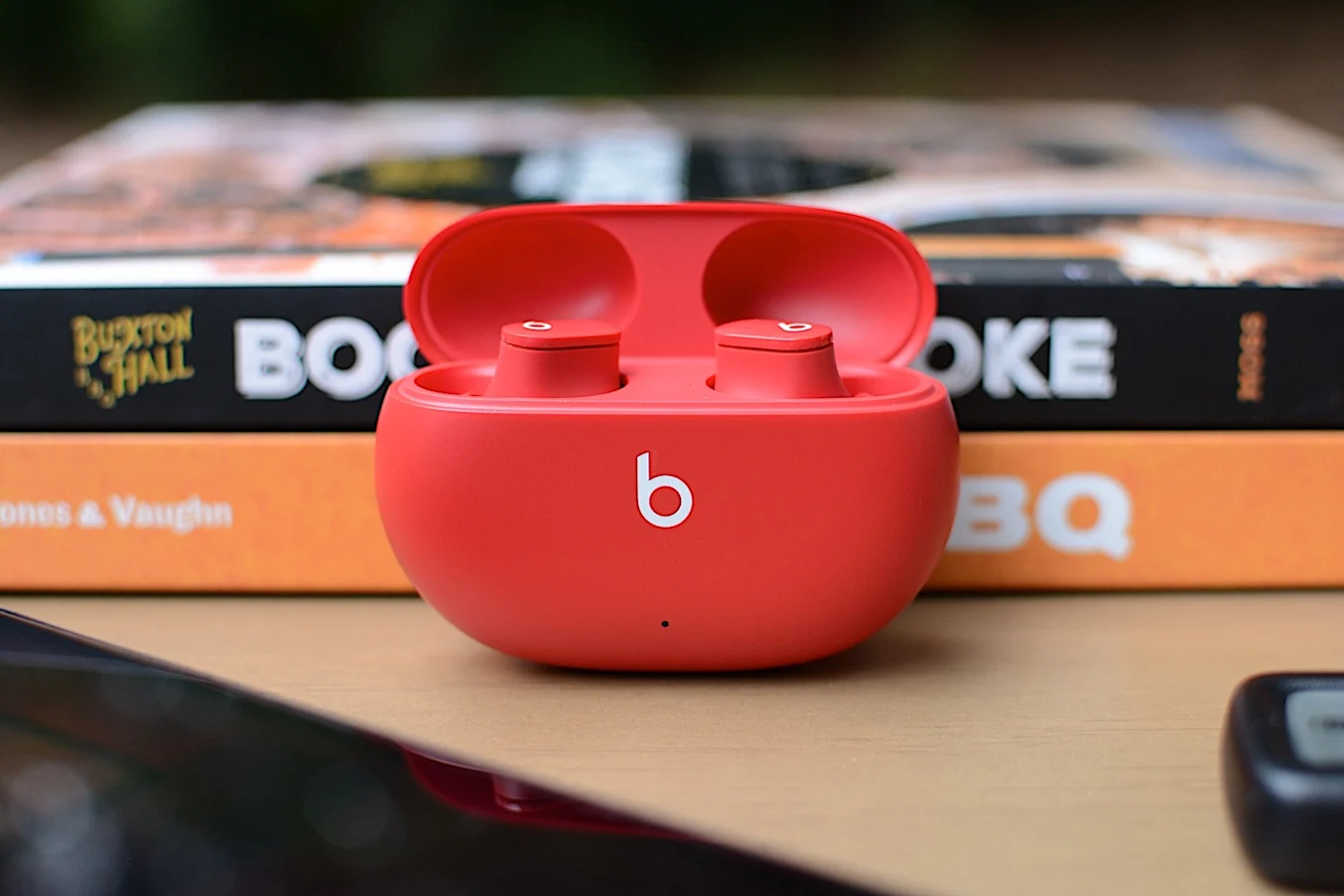
The Beats Studio Buds are back on sale for $100, or $50 off their usual rate. These are some of the best Beats earbuds for most people and we gave them a score of 84 for their comfortable design, good sound quality and ANC and fast pairing with both iOS and Android devices.
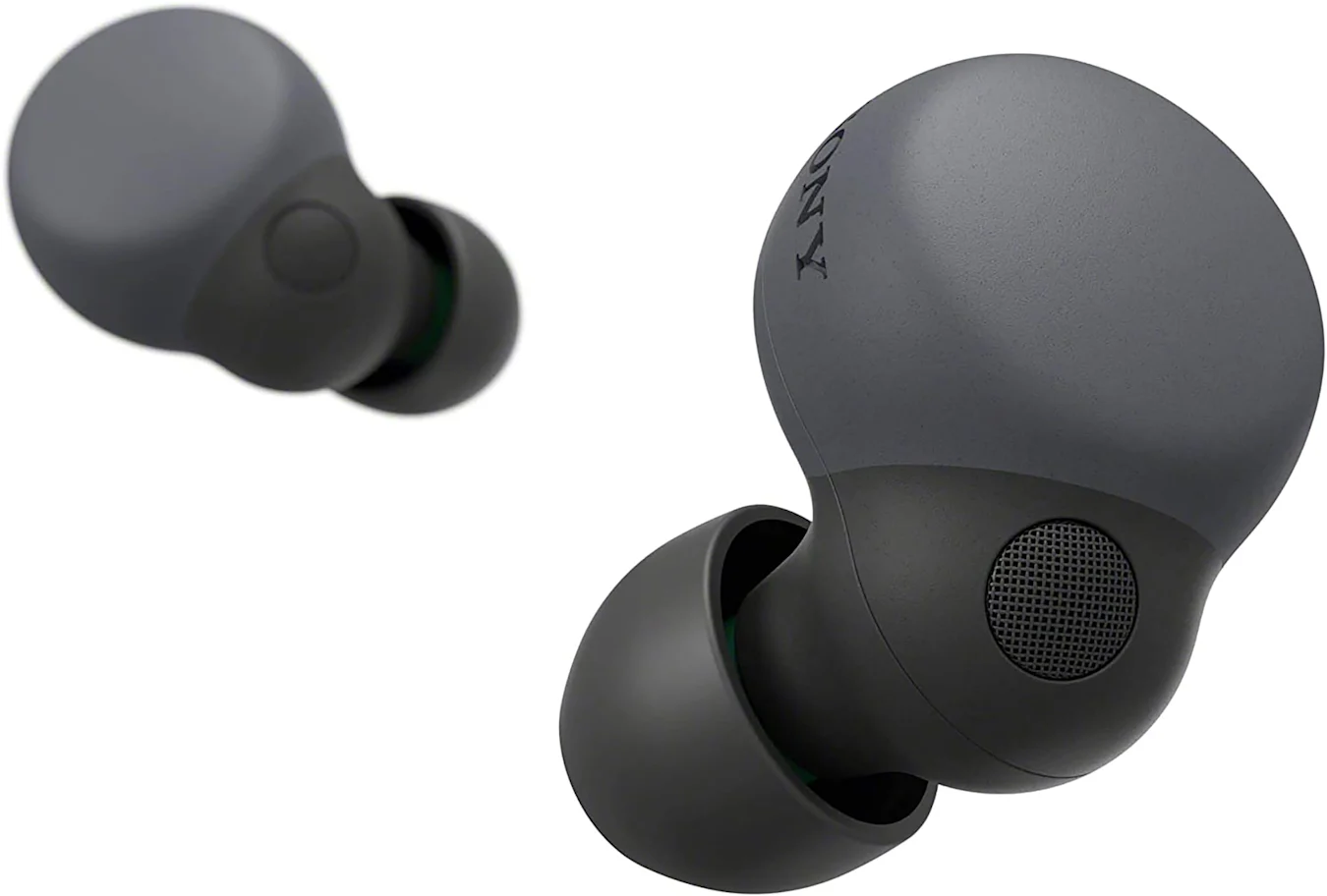
Sony's LinkBuds S are on sale for $148, which is 26 percent off and a new all-time low. These buds came out earlier this year and support smart playback, which lets them automatically play and pause music depending on what you're doing.
Jabra's Elite 3 earbuds are on sale for $58 right now, which is 28 percent off their normal price.We gave them a score of 88 for their comfortable fit, impressive sound quality and good battery life.
Apple has released a fix for a zero-day vulnerability that bad actors could exploit to take full control of an iPhone, an iPad or a computer running macOS Monterey. The tech giant's security advisory is pretty light on details, but it has identified CVE-2022-3289 as a vulnerability discovered by an anonymous researcher. It says the flaw could be exploited "to execute arbitrary code with kernel privileges," which means attackers could act as the user and gain admin control of the target device. The company says it's aware that the vulnerability may have already been exploited.
In addition, Apple has also rolled out a fix for a vulnerability affecting WebKit, the engine used by Safari, Mail and many other iOS and macOS apps. According to the company, it allows attackers to arbitrarily execute code and could hence be used to, among other things, download more malware. Like the first vulnerability, Apple credits an anonymous researcher for the discovery of this flaw — it also knows that it may have already been exploited and used to compromise iOS and Mac devices.
Both flaws are present in macOS Monterey 12.5.1, and Apple has rolled out a patch for the operating system. They both affect the same set of iPhones and iPads, as well, particularly: iPhone 6s and later, iPad Pro (all models), iPad Air 2 and later, iPad 5th generation and later, iPad mini 4 and later and iPod touch (7th generation). Since both flaws are likely being actively exploited right now, it's probably wise for owners of all the aforementioned devices to install the patches by downloading the latest software update.
Numerous third-party iPad styluses magnetically attach to your tablet, but they typically recharge through USB — not much help if you forget to top up before a writing session. Adonit may have addressed that flaw with its $45 Neo Pro, however. From what we've seen, it's the first unofficial pen to wirelessly charge on the side of an iPad Air, iPad mini or iPad Pro. You can pay less than half the price of a $129 Apple Pencil without giving up a major convenience.
The Neo Pro offers up to nine hours of use. It doesn't require a Bluetooth connection to get started, but setting that up will show your remaining charge in the iPad's battery life widget.
There is a reason the stylus is such a bargain. While the Neo Pro offers tilt sensitivity, palm rejection and replaceable tips, there's no pressure detection — this is more for note-takers than creatives producing detailed artwork. With that said, this might be a strong value if you need a pen for lectures and office meetings.