Samsung's 77-inch S95C QD-OLED TV goes on sale for $4,500

Samsung's latest 77-inch S95 QD-OLED TV generated some buzz at CES this year thanks to brightness levels up to 2,000 nits, 144Hz refresh rates and more. Now, the company has revealed that you'll pay to get those premium features: $4,500 for the 77-inch model, with shipping set to start in the US on February 15th. 

As mentioned, Samsung's 2023 QD-OLED TV lineup will supposedly hit up to 2,000 nits of peak brightness, a bit more than LG's latest OLED models and approaching Mini-LED TVs. That's thanks to a new QD-OLED Panel from Samsung Display, which uses a new "HyperEfficient EL" OLED material and Samsung's IntelliSense AI. The TVs will also be more energy efficient and offer more accurate colors, according to Samsung Display. 

The 144Hz refresh rate will make it great for gaming, as it already offers the lowest input lag you can get on any TV or monitor at just 0.1 milliseconds. As HDTVTest's Vincent Teoh pointed out, the 77-inch S95C will come with an external connect box, which allowed Samsung to make the panel extremely thin and reduce bezel sizes down to the bare minimum. However, as with all other Samsung TVs, it doesn't support Dolby Vision, using Samsung's HDR 10+ instead. 

The price is a bit more than LG's comparable 77-inch G2 model from last year, priced at $4,200. If you order before February 20th, though, Samsung will throw in free installation worth around $200. The company has yet to reveal pricing across the rest of its lineup, but last year's 55- and 65-inch models cost $2,200 and $3,000, respectively.
Why Foxconn-Vedanta JV Looking to Partner STMicroelectronics; Explain Experts

Why Foxconn-Vedanta JV Looking to Partner STMicroelectronics; Explain Experts

Apart from the Vedanta-Foxconn consortium, the government has received five other bids to commence semiconductor fabrication units.

Staff Wed, 02/08/2023 - 15:07
Circuit Digest 08 Feb 09:37

Arduino based Audio Spy Bug using NRF24L01

Arduino based Audio Spy Bug using NRF24L01

In this project, we are going to build an audio bug using Arduino and NRF24L01. This audio spy bug is highly customizable and can be easily integrated with other devices and systems. The NRF24L01 module allows transmission over specific channel, ensuring that our transmissions remain private up to a level.

Jobit Joseph Wed, 02/08/2023 - 12:30

Connecting a Keyboard to a Vintage PC-XT, the Hard Way

We’re not sure if there’s any single characteristic that qualifies someone as a hacker. After all, we’re a pretty eclectic bunch, with skills that range all over the map, and what one person feels is trivial, others would look upon as black magic. But there’s one thing we’re sure of: if you find yourself reading the original POST code for the PC-XT motherboard just to get a keyboard working, you’re pretty much our kind of people.

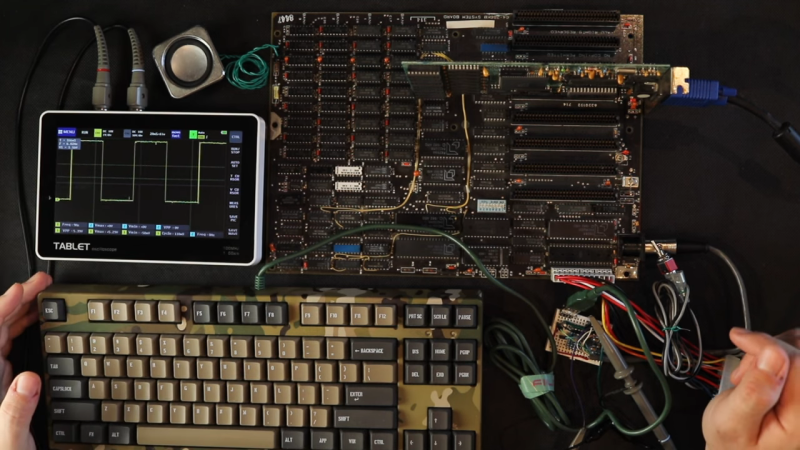
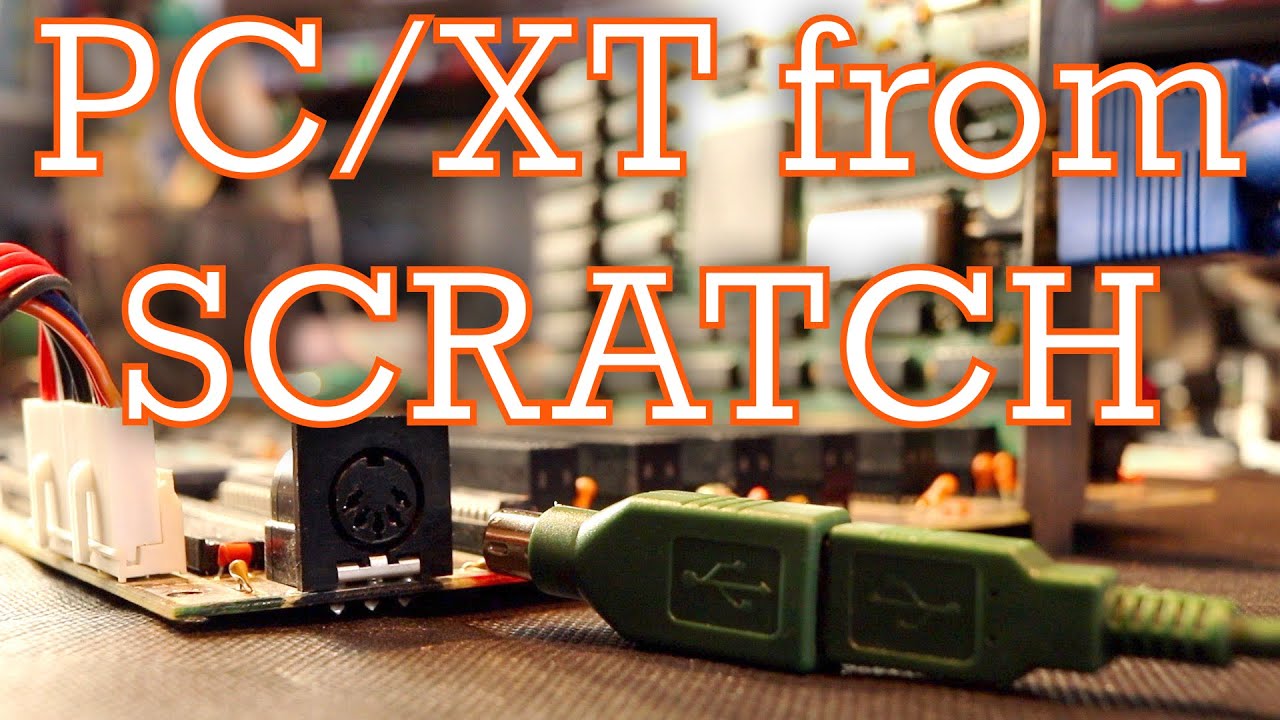
That was the position [Anders Nielsen] found himself in as work progresses on his “PC-XT from Scratch” project, which seeks to build a working mid-80s vintage IBM Model 5160 using as many period-correct parts as possible. The first installment of the series featured the delicate process of bringing the motherboard up, lest the magic smoke was released. After seeing some life out of the old board, [Anders] needed a little IO, specifically video and keyboard. The video side of the equation was relatively trivial, with an early-90s VGA card from eBay — not exactly period correct, but good enough to get something to display.

The keyboard was another matter entirely. It’s not too much of a chore to find a keyboard that’ll talk to a PC-AT, but the PC-XT had an entirely different protocol, not to mention that chunky 5-pin DIN connector. As with many things, the solution involved building an adapter out of an Arduino, but the process was not exactly low-friction. First, there was the question of dealing with the open-collector outputs on the keyboard, which required code changes. Next, [Anders] broke out the oscilloscope to check waveforms, and found a weird 9-Hz square wave on top of the keyboard clock signal. That ended up being a sign that the keyboard was stuck in a manufacturing test mode, according to a read-through of the power on self-test (POST) source code. A tiny tweak of the Arduino code got everything working.

We’ve got to say that we’re loving this deep dive into the internals of a piece of computer history. [Anders] teased the next step, which will use an empty ROM socket on an old network card to load some assembly code onto the XT. We’re very much looking forward to that exploit.

Hack a Day 08 Feb 06:00

Apple's retail staff is reportedly testing its 'buy now, pay later' service

Apple has expanded the internal testing for its Pay service's buy now, pay later feature to include its retail employees, according to Bloomberg. When the tech giant's experimental features make their way to its retail staff, that's typically a sign that it's going to be released in the near future. Apple Store workers started testing the company's credit card in 2019 a month before it became available, and staff at its HQ visitor center tested Tap to Pay shortly before the first partner companies like Square and PayPal launched support for the payment solution. 

The tech giant first announced the pay later functionality for Apple Pay at its WWDC event in June 2022. It was supposed to arrive alongside iOS 16, but the company changed its mind and rolled out the new mobile platform without the feature in tow. Bloomberg's Mark Gurman reported at the time that the company was having "fairly significant technical and engineering challenges in rolling out the service," which led to delays. 

When Apple introduced pay later, it said the payment option will give users a way to split the cost of purchases into four equal installments paid over six weeks with no additional interest or fees. Gurman now says that the company is also working with Goldman Sachs Group to offer an option that splits up the cost of large purchases into several months with interest on top. Seeing as the company even established its own subsidiary to conduct customer credit checks and approvals, it's not hard to believe that it has plans to introduce more pay later options in the future. 

Apple

Canon's $680 EOS R50 is its most affordable RF camera yet

Canon is adding a new, more affordable entry point into its RF mirrorless camera ecosystem. Alongside the full-frame EOS R8, the company unveiled today the EOS R50, an APS-C RF mount camera that will start at $680 when it goes on sale later this year. Canon didn’t send over a full spec sheet, but judging from the information the company did share, the R50 could quickly become a go-to for many beginners.

The camera features a 24.2-megapixel sensor capable of capturing uncropped 4K video footage at up to 30 frames per second. The R50 can also shoot 1080p video at up to 60 frames per second and S&Q-style slo-mo footage at up to 120 frames per second. What’s more, Canon claims the camera can capture a full hour of continuous footage. Despite its modest price, the R50 also includes the company's excellent Dual Pixel autofocus technology, with built-in subject detection for people, animals and vehicles. Best of all, the tech is available for both stills and video.

Canon

You don't get any log modes, but it does have HDR PQ which also gives you 10-bit video — not bad for a budget camera. Other video features include a microHDMI port for external video, both microphone and headphone ports, and UVC compatibility for direct webcam streaming. 

Burst shooting speeds are great at this price as well: 12 fps in electronic first-curtain shutter mode (there's no full mechanical shutter) and 15 fps in electronic shutter mode, both with servo AF. It'll only capture 13 C-RAW+JPEG files in a burst though, likely due to the slow UHS-I SD card support. There's no in-body stabilization (IS) at that price, but it can use the IS built into lenses or digital stabilization (with a crop) for vlogging. It also has an OLED viewfinder, which many cameras in this price range don't, though resolution is fairly low at 2.36 million dots. 

Canon

At the same time, Canon is expanding its RF lens lineup to add new crop sensor glass. The RF-S55-210mm is a compact telephoto lens with a full-frame equivalent field of view between 88mm and 336mm. It features a variable f/5 to f/7.1 aperture, four-and-a-half stops of built-in optical stabilization and close-focusing capabilities. The RF-S55-210mm IS STM isn’t the fastest option in Canon’s RF lens stable, but it does add some much-needed choice on the APS-C side of things.

At $680 for body-only, the R50 slots under the EOS R10, which was previously Canon’s most affordable RF mirrorless camera. Effectively, the R50 is a more capable version of the EOS M50 Mark II that’s less than $100 more expensive and doesn’t limit you to Canon’s dead-end EF-M mount system. It’s also competitive against Sony’s ZV-E10 and Nikon’s Z30, which cost about the same but don’t offer an electronic viewfinder. The EOS R50 will arrive later this year. In addition to selling the body on its own, Canon will bundle the camera as part of a Content Creator Kit that will ship with a microphone, 18-45mm kit lens and grip for $800.

Canon's 24-megapixel EOS R8 is its most affordable full-frame mirrorless camera

Canon has put Sony and its other rivals on blast with the launch of the $1,500 24-megapixel EOS R8, its cheapest full-frame camera yet. Released alongside the $680 R50 APS-C model, it's targeted to photographers and video creators on a budget. However, it's got some impressive features like uncropped, oversampled 4K video up 60 fps, shooting speeds up to 40 fps and Canon's excellent Dual Pixel autofocus. 

On the photography front, the R8 can shoot at up to 6 fps with the first-curtain electronic shutter (like the R50, there's no fully mechanical shutter) or a whopping 40 fps with the electronic shutter. That sounds great, but rolling shutter may be an issue in electronic mode for fast moving subjects. It can capture up to a very respectable 100 C-RAW + JPEG files at a time to the single UHS-II card slot. The autofocus systems looks strong, using Canon's Dual Pixel AF along with AI subject detection for people, animals and vehicles. 

Canon

For video, you can capture 4K video up to 60 fps with 6K oversampling, or Full HD at up to 180 fps — quite impressive considering the price. Editing-friendly ALL-I capture is supported up to 4K 30p with a 470Mbps data rate. It supports up to two hours of continuous recording with no 30-minute limit, though 4K 60p and 180 fps Full HD shooting times are thermally limited to around 30 minutes. You can shoot 10-bit HDR PQ or Canon Log-3 video, so this would be the perfect budget vlogging camera if not for the overheating situation. It also has focus breathing compensation (for select lenses).

The main thing missing compared to the $2,500 EOS R6 II is 5-axis in-body stabilization. However, it does have optical stabilization with supported lenses and Canon's Movie Digital IS, which works in concert with lens stabilization. 

Canon

Other features include a micro-HDMI port that supports up to 4K 60p, mic and headphone ports, an LP-E17 battery (no CIPA battery life provided yet) and USB webcam support. The 3-inch, 1.62 million dot display flips out for vloggers, but the OLED electronic viewfinder is a low-end unit with 2.36-million dots of resolution.

Despite the low price, there are no red flags I can see on the R8 (pending a full review, of course). At a full $1,000 below the R6 II, it looks like a great camera particularly for vloggers and content creators. Canon also introduced a budget full-frame kit lens, the RF24-50mm f/4.5-6.3 IS STM, selling by itself for $300. The EOS R8 goes on sale in the spring of 2023 for $1,500, or $1,700 with the aforementioned lens. 

Disney is bringing the first episode of 'The Mandalorian' to broadcast TV

For one night only, Disney’s breakout Star Wars series is coming to cable TV. Ahead of the premiere of the third season of The Mandalorian on March 1st, Disney announced today it would air the show’s debut episode, “Chapter 1: The Mandalorian,” on February 24th. If you somehow haven’t seen the series before, you can catch the episode that started it all on ABC, Freeform or FX. All three stations will air the 41-minute debut at 8PM ET/PT.

If you’ve managed to avoid spoilers for The Mandalorian until now, first of all, great job; it couldn’t have been easy. Second, we won’t ruin the surprise, but the debut episode is a great taste of what made the first season of the series feel so special. It has a bit of everything that people came to love about The Mandalorian, including witty dialogue, fun action set pieces and, of course, a certain cute alien.

This isn’t the first time Disney has brought a Disney+ exclusive to TV. The company previously aired two episodes of Andor on ABC, Freeform and FX when it seemed that series was struggling to find an audience. Considering the company recently lost $1.5 billion on its streaming services, bringing The Mandalorian to broadcast TV makes a lot of sense as an effort to attract subscribers to Disney+.

Microsoft's new Bing and Edge hands-on: Surprisingly well-integrated AI

The age of generative AI is upon us, and this week alone Google and Microsoft made major announcements around their respective products for the masses. While Google unveiled an "experimental conversational AI service" called Bard yesterday, Microsoft had a fuller slate of news to share at its event in Redmond, WA today. Through a partnership with ChatGPT maker OpenAI, Microsoft is adding more advanced AI conversation models to power updates to Bing and Edge

The company's keynote today happened at breakneck pace, with demos whizzing by so quickly there was barely enough time to make sense of the updates. Thankfully, I was able to briefly check out a full demo here with Dena Saunders from Bing Engineering. It was nice to see everything at a more comprehensible pace, but it was unfortunately restricted to a set of scripted examples. I'll be getting access to the preview through my own whitelisted accounts in a bit so I will be updating this post with my personal impressions, but for now, I can break down at least what the updates look like on a demo computer.

In general, there are four new areas of change coming to Bing (and we'll get to Edge later): Search, Answers, Chat and Create. The first update is the new search box. Instead of your typical long, one-line bar, there is now a box more similar to those on Twitter or Facebook that prompts you to ask Bing anything. The character limit is now 1,000. The idea is to make the process of looking for answers something more conversational — similar to Google's approach for years now. 

When you submit your query, results are now displayed a bit differently. On the left is a column with your typical "answers" just like how you see it on Bing now. On the right, however, is a box that explains how the system found those answers. I initially thought this was similar to what Google does in its "About this search" panels, but I was wrong. This box is a home for the AI and fills up with text that appears in real time, complete with animation and a "Stop responding" button in case you don't have the patience to see the AI's explanation. 

The third and fourth parts are the more interesting updates. Chat, for example, is a new way you can get solutions to the problems you're looking to solve. You can access the Chat page from the Bing results page by tapping the Chat button above the answers or by scrolling up (swiping down on touchscreens). 

This story is developing, please refresh for updates.

Clock Your Camera With This Shutter Speed Tester

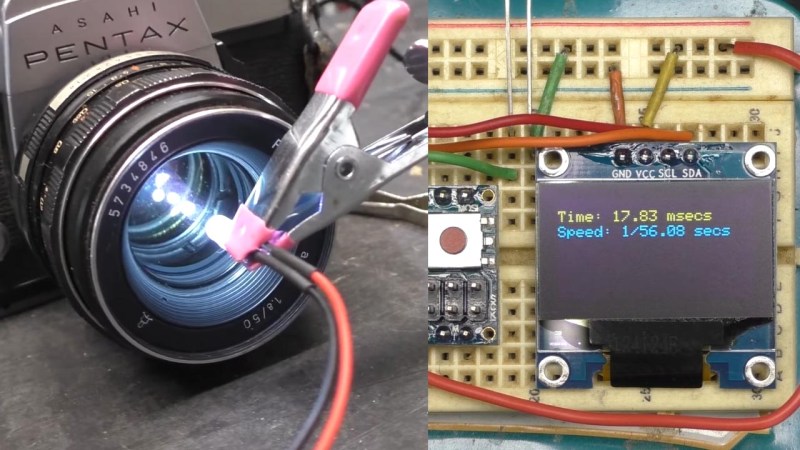
Camera shutter speed is an essential adjustment in photography – along with the aperture, the shutter moderates the amount of light entering the camera. Older cameras (and some newer ones) use mechanical shutters that creep out-of-spec over the years, so [Dean Segovis] built a handy shutter speed tester.

With just a handful of basic components, this project is a great one for beginners to sink their teeth into. The tester is based around a photoresistor that measures light from another source (a flashlight) that travels through the camera body. When the shutter on the camera is released, the shutter speed can be measured and displayed on the OLED screen. An Arduino naturally handles all the computational duties. The whole thing can be easily assembled on a breadboard in just a couple of minutes.

The original project by [hiroshootsfilm] is over on Project Hub, however [Dean] takes a deeper dive with some code troubleshooting, as well as trying out a variety of old film cameras with the breadboard tester. His testing revealed that the photoresistor was better able to detect shutter speed when the camera lens was removed, which is a hot tip for anyone else that wants to try this.

While it’s not surprising that these older cameras are having trouble with their mechanical shutters, this little tester would be an invaluable tool when it comes time to start tweaking shutter mechanisms. The full video is after the break and more details are scribbled down here, but make sure to check out the follow-up video where [Dean] prints a neat enclosure for the electronics.

If this project has brought out the shutterbug in you, make sure to check out this brain transplant for a Polaroid 100-series Packfilm camera that we covered way back in 2011.