We saw both of LG's new soundbars in action at CES earlier this year — and while the company was happy to show off the speakers' wireless connectivity and other features, it wasn't ready to share pricing or availability. Turns out, both the premium-focused LG Sound Bar C (SC9) and the more compact SE6 are available starting today, March 22nd. Which unit is right for you depends not only on what kind of soundscape you're hoping to build, but also on if you already have an compatible LG TV.
The higher-end Sound Bar C sells for $999, and comes with an included subwoofer as well as the LG Synergy Bracket — a soundbar mount designed specifically for LG OLED C Series TVs that bolts the audio directly to the screen, rather than the wall or your TV stand. LG's Wow Interface is exclusive to the SC9, which lets you control the soundbar's settings from a compatible LG TV itself.
At $450, the LG SE6 is less expensive and lacks a dedicated subwoofer, but it still packs Dolby Atmos and many of the higher-end soundbar's key features. Wow Orchestra can sync the sound bar's audio to the TV's internal speakers for a larger soundscape, and LG's Wowcast feature allows both units to wirelessly connect to a TV to avoid visible cable clutter.
Both the SC9 and SE6 are available from LG.com and select retailers starting on March 22nd, 2023.
This article originally appeared on Engadget at https://www.engadget.com/lgs-2023-wireless-soundbars-available-now-starting-at-450-183250200.html?src=rss
The rumors were true: Valve has just taken the wraps off of Counter-Strike 2, announcing a limited beta that is available to select members of the game’s community. The studio says the sequel will overhaul every system, piece of content and part of the Counter-Strike experience. As expected, Valve is moving the game to the latest version of its in-house Source 2 engine, leading to a noticeable leap in graphical fidelity.
The game will feature sharper textures, more life-like lighting and additional geometry. Valve says the Counter-Strike 2 team is taking a three-tier approach to level design. “Touchstone” maps like Dust 2 will, for the most part, be left untouched outside of tweaks to their lighting and readability. “Upgrade” maps, meanwhile, will take advantage of Source 2’s enhanced lighting pipeline for more realistic-looking materials and reflections. Lastly, Valve plans to fully overhaul a handful of levels, taking advantage of everything its engine has to offer.
The move to Source 2 will also bring with it gameplay enhancements. Starting, most notably, with how smoke grenades function. As Valve explains in a behind-the-scenes video, smoke grenades will now live as volumetric 3D objects within the game world, making them responsive to other gameplay elements and allowing players to momentarily shape sightlines with bullets and explosions.
Valve is also overhauling the game’s server architecture. It says Counter-Strike 2 will support sub-tick updates, a feature the studio claims will allow the game’s servers to know the instant a player move, fires their weapon or throws a grenade. In theory, that should make the new entry feel like the most responsive Counter-Strike to date.
When the full version of the game arrives this summer, Counter-Strike 2 will be a free upgrade to Counter-Strike: Global Offensive. Any cosmetics you’ve collected in CS:GO will carry over to the new game (and look better than ever). Valve is inviting players to the limited beta based on a handful of factors, including recent playtime and Steam account standing. The studio promised to share more information about Counter-Strike 2 closer to release.
This article originally appeared on Engadget at https://www.engadget.com/counter-strike-2-arrives-this-summer-as-a-free-upgrade-for-csgo-181013726.html?src=rss
TikTok CEO Shou Chew is preparing to tell lawmakers that there are many “misconceptions” about the app, and that banning it will damage the United States economy. He’s also planning to tell members of Congress that concerns about parent company ByteDance, and its ties to China, are unfounded.
“Let me state this unequivocally: ByteDance is not an agent of China or any other country,” Chew says in written remarks released by the House Energy and Commerce Committee ahead of Thursday’s hearing on TikTok. The hearing, which will mark Chew’s first Congressional appearance, comes at a moment when the stakes couldn’t be higher for the company.
US officials recently told the company that TikTok could be banned in the United States if ByteDance doesn’t divest itself from the company. And members of both parties have supported bills that would empower President Joe Biden and others in his administration to ban the app.
Much of Chew’s written testimony is similar to arguments TikTok has been making for years. He details the app’s safety features, particularly those aimed at teens, as well as Project Texas, TikTok’s billion-dollar effort to lock down US users’ data. “Earlier this month, we began the process of deleting historical protected U.S. user data stored in non-Oracle servers; we expect this process to be completed later this year,” Chew writes. “Under this structure, there is no way for the Chinese government to access it or compel access to it.”
Chew’s written testimony also touches on revelations that four former ByteDance employees used TikTok to access the data of US journalists. The incident, which further fueled lawmakers’ concerns about TikTok, has reportedly prompted a DoJ investigation into the company. “I condemn this misconduct in the strongest possible terms,” Chew wrote, noting that the company is conducting an investigation with an outside law firm.
But most notable are Chew’s comments about China. He says that allegations that TikTok is “beholden to the Chinese government” are “emphatically untrue” and describes ByteDance as a “global enterprise” that was “founded by Chinese entrepreneurs.”
Despite those assurances, lawmakers are likely to grill Chew in depth about TikTok’s ties to ByteDance and China, and whether the company can be trusted to protect US users. At a previous hearing, when lawmakers heard from TikTok COO Vanessa Pappas, they were frustrated by her insistence that ByteDance was not a Chinese company, and pressed her about TikTok’s China-based employees. How Chew answers similar questions could directly affect the TikTok's future in the United States.
This article originally appeared on Engadget at https://www.engadget.com/tiktok-ceo-to-congress-bytedance-is-not-an-agent-of-china-173741845.html?src=rss
Apple’s Major League Baseball broadcast lineup no longer includes free games for non-subscribers. The company announced today that its “Friday Night Baseball” doubleheaders, which resume on April 7th, now require an Apple TV+ subscription.
During the 2022 baseball season, anyone could stream the Friday night games on Apple TV+ without a subscription. However, the company did note at the time that the offer would only be available for a limited time. It was Apple’s first foray into live sports after negotiating a seven-year with MLB worth $595 million.
Although the games are now locked behind a subscription, Apple’s deal doesn’t include blackouts for local teams, a rarity in non-network-TV sports broadcasting. Additionally, it’s worth noting that while Apple bills its Friday-night lineups as “doubleheaders,” the two games often air simultaneously. The first game on April 7th is an exception, fearing the Texas Rangers vs. Chicago Cubs at 2 PM ET and the San Diego Padres vs. Atlanta Braves at 7 PM ET. You can browse Apple’s schedule (up to June 30th).
Apple’s 2023 in-game broadcast lineup includes Wayne Randazzo (play-by-play), Dontrelle Willis (analyst), Heidi Watney (sideline reporter), Alex Faust (play-by-play), Ryan Spilborghs (analyst) and Tricia Whitaker (sideline reporter). In addition, pre- and postgame coverage brings back host Lauren Gardner, along with Siera Santos, Xavier Scruggs, Matt Joyce, Russell Dorsey and former MLB umpires Brian Gorman and Dale Scott.
Although baseball was Apple’s first dive into live sports, the company also now hosts Major League Soccer Season Pass, which costs an extra $13 per month or $79 for the season ($15 / mo. or $99 / season for non-Apple TV+ subscribers). Additionally, Apple recently partnered with T-Mobile to give its wireless subscribers full-season access for free. Given that Apple TV+ is only three years old, the iPhone maker has moved quickly to flesh out its streaming platform far beyond Ted Lasso.
This article originally appeared on Engadget at https://www.engadget.com/apples-friday-night-baseball-returns-april-7th-but-youll-need-a-subscription-to-watch-171047615.html?src=rss
When looking back at past console generations, the conversation often turns to graphical fidelity. And for good reason. Who could, for example, forget the first time they left the confines of Kokiri Forest for the wide expanse of Hyrule Field in The Ocarina of Time? It was a moment where you felt like you were experiencing the future of gaming.
But as video games have become more complex, so too have the peripherals we use to play them. Over on Engadget’s YouTube channel, Senior Producer Brandon Quintana recently took a look back at the evolution of console controllers, tracking their development all the way from the 1970s to the modern day. It’s an overview that includes everything from the Coleco Telstar to the PlayStation 5 and its Dual Sense controller.
This article originally appeared on Engadget at https://www.engadget.com/the-evolution-of-video-game-controllers-from-telstar-to-the-ps5s-dualsense-170415428.html?src=rss
Are you tired of TV providers advertising one price, but charging another thanks to hidden fees? You might not have to put up with that practice for much longer. The Federal Communications Commission (FCC) has proposed a requirement that cable and satellite TV services "clearly and prominently" display the true cost of service both in their marketing and on subscriber bills. Companies couldn't mask programming costs as fees that only show up on your bill, hiding them behind vague or potentially misleading terms.
The measure is intended to help would-be customers make truly informed choices about TV subscriptions, including comparisons with streaming services. The move could also help boost competition between providers and help cash-strapped families avoid unpleasant surprises, FCC chair Jessica Rosenworcel claims.
The proposal comes months after President Biden called on government agencies to fight "junk fees" and otherwise demand more transparent pricing for services and events. The FCC itself recently said it would require broadband "nutrition labels" that display prices and typical performance. In that light, the TV price transparency effort is mainly an extension that could outline exactly how much you'll pay for a multi-service bill.
The proposal doesn't come at a great time for conventional TV giants. Streaming TV viewership in the US (including live and on-demand) overtook cable for the first time last summer. While internet-only services aren't always better deals than cable and satellite equivalents, the increased transparency could prevent traditional companies from artificially minimizing the differences.
This article originally appeared on Engadget at https://www.engadget.com/cable-and-satellite-providers-may-have-to-advertise-the-true-price-of-tv-service-164929621.html?src=rss
The “Apple effect” can be as helpful as it is infuriating. A good technology can exist for years, and many won’t care until it gets the Cupertino seal of approval. To that end, a lot of people are about to start caring about “high resolution” audio as the company launched its upgraded music service to the masses.
But as many were quick to point out, some of Apple’s own products don’t necessarily support the higher sample rate and bit-depths on offer. No worries, there’s a dongle for that. (And there are options for Android and the desktop, too.)
As hinted, it's not just Apple in on the hi-resolution game: Qobuz, Tidal and Deezer have been doing it for a while, and Spotify is planning on introducing its own version soon. The products in this guide will play nice with any of these services, aside from Tidal's MQA, which is a little more specific (and we have options for that as well).
Why do I need new hardware to listen to music?
Apple
The short answer is, you don’t. You can play “hi-res” audio files on most phones and PCs, you just might not be getting the full experience. If your device’s audio interface tops out at 44.1 or 48kHz (which is fairly common and covers the vast majority of music online) then that’s the experience you’ll get. If you want to enjoy music at a higher sample rate and bit-depth (aka resolution), you’ll need an interface that supports it and wired headphones.
It’s worth pointing out that “lossless” and “hi-res” are related terms, but not the same thing and will vary from service to service. Apple uses ALAC encoding which is compressed, but without “loss” to the quality (unlike the ubiquitous .aac or .mp3 file formats). CDs were generally mastered to at least 16-bit / 44.1kHz which is the benchmark that Apple is using for its definition of lossless. In audio circles, a general consensus is that hi-res is anything with a sample rate above 44.1kHz. Increasingly, though, the term is being used for anything 96kHz and above.
This, of course, isn’t only about Apple’s new streaming formats. External DACs and audio interfaces are a great way to upgrade your listening experience generally. Especially if you want to get into the world of more exotic (read: pricey) headphones, as they often even require a DAC to provide enough clean signal to drive them. For audiophile headphones, a phone or laptop’s built-in sound chip often doesn’t have the oomph needed.
Okay, but can’t I just use the headphone adapter for my phone?
No. Well, yes, but see above. A Lightning or USB-C to 3.5mm headphone adapter often is an audio interface and most of the ones you’re buying for $7 (or that come free in the box) do not support hi-res audio beyond 48kHz / 24-bit. Android is a little more complicated, as some adapters are “passive” and really just connect you to the phone’s internal DAC like old school headphones. Others (active ones) have a DAC built-in and good luck finding out what your specific phone and the in-box adapter delivers. (Hint: connect it to a PC and see if it comes up as an audio interface. You might find some details there if it does).
What is a “DAC,” though?
Billy Steele / Engadget
A DAC takes the digital (D) music from your phone or computer and converts (C) it into analog (A) sound you can hear. All phones and PCs have them, but since handsets moved to USB-C, Lightning or Bluetooth for music, the task of converting that signal was generally outsourced to either your adapter or your wireless headphones.
DACs can be used with phones, laptops and desktops but tend to be much simpler than a regular external audio interface. One basic distinction is that DACs are usually for listening only whereas an audio interface might have ports to plug in microphones and instruments (but an external audio interface is also technically a DAC).
The benefit of DACs is that they tend to be lightweight, making them more suitable for mobile use, although it still gets a little tricky with the iPhone as you still might need to add another dongle to make it play nice with Lightning. Also, not all DACs support all the higher audio resolutions. Most require external power or an onboard battery, though some can use the power from whatever you plug them into — in which case expect a hit to your battery life. Below are some of our picks for a variety of scenarios.
Best for Android users looking for a simple, affordable option: Ugreen USB-C to 3.5mm headphone adapter
Okay, you were expecting serious outboard gear and we start by showing you a basic adapter? Yes, because this one supports 96kHz audio (24-bit) and is about as straightforward as you can get. Simply plug into your USB-C device (or USB-A with an… adapter), connect your headphones and away you go. There are no buttons, no controls, nothing to charge.
While this dongle doesn’t support 192kHz, the move up to 96kHz is still firmly in the “hi-res” audio category, and its super low profile and ease of use make it a great option for those that want an audio quality bump without going full-bore external DAC.
Of course, this dongle is best suited to devices with a USB-C port such as the iPad Pro, MacBook or most Android phones. As noted earlier, it’s possible your Android already supports hi-res audio and a simple passive dongle is all you need, but given the price and quality of this one, at least you know what you’re getting, as the specific details of audio support for every Android phone out there are often hard to find.
The downside is that this adapter won’t do much to help drive higher impedance headphones, so it’s less suited to audiophiles who really need more power to drive their favorite cans. I used this on both an Android phone and an iMac and it worked just fine, although with Apple computers you need to head to the Audio/MIDI settings first to make sure you’re getting the highest quality available.
Best for streamlined desktop use with high-end headphones: Apogee Groove
Apogee gear is usually found in the studio. The Groove takes the company’s decades of audio experience and squeezes it into a highly portable DAC that’s perfect for those who want a lightweight option for their desktop or laptop. We’re stepping up the sound quality here with support for 192 kHz (24-bit), which will cover everything from Apple’s new lossless service.
Connecting your iPhone to the Groove is a little more complicated. It works just fine, but you’ll need something like the Apple Camera kit, as it needs external power. In short, it gets a bit “dongly” but it works if you want something for your desktop first, that can do double duty on iPhone. Android support is a little hit and miss, though you would still need a way to feed it power while in use.
Once you’re set up, just plug in your headphones and you’re away. The rubberized base of the Groove stops it from shifting around on your desk, and the large buttons make controlling volume a breeze, with LED feedback to show you volume levels.
Audio sounds dynamic, with a generous bump in gain over whatever you’re plugging it into likely offers. The frequency response is flat meaning you get out exactly what you put in audio-wise, making this a great choice if the connectivity (and price) matches your specific use case.
Best for power and portability: AudioQuest Dragonfly Cobalt
Bar the Ugreen dongle, the Dragonfly is easily the smallest, most portable device on this list. And better yet, it almost certainly works with your phone, PC or laptop and won’t require a dedicated power supply (despite the lack of a built-in battery). You’ll still need an adapter for phones (USB-A to Lightning or USB-A to USB-C for Android) but otherwise, it’s plug and play. There’s no volume control, just one 3.5mm headphone jack and a color-changing LED (to tell you what sample rate the track you’re listening to is using).
At $300, it’s a pricey proposition, but the cable spaghetti of some devices or the sheer heft of others, means the Dragonfly’s small footprint and rugged simplicity make it refreshingly discreet and simple. AudioQuest also offers two cheaper models, starting at $100 that are likely more than good enough for most people.
Don’t let the Dragonfly’s size and lack of controls fool you, the Cobalt throws out some serious, high quality sound. According to AudioQuest, the maximum resolution has been intentionally limited to 96kHz for the “optimal” experience, and that’s plenty enough to cover what you’ll get from most music services.
The output from the in-built headphone amp will make your phone’s audio feel positively wimpy by comparison, and the powerful internal sound processing chip delivers great quality audio with a wide soundstage across a range of genres and formats.
One extra trick up the Dragonfly’s sleeve is native support for Master Quality Authenticated (MQA) files. This is the preferred format of Tidal, so if that’s your service of choice, the Dragonfly is ideal.
Best for super high resolution: Fiio Q3
Fiio has been a popular name in the portable DAC scene for a while now, and for good reason. The products deliver solid audio quality, support all manner of resolutions and are compatible with a wide range of devices. The Q3 is bigger than the previous options on this list (it’s about 1cm shorter than an iPhone 4), but remains fully portable. There are even some goofy silicone bands so you can strap it to your phone, rather than have a flappy, heavy appendage.
For users on the go, the Q3’s built-in battery (good for about eight hours) means you won’t need to drain the power on whatever you’re plugging it into. It also means mobile users won’t need a dreaded second cable. Throw in support for three different size headphone jacks (sadly, ¼-inch isn’t one of them) and you have a DAC that will serve you souped-up sounds wherever you are and whatever you’re listening to.
There isn’t a display, which you might expect for something this size, but there is an LED that changes color when you’re listening to something higher than 48kHz, so you can tell which tracks in your streaming service’s library really are higher-res. The dedicated volume control doubles as a power knob and there’s also a “bass boost” switch just like the good old days. On top of the USB-C input, there’s also the option for analog audio sources via the 3.5mm port.
Even if you’re not listening to high sample rate music, the Q3 sounds fantastic. The difference in volume, punch and dynamic range that comes through in songs that sounded flat and dense when listening directly through a phone or laptop was remarkable. Throw in support for all the hertz and bit-depths that you’ll likely ever need and what’s not to like? Especially as the Q3 comes in cheaper than some of the less capable options in this guide (the slight extra heft will be a key factor here).
Best for high resolution / fans of Tidal: iFi Hip Dac
If this were a spec race, it’d be a photo finish between Fiio’s Q3 and iFi’s Hip Dac. Like the Q3, the Hip Dac blows right past support for 192kHz right up to 384kHz. It also offers balanced output via 4.4mm headphones which is rare to find on consumer headphones, but some higher-end cans offer it for those who want to eliminate any potential interference. There’s also an internal battery, bass boost and a very similar form-factor to the Q3.
For anyone interested in either of these two it might come down to a single feature. Be that the highest sample rate it can support (Q3 wins) or its ability to decode Tidal’s MQA files (in which case, you want the Hip Dac).
The sound out of this thing takes on the Q3 blow for blow and even the same knurled volume control is here. But let’s be honest, the fact it looks like (and was named after) a hip flask is clearly also a major selling point. Though it's worth mentioning the Hip Dac takes a female USB cable, supplied in the box. But this does mean you'll need to use the Camera Kit to get into the iPhone, whereas the Q3 works with one single provided cable.
Regardless, it’s another robust option that will more than cover most bases for most people. As with the Q3, the internal battery means you won’t need to feed it power while in use (estimated eight hours) and connecting it to your phone or computer is the same; as long as you can pipe a USB cable into it, you’re good to go.
Best for desktop warriors: Focusrite Scarlett 2i2
Only looking for a desktop option? Then a good old fashioned audio interface might be the best choice for you. Focusrite’s Scarlett series has near-legendary status at this point and an eye-wateringly high review ratio on Amazon for a good reason: It does what it does very very well.
Most current laptops and desktops can probably handle at least 96kHz audio, but with the Scarlett you can be sure you are getting the full 192kHz when available and the dedicated audio processors and headphone amps will do a much better job of it.
The main benefit here is the general upgrade you will be giving to your PC. Not only will your listening experience be enhanced, but you’ll be able to plug in microphones and instruments if streaming or recording are your thing, all in one device and all for about the same price as some of the more mobile-oriented devices on this list.
This article originally appeared on Engadget at https://www.engadget.com/the-best-dac-for-lossless-high-resolution-music-iphone-android-160056147.html?src=rss
A year after first launching in the US, Amazon Luna is expanding to three new regions. Starting today, the cloud gaming service is available in Canada, Germany and the United Kingdom. The expansion marks the first Amazon customers outside of the US have had a chance to try Luna. If you’re a Prime subscriber, the company offers a handful of complimentary games every month. The March lineup features four games, including Megaman 11 and Trails from Zero.
You can access more of the Luna library by subscribing to bundles Amazon calls “Channels.” For instance, the Luna+ channel comes with games like Control, Street Fighter II and Tetris Effect. Pricing varies by market, but in Canada for example, Luna+ costs $13 per month.
There’s also a Ubisoft+ channel that comes with access to all of the publisher’s most popular games, including Assassin’s Creed Valhalla, Watch Dogs: Legion and Rainbox Six Extraction. If you already own some of Ubisoft’s games on PC, you can play those games on Luna provided you have an Amazon Prime or Luna+ subscription.
Notably, today’s announcement sees Luna expanding to three markets where Stadia was available before it was unceremoniously shut down by Google at the start of the year. Judging by the fact Amazon recently removed 53 games from the Luna+ library, the service hasn’t exactly been a homerun for the retail giant, but an expansion is a move in the right direction.
This article originally appeared on Engadget at https://www.engadget.com/amazon-luna-expands-to-canada-germany-and-the-uk-155932509.html?src=rss
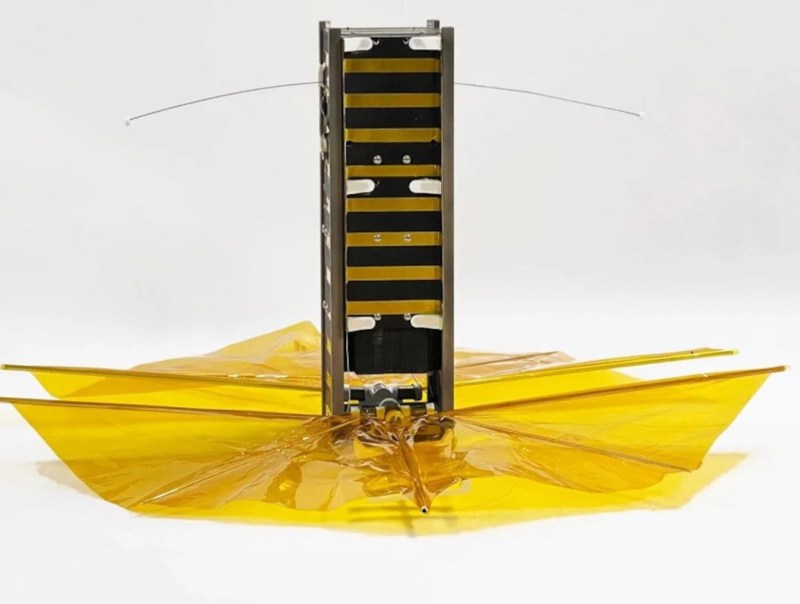
When sending satellites into space, the idea is to place them into as stable an orbit as possible in order to maximize both the time the satellite is useful and the economics of sending it there in the first place. This tends to become rather untenable as the amount of space junk continues to pile up for all but the lowest of orbits, but a team at Brown University recently tested a satellite that might help solve this problem, at least for future satellite deployments.
The main test of this satellite was its drag sail, which increases its atmospheric drag significantly and reduces its spaceflight time to around five years. This might make it seem like a problem from an economics standpoint, as it’s quite expensive to build satellites and launch them into space, but this satellite solves these problems by being both extremely small to minimize launch costs, and also by being built out of off-the-shelf components not typically rated for spaceflight. For example, it gets its power solely from AA batteries and uses an Arduino for its operation and other research.
The satellite is currently in orbit, and has already descended from an altitude of 520 km to 470 km. While it won’t help reduce the existing amount of debris in orbit, the research team hopes to demonstrate that small satellites can be affordable and economically feasible without further contributing to the growing problem of space junk. If you’re looking to launch your own CubeSat one day, take a look at this primer which goes over most of the basics.
Nothing’s revealed its second-generation Ear wireless buds. The eye-catching design sticks around and the company has tried to address some of the issues that bedeviled the original, with some much-needed improvements to connectivity and setup. Fortunately, the price of the Nothing Ear 2 is the same as the Ear 1: $149, which undercut a lot of the established true wireless competition.
Nothing hasn’t redesigned its buds and case – they look very similar side-by-side – but it’s made a handful of incremental changes. Most of them focus on the case, which is smaller and slimmer. The outer part of the case is still transparent, but part of the white structure is now exposed. There’s no textured surface, just a soft-touch panel. Nothing claims the see-through plastic is harder to scratch and damage than the original Ear 1. In my pockets and bag, getting shuffled around with keys or other objects has already left a noticeable scratch on the case. I also worry that this exposed panel could get muckier easier – the curse of all white gadgets.
Photo by Mat Smith / Engadget
Tackling one the bigger complaints I had with the Ear 1, Nothing moved the microphones and antenna inside the buds to improve connectivity and stability – something it also did with the cheaper Ear Stick. The company’s first wireless buds were often finickity when pairing. The company has also changed the antenna structure for better reliability, and the initial pairing process seems to be less fussy and smoother than its predecessor. It’s also, finally, added dual connectivity, making it easier to switch between your phone and laptop.
Microphone placements have also been repositioned to reduce wind noise on calls, but I didn’t notice major improvements over the Ear 1. Nothing said its Clear Voice tech was tuned to just shy of 2 million sounds on the Ear 1 in order to filter them out, while that was closer to 20 million on its newest buds. However, I made several test calls, and I was still difficult to hear when it was windy.
Nothing says it improved sound detail with polyurethane components for clearer low frequencies (it’s been a while since a company has sold polyurethane as a feature), and graphene for brighter highs. There’s also a dual chamber design for a wider soundstage.
The Ear 2 will also be compatible with Hi-res audio at launch, although they weren’t at time of writing, and are compatible with the LHDC 5.0 codec, which all means they should work with premium audio standards where you can find them.
But does it sound all that different? Swapping between the Ear 1 and Ear 2, the newest version does offer clearer sound in the trebles and the bass has more oomph than before. But, compared to wireless buds that are often hundred dollars more expensive, like the AirPods Pro or Sony’s latest flagship buds, they don’t quite stand up, coming off a little flat.
Nothing’s latest buds offer three levels of active noise cancellation (ANC): low, mid and high. The Ear 2 also offer a personalized ANC profile calibrated to your own hearing. The test is a lengthy five minutes, roughly, with a test dedicated to each bud. Your mileage and ears will different, but I didn’t note any marked improvements after calibration. The ANC isn’t perfect: At the highest levels of active noise cancellation still seemed to struggle with the reverberations on trains and the subway, leading to a jarring noise echo in my left bud while using ANC, despite recalibrating the buds several times in a bid to fix it. It’s, fortunately, happening much less often following a firmware update over the weekend. There’s also an adaptive ANC mode that will flit between levels depending on the noise around you, hopefully reducing the toll on battery life.
Nothing says there are battery improvements across both the buds (roughly an hour more, to over six hours) and the case, which can juice the buds for up to 36 hours of listening (with ANC off), two hours longer than the Ear 1. You should get 8 hours of audio from a 10-minute charge, too. There’s still wireless charging too, if you want it.
Setting up and switching between ANC modes is done through the updated Nothing X app, but the Ear 2, predictably, work best with Nothing’s Phone 1, with drop-down shortcuts and easier access to the fine-grain controls.
There’s also a custom sound profile calibration to hone in on frequencies you might not hear – thanks, aging. The equalizer, again inside the companion app, offers more options. You switch between treble- or bass-centric modes, a balanced mode and one dedicated to voice. My custom sound profile also came with the ability to augment my weaker audio frequencies I had trouble hearing with a richer profile, alongside the standard recommended mode. You can also tweak the intensity with a slider.
Photo by Mat Smith / Engadget
Nothing may have added many minor features and improvements but the Ear 2 isn’t shaking up the status quo like its predecessor. Given the eye-catching hardware of the Ear 1, I wasn’t expecting a major redesign (they don’t need it) and the company has addressed my biggest problems with the first headphones. It’s hard to complain about the range of improvements, including upgraded water and sweat resistance rating: the buds are IP54 rated while the charging case is IP55.
The Ear 2 will launch in white on March 28th on Nothing’s own retail site, as well as on Amazon and Kith. Unfortunately, if you were looking to match your black Phone 1, there’s no plan for a black option.
This article originally appeared on Engadget at https://www.engadget.com/nothing-ear-2-wireless-buds-price-release-date-impressions-153040749.html?src=rss