After launching its .Swoosh web3 platform in November, Nike is ready to unveil its first set of digital collectibles today. The company has announced the Our Force 1 (or OF1) series of "virtual creations" will be available to a select group with invitations on May 8th, while general access opens on May 10th. You can choose to buy one of two boxes — "Classic Remix" or "New Wave," and each will cost you $19.82 either way. You'll have to have an account on the Swoosh website and have minted your ID to get one of these, though.
Now to be clear, these aren't actual shoes you'd be getting. You're paying for a digital box to start, and you won't know what design you got either. On an undisclosed date after May 10th, Nike will reveal all the OF1 boxes at the same time, though you'll have the option of not opening the box and leaving it as a virtual Schrodinger's cat situation. Swoosh members will be alerted when that day comes, and each box comes with a 3D file that you can use to, say, export to other platforms (if compatible) and more.
There are over 100,000 "Nike Virtual Creations" in the OF1 collection, and they're mostly based on the Air Force 1. If you picked a Classic Remix box, you'll get a "favorite, classic archive AF1 released from 1982 to 2006" or "a more unique, custom AF1 with a nostalgic twist." Those who select New Wave will receive a "classic archive from 2007 or later" or "an expressive, custom AF1 with a more futuristic twist." There are also four designs from the winners of the company's previous "Your Force 1" contest that are in the mix across both types of boxes.
Like Nike explained when it launched .Swoosh, these digital collectibles aren't just for online use. "In the near future," the company said, it "will introduce other new utilities and benefits... such as exclusive physical products or experiences."
Since its launch, .Swoosh has seen over 330,000 accounts created and on April 18th, about 106,453 members will be chosen at random to receive virtual posters via Airdrop. This will allow them early access to buying an OF1 box. Nike said its DEI and SC+I partners will be included in this Airdrop, along with "those who participated in the #OurForce1 challenge and/or registered at our .Swoosh Session tour stops." If you're a major Nike fan and are willing to part with $20 for a digital collectible with the possibility that it might get you early access to future product drops, you can register at swoosh.nike to be eligible to buy an OF1 on May 10th. Only those who have already minted their IDs before April 12th will be considered for early access.
This article originally appeared on Engadget at https://www.engadget.com/nike-launches-our-force-1-collection-of-digital-shoes-with-real-world-perks-160030487.html?src=rss
VW has finally revealed its ID.7 sedan in earnest, and it's clear long-distance driving is the main draw. The "upper mid-size" electric car combines a new, more powerful and efficient 210kW (282HP) motor with an optional 86kWh battery and a highly aerodynamic design (the drag coefficient is 0.23) to deliver a claimed 435 miles of range on the WLTP test cycle. We'd expect more conservative numbers from US regulators (WLTP tends to be 22 percent higher), but this might just rival some Mercedes EQS models at a lower price. It's certainly longer than the 275-mile EPA range of the ID.4.
This also represents VW's first significant shakeup of its interior design and technology since launching the ID line. The ID.7 includes an augmented reality heads-up display, a 15-inch infotainment display and interface changes like a new air conditioning system and customizable favorites buttons. You can use an "Ida" voice assistant to control a number of cabin features, such as a sunroof with smart glass. A 14-speaker Harman Kardon sound system and adaptive climate control seats (a first in a VW) also make this the brand's most luxurious EV to date.
As with the revamped ID.3, the ID.7 offers a number of driver aids. Travel Assist can use crowdsourced data to help navigation even on backroads, and performs highway lane changes. You can also have the car park itself, even if you're standing outside.
VW hasn't divulged pricing for the ID.7. It goes on sale in Europe and China in fall 2023, while North American buyers will have to wait until sometime in 2024. The EV may be a tough sell in North America, where crossovers and SUVs dominate. However, the range may help its chances. It's difficult to find this kind of endurance in any EV outside of higher-end luxury options. It may be worth choosing if you're determined to minimize charging stops during a long-distance jaunt and aren't concerned about trunk space.
This article originally appeared on Engadget at https://www.engadget.com/vws-id7-electric-sedan-offers-a-wltp-range-of-435-miles-155138752.html?src=rss
My dad bought me Breville’s Juice Fountain for a very specific purpose: to recreate the horse’s neck cocktail he’d enjoyed on a snowy evening at the High West distillery saloon in Utah. The drink calls for a quarter ounce of ginger juice, and if you’ve ever seen a knotty clump of said root, it doesn’t look like it would contain much liquid. That’s where the Fountain comes in – it extracts a waterfall from seemingly parched produce like it’s squishing grapes.
I make ginger juice in bigger batches, getting about five liquid ounces from eight ounces of ginger. Weight-to-volume conversions aside, that’s a pretty great ratio. It lasts a week or two in the fridge, so I can get a lot of horse’s necks out of a juicing session. The cocktail itself is bright, warming and spicy – and possibly my favorite tipple.
But I’m not drinking as much these days, so I’ve been using the Juice Fountain for healthier stuff that doesn't have bourbon in it… like straight juice. At first, I turned to the internet for recipes, but pretty quickly learned that throwing in whatever sounds good tends to have the best results. Carrot, ginger, lemon and orange together make something sweet and zesty that tastes and looks like a sunrise. Apple, kale, celery and lemon make a vivid green drink that reminds me of spring and feels like you’re drinking a cup of vitamins — if a cup of vitamins were delicious.
Photo by Amy Skorheim / Engadget
The appliance has two speeds: high for harder vegetables and low for softer fruit. Besides picking a speed, the only prep you need to do is to wash all ingredients and remove the peel and pith on citrus — no need to scrape the skin off ginger or remove the stalks from kale. Apples can even go in whole, as long as they fit down the impressively wide chute (though I usually core mine, out of an irrational cyanide paranoia).
Once the fruits and vegetables go in, the Fountain transforms them into juice in seconds, absolutely obliterating them with what I can only assume is a tiny jet-engine. Seriously, it sounds like an aircraft readying itself for takeoff; this is a daylight hours-only kind of machine. The motor is so powerful and the mesh/graters so robust that just the weight of a carrot or cucumber itself is usually enough to run it through the extractor. Even leafy kale only needs a light push from the plunger.
So yes, it does a great job of getting the most out of each piece of produce, but juicing still isn’t cheap. A big bunch of organic carrots and a few oranges quickly turn into a lovely neon drink, but there might be $6 worth of produce swimming in that cup. But hey, if it means my kid will drink eight ounces of a kelly green apple/kale concoction and ask for more, it’s worth it in my book.
When I first saw it, I was convinced the Fountain would be something I’d use once and never again after the tedium of washing its various intricate parts. And it does break down into quite a few pieces (seven to be exact), but taking it apart and putting it back together is completely intuitive. I don’t think I looked at the instructions since the first disassembly.
Cleaning the components isn’t hard either – as long as you do it immediately. If you wait until the pulp bits and juice spray have hardened, you’ll have to put in some muscle and fuss to get it sparkly again. The hardest part to wash is probably the mesh-and-grate extraction basket. Breville supplies a scrub brush for the job, but I promptly lost that. Turns out a standard dish brush and warm, soapy water do a great job of removing apple, carrot and all other remnants. A few of the parts are dishwasher safe, but others aren’t. I figure if I have to hand-wash some, I may as well do them all.
Photo by Amy Skorheim / Engadget
The only other thing that gave me pause was the pulp. Liquid health pours from one side of the machine, but a pile of fluffy plant matter kicks out the other. The first time I saw it I had to wonder what the heck I was supposed to do with all of that. I tried a few muffin recipes that call for juicer pulp, but they didn’t turn out well. (I blame my baking skills, not the directions.) I still believe I’ll find something that works, but I have to experiment more.
So far, my favorite solution is adding the fluff to my weekly batch of breakfast smoothies. My advice if you do the same: don’t include any ginger pulp – if you do, it’ll be the only thing you taste. Citrus leftovers are also pretty overbearing and bitter. Fluff from apple, celery and carrots have the most neutral flavor and go nicely in a morning shake. Of course, I still always have way more byproduct than I could possibly use, so I just compost the rest.
At $180, it’s not the cheapest kitchen appliance you can buy, but it’s far from the most expensive. Even though mine was a gift, I feel like it’s worth its price tag. Design-wise, the Fountain follows the silvery, matte aesthetic Breville tends to give its kitchen appliances, a look that’s neither too modern or overly retro. It has lovely curves and a graceful, tower-like profile. But thanks to the aforementioned jet engine, the Fountain isn’t small. My tiny kitchen has no space to store it on the countertop, so when it’s not doing its juice thing, it lives up in a cupboard. Honestly, it’s a pain to get down. But I’m happy (and healthier) every time I do.
This article originally appeared on Engadget at https://www.engadget.com/breville-juice-fountain-plus-irl-150059913.html?src=rss
Apple is launching its high-yield savings account for Card owners in the US after a months-long wait. Sign up for the 4.15 percent annual percentage yield offering and you can either transfer money (from your Apple Cash balance or a linked bank account) or automatically deposit your Daily Cash from purchases. There are no fees, balance requirements or minimum deposit amounts, and you can withdraw money at any time.
Like with Apple Card itself, Goldman Sachs provides the savings account. The concept is somewhat similar to Goldman's "Marcus" account, which offers a 2.15 percent yield with comparable flexibility. Both Marcus and Apple's account are built for mobile users who aren't keen on setting foot inside a bank. The difference, of course, is that Apple's is tied to the iPhone's Wallet app.
The savings account requires at least iOS 16.4. There are also a few limitations. You can't have more than $250,000 in the account, and transfers to or from Apple Cash have to range between $1 and $10,000. You also can't transfer more than $20,000 per week.
The debut comes just weeks after the company introduced Apple Pay Later to help American users split online purchases into interest-free payments. As with that service, the Apple Card savings account is believed to be part of a larger strategy that brings more financial services in-house. These not only let Apple control more of its customer experience, but help it keep users in the ecosystem. You may stick to iPhones knowing you can easily build funds.
This article originally appeared on Engadget at https://www.engadget.com/apple-card-holders-can-now-sign-up-for-a-high-yield-savings-account-142024930.html?src=rss
Mercedes has a history of building wonderful luxury vehicles, so much so that the S-Class may as well be the official car of CEOs being driven around town. Yet, Mercedes aims higher with the Maybach lineup, taking the S-Class and kicking it up a notch. (If you watch the HBO drama Succession, you’ve likely seen a Maybach ferrying the patriarch Logan Roy as he destroys the will of his children.)
Today, Mercedes is giving its EQS SUV the Maybach treatment. The EQS 680 SUV Maybach takes the electric Mercedes and fills it with all the opulence found in other Maybachs to create a luxury car that is a bit kinder to the environment. We got a chance to see the vehicle ahead of today’s unveiling. It has everything you’d expect from a Maybach, from the two-tone paint job through to a fridge for bubbly and specially-built cup holders for champagne flutes.
Mercedes isn't letting anyone drive the EQS SUV Maybach yet, and it also doesn’t have an EPA range estimate or battery capacity to share. But if you’re riding in the back of this SUV, that’s really none of your concern. Check out our video to see just how lavish an electric Maybach can be.
This article originally appeared on Engadget at https://www.engadget.com/mercedes-eqs-680-suv-maybach-is-all-about-back-seat-luxury-140031158.html?src=rss
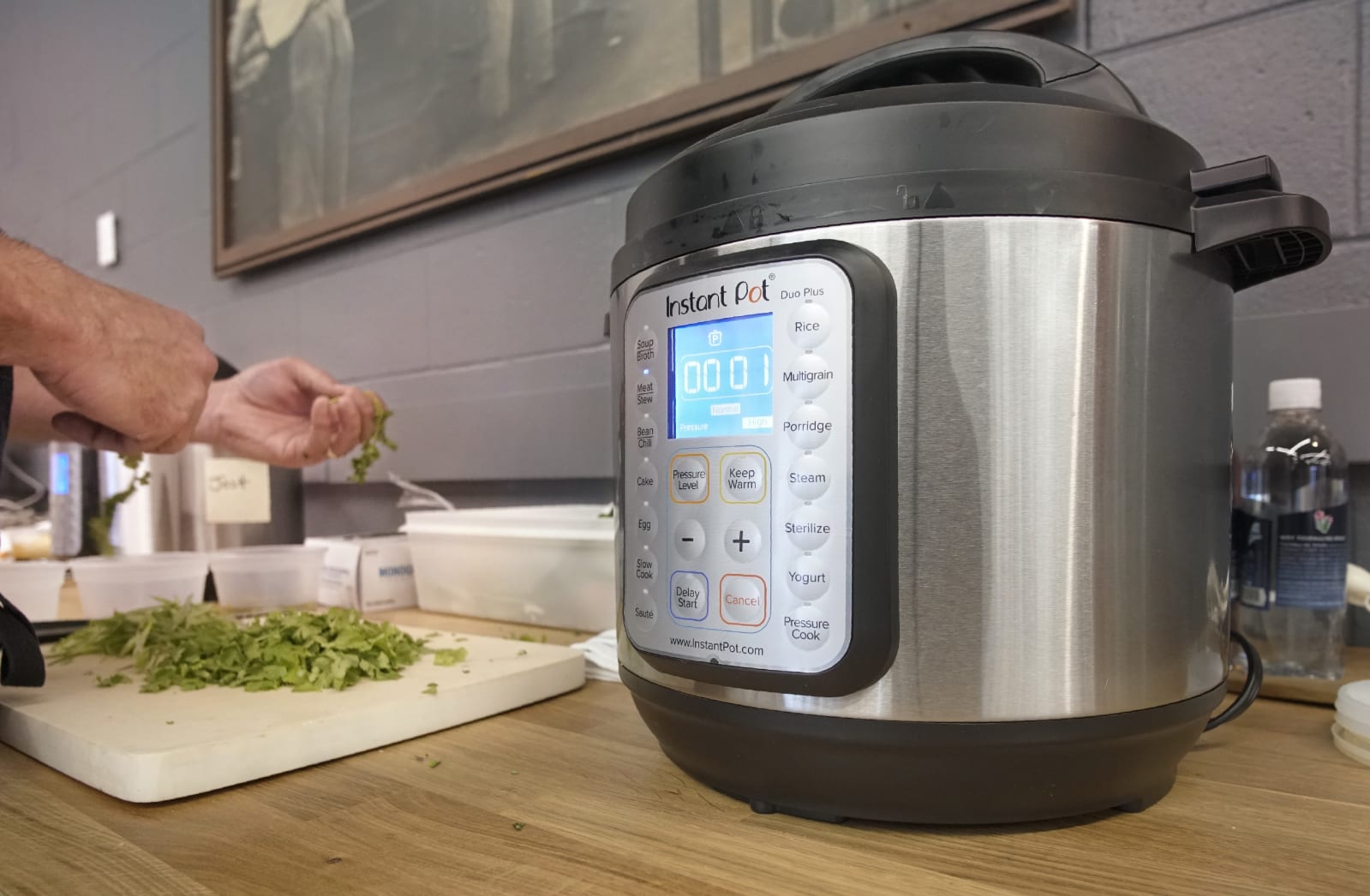
The Instant Pot is one of those rare kitchen appliances to reach not just cult status, but broad mainstream appeal. An “all-in-one” multicooker that promises to replace a rice cooker, a yogurt maker, a slow cooker and more, the Instant Pot has risen to fame in part thanks to its versatility and also the fact that it’s a good electric pressure cooker. This lets you cook food at an accelerated rate — think pulled pork in an hour, or chicken curry done in 10 minutes. And because it’s electric, you just press a few buttons and walk away without having to keep an eye on it.
It’s no wonder why the Instant Pot has become a favorite among home cooks, even those of us on the Engadget staff. Not only have a few of us bought it for ourselves, we've recommended it in past gift guides. Sure, it's not a gadget in the traditional sense (although there is a WiFi-connected version with an app), but it does have a lot of crossover appeal thanks to its promise of all-in-one efficiency.
But what do you do when you get one? With so many recipes on the internet and so many different things you can do with it, where do you even start? In this guide, I'll attempt to give you a primer on the first steps you should take when you get one, some tips and tricks on how to use it and a few favorite recipes and source links. A lot of this comes from personal experience; I've been an Instant Pot owner for a few years. I'll also note that the listed recipes reflect my own taste, but hopefully this guide will provide a good start for your own culinary adventures.
How Instant Pots work
For the uninitiated, the Instant Pot is an "all-in-one" kitchen gadget that promises to replace a rice cooker, a yogurt maker,a slow cooker and more. But the real reason the Instant Pot has risen to fame is that it's also a very good electric pressure cooker. This lets you cook food at an accelerated rate; imagine pulled pork in an hour instead of five or a chicken curry done in 10 minutes. And because it's electric, you just press a few buttons and walk away. Unlike a stovetop pressure cooker, there's no need to keep a constant eye on it.
There are several Instant Pot models to choose from. Some of the lower-end ones lack the yogurt mode, and a couple of the higher-end models have extra features like sous-vide cooking and canning, but all of them have the pressure cooker function, and indeed, much of this guide focuses on that.
Which Instant Pot model is right for you?
Best for most: Instant Pot Duo (6-quart)
There are several Instant Pot models to choose from. Some of the lower-end ones lack the yogurt mode, and a couple of the higher-end models have extra features like sous-vide cooking and canning, but all of them have the pressure cooker function.
The Instant Pot Duo strikes the right balance of features, size and power for most people. It has pretty much every function you’d want, including modes for sauté, slow cooking, yogurt making and of course pressure cooking. We find that the six quart model is perfect for a couple who likes to meal-prep or have leftovers, or for a family of four.
Best for single users: Instant Pot Duo (3-quart)
Living by yourself? Then you might want to scale down to the three quart model, which has most of the same features as the six-quart model, except in a smaller footprint.
Upgrade pick: Instant Pot Pro
The Instant Pot Pro is designed for enthusiasts, offering an assortment of upgrades over other Instant Pots. The inner bowl has an extra thick bottom that can go on the stove, plus it has handles so it’s easier to lift. It comes with 28 customizable programs for different foods, and there are five favorites buttons that you can assign to frequently used settings. The steam release switch has also been upgraded to reduce noise and splatter, and there are even steam release reminder alerts with 5- and 10-minute pre-sets. The Pro is also one of a few Instant Pots that’s compatible with an optional QuickCool lid, which helps you release pressure faster.
If you want WiFi: Instant Pot Pro Plus
The Pro Plus includes many of the same features as the regular Pro, except it has WiFi connectivity as well, which allows it to control with a mobile app. This lets you release the steam remotely, or schedule when you want to do it after the cook is done.
A brief word on other Instant Pot models:
The Duo Plus is an upgraded version of the Duo Series. It has two additional functions: sous vide (for temperature-controlled cooking) and sterilizer (a steam shortcut for sterilizing items like baby bottles). There’s also a cooking progress status bar plus an anti-spin design that keeps the inner pot in place when you’re sauteing.
The Duo Crisp + Air Fryer is basically an Instant Pot that comes with an additional lid that adds dry-heat cooking methods like baking, broiling, dehydrating and of course air frying. There’s also a $200 Pro version that pairs the air fryer lid with the Pro model mentioned above.
The Instant Pot Max is best if you’re really into canning your own foods. It’s the only one that’s capable of reaching 15 PSI, which is needed for pressure-canning.
The Star Wars Instant Pots are a great choice for avid Star Wars fans or anyone who appreciates novelty appliances. They’re really just rebranded versions of the Duo, with the same exact functionalities and features. They come in five iterations: Little Bounty, Darth Vader, Stormtrooper, BB-8 and R2-D2.
What about sous vide?
If you’re interested in trying sous vide but don’t want to make an investment in a standalone device, then the Instant Pot Pro, the Duo Plus, the Pro Plus, the Duo Crisp or the Max are good choices.
Getting started
The Instant Pot has three parts: the housing with the cooking element at the bottom; the stainless steel inner pot; and the lid, which comes with a sealing ring plus a steam-release valve. Setup is as easy as putting the inner pot inside the housing and plugging it in. You'll also want to attach the tiny condensation collector on the back if the instructions call for it.
The first thing to do is a "water test," which not only helps familiarize you with the basic pressure cooker features, but confirms your appliance is in proper working order. To do this, put three cups of water in the pot, twist the lid on — it'll make a sound when it's locked in place — and set the pressure cooker on high for two minutes. The way to do this varies from model to model; on the Duo machines, you'll have to press Manual, select High, then dial down the time to two minutes. On something like the Ultra, you just need to go to the Pressure Cooker menu, dial it to two minutes and select High.
Then, make sure your valve is set to "Sealing" so that the Instant Pot can build pressure. On the Duo machines, this means rotating it so the arrow points up, while on the Ultra, the valve will automatically be set to Sealing. Finally, press "Start." The Instant Pot will then build up that pressure to High, maintain it for the set two minutes, and then stop. In some cases, you'll hear hissing and see steam coming out of the Instant Pot. This is totally normal. You'll know the Instant Pot is under pressure when the float valve pops up and the hissing quiets down.
The lid cannot be opened when the Instant Pot is under pressure; you must depressurize it first. Once the cooking is done, you can let the pot naturally depressurize (also known as "Natural Release"), which simply means leaving it alone for 20 or so minutes until the float valve comes down.If you don’t want to wait that long, you can do a manual release (also known as "Quick Release") by switching the valve to "Venting." To do that on the Duo models you rotate the valve; on the Ultra, press the steam release button on top. This method will release a lot of steam, so I suggest doing this under a range hood if you have one. Again, once the float valve comes back down, you'll know the Instant Pot has been depressurized.
Doing the water test teaches you the basics of sealing the Instant Pot, setting it and depressurizing it. Plus, if anything goes wrong along the way — especially if it doesn't seal the pressure — you can call the retailer or manufacturer to troubleshoot or ask about a return or exchange. It's a step that many people skip, but I recommend it for beginners.
Instant Pot accessories
The Instant Pot is ready to use right out of the box, but if you want to get even more functionality out of it, then you might want to consider some accessories. The following are just a few suggestions that we think will elevate your Instant Pot experience.
Tempered glass lid
The main reason to get an Instant Pot is to use it as a pressure cooker, but it has other functions too. If you want to use it as a slow cooker or you simply want to keep your food warm, you’ll want to invest in a tempered glass lid like our Editor-In-Chief Dana Wollman did. This lid is also a good way to keep your food covered if you want to transfer the inner pot to a table or in the fridge.
Steamers/PIP
Steaming food in the Instant Pot is quick and easy, but you’ll want specific equipment to get the job done right. Instant Pot makes two styles of silicone steamers; one is a stacking model that you can use for dumplings or fish, and another is a collapsible one that is ideal for batch-cooking vegetables. If you need even more capacity, we recommend this Hatrigo mesh steamer basket.
Along your Instant Pot discovery journey, you might come across a phrase called “PIP cooking.” This stands for Pot-in-Pot and involves putting another vessel inside the Instant Pot. This method is great if you’re cooking foods that don’t contain liquid (such as cheesecake) or you simply want to cook in smaller quantities. One of our favorite accessories for this is the Aozita Stackable Steamer, which not only acts as a steamer, but also contains tiered containers so that you could cook multiple foods at once.
Sealing ring
If you use your Instant Pot for both savory and sweet applications, then we suggest getting extra sealing rings so that the odor of one doesn’t affect the other. You don’t really want your cheesecake to smell like pulled pork or vice versa.
Air fryer lid
As the name suggests, the Instant Pot Air Fryer Lid essentially turns your Instant Pot into an air fryer. It’s a good option if you don’t want two appliances taking up space on your kitchen counter, and this add-on does a decent job of “air frying” foods. Still, the Lid really only works for small batches as well as smaller pieces of food. Even a hot dog is too large to fit inside the air fryer basket.
If you’re going to use the air fryer lid to add roasting and broiling capabilities to the Instant Pot — so you can brown a roast chicken or melt the cheese on a lasagna, for example — then it’s not a bad option. But as far as air frying goes, I’d recommend saving up and investing in an actual air fryer instead.
Tips and tricks
Don't worry about all the buttons
When you first get the Instant Pot, you might be overwhelmed by all of the different buttons on the front of it. There are ones that say "Meat/Stew," "Chili/Beans," "Multigrain," "Egg" and even "Cake." With the exception of a few, most of these are simply shortcuts that Instant Pot programmed ahead of time. You might never need to use them.
The most important buttons to know are "Sauté," which (as you might expect) lets you sauté things in the pot, and the aforementioned "Manual" or "Pressure Cooker" function. The rest are pretty superfluous, with the exception of "Keep Warm," "Cancel" and non-pressure cooker functions like the "Slow Cooker" or "Yogurt" (which helps maintain the cultured milk at a specific temperature).
Add at least half a cup of liquid, and don't go over the maximum
One of the things you'll learn about pressure cooking is that you don't need to add as much liquid as you would in regular recipes. But you'll still need to add some because the pressure cooker requires moisture to build that pressure. Otherwise, the Instant Pot could overheat and show an "OvHT" or “BURN” error on the display. On the other hand, you shouldn't fill it up beyond two-thirds capacity, which is handily marked on the inside of the inner pot. The Instant Pot probably won't explode on you — it has a lot of safety features to prevent that — but you probably shouldn't test its boundaries.
Cooking times aren't always accurate
Setting the pressure cooker timer for two minutes doesn't mean the entire cooking time is two minutes. You have to take into account the amount of time the Instant Pot needs to come to pressure and the time it'll need to depressurize. The more stuff you have in the pot (and the colder it is), the longer it takes. Because of that, a "five-minute" chicken curry could really be more like 10 or 15 minutes from start to finish.
Clean it carefully and frequently
The inner pot is dishwasher safe, which is convenient, but the rest has to be cleaned by hand. Also, don't make the same mistake I did and accidentally spill something hot directly on the cooking element. The outer shell is hard to clean because you can't put it in the sink — electricity and water don't mix, after all — and you risk damaging the appliance. As for the lid, hand wash it after every use. You'll also notice after a while that the sealing ring — the rubber/silicone gasket on the inside of the lid — might develop a smell as it absorbs the scent of the food you're cooking. I recommend soaking it in a vinegar solution, or you could also put it on the top rack of your dishwasher.
You can't cook everything with it
Sure, you can cook everything from dog food to jam in the Instant Pot, but it's not a miracle worker. You can't deep fry in it. You can't bake a pie in it. Don't be ridiculous.
Recipes and guides
Now you're all ready to cook, and you're probably dying to know what to make in it. Due to the popularity of the Instant Pot, you'll find no shortage of cookbooks and recipe tutorials online. The Facebook group I mentioned is a good place to start, and there are countless YouTube tutorials as well. Here are just a few of my favorite resources:
Amy and Jacky are part of the OG Instant Pot community, and their site is great for beginners. Not only will you get the low-down on the aforementioned water test, but you'll also get great recipes for bone broth, "fail-proof" rice, yogurt, cheesecake and more.
Whether or not you're into the "paleo" lifestyle, you'll like Michelle Tam's list of Instant Pot recipes. Pressure cookers are great for shortening the amount of time for cooking braised meats, and she has a lot of recipes that cater to your inner carnivore. Her Instant Pot pulled pork recipe is still my go-to, and the short ribs are great as well.
My personal favorite site for pressure-cooker recipes is probably Serious Eats. All of these recipes are fantastic. I've tried the chicken stock, the mushroom risotto, the chicken pho, the chicken and chickpea masala, and they've all been outstanding.
Another personal favorite is The New York Times’ Cooking section, which has a list of wonderful pressure-cooker-friendly recipes. My favorites are from Melissa Clark, who has written two Instant Pot cookbooks: Dinner In an Instant and Comfort in an Instant. There's a recipe in Comfort in an Instant for spaghetti and meatballs that I was hugely skeptical of but turned out to be one of the most remarkable things I've ever made. I also love the recipes for chicken korma and shrimp biryani.
Other sources
Here are a few other guides that I found very useful in my own Instant Pot journey, and they contain links to many more recipes and sites than I have space for here:
With all of this information in your arsenal, you should have no fear in picking up an Instant Pot. Thankfully, not only is the base model pretty affordable at less than $100, Amazon frequently puts it on sale either on Prime Day or on Black Friday. So if you haven't bought one just yet, it's not a bad idea to wait until one of those times of year to get one at a deep discount. And when you do, come on back here, read through the guide once more and venture off on your own pressure-filled culinary adventures.
Images: Detroit Free Press via Getty Images (First Instapot); Portland Press Herald via Getty Images (Instapot / chopping board); Boogich via Getty Images (cooking)
This article originally appeared on Engadget at https://www.engadget.com/instant-pot-guide-131534709.html?src=rss
Less than a month after debuting its new suite of Firefly generative AI editing tools, Adobe announced Monday that it is already working on a host of upgrades to further empower its users through Creative Cloud video and audio applications. The additions should be coming to Firefly's beta program later this year.
Built from the company's long-running AI program, Sensei, Firefly is a suite of generative AI models that can both create and transform audio, video, illustrations and 3D models using text prompts in the same way that Dall-E and ChatGPT do. Firefly's features are already available across Adobe's ecosystem including Premiere Pro, Illustrator, After Effects and Photoshop, though they're currently only accessible through the closed beta program.
The new features announced Monday are designed to help professional editors cut down on their drudge work, boosting color levels, inserting placeholder images, adding effects, autonomously recommending b-roll for a given project — simply by typing their ideas into Firefly's AI text prompt and letting the algorithm do its thing. This will include "text to color enhancements," a broad-ranging capability that can adjust the brightness and saturation levels, shift the time of day — even the time of year — using natural language prompts.
The generative AI features will extend to audio as well, with the capacity to insert background music and sound effects by describing the editor what they want through text. The animated font features that we first glimpsed at last month's debut event are expected to arrive shortly as well as an automated b-roll feature that analyzes the content of the script to generate storyboards and suggest video clips. Most impressive, Firefly will even throw together personalized how-to guides to walk new users through the process of using these features.
This article originally appeared on Engadget at https://www.engadget.com/adobe-fireflys-new-ai-tools-aim-to-cut-down-drudge-work-for-editors-130005412.html?src=rss
After many delays and a last-minute approval, SpaceX appears ready to conduct Starship's first orbital test flight. The next-generation rocket is now expected to launch from Boca Chica, Texas at 9:20AM Eastern with a livestream already available through the company's YouTube channel (below). While conditions are generally favorable, there are backup launch windows on Tuesday and Wednesday.
This is the first time SpaceX is launching a fully integrated Starship system with a Super Heavy booster underneath to get the main vehicle into orbit. The combination is about 394 feet tall, or taller than the Saturn V rocket. While both Starship and the booster are designed to be reusable, both will splash into the sea during the test.
There's no guarantee of success. In a Twitter Spaces chat on Sunday, Elon Musk told fans to "set your expectations low." Don't be surprised if something goes awry, in other words. Instead, this test is more about collecting data to improve future boosted Starship flights.
A successful test is crucial both for SpaceX's long-term plans, including lunar tourism, as well as NASA's exploration plans. The Artemis Moon landings beginning in December 2025 will use Starship to take crews from an orbiting Gateway station to the lunar surface. While those won't depend on a booster, NASA needs to know that Starship is reliable before these crewed missions can go forward.
This article originally appeared on Engadget at https://www.engadget.com/watch-spacexs-starship-orbital-test-flight-at-920am-et-124553427.html?src=rss
It was after a particularly grueling session with The Legend of Zelda: Breath of the Wild that I started to wonder: When did developers stop putting cheats into their games to help the less talented among us get through the tricky bits? When I was a kid, a little bit of Up Down Left Right A and Start together, and a little older, a little /~noclip saved me no end of bother. These days, if you look for cheats for any modern game online, the best you’ll get is to be sassily told to “git gud.”
Sorry, a little context: I play games, but I’m not a Gamer, or a Nintendo Person, so in 2023 I resolved to remedy this. So many discussions at work fly past me because while I’ve heard of Cliff Bleszinski and Hironobu Sakaguchi, I couldn’t tell you their oeuvre without Googling. Part of my self-education was to watch every Zero Punctuation compilation to speedrun the last decade of games development. Another part was to seek out some classic games that I’d never played through ignorance, weakness, or my own stupid fault.
The first step on this journey only required me to go to the bookshelves in my living room, ironically. I bought my Pokémon Go-loving wife a Nintendo Switch at the start of 2020 so she could play Let’s Go Pikachu!. Not long after, a friend handed me their copy of Breath of the Wild and said I should give it a play. But it’s been sitting on my bookshelf for three years, as I subconsciously resisted the urge to give it a go. This, I’ll admit, is because I’ve always had the notion that Nintendo games are Hard Work.
And that was my belief up until a month ago, when I thought I’d better try Breath of the Wild before Tears of the Kingdom came out. I figured I’d give it half an hour, the smallest of toes dipped into the world, so that I could say I’d tried and that it wasn’t for me. And before you can say “I need to be up at seven in the morning for work,” it was long past midnight. Since then, Breath of the Wild has consumed my every waking moment. It is, without a doubt, one of the most engrossing and immersive games I have ever played, despite my frustrations.
Nintendo
It’s why I felt compelled to write this, because I want to spread the gospel to non-gamers who might feel similarly like they’ve missed the bus. Especially since we can hope that the older game might fall in price as people seek out its replacement. Or, given the current situation with Nintendo persistently keeping the prices of its older first-party games high, at least it won’t get any more expensive. But, to undermine my own argument, I’d say that if Tears of the Kingdom is half as good as Breath of the Wild, it’ll probably be the first game that’s worth the $70 fee Nintendo’s trying to push consumers into accepting.
Despite its age (it is from 2017, after all), Breath of the Wild feels cutting-edge, and part of that is how deep it is. When I started playing, I worried that it would be yet another soulless open-world grind-a-thon, a feeling not soothed by the presence of Far Cry-esque towers you need to conquer to open up areas of the map. But the one thing that this game has that sets it apart from its genre-mates is a level of curation that continues to surprise me.
It plays out on a sprawling map, but it never feels like you’re traversing through an empty void. The density of what’s available means that, despite spending a month or so covering just half of Hyrule (I’ve only recently reached Goron City), I never stop finding new stuff. And there are some assets that have been reused, like the standard template for enemy camps, but you never feel that they’ve been copy-pasted to pad out the space. This Hyrule feels hand-made, with every detail sweated beyond any player’s comprehension.
Even a philistine like me can appreciate the level of craft, not just in its layout, but how it has been built. Take the chemistry engine, which seems like such a simple idea you wonder why it hasn’t been a part of open worlds forever. By giving each material its own properties, you can take advantage of more than just weight physics to help you solve puzzles. Thanks to YouTube, once I understood how Shock Traps worked, I was able to start making real progress in the shrine quests that put you face to face with a particularly murderous killbot.
And the game’s critical path is left so completely wide open as to almost not matter at all, giving you total freedom. Rather than giving you a set series of missions, you unlock the main quest line after the first hour, and then can tackle it in any way you wish. I’ve seen more than a few Straight To Ganon speed runs where expert players take a bare-footed Link to defeat the title’s big bad within minutes of being able to leave the tutorial area. I love, too, how the landscape gently nudges you toward the safer areas where you can level up before you’re let loose on the harsher climates of, say, Death Mountain.
Nintendo
This works so well that when you’ve gotten a little way along you start picking up weapons that aren’t total garbage. Recently, I was cornered by a Guardian Stalker, very much a one-hit kill villain you can only ever hope of running out of view from. But, trapped in the North Lomei Labyrinth, I had no option but to try and fight without dying. And I managed to hack off its legs, one by one, until it flopped on its side, unable to shoot me with its laser. The feeling of exhilaration and satisfaction after so many deaths, was one for the ages. You don’t need to git gud in the grindy sense, you just need to spend enough time in the world to gently, naturally evolve how you play the game until things get easy.
And this is when I realized there was a good reason developers don’t put cheats into their games any more. Because a good title, like Breath of the Wild, rarely prescribes how you navigate and solve its world. If you’re not a fighter, you can devote your energies to stealthily circumnavigating your foes. When you grasp the game’s physics engine, you can use a well-placed remote bomb to send a venom-spitting Lizalfo hurtling down the side of a cliff. The only thing I can’t do yet is take on a Lynel – the game’s super-tough mini-boss – and not get rinsed, because I’m not sure I’ll ever learn the art of parrying.
Now, that may be deficiency enough that I never actually finish the game, since that’s rarely an impediment to getting to the fun bits. Take the shrine quests, which (mostly) offer the most enjoyable physics puzzles since Portal, give or take the aforementioned combat trials. Part of this is because the puzzles can be hard but are never unfairly-formatted, and there’s almost always a solution that’ll come to mind if you just walk around for long enough. The fact there’s no time limit or villain trying to force you to hurry up helps matters considerably.
I have gripes, but they’re all mostly nitpicks. The Switch’s hardware limitations means that the game’s draw distance can sometimes be a problem. If you’re looking for a spot out of sight of enemies to land your glider on, it can only be once you’re inches from the ground that it’ll finally render a camouflaged Lizalfo. And Nintendo’s policy of never being entirely open with the player to encourage experimentation means you’ll need to have some YouTube tutorial channels bookmarked to help you navigate some of the more baffling bits.
Simon Parkin’s essay about Breath of the Wild in The New Yorker quoted original series creator Shigeru Miyamoto, who described Hyrule as a “miniature garden you can put into a drawer and revisit any time you like.” And this speaks to something I’ve found about the game, that it’s less of a video game and more of a place that you can choose to visit. This vast, pastoral paradise, which you can roam around on foot, climbing mountains or on horseback. A land only spoiled by the regular appearance of a zombified enemy crawling up out of the ground to ruin your reverie.
In a way, as much as I enjoyed having No Man’s Sky as my lockdown game of 2020, I wish I’d been braver and tried Zelda back then. I’d have rather spent time inside Miyamoto’s miniature garden, now lovingly tended by Hidemaro Fujibayashi and Eiji Aonuma. And I think I’m going to have to try and get this finished as quickly as possible so that I’m ready to continue my journey in Tears of the Kingdom.
This article originally appeared on Engadget at https://www.engadget.com/how-this-non-gamer-fell-in-love-with-the-legend-of-zelda-breath-of-the-wild-123054845.html?src=rss
Two weeks ago, Netflix confirmed it was taking a rare opportunity to livestream Love Is Blind's season 4 reunion. However, when the time came, what was an exciting prospect became a source of frustration as technical difficulties led to canceling the reality dating show's real-time viewing.
At first, subscribers were told there would only a few minutes of delay, but Netflix finally pulled the plug after over an hour. The streaming service soon tweeted an apology: "To everyone who stayed up late, woke up early, gave up their Sunday afternoon… we are incredibly sorry that the Love Is Blind Live Reunion did not turn out as we had planned. We're filming it now and we'll have it on Netflix as soon as humanly possible. Again, thank you and sorry."
The show is incredibly popular, with Niemanreporting it was 2022's eighth most streamed original show. The reunion, hosted by real-life couple Nick and Vanessa Lachey, checks back in with Love Is Blind contestants months after filming has finished. If you're not familiar with it's premise, the show follows 30 men and women who date each other over 10 days from inside pods that prevent them from seeing each other. The idea: Avoid letting any physical aspects weigh in on how they feel. All in all, it made sense for Netflix to choose Love Is Blind for a livestream but the streaming service just couldn't hold up the technical end of the bargain.
To everyone who stayed up late, woke up early, gave up their Sunday afternoon… we are incredibly sorry that the Love is Blind Live Reunion did not turn out as we had planned. We're filming it now and we'll have it on Netflix as soon as humanly possible. Again, thank you and…
Early in the morning, Netflix tweeted an update alongside a photo of the Love Is Blind cast with a "promise" that the reunion will be available to stream today at 3PM ET.
This article originally appeared on Engadget at https://www.engadget.com/netflix-cancels-second-ever-livestream-after-love-is-blind-reunion-hit-by-technical-issues-120930605.html?src=rss