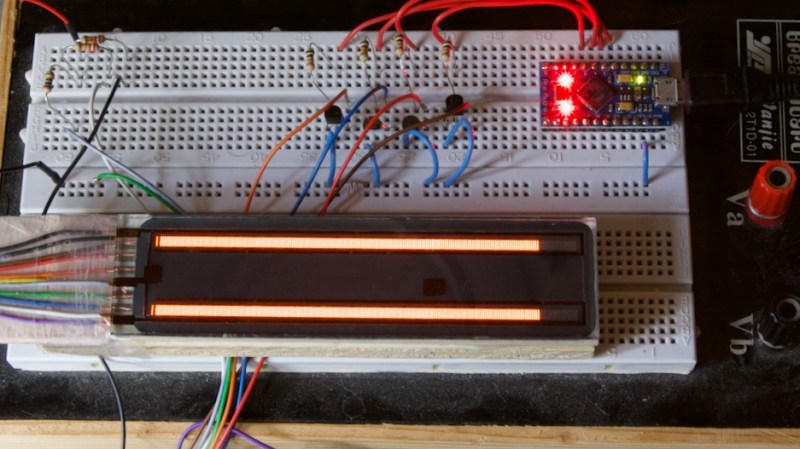
Noble Graphs: Displaying Data With Neon Like Its 1972

In the days before every piece of equipment was an internet-connected box with an OLED display, engineers had to be a bit more creative with how they chose to communicate information to the user. Indicator lights, analog meters, and even Nixie tubes are just a few of the many methods employed, and are still in use today. There are, however, some more obscure (and arguably way cooler) indicators that have been lost to time.

[Aart Schipper] unearthed one such device while rummaging around in his father’s shed: a pair of Burroughs Bar Graph Glow-Transfer Displays. These marvelous glowing rectangles each have two bars (think the left and right signals on an audio meter, which is incidentally what they were often used for), each with 201 neon segments. Why 201, you may ask? The first segment on each bar is always illuminated, acting as a “pilot light” of sorts. This leaves 200 controllable segments per channel. Each segment is used to “ignite” its neighboring segment, something the manufacturer refers to as the “Glow-Transfer Principle.” By clever use of a three-phase clock and some comparators, each bar is controlled by one analog signal, keeping the wire count reasonably low.

Don’t get us wrong, the warm, comforting glow of Nixie tubes will always have a special place in our hearts, but neon bar graphs are just hard to beat. The two do have a similar aesthetic though, so here’s hoping we see them used together in a project soon.

Thanks to [Jan] for the tip!

Hack a Day 18 Oct 03:00
arduino  neon  nixie  parts  retro  

X is starting to charge new users $1 per year to send tweets

After weeks of speculation, X has confirmed its plans to charge new users for the service previously known as Twitter. The company shared details about a new subscription called “Not a Bot,” that it’s currently testing in New Zealand and the Philippines.

The subscription, which was first reported by Fortune, requires new users to pay the equivalent of $1 USD per year in order to be able to post. “As of October 17th, 2023 we’ve started testing ‘Not A Bot,’ a new subscription method for new users in two countries,” X explains. “This new test was developed to bolster our already significant efforts to reduce spam, manipulation of our platform and bot activity. This will evaluate a potentially powerful measure to help us combat bots and spammers on X, while balancing platform accessibility with the small fee amount.”

Under the scheme, new users will be required to verify their phone numbers and pay the $1 fee if they want to use core features like tweets, retweets, bookmarks and likes. Those who who don’t pay will only be able to use X in a “read only” mode.

The company said that for now the fees will not apply to existing users. “It is not a profit driver,” X said.

Starting today, we're testing a new program (Not A Bot) in New Zealand and the Philippines. New, unverified accounts will be required to sign up for a $1 annual subscription to be able to post & interact with other posts. Within this test, existing users are not affected.

This…

— Support (@Support) October 17, 2023

Developing...

This article originally appeared on Engadget at https://www.engadget.com/x-is-starting-to-charge-new-users-1-per-year-to-send-tweets-000925191.html?src=rss

X now requires community fact checks to include sources

X is making a significant change to its crowd-soruced fact checking tool in an attempt to stem the flow of misinformation on its platform. The new rule is one that will be familiar to professional fact checkers, academics and Wikipedia editors, but is nonetheless new to X’s approach to fact-checking: the company will now require its volunteer contributors to include sources on every community note they write.

The company announced the change in a post on X, shortly after Wired reported that some community notes contributors are worried the tool is being manipulated by bad actors and worsening X’s misinformation problems amid the ongoing Israel-Hamas war. “Starting today, sources are now required for proposed notes,” the company wrote. “We haven’t previously required this, as some helpful notes inherently do not need sources – for example, they refer to details of the post or media it contains. But those instances are less common, and we believe the overall impact of this change will be positive.”

The change comes amid mounting scrutiny of the amount of misinformation and other falsehoods spreading on X in recent days. Longtime researchers have said that misinformation has reached new heights following Hamas’ attacks in Israel and the ensuing war. The advent of paid verification, and algorithm changes that boost paying subscribers, have allowed misinformation to spread relatively unchecked, researchers have said.

Notes that cite sources have a much higher likelihood of earning a 'Helpful' status. This is not surprising, as sources make notes more easily verifiable by viewers and raters. Starting today, sources are now required for proposed notes.

We haven’t previously required this, as… pic.twitter.com/6CWGkvtLPJ

— Community Notes (@CommunityNotes) October 17, 2023

European Union officials have also raised concerns, pointing to the viral spread of video game footage and other unrelated content falsely claiming to depict scenes from the ongoing conflict. EU officials opened an investigation into X over its handling of misinformation last week.

Under Elon Musk’s leadership, X cut the teams responsible for curating reputable information about breaking news events, removed misinformation-reporting tools, slashed safety teams that patrolled for disinformation, and stopped labeling state-affiliated media accounts. Instead, the company has relied almost entirely on Community Notes, which allows volunteer contributors to append fact-checks to individual tweets.

Contributors are not vetted before joining the program, though notes have to reach a certain threshold of “helpful” ratings from other contributors before they’ll be visible. X CEO Linda Yaccarino told EU officials last week that the company had “recently launched a major acceleration in the speed at which notes appear.”

According to Wired, the system is easily manipulated as groups of contributors can rate each other’s notes, or selectively rate contributions that align with their opinions. The report also says that community notes related to the Israel-Hamas war have been filled with conspiracy theories and infighting between contributors.

The change to require a linked source may be X’s attempt to increase the quality of its notes, though it doesn’t seem to have any guidelines about the types of sources that can be cited. The company says “thousands” of new contributors have joined the program in recent days, and that notes have been viewed “millions” of times.

This article originally appeared on Engadget at https://www.engadget.com/x-now-requires-community-fact-checks-to-include-sources-235125787.html?src=rss

Full Self-Driving, on a Budget

Self-driving is currently the Holy Grail in the automotive world, with a number of companies racing to build general-purpose autonomous vehicles that can get from point A to point B with no user input. While no one has brought one to market yet, at least one has promised this feature and had customers pay for it, but continually moved the goalposts for delivery due to how challenging this problem turns out to be. But it doesn’t need to be that hard or expensive to solve, at least in some situations.

The situation in question is driving on a single stretch of highway, and only focuses on steering, so it doesn’t handle the accelerator or brake pedal input. The highway is driven normally, using a webcam to take images of the route and an Arduino to capture data about the steering angle. The idea here is that with enough training the Arduino could eventually steer the car. But first some math needs to happen on the training data since the steering wheel is almost always not turning the car, so the Arduino knows that actual steering events aren’t just statistical anomalies. After the training, the system does a surprisingly good job at “driving” based on this data, and does it on a budget not much larger than laptop, microcontroller, and webcam.

Admittedly, this project was a proof-of-concept to investigate machine learning, neural networks, and other statistical algorithms used in these sorts of systems, and doesn’t actually drive any cars on any roadways. Even the creator says he wouldn’t trust it himself, but that he was pleasantly surprised by the results of such a simple system. It could also be expanded out to handle brake and accelerator pedals with separate neural networks as well. It’s not our first budget-friendly self-driving system, either. This one makes it happen with the enormous computing resources of a single Android smartphone.

Engadget Podcast: Max Evry on his oral history of David Lynch's Dune

We still have months to wait before Dune: Part Two hits theaters, so what better time to reminisce about David Lynch's intriguing adaptation of Frank Herbert's masterpiece? Reviled at the time, Lynch's Dune has now firmly established itself as a cult sci-fi epic, a film with boundless creative energy hampered by studio interference.

In this bonus episode, Devindra chats with film journalist Max Evry, author of A Masterpiece in Disarray: David Lynch's Dune. We explore why he devoted two years of his life towards researching an unloved film, as well as how it's a refreshing departure from the superhero films dominating theaters today.


Listen below or subscribe on your podcast app of choice. If you've got suggestions or topics you'd like covered on the show, be sure to email us or drop a note in the comments! And be sure to check out our other podcast, Engadget News!

Subscribe!

Credits
Host: Devindra Hardawar
Guest: Max Evry
Music: Dale North

This article originally appeared on Engadget at https://www.engadget.com/engadget-podcast-max-evry-on-his-oral-history-of-david-lynchs-dune-195809003.html?src=rss

Elgato's new teleprompter is designed for streamers

Politicians and awkward SNL hosts have long-relied on the humble teleprompter to get their lines out, and now there’s a device that lets the rest of us get in on the mealy-mouthed fun. The Elgato Prompter is basically a shrunken-down teleprompter, complete with a scrolling display, side hoods to minimize unwanted ambient lighting and simple connectors that attach to an external camera, built-in webcam or just about anywhere else.

Unlike other prompters on the market, you don’t need your own tablet or phone, thanks to a built-in screen and the company’s proprietary Camera Hub software. Once activated, the device not only displays video scripts, but also mirrors any window or app via a simple drag and drop. This lets you see both the script and live feeds from chat participants at the same time, all while looking directly into the camera. It’s a bona-fide cornucopia of human social cues.

Of course, you aren’t relegated to live feeds from fellow chat participants. You can drag and drop anything to the Prompter, with Elgato suggesting that users place a window of “the big match” so people can sneak glances during those endless work meetings. We would never, however, recommend such a blatant display of truancy.

The Prompter is an Elgato product, so it offers some deep integration with the recently-discounted Stream Deck. There’s a plugin for the device that offers control and adjustment options at the touch of a button, all of which should come in handy for livestreamers and YouTubers looking for that perfect take. To that end, Elgato says it built the device to be the “true all-in-one solution for content creators.”

Elgato, which is owned by noted peripheral manufacturer Corsair, says the Prompter integrates with more webcams, cameras and smartphones than any other similar device on the market, so you likely won’t need to buy additional hardware to use it. If you’re worried, there’s a list of supported cameras and devices right here.

Setup seems simple enough, with included attachment clips and a stand, interchangeable backplates and a single USB connection to both power the device and transfer data. The Elgato Prompter is available right now and costs $280.

This article originally appeared on Engadget at https://www.engadget.com/elgatos-new-teleprompter-is-designed-for-streamers-184546932.html?src=rss

Latest Xbox accessibility features include controller pairing without touching the console

On Tuesday, Microsoft announced a slew of accessibility updates for Xbox players on consoles and PCs. These include keyboard key remapping using controllers, easier-to-get-to accessibility shortcuts and a new section in the Microsoft Store. In a reminder that inclusive design can help everyone, one of the new features will let anyone set up a new controller without getting up to press a pair button on the console.

Wireless controller pairing no longer requires direct console contact. “From the comfort of a couch, wheelchair, hospital bed, etc., players can now put their console into pairing mode using an Xbox media remote, digital assistant voice command, or previously paired controller to connect a new controller to their console,” the company wrote today in a blog post. An official online support document walks you through the setup steps.

Microsoft also announced that “almost 90 keyboard keys” will soon be remappable to the Xbox Adaptive Controller and Elite Series 2 controllers. The idea is to make it easier for people with disabilities to play games that only support mouse / keyboard input. One example the company provides is reprogramming the left bumper to Ctrl+C for copying text.

In addition, the company is simplifying the steps to view options from the Xbox Accessibility menu. Beginning on October 19, the Xbox Game Bar on Windows will let you jump to accessibility settings via widgets. “In the updated Xbox widgets, you’ll find both visual and audio-related accessibility controls to customize your PC gaming experience according to your preferences and needs,” Microsoft wrote. Once the feature launches, you’ll get to the accessibility options via the settings button for “any of the new Xbox widgets in Game Bar.”

Finding accessibility-friendly games is about to get easier, too. The Xbox store now has a channel devoted to Accessibility in Games, featuring every title with corresponding feature tags. The labeling feature launched in 2021 and spread to the Windows app and web store earlier this year.

Finally, Microsoft shared the video below highlighting how the Adaptive Gaming program at Craig Hospital in Englewood, CO, is empowering players with disabilities to rekindle their love of gaming.

This article originally appeared on Engadget at https://www.engadget.com/latest-xbox-accessibility-features-include-controller-pairing-without-touching-the-console-183558285.html?src=rss

MiCreator Studio hands-on: A $199 portable recording studio worth more than its price tag

Austrian Audio is not exactly a household name. It was formed in 2017 following the closure of AKG's offices in Vienna. And it's mostly stuck to higher-end microphones and headphones. Now the company is dipping its toes into more consumer-friendly territory with the $199 MiCreator Studio, a combination condenser microphone and USB-C audio interface in an incredibly portable package. 

At 155 x 60 x 37 mm the MiCreator Studio is quite small, but I'd say a touch shy of pocketable. It's also surprisingly dense. 13 ounces isn't exactly heavy, but it's more than I expected the MiCreator to weigh just by looking at it. The heft makes it feel like a durable and well-made device. The only exception to this is the swappable faceplates. My review sample came with black and red plates, they look nice but feel a little flimsy. And the magnets that attach them to the sides are a little weak and I could see them easily coming off if tossed in bag. At least it comes with a soft pouch you can put it in so everything will stay in one place even if it does get jostled around. 

Terrence O'Brien / Engadget

There are a pair of rubber feet on the bottom that allow the MiCreator to sit comfortably on almost any surface with little concern it'll get jostled around. And the mic capsule is suspended by rubber shock absorbers, so vibration shouldn't prove too much of a concern. If the tiltable head doesn't give you enough flexibility, there is screw mount underneath for attaching to a mic stand.

Controls on the unit itself are relatively spartan. On the front is a switch that changes the mic from high gain, to low gain or mutes it. And there's a knob for controlling monitoring levels or the balance between two sources when you have something plugged into the 3.5mm in/out jack on the back. Below that dual-purpose jack is a dedicated 3.5mm headphone output, and above it is a switch that allows you to set the input level of the additional input.

The switches for changing the input level are probably my biggest gripe with the MiCreator. The difference between the high and low settings are pretty massive. Yes, obviously you can tweak the levels in your DAW and most people will have no issue doing that. But personally I like getting my levels as close to right as possible without touching the gain in my DAW for maximum flexibility. 

Terrence O'Brien / Engadget

I also found that the high gain setting still required me to get pretty close to the mic while speaking which resulted in a lot of breath and mouth noises. Probably exactly what you want when recording some ASMR videos, but it wasn't ideal for podcasting. Again, a lot of this is easily rectified with a decent pop filter. But that's one more thing to carry and slightly undercuts the portability factor.

Those minor nitpicks aside, the mic sounds great. They're highly directional so, despite the fact that they're fairly sensitive condenser mics, background noise is rarely a problem. And they capture a healthy amount of midrange and low end. That's essential for micing up, say, a guitar amp, and it tends to treat my lower vocal register well. But many will want to toss a low cut on their voice in post production.

That lack of tweakability on the gain is an issue again when you plug an instrument directly into the second input. Something like a synth with a master volume that doesn't alter tone is fine. But going direct in with my guitar was a little hit or miss. The most reliable way was to go through my pedal board and one of UA's amp sim pedals to give me better control over volume and tone, rather than relying on amp plugins in a DAW. Austrian Audio gets a ton of credit though for including an instrument cable in the box though that's standard 1/4-inch TS on one side and 3.5mm TRRS on the other side for plugging into the MiCreator. It might seem like a small thing, but it saves you from having to track down and order a rather unusual cable on your own.

Terrence O'Brien / Engadget

The company also sent over one of its MiCreator Satellites. This is a second mic, without an interface, designed to pair with the MiCreator. It costs $99 but adds a lot of flexibility. For one, it's the exact same mic as the MiCreator, so you can use them as a stereo pair or for two people in a simplified podcast setup. But the included cable is also long enough for you to put one mic right up against an amp while capturing some room tone with the other. Or, you could mic an acoustic guitar with one and sing into the other. And the Satellite is truly tiny. This is one of, if not the, smallest full-fledged podcast studio you can can get. 

If there's one feature I would have loved to see, it's a standalone operating mode. If the MiCreator had a small battery and a microSD card slot so it could double as a field recorder, or capture an interview when hooking up your laptop or iPad is not really feasible, I could see it carving out a permanent spot in my day bag.

Still, for $199, or $299 when bundled with a Satellite, the MiCreator offers a surprising amount of value. Frankly it's better than it has any right being at that price. It's an excellent condenser USB microphone and a solid (if simple) audio interface in a small, rugged package. It can be a high-quality go-anywhere podcast studio. Or be the primary way a band records new material while they're out on tour. 

This article originally appeared on Engadget at https://www.engadget.com/micreator-studio-hands-on-a-199-portable-recording-studio-worth-more-than-its-price-tag-180021292.html?src=rss

Google rolls out more accessibility features for Maps, Search and Assistant

Google has revealed a string of accessibility updates it's rolling out for Maps, Search and Assistant, as well as greater availability of some camera-based Pixel features. One of the main focus areas this time around is wheelchair accessibility. A new option that's gradually becoming available on iOS and Android will allow Maps users to request stair-free walking routes. This feature — which Google says will benefit those traveling with luggage and strollers as well — will be available globally, as long as the company has sufficient data for the region.

Google notes that if you have the wheelchair-accessible option enabled in your transit preferences, this will automatically be applied to walking routes too. Otherwise, when you request a walking route, you can access stair-free directions by tapping the three dots at the top of the screen and enabling the "wheelchair-accessible" option.

On a related note, wheelchair-accessible information will be available across more Google products, namely on Maps for Android Auto and cars with Google built in. When you search for a place and tap on it, a wheelchair icon will appear if the location has a step-free entrance, accessible restrooms, parking or seating.

It should be easier to find and support businesses owned by people with disabilities in Maps and Search too. If a business chooses to identify itself as "disabled-owned," this will be mentioned in Maps and Search listings. Google previously rolled out similar Asian-owned, Black-owned, Latino-owned, LGBTQ+ owned, veteran-owned and women-owned business labels.

Elsewhere, Google is enabling screen reader capabilities in Lens in Maps (which was previously called Search with Live View), an augmented reality tool that's designed to help you find things like ATMs, restrooms and restaurants with the help of your handset's camera. When you're in a perhaps unfamiliar place, you can tap the camera icon in the search bar and point your phone at the world around you.

"If your screen reader is enabled, you’ll receive auditory feedback of the places around you with helpful information like the name and category of a place and how far away it is," Eve Andersson, senior director on Google's Products for All team, wrote in a blog post. This Lens in Maps feature, which is geared toward blind and low-vision folks, will be available on iOS starting today and Android later this year.

On Pixel devices, the Magnifier app uses your camera to help you zoom in on real-world details from afar or to make text on menus and documents easier to read with the help of color filters, brightness and contrast settings. The app is available for Pixel 5 and later devices, but not the Pixel Fold.

Google also notes that the latest version of Guided Frame that arrived on Pixel 8 and Pixel 8 Pro earlier this month recognizes pets, dishes and documents in addition to faces to help people who are blind or have low-vision take good-quality photos. The Guided Frame update is coming to Pixel 6 and Pixel 7 devices later this year.

Meanwhile, Google is offering more customizable Assistant Routines. The company says you'll be able to add a Routine to your home screen as a shortcut, determine the size of it and customize it with your own images. "Research has shown that this personalization can be particularly helpful for people with cognitive differences and disabilities and we hope it will bring the helpfulness of Assistant Routines to even more people," Andersson wrote. Google developers took inspiration from Action Blocks for this feature.

Last but not least, Google earlier this year added a feature to the desktop Chrome address bar to detect typos and suggest websites based on what the app reckons you meant. The feature will be available on Chrome on iOS and Android starting today. The idea is to help folks with dyslexia, language learners and those who make typos more easily find what they're seeking.

This article originally appeared on Engadget at https://www.engadget.com/google-rolls-out-more-accessibility-features-for-maps-search-and-assistant-175237621.html?src=rss

YouTube is rolling out a new 'You' section as part of a substantial update

YouTube’s rolling out a whole bunch of new features and design updates, three dozen in total. Some of these tools are for the web app, while others are for the smartphone app and smart TV software. These features aren’t game-changers by themselves, but they add up to an improved user experience. Let’s go over some of the more interesting ones.

It’s now easier to speed up videos for those who just can’t get enough of really fast podcast clips. Just hold your finger down on the video and it’ll automatically bump up the playback speed to 2x. This feature is also useful for searching through a video for a relevant portion, in addition to fast-paced playback. The tool’s available across web, tablets and mobile devices.

The app’s launching bigger preview thumbnails to help with navigation. There’s also a new haptic feedback component that vibrates when you hover over the original start point, so you never lose your place. This will help when perusing videos with your finger on a smartphone or tablet, as the current way to do this isn’t exactly accurate.

One of the more useful updates here is a new lock screen tool to avoid accidental interruptions while you watch stuff on your phone or tablet. This should be extremely handy for those who like to take walks or exercise while listening to YouTube, as the jostling typically interrupts whatever’s on-screen. In other words, your quiet meditation video won’t accidentally switch to some guy yelling about the end of masculinity as your phone sits in a pocket, purse or handbag.

Speaking of guys yelling about the end of masculinity, the company’s finally (finally) added a stable volume feature, which ensures that the relative loudness of videos don’t fluctuate too much. This tool’s automatically turned on once you snag the update.

Even the humble library tab has gotten a refresh. It’s now called “You” and relays a bit more data than before. You’ll have access to previously watched videos, playlists, downloads and purchase all from one place. Again, this change impacts the app on both web and mobile devices. 

The rest of the updates are design related, with on-screen visual cues that appear when creators ask you to subscribe complete with dopamine-enhancing sparkles when you finally “smash that like button.” There’s even a new animation that follows the view count and like count throughout a video’s first 24 hours. Some design elements extend to the smart TV app, including a new vertical menu, video chapters, a scrollable description section and more.

YouTube’s latest update is a tiered release and the company says it could be a few weeks before it reaches every user throughout the globe. The popular streaming platform says more features are forthcoming, including a redesign of the YouTube Kids app.

YouTube’s constantly changing up its core features. The past year has seen an enhanced 1080p playback option for web users and the company's even announced a spate of AI-enhanced creator tools, among other updates. Evolve or die right? The social media landscape, after all, is currently in the midst of something of a sea change.

This article originally appeared on Engadget at https://www.engadget.com/youtube-is-rolling-out-a-new-you-section-as-part-of-a-substantial-update-174512477.html?src=rss