Apple continues to expand its Fitness+ workout video service with more content catering to people with different needs and lifestyles. Today, the company is adding seven ten-minute videos for new parents, in a series called "Get back to fitness after having a baby." The activities are a mix of core, strength and Apple's "Mindful Cooldown" workouts that are led by Fitness+ trainer Betina Gozo, who is a new mom.
Like other videos in the service, the new workouts also feature modification guidance for those who want a greater challenge or prefer to take it slower. The mindful cooldowns offer stretches that target common post-pregnancy tight spots, while the core sessions also include pelvic floor exercises.
Of course, new parents should not feel any pressure to "get back to fitness" on any schedule other than what they're comfortable with. In Apple's introduction video to the new content, Gozo makes it clear that viewers should take things at their own pace, and make sure to get the go-ahead from their healthcare provider before engaging in strenuous activity.
The new workouts are available in Fitness+ starting today, which, as a reminder, costs $10 a month. You'll need to have an Apple Watch to use the service.
Nearly three decades after Doom’s 1993 release, people continue to find ways to breathe new life into id Software's seminal first-person shooter. The latest to do so is a modder by the name of Sultim-t who this past week released Doom Ray Traced. As the name suggests, the project adds real-time path tracing to Doom, and the result can often be spectacular, with many levels featuring a sense of atmosphere they didn’t have before.
Unfortunately, this version of Doom isn’t playable on some of the more unusual places you can find the shooter. Only NVIDIA GPUs can run the mod, with support for AMD video cards not offered at the moment. To install Doom Ray Traced, you'll need an original Doom.wad file and the PrBoom source port. After that, you can play first three episodes of the game with modern lighting. Rip and tear.
NASA has delayed a critical test of its next-generation Space Launch System. On Sunday, the agency had planned to fuel the rocket as part of a “wet dress rehearsal” designed to replicate the launch countdown process for its upcoming Artemis 1 Moon mission later this year. Shortly after 12PM ET, NASA announced it was scrubbing the test due to an issue with the rocket’s mobile launcher platform.
For safety, we've stopped the #Artemis I wet dress rehearsal. Teams are meeting now to assess next steps. We are looking at Monday, April 4 as the next opportunity to resume operations, and will have a media briefing later today. Check here for updates. https://t.co/pweviGRjwg
Before NASA personnel began loading the spacecraft with 700,000 gallons of liquid propellant, the agency found a system on the launcher vital to the rocket’s safety had failed after it lost the ability to pressurize the platform. "The fans are needed to provide positive pressure to the enclosed areas within the mobile launcher and keep out hazardous gases," NASA said. “Technicians are unable to safely proceed with loading the propellants into the rocket's core stage and interim cryogenic propulsion stage without this capability."
NASA could re-attempt the test as early as April 4th, though that will depend on a handful of factors, including the availability of fuel. The agency said it would hold a press conference later today to discuss its plan. A successful test would mark an important milestone for NASA. It has spent a decade and more than $23 billion developing the Space Launch System, and the rocket is the centerpiece of many of NASA’s plans for the Moon and beyond.
A little more than a month before its May 5th premiere, Paramount+ has shared a new trailer for Star Trek: Strange New Worlds. For those who have become weary of the franchise’s more dark tone during the Alex Kurtzman era, Strange New Worlds looks like a return to the relentless optimism and romanticism put forward by creator Gene Roddenberry. “I love this job,” Pike whispers to Rebecca Romijn’s Number One, followed by a brief montage of some of the adventures the crew of the Enterprise will find itself in season one of the series.
Set about a decade before The Original Series, Strange New Worlds features a handful of future Star Trek greats before their career-defining stint on the Enterprise, with Anson Mount, Rebecca Romijn and Ethan Peck reprising their respective roles as Pike, Spock and Number One from Star Trek: Discovery season two. To that cast, the series adds the likes of Celia Rose, portraying a young Nyota Uhura, and a few newcomers that we haven’t seen before.
In the US, Star Trek: Strange New Worlds will stream exclusively on Paramount Plus.
Twitter’s Android app has lagged behind its iOS counterpart for years, but at least in one way, the two clients could soon be on equal footing. In a tweet spotted by Android Police, Jane Manchun Wong, who’s known for reverse engineering apps to find new features before they’re released, said the company is working on allowing Android users to freely select text within tweets. That’s something Twitter’s iOS client has allowed you to do for a while.
Huh. Good! I always assumed the lack was some kind of Dark Pattern to encourage the built in link sharing
The discovery initially lead to some confusion among Android users as a handful of devices already allow you to do that. For instance, Google’s Pixel phones come with a feature called Overview Selection that lets you select text from any screen for copying and pasting, but as former XDA Developers editor and Android expert Mishaal Rahman points out, that tool isn’t available everywhere. “Apart from Google Pixels, I don’t know if any other devices have it,” he said in response to a question from one developer who thought Twitter already supported text selection on Android.
We’re reached out to Twitter to find out when the company plans to roll out the feature to Android users. It’s strange that it took Twitter so long to add something so simple, but now that it’s on its way, Android users are sure to appreciate it.
Twitter founder Jack Dorsey would like you to know he too misses the early days of the internet when protocols like IRC made the web seem like a place of boundless possibility. He also knows he’s partly to blame for the current state of things.
the days of usenet, irc, the web...even email (w PGP)...were amazing. centralizing discovery and identity into corporations really damaged the internet.
“The days of Usenet, IRC, the web… even email (with PGP)... were amazing,” Dorsey said on Saturday in a tweet spotted by Mashable. “Centralizing discovery and identity into corporations really damaged the internet. I realize I’m partially to blame, and regret it.”
Dorsey’s tweet is a remarkable admission by a tech executive who made billions creating a platform that centralized the way we consume news. Twitter may not be as big as Facebook and TikTok, but the effect it has had on the information economy is undeniable. Many of us turn to Twitter when we want to follow ongoing events in close to real-time as possible, but at times the company has struggled to combat misinformation, much to the harm of our public institutions.
This isn’t Dorsey’s first time lamenting the current state of the internet. In December, he went on a rant about how Web3 had already been co-opted by investors. “You don’t own ‘Web3,’” he said at the time. “The VCs and their LPs do. It will never escape their incentives.”
While Apple’s AirPods Pro are a few years old now, they’re still among the best wireless earbuds you can pair with an iPhone. And if you’ve been waiting to purchase a set, now is a good time to do so. Amazon has discounted the AirPods Pro to $174, down from their suggested retail price of $249. While $174 isn’t an all-time low price for the AirPods Pro, it is their lowest price of the year, and they likely won’t cost less until Black Friday.
We gave the AirPods Pro a score of 87 when they came out in 2019. The inclusion of interchangeable silicone tips, a feature you won’t find on Apple’s two other in-ear earbuds, makes them more comfortable to wear during extended listening sessions. They also feature active noise-cancellation and a design that is IPX4 certified, making them a good fit for gym use. As with Apple’s other audio products, a big part of the appeal of the AirPods Pro is seamless integration with iOS. Initial pairing is a breeze, and you can easily switch between multiple devices.
For those looking for a more budget option, Amazon has also discounted the second-generation AirPods to $99. That’s a 38 percent drop from their usual $159 price. And while we think the new third-generation AirPods are a better purchase for most people, the older model still comes with the company’s H1 wireless chipset, meaning you get access to features like hands-free Siri and seamless pairing with Apple devices.
Follow @EngadgetDeals on Twitter for the latest tech deals and buying advice.
A company's public image is arguably even more important to its bottom line than the product they produce and very much not something to be trifled with. Would Disney be the entertainment behemoth it is today if not for its family-friendly facade, would Google have garnered so much goodwill if not for its "don't be evil" motto? Nobody's going to buy your cars if they think the company is run by some "pedo guy." With the scale of business that modern tech giants operate at and the amounts of money at stake, it's little surprise that these titans of industry will eagerly leverage their legal departments to quash even the slightest sullying of their reputations. But they can only Cease and Desist you if they can find.
In The United States of Anonymous: How the First Amendment Shaped Online Speech, associate professor of cybersecurity law in the United States Naval Academy Cyber Science Department and author Jeff Kosseff explores anonymity's role in American politics and society, from its colonial and revolutionary era beginnings, to its extensive use by the civil rights movement, to the modern online Damocles sword it is today. In the excerpt below, Kosseff recounts the time that Raytheon got so mad by posts on the Yahoo! Finance message board, that it tried to sue Yahoo! to give up the real life identities of three anonymous users so it could in turn sue them for defamation.
That was the title of a November 1, 1998, thread on the Yahoo! Finance bulletin board dedicated to tracking the financial performance of Raytheon, the mammoth defense contractor. Like many publicly traded companies at the time, Raytheon was the subject of a Yahoo! Finance message board, where spectators commented and speculated on the company’s financial status. Yahoo! allowed users to post messages under pseudonyms, so its Finance bulletin boards quickly became a virtual — and public — water cooler for rumors about companies nationwide.
The Yahoo! Finance boards largely operated on the “marketplace of ideas” approach to free speech theory, which promotes an unregulated flow of speech, allowing the consumers of that speech to determine its veracity. Although Yahoo! Finance may have aspired to represent the marketplace of ideas, the market did not always quickly sort the false from the true. During the dot-com boom of the late 1990s, Yahoo! Finance users’ instant speculation about a company’s financial performance and stock price took on new importance to investors and companies. But some of these popular bulletin boards contained comments that were not necessarily helpful to fostering productive financial discussion. “While many message boards perform their task well, others are full of rowdy remarks, juvenile insults and shameless stock boosterism,” the St. Petersburg Times wrote in 2000. “Some boards are abused and fall prey to posters who try to manipulate a company’s stock, typically by pushing up its price with misleading information, then selling the stock near its peak.”
Corporate executives and public relations departments routinely monitored the bulletin boards, keenly aware that one negative post could affect employee morale and, more importantly, stock prices. And they did not have faith in the marketplace of ideas sorting out the truth from the falsities. While companies were accustomed to handling negative press coverage, the pseudonymous criticism on Yahoo! Finance was an entirely different world. Executives knew to whom they could complain if a newspaper’s business columnist wrote about inflated share prices or pending layoffs. Yahoo! Finance’s commenters, on the other hand, typically were not easily identifiable. They could be disgruntled employees, shareholders, or even executives.
The reputation-obsessed companies and executives could not use the legal system to force Yahoo! to remove posts that they believed were defamatory or contained confidential information. In February 1996, Congress passed Section 230 of the Communications Decency Act, which generally prevents interactive computer services—such as Yahoo!—from being “treated as the publisher or speaker” of user content. In November 1997, a federal appellate court construed this immunity broadly, and other courts soon followed. Congress passed Section 230 in part to encourage online platforms to moderate objectionable content, and the statute creates a nearly absolute bar to lawsuits for defamation and other claims arising from third-party content, whether or not they moderate. Section 230 has a few exceptions, including for intellectual property law and federal criminal law enforcement. Section 230 meant that an angry subject of a Yahoo! Finance post could not successfully sue Yahoo! for defamation, but could sue the poster. That person, however, often was difficult to identify by screen name.
Not surprisingly, the Yahoo! Finance bulletin boards would become the first major online battleground for the right to anonymous speech. Companies’ attempts in the late 1990s to unmask Yahoo! Finance posters would set the stage for decades of First Amendment battles over online anonymity.
A November 1, 1998, reply in the Raytheon bonuses thread came from a user named RSCDeepThroat. The four-paragraph post speculated on the size of bonuses. “Yes, there will be bonuses and possibly for only one year,” RSCDeepThroat wrote. “If they were really bonuses, the goals for each segment would have been posted and we would have seen our progress against them. They weren’t, and what we get is black magic. Even the segment execs aren’t sure what their numbers are.” RSCDeepThroat predicted bonuses would be less than 5 percent. “That’s good as many sites are having rate problems largely due to the planned holdback of 5%. When it becomes 2%, morale will take a hit, but customers on cost-plus jobs will get money back and we will get bigger profits on fixed-price jobs.”
RSCDeepThroat posted again, on January 25, 1999, in a thread with the title “98 Earnings Concern.” The poster speculated about business difficulties at Raytheon’s Sensors and Electronics Systems unit. “Word running around here is that SES took a bath on some programs that was not discovered until late in the year,” RSCDeepThroat posted. “I don’t know if the magnitude of those problems will hurt the overall Raytheon bottom line. The late news cost at least one person under Christine his job. Maybe that is the apparent change in the third level.” The poster speculated that Chief Executive Dan Burnham “is dedicated to making Raytheon into a lean, nimble, quick competitor.” Although RSCDeepThroat did not provide his or her real name, the posts’ discussion of specifics—such as the termination of someone who worked for “Christine”—suggested that RSCDeepThroat worked for Raytheon or was receiving information from a Raytheon employee.
RSCDeepThroat and the many other people who posted about their employers on Yahoo! Finance had good reason to take advantage of the pseudonymity that the site provided. Perhaps the most important driver was the Economic Motivation; if their real names were linked to their posts, they likely would lose their jobs. Likewise, the Legal Motivation drove their need to protect their identities, as many employers had policies against disclosing confidential information, and some companies require their employees to sign confidentiality agreements. And the Power Motivation also was a likely factor in the behavior of some Yahoo! Finance posters—suddenly, the words and feelings of everyday employees mattered to the company’s top executives.
Raytheon sought to use its legal might to silence anonymous posters. The prospect of inside information being blasted across the Internet apparently rankled Raytheon’s executives so much that the company sued RSCDeepThroat and twenty other Yahoo! Finance posters for breach of contract, breach of employee policy, and trade secret misappropriation in state court in Boston. In the complaint, the company wrote that all Raytheon employees are bound by an agreement that prohibits unauthorized disclosure of the company’s proprietary information. Raytheon claimed that RSCDeepThroat’s November post constituted “disclosure of projected profits,” and the January post was “disclosure of inside financial issues.”
Raytheon’s complaint stated only that the company sought damages in excess of twenty-fi ve thousand dollars. Litigating this case might cost more than any money the company would recover in settlements or jury verdicts. The lawsuit would, however, allow Raytheon to attempt to gather information to identify the authors of the critical posts.
Raytheon’s February 1, 1999, complaint was among the earliest of what would become known as a “cybersmear lawsuit,” in which a company filed a complaint against (usually pseudonymous) online critics. Because of its high visibility and large number of pseudonymous critics, Yahoo! Finance was ground zero for cybersmear lawsuits.
Because Raytheon only had the posters’ screen names, the defendants listed on the complaint included RSCDeepThroat, WinstonCar, DitchRaytheon, RayInsider, RaytheonVeteran, and other monikers that provided no information about the posters’ identities. To appreciate the barriers that the plaintiffs faced, it first is necessary to understand the taxonomy that applies to the levels of online identity protection. This was best explained in a 1995 article by A. Michael Froomkin. He summarized four levels of protection:
Traceable anonymity: “A remailer that gives the recipient no clues as to the sender’s identity but leaves this information in the hands of a single intermediary.”
Untraceable anonymity: “Communication for which the author is simply not identifiable at all.”
Untraceable pseudonymity: The message is signed with a pseudonym that cannot be traced to the original author. The author might use a digital signature “which will uniquely and unforgeably distinguish an authentic signed message from any counterfeit.”
Traceable pseudonymity: “Communication with a nom de plume attached which can be traced back to the author (by someone), although not necessarily by the recipient.” Froomkin wrote that under this category, a speaker’s identity is more easily identifiable, but it more easily allows communication between the speaker and other people.
Although traceable anonymity and traceable pseudonymity are not substantially diff erent from a technical standpoint—in both cases, the speakers can be identified, Margot Kaminski argues that a speaker’s choice to communicate pseudonymously rather than anonymously might have an impact on their expression because pseudonymous communication “allows for the adoption of a developing, ongoing identity that can itself develop an image and reputation.”
Yahoo! Finance largely fell into the category of traceable pseudonymity. Yahoo! did not require users to provide their real names before posting. But it did require them to use a screen name and asked for an email address (though there often was no guarantee that the email address alone would reveal their identifying information). It automatically logged their Internet Protocol (IP) addresses, unique numbers associated with a particular Internet connection. Plaintiff’s could use the legal system to obtain this information, which could lead to their identities, albeit with no guarantee of success.
Working from home – either you enjoy it, or doing so has been thrust upon you. As a world-class introvert I’ve always enjoyed being self-employed and working from my own office. However others do not, as they have missed out on the activity and interacting with other people in their workplace.
I was recently asked by an associate to make up a simple messaging system, that would allow them to indicate their work status and also request a coffee or whatnot from their husband, which has resulted in the simple messaging system described in this article – which you can build too.
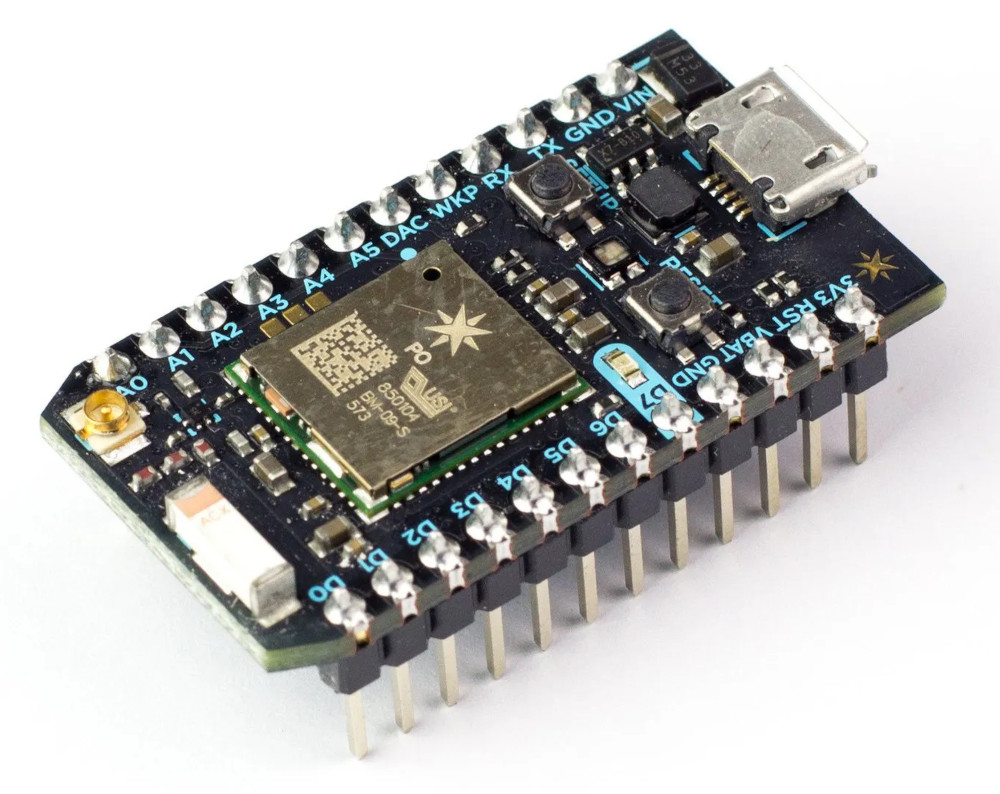
Being somewhat lazy efficient I needed a simple WiFi-based solution that allowed for simple control of some digital output pins from a web page. A bit of research resulted with the Particle Photon, a compact WiFi-enabled microcontroller that includes all the Internet-connectivity without any hard work or recurring payments.
After consultation it was decided that there should be five messages that can be sent and will need to be indicated to the receiver:
“I’m in a meeting, do not disturb”
“I’m working alone, so I can be disturbed”
Bring coffee
Bring Water
“I’ve finished work for the day”
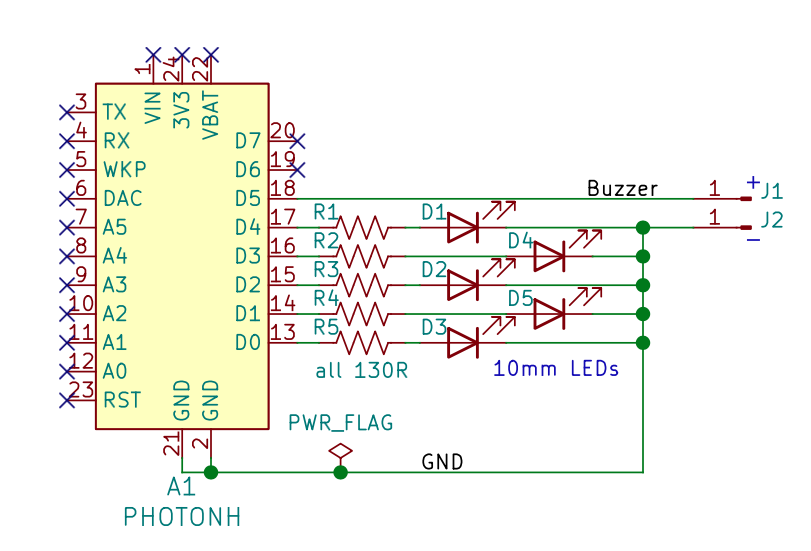
So that would need the control of five LEDs, and a buzzer to alert the receiver of new messages. Six digital outputs in total to be controlled remotely. Easily done with the Photon.
All the digital outputs on the Photon are 3.3V, and you can power the lot via the micro USB socket. Now let’s get started. I’ll go through the hardware first, then the software and connectivity.
USB power supply to micro USB plug to power system.
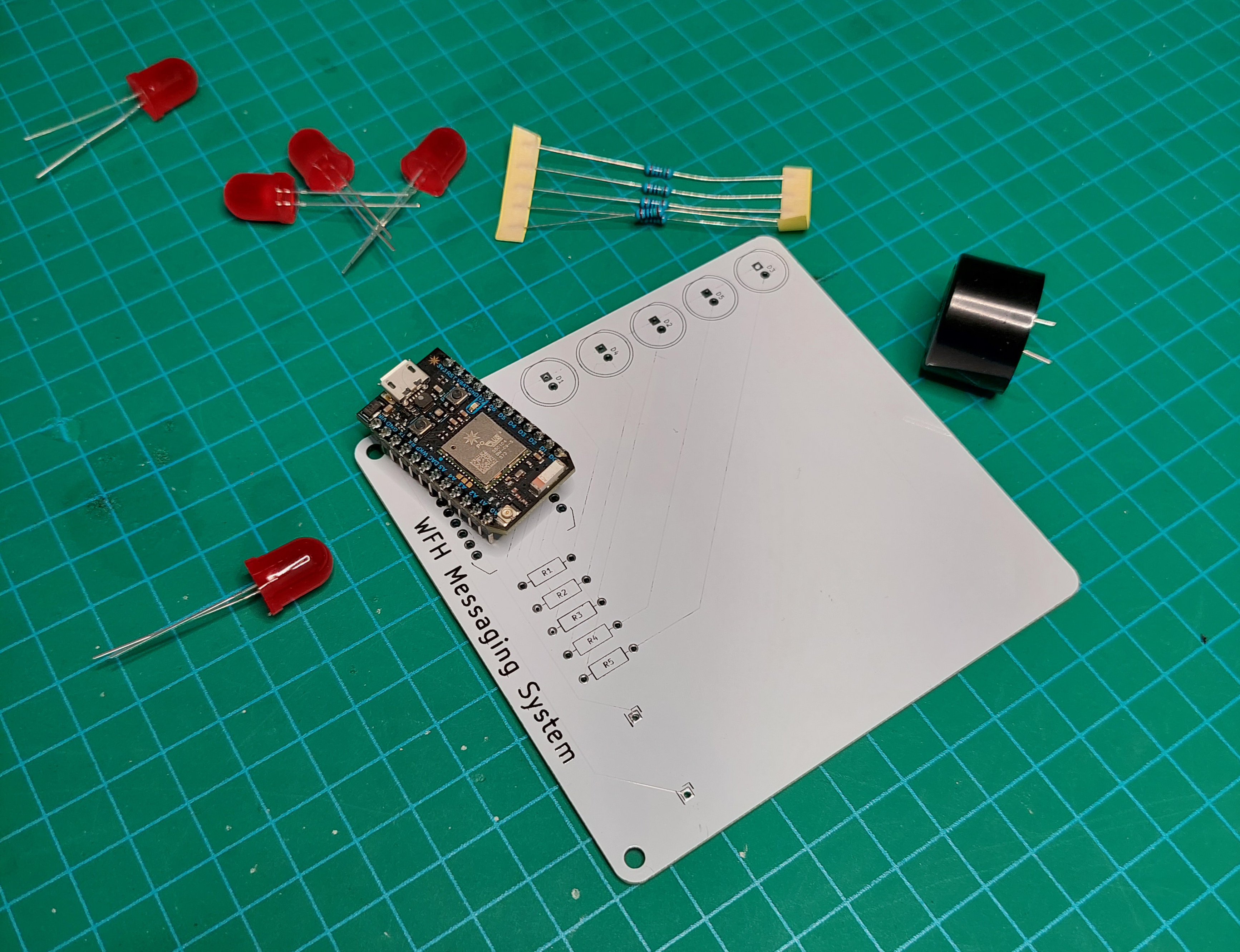
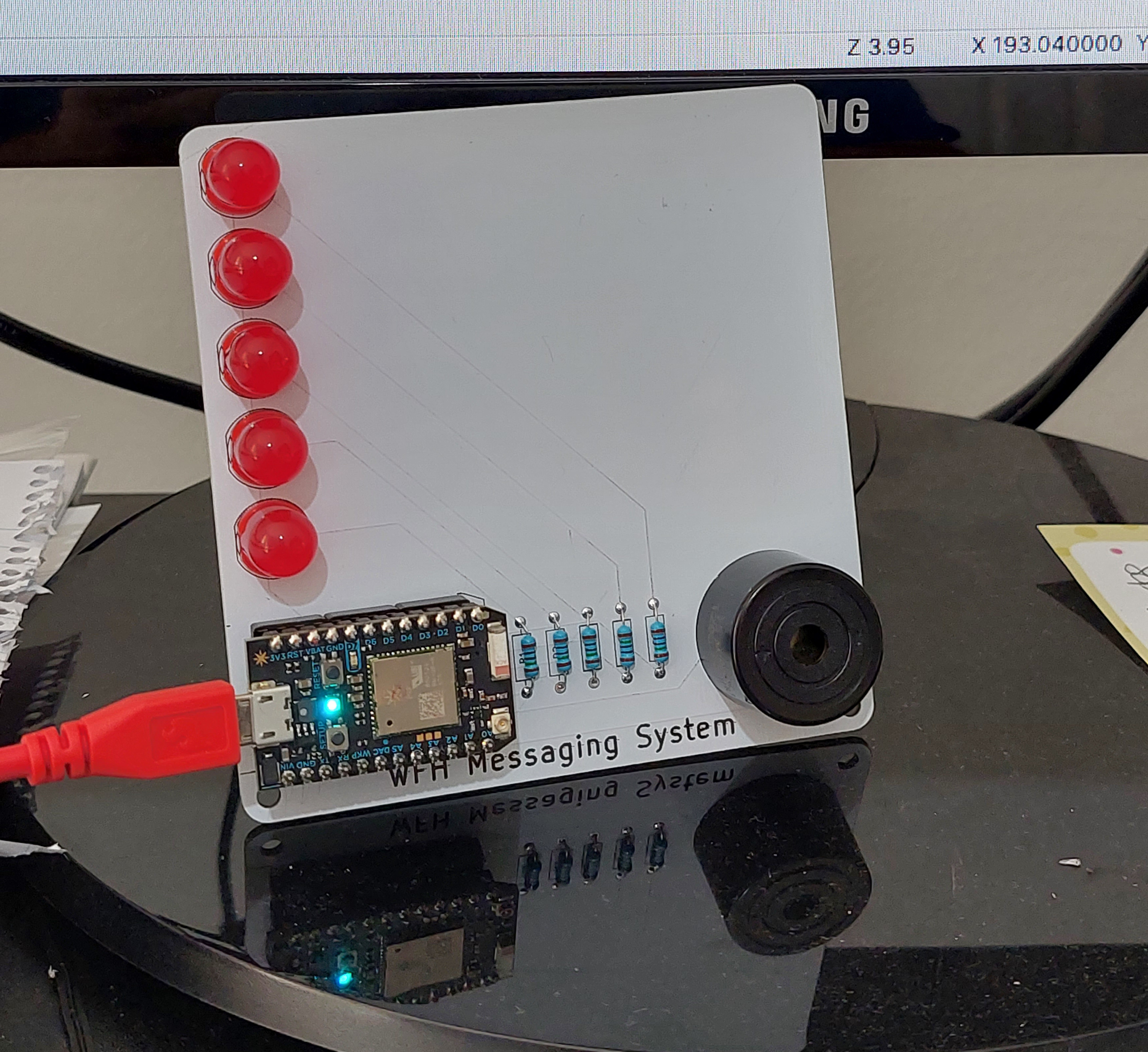
The whole thing is a minimalist design, as shown below:
The PCB shown in this article was made for a buzzer with 16mm between the pins, as it was available locally. If soldering is new to you, or you need a refresher – watch Dave Jones’ video.
This is a simple circuit you can knock out on a solderless breadboard or your own PCB with KiCAD). Click here for the Photon KiCAD library. Click here if you want the gerber files to order your own PCB. You can view the gerbers using tools such as gerblook.
At the time of writing this I have a few PCBs left over… if you live in Australia I’ll send you one for free – email admin@tronixstuff.com.
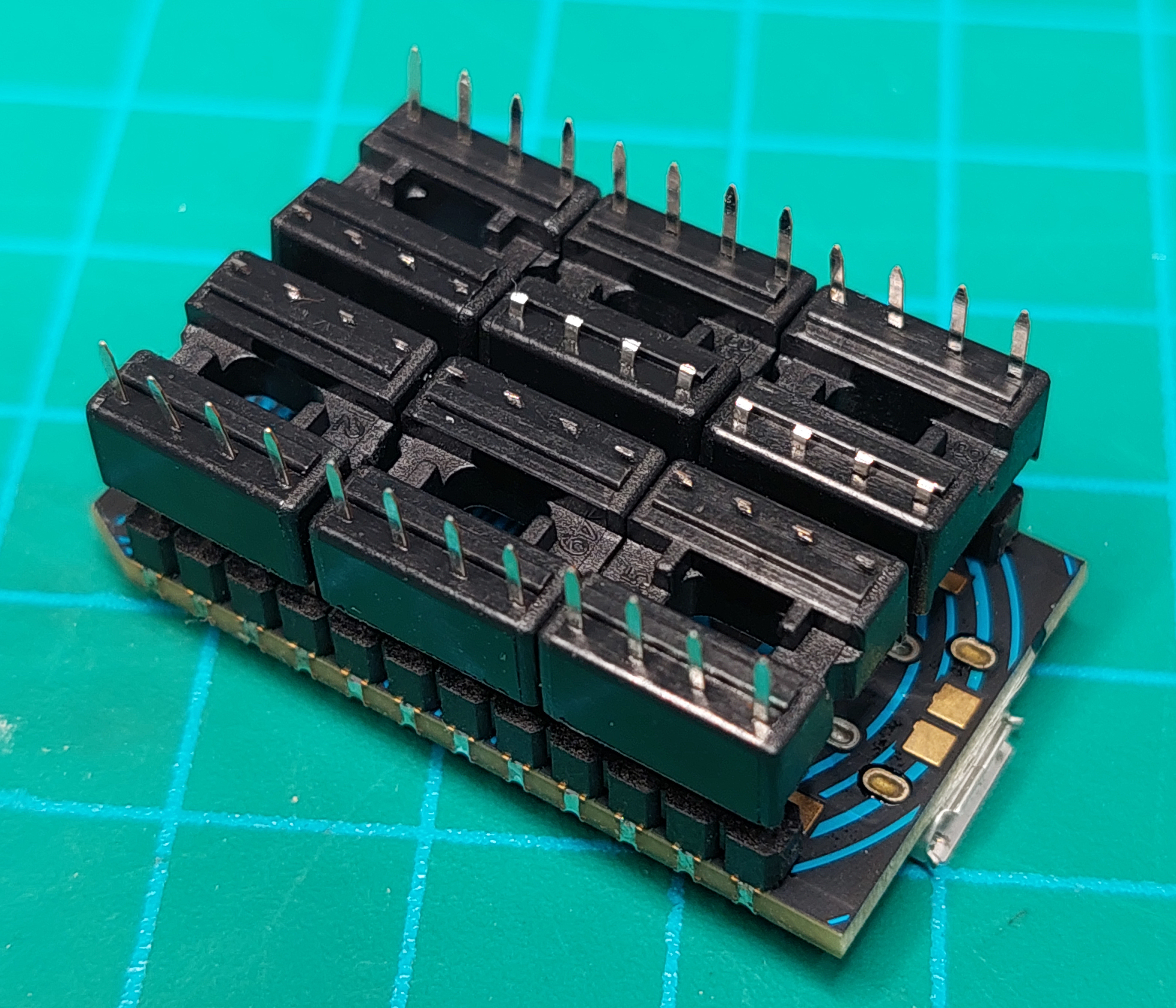
In my infinite wisdom I forgot to get some inline header sockets (as you don’t really want to directly solder the Photon to the PCB). However having hundreds spare, a work around was to use six 8 pin IC sockets, and trim one side of the pins off from each socket. Which worked …well enough:
Fitting the rest of the parts was a doddle, and resulted with the following board:
The messages were purposely not printed on the PCB silkscreen, instead all that white space is for the users to apply their own labels – as they may want to change the messages later on.
The M3 threaded spacers and nuts are fitted to the holes on the PCB to give it some legs to stand up on. So now that the hardware is finished, it’s time to get all this working with the code and connectivity.
Software and Connectivity
There are a few steps for you to complete in order to build this system, and I’ll run through them in order now.
First, follow the instructions provided by Particle which will involve you setting up a Particle account, registering and testing your Photon. During this process you will be given your “device ID” – save this as you’ll need it later. It will also save the WiFi access point details into the Photon, so do this step using the WiFi network that will host the messaging system.
Next, install the Particle CLI (Command Line Interface). It is available for Windows, Linux and MacOS. This takes about five minutes, so get up and have a stretch.
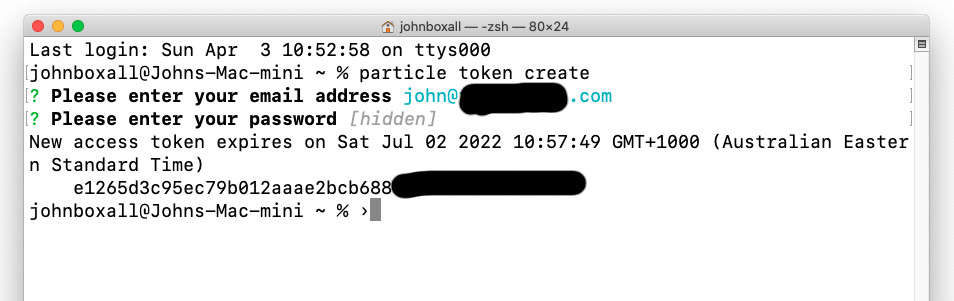
Now you need an access token, a unique identifier for your Particle account. Open the terminal on your computer and run the command “particle token create”. You’ll be prompted for your Particle account email address and password, then presented with the token (the long random string of text). Save the token for later.
I’ve blocked out my email address and part of the token to keep troublemakers at bay.
The next step is to build the web page that contains the buttons to be pressed to send the required messages. Open a simple text editor and save the following to a .html file.
https://cdn.jsdelivr.net/npm/particle-api-js@8/dist/particle.min.js
var particle = new Particle();
// This is incredibly insecure, and only ideal for local tasks of no consequence if things go wrong.
const accessToken = ‘ENTER YOUR ACCESS TOKEN HERE’;
const deviceId = ‘ENTER YOUR DEVICE ID HERE’;
function ledControl(cmd) {
// Used to turn on or off the LED by using the Particle.function “led”
document.getElementById(“statusSpan”).innerHTML = ”;
particle.callFunction({deviceId, name:’led’, argument: cmd, auth:accessToken}).then(
function(data) {
document.getElementById(“statusSpan”).innerHTML = ‘Message sent.’;
},
function(err) {
document.getElementById(“statusSpan”).innerHTML = ‘Error calling device: ‘ + err;
}
);
}
WFH Messaging System
Working Alone.
In a meeting – DND.
I need coffee!
Please bring me some water.
Finished for the day.
Enter your access token and device ID as noted in the HTML file. Just for the record, this system is incredibly insecure and shouldn’t be used for anything of any consequence, so if you modify this to control your door locks or alarm system, that’s on you.
You don’t need to be an expert on HTML, however if you’re not sure about it check out this great HTML tutorial site.
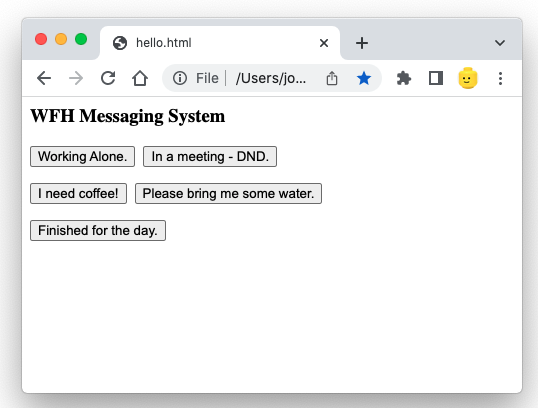
Now open the file using a web browser, and make it a bookmark for the user to easily fine. You will be presented with a simple interface:
You can easily change the text on each button, just edit the HTML and save the file. Now review the HTML, and note that for each button there’s the text (for example):
onclick=”ledControl(‘D1On’)”>Working Alone.
This snippet will send the text “D1On” back to the Photon when the button “Working Alone.” is pressed. The idea is that we need all the buttons to send back a unique message to the Photon, so it knows what to do with the LEDs and/or buzzer. Take note that each button press sends a different piece of text back to the Photon.
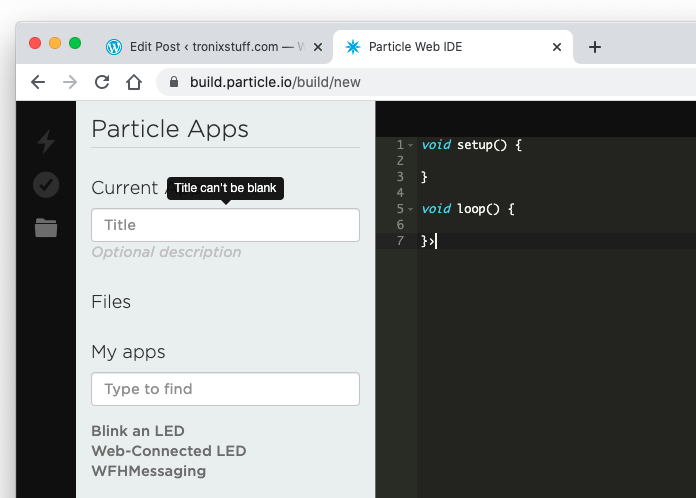
Moving on, we now need to enter and upload the code to the Photon. In a web browser, visit https://build.particle.io/build/new. You may need to log in to your Particle account during this process. After a moment, you’ll be presented with a text editor that may look familiar to anyone working with Arduino. Photon code is based off the Arduino plaform, so Arduino users or AVR C users will have a head start.
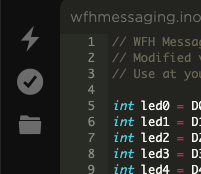
Give your project a title, then copy and paste the following code into the editor:
// WFH Messaging system.
// Modified version of code provided by particle.io documentation.
// Use at your own risk.

int led0 = D0;
int led1 = D1;
int led2 = D2;
int led3 = D3;
int led4 = D4;
int buzzer = D5;

void setup()
{
   // set pins connected to LEDs and buzzer as outputs
   pinMode(led0, OUTPUT);
   pinMode(led1, OUTPUT);
   pinMode(led2, OUTPUT);
   pinMode(led3, OUTPUT);
   pinMode(led4, OUTPUT);
   pinMode(buzzer, OUTPUT);

   // We are also going to declare a Particle.function so that we can turn the LEDs on and off from the cloud.
   Particle.function("led",ledToggle);
   // This is saying that when we ask the cloud for the function "led", it will employ the function ledToggle() from this app.

   // Turn off LEDs upon reset
   digitalWrite(led0, LOW);
   digitalWrite(led1, LOW);
   digitalWrite(led2, LOW);
   digitalWrite(led3, LOW);
   digitalWrite(led4, LOW);
   digitalWrite(buzzer, LOW);
}

void loop()
{
   // Nothing to do here as waiting for text from control webpage
}

void soundAlert()
{
    digitalWrite(buzzer, HIGH);
    delay(1000);
    digitalWrite(buzzer, LOW);
}

void coffeeAlert()
{
    for (int i=0; i<5; i++)
    {
        digitalWrite(buzzer, HIGH);
        delay(100);
        digitalWrite(buzzer, LOW);
        delay(100);
    }
}

void waterAlert()
{
    for (int i=0; i<2; i++)
    {
        digitalWrite(buzzer, HIGH);
        delay(500);
        digitalWrite(buzzer, LOW);
        delay(100);
    }
}


int ledToggle(String command) {
// function receives a string from control webpage (the commands such as D0On) and acts on them

    if (command=="D0On") {
        digitalWrite(led0,HIGH); // in a meeting - DND
        digitalWrite(led1,LOW); // turn off working alone LED
        digitalWrite(led4,LOW); // turn off finished for the day LED
        soundAlert();
        return 1;
    }
    else if (command=="D1On") {
        digitalWrite(led1,HIGH); // working alone
        digitalWrite(led0,LOW);  // turn off DND LED
        digitalWrite(led4,LOW); // turn off finished for the day LED
        soundAlert();
        return 0;
    }
     else if (command=="D2On") {
        digitalWrite(led2,HIGH); // coffee request
        coffeeAlert();
        delay(2000);
        digitalWrite(led2,LOW);
        return 0;
    }
     else if (command=="D3On") {
        digitalWrite(led3,HIGH); // water request
        waterAlert();
        delay(2000);
        digitalWrite(led3,LOW);
        return 0;
    }
     else if (command=="D4On") {
        digitalWrite(led4,HIGH); // finished for the day
        digitalWrite(led0,LOW);  // cancel DND LED if on
        digitalWrite(led1,LOW);  // cancel working alone LED if on
        soundAlert();
        return 0;
    }

    else {
        return -1;
    }
}
This code configures the digital output pins for the LEDs and buzzer from lines 5 to 10, which are then set to outputs from lines 15 to 20. We then turn them all off from lines 27 to 32, so every time the Photon is reset or turned on after a power off, no LEDs or the buzzer are on.
On line 23 we have the following:
Particle.function("led",ledToggle);
This the link between the code on the HTML page you created earlier, and the function starting from line 70 in the Photon code. “led” is linked in the HTML line with “particle.callFunction”, and “ledToggle” is the function in the Photon code.
So whenever a button is pressed, the message (such as “D4On”) winds its way from the web browser via the magic of the Internet to the Photon, and then compared against the “if” statements in the function from line 73.
For example, when “D4On” is received, it is matched at line 101 by the Photon, which then turns on LED number 4 (for “Finished for today”), and also turns off the “DND” and “Working Alone” LEDs.
For all the other messages you can follow the code from line 73 to see how each button press on the webpage controls various combinations of LEDs and buzzer outputs. To save time there’s three custom buzzer functions that are used for differents audible alerts, so the message recipient can hear if the sender’s status has changed, or if they want a coffee or water. Pity the end user of this.
Finally, when you’ve entered the code in the Photon editor, click the little folder a the top-left of the screen which saves your code in the online storage provided by Particle:
Then you can upload the code to the Photon by clicking the lightning bolt. If there are no errors in the code, it will be compiled and shot off to the Photon. During this process, the LED on the Photon will blink slowly then quickly, then “breathe” on and off when it’s ready to go.
This could take up to a minute depending on your Internet connection. However if there’s something wrong, this will be shown in the bottom of the Photon editor page. Follow the messages to determine what’s wrong, then save and try again.
By now it should all be working. Now add labels next to the LEDs for the recipient to know what the sender is trying to say or demand, and you’re finished. A quick demonstration is shown in the following video:
So there you have it. On a broader sense, this can also be considered a demonstration of how to easily control things from a distance using a Particle Photon and a web-enabled device.
I hope you enjoyed making this or at least reading about it. If you find this sort of thing interesting, please consider ordering one or both of my books from No Starch Press, or other book sellers:
Tesla delivered 310,048 vehicles over the first three months of 2022, the automaker announced on Saturday. “This was an exceptionally difficult quarter due to supply chain interruptions and China Zero-Covid policy,” Musk said on Twitter shortly after Tesla shared the news.
This was an *exceptionally* difficult quarter due to supply chain interruptions & China zero Covid policy.
Outstanding work by Tesla team & key suppliers saved the day.
Last month saw the company suspend production at its Shanghai Gigafactory, its largest manufacturing facility, twice. Despite those hiccups, the 310,048 vehicles Tesla delivered in Q1 represent a 68 percent year-on-year increase from Q1 2021 when the company shipped approximately 184,400 cars. According to Tesla, the Model 3 and Model Y made up the majority of its deliveries in Q1 2022, with 295,324 of those cars making their way to consumers since the start of the year. Over the same time frame, the company produced 305,407 vehicles, a not insignificant feat when you consider the supply chain issues that have affected Tesla and many other automakers.
Q1 also saw Tesla begin shipping vehicles from its $5.5 billion Gigafactory in Grenheide, Germany. The company plans to eventually produce 500,000 cars per year from the plant.