The best webcams you can buy

That tiny webcam on your laptop has probably gotten more use in the last few years than it ever has before. Even if you’re back to taking some of your meetings in the office, chances are that back-to-back Zoom calls are now a permanent part of your professional life. Once an afterthought, your computer’s webcam has become one of its most important components — and the fact remains that most built-in cameras are not able to provide consistent, high-quality video chat experiences.

This is where external webcams come in. They can do wonders for those with lackluster built-in webcams, people who spend most of their working hours on video conferences, and those who picked up a new hobby of streaming on Twitch or YouTube over the past couple of years. But as with most PC accessories, it can be tough to sort through the sea of options out there. We tested out a bunch of the latest webcams to see which are worth your money and which you can safely skip.

What to look for in a webcam

Resolution and field of view

While some newer machines have 1080p webcams, most built-in cameras have a resolution of 720p, so you’ll want to look for an external one that’s better than that. FHD webcams will give you a noticeable bump in video quality; ideally, you’re looking for something that can handle 1080p at 60fps or 30fps. If you’re considering a cheap 720p webcam, make sure to get one that supports at least 30fps (most will) or, even better, 60fps. However, if your primary concern is looking better during video calls, 1080p is the way to go.

Some webcams can shoot in 4K, but that’s overkill for most people. Not to mention most video conferencing services like Zoom, Google Meet and Skype don’t even support 4K video. When it comes to streaming, Twitch maxes out at 1080p video, but YouTube added 4K live streaming back in 2016. Ultimately, with 4K webcam shots having such limited use, most people can get by with a solid 1080p camera.

Field of view controls how much can fit in the frame when you’re recording. Most webcams I tested had a default field of view of around 78 degrees, which was enough to capture me and enough of my background to show that I really need to organize my home office. On cheaper webcams you’ll usually see narrower fields of view (around 60 degrees), and those aren’t necessarily bad. They won’t show as much of your background, but that also means you won’t be able to squeeze as many friends or family members into frame when you’re having Zoom birthday parties. On the flip side, more expensive webcams may let you adjust the field of view to be even wider than average.

Valentina Palladino / Engadget

Autofocus and other “auto” features

Webcams with autofocus will keep you looking sharp without much work on your part. You should be able to move around, step back and forth, and remain in focus the whole time. Some models let you manually adjust focus, too, if you have specific needs. Devices with fixed focus are less convenient, but they tend to be more affordable.

In the same vein is auto framing, a feature that some high-end webcams now offer. Similarly to Apple’s Center Stage feature, the camera automatically adjusts to keep you in the center of the frame even as you move around. But you’ll pay a premium for it: The only two webcams I tested that had auto framing were the $200 Dell UltraSharp webcam and the $220 Anker Video Bar, and while that helped those models stand out from the pack, neither were great enough to earn a spot in our best picks list.

You’ll also see other “auto” features listed in webcam specs, most notably auto light correction. This will adjust the camera’s settings to make up for a dimly lit room. If you don’t have a well-lit setup for your video calls, or often take calls in different places where you can’t control the lighting, this feature will be valuable.

Microphones

Most webcams have built-in microphones that, depending on your setup, might end up being closer to you than your computer’s own mics. Check to see if the model you’re considering has mono or stereo mics, as the latter is better. Some even use noise-reduction technology to keep your voice loud and clear. While audiophiles and streamers will want to invest in a standalone microphone, most others can get by using a webcam’s built-in mic.

Design

There aren’t a ton of fascinating breakthroughs when it comes to webcam design. Most are round or rectangular devices that clip onto a monitor or your laptop screen. Some have the ability to screw onto a tripod stand and others can simply sit on your desk beside your computer. But unless you really like having people stare up your nose, the latter isn’t ideal. We recommend clipping your webcam to your monitor and ensuring that it’s at or slightly above eye level.

A few webcams go above and beyond by adding hardware extras like built-in lights and lens covers, too. The former can help you stand out in a dark room, while the latter makes it so hackers can’t view you through your webcam without your knowledge.

Price

Most external webcams that are just good enough to be a step up from your computer’s built-in camera cost between $60 and $150. If the webcam has the same resolution as the internal one on your laptop, you should look out for other specs like auto light correction, a wider field of view or an extra-long connecting cable that can provide a step-up in quality or ease of use.

Spending $150 or more means you might get advanced features like 4K resolution, vertical and horizontal recording options, stereo mics, customizable video settings and more. But unless you’re spending hours on video calls each day or streaming multiple times each week, you can safely skip most of those high-end options.

Engadget picks

Best overall: Logitech C920s Pro HD

Valentina Palladino / Engadget

The Logitech C920s Pro HD webcam seems like a great value on paper, and it proves that to be true, too, once you take it out of the box. For around $60, you’re getting an FHD webcam that can shoot in up to 1080p/30fps, has a 78-degree field-of-view, dual microphones and auto light correction. It’s a fairly average-looking webcam measuring 3.7 inches at its widest point, with the lens in the middle and its two microphones on either side.

Buy Logitech C920s Pro HD at B&H - $70

The adjustable base is quite sturdy and, while I kept it hooked to my external monitor most of the time, you could easily attach it to your laptop’s screen or sit it on your desk and angle the camera upward. There’s also a hole on the underside if you wish to connect it to a tripod. There’s an optional lens cover in the box that provides protection when you transport the webcam, but also gives you extra privacy.

I immediately saw an improvement in video quality when I took conference calls using the C920s Pro HD. I’m lucky enough to have one lamp and one large window in my small home office, so I’m usually not fighting for good light. But even on cloudy days, the camera’s 1080p video was sharp and produced fairly accurate colors. While cheaper cameras struggled on rainy days with the lamp off, the C920s Pro HD illuminated my whole face and had minimal shadows.

All Logitech webcams can use the company’s Camera Settings app to adjust things like field of view, brightness, color intensity and autofocus, but I kept the default settings on this one. The C920s Pro HD does have autofocus and it was so good that I barely noticed it. I was always in focus during my video chats and I never saw the camera struggling to regain focus even if I moved around.

Runner Up: Anker PowerConf C200

Valentina Palladino / Engadget

Anker’s cube-like PowerConf C200 webcam has a lot of the same perks as Logitech’s C920s Pro HD, along with a few extras and a price tag that’s $10 more. Setup is equally as easy as with the Logitech cam – just plug it into your computer or docking station and start using it. You can download the AnkerWork software to edit things like brightness, sharpness and contrast ratio and, as with Logitech’s, I kept all of those settings at their defaults.

Buy PowerConf C200 at Amazon - $70

But you’re also able to control the camera’s resolution and field of view with this software, too. The C200 webcam defaults to a 2K resolution, but you can bring it down to 1080p, 720p or even 360p if you wish. Same goes for field of view: The default is 95 degrees, but I bumped mine down to 78 degrees to spare my colleagues a wider view of my messy home office.

I was immediately impressed with the C200’s video quality: 2K is likely more than most people need (1080p should do just fine), but the extra sharpness and clarity is a nice touch. The webcam’s autofocus is quite fast, and its larger f/2.0 aperture captures more light so you stay illuminated even in darker settings.

In addition to a built-in lens cover that you can slide closed for privacy, the C200 has dual stereo mics that actually do a good job of capturing your voice loud and clear. You can also choose directional or omnidirectional vocal pickup in the AnkerWork settings, with the latter being better if you have multiple people speaking on your end.

My biggest complaints about the C200 webcam are that it’s a bit cumbersome to adjust its angle when it’s perched on your monitor or screen. Unlike most other webcams, Anker’s doesn’t have a short neck of sorts that connects the camera to its adjustable base – it’s just one, chunky piece of plastic that I had to use both hands to adjust when necessary. Also, the C200 comes with a USB cable that’s much shorter than others. This won’t be a problem if you’re connecting the webcam directly to your laptop, but it’s not as flexible if you have a standing desk converter or a more complicated setup that requires long cables.

Best for streaming: Logitech Streamcam

Valentina Palladino / Engadget

Of all the webcams I tested, I had the most fun using Logitech’s Streamcam. While it’s a bit weird to say I “had fun” with such an innocuous piece of tech, I found the Streamcam to be remarkable in many ways. First and foremost, the video quality is excellent: It shoots in 1080p/60fps and its video is slightly sharper than that of the Logitech C920s Pro HD. Details in my clothing came through much better and, whether I liked it or not, so did some of the texture on my skin. The Streamcam was also one of the best devices when it came to color reproduction.

Buy Logitech Streamcam at Amazon - $170

All of those perks remain the same even when you’re shooting in low-light conditions. The Streamcam’s auto-exposure feature made up for the darkness in my office on gloomy days. And it has the best kind of autofocus — the kind that you never notice in action.

The dual omnidirectional mics inside the Streamcam delivered my voice loud and clear during video calls. If you stream often and find yourself without an external mic, it’s nice to know that you could get by with the Streamcam’s built-in ones in a pinch. The microphones also have noise reduction to keep your voice font and center.

As far as design goes, the Streamcam is a bit larger than most. It’s a chunky almost-square that can easily be positioned on a monitor or on a tripod, and a unique feature of its design is its ability to shoot either vertically or horizontally. I kept mine in the standard 16:9 format, but some streamers who post to social media often will like the 9:16 format that’s best for Instagram and TikTok. Logitech also made sure the Streamcam was optimized for Open Broadcaster Software (OBS), XSplit and Streamlabs, so you can use it directly out of the box for your next live session.

The Streamcam is the best all-purpose webcam on our list; if you want one device that can do it all, from video conferences to Twitch streams to family video chats, the Streamcam is the best option. However, not everyone will want to drop the $170 on one. Its higher price keeps it from our top spot because those who just want to look better on Zoom calls don’t need to drop $170 to do that.

Best premium: Logitech Brio

Valentina Palladino / Engadget

If you’re willing to spare no expense on a webcam, Logitech’s $200 Brio is the one to get. It has a lot of things going for it, but the best and most important feature is its 4K recording. It’s capable of shooting in 4K/30fps in addition to 1080p and 720p in either 60fps or 30fps. I kept it set at 4K and I never looked better on a video call. My feed was sharp and clear, and the only negative thing about it was the slightly inaccurate colors (they came off more saturated than normal).

Buy Logitech Brio at Amazon - $200

Low-light performance was stellar as well. The Brio’s light correcting technology with HDR made up for the cave-like environment in which I was sometimes forced to record. As far as sound goes, the dual microphones inside the Brio were some of the loudest and clearest of any webcam I tested. They also use noise-canceling technology to capture audio from up to one meter away while blocking out background noise.

The Brio also had the most customizable settings of the Logitech cameras I tried. In addition to brightness, contrast, color intensity, white balance and autofocus, you’re able to adjust HDR, field of view and image ratio in the Camera Settings app. While I kept most of the default settings, I changed my field of view from 65 degrees to 78 degrees (the third option of 90 degrees was too wide for my taste), and it captured just enough of my background but still kept me as the focal point.

I also opted to turn off autofocus because I found it to be finicky. Issues with the Brio’s autofocus have been documented online and I’ve reached out to Logitech for troubleshooting tips. An Engadget colleague who uses the Brio as his daily webcam hasn’t experienced the autofocus issues, so there just might not be enough contrast between myself and the background. Since I take most video calls from my home office desk, adjusting the focus manually to fit that environment worked well for me.

It’s hard to get excited about webcam design, but Logitech tried to make the Brio as sleek looking as possible. Instead of a mere rectangle, the Brio is an elongated oval with rounded edges and a standard base that clips securely onto a screen. The front is a glossy black, punctuated only by the camera lens, two tiny slits for the microphones and the IR sensors. The latter makes the Brio compatible with Windows Hello, so you can unlock your system using facial recognition. And when you want more privacy, you can use the included lens shade to cover the camera.
Nintendo moves 'Xenoblade Chronicles 3' release forward to July 29th

In a rare case when we're so used to major games getting delayed, Nintendo now plans to release Xenoblade Chronicles 3 on Switch on July 29th. It originally scheduled the game for September, but perhaps in part due to a Zelda-shaped hole in the 2022 calendar, the company is moving up the release date.

Xenoblade Chronicles 3 will arrive nearly five years after the previous game. While the JRPG will follow on from the events of Xenoblade Chronicles and Xenoblade Chronicles 2, it'll have a new cast of characters. A new trailer offers a peek at them in action and reveals that you can team with up to seven characters at the same time. A special edition that will be available exclusively through the My Nintendo Store includes a steelbook cover and an art book.

Despite the sequel to The Legend of Zelda: Breath of the Wildslipping to next spring, Nintendo still has an exciting lineup of exclusives for the rest of 2022. Nintendo Switch Sports arrives this month and June brings both Mario Strikers: Battle League and Fire Emblem Warriors: Three Hopes. The Live A Live remake will drop a week before Xenoblade Chronicles 3.Splatoon 3 is earmarked for sometime this summer, while Bayonetta 3 and Pokémon Scarlet and Violet are also expected to arrive later this year.

Apple's 14-inch MacBook Pro is back down to a record low of $1,749

The 2021 MacBook Pros were some of the best laptops we came across last year, but as to be expected, they come with high price tags. Right now, you can pick up the 14-inch MacBook Pro for $250 cheaper than usual at Amazon. The price has already been discounted by $50, but an addition $200 automatically applied coupon brings the machine down to a record low of $1,749.

Buy 14-inch MacBook Pro (512GB) at Amazon - $1,749

This particular model comes with Apple's M1 Pro chip, which features an 8‑core CPU and 14‑core GPU, plus 16GB of RAM and a 512GB SSD. The performance gains provided by specs like this was one reason why both the 14- and 16-inch MacBook Pros earned a score of 92 from us when we reviewed them last year. Not only will they be able to handle anything you throw at them, but they also have the stamina to last most of the day. We clocked a 12.5-hour battery life for the 14-inch model in our testing and a 16.5-hour battery life on the 16-inch laptop.

While the MacBook Pro looks fairly similar to previous models, Apple fixed a few long-standing issues — namely, the lack of ports. The new machines have three Thunderbolt 4 ports, an HDMI connector, a headphone jack, an SD card slot and a MagSafe power port. You're also getting a 1080p FaceTime webcam and a Liquid Retina XDR display with a 3,024 x 1,964 resolution, up to 1,600 nits of brightness and a 120Hz refresh rate. The biggest downsides to the MacBook Pro are its non-upgradeable memory and storage, plus its high price tag. This discount addresses one of those issues, and overall, it's a solid laptop that will be best for power users.

Follow @EngadgetDeals on Twitter for the latest tech deals and buying advice.

Amazon ordered to reinstate warehouse worker who was fired after protest

Amazon is facing legal consequences for its history of firing protest participants. The New York Timesreports that judge Benjamin Green has ordered Amazon to reinstate warehouse worker Gerald Bryson, who was fired from his role at Staten Island's JFK8 facility (the one that just voted to unionize) after allegedly violating language policies during a COVID-19 safety protest on April 6th, 2020. Green sided with a National Labor Relations Board argument that Amazon retaliated against Bryson for protesting, and reportedly used a "skewed" investigation to find pretexts for firing the employee.

Bryson (pictured above) had been protesting outside JFK8 and called for Amazon to shut down the warehouse for safety reasons. He got into a row with a female employee who said she was grateful for the work. Only Bryson was fired despite the two trading insults — the woman received a written warning. The people Amazon interviewed for its investigation provided "one-sided, exaggerated" versions of events, according to Green, including claims of racial slur use that weren't supported by video evidence. Amazon didn't interview the person who recorded the video.

The judge also found that Amazon had previously issued lighter punishments for more serious infractions (such as the use of violence). The company also didn't provide all the documents requested in a subpoena.

In a statement to The Times, Amazon said it "strongly disagree[s]" with Green's decision and claimed the NLRB wanted the company to "condone" Bryson's behavior. The tech giant planned to appeal the decision with the NLRB.

Amazon has been repeatedly accused of retaliating against staff who challenge its policies. Safety protest leader Chris Smalls accused the company of firing him for highlighting poor safeguards against COVID-19. Maren Costa and Emily Cunningham, meanwhile, were supposedly fired for being vocal critics of Amazon's climate and labor practices. Amazon said these workers were dropped for violating policy, but opponents rejected those assertions.

Bryson's win comes as Amazon faces a growing backlash from workers. On top of the successful unionization vote at JFK8, the company is grappling with a close rerun election for unionization at an Alabama warehouse as well as a looming vote at a second Staten Island facility. Employees are increasingly demanding better treatment, and the company's attempts to quash dissent aren't always proving successful.

The Morning After: Our verdict on Playdate, the console with a crank

After all that waiting, Senior Editor Jessica Conditt finally got her hands on Playdate. From the makers of Firewatch and meme-friendly Untitled Goose Game, it’s a petite portable console that marries the familiarity of the GameBoy with the spirit of indie game innovation. That last bit might sound like hollow platitudes, but well, it’s true.

Engadget

This isn’t a console for FPS, teraflops or anything MMO, it’s like a pixel-filled brainstorm of delights. Having said that, if you decide to order the handheld today, you're in for a wait. "We've filled our production capacity for 2022, but we're ramping up to make even more systems," the company says on its website.

Maybe I’ll wait out for Playdate 2. I’ll always have my fishing controller, but it’s not the same.

— Mat Smith

The biggest stories you might have missed

VW ID.Buzz first look

An EV that makes vans cool again.

Engadget

If you want an electric van, your options are limited, which is precisely what VW is hoping to address with the upcoming ID.Buzz. At the New York International Auto Show, we finally got to check it out.

It’s slated to go on sale sometime in 2024, featuring a 77 kWh battery and two rows of seats for the European model (which is the version VW had on display) or a full three rows of seats and slightly longer chassis for the US market. Other specs, like its range and price, are still TBD.

Take a closer look.

Samsung Galaxy A53 5G review

Hardly an upgrade.

Engadget

Samsung’s Galaxy A53 5G offers one of the better displays on a midrange phone, with a 2,400 by 1,080 resolution and 120Hz refresh rate. But Samsung’s slow Exynos 1280 chipset struggles, even with basic tasks. If you’re set on a Samsung phone and have an extra $100 to spend, consider the Galaxy S21 FE, which has been heavily discounted since its launch last year.

Continue reading.

'Battlefield 2042' will finally get in-game voice chat on

Groundbreaking.

Battlefield 2042 will finally get in-game voice chat, but with caveats. The VoIP feature won't work across an entire team. The only channel options are for parties and squads (with a maximum of four members). Given that teams can have up to 64 players, voice chat could get messy fast with that many people talking over each other. A proximity-based option might have been helpful for callouts, though. Sigh.

Continue reading.

The Engadget Podcast

Nintendo Switch Sports and Elon Musk's ongoing Twitter affair.

This week, Cherlynn Low and guest co-host Sam Rutherford discuss the new Nintendo Switch Sports games, a coincidental week of beauty gadget coverage and the ongoing saga of Elon Musk trying to own Twitter.

Listen and subscribe here

For some reason, Nintendo’s Super Mario anime has been remastered in 4K

But we still don’t understand it.

Nintendo's first anime movie, from 1986, is back. Femboy Films has released a 4K remaster of The Great Mission to Rescue Princess Peach on both YouTube and the Internet Archive. You’ll get clean, color-corrected visuals based on a rare 16mm print, and new English subtitles and a fresh two-channel Dolby Surround audio capture from the VHS release. Oh, and Mario and Luigi work at a grocery store now.

It gets weirder...

Continue reading.

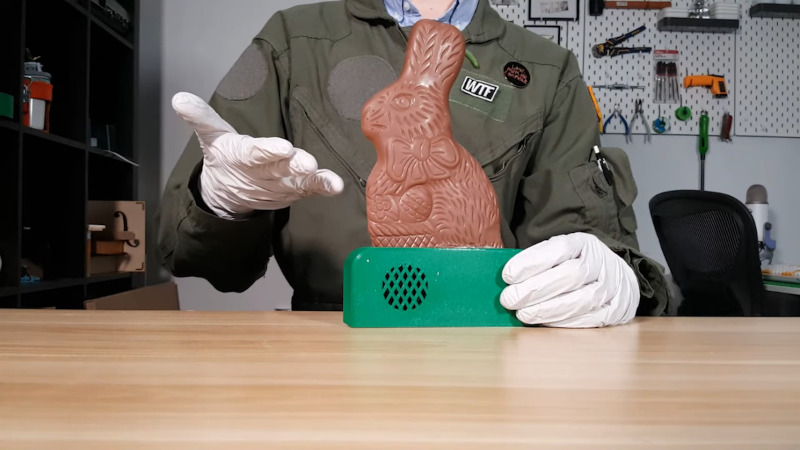
Edible Electronics Let Us Hear the Lamentations of the Chocolate Bunnies

Yet another Day of the Chocolate Bunnies has passed by, and what did you do to mark the occasion? You likely kicked back and relaxed, surrounded by whatever you gave up for Lent, but good for you if you mixed chocolate and electronics like [Repeated Failure] did. They created a completely edible chocolate Easter bunny that screams when bitten.

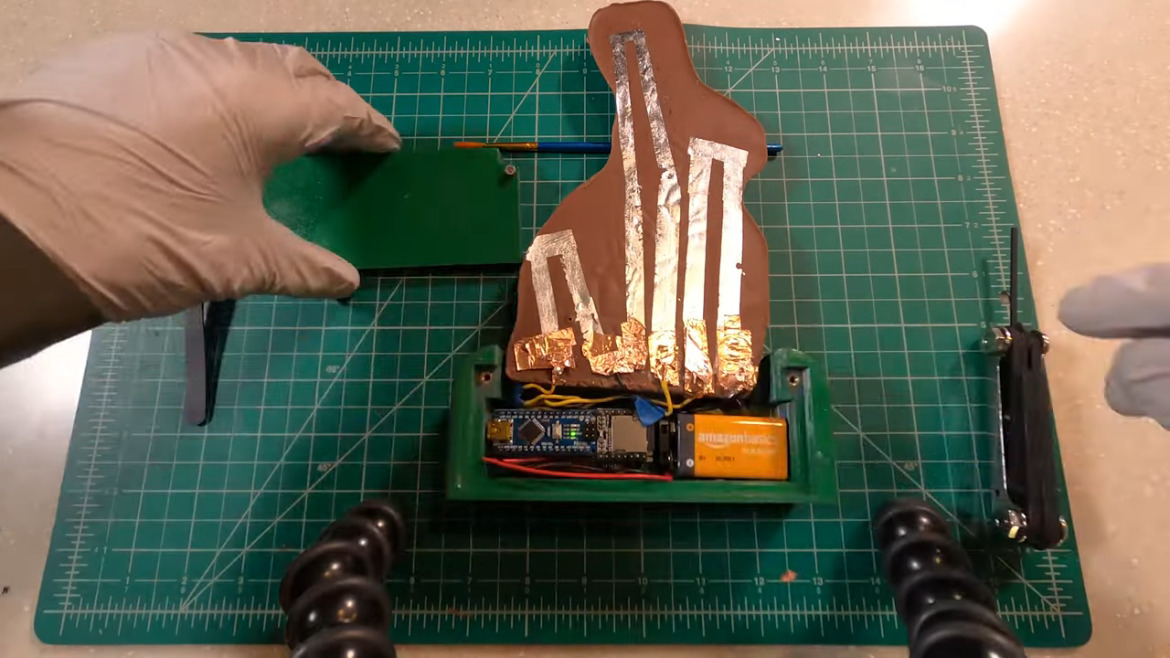
So obviously, the hardest part is figuring out something to build the circuit with that is both conductive and safe to eat. [Repeated Failure] spent a lot of time with carbon oleogel paste, which is made from natural oils and waxes. Not only was it less conductive than [Repeated Failure]’s skin, it came out pitch black and tasted like nothing, which kind of a bonus, when you think about it.

Then came the cake paint, which [Repeated Failure] laced with trace amounts of silver powder. While that worked somewhat better, a successful circuit would have likely required near-fatal amounts of the stuff. Yikes!

The winner turned out to be edible silver leaf, which is like gold leaf but cheaper. Ever had Goldschläger? Gold leaf is what’s suspended inside. The really nice thing about silver leaf is that it comes in thin sheets and can easily be cut into circuit traces with scissors and connected to I/O pins with copper tape. Be sure to check it out after the break, including [Repeated Failure]’s friend’s reaction to innocently biting the chocolate bunny’s ears off, as one tends to do first.

Think you’d rather hear plants giggle? Sure, it sounds cute, but it’s actually kind of creepy.

Audi’s Urbansphere EV concept is built for tomorrow's megacities

As automobiles gain increasing autonomy and their occupants spend less time actively paying attention to the task of driving, Audi is reimagining the role of the vehicle’s cabin space — from a rigid, safety-centered, face-forward setup to a more open, communal design. The automaker showcased this evolution in its new Urbansphere EV concept, which it unveiled on Tuesday.

Audi

The Urbansphere is the third in a trifecta of futuristic Audi EV concepts. It joins the Skysphere — a 623-HP EV roadster announced last August reminiscent of the Disco-era Chevy Camaro or Jaguar XJ6 — and the Grandsphere touring coupe announced in September. All three are built with level 4 autonomous vehicle technology in mind, a project that Audi is collaborating on with CARIAD, Volkswagen Group’s software business. The hope is to get to market in the second half of this decade.

The Urbansphere is the largest of the trio and the biggest Audi concept vehicle to date. It sits on 24-inch rims and measures a whopping 18 feet in length — the same as GM’s Hummer EV; it's over 6.5 feet wide (a Paul Pierce wingspan) and 5.8 feet tall (approximately one entire Tom Hardy!) And because the Urbansphere doesn’t have to account for a conventional arrangement of a combustion-powered car's components “it prioritizes the occupants’ need to experience ample space as a distinctive comfort factor,” the company wrote in a Tuesday press release.

Audi

As such, the Urbansphere’s interior offers two bucket seats in both rows, the rear pair boasting seatbacks that recline up to 60 degrees with extendable footrests. The front seats swivel to enable fed-up parents to more easily get at their misbehaving progeny without having to pull this goddamn car over and then NOBODY’S going to Disneyland, though a series of privacy dividers and seat back-mounted television screens should help keep the peace.

Audi

Audi also has plans to include a “large-format and transparent OLED screen” that pivots vertically from the roof down between the two rows. It would span the entire width of the cabin interior, like a taxi divider, and allow the rear passengers to watch movies or take conference calls. (Because even in the most idealized future Audi can imagine, we are still inconvenienced by conference calls.) When not in use, the screen will remain transparent or will fold up against the vehicle’s equally clear glass roof.

Audi

The vehicle could include an anxiety detection program that “uses facial scans and voice analysis to determine how passengers are feeling" and might offer "personalized suggestions” to relieve stress. Audi does appear to be taking the relaxation of the Urbansphere’s conceptual drivers quite seriously, incorporating calming wood accents throughout the cabin and obscuring display panels in the central infotainment screen until the car powers on.

Audi

Part of the experience that Audi envisions is the Urbansphere serving as a pseudo-assistant, allowing the driver to, say, make restaurant reservations from inside or order groceries for curbside pickup. It might also leverage level 4 capabilities to ferry riders to their destination then independently find a parking or charging station.

Audi

With an 800V architecture supporting a 270 kw max DC charging speed, it shouldn’t take too long to top off the Urbansphere’s cells. Its 120 KwH battery pack requires just 25 minutes to charge from 5 to 80 percent of its 466-mile range capacity. Overall, Audi estimates it can wring 186 miles out of a quick 10-minute charge.

Sega’s Super Game project already has a Crazy Taxi reboot underway

A new, big budget reboot of Crazy Taxi has already been in development for more than a year, and is expected to launch within the next three years. That’s the revelation issued forth by Bloomberg today, suggesting that a rebooted Jet Set Radio is also currently gestating with a similar development timeline. Both titles are part of Sega’s Super Game project, which the company first teased back in early 2021 as a way of accelerating the developer's recovery.

Details about Super Game have been thin on the ground but Shuji Utsumi, the former PlayStation executive leading the project, has let some things slip. Back in April, he said that the project would involve a series of AAA titles leveraging cloud gaming and, deep sigh, NFTS. Late last year, Sega announced that it was teaming up with Microsoft’s Azure cloud division to help produce large-scale “global games.”

When Super Game was announced, Sega bandied around references to its Silver Age blockbusters including Crazy Taxi, Jet Set Radio, Panzer Dragoon and Virtua Fighter. According to Bloomberg, these titles are going to be reborn in the Fortnite mould as a free-to-play, massively online title. Sega is reportedly staking its business on the riches on offer from such titles, which already have devoted cult followings. Of course, as with any title this early in its lifespan, Sega could pull the plug before it reaches players, but it's about time we had something nice in this life, and no amount of NFTs can make us hate Crazy Taxi... right?

Mercedes' EQS SUV arrives in US showrooms this year

Building upon the success of the EQS and the launch of the EQE, Mercedes has another electric vehicle on the way to the United States. This time it’s more in line with what the US wants: an SUV.

The oddly named EQS SUV is to the sedan EQS what the GLS is to the regular S-Class — an upright take on its ultra high-end model. It was unveiled recently in Germany and we got a chance to check out the taller electric vehicle from Mercedes. In addition to having room for seven, the electric SUV has an off-road mode and special running boards that help reduce drag. 

While Mercedes is mum on pricing and range details for the US, we do know that its European range will be "up to 600 kilometers" based on the WLTP standard, which should make the range top out at a shade over 300 miles in the US' more stringent EPA ratings. As for pricing, well, the regular EQS starts at just over $100,000 so the SUV is going to be in a similar bracket to Tesla's Model X. The car’ll be built in the US and available this fall, and you can watch the video above for the full story.

Samsung's Pokémon-themed Galaxy Z Flip 3 is a delight

Samsung has unveiled the Pokémon Edition of its Galaxy Z Flip 3 foldable smartphone that's bound to be irresistible to collectors. It comes in a special box with a number of Pokémon-themed accessories, including a Pikachu picture case (with a Pokémon Custom Pack), a Pikachu Clear Cover Set, a Pokémon Pouch with a lanyard strap, a Pikachu keychain and a Poké Ball stand. It'll also have some Pokémon-edition ringtones, themes and wallpapers. 

The model is coming along at a good time, as a Pokémon Bread craze has apparently taken South Korea by storm, according to Maekyung.com. Collectors are mostly buying them for the Pokémon stickers contained inside, which are reportedly selling for 10 times the price of the $1.20 bread. 

Samsung has released custom versions of its foldable phones before, including the Thom Browne Edition of the Galaxy Flip 3 and and Fold 3. Judging by the reaction of some of my Engadget colleagues, though, Samsung has nailed the Pokémon Edition's design and accessories. It has yet to release the price and other details, but it's likely to be sold only in Korea — we'll learn all when it drops on April 25th.