Blue Origin’s recent NS-23 flight didn’t go according to plan. On Monday morning, the private space firm was forced to abort the uncrewed mission after one of its New Shepard rockets suffered an unspecified “booster failure.” The problem came up about a minute after the flight took off from Blue Origin’s West Texas launch site at 10:26AM ET. You can see the entire incident unfold in the video the company shared on Twitter.
Booster failure on today’s uncrewed flight. Escape system performed as designed. pic.twitter.com/xFDsUMONTh
“It appears we have experienced an anomaly with today’s flight,” a commentator said during the NS-23 livestream. “This was unplanned and we don't have any details yet. But our crew capsule was able to escape successfully, we’ll follow its progress through landing. As you can see, the drogues have deployed, and the mains are going to be pulled out next.”
The capsule was carrying NASA-funded research equipment. “It’s useless to speculate about what happened at this point. Not even the company knows the cause,” tweeted Eric Berger, senior space editor at Ars Technica, adding in a separate post that had the spacecraft been manned, the crew “would have felt a serious jolt, but would have been safe.”
Blue Shepard won’t be able to fly again until Blue Origin investigates the incident and the Federal Aviation Administration signs off on the company’s findings.
The leaders of the Senate Judiciary Committee are pushing Twitter’s CEO Parag Agrawal to address allegations made by the company’s former head of security in a lengthy whistleblower complaint. In a new letter to Agrawal reported by CNN, the leaders of the committee pressed the CEO to address claims that Twitter’s security practices could harm national security, as well as other issues raised in Peiter “Mudge” Zatko’s complaint.
Up to now, Twitter has declined to address the majority of Zatko’s claims in any kind of detail, though the company’s lawyers attempted to portray him as a disgruntled former employee during a hearing in a Delaware court last week. The letter comes the day before Zatko is scheduled to appear at a Judiciary Committee hearing to publicly testify about his experience as Twitter’s head of security.
Agrawal was also “extended an invitation” to appear at the hearing, according to the letter, though he apparently declined the offer. A Twitter spokesperson didn’t immediately respond to a request for comment.
In addition to national security concerns, Zatko also raised significant concerns regarding Twitter’s ability to counter misinformation and its handling of basic internal security. Zatko also alleges that Twitter misled the Federal Trade Commission and other regulatory agencies.
“These allegations raise serious concerns given Twitter’s significant role in the U.S. communications landscape and its global reach,” Senators Dick Durbin and Chuck Grassley write in the letter. It asks Agrawal to respond by September 26th.
The letter is sure to increase the pressure on Twitter, which is also in the midst of a messy legal battle with Elon Musk, who has been trying to get out of his $44 billion deal to buy the company. Last week, a judge said that Musk could add Zatko’s whistleblower complaint to his legal case.
Sony's next State of Play preview event is going down on Tuesday, September 13th at 6pm ET, the company announced via Twitter Monday. "We’ll have some great updates from our amazing Japanese partners and developers all around the world," Sony noted in a subsequent tweet. "Expect about ~20 minutes covering 10 upcoming games."
State of Play returns tomorrow, September 13. Watch live to see new reveals and updates for PS5, PS4, and PS VR2.
Further details regarding which games will be showcased were not provided, however Sony has repeatedly focused on PS VR2 titles during the past two events, seemingly intent on teasing all of the nearly two dozen "major" titles — including from the Among Us and Horizon franchises — which are scheduled to launch alongside the next generation headset.
The State of Play will live stream through PlayStation's Twitch and YouTube channels. Gaming fans will be in for a treat tomorrow, as this afternoon event follows Nintendo's next Direct stream, which is happening Tuesday morning, at 10am ET.
Twitter has begun rolling out its redesigned Spaces tab. Starting today, Twitter Blue members on iOS can check out the new interface element through the subscription’s early access Labs feature. The tab brings together live and recorded Spaces, and even offers a selection of popular podcasts you can listen to directly through the app.
listen up: podcasts are coming to Twitter!
now available in Twitter Blue Labs—members on iOS get early access to try the redesigned @TwitterSpaces tab, which includes podcasts, themed audio stations, and live + recorded Spaces
Evidence that Twitter was working on adding podcasts came out in March when developer Jane Manchun Wong found references to the tab in Twitter’s code. A few months later, the company began testing the interface tweak with a small group of English-speaking users on Android and iOS. In its current iteration, the tab features separate categories for current and upcoming Spaces and a Stations section that groups podcasts and Spaces under similar themes.
If the interface Twitter has gone with doesn’t look ideal for finding a specific podcast or episode, that’s by design. The tab won’t replace dedicated apps like Pocket Casts. However, it may help you discover something new to listen to, and if in the process you check out a Space or two, then the tab has done its job.
Apple released iOS 16 earlier today, and one of the more notable features the update introduces is a redesigned lock screen experience. For the first time, Apple is letting you customize the typeface and accent color of on-screen elements like the date and time. Moreover, you can finally add widgets. As of today, there are a handful of ones from Apple to choose from, but in the coming days and weeks, you can expect most app developers, including Google, to add their own ones.
Google
On Monday, Google detailed what Search, Chrome, Drive, Maps, Gmail and News users can expect once those apps support iOS lock screen widgets. For the most part, there aren’t many surprises here. The majority of the apps will come with several different widgets, allowing you to access some features with one tap. For instance, Chrome widgets include shortcuts to the browser’s incognito mode and voice search functionality. There’s even a separate widget for Chrome’s dinosaur game in case you find yourself without an internet connection and need something to pass the time.
The best part is that you won’t need to go out of your way to download anything. “Once our widgets are available, just press and hold down your Lock Screen to start customizing,” says Google. You can expect them to arrive in the “coming weeks,” according to the company.
Google is killing its Pixelbook laptop, according to an internal memo reported byThe Verge. The company has also “shut down” the team that was working on the next generation of the device, which was reportedly “far along in development.”
The company apparently opted to shift resources away from the premium Chromebook in an effort to cut costs. Members of the Pixelbook team were reportedly moved to other roles at Google.
The move means Google is officially done making laptops after nearly a decade of experimenting with notebooks. In 2013, the company introduced the Chromebook Pixel — the first Google-made hardware to get Pixel branding — and refreshed it with a pricier model two years later. Google shifted strategies again in 2017, when the first Pixelbook debuted as a high-end alternative to the typically low-cost Chromebooks. The 2-in-1 started at $999, and came with an optional Pixelbook Pen accessory.
In 2019, Google introduced the $649 Pixelbook Go as a more affordable, but still higher-end, Chromebook with Pixel branding. Though the Pixel-branded Chromebooks were meant to show off just how much was possible when Chrome OS was combined with more premium hardware, the devices never seemed to be as popular as the cheaper alternatives that have long dominated classrooms, particularly during the pandemic.
Google didn’t immediately respond to a request for comment.
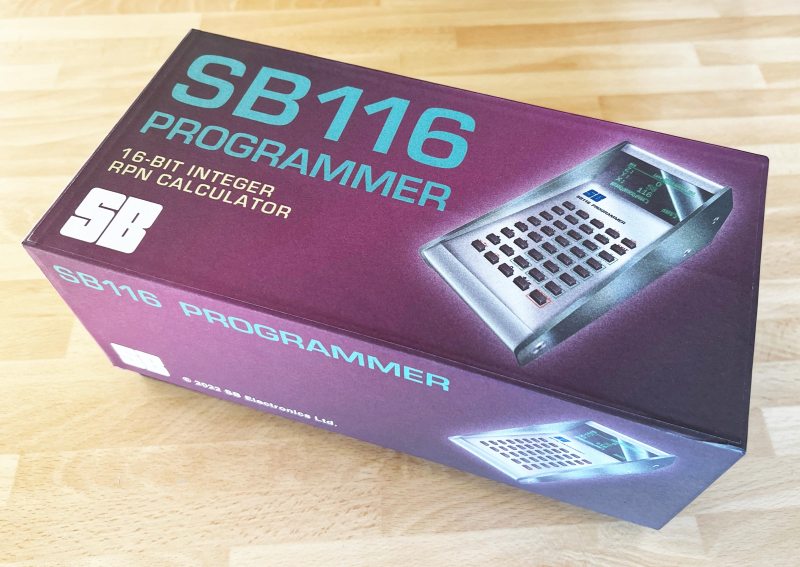
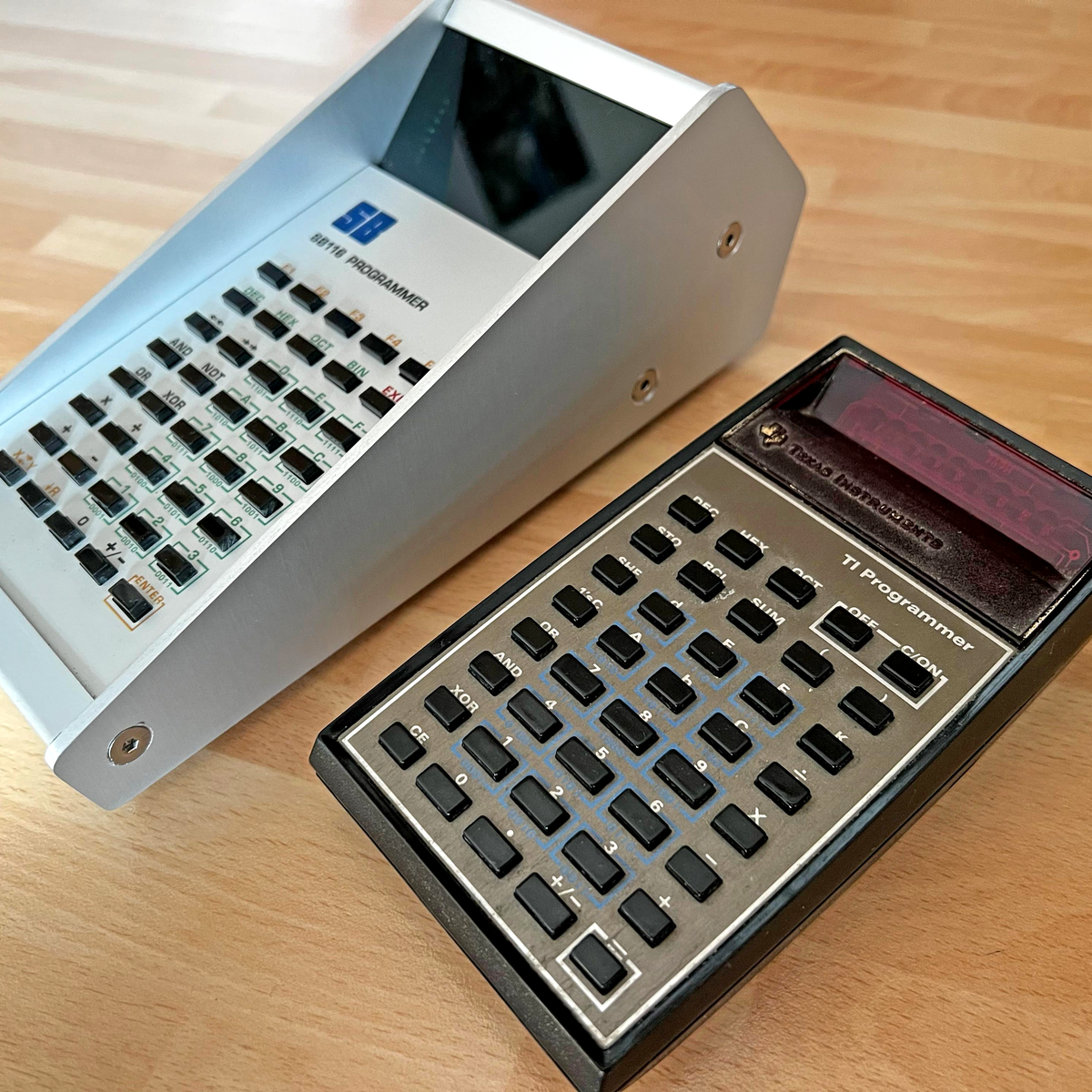
There’s something about Reverse Polish Notation (RPN) and the calculators that use it. It calls to mind a time when a calculator was a serious tool, and not just a throwaway toy. Created in the legacy of such calculators by HP and Texas Instruments, [Simon Boak] shows off his SB116, sporting an Arduino Nano under the hood. It’s a fully custom design, with a hand-built metal case, a custom PCB for the keyboard, and a tiny OLED display for maximum retro green goodness.
The impetus for this build was to replace a particular calculator, a well-used TI Programmer, that’s useful for working with 6502 assembly. The SB116 supports binary, octal, decimal, and hex; and boasts some downright useful functions — AND, NOT, OR, XOR, and bitshifts. The source code is available, but you’re on your own for the case and keyboard. And for maximized retro faux-nostalgia, [Simon] designed a box that would have looked right at home on an 80s store shelf.
From the moment Canon launched the full-frame mirrorless EOS R, everyone wondered if it would use the same mount for APS-C cameras and effectively kill the EF-M system. It did just that in May, launching not just one but two RF APS-C cameras. One was the flagship $1,500 EOS R7 that I tested last month, and the other is the $980 EOS R10, the subject of today’s review.
For that considerably lower price, some features are missing. It has a lower-resolution 24-megapixel sensor versus the R7’s 33 and is missing some of the R7’s highlight features like in-body stabilization and a second card slot.
Surprisingly though, it nearly matches the R7 in shooting speeds and offers similar video specs. It also has the benefit of being smaller and lighter for travel, street shooting and more. But technical details aside, how does it perform in the real world, particularly for casual users and beginners? I took it on vacation and did some sports and street shooting to find out.
Body and handling
Much like with the EF and EF-S lens mounts used on Canon’s DSLRs, the R10 uses the RF-S mount that’s compatible with full-frame RF mount cameras. As such, it supports every full-frame RF lens and also works with the two new RF-S lenses released with the R7 and R10. However, those are only kit lenses, so if you want a prime lens you’ll need to either buy a full-frame lens or use a DSLR EF lens with an adapter.
The R10 isn’t as pretty as its rival, the Fujifilm X-T30, but it’s better-looking and easier to use than any of Sony’s boxy APS-C cameras. It’s quite small and light, weighing just 426 grams, considerably less than the 612-gram R7 and just a bit more than the Sony A6400.
Despite the small size, it’s got a generous array of physical controls. That includes a pair of dials for exposure, a mode selection dial, a joystick, a D-pad and an AF/M button. You also get a focus selector switch on the front, a record button on top and five programmable buttons across the back and top.
Canon didn’t try anything fancy here as it did with the touch control on the EOS-R, and everything is easy to find, particularly if you’re used to Canon cameras. The grip is deep, though your fingers can get cramped with a large lens installed. The menus are typical Canon, so they don’t exactly have a fresh modern look, but they’re easy to use.
Like every other R-series camera so far, the R10 has a flip-out screen for vlogging and selfies. Canon is clearly marketing this at vacationers, young people and YouTubers, so this feature is a must. The EVF is mediocre though, with a low-res 2,368K screen and low magnification. To be fair though, other cameras in this price range have similar EVs.
The R10 has a single SD card slot and small 1,040 mAh LP-E17 battery. That’s also par for the course in this category, but it means that you can’t back up your photos so you could lose them if your card is corrupt. Battery life is also on the low side at 450 shots max (with the monitor) or about an hour of 4K 30p video shooting.
It has a USB-C port for data transfers and charging, but it’s fussy about which chargers you can use. I didn’t have any luck with any of my phone chargers or cables, so you’ll need to check what Canon recommends. It has a micro HDMI port, along with WiFi and Bluetooth and comes with a microphone input but no way to connect headphones. By comparison, Fujifilm’s X-T30 lets you hook up headphones with an iPhone-style USB-C adapter.
Performance
Steve Dent/Engadget
The R10 does the main thing most buyers want: it takes sharp photos, quickly. It can shoot at up to 15 fps in mechanical shutter mode, an impressive figure for a consumer camera and the same as the R7. In electronic mode, it can hit 23 fps, just 7 fps shy of its pricier sibling. However, you’ll need to beware of rolling shutter in silent mode that can skew photos if the camera or subject moves too quickly. But it’s not as bad as the R7 in that respect.
With a smaller buffer than the R7, it can only sustain those bursts for around two seconds, so you’ll need to time your shooting well. It does support UHS-II SD cards, though, so it can clear the buffer quickly if you have a fast card.
The best feature of this camera is the AI-powered Dual Pixel autofocus that’s similar to what you find on the R7 and even the professional EOS R3. It allowed me to keep fast-moving subjects in focus, either by keeping the AF point on them or using face and eye tracking. You can track people, animals and vehicles, but it doesn’t really support tap-to-track like other Canon models.
With people or animals it’ll fluidly track the head or eyes, and does a great job of switching between the two seamlessly. For racing vehicles, it attempts to focus on the helmet of the driver. The system is responsive, reliable and nearly idiot-proof, smoothly tracking subjects whether you’re in point or wide area AF modes. That makes it great for beginners who may not want to dive into the manual to figure out complex settings for subject tracking.
Image quality
The R10 delivers accurate colors with warm skin tones like most photographers want. JPEGs strike a good balance between sharpening and noise reduction, while RAW files deliver decent but not spectacular dynamic range. That allows for a good amount of room to tweak images.
Low-light performance is a weak point, however. You can consider ISO 6400 to be a hard limit, and even then, you’ll get a lot of noise if you try to boost blacks on underexposed shots. ISO 12,800 is possible in a pinch, but I wouldn’t recommend it if you need a clear photo. The lack of in-body stabilization also means you’ll risk getting blurry photos at shutter speeds under 1/100th, unless your hands are spectacularly steady.
As I frequently forgot, though, the R10 does have a built-in flash that’ll let you at least get a clear though not very artistic photo if you don’t have enough light. Just make sure to dial the flash strength down in the settings to avoid blowing out your subject.
Video
Steve Dent/Engadget
The R10 is one of the best APS-C cameras for video. You get sharp, downsampled 4K at 30 fps or less, and cropped video at 60 fps that’s not as sharp but certainly still usable. If you want super slow, it can shoot at 120 fps at 1080p, but video is obviously softer still.
It’s also the only sub-$1,000 APS-C camera I can think of that offers 10-bit video via the HDR PQ mode. However, unlike with most log video, you won’t find a standard lookup table (LUT) for this in Adobe Premiere or other editing systems. So unless you play the video directly to an HDR TV, it can be tricky to work with.
Autofocus isn’t quite as good for video as for photos, as the system occasionally focuses on the background instead of the subject. That doesn’t happen often though, so the video I shot was usually sharp except in a few cases.
The lack of in-body IS means you’ll need to use stabilized lenses for handheld video. And for anything like vlogging, you’ll also want to turn on the electronic stabilization or even use the enhanced IS. Electronic IS adds a significant crop, on top of the 1.6X APS-C crop, so the two kit lenses are just barely wide enough on the 18mm end of the zoom.
Steve Dent/Engadget
Vlogging at 60 fps adds another degree of difficulty, as you get a further 1.56x crop, so the 18mm lens becomes nearly a 50mm lens. While vlogging, I found I could barely fit my head into the frame, even while using a Joby Gorillapod to add some extra arm length.
Rolling shutter can also be an issue, particularly for oversampled 4K 30p video, though it’s far less severe than in Sony’s APS-C cameras. It improves in 4K 60p mode because there’s less sensor to read out, but again, you’re facing a serious crop and softer footage.
As with photos, video quality is excellent with dynamic range on par with rival cameras, though a bit less than what Sony has on offer. The oversampled video is very sharp and again, colors are precise and skin-friendly. You can get extra dynamic range shooting in HDR mode for sunsets and the like, but again, beware that it requires some work to look any good.
Wrap-up
Steve Dent/Engadget
The $980 EOS R10 is a solid start for Canon’s budget crop-sensor RF cameras. It has awesome shooting speeds, excellent autofocus, good image quality, nice handling, a flip-out display and solid video capabilities.
There is room for improvement, though. It’s not as huge a leap as I’d hoped over Sony’s $900, two-year-old A6400. And while it has 10-bit capability and better autofocus than Fujfilm’s $900 X-T30 II, the latter is better overall for video and has slightly higher resolution. It’s also a bit too expensive to qualify as a true budget camera.
Still, this camera is bound to appeal to users who want to step up from a smartphone and are tempted by Canon’s solid reputation. They won’t be disappointed with the R10, because it’s easy to use and delivers where it counts with sharp, nice-looking photos and video.
Starbucks is jumping on the Web3 bandwagon. On Monday, the company detailed Odyssey, an upcoming extension to its popular rewards program that will allow customers to collect NFTs. You can probably guess where this is going. Every NFT will have a points value based on its rarity, and as you earn more tokens, you’ll unlock new experiential rewards. Those could include a virtual expresso martini-making, an invite to events at Starbucks Reserve Roasteries and a trip to Costa Rica to visit one of the company’s coffee suppliers.
There will be a few ways to collect the tokens, which Starbucks has taken to calling “digital collectible stamps.” By completing “journeys” – essentially games and quizzes – you’ll earn “journey stamps.” Naturally, Starbucks will also let you skip all that and buy “limited-edition stamps” directly through the Starbucks Odyssey website. You won’t even need any cryptocurrency in that case, with the company accepting credit cards. If you’re worried about the potential environmental impact of Starbucks adding a Web3 component to its rewards program, the company says Odyssey will use a proof-of-stake blockchain built by Polygon.
“Our vision is to create a place where our digital community can come together over coffee, engage in immersive experiences, and celebrate the heritage and future of Starbucks,” said Brady Brewer, Starbucks executive vice president and chief marketing officer. Starbucks employees and Rewards members can join a waitlist to try Odyssey later this year.