Posts with «author_name|valentina palladino» label

The best webcams you can buy

That tiny webcam on your laptop has probably gotten more use in the last few years than it ever has before. Even if you’re back to taking some of your meetings in the office, chances are that back-to-back Zoom calls are now a permanent part of your professional life. Once an afterthought, your computer’s webcam has become one of its most important components — and the fact remains that most built-in cameras are not able to provide consistent, high-quality video chat experiences.

This is where external webcams come in. They can do wonders for those with lackluster built-in webcams, people who spend most of their working hours on video conferences, and those who picked up a new hobby of streaming on Twitch or YouTube over the past couple of years. But as with most PC accessories, it can be tough to sort through the sea of options out there. We tested out a bunch of the latest webcams to see which are worth your money and which you can safely skip.

What to look for in a webcam

Resolution and field of view

While some newer machines have 1080p webcams, most built-in cameras have a resolution of 720p, so you’ll want to look for an external one that’s better than that. FHD webcams will give you a noticeable bump in video quality; ideally, you’re looking for something that can handle 1080p at 60fps or 30fps. If you’re considering a cheap 720p webcam, make sure to get one that supports at least 30fps (most will) or, even better, 60fps. However, if your primary concern is looking better during video calls, 1080p is the way to go.

Some webcams can shoot in 4K, but that’s overkill for most people. Not to mention most video conferencing services like Zoom, Google Meet and Skype don’t even support 4K video. When it comes to streaming, Twitch maxes out at 1080p video, but YouTube added 4K live streaming back in 2016. Ultimately, with 4K webcam shots having such limited use, most people can get by with a solid 1080p camera.

Field of view controls how much can fit in the frame when you’re recording. Most webcams I tested had a default field of view of around 78 degrees, which was enough to capture me and enough of my background to show that I really need to organize my home office. On cheaper webcams you’ll usually see narrower fields of view (around 60 degrees), and those aren’t necessarily bad. They won’t show as much of your background, but that also means you won’t be able to squeeze as many friends or family members into frame when you’re having Zoom birthday parties. On the flip side, more expensive webcams may let you adjust the field of view to be even wider than average.

Valentina Palladino / Engadget

Autofocus and other “auto” features

Webcams with autofocus will keep you looking sharp without much work on your part. You should be able to move around, step back and forth, and remain in focus the whole time. Some models let you manually adjust focus, too, if you have specific needs. Devices with fixed focus are less convenient, but they tend to be more affordable.

In the same vein is auto framing, a feature that some high-end webcams now offer. Similarly to Apple’s Center Stage feature, the camera automatically adjusts to keep you in the center of the frame even as you move around. But you’ll pay a premium for it: The only two webcams I tested that had auto framing were the $200 Dell UltraSharp webcam and the $220 Anker Video Bar, and while that helped those models stand out from the pack, neither were great enough to earn a spot in our best picks list.

You’ll also see other “auto” features listed in webcam specs, most notably auto light correction. This will adjust the camera’s settings to make up for a dimly lit room. If you don’t have a well-lit setup for your video calls, or often take calls in different places where you can’t control the lighting, this feature will be valuable.

Microphones

Most webcams have built-in microphones that, depending on your setup, might end up being closer to you than your computer’s own mics. Check to see if the model you’re considering has mono or stereo mics, as the latter is better. Some even use noise-reduction technology to keep your voice loud and clear. While audiophiles and streamers will want to invest in a standalone microphone, most others can get by using a webcam’s built-in mic.

Design

There aren’t a ton of fascinating breakthroughs when it comes to webcam design. Most are round or rectangular devices that clip onto a monitor or your laptop screen. Some have the ability to screw onto a tripod stand and others can simply sit on your desk beside your computer. But unless you really like having people stare up your nose, the latter isn’t ideal. We recommend clipping your webcam to your monitor and ensuring that it’s at or slightly above eye level.

A few webcams go above and beyond by adding hardware extras like built-in lights and lens covers, too. The former can help you stand out in a dark room, while the latter makes it so hackers can’t view you through your webcam without your knowledge.

Price

Most external webcams that are just good enough to be a step up from your computer’s built-in camera cost between $60 and $150. If the webcam has the same resolution as the internal one on your laptop, you should look out for other specs like auto light correction, a wider field of view or an extra-long connecting cable that can provide a step-up in quality or ease of use.

Spending $150 or more means you might get advanced features like 4K resolution, vertical and horizontal recording options, stereo mics, customizable video settings and more. But unless you’re spending hours on video calls each day or streaming multiple times each week, you can safely skip most of those high-end options.

Engadget picks

Best overall: Logitech C920s Pro HD

Valentina Palladino / Engadget

The Logitech C920s Pro HD webcam seems like a great value on paper, and it proves that to be true, too, once you take it out of the box. For around $60, you’re getting an FHD webcam that can shoot in up to 1080p/30fps, has a 78-degree field-of-view, dual microphones and auto light correction. It’s a fairly average-looking webcam measuring 3.7 inches at its widest point, with the lens in the middle and its two microphones on either side.

Buy Logitech C920s Pro HD at B&H - $70

The adjustable base is quite sturdy and, while I kept it hooked to my external monitor most of the time, you could easily attach it to your laptop’s screen or sit it on your desk and angle the camera upward. There’s also a hole on the underside if you wish to connect it to a tripod. There’s an optional lens cover in the box that provides protection when you transport the webcam, but also gives you extra privacy.

I immediately saw an improvement in video quality when I took conference calls using the C920s Pro HD. I’m lucky enough to have one lamp and one large window in my small home office, so I’m usually not fighting for good light. But even on cloudy days, the camera’s 1080p video was sharp and produced fairly accurate colors. While cheaper cameras struggled on rainy days with the lamp off, the C920s Pro HD illuminated my whole face and had minimal shadows.

All Logitech webcams can use the company’s Camera Settings app to adjust things like field of view, brightness, color intensity and autofocus, but I kept the default settings on this one. The C920s Pro HD does have autofocus and it was so good that I barely noticed it. I was always in focus during my video chats and I never saw the camera struggling to regain focus even if I moved around.

Runner Up: Anker PowerConf C200

Valentina Palladino / Engadget

Anker’s cube-like PowerConf C200 webcam has a lot of the same perks as Logitech’s C920s Pro HD, along with a few extras and a price tag that’s $10 more. Setup is equally as easy as with the Logitech cam – just plug it into your computer or docking station and start using it. You can download the AnkerWork software to edit things like brightness, sharpness and contrast ratio and, as with Logitech’s, I kept all of those settings at their defaults.

Buy PowerConf C200 at Amazon - $70

But you’re also able to control the camera’s resolution and field of view with this software, too. The C200 webcam defaults to a 2K resolution, but you can bring it down to 1080p, 720p or even 360p if you wish. Same goes for field of view: The default is 95 degrees, but I bumped mine down to 78 degrees to spare my colleagues a wider view of my messy home office.

I was immediately impressed with the C200’s video quality: 2K is likely more than most people need (1080p should do just fine), but the extra sharpness and clarity is a nice touch. The webcam’s autofocus is quite fast, and its larger f/2.0 aperture captures more light so you stay illuminated even in darker settings.

In addition to a built-in lens cover that you can slide closed for privacy, the C200 has dual stereo mics that actually do a good job of capturing your voice loud and clear. You can also choose directional or omnidirectional vocal pickup in the AnkerWork settings, with the latter being better if you have multiple people speaking on your end.

My biggest complaints about the C200 webcam are that it’s a bit cumbersome to adjust its angle when it’s perched on your monitor or screen. Unlike most other webcams, Anker’s doesn’t have a short neck of sorts that connects the camera to its adjustable base – it’s just one, chunky piece of plastic that I had to use both hands to adjust when necessary. Also, the C200 comes with a USB cable that’s much shorter than others. This won’t be a problem if you’re connecting the webcam directly to your laptop, but it’s not as flexible if you have a standing desk converter or a more complicated setup that requires long cables.

Best for streaming: Logitech Streamcam

Valentina Palladino / Engadget

Of all the webcams I tested, I had the most fun using Logitech’s Streamcam. While it’s a bit weird to say I “had fun” with such an innocuous piece of tech, I found the Streamcam to be remarkable in many ways. First and foremost, the video quality is excellent: It shoots in 1080p/60fps and its video is slightly sharper than that of the Logitech C920s Pro HD. Details in my clothing came through much better and, whether I liked it or not, so did some of the texture on my skin. The Streamcam was also one of the best devices when it came to color reproduction.

Buy Logitech Streamcam at Amazon - $170

All of those perks remain the same even when you’re shooting in low-light conditions. The Streamcam’s auto-exposure feature made up for the darkness in my office on gloomy days. And it has the best kind of autofocus — the kind that you never notice in action.

The dual omnidirectional mics inside the Streamcam delivered my voice loud and clear during video calls. If you stream often and find yourself without an external mic, it’s nice to know that you could get by with the Streamcam’s built-in ones in a pinch. The microphones also have noise reduction to keep your voice font and center.

As far as design goes, the Streamcam is a bit larger than most. It’s a chunky almost-square that can easily be positioned on a monitor or on a tripod, and a unique feature of its design is its ability to shoot either vertically or horizontally. I kept mine in the standard 16:9 format, but some streamers who post to social media often will like the 9:16 format that’s best for Instagram and TikTok. Logitech also made sure the Streamcam was optimized for Open Broadcaster Software (OBS), XSplit and Streamlabs, so you can use it directly out of the box for your next live session.

The Streamcam is the best all-purpose webcam on our list; if you want one device that can do it all, from video conferences to Twitch streams to family video chats, the Streamcam is the best option. However, not everyone will want to drop the $170 on one. Its higher price keeps it from our top spot because those who just want to look better on Zoom calls don’t need to drop $170 to do that.

Best premium: Logitech Brio

Valentina Palladino / Engadget

If you’re willing to spare no expense on a webcam, Logitech’s $200 Brio is the one to get. It has a lot of things going for it, but the best and most important feature is its 4K recording. It’s capable of shooting in 4K/30fps in addition to 1080p and 720p in either 60fps or 30fps. I kept it set at 4K and I never looked better on a video call. My feed was sharp and clear, and the only negative thing about it was the slightly inaccurate colors (they came off more saturated than normal).

Buy Logitech Brio at Amazon - $200

Low-light performance was stellar as well. The Brio’s light correcting technology with HDR made up for the cave-like environment in which I was sometimes forced to record. As far as sound goes, the dual microphones inside the Brio were some of the loudest and clearest of any webcam I tested. They also use noise-canceling technology to capture audio from up to one meter away while blocking out background noise.

The Brio also had the most customizable settings of the Logitech cameras I tried. In addition to brightness, contrast, color intensity, white balance and autofocus, you’re able to adjust HDR, field of view and image ratio in the Camera Settings app. While I kept most of the default settings, I changed my field of view from 65 degrees to 78 degrees (the third option of 90 degrees was too wide for my taste), and it captured just enough of my background but still kept me as the focal point.

I also opted to turn off autofocus because I found it to be finicky. Issues with the Brio’s autofocus have been documented online and I’ve reached out to Logitech for troubleshooting tips. An Engadget colleague who uses the Brio as his daily webcam hasn’t experienced the autofocus issues, so there just might not be enough contrast between myself and the background. Since I take most video calls from my home office desk, adjusting the focus manually to fit that environment worked well for me.

It’s hard to get excited about webcam design, but Logitech tried to make the Brio as sleek looking as possible. Instead of a mere rectangle, the Brio is an elongated oval with rounded edges and a standard base that clips securely onto a screen. The front is a glossy black, punctuated only by the camera lens, two tiny slits for the microphones and the IR sensors. The latter makes the Brio compatible with Windows Hello, so you can unlock your system using facial recognition. And when you want more privacy, you can use the included lens shade to cover the camera.
Apple's 14-inch MacBook Pro is back down to a record low of $1,749

The 2021 MacBook Pros were some of the best laptops we came across last year, but as to be expected, they come with high price tags. Right now, you can pick up the 14-inch MacBook Pro for $250 cheaper than usual at Amazon. The price has already been discounted by $50, but an addition $200 automatically applied coupon brings the machine down to a record low of $1,749.

Buy 14-inch MacBook Pro (512GB) at Amazon - $1,749

This particular model comes with Apple's M1 Pro chip, which features an 8‑core CPU and 14‑core GPU, plus 16GB of RAM and a 512GB SSD. The performance gains provided by specs like this was one reason why both the 14- and 16-inch MacBook Pros earned a score of 92 from us when we reviewed them last year. Not only will they be able to handle anything you throw at them, but they also have the stamina to last most of the day. We clocked a 12.5-hour battery life for the 14-inch model in our testing and a 16.5-hour battery life on the 16-inch laptop.

While the MacBook Pro looks fairly similar to previous models, Apple fixed a few long-standing issues — namely, the lack of ports. The new machines have three Thunderbolt 4 ports, an HDMI connector, a headphone jack, an SD card slot and a MagSafe power port. You're also getting a 1080p FaceTime webcam and a Liquid Retina XDR display with a 3,024 x 1,964 resolution, up to 1,600 nits of brightness and a 120Hz refresh rate. The biggest downsides to the MacBook Pro are its non-upgradeable memory and storage, plus its high price tag. This discount addresses one of those issues, and overall, it's a solid laptop that will be best for power users.

Follow @EngadgetDeals on Twitter for the latest tech deals and buying advice.

Fitbit's Charge 5 tracker is on sale for $130 right now

Fitness trackers are a good alternative to smartwatches for those that want to keep track of daily activity and workouts, but aren't into the look and feel of digital timepieces. One of the best out there is Fitbit's Charge 5 and you can get it for $130 right now at Amazon. That's 13 percent off its regular price and, while not a record low, it's only $10 more than that.

Buy Fitbit Charge 5 at Amazon - $130

The Charge 5 earned a score of 82 from us — while Fitbit updated its design, the tracker is quite similar to the Charge 4 that came before it. It has a full color touchscreen with an always-on mode that you can choose to enable, plus a frame that's 10 percent thinner than its predecessor and more comfortable band.

It's definitely more low-profile than a standard smartwatch, which some will appreciate, but just because it's relatively slim doesn't mean it's light on power. The Charge 5 tracks all-day heart rate, activity, sleep and more, plus it has a built-in GPS for mapping outdoor workouts. It also comes standard with Fitbit Pay, the company's contactless payment system, so you can pay for groceries or a coffee on your way back from a run without needing your wallet.

Like other trackers, the Charge 5 has a clear advantage over standard smartwatches when it comes to battery life. The device lasted about two and a half days in our testing with the screen in always-on mode, and a full five days with that feature turned off. If you're looking for an activity monitor that you won't have to worry about charging every night, this is a good option.

If you are more of a smartwatch person, Fitbit's high-end Sense device is also on sale right now for $200, or $100 off its normal price. We gave the timepiece a score of 82 for its bright, sharp display and comprehensive suite of health tracking tools, which includes EDA scanning, skin temperature monitoring, ECG measurements, high and low heart rate alerts and more.

Buy Fitbit Sense at Amazon - $200

Follow @EngadgetDeals on Twitter for the latest tech deals and buying advice.

iRobot's Roomba 694 is back on sale for $179

If you're looking for a budget-friendly robot vacuum to get for yourself or for mom for Mother's Day, iRobot's Roomba 694 is a great option. It's our current favorite affordable robo-vac, and now you can pick it up for even less than its normal rate of $274. Amazon has the machine for $179, which is $95 off and a return to its record-low price.

Buy Roomba 694 at Amazon - $179

Chances are you've heard of iRobot before even if you have never owned a robot vacuum because the brand is, arguably, the most well known in that space. With that recognition comes high price tags, but the Roomba 694 is a solid machine made better by this discount. It has a three-button design and app connectivity, giving you a few ways to control it, and it cleans both hard and carpeted surfaces well. It'll putter around your home, sucking up dirt, debris and even pet hair as it moves from room to room, and it'll automatically return to its charging base when it's finished.

In addition to starting cleaning jobs from the iRobot app, you can also set cleaning schedules, which make the robot even more autonomous. The Roomba 694 is also compatible with Alexa and the Google Assistant, so you can use voice commands to control it as well.

iRobot estimates the Roomba 694 will run for about 90 minutes before it needs a recharge, but we found that it often ran for less time before returning home. That means that those with larger homes may have to wait longer for clean floors as the machine will have to charge up before it completes a job, but otherwise, there aren't many downsides to this robo-vac. It's an especially good pick for novices since iRobot's mobile app is quite easy to use and the machine does the cleaning basics well.

A couple of other iRobot machines are also on sale right now, and they're best for those that want to splurge on an advanced robot vacuum. Both the Roomba j7+ and the Roomba s9+ are $200 off right now, bringing them down to $599 and $799, respectively. The former is one of the company's newest devices with a pet poop detection feature (yes, you read that right), while the latter is the highest-end machine you can get from iRobot. Both also come with clean bases, so the robots will empty their dustbins into the base after every cleaning job.

Buy Roomba j7+ at Amazon - $599Buy Roomba s9+ at Amazon - $799

Follow @EngadgetDeals on Twitter for the latest tech deals and buying advice.

Apple's third-gen AirPods drop to $150, plus the rest of the week's best tech deals

A number of gadgets remain on sale as we head into the holiday weekend. Apple's latest AirPods remain $30 off and down to $150, and you can pick up the AirPods Pro for $175. Certain colors of the Apple Watch Series 7 are on sale for as low as $313, plus you can save on a bunch of Surface devices in Microsoft's spring sale. Finally, Amazon has discounted its regular Kindle to $55 while also slashes prices of its Fire tablets. Here are the best tech deals from this week that you can still get today.

AirPods (3rd gen)

Billy Steele/Engadget

Apple's newest earbuds are close to their record-low price right now. You can grab the third-gen AirPods for $150, or $30 off their normal rate. We gave them a score of 88 for their improved design, much better audio quality and longer battery life.

Buy AirPods (3rd gen) at Amazon - $150

AirPods Pro

Billy Steele / Engadget

Apple's AirPods Pro are back on sale for $175, which is 30 percent off their normal price. We gave them a score of 87 for their improved fit, good audio quality and solid ANC.

Buy AirPods Pro at Amazon - $175

10.2-inch iPad

Nathan Ingraham / Engadget

Both Amazon and Walmart have the entry-level iPad for $309 right now, or $20 off its normal price. We gave the slab a score of 86 for its improved performance, excellent battery life and Center Stage-capable front cameras.

Buy 10.2-inch iPad at Amazon - $309Buy 10.2-inch iPad at Walmart - $309

Apple Watch Series 7

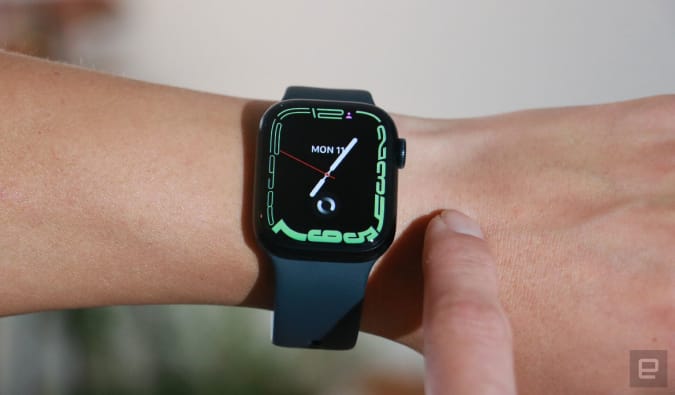
Many color options of the 41mm Apple Watch Series 7 are down to $330, or $70 off their normal price. The green model is even cheaper, coming in at $313. We gave the wearable a score of 90 for its bigger screen, faster charging and handy watchOS 8 features.

Buy Apple Watch Series 7 at Amazon starting at $313

Mac Mini M1

Engadget

You can pick up the Mac Mini M1 desktop for $570, which is an all-time-low price, thanks to a $99 coupon that's automatically applied at checkout. It runs on an eight-core CPU, eight-core GPU, a 16-core Neural Engine, 8GB of RAM and 256GB of storage. It's a good option if you want a relatively new desktop that won't take up too much space on your desk.

Buy Mac Mini M1 at Amazon - $570

Microsoft spring sale

Through April 21st, you can save hundreds on Surface devices, Xbox games and more in Microsoft's spring sale. The Surface Laptop Go is up to $200 off, so you can grab the model with a Core i5 processor, 8GB of RAM and 256GB of storage for $700.

Buy Surface Laptop Go at Microsoft starting at $400Shop Microsoft spring sale

Amazon Kindle

Engadget

Amazon's regular Kindle is down to $55, which is $35 cheaper than usual. You can also pick up the Kids Edition for $65 instead of the usual $110. While the latest Paperwhites have a lot of bells and whistles, the standard Kindle remains a good option for those on a budget.

Shop Kindle sales at Amazon

Amazon Fire tablets

Valentina Palladino / Engadget

A number of Fire tablets are on sale right now, including the Fire HD 8, which is down to $50. The larger Fire HD 10 has also been discounted to $100, which is $50 off its normal rate. These slabs are good options for those that want a basic, lightweight device for travel or doing things like online shopping and checking email from your couch.

Buy Fire HD 8 at Amazon - $50Buy Fire HD 10 at Amazon - $100

iRobot Roomba j7+

iRobot

iRobot's Roomba j7+ and s9+ are $200 off at Wellbots right now when you use the code ENGMOM200 at checkout. These are some of the company's most powerful robo-vacs: the j7+ has a convenient "poop-detection" feature while the s9+ has the strongest suction power of any Roomba. Both also come with clean bases, which allow the robots to automatically empty their bins after each cleaning job.

Buy Roomba j7+ at Wellbots - $599Buy Roomba s9+ at Wellbots - $799

Amazon smart thermostat

Amazon

Amazon's smart thermostat is back on sale for $48, which is 20 percent off its regular price. The Energy Star-certified device uses Honeywell's Home Thermostat tech to help you save on energy costs — and, like other Amazon devices, it works with Alexa so you can use voice commands to control the temperature in your home.

Buy smart thermostat at Amazon - $48

Google Nest thermostats

Google

Both Google's standard Nest Thermostat and the more advanced Learning model remain discounted right now. You can pick up the regular version for $119, while the Learning Thermostat is still on sale for $200. They share most of the same features, but you'll get a slicker design, a higher-res display and the ability to connect with Nest Temperature Sensors with the Learning model.

Buy Nest Thermostat at Amazon - $119Buy Nest Learning Thermostat at Amazon - $200

Chromecast with Google TV

Google

The latest Chromecast with Google TV is $10 off at Walmart and Best Buy, bringing it down to $40. We gave the compact streaming device a score of 86 for its solid remote control, good Google Assistant integration and support for 4K content with Dolby Vision and Atmos.

Buy Chromecast with Google TV at Walmart - $40Buy Chromecast with Google TV at Best Buy - $40

New tech deals

Apple gift cards

You can get a $5 promotional credit when you buy a $50 Apple gift card at Amazon when you use either the code APPLEDEAL or APPLEAPRIL at checkout. The promotional credit can be used on future Amazon purchases, and while it's not a huge credit, it's more than what we usually see attached to Apple gift cards.

Shop Apple gift cards at Amazon

Jabra Elite 7 Active

The Elite 7 Active earbuds are 17 percent off and down to $150 right now. These are some of Jabra's newest buds and they have a special "ShakeGrip coating" that helps keep the buds in place during sweaty workouts. Plus, the elite 7 Active support adjustable ANC, HearThrough technology and four microphones for better call quality.

Buy Elite 7 Active at Amazon - $150

Satechi Easter sale

Through April 17th, you can get 15 percent off at Satechi when using the code EASTER15, and for orders of $100 or more, they'll up it to 20 percent with the code EASTER20. Now's a good time to pick up a new keyboard, mouse, USB-C hub or other accessory while you can get it for less.

Shop Satechi Easter sale

NordVPN

NordVPN's latest deal lets you save 51 percent off the price of a two-year subscription, so you'll pay only $96 for that time period. After the first two years, the price goes up to $99 per year. NordVPN is one of our favorites thanks to its speed, its no-logs policy, the thousands of servers it has to choose from and that one account supports up to six connected devices.

Subscribe to NordVPN (2 years) - $96

Follow @EngadgetDeals on Twitter for the latest tech deals and buying advice.

iRobot's poop-detecting Roomba j7+ robot vacuum is $200 off right now

If you missed the last sale on iRobot's latest robot vacuums, you're in luck. Both the Roomba j7+ and the Roomba s9+ are $200 off at Wellbots when you use the code ENGMOM200 at checkout. That brings them down to $599 and $799, respectively, which are both close to the best prices we've seen on both vacuums.

Buy Roomba j7+ at Wellbots - $599Buy Roomba s9+ at Wellbots - $799

The newer of the two is the Roomba j7+, which came out at the end of last year. It's technically not as powerful as the s9+, but it has new AI-driven computer vision technology that helps it detect objects and move around them as it cleans. Because of that, iRobot dubbed this their "pet-poop detecting" robot, and the company even has the Pet Owner Official Promise (or P.O.O.P. for short), which states that you'll get a new vacuum if the one you bought fails to avoid accidental pet poop in your home.

The Roomba j7+ isn't the most powerful vacuum in the company's lineup, but it does have 10x the suction power of a standard Roomba, plus smart mapping, dual multi-surface brushes and more. The "plus" model also comes with a clean base into which the robo-vac will automatically empty its dustbin after each cleaning job.

The Roomba s9+, on the other hand, is the top-of-the-line vacuum from iRobot, and it has 40x the suction power of the standard models, a 3D sensor for object detection and a design that helps it clean room corners more easily. Both it and the Roomba j7+ are compatible with Amazon's Alexa and the Google Assistant, so in addition to controlling them from the iRobot mobile app, you can also tell them to clean up your home using voice commands.

Follow @EngadgetDeals on Twitter for the latest tech deals and buying advice.

Apple's AirPods Pro are on sale for $175 again

Apple's best sounding earbuds have been discounted on and off throughout the past few months, and now they're back down to one of the best prices we've seen all year. The AirPods Pro are 30 percent off again at Amazon, bringing them down to $175. That's just about the lowest price we've seen since the holiday shopping season (they were $1 cheaper earlier this month) and it puts the Pros back in line with the rest of Apple's audio lineup, which has been on sale for the past few days.

Buy AirPods Pro at Amazon - $175

If over-ear headphones aren't your thing, the AirPods Pro are your next best bet if you want an Apple device that has above-average audio quality. Not only do the AirPods Pro sound better than the company's standard earbuds, but they also have strong ANC that blocks out most surrounding noises. And you still get Transparency mode, while lets you hop in and out of conversations easily, and support for spatial audio. They're also arguably the best AirPods to get if you care about fit, since you can get a more accurate fit for your ear thanks to their interchangeable tips.

The AirPods Pro also have the H1 chip inside, which enables things like hands-free Siri access and quick pairing and switching between Apple devices. It's one of the biggest draws of AirPods — if you're steeped in the Apple ecosystem already, these earbuds will work seamlessly with all of your gadgets. The Pros should last for five hours before they need more juice, and you'll get 24 hours of total listening time when you employ the power kept in its MagSafe charging case.

With the Pros are back on sale, you'll find that you can get most Apple headphones and earbuds at a discount right now. The new, third-generation AirPods are down to $150 and the second-generation earbuds are on sale for only $100. Even the AirPods Max are cheaper than usual: at the time of writing this, the space gray, blue and silver models are down to $450 thanks to a sale price and an additional coupon that knocks another $29 off their final price.

Buy AirPods (3rd gen) at Amazon - $150Buy AirPods (2nd gen) at Amazon - $100Buy AirPods Max at Amazon - $450

Follow @EngadgetDeals on Twitter for the latest tech deals and buying advice.

Microsoft's spring sale knocks up to $200 off the Surface Laptop Go

Microsoft is ushering in the spring season with a new sale that discounts Surface devices, Xbox games, accessories and more through April 21st. A bunch of Surface gadgets are hundreds of dollars off right now, including the new Surface Pro X that's down to $700 for the base model, but you'll find an even better deal on the Surface Laptop Go. The entry-level Windows notebook is up to $200 off, so you can grab the model with a Core i5 processor, 8GB of RAM and 256GB of storage for $700. The base configuration is $150 off, too, bringing it down to $400.

Buy Surface Pro X at Microsoft starting at $700Buy Surface Laptop Go at Microsoft starting at $400Shop spring sale at Microsoft

While you can spend $700 and get either the Surface Pro X or the Laptop Go, we think the latter is the better option. The Surface Pro X is a gorgeous machine, but we found that buggy software held the 2-in-1 back from being truly great. While the Laptop Go has its compromises, it makes a great basic notebook thanks to its stellar hardware and speedy performance. Coming in at 2.45 pounds, the Laptop Go is lighter than its predecessor and looks sharp with its anodized aluminum top portion. Its 12.4-inch touchscreen gives you just enough room to multitask easily and its 3:2 aspect ratio makes it better for reading long articles and documents. 

All of the Surface Laptop Go configurations run on Core i5 processors, which means you'll get solid CPU performance regardless of the one you pick. We recommend opting for a model with 8GB of RAM because it'll serve you better over time than a measly 4GB will. As far as other features go, you're getting a 720p webcam, a fingerprint-toting power button, one USB-C port and one USB-A port on the Laptop Go. Microsoft didn't pack this machine with a lot of extra perks because it's designed to be an affordable Surface option — just good enough to give those with basic needs a solid laptop experience, and it does deliver on that.

Xbox players can also save on individual titles thanks to this sale, along with subscriptions to Game Pass. You can join Xbox Game Pass Ultimate for only $1 for your first month, and the sale price applies for PC Game Pass, too. Discounted games include Red Dead Redemption 2 for $24, Call of Duty: Black Ops Cold War for $35, The Witcher 3: Wild Hunt for $10 and BioShock: The Collection for $10.

Subscribe to Xbox Game Pass Ultimate at Microsoft - $1Subscribe to PC Game Pass at Microsoft - $1Shop Xbox games at Microsoft

Follow @EngadgetDeals on Twitter for the latest tech deals and buying advice.

Apple's latest AirPods are back on sale for $150

We saw both the AirPods Pro and the second-generation AirPods drop to near record-low prices last week, and now the third-generation AirPods have followed suit. Apple's latest version of its popular wireless earbuds are down to $150 right now, or $30 off their normal rate and only $10 more than their all-time-low price. We last saw them at this price at the end of March, so now's a good time to grab them if you missed the previous sale.

Buy AirPods (3rd gen) at Amazon - $150

Apple made a lot of improvements to these AirPods — most notably, giving them a total redesign that makes them fit better than the second-generation wireless buds. They still don't quite match the AirPods Pro when it comes to fitting into different ear shapes, but they're much better than the classic AirPods. Apple also dramatically improved the audio quality on these buds by pairing a custom driver with a high-dynamic-range amplifier. You'll get crisp highs and a rich, consistent bass out of these buds, and if you're upgrading from a pair of second-gen buds, you'll immediately notice the difference in sound quality from the moment you put the new AirPods in your ears.

On top of that, the latest AirPods support Adaptive EQ, spatial audio and dynamic head tracking, plus they have a longer battery life, too. You'll get up to six hours of listening time before they need a recharge, and when use with their MagSafe case, you'll get up to 30 hours of total use. And as with other Apple earbuds, this model has the H1 chip inside, which enables convenient features like hands-free Siri access and quick pairing and switching between Apple devices. Overall, these are a solid pair of wireless earbuds that will be a good first pair for iPhone users who have yet to pick one up, or a great upgrade for those running their existing buds into the ground.

Follow @EngadgetDeals on Twitter for the latest tech deals and buying advice.

Google's Nest Learning Thermostat is $50 off right now

A smart thermostat can help you save on energy costs while also letting you conveniently control your home's environment from anywhere. Google's Nest Learning Thermostat has a few extra perks that make it a great option for smart home enthusiasts, and now it's on sale for $50 less than usual. You can pick up the IoT device for $200 right now across the web, which, while not its record low, is close to it and a solid sale price.

Buy Nest Learning Thermostat at Amazon - $200Buy Nest Learning Thermostat at Adorama - $200Buy Nest Learning Thermostat at B&H - $200Buy Nest Learning Thermostat at Best Buy - $200

The Energy Star-certified Learning Thermostat helps you save energy by learning your preferences and building a schedule around your routines. After using the device for a little while, it'll learn when you like to keep your home cool and warm, automatically adjusting the temperature when necessary. It can also use sensors in your smartphone to know when you've left the house, automatically turning temperatures down to conserve energy. And if you like to have more control over your home's environment, you can use the Nest app to set temperature schedules, adjust the thermostat remotely and more.

While the standard Nest Thermostat is better for those with tight budgets, the Learning Thermostat gives you a few extra perks that may be worth splurging for. The higher-end model works with Nest Temperature Sensors, so you can adjust settings on a per-room basis. It also looks a lot sleeker than the standard smart thermostat thanks to its metal details, included trim plate and high-res display. The latter also shows more information than the mirrored display on the standard device, including the date, local weather and more.

Follow @EngadgetDeals on Twitter for the latest tech deals and buying advice.