Posts with «arduino mega» label

Teach kids how colors are made with the color machine
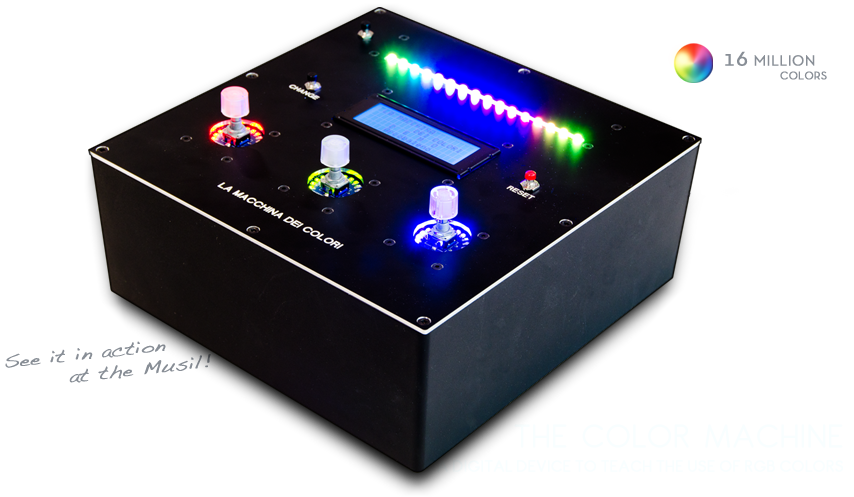
The Color Machine (La macchina dei colori, in Italian language) is a tool to teach children about the use and the operation of RGB color coding, which is used in all digital devices (TVs, smartphones, computers, etc.). It was created with Arduino Mega by an italian duo composed by Fabio Ghidini and Stefano Guerrini:

Using 3 knobs you can increase the percentages of red, green and blue separately, and the LED strip at the top of the machine lights up consistently with the color mix choosen.

The Color Machine has 4 different operating modes: “let’s create colors”, “guess the color”, “the names of the colors” and “demo”. Under the guidance of a teacher, children can play and learn at the same time to recreate colors with additive synthesis. This device is currently used in the educational workshops of Musil – Museum of Industry and Labour of Rodengo Saiano (Italy).


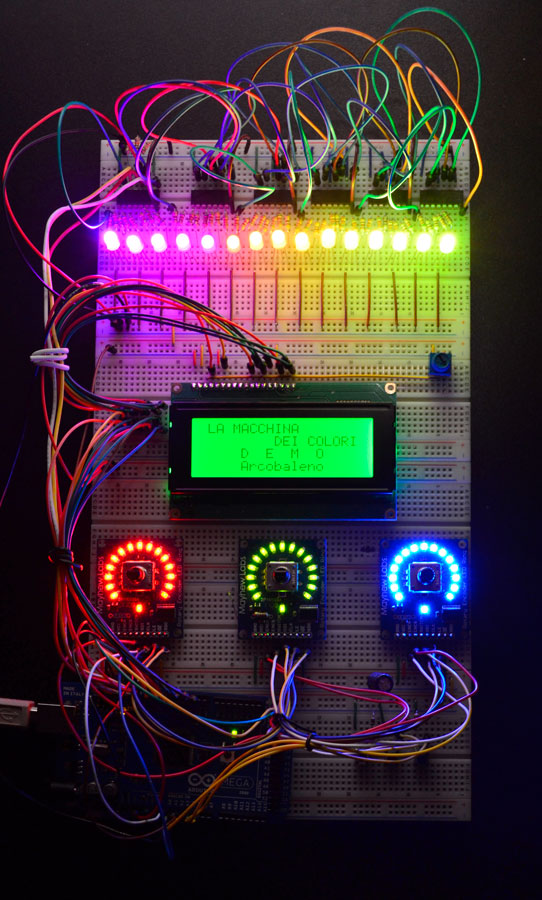
This is the first propotype:
Arduino Blog 09 Apr 11:05

How to monitor a domestic photovoltaic plant with Arduino


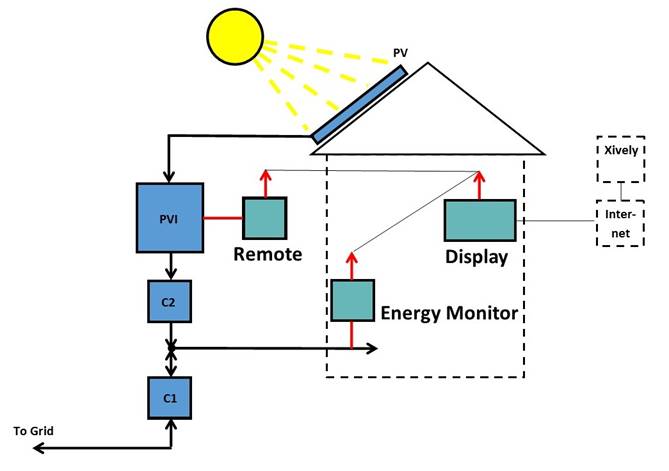
ArdaSol is the name of a project for a solar energy monitoring system based on Arduino Mega and UNO, made by Heinz Pieren. It’s a system built to monitor energy production and consumption of a domestic photovoltaic plant:

The ArdaSol Energy Monitoring System has 3 devices:

- ArdaSol Display based on a Arduino Mega Board
The master of the system, it collects the data from the two other ArdaSol devices, shows the data on the display, stores it on a SD card and sends it to a server in the internet.

- ArdaSol Energy Monitor based on a Arduino Uno
Measures the consumption of the energy, shows energy values on local display and delivers it on request to the ArdaSol Display.

- ArdaSol Remote PVI Interface based on a Arduino Uno
The photovoltaic inverter (PVI) has a RS485 interface, this is connected to ArdaSol Remote, which interacts as a gateway to ArdaSol Display. It converts the requests, coming with a radio signal to the PVI and vice versa.


Romibo therapeutic robot, eyes-on (video)

Between old Paro the robo seal and the original iteration of Keepon, we've seen plenty of adorable robots designed for therapeutic purposes. Romibo's creators have no qualms admitting that their own creation is following in those cuddly footsteps, but what sets their furry 'bot apart from much of the competition is a focus on (relative) affordability. For starters, there's the fact that Romibo is being offered up as an open-source project online, letting do-it-yourselfers build their own versions and contribute custom designs.

The company's also hoping families will get into the act, making sure that Romibo is "able to be assembled by a neurotypical child 10+ and a parent" -- and then there are the plans to offer up workshops to let folks build robots to be donated to special needs facilities. Once built, Romibo can drive around, blink its eyes, speak and move its antennae. Crack it open and you'll find WiFi, bluetooth, light sensors, an IR Proximity sensor, accelerometers and a big 'ole Arduino Mega. There's a certain amount of autonomous functionality (watch in the video below as Romibo's handler warns about it driving off the edge of the table), or you can control the robot via an iPad app. You can also use an SD card to help teach it some new words.

Continue reading Romibo therapeutic robot, eyes-on (video)

Filed under: Robots

Romibo therapeutic robot, eyes-on (video) originally appeared on Engadget on Tue, 23 Oct 2012 09:46:00 EST. Please see our terms for use of feeds.

Permalink | Email this | Comments

Crayolascope hacks toys into foot-thick 3D display

Artist Blair Neal, as many other great creators have before him, turned to children's toys as the source of inspiration for his latest project. Crayolascope is a rudimentary 3D display hacked together from several Glow Books, a light-up play on a flip-book from the titular company. The installation, currently housed at the New York Hall of Science in Flushing, layers 12 of its component clear plastic sheets to create a roughly one-foot deep display that plays a simple pre-drawn animation. The whole thing is controlled by an Arduino Mega, that can either play back the neon scribbles at varying speeds (controlled by a knob built into the console) or scrub through frame by frame. Neal isn't quite done tweaking the Crayolascope either. As it stands he's limited to between 14 and 18 frames, before it becomes too difficult to see through the sheets. And it requires near total darkness for optimal operation. To see it in action check out the video after the break.

Continue reading Crayolascope hacks toys into foot-thick 3D display

Crayolascope hacks toys into foot-thick 3D display originally appeared on Engadget on Mon, 25 Jun 2012 16:59:00 EST. Please see our terms for use of feeds.

Permalink | Email this | Comments

DIY Amp Hour Meter

Ever wanted to see how much electricity your next project is consuming? Look no further; this Instructable will guide you about how you can, too, make a device to monitor the same.

This project was developed by Steve Spence of Arduinotronics with input from forum members at the Yahoo Group - Arduino Home and The Arduino Forum.

Steve writes:

“There’s a couple of commercial products that can do this, but not with the flexibility I wanted. I designed an Arduino micro-controller based solution that is very extensible. Right now it monitors the above values of attached gear, and I’m thinking about adding web monitoring and an SD Card for data collection.”