


Porting a weather station app from the Arduino® GIGA™ R1 to the Arduino® UNO™ R4 boards
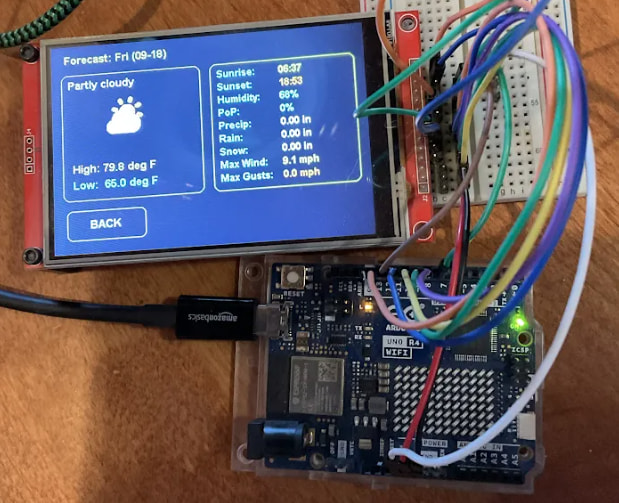
GIGA R1 WiFi is built as a powerful development board, thanks to its dual-core, 32-bit STM32H747XI microcontroller, designed to operate at clock speeds of up to 480 MHz and equipped with 1 MB of RAM. Arduino Forum users KurtE and Merlin513 developed a ZephyrOS-based weather station app for it, showcasing its capabilities. What’s more, they recently published a demonstration that it also works on the less powerful UNO R4 WiFi.
The original project with GIGA
ZephyrOS is an RTOS (Real-Time Operating System), which we chose as a replacement following the end of active Mbed development in 2024. With the Arduino Core on Zephyr 0.90.0 now officially stable, it provides a foundation for applications designed to support process management, task scheduling, and real-time operation.
KurtE and Merlin513 built their weather app for ZephyrOS on the GIGA R1 WiFi with a paired touchscreen (like the GIGA Display Shield). That app is engineered to show the local weather through a nice GUI, with touch-selectable detailed information on specific days.
The result was relatively resource-intensive for a microcontroller, but the GIGA R1 WiFi’s processing and memory resources were designed to support the application.
The new, limit-stretching version
The UNO R4 WiFi is a more resource-constrained board, featuring a single-core Renesas RA4M1 microcontroller operating at 48 MHz and 32 kB of RAM. It also includes 256 kB of flash storage, compared with the GIGA R1 WiFi’s 2 MB.
This translates into two challenges: shaving the package size down to fit in the available flash storage and reducing resource usage for the available RAM. Fortunately, solving the first challenge also eliminated the second. KurtE did that by switch display libraries and simplifying the GUI elements. Most of that came down to reducing the color palette and minimizing image sizes where possible.
With these optimizations in place, KurtE demonstrated that the weather application could run on the UNO R4 WiFi and described the result as operating “reasonably well.”
The great challenge of smaller platforms
Optimizing software for constrained hardware isn’t just an exercise in trimming code – it’s a mindset that encourages thoughtful engineering. While high-spec boards give you room to dream big, figuring out how to squeeze a full RTOS, graphical interface, and real-time data onto a board with 32 kB of RAM demonstrates how practical constraints can inspire creative solutions.
Porting projects like this weather station down to smaller platforms helps make complex applications more accessible, showing that with the right optimizations, you don’t always need massive compute power to build impressive, responsive systems.
Have a similar project to share? Add it to your next post on the Arduino Forum, or document it on Arduino Project Hub so the entire community can benefit from your experience and build on it!
Arduino, GIGA, and UNO are trademarks or registered trademarks of Arduino S.r.l.
The post Porting a weather station app from the Arduino® GIGA™ R1 to the Arduino® UNO™ R4 boards appeared first on Arduino Blog.