Posts with «ai» label

What can you build, when AI can interact with the real world?
The single-board computing market is shifting rapidly, and we are moving into an era of unprecedented possibilities where edge AI, computer vision, real-time control, and rich sensor streams converge locally. Yes, it’s exciting – but even amidst this “explosion” of hardware, an age-old rule holds true: define what you want to build before picking your tool.

No single board can (nor should!) excel at everything. A low-power embedded sensor, an autonomous robot, and a high-throughput video server all demand different architectures. For example, if you are weighing hardware choices for a general-purpose Linux setup versus a hybrid microcontroller, read this in-depth review to evaluate how different design philosophies match your requirements.

In concrete terms, it’s great to get a sense of what each board can do – and even better if you can look at a variety of cool projects at the same time! So here is a selection of what we are seeing developers build across key domains with the Arduino® UNO Q board, leveraging its dual-brain to bridge high-level AI workloads with deterministic physical control. 

Dive into perception-driven robotics

Robotics excels on hybrid platforms because physical movement requires tight, real-time microcontroller timing while visual recognition requires heavy AI processing.

  •  A robot arm that sees you: Uses camera vision designed to recognize people and a robotic arm built to deliver items, with a Modulino LED Matrix providing visual feedback.
  • UNO Q Braccio: Integrates Edge Impulse AI and ROS 2 in a platform engineered to support robotic arm control, including simulation in Gazebo.
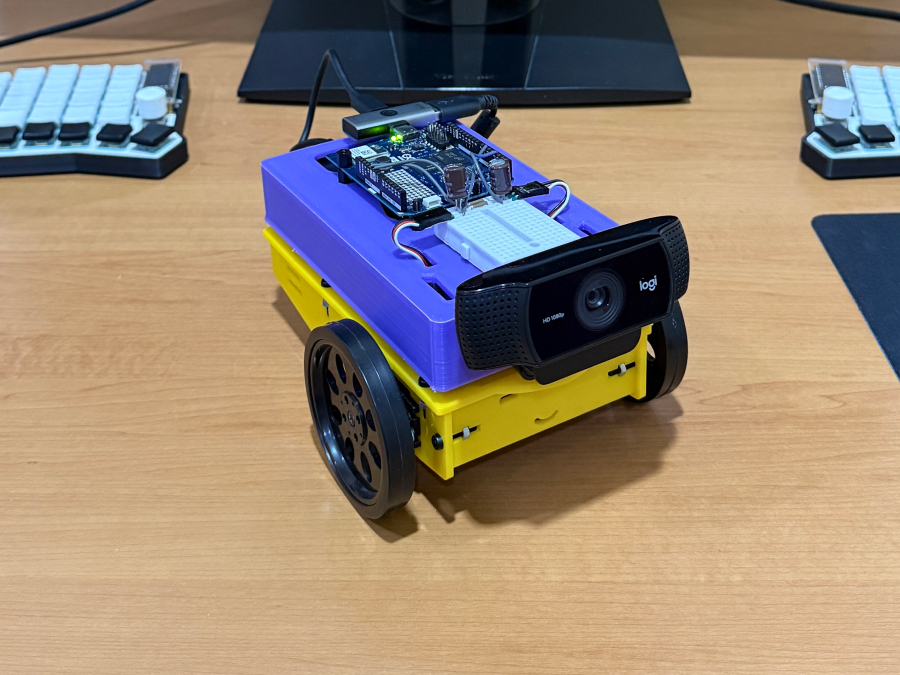
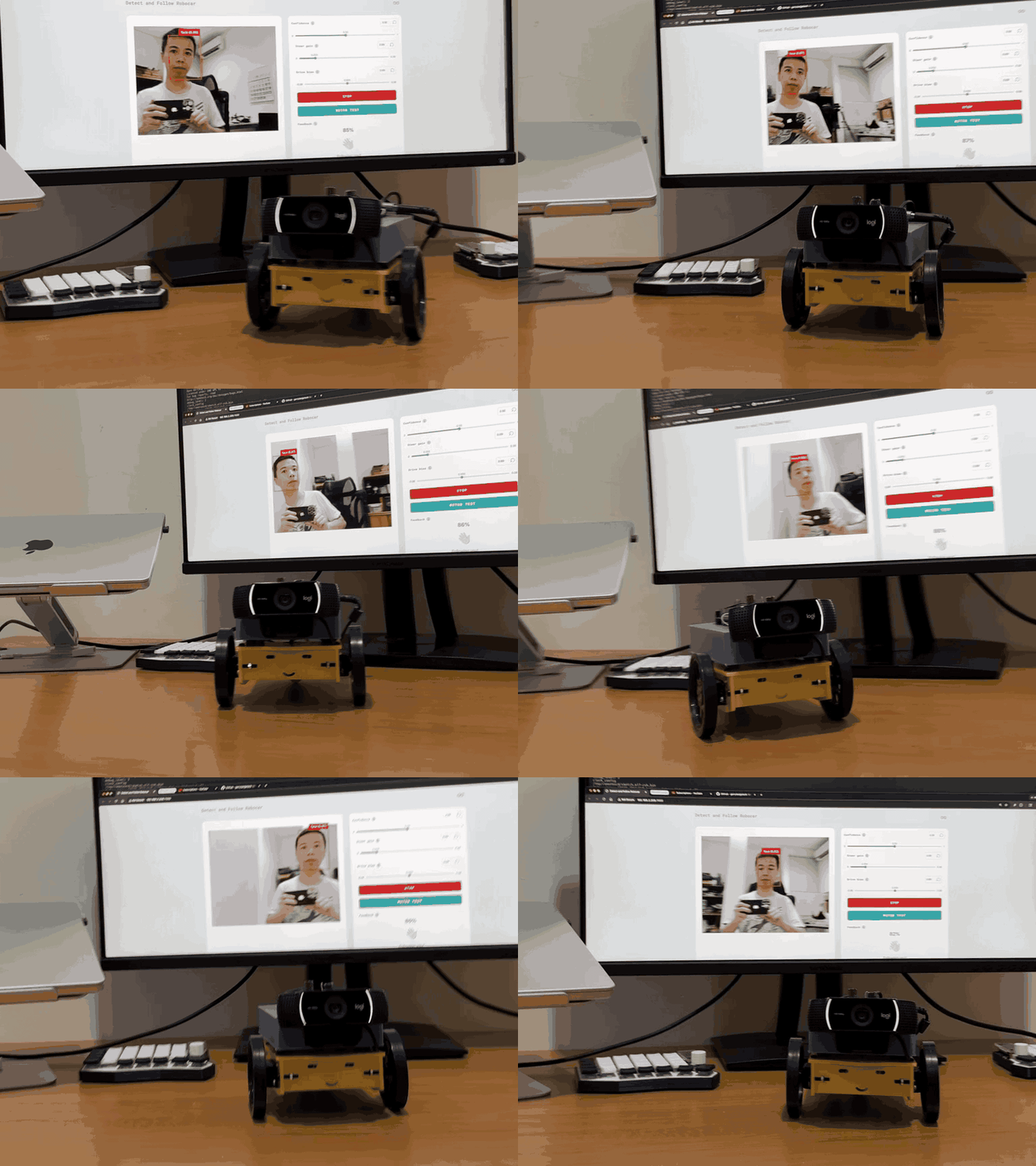
  • Face-following robot: Uses Edge Impulse computer vision designed to track faces and convert tracking data into physical servo movements.
  • AI agent robot: Uses a local AI agent built to support physical navigation and decision-making tasks in real-world environments.
Explore the world through computer vision and spatial sensing

Instead of just streaming video, local machine learning turns cameras and sensors into environmental perception engines.

  • Gesture-controlled input system: Uses a standard webcam and Edge Impulse in a workflow built to convert hand gestures into inputs for digital applications.
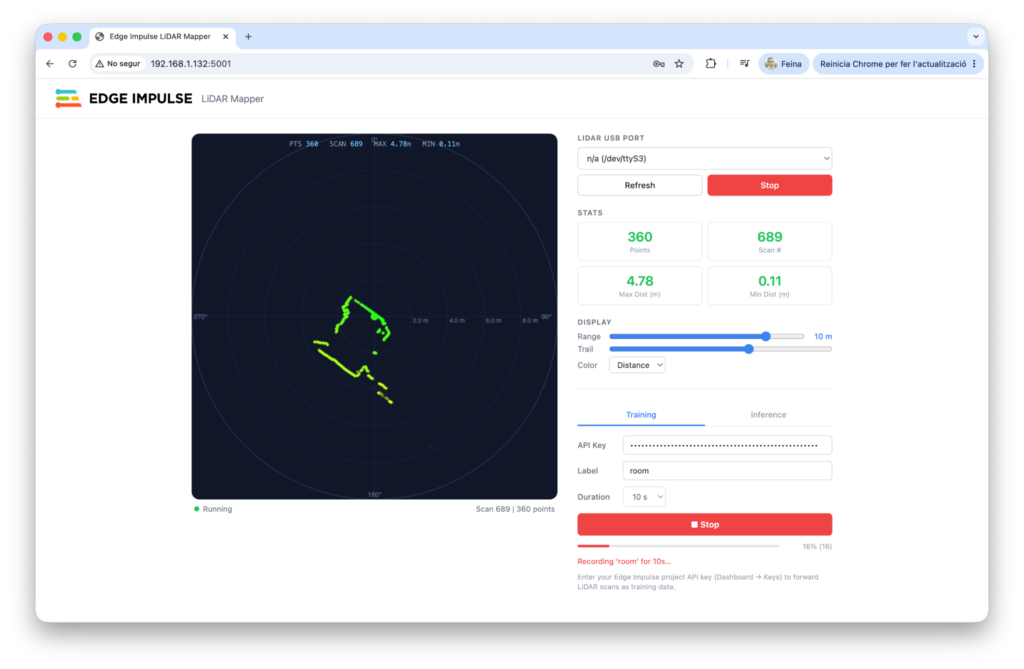
  • Real-time LiDAR room mapper: Pairs LiDAR sensors with Edge Impulse ML in a system engineered to help interpret spatial data and interpret room layouts locally.
Create smart environments with interactive AI

Local AI allows devices to run full “sense, interpret, decide, act” loops without relying on cloud latency or external servers.

  • Talk to your house: An all-in-one smart home hub engineered to support wake-word detection, voice commands, sensor management, and a web interface.
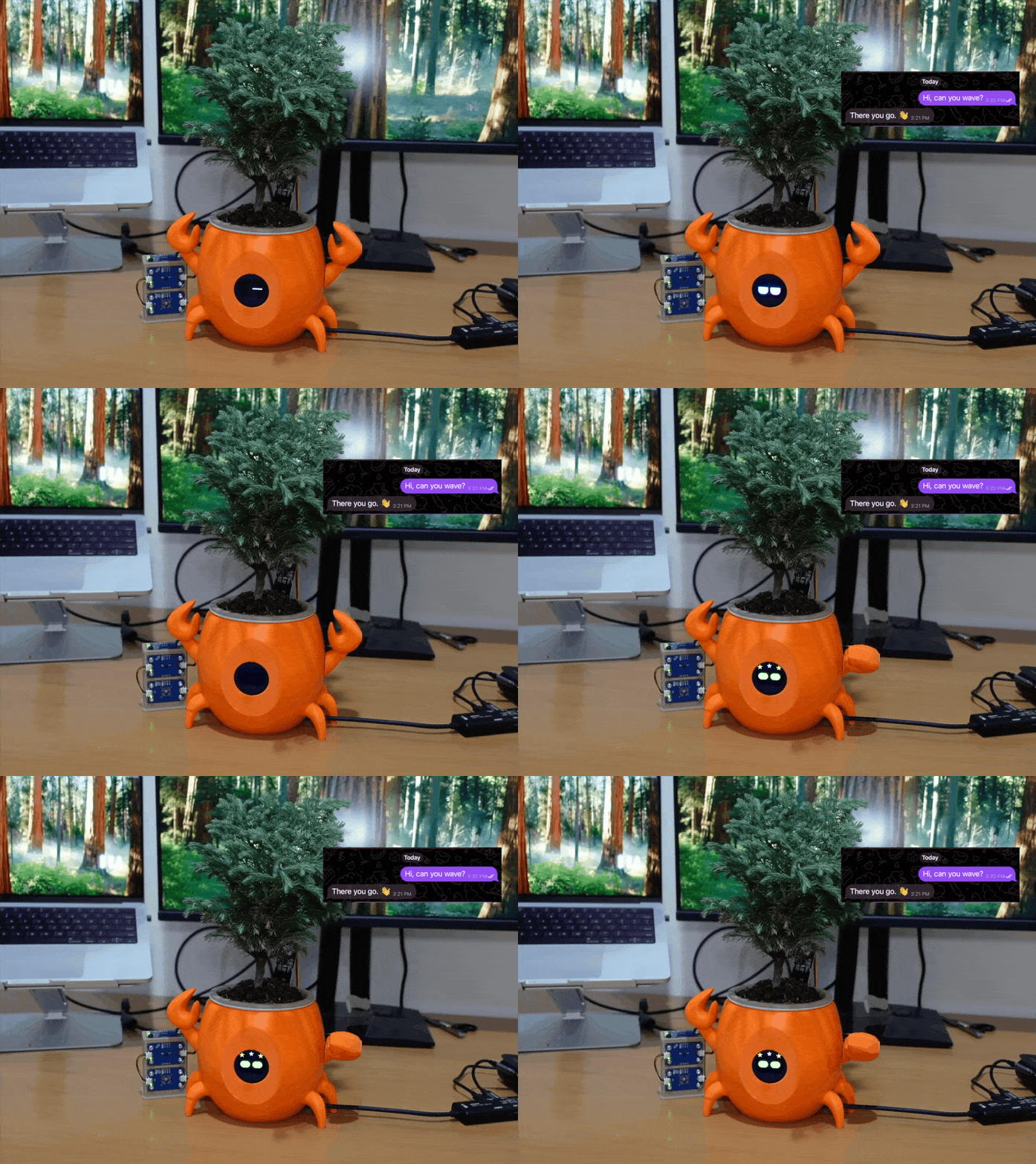
  • Clawrophyll: A smart houseplant system designed to run a local AI agent directly on the board.
We don’t need every platform to do the same thing

The technological landscape is expanding, giving us more tools to build with: the goal was never to find one ultimate board “to rule them all”, but to match your project’s unique demands to the right architecture. Whether you need a raw Linux computing hub or a dual-brain setup like UNO Q, starting with a clear target can help you build smarter, faster, and more effectively. Today, we have more options, more possibilities – and this may ultimately be the most exciting part in the current era of single-board computing.

UNO Q is available on the Arduino Store, and can be ordered from DigiKey, Farnell, Mouser, Newark, RS Components, Robu.in, and other authorized distributors and resellers worldwide.

Qualcomm branded products are products of Qualcomm Technologies, Inc. and/or its subsidiaries. Arduino, UNO, and the Arduino logo are trademarks or registered trademarks of Arduino S.r.l.

The post What can you build, when AI can interact with the real world? appeared first on Arduino Blog.
Face-tracking robot with Arduino UNO Q

An inexpensive robot kit with Arduino UNO Rev3, obstacle-avoidance sensors, and line-following capability becomes a face-tracking robot. The trick is in the control board: just replace the UNO Rev3 with an Arduino UNO Q, which has the same headers and mounts an STM32U585 microcontroller alongside a Linux microprocessor. Iulia Feroli’s project shows how local artificial intelligence can be added to a low-cost robot without touching the mechanics.

The robot starts from the Elegoo kit, with its motor shield and sensors for obstacle avoidance and line following. The UNO Q slots in place of the original board, and the shield moves over without any modification. Thanks to the STM32 microcontroller and the Linux microprocessor, the new board runs machine learning models locally, with no cloud connection. A standard USB webcam is connected to the UNO Q to provide vision.

Video stream and face tracking

The webcam video stream is processed with the face tracking Brick from Arduino App Lab. The code converts the face position in the frame into movement commands for the robot. The robot rotates to center the face and moves toward it, always staying in front of the person. The result is a responsive face tracker that requires no external servers or Wi-Fi connections.

Iulia Feroli’s project is documented in a video showing the robot in action, with an explanation of the assembly and the code. Swapping the board is the core of the intervention: the UNO Q maintains electrical and mechanical compatibility with the UNO Rev3 but adds the computing power needed for AI. In addition, the face tracking Brick in Arduino App Lab simplifies managing the machine learning model, making the code accessible even to those without neural network experience.

What you need to rebuild the project

To replicate the robot you need only a few components, all easily available. The list includes the Elegoo kit, a USB webcam, and the control board. Here are the main steps:

  • Remove the Arduino UNO Rev3 from the Elegoo kit and keep the motor shield.
  • Mount the Arduino UNO Q in its place, checking that the headers align.
  • Connect the USB webcam to the UNO Q port.
  • Upload the sketch with the face tracking Brick from Arduino App Lab.
  • Power the robot and test it in front of a face.

The UNO Q is the heart of the system: it combines the simplicity of the STM32U585 microcontroller with the power of the Linux processor. This combination allows local machine learning models, such as face tracking, to run without additional hardware. The board is also available in a 4GB version with a full accessory kit, which includes everything needed to get started.

The original Elegoo kit, with its Arduino UNO Rev3 board, remains an excellent base for other projects. However, for this face tracker, the UNO Q is the right choice: it offers the necessary computing power and maintains compatibility with the shield. The overall cost stays low, and the result is a smart robot that impresses with its responsiveness.

Source: https://youtu.be/FIu14vCvGfs?si=8SSW0K6O7J6Y07tz

The post Face-tracking robot with Arduino UNO Q appeared first on Open Electronics.

AI System Drops a Dime on Noisy Neighbors

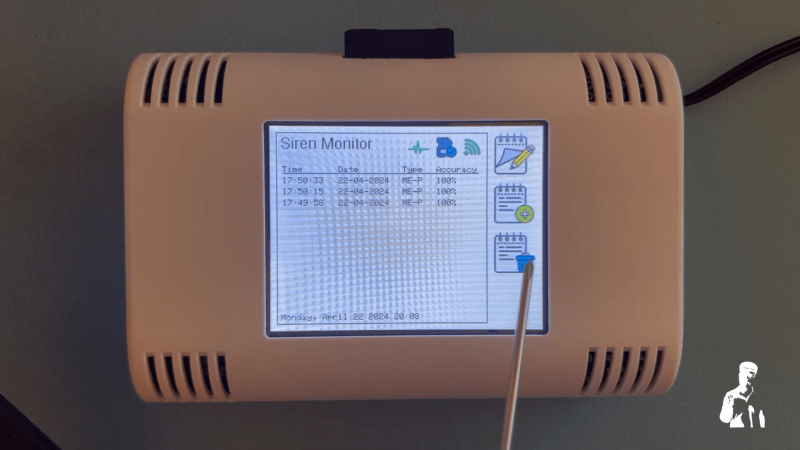
“There goes the neighborhood” isn’t a phrase to be thrown about lightly, but when they build a police station next door to your house, you know things are about to get noisy. Just how bad it’ll be is perhaps a bit subjective, with pleas for relief likely to fall on deaf ears unless you’ve got firm documentation like that provided by this automated noise detection system.

OK, let’s face it — even with objective proof there’s likely nothing that [Christopher Cooper] is going to do about the new crop of sirens going off in his neighborhood. Emergencies require a speedy response, after all, and sirens are perhaps just the price that we pay to live close to each other. That doesn’t mean there’s no reason to monitor the neighborhood noise, though, so [Christopher] got to work. The system uses an Arduino BLE Sense module to detect neighborhood noises and Edge Impulse to classify the sounds. An ESP32 does most of the heavy lifting, including running the UI on a nice little TFT touchscreen.

When a siren-like sound is detected, the sensor records the event and tries to classify the type of siren — fire, police, or ambulance. You can also manually classify sounds the system fails to understand, and export a summary of events to an SD card. If your neighborhood noise problems tend more to barking dogs or early-morning leaf blowers, no problem — you can easily train different models.

While we can’t say that this will help keep the peace in his neighborhood, we really like the way this one came out. We’ve seen the BLE Sense and Edge Impulse team up before, too, for everything from tuning a bike suspension to calming a nervous dog.

Dr. Squiggles: An AI Rhythm Robot

Build a smart octopus drumbot that listens, learns, and plays along with you

Read more on MAKE

The post Dr. Squiggles: An AI Rhythm Robot appeared first on Make: DIY Projects and Ideas for Makers.

Machine Learning with Microcontrollers Hack Chat

Join us on Wednesday, September 11 at noon Pacific for the Machine Learning with Microcontrollers Hack Chat with Limor “Ladyada” Fried and Phillip Torrone from Adafruit!

We’ve gotten to the point where a $35 Raspberry Pi can be a reasonable alternative to a traditional desktop or laptop, and microcontrollers in the Arduino ecosystem are getting powerful enough to handle some remarkably demanding computational jobs. But there’s still one area where microcontrollers seem to be lagging a bit: machine learning. Sure, there are purpose-built edge-computing SBCs, but wouldn’t it be great to be able to run AI models on versatile and ubiquitous MCUs that you can pick up for a couple of bucks?

We’re moving in that direction, and our friends at Adafruit Industries want to stop by the Hack Chat and tell us all about what they’re working on. In addition to Ladyada and PT, we’ll be joined by Meghna Natraj, Daniel Situnayake, and Pete Warden, all from the Google TensorFlow team. If you’ve got any interest in edge computing on small form-factor computers, you won’t want to miss this chat. Join us, ask your questions about TensorFlow Lite and TensorFlow Lite for Microcontrollers, and see what’s possible in machine learning way out on the edge.

Our Hack Chats are live community events in the Hackaday.io Hack Chat group messaging. This week we’ll be sitting down on Wednesday, September 11 at 12:00 PM Pacific time. If time zones have got you down, we have a handy time zone converter.

Click that speech bubble to the right, and you’ll be taken directly to the Hack Chat group on Hackaday.io. You don’t have to wait until Wednesday; join whenever you want and you can see what the community is talking about.

Blisteringly Fast Machine Learning On An Arduino Uno

Even though machine learning AKA ‘deep learning’ / ‘artificial intelligence’ has been around for several decades now, it’s only recently that computing power has become fast enough to do anything useful with the science.

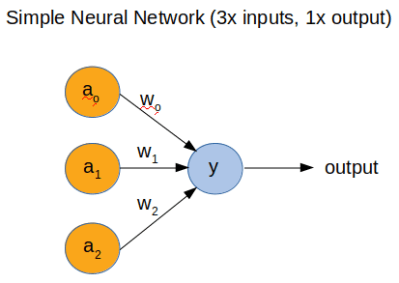
However, to fully understand how a neural network (NN) works, [Dimitris Tassopoulos] has stripped the concept down to pretty much the simplest example possible – a 3 input, 1 output network – and run inference on a number of MCUs, including the humble Arduino Uno. Miraculously, the Uno processed the network in an impressively fast prediction time of 114.4 μsec!

Whilst we did not test the code on an MCU, we just happened to have Jupyter Notebook installed so ran the same code on a Raspberry Pi directly from [Dimitris’s] bitbucket repo.

He explains in the project pages that now that the hype about AI has died down a bit that it’s the right time for engineers to get into the nitty-gritty of the theory and start using some of the ‘tools’ such as Keras, which have now matured into something fairly useful.

In part 2 of the project, we get to see the guts of a more complicated NN with 3-inputs, a hidden layer with 32 nodes and 1-output, which runs on an Uno at a much slower speed of 5600 μsec.

This exploration of ML in the embedded world is NOT ‘high level’ research stuff that tends to be inaccessible and hard to understand. We have covered Machine Learning On Tiny Platforms Like Raspberry Pi And Arduino before, but not with such an easy and thoroughly practical example.

Kinetic Sculpture Achieves Balance Through Machine Learning

We all know how important it is to achieve balance in life, or at least so the self-help industry tells us. How exactly to achieve balance is generally left as an exercise to the individual, however, with varying results. But what about our machines? Will there come a day when artificial intelligences and their robotic bodies become so stressed that they too will search for an elusive and ill-defined sense of balance?

We kid, but only a little; who knows what the future field of machine psychology will discover? Until then, this kinetic sculpture that achieves literal balance might hold lessons for human and machine alike. Dubbed In Medio Stat Virtus, or “In the middle stands virtue,” [Astrid Kraniger]’s kinetic sculpture explores how a simple system can find a stable equilibrium with machine learning. The task seems easy: keep a ball centered on a track suspended by two cables. The length of the cables is varied by stepper motors, while the position of the ball is detected by the difference in weight between the two cables using load cells scavenged from luggage scales. The motors raise and lower each side to even out the forces on each, eventually achieving balance.

The twist here is that rather than a simple PID loop or another control algorithm, [Astrid] chose to apply machine learning to the problem using the Q-Behave library. The system detects when the difference between the two weights is decreasing and “rewards” the algorithm so that it learns what is required of it. The result is a system that gently settles into equilibrium. Check out the video below; it’s strangely soothing.

We’ve seen self-balancing systems before, from ball-balancing Stewart platforms to Segway-like two-wheel balancers. One wonders if machine learning could be applied to these systems as well.

IOT AI in the Cloud using Reinforcement Learning

Let's Make Robots 04 May 23:03
ai  arduino  cloud  esp8266  iot  

Sorting cucumbers using AI, Raspberry Pi + Arduino

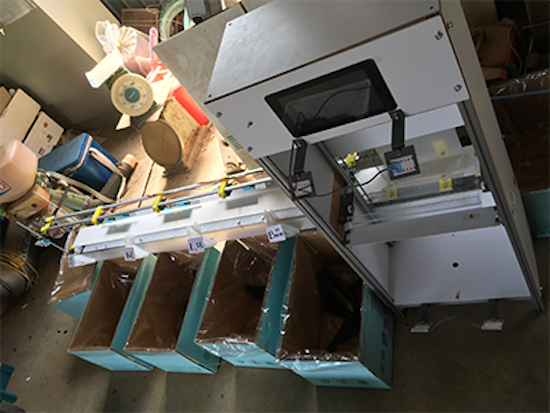
When it comes to farming veggies like cucumbers, the sorting process can often be just as hard and tricky as actually growing them. That’s why Makoto Koike is using Google’s TensorFlow machine learning technology to categorize the cucumbers on his family’s farm by size, shape and color, enabling them to focus on more important and less tedious work.

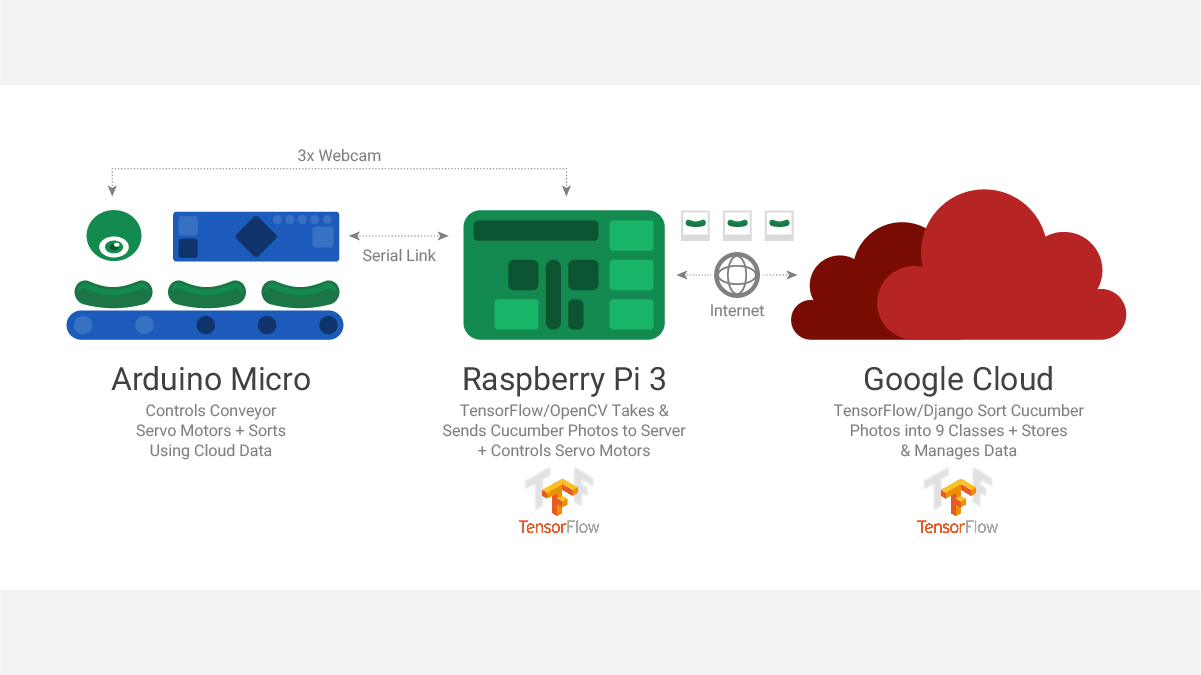
A camera-equipped Raspberry Pi 3 is used to take images of the cucumbers and send them to a small-scale TensorFlow neural network. The pictures are then forwarded to a larger network running on a Linux server to perform a more detailed classification. From there, the commands are fed to an Arduino Micro that controls a conveyor belt system that handles the actual sorting, dropping them into their respective container.

You can read all about the Google AI project here, as well as see it in action below!

My virtual robot project

Concept:

read more