Posts with «servos» label

XGO Duck: the open source robot duck that walks with neural policies

XGO Duck is an open source, 3D-printable robot duck that Luwu Dynamics built starting from Pollen Robotics’ Microduck. From the original project it keeps the body, the layout of the 15 servos and the joint order, but replaces all of the electronics. In place of the Pollen Robotics board there is an Arduino UNO Q, which runs neural policies for walking, getting up from the ground and picking. So there is no need to wait for a commercial robot: anyone with a 3D printer can build one.

The heart of the system is the Arduino UNO Q itself, which hosts two computers on a single board. On one side there is a host with a Qualcomm processor running Linux, on the other an STM32U585 MCU running Zephyr. This division of tasks is the most interesting architectural choice in the project. The host handles the neural policies, the MCU handles real-time motor control. On top of that, the link between the two is a 2 Mbps Bridge, so the two worlds stay synchronised without Linux ever having to wait on the servo bus.

Two computers, two loops: 50 Hz for the policies and 100 Hz for the bus

The host runs the ONNX policies at 50 Hz on a dedicated thread, with the web UI listening on port 9527. The MCU, on the other hand, runs a 100 Hz bus loop and does not wait for Linux. It publishes a 240-byte duck_state snapshot at 100 Hz; the host filters every snapshot on arrival and the 50 Hz thread reads the latest available one, skipping late cycles. That way the robot does not stall if the host is busy.

The servo bus always addresses all 15 servos in the order ID 10-14, 20-24, 30-34. The order in action 14-D of the policy is instead 10-14, 30-33, 20-24. The servo bus is on Serial1 at 1 Mbps, while the QMI8658 IMU is on Wire at 400 kHz, with I2C address 0x6A then 0x6B. Servo positions are saturated to the encoder range 0-4095, with a raw centre position of 2047.

  • 15 FeeTech 1910 servos on a serial bus
  • Arduino UNO Q with Qualcomm host and STM32U585 MCU
  • QMI8658 IMU on the Wire bus at 400 kHz
  • Bridge host-MCU link at 2 Mbps
  • servo bus on Serial1 at 1 Mbps

The neural policies: observation [1, 61], action [1, 14] and automatic get-up

The policies expect an observation [1, 61] and output an action [1, 14]. There are three: xgoduck_walk.onnx for walking, xgoduck_getup.onnx for getting up from the ground and xgoduck_pick.onnx for the pick, which lasts 4 s. A tilt above 55° for 0.15 s triggers the get-up model, then the action is forced to 0 for 1 s. When the tilt drops below 15° for 1 s, the robot goes back to walking.

The home pose has hip and ankle at ±24°, knee at 0°, hip roll at ±5°, neck and head pitch at 20°, mouth at 0°. The action_scale is 1. The walking commands are vx ±0.4, vy ±0.3 and ωz ±1.0, with a joystick dead zone of 0.1. The four head channels sit within ±1 radian. The mouth is driven from the web UI from 0° to 30°, and in the pick cycle it opens to 30° and closes when φ ≥ 0.4.

Action smoothing uses α = 0.45 on the slices [0:5], [5:10] and [10:14], yaw smoothing uses α = 0.5 and joint speed smoothing uses α = 0.4. The gravity complementary filter uses τ = 0.3 s, with accelerometer correction dropping when the norm deviates from 1 g by more than about 20%. Position control stops if commands are missing for 250 ms or if the IMU is missing for 100 ms; a host feedback older than 150 ms disarms it.

The Zephyr firmware, servo calibration and the web UI on port 9527

The firmware is a CLI app built with Arduino Zephyr core 1.0.0, on top of RouterBridge 0.4.3, RPClite 0.3.1 and MsgPack 0.4.2. A patch to RouterBridge 0.4.3 raises the RPC thread stack from 500 to 4096 bytes, and the serial router is set to 2 Mbps. Calibration and servo setup use a 2 s heartbeat. The temporary gains for the centring movement are KP = 6 and KD = 20, with a temporary KP = 10 for the servo with ID 34. During calibration the gains become KP = 3 and KD = 0, and every servo is commanded to 2047.

The servo setup page starts with default values KP = 5 and KD = 20. Writing the ID unlocks register 0x37 and then writes 0x05; writing KP/KD unlocks 0x37 and stores both bytes at 0x15. The duck_command sent by the host is 80 bytes. Closing the page or leaving it in the background for more than 1 s disables position control, so the web UI is not just a convenience panel.

The Luwu Dynamics repository collects the project code: sketch, configurations, ONNX models and support scripts. Among the tools are tools/prepare-bridge.py, tools/router-2m.sh, tools/reuse-toolchain.py, tools/verify-elf.py and tools/measure.py, which measures for 60 seconds. There are also python/rl_core.py, python/requirements.txt, sketch/sketch.yaml, app.yaml, data/zero_pos.json and sketch/duck_config.h. Anyone who wants to rebuild it will find everything needed to get started there.

The host needs a Linux environment with ONNX Runtime and Python, while the MCU runs on Zephyr. The UNO Q loader error in case of a tail-call is ENOEXEC (−8), a detail familiar to anyone who compiles firmware. The default rate of Bridge.begin() in another app is 115200, so it has to be raised to 2 Mbps to run the bus as needed. If you want to start with the right hardware, an Arduino UNO Q with a complete accessory kit covers the host and MCU side on a single board.

Source: https://github.com/LuwuDynamics/xgoduck_runtime_arduino

Related products

The post XGO Duck: the open source robot duck that walks with neural policies appeared first on Open Electronics.
Arduino Activated Automotive Aerodynamic Apparatus is… (Spoiler Alert!)

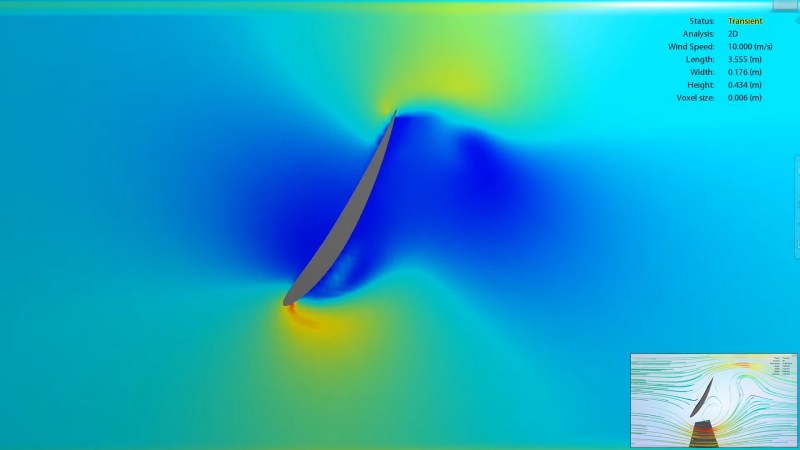
Sometimes a great hack is great for no other reason than that it’s fun, and [Michael Rechtin]’s DIY Active Aero Spoiler and Air Brake certainly qualifies as a fun hack. This is a mod designed to live in a world where looks are everything, stickers add horsepower, and a good sound system is more important than good wheel alignment. Why is that? Because like the switch that exists only to activate the mechanism that turns it off, the DIY Active Aero Spoiler and Air Brake seen below is almost completely useless. So to understand its allure, we must understand its inspiration.

For a few decades now, luxury sports car manufacturers have been adding active aerodynamic components to their vehicles. For example, several Porsche models feature adaptive spoilers that adjust to driving conditions. Super cars such as the Bugatti Veyron have spoilers that flip up at high angles during braking to increase drag and reduce braking distance. All of these features are sadly missing from the average two or four door family-car-turned-wannabe-track-fiend. Until now!

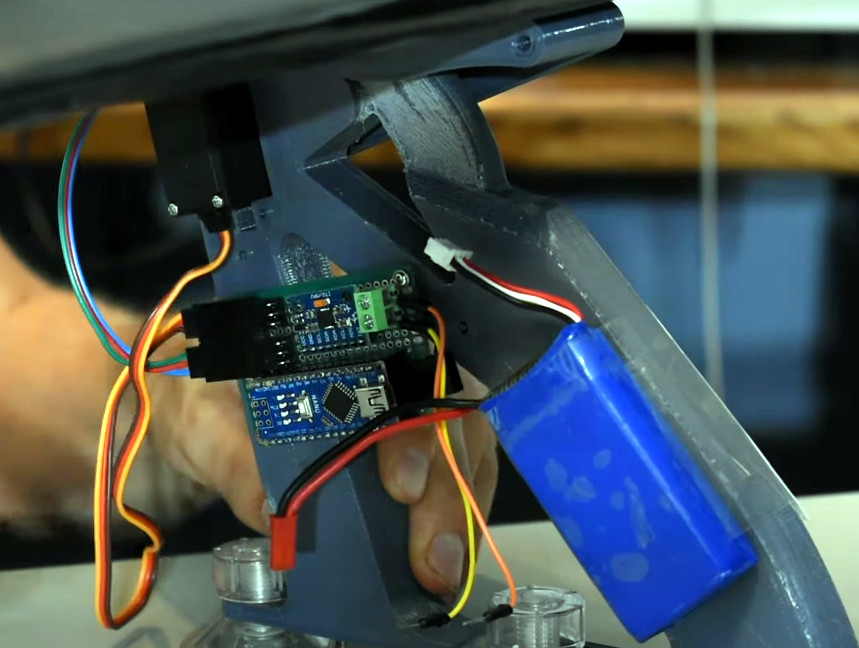
[Michael] has created a new active spoiler for every mall-bound muffler-challenged hand me down. The build starts with a CNC cut foam wing which is covered with fiberglass, Bondo (an automotive necessity) and some faux carbon fiber for that go-fast feel. An Arduino, IMU, two servos, and a battery pack detect deceleration and automatically increase the spoiler angle just like the big boys, but without needing any integration into the vehicles systems. Or bolts, for that matter.

It’s unlikely that the braking force is enough to slow down the vehicle though, given that it’s not enough to pop the suction cups holding it to the trunk lid. But does it have the “wow” factor that it was designed to induce? Spoiler Alert: It does!

As it turns out, this isn’t the first adjustable spoiler featured here at Hackaday, and this adjustable spoiler on a car that’s made for actual racing is quite interesting.

Thanks to [Zane] for the tip on this project!

Automated Sentry Turret For Your Secret Lab

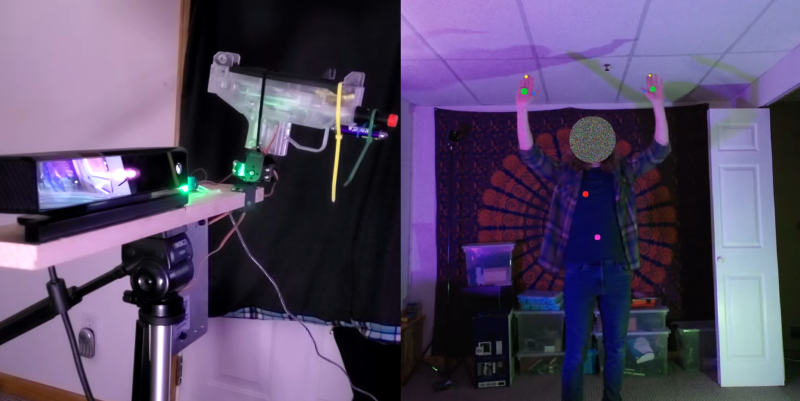
There are few things as frustrating when you’re trying to get some serious hacking done than intruders repeatedly showing up without permission. [All Parts Combined] has the solution for you, with a Kinect-based robotic sentry turret to keep them at bay.

The system consists of a Microsoft Kinect V2 connected to a PC, which runs an app to do all the processing, and outputs the targeting information to an Arduino over serial. The Arduino controls a simple 2-axis servo mount with an electric airsoft gun zip-tied to it. The trigger switch is replaced with a relay, also connected to the Arduino.

The Kinect V2 comes with SDKs that really simplify tracking human movement, and outputs the data in an easy-to-use format. [All Parts Combined] used the SDK in Unity, which allows him to choose which body parts to track. He added scripts that detect a few basic gestures, issues voice commands, and generates the serial commands for the Arduino. The servo angles are calculated with simple geometry, using XY coordinates of the target received from the SDK, and the known distance between the Kinect and turret. When an intruder enters the Kinect’s field of view it immediately starts aiming at the intruder’s heart, issues a “Hands Up!” command, and tells the intruder to leave. If the intruder doesn’t comply, it starts an audible countdown before firing. [All Parts Combined] also added a secret disarming gesture (double hand pistols), which turns the turret into an apologetic comrade. All it needs is a Portal-inspired enclosure.

It’s a fun project that illustrates how the Kinect can make complex computer vision tasks relatively simple. Unfortunately the V2 is no longer in production, having been replaced by the more expensive, developer focused Azure Kinect. We’ve covered several Kinect-based projects, including a 3D room scanner and a robotic basketball hoop.

Hack a Day 07 Jun 03:01

This Arduino Keeps Its Eyes On You

[Will] wanted to build some animatronic eyes that didn’t require high-precision 3D printing. He wound up with a forgiving design that uses an Arduino and six servo motors. You can see the video of the eyes moving around in the video below.

The bill of materials is pretty simple and features an Arduino, a driver board, and a joystick. The 3D printing parts are easy to print with no supports, and will work with PLA. Other than opening up holes there wasn’t much post-processing required, though he did sand the actual eyeballs which sounds painful.

The result is a nice tight package to hold six motors, and the response time of the eye motion is very impressive. This would be great as part of a prop or even a robot in place of the conventional googly eyes.

While the joystick is nice, we’d like to see an ultrasonic sensor connected so the eyes track you as you walk across the room. Maybe they could be mounted behind an old portrait for next Halloween. Then again, perhaps a skull would be even better. If you want a refresher about servos, start with a laser turret tutorial.

7 Lessons from Building a GoPro Auto-Panorama Device

Trick your GoPro into taking pictures with a recording

Read more on MAKE

The post 7 Lessons from Building a GoPro Auto-Panorama Device appeared first on Make: DIY Projects and Ideas for Makers.

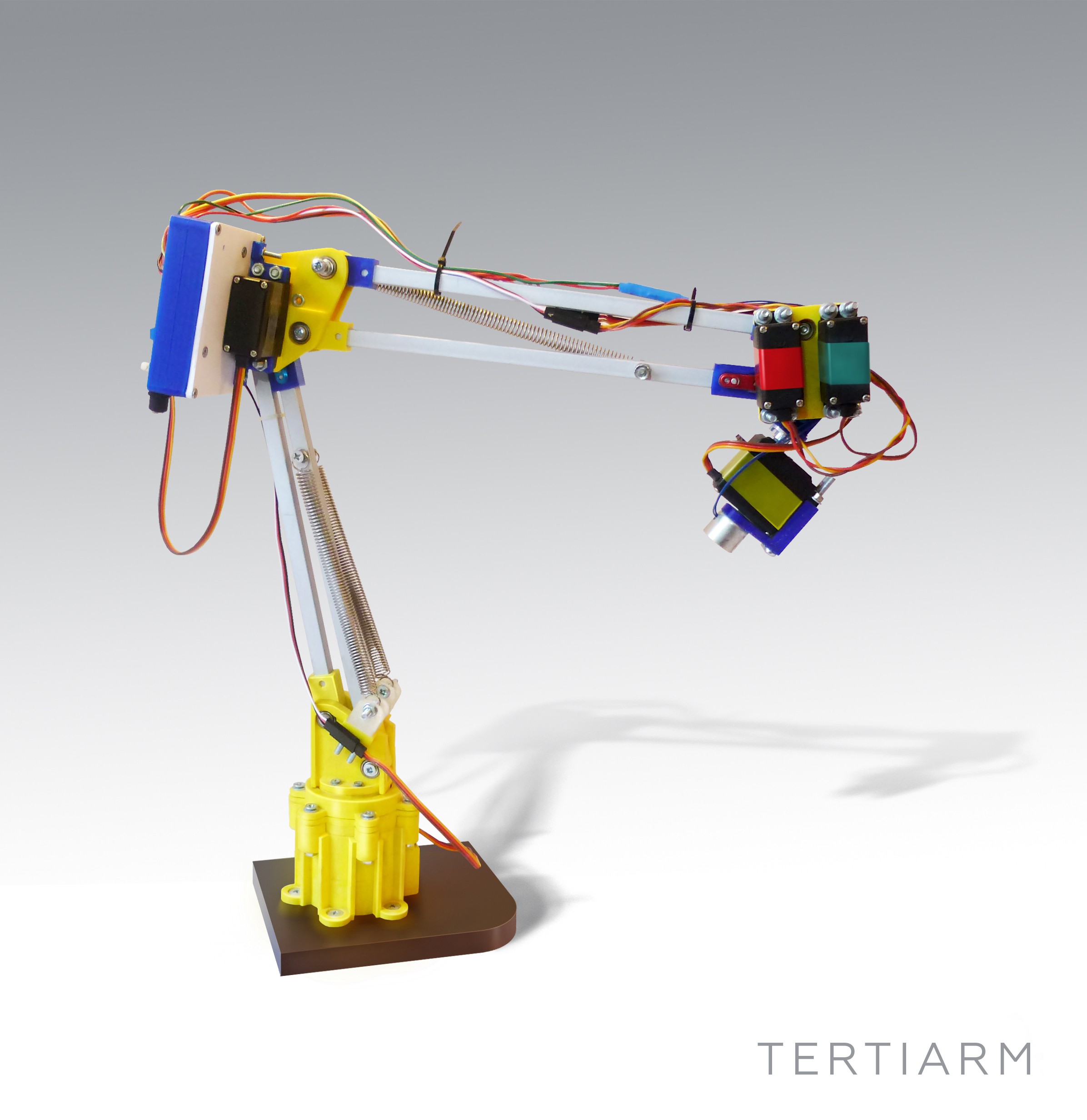
Tertiarm - low cost, 3d printed robot arm based on Ikea lamp

Primary image

What does it do?

Move things, push buttons, etc.

Cost to build

Embedded video

Finished project

Complete

Number

Time to build

Type

URL to more information

Weight

read more

Let's Make Robots 07 Feb 15:54

Tertiarm - low cost, 3d printed robot arm based on Ikea lamp

Primary image

What does it do?

Move things, push buttons, etc.

Cost to build

Embedded video

Finished project

Complete

Number

Time to build

Type

URL to more information

Weight

read more

Let's Make Robots 07 Feb 15:54

Tertiarm - low cost, 3d printed robot arm based on Ikea lamp

Primary image

What does it do?

Move things, push buttons, etc.

Cost to build

Embedded video

Finished project

Complete

Number

Time to build

Type

URL to more information

Weight

read more

Let's Make Robots 07 Feb 15:54

Make a Wi-Fi Enabled Light Switch Turner Onner

Use a servo to flick a light switch mechanically — without ever touching 110V power — with this Wi-Fi “Turner Onner”

Read more on MAKE

The post Make a Wi-Fi Enabled Light Switch Turner Onner appeared first on Make: DIY Projects and Ideas for Makers.

Quadrupede bluetooth Spider


After printing pieces to Prusa I3 is the new 4-legged spider with bluetooth comm :)


read more

Let's Make Robots 07 Jun 20:27
32 servo controler  6v  arduino  balance  battery  biped  bluetooth  fast  greek  grrobot  hands  head  hexapod  humanoid  led  legs  mg995  mini servo  move  one leg  program  relay  robot  robotics  servos  slow  ssc32  step  vb.net  walk  warior