Posts with «open source» label

From open source to real world solutions: How Linux and Arduino bring big ideas to life

Linux mascot Tux the penguin was created by Larry Ewing using GIMP

The idea that changed how we build technology

Happy Linux Day, Arduino Fans!

Since 1991, Linux has helped popularize open-source software. And then Arduino, inspired by that, extended that open source concept to hardware with its own launch in 2005. The open-source movement did not stop at the screen; it also influenced the development of physical computing. As we celebrate Linux Day, we honor the collaborative ethos that helped shape the internet and the Arduino movement. Just as Linux democratized software by opening the kernel, Arduino liberated hardware from corporate labs, proving that when we freely share our blueprints from C++ to circuit schematics, we empower a global community to build the future together.

Linux meets the physical world

Imagine building an autonomous robot where the engineering challenge isn’t just running computer vision, but seamlessly bridging that user-space intelligence with bare-metal physical execution. The Arduino® UNO Q board solves this by unifying a Qualcomm Dragonwing QRB2210 microprocessor running a full Debian Linux environment with an STM32U585 microcontroller for real-time, deterministic hardware control. This dual architecture gives developers the established capabilities of Debian’s package ecosystem and networking stack for AI workloads, while the bare-metal microcontroller supports real-time control of motors, sensors, and actuators, including sub-millisecond operations where supported by the applicable configuration and workload.

This integrated architecture is designed to reduce the friction associated with bridging separate computing and control hardware.By unifying real-time control with Debian’s robust software ecosystem, the UNO Q can help developers focus on building applications across robotics, computer vision, and industrial automation.The platform illustrates how advanced computing and bare-metal execution can be combined in an open, collaborative development environment.

From ideas to real world builds

The real power of open source comes to life in what people can create with it. Across the Arduino community, makers and developers can explore a broad range of possibilities, from desktop companion robots to autonomous systems that tackle everyday problems, and beyond. Whether they’re experimenting with the UNO Q or Arduino® VENTUNO Q board, sharing their ingenuity through competitions and hackathons, or inspiring others with creative builds, these projects turn bold ideas into working solutions. Here are a few builds that caught our attention, built by community members using Arduino hardware and Linux-based capabilities.

Curie: An AI companion for ADHD and cognitive focus grounding

Curie is an open-source desk companion built on UNO Q, intended to interact through audio and vision features to help users begin tasks and maintain focus. Learn more.

Autonomous pantry assistant
An autonomous edge AI assistant that identifies pantry products and reads their labels aloud for people with low vision. Learn more.

A robot arm that sees you
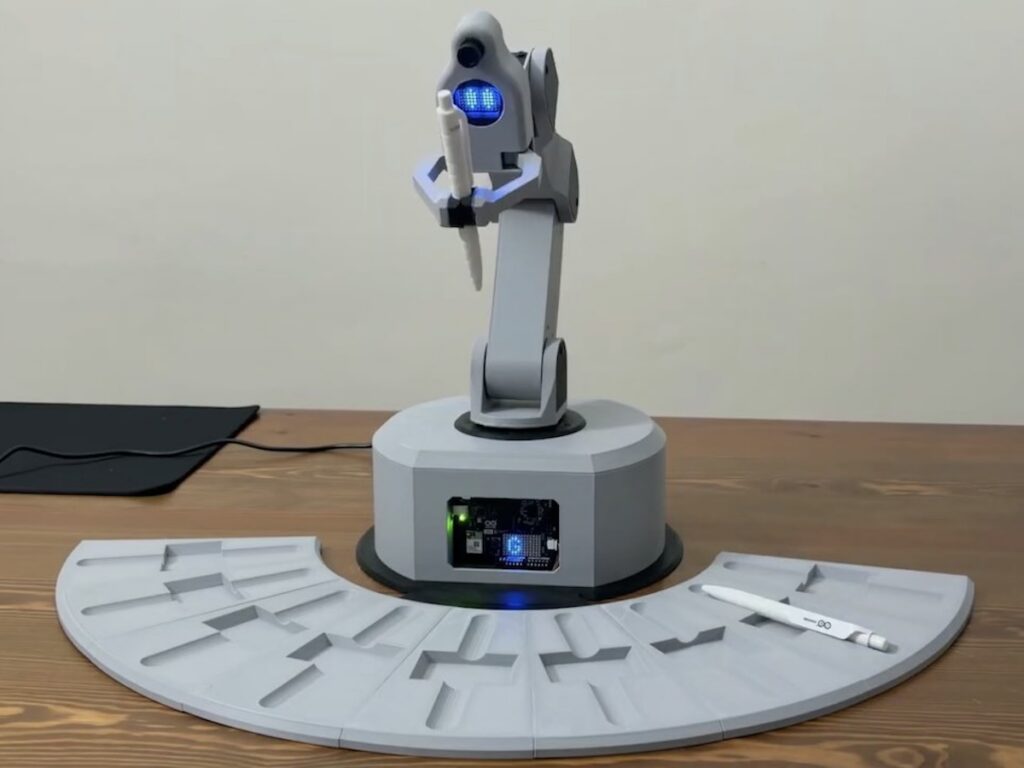
Imagine a robot arm designed to detect configured users and deliver selected objects. The arm runs on Feetech digital servo motors with a Waveshare control board, and a camera on the head handles the recognition. Learn more.

Depth multitool on the VENTUNO Q
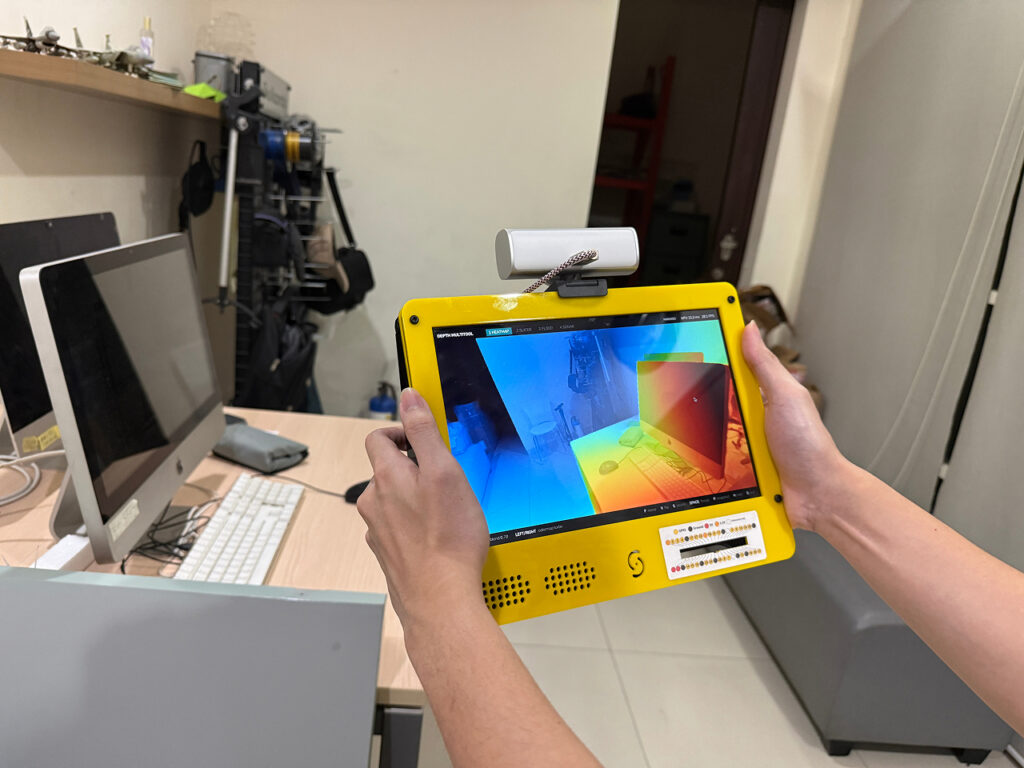
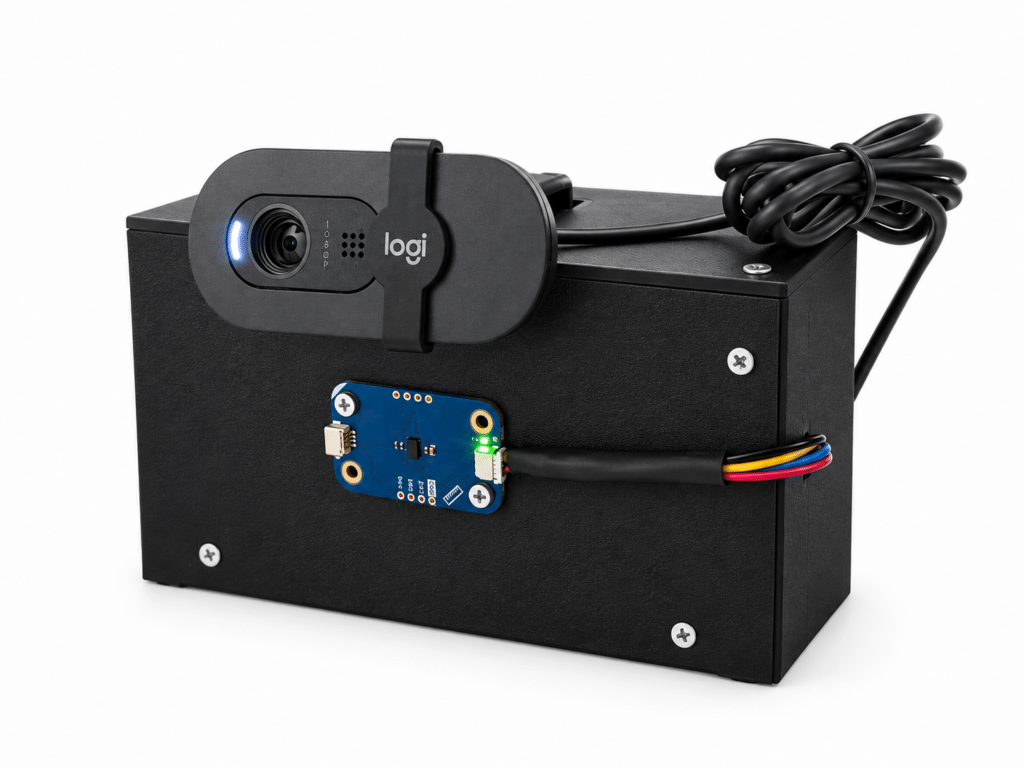
One ordinary webcam, a depth model on the VENTUNO Q NPU, and four visualization modes for estimating the distance of objects within the camera’s field of view. Learn more.

Building on open foundations

Many community projects build on open-source software and hardware. Arduino continues to strengthen that foundation with new hardware, software, and tools that give developers more ways to experiment, create, and solve difficult problems. The 2026 Arduino Open Source Report highlights this motion and key contributions from our vibrant, passionate community. Here are just a few of the highlights, reported by Arduino as part of its open-source ecosystem:

  • 6 new open source hardware boards
  • 11 new official libraries
  • Arduino® App Lab for UNO Q

The community led with:

  • 1,218 new libraries, bringing the total to 8,754
  • 6,602 new versions of libraries
  • 420 new open source projects

The next chapter

As AI descends from the cloud to power the next generation of autonomous robots and edge devices, open-source development continues to play an important role in this area. The convergence of Linux, Arduino, and edge intelligence is helping enable new physical-computing applications, and it is the global community that will define what is possible. That is the true spirit of Linux Day: a brilliant, decentralized future we are building together.


Qualcomm branded products are products of Qualcomm Technologies, Inc. and/or its subsidiaries. Arduino, UNO, and VENTUNO are trademarks or registered trademarks of Arduino S.r.l.

The post From open source to real world solutions: How Linux and Arduino bring big ideas to life appeared first on Arduino Blog.

Arduino Blog 23 Oct 20:12

Arduino Zephyr core 1.0.0: the move away from MbedOS is complete

The Arduino core for Zephyr RTOS has reached version 1.0.0. This release marks the completion of the transition away from the old MbedOS-based core. The new core provides a modern and flexible foundation for current and future Arduino boards. It also lets you use Zephyr RTOS features and APIs directly from the Arduino IDE, Arduino CLI and Arduino App Lab tools.

The project is built on a two-component architecture. The core generates a standalone elf file that is loaded dynamically by a precompiled Zephyr firmware called the loader. The loader handles the interaction between sketches and the underlying Zephyr system. After the initial bootloader installation, the loader automates the sketch loading process. Version 0.90.0 made the Zephyr loader installation procedure fully automatic.

The loader and its operating modes

The loader’s behaviour is set through the IDE’s Mode menu. In Standard mode, the loader loads the sketch automatically. In Debug mode, on the other hand, it requires you to type ‘sketch’ in the Zephyr shell. This flexibility makes debugging much easier. The loader design is generic: board-specific changes are made in the DTS overlay or fixup files.

The core is validated with version v0.16.8 of the Zephyr SDK. Development uses the standard tools of the Zephyr ecosystem, such as west and sync-zephyr-artifacts. The core also relies on components such as llext, the dynamic extension mechanism, and zephyr-sketch-tool for compiling sketches. Everything rests on ArduinoCore-API to maintain compatibility with the Arduino ecosystem.

What you need to get started

To try the Zephyr core you need a supported board and an up-to-date development environment. Here are the main steps:

  • Install Arduino IDE 2.x.x or Arduino CLI
  • Add board support through the Board Manager
  • Install the Zephyr core from version 1.0.0
  • Configure the loader mode from the IDE’s Mode menu

Version 1.0.0 of the Zephyr core is a milestone release. The move from MbedOS to Zephyr is complete. The new core offers a more solid foundation for the future of Arduino boards. Among the new features, support for the project’s code repository includes all the loader and core sources. In addition, the new Arduino UNO Q board is among the first devices to benefit from this architecture.

Arduino’s Zephyr core, designed to replace the MbedOS version, has reached release 1.0.0 and now supports the VENTUNO Q.

The Zephyr core represents a paradigm shift for Arduino. It is not just an update: it is an infrastructure built to last. The separation between loader and sketch makes the system safer and easier to update. What’s more, using Zephyr RTOS opens the door to advanced features such as support for numerous protocols and optimised power management. For anyone developing IoT applications, this is a solid foundation to build on.

The transition from MbedOS to Zephyr was not only technical, but also strategic. Zephyr is an open source RTOS with an active community and a regular release cycle. This guarantees long-term support for Arduino boards. In addition, version 1.0.0 of the core is validated with the Zephyr SDK v0.16.8, ensuring stability and compatibility. The future of Arduino boards goes through here.

Source: https://github.com/arduino/ArduinoCore-zephyr

Related products

The post Arduino Zephyr core 1.0.0: the move away from MbedOS is complete appeared first on Open Electronics.

Face-Following Robot Built on Arduino UNO Q and Edge Impulse

A new open-source project demonstrates how to combine computer vision and robotics on a single board. The robot, about the size of a desk, detects a human face through locally executed machine learning and turns toward it in real time, working at roughly 10–15 frames per second. Everything runs on the new Arduino UNO Q, without relying on the cloud.

Dual-processor architecture

The operation leverages the hybrid architecture of the UNO Q, which integrates two distinct units. The Qualcomm MPU microprocessor, running Linux, executes the AI model and the control logic written in Python. The STM32 MCU microcontroller, running Zephyr RTOS, drives the PWM signal of the servomotors with real-time precision.

The two processors communicate via Bridge RPC, a protocol based on MessagePack over an internal serial link, with a round-trip latency of about 8 milliseconds. This way, heavy inference stays separate from the real-time path, keeping motor control deterministic.

Vision, control, and web interface

The face-following robot built on the Arduino UNO Q.

A USB webcam captures video, while a lightweight face-detection model locates the face in the frame. A proportional controller then converts the horizontal position of the face into differential commands for the wheels. The project uses two ready-made App Lab “bricks”: one for camera-based object detection, the other for the web interface.

In particular, the browser-accessible dashboard lets you monitor detections and adjust steering parameters in real time, without recompiling the code. Every change to the sliders takes effect immediately via Socket.IO, making the tuning phase quick.

Technical details and motion safety

The robot uses differential drive with two continuous-rotation servos: a 1500-microsecond pulse corresponds to stop, while lower or higher values determine rotation in either direction. Additionally, the system limits Bridge calls to a maximum of 20 Hz, because sending commands too quickly would block the serial link.

The project therefore includes several protections: a “coasting” mechanism that maintains the last known position when the face disappears for a moment, a watchdog that stops the robot if detections are interrupted, and an emergency stop that ignores rate limiting to halt the motors immediately. Classified as an intermediate-level project, it is fully documented and released under an open-source license.

The post Face-Following Robot Built on Arduino UNO Q and Edge Impulse appeared first on Open Electronics.

Boards Guide 2024: Boards Are Back

From Make: Vol. 87: New evolutions in dev boards make this a metamorphic period for Makers.

The post Boards Guide 2024: Boards Are Back appeared first on Make: DIY Projects and Ideas for Makers.

Boards Guide 2024: Boards Are Back

From Make: Vol. 87: New evolutions in dev boards make this a metamorphic period for Makers.

An Open-Source Ebike Motor Controller

DIY e-bikes are often easy to spot. If they’re not built out of something insane like an old washing machine motor, the more subtle kits that are generally used still stand out when compared to a non-assisted bike. The motors tend to be hub- or mid-drive systems with visible wires leading to a bulky battery, all of which stand out when you know what to look for. To get a stealthy ebike that looks basically the same as a standard bicycle is only possible with proprietary name-brand solutions that don’t lend themselves to owner repair or modification, but this one has at least been adapted for use with an open source motor controller.

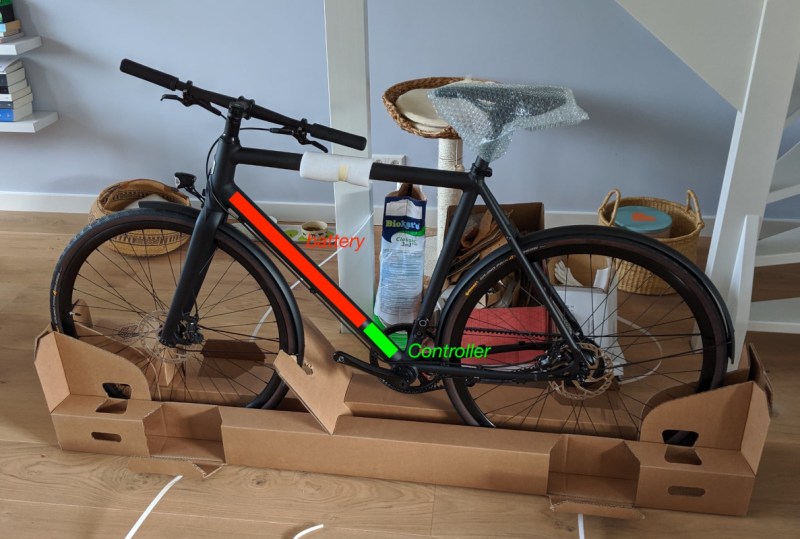
The bike in use here is a model called the Curt from Estonian ebike builder Ampler, which is notable in that it looks indistinguishable from a regular bicycle with the exception of the small 36-volt, 350-watt hub motor somewhat hidden in the rear wheel. [BB8] decided based on no reason in particular to replace the proprietary motor controller with one based on VESC, an open-source electric motor controller for all kinds of motors even beyond ebikes. Installed on a tiny Arduino, it fits inside the bike’s downtube to keep the stealthy look and can get the bike comfortably up to around 35 kph. It’s also been programmed to turn on the bike’s lights if the pedals are spun backwards, and this method is also used to change the pedal assist level, meaning less buttons and other user-interface devices on the handlebars.

[BB8] has been working on this for a while, and although the bulk of a working ebike controller is there, it still doesn’t support the torque sensing pedals included with this bike. We’re presuming that this is still a work-in-progress as the Arduino and associated code easily interfaces with all the other sensors available on this bike. Hopefully this open-source motor controller finds its way into other proprietary systems as well, since a lot of these ebikes can turn into massive paperweights if the companies who originally built them go out of business or simply decide to stop supporting older models. Of course, you can avoid this issue entirely by building your own ebike from spare parts.

Thanks to [Arnoud] for the tip!

Robotic Platform Is Open Sourced And User Friendly

Having a 3D printer or a CNC machine available for projects is almost like magic. Designing parts in software and having them appear on the workbench is definitely a luxury. But for a lot of us, these tools aren’t easily available and projects that use them can be out-of-reach. That’s why one of the major design goals of this robotics platform was to use as many off-the-shelf components as possible.

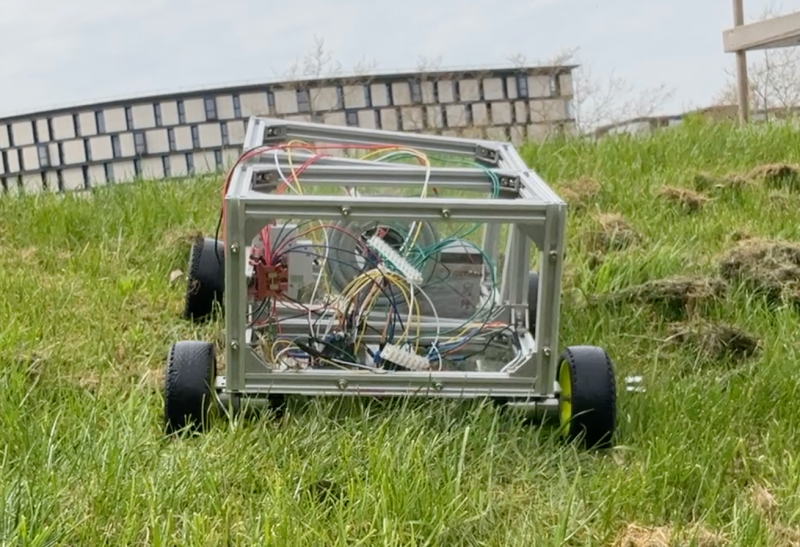
The robot is called the OpenScout and, as its name implies, intends to be a fully open-source robotics platform for a wide range of use cases. It uses readily-available aluminum extrusion as a frame, which bolts together without any other specialized tools like welders. The body of the robot is articulating, helping it navigate uneven terrain outdoors. The specifications also call for using an Arduino to drive the robot, although there is plenty of space in the robot body to house any robotics platform you happen to have on hand.

For anyone looking to get right into the useful work of what robots can do, rather than spending time building up a platform from scratch, this is an excellent project. It’s straightforward and easy to build without many specialized tools. The unique articulating body design should make it effective in plenty of environments. If you do have a 3D printer, though, that opens up a lot of options for robotics platforms.

Open-Source Robotic Arm for All Purposes

A set of helping hands is a nice tool to have around the shop, especially if soldering or gluing small components is a common task. What we all really want, though, is a robotic arm. Sure, it could help us set up glue or solder but it can do virtually any other task it is assigned as well. A general-purpose tool like this might be out of reach of most of us, unless we have a 3D printer to make this open-source robotic arm at home.

The KAUDA Robotic Arm from [Giovanni Lerda] is a five-axis arm with a gripping tool and has a completely open-source set of schematics so it can be printed on any 3D printer. The robot arm uses three stepper motors and two servo motors, and is based on the Arduino MEGA 2560 for control. The electrical schematics are also open-source, so getting this one up and running is just an issue of printing, wiring, and implementing some software. To that end there are software examples available, and they can easily be modified to fit one’s robotic needs.

A project like this could be helpful for any number of other projects, or also just as a lesson in robotics for yourself or even in a classroom, since many schools now have their own 3D printers. With everything being open-source, this is a much simpler endeavor now than other projects we’ve seen that attempted to get robotic arms running again.

December 2019 Certified Open Source Hardware

The Open Source Hardware Association (OSHWA) runs a free program that allows creators to certify that their hardware complies with the community definition of open source hardware.  Whenever you see the certification logo, you know that the certified hardware meets this standard. The certification site includes a full list of […]

Read more on MAKE

The post December 2019 Certified Open Source Hardware appeared first on Make: DIY Projects and Ideas for Makers.

The Smaller, Tinier Arduino Platform

While many of the Arduino platforms are great tools for gaining easy access to microcontrollers, there are a few downsides. Price and availability may be the highest on the list, and for those reasons, some have chosen to deploy their own open-source Arduino-compatible boards.

The latest we’ve seen is the Franzininho, an Arduino Gemma-like board that’s based on the ATtiny85, a capable but tiny microcontroller by Atmel in a compact 8-pin configuration. This board has everything the Gemma has, including a built-in LED and breakout pins. One of the other perks of the Franzininho over the Gemma is that everything is based on through-hole components, making the assembly much easier than the surface mount components of the Gemma.

It’s worth noting that while these boards are open source, the Arduinos are as well. It’s equally possible to build your own 100% identical Arduino almost as easily. If you want more features, you can add your own by starting from one of these platforms and do whatever you want with it, like this semi-educational Atmel breakout board.

Thanks to [Clovis] for the tip!