Posts with «arduino cli» label

Arduino Zephyr core 1.0.0: the move away from MbedOS is complete

The Arduino core for Zephyr RTOS has reached version 1.0.0. This release marks the completion of the transition away from the old MbedOS-based core. The new core provides a modern and flexible foundation for current and future Arduino boards. It also lets you use Zephyr RTOS features and APIs directly from the Arduino IDE, Arduino CLI and Arduino App Lab tools.

The project is built on a two-component architecture. The core generates a standalone elf file that is loaded dynamically by a precompiled Zephyr firmware called the loader. The loader handles the interaction between sketches and the underlying Zephyr system. After the initial bootloader installation, the loader automates the sketch loading process. Version 0.90.0 made the Zephyr loader installation procedure fully automatic.

The loader and its operating modes

The loader’s behaviour is set through the IDE’s Mode menu. In Standard mode, the loader loads the sketch automatically. In Debug mode, on the other hand, it requires you to type ‘sketch’ in the Zephyr shell. This flexibility makes debugging much easier. The loader design is generic: board-specific changes are made in the DTS overlay or fixup files.

The core is validated with version v0.16.8 of the Zephyr SDK. Development uses the standard tools of the Zephyr ecosystem, such as west and sync-zephyr-artifacts. The core also relies on components such as llext, the dynamic extension mechanism, and zephyr-sketch-tool for compiling sketches. Everything rests on ArduinoCore-API to maintain compatibility with the Arduino ecosystem.

What you need to get started

To try the Zephyr core you need a supported board and an up-to-date development environment. Here are the main steps:

  • Install Arduino IDE 2.x.x or Arduino CLI
  • Add board support through the Board Manager
  • Install the Zephyr core from version 1.0.0
  • Configure the loader mode from the IDE’s Mode menu

Version 1.0.0 of the Zephyr core is a milestone release. The move from MbedOS to Zephyr is complete. The new core offers a more solid foundation for the future of Arduino boards. Among the new features, support for the project’s code repository includes all the loader and core sources. In addition, the new Arduino UNO Q board is among the first devices to benefit from this architecture.

Arduino’s Zephyr core, designed to replace the MbedOS version, has reached release 1.0.0 and now supports the VENTUNO Q.

The Zephyr core represents a paradigm shift for Arduino. It is not just an update: it is an infrastructure built to last. The separation between loader and sketch makes the system safer and easier to update. What’s more, using Zephyr RTOS opens the door to advanced features such as support for numerous protocols and optimised power management. For anyone developing IoT applications, this is a solid foundation to build on.

The transition from MbedOS to Zephyr was not only technical, but also strategic. Zephyr is an open source RTOS with an active community and a regular release cycle. This guarantees long-term support for Arduino boards. In addition, version 1.0.0 of the core is validated with the Zephyr SDK v0.16.8, ensuring stability and compatibility. The future of Arduino boards goes through here.

Source: https://github.com/arduino/ArduinoCore-zephyr

Related products

The post Arduino Zephyr core 1.0.0: the move away from MbedOS is complete appeared first on Open Electronics.
arduino-cli 0.8.0 is here!

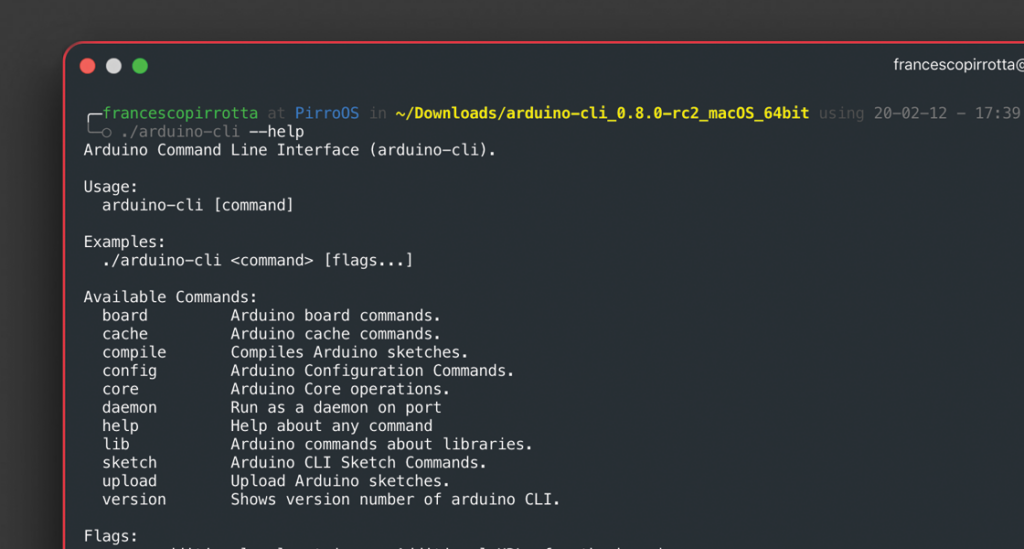
Our dev team is grateful for the high quality contributions that the project is receiving, and is working hard to collect all the lovely feedback we have received to shape the Arduino CLI into the best tool possible for the community!

Highlights of our latest release include:

  • Resource usage improvements
  • Better libraries handling
  • Bug fixing

You can see the full list of changes here.

arduino-cli 0.7.0 is out!

Our dev team is about to kick off their holiday breaks, but not without sharing some exciting news first: the release of arduino-cli 0.7.0!

Highlights include:

  • Notarization compliance for macOS
  • Some breaking changes:
    • Remove Sketchbook concept, introduce user data folder
    • “lib list” now returns an empty JSON array when there are no libraries installed
    • Change configuration file format
    • Terminate daemon command when parent process exits; added “–daemonize” flag to keep old behavior
  • Added a lot of bugfixing and minor features

The latest version will be available on the other distribution channels (i.e. Homebrew) in the coming days. Stay tuned!

Announcing the Arduino Command Line Interface (CLI)

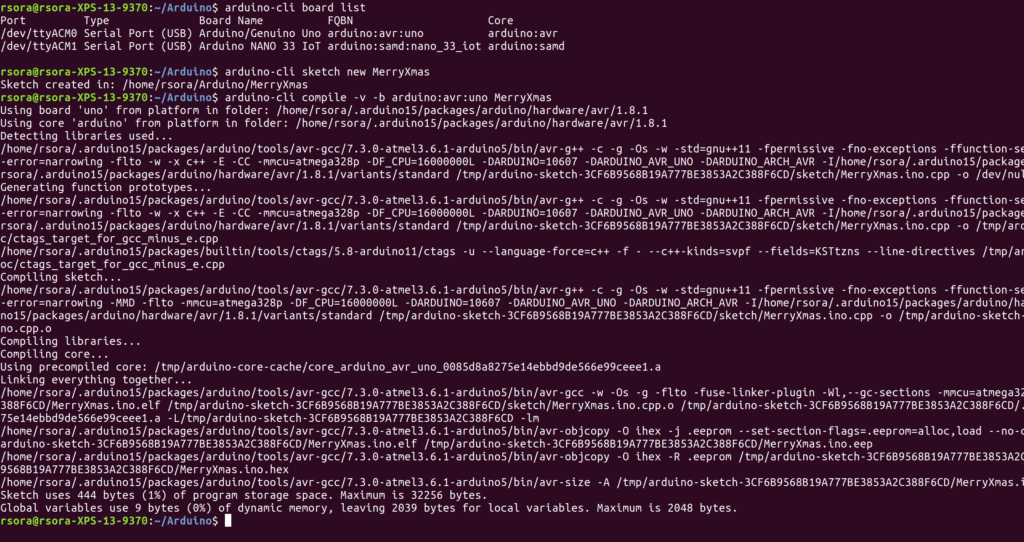
The Arduino team has been working hard to support the needs of our professional developer community. Many of you requested a way to use our tools in Makefiles, and wanted Arduino IDE features available via a fast, clean command line interface.  How cool would it be to install project dependencies with:

arduino-cli lib install “WiFi101” “WiFi101OTA”

So that’s what we’ve done! To make it even cooler, most Arduino CLI commands have the option to output JSON for easy parsing by other programs:

arduino-cli –format json lib search wifinina

{“libraries”:[{“Name”:”WiFiNINA”,”Releases”:{“1.0.0”:{“Author”:”Arduino”,”Version”:”1.0.0″,”Maintainer”:”Arduino \u003cinfo@arduino.cc\u003e”,”Sentence”:”Enables network connection (local and Internet) with the Arduino MKR WiFi 1010, Arduino MKR VIDOR 4000 and Arduino UNO WiFi Rev.2.”,”Paragraph”:”With this library you can instantiate Servers, Clients and send/receive UDP packets through WiFi. The board can connect either to open or encrypted networks (WEP, WPA). The IP address can be assigned statically or through a DHCP. The library can also manage DNS.”,”Website”:”http://www.arduino.cc/en/Reference/WiFiNINA”,”Category”:”Communication”,”Architectures”:[“*”],”Types”:[“Arduino”],”Resource”:{“URL”:”http://downloads.arduino.cc/libraries/github.com/arduino-libraries/WiFiNINA-1.0.0.zip”,”ArchiveFileName”:”WiFiNINA-1.0.0.zip”,”Checksum”:”SHA-256:79f133fedf86411ca7add773a4293137dec057a3b8f1a7904db2d444ed8f4246″,”Size”:65651,”CachePath”:”libraries”}}}}]}

The other big news is you can run Arduino CLI on both ARM and Intel (x86, x86_64) architectures. This means you can install Arduino CLI on a Raspberry Pi or on your servers, and use it to compile Sketches targeting the board of your choice (Don’t forget you can also remotely manage your Linux device with Arduino Create Device Manager!)

Getting Started

This first release is an alpha, and we would like your feedback to help us improve it. You can download the Arduino CLI alpha preview binaries from:

Linux (64-bit): https://downloads.arduino.cc/arduino-cli/0.1.0-alpha.preview/arduino-cli-0.1.0-alpha.preview-linux64.tar.bz2

Linux (32-bit): https://downloads.arduino.cc/arduino-cli/0.1.0-alpha.preview/arduino-cli-0.1.0-alpha.preview-linux32.tar.bz2

Linux (ARM): https://downloads.arduino.cc/arduino-cli/0.1.0-alpha.preview/arduino-cli-0.1.0-alpha.preview-linuxarm.tar.bz2

OSX: https://downloads.arduino.cc/arduino-cli/0.1.0-alpha.preview/arduino-cli-0.1.0-alpha.preview-osx.zip

Windows: https://downloads.arduino.cc/arduino-cli/0.1.0-alpha.preview/arduino-cli-0.1.0-alpha.preview-windows.zip

Once you’ve installed Arduino CLI, you can try it out using our getting started guide: https://github.com/arduino/arduino-cli#getting-started

The Arduino CLI code repository is also available at: https://github.com/arduino/arduino-cli. As usual, it’s open source – but if you’re a company who wants to use it to create a customized tool, you can also contact us for a commercial license.

Integrate Arduino Support Into Your Preferred Platform

After we used Arduino CLI for awhile, we decided to make it the standard way our software communicates. Imagine having the Arduino IDE or Arduino Create Editor speaking directly to Arduino CLI – and you having full control of it. You will be able to compile on your machine or on our online servers, detect your board or create your own IDE on top of it!

We want you to be able to add Arduino support to whatever development flow you prefer. Whether you use Atom, Eclipse, Emacs, Vim, VSCode, or are even building your own tools, Arduino CLI makes this possible. Let us know what you think!