An inexpensive robot kit with Arduino UNO Rev3, obstacle-avoidance sensors, and line-following capability becomes a face-tracking robot. The trick is in the control board: just replace the UNO Rev3 with an Arduino UNO Q, which has the same headers and mounts an STM32U585 microcontroller alongside a Linux microprocessor. Iulia Feroli’s project shows how local artificial intelligence can be added to a low-cost robot without touching the mechanics.
The robot starts from the Elegoo kit, with its motor shield and sensors for obstacle avoidance and line following. The UNO Q slots in place of the original board, and the shield moves over without any modification. Thanks to the STM32 microcontroller and the Linux microprocessor, the new board runs machine learning models locally, with no cloud connection. A standard USB webcam is connected to the UNO Q to provide vision.
Video stream and face tracking
The webcam video stream is processed with the face tracking Brick from Arduino App Lab. The code converts the face position in the frame into movement commands for the robot. The robot rotates to center the face and moves toward it, always staying in front of the person. The result is a responsive face tracker that requires no external servers or Wi-Fi connections.
Iulia Feroli’s project is documented in a video showing the robot in action, with an explanation of the assembly and the code. Swapping the board is the core of the intervention: the UNO Q maintains electrical and mechanical compatibility with the UNO Rev3 but adds the computing power needed for AI. In addition, the face tracking Brick in Arduino App Lab simplifies managing the machine learning model, making the code accessible even to those without neural network experience.
What you need to rebuild the project
To replicate the robot you need only a few components, all easily available. The list includes the Elegoo kit, a USB webcam, and the control board. Here are the main steps:
Remove the Arduino UNO Rev3 from the Elegoo kit and keep the motor shield.
Mount the Arduino UNO Q in its place, checking that the headers align.
Connect the USB webcam to the UNO Q port.
Upload the sketch with the face tracking Brick from Arduino App Lab.
Power the robot and test it in front of a face.
The UNO Q is the heart of the system: it combines the simplicity of the STM32U585 microcontroller with the power of the Linux processor. This combination allows local machine learning models, such as face tracking, to run without additional hardware. The board is also available in a 4GB version with a full accessory kit, which includes everything needed to get started.
The original Elegoo kit, with its Arduino UNO Rev3 board, remains an excellent base for other projects. However, for this face tracker, the UNO Q is the right choice: it offers the necessary computing power and maintains compatibility with the shield. The overall cost stays low, and the result is a smart robot that impresses with its responsiveness.
Every day, hundreds of thousands of kits are prepared in warehouses before components ever reach an automotive production line. While robots have become commonplace in modern manufacturing, many upstream logistics activities still rely heavily on human operators performing repetitive pick-and-place and kitting tasks.
What if robots could learn these operations the same way humans do: by simply watching a demonstration?
That question was at the heart of I-GENIUS, a research project coordinated by MYWAI within the European ARISE initiative with Centro Ricerche FIAT (CRF) and the University of Genoa’s Department of Mechanical, Energy, Management and Transportation Engineering (DIME).
The project explored new approaches to Human-Robot Interaction, combining AI, computer vision, and robotics to enable machines to acquire manipulation skills from minimal human guidance.
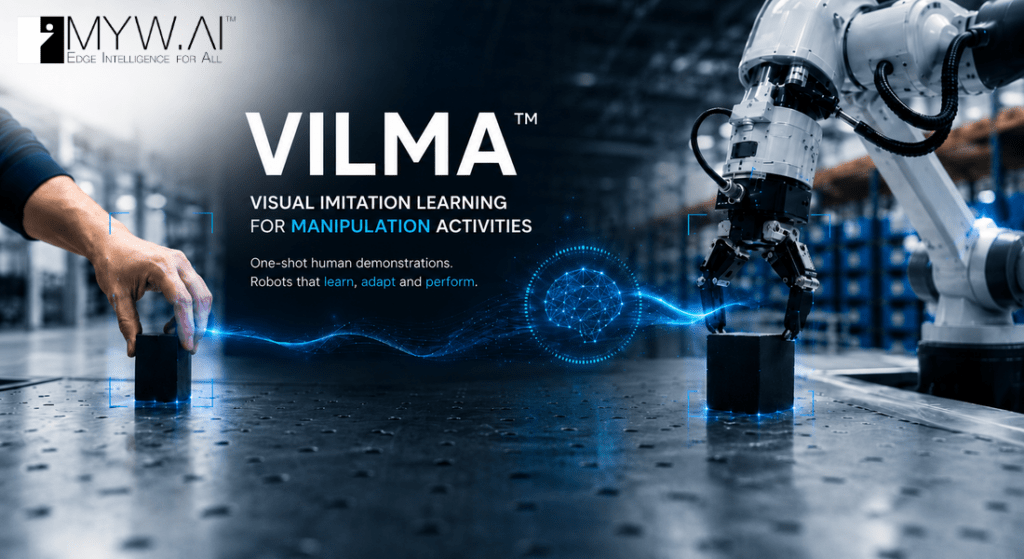
One of the project’s key outcomes was VILMA (Visual Imitation Learning for Manipulation Activities), an AI-powered toolkit integrated into MYWAI’s EDGE AI middleware platform. VILMA helps enable robots and humanoids to learn complex manipulation tasks from one-shot human demonstrations, aiming to significantly reduce programming effort while improving flexibility in dynamic industrial environments.
The technology was evaluated in a large-scale automotive warehouse use case developed together with CRF and reproduced within the robotics laboratories at DIME.
Today, MYWAI is bringing this technology to a broader community of developers, makers, and robotics innovators by porting the VILMA Toolkit to new Arduino products powered by Qualcomm Dragonwing processors, including both the Arduino®UNO Q and VENTUNO Q boards.
This demonstration showcases the potential for edge-native robotics applications that use imitation learning techniques on hardware platforms built to support compact form factors and efficient power consumption.
At the iGenius final presentation, the founder and CEO of MYWAI, Fabrizio Cardinali, stated: “The dual-brain architecture of the UNO Q and VENTUNO Q platforms is an ideal foundation for MYWAI’s next generation of Edge AI robotics. After validating distributed intelligence concepts within the ARISE I-GENIUS project, we are now leveraging these platforms to bring World Action Models closer to the edge through the latest release of the MYWAI EdgeAI Management Platform and its mobile tracker, HEDGELOG. By combining One-Shot Video Imitation Learning with edge-native AI execution, we aim to enable robots and intelligent industrial machines to acquire, distribute, adapt, and execute complex manipulation skills with unprecedented flexibility and scalability.”
Watch the full demonstration of the I-GENIUS project and see VILMA in action in this video.
The MYWAI VILMA agent
VILMA is a visual imitation learning toolkit that helps enable robots to learn manipulation tasks from human demonstrations. It is designed to process RGB-D recordings or MP4 videos to extract hand and object trajectories, generate reusable robot skills using Dynamic Movement Primitives (DMPs), and produce robot-ready trajectories for playback. It is constructed to serve as the demonstration learning module, supporting rapid robot programming, skill reuse, and deployment.
The AI pipeline
One-shot demonstration acquisition
The one-shot demonstration acquisition step is set to record a human performing the task or retrieve an existing demonstration from a selected MYWAI equipment event. It stages the video, RGB frames, depth data, and camera parameters, and allows the user to select the target object for tracking. This information provides the inputs required by the remaining pipeline stages.
Hand detection
Using MediaPipe, this stage is structured to detect 21 hand landmarks in each RGB frame and combine their 2D positions with depth data to calculate 3D camera coordinates. For demonstrations loaded from MYWAI, the staged RGB and depth data are processed through the same pipeline. Kalman smoothing and previous-position retention improve tracking robustness, and the resulting trajectories can be saved back to the MYWAI event.
Object detection
Using a YOLO model, this stage is designed to detect or track the object selected through the local or MYWAI interface. It combines the bounding-box centre with depth information to calculate the object’s 3D position, applies Kalman smoothing, and saves the trajectory and annotated frames. These results can then be included in the pipeline artifacts stored in MYWAI.
Trajectory and segmentation
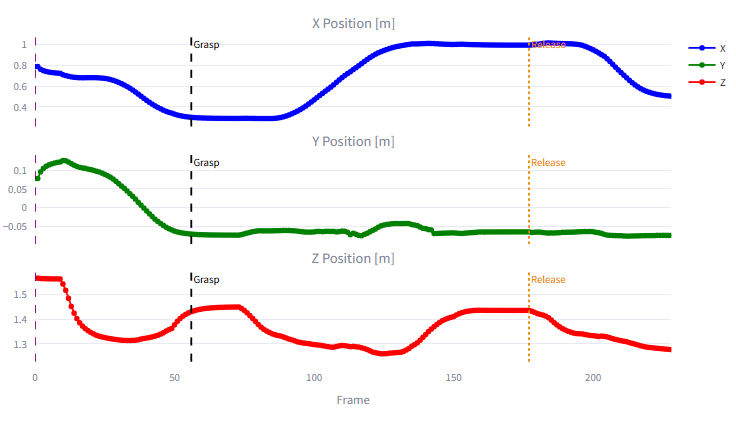
This stage is constructed to load the smoothed hand and object trajectories, estimate the grasp point from the hand’s proximity to the object, and detect the release point from the object’s movement and stabilization. It uses the hand trajectory as the main motion path and divides it into reach, grasp, move, release, and post-release phases. The trajectories, event indices, and segmentation metadata can be packaged as MYWAI event data, a time and space data fusion format developed by MYWAI for its AI-IoT management platform particularly geared towards Multimodal AI and, next, towards World Action Models.
DMP generation
The DMP-generation stage is designed to learn separate Dynamic Movement Primitive models for the reach and move phases. It evaluates different regularization values, selects the model that provides the best accuracy and smoothness, validates the reproduced motion, and saves the trained models and trajectories. These DMP artifacts can be uploaded to MYWAI with the other pipeline results for later retrieval and reuse.
Demonstration
The demonstration stage is structured to convert the generated DMP trajectory into Cartesian robot positions using the configured scale, offset, and rotation, then apply inverse kinematics to calculate the joint trajectory. The robot model may be loaded from the selected MYWAI equipment, and the resulting motion is displayed through the MYWAI 3D Viewer, synchronized with the recorded video and its grasp and release events.
DMP adaptation with new goal and new object
The adaptation stage is set to load the learned skill – either from the current pipeline or a restored MYWAI event – and detect a new target object using RGB and depth data. It calculates the 3D offset between the original and new objects, redirects the reach and move trajectories toward the new pick and release positions, and preserves the demonstrated motion characteristics. The adapted trajectory can then be visualized with the MYWAI 3D Viewer or sent to the robot.
Live streaming adaptation and UNO Q and VENTUNO Q support
The Live stream phase represents the deployment and real-time inference stage of the VILMA Agent. While the initial learning phase is conducted on the MYWAI platform to generate Dynamic Movement Primitives (DMP), the Live stream phase focuses on shipping these DMPs along with a fine-tuned YOLOv8 model, supported today on UNO Q and VENTUNO Q.
Architecture and components
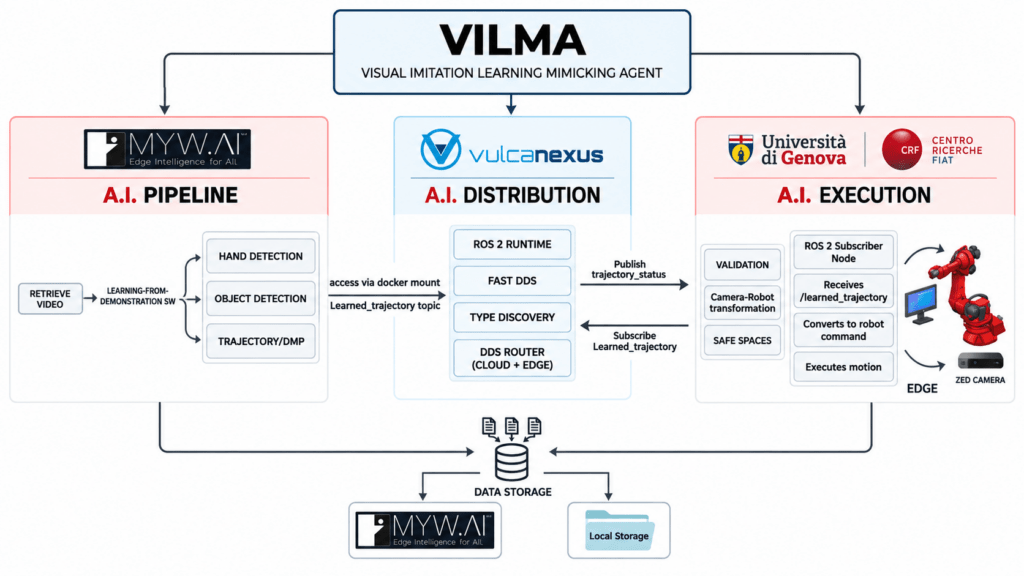
As illustrated in the system schematic below, the architecture is designed as a distributed setup divided into an Edge AI Layer for intelligence and a Communication Layer for hardware interfacing.
Let’s break down how the live stream pipeline is working considering the VENTUNO Q version.
1. Edge AI layer (VENTUNO Q)
Running on VENTUNO Q, this layer is structured to handle high-level decision-making.
VILMA Control Loop: The primary application logic responsible for the overall control loop. It It is designed to orchestrate object detection and performs DMP Adaptation to translate learned human motions into the current physical environment.
Video Object Detection Brick: This component runs on VENTUNO Q to manage the inference flow. It receives the incoming video feed and communicates with the inference service.
Docker: YOLOv8 Inference Service is formed as a containerized service that runs the quantized YOLOv8 model. This model is designed to be fine-tuned and deployed via the Edge Impulse platform using the “Bring Your Own Model” feature.
2. ROS 2 communication layer (Workstation)
A separate workstation connected directly to the devices manages the high-bandwidth data streams and robotic control via ROS 2.
ROS 2 Streaming Node: Interfaces with the ZED Camera/Depth Sensor to capture raw visual data, publishing it as a /camera_feed to VENTUNO Q.
ROS 2 Command Node: This node acts as a wrapper around the Fairino Python SDK. It is engineered to serve as the receiver for the /learned_trajectory sent from the edge device, utilizing the SDK to directly control the robot and help ensure it accurately follows the planned trajectory.
3. Physical hardware
External hardware is connected to complete the runtime VILMA ecosystem, namely:
ZED Camera: The stereo camera which is engineered to capture the image and depth data required for the vision system.
Fairino FR10 Robot: The robotic arm that is constructed to execute the pick-and-place tasks based on the trajectories computed by VILMA.
Component communication and data flow
The communication between these components is designed for low-latency execution as shown in the schema above:
Vision Input: The Workstation is engineered to stream the /camera_feed (image and depth) to VENTUNO Q.
Edge Inference: The VILMA Control Loop is designed to utilize a WebSocket stream to send frames to the Docker YOLOv8 Inference Service. The service returns the detected object bounding box to the control loop.
Motion Adaptation: The system is structured to take the detected object positions and adapts the human-learned DMP to calculate a precise pick-and-place trajectory.
Robotic Execution: The resulting /learned_trajectory is published back to the Workstation’s ROS 2 Command Node, which drives the Fairino FR10 robot to complete the task.
This modular approach is designed to allow the heavy vision processing and motion adaptation to happen on the edge (VENTUNO Q) while leveraging the robust ROS 2 ecosystem for robot communication and sensor streaming.
To learn more about the project and MYWAI’s EDGEAI Platform and Middleware, visit myw.ai.
Qualcomm branded products are products of Qualcomm Technologies, Inc. and/or its subsidiaries.
Arduino, UNO, and VENTUNO are trademarks or registered trademarks of Arduino S.r.l.
A new open-source project demonstrates how to combine computer vision and robotics on a single board. The robot, about the size of a desk, detects a human face through locally executed machine learning and turns toward it in real time, working at roughly 10–15 frames per second. Everything runs on the new Arduino UNO Q, without relying on the cloud.
Dual-processor architecture
The operation leverages the hybrid architecture of the UNO Q, which integrates two distinct units. The Qualcomm MPU microprocessor, running Linux, executes the AI model and the control logic written in Python. The STM32 MCU microcontroller, running Zephyr RTOS, drives the PWM signal of the servomotors with real-time precision.
The two processors communicate via Bridge RPC, a protocol based on MessagePack over an internal serial link, with a round-trip latency of about 8 milliseconds. This way, heavy inference stays separate from the real-time path, keeping motor control deterministic.
Vision, control, and web interface
The face-following robot built on the Arduino UNO Q.
A USB webcam captures video, while a lightweight face-detection model locates the face in the frame. A proportional controller then converts the horizontal position of the face into differential commands for the wheels. The project uses two ready-made App Lab “bricks”: one for camera-based object detection, the other for the web interface.
In particular, the browser-accessible dashboard lets you monitor detections and adjust steering parameters in real time, without recompiling the code. Every change to the sliders takes effect immediately via Socket.IO, making the tuning phase quick.
Technical details and motion safety
The robot uses differential drive with two continuous-rotation servos: a 1500-microsecond pulse corresponds to stop, while lower or higher values determine rotation in either direction. Additionally, the system limits Bridge calls to a maximum of 20 Hz, because sending commands too quickly would block the serial link.
The project therefore includes several protections: a “coasting” mechanism that maintains the last known position when the face disappears for a moment, a watchdog that stops the robot if detections are interrupted, and an emergency stop that ignores rate limiting to halt the motors immediately. Classified as an intermediate-level project, it is fully documented and released under an open-source license.
“There goes the neighborhood” isn’t a phrase to be thrown about lightly, but when they build a police station next door to your house, you know things are about to get noisy. Just how bad it’ll be is perhaps a bit subjective, with pleas for relief likely to fall on deaf ears unless you’ve got firm documentation like that provided by this automated noise detection system.
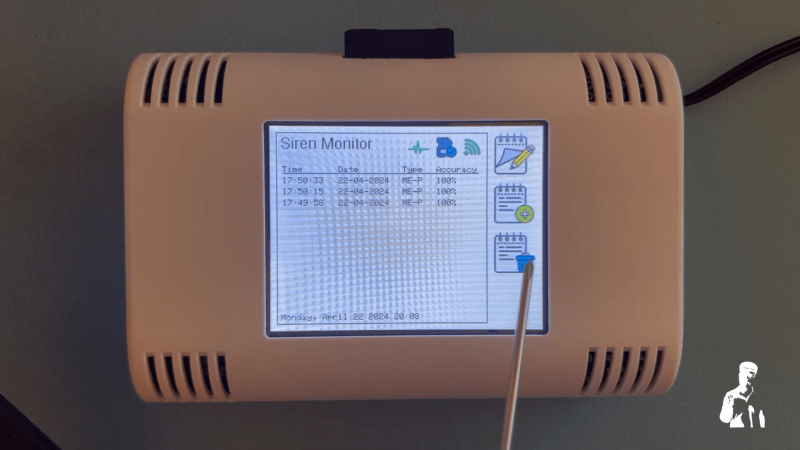
OK, let’s face it — even with objective proof there’s likely nothing that [Christopher Cooper] is going to do about the new crop of sirens going off in his neighborhood. Emergencies require a speedy response, after all, and sirens are perhaps just the price that we pay to live close to each other. That doesn’t mean there’s no reason to monitor the neighborhood noise, though, so [Christopher] got to work. The system uses an Arduino BLE Sense module to detect neighborhood noises and Edge Impulse to classify the sounds. An ESP32 does most of the heavy lifting, including running the UI on a nice little TFT touchscreen.
When a siren-like sound is detected, the sensor records the event and tries to classify the type of siren — fire, police, or ambulance. You can also manually classify sounds the system fails to understand, and export a summary of events to an SD card. If your neighborhood noise problems tend more to barking dogs or early-morning leaf blowers, no problem — you can easily train different models.
While we can’t say that this will help keep the peace in his neighborhood, we really like the way this one came out. We’ve seen the BLE Sense and Edge Impulse team up before, too, for everything from tuning a bike suspension to calming a nervous dog.
Self-driving is currently the Holy Grail in the automotive world, with a number of companies racing to build general-purpose autonomous vehicles that can get from point A to point B with no user input. While no one has brought one to market yet, at least one has promised this feature and had customers pay for it, but continually moved the goalposts for delivery due to how challenging this problem turns out to be. But it doesn’t need to be that hard or expensive to solve, at least in some situations.
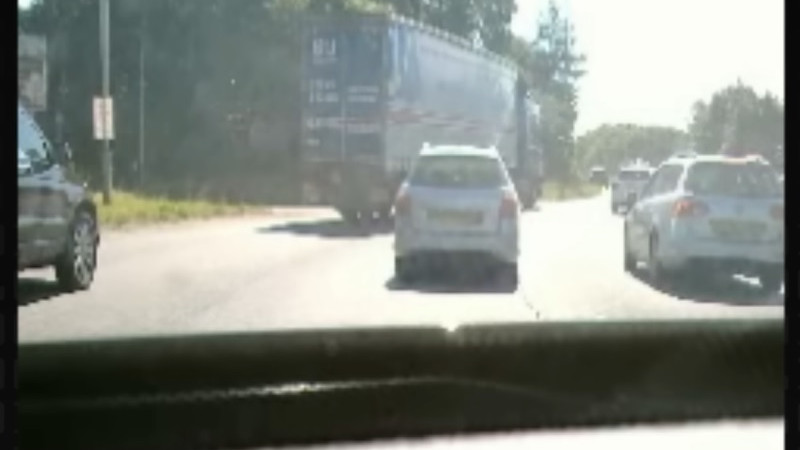
The situation in question is driving on a single stretch of highway, and only focuses on steering, so it doesn’t handle the accelerator or brake pedal input. The highway is driven normally, using a webcam to take images of the route and an Arduino to capture data about the steering angle. The idea here is that with enough training the Arduino could eventually steer the car. But first some math needs to happen on the training data since the steering wheel is almost always not turning the car, so the Arduino knows that actual steering events aren’t just statistical anomalies. After the training, the system does a surprisingly good job at “driving” based on this data, and does it on a budget not much larger than laptop, microcontroller, and webcam.
Admittedly, this project was a proof-of-concept to investigate machine learning, neural networks, and other statistical algorithms used in these sorts of systems, and doesn’t actually drive any cars on any roadways. Even the creator says he wouldn’t trust it himself, but that he was pleasantly surprised by the results of such a simple system. It could also be expanded out to handle brake and accelerator pedals with separate neural networks as well. It’s not our first budget-friendly self-driving system, either. This one makes it happen with the enormous computing resources of a single Android smartphone.
When we think about machine learning, our minds often jump to datacenters full of sweating, overheating GPUs. However, lighter-weight hardware can also be used to these ends, as demonstrated by [Nikodem Bartnik] and his latest robot.
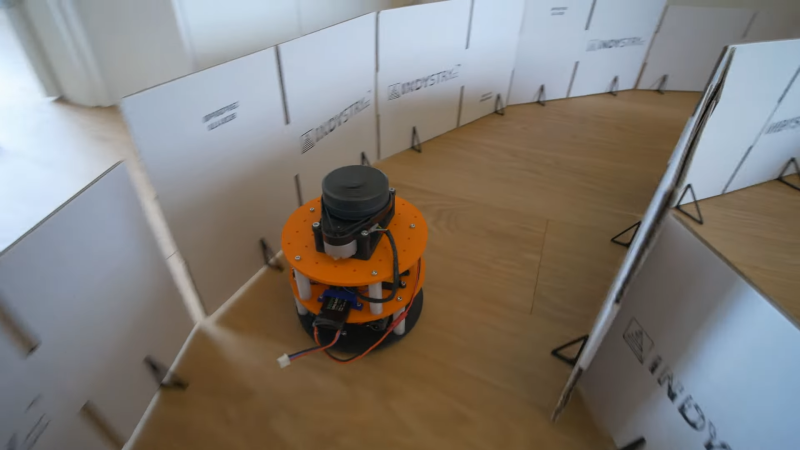
The robot is charged with autonomously navigating a simple racetrack delineated by cardboard barriers. The robot is based on a two-wheeled design with tank-style steering. Controlled by an Arduino Uno, the robot uses a Slamtec RPLIDAR sensor to help map out its surroundings. The microcontroller is also armed with a Bluetooth link and an SD card for storage.
The robot was first driven around the racetrack multiple times under manual control, all the while collecting LIDAR data. This data was combined with control inputs to help create a data set that could be used to train a machine learning model. Feature selection techniques were used to refine down the data points collected to those most relevant to completing the driving task. [Nikodem] explains how the model was created and then refined to drive the robot by itself in a variety of race track designs.
There are plenty of problems that are easy for humans to solve, but are almost impossibly difficult for computers. Even though it seems that with modern computing power being what it is we should be able to solve a lot of these problems, things like identifying objects in images remains fairly difficult. Similarly, identifying specific sounds within audio samples remains problematic, and as [Eivind] found, is holding up a lot of medical research to boot. To solve one specific problem he created a system for counting coughs of medical patients.
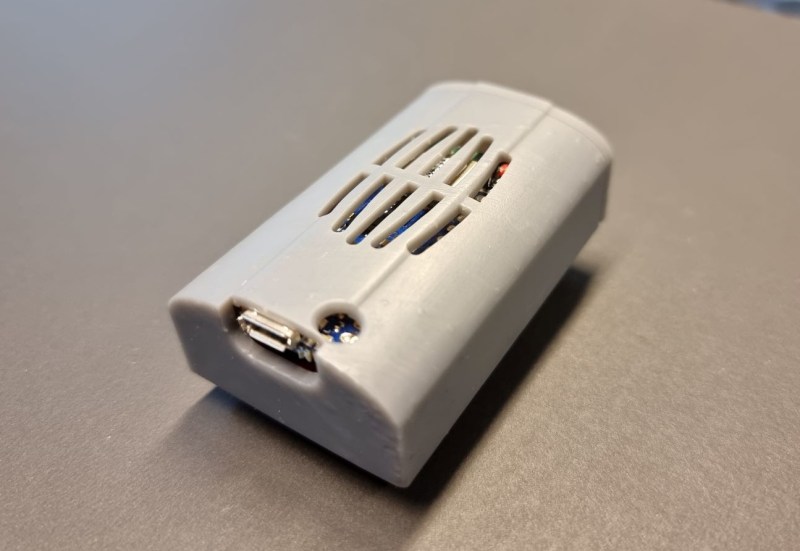
This was built with the idea of helping people with chronic obstructive pulmonary disease (COPD). Most of the existing methods for studying the disease and treating patients with it involves manually counting the number of coughs on an audio recording. While there are some software solutions to this problem to save some time, this device seeks to identify coughs in real time as they happen. It does this by training a model using tinyML to identify coughs and reject cough-like sounds. Everything runs on an Arduino Nano with BLE for communication.
While the only data the model has been trained on are sounds from [Eivind], the existing prototypes do seem to show promise. With more sound data this could be a powerful tool for patients with this disease. And, even though this uses machine learning on a small platform, we have seen before that Arudinos are plenty capable of being effective machine learning solutions with the right tools on board.
Measuring air quality at any particular location isn’t too complicated. Just a sensor or two and a small microcontroller is generally all that’s needed. Predicting the upcoming air quality is a little more complicated, though, since so many factors determine how safe it will be to breathe the air outside. Luckily, though, we don’t need to know all of these factors and their complex interactions in order to predict air quality. We can train a computer to do that for us as [kutluhan_aktar] demonstrates with a machine learning-capable air quality meter.
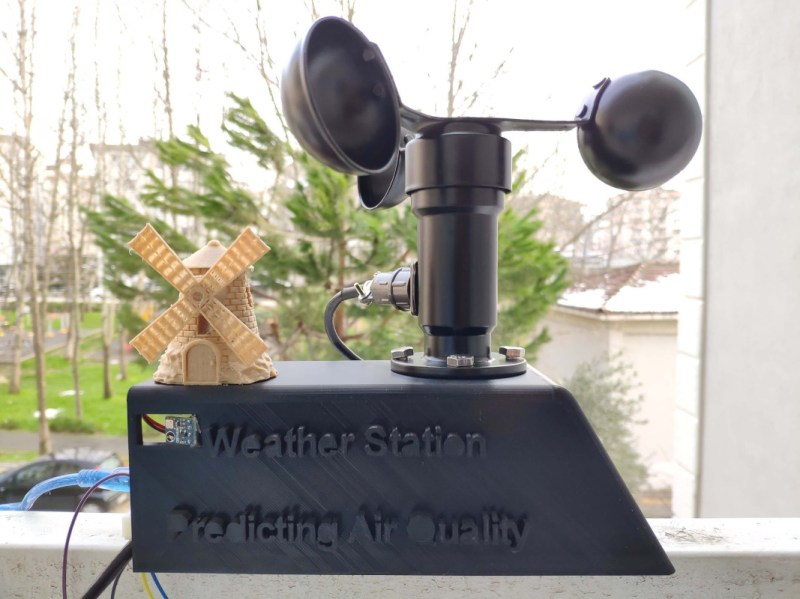
The build is based around an Arduino Nano 33 BLE which is connected to a small weather station outside. It specifically monitors ozone concentration as a benchmark for overall air quality but also uses an anemometer and a BMP180 precision pressure and temperature sensor to assist in training the algorithm. The weather data is sent over Bluetooth to a Raspberry Pi which is running TensorFlow. Once the neural network was trained, the model was sent back to the Arduino which is now capable of using it to make much more accurate predictions of future air quality.
The build goes into quite a bit of detail on setting up the models, training them, and then using them on the Arduino. It’s an impressive build capped off with a fun 3D-printed case that resembles an old windmill. Using machine learning to help predict the weather is starting to become more commonplace as well, as we have seen before with this weather station that can predict rainfall intensity.
If there’s one demographic that has benefited from people being stuck at home during Covid lockdowns, it would be dogs. Having their humans around 24/7 meant more belly rubs, more table scraps, and more attention. Of course, for many dogs, especially those who found their homes during quarantine, this has led to attachment issues as their human counterparts have begin to return to work and school.
[Clairette] has had a particularly difficult time adapting to her friends leaving every day, but thankfully her human [Nathaniel Felleke] was able to come up with a clever solution. He trained a TinyML neural net to detect when she barked and used and Arduino to play a sound byte to sooth her. The sound bytes in question are recordings of [Nathaniel]’s mom either praising or scolding [Clairette], and as you can see from the video below, they seem to work quite well. To train the network, [Nathaniel] worked with several datasets to avoid overfitting, including one he created himself using actual recordings of barks and ambient sounds within his own house. He used Eon Tuner, a tool by Edge Impulse, to help find the best model to use and perform the training. He uploaded the trained network to an Arduino Nano 33 BLE Sense running Mbed OS, and a second Arduino handled playing sound bytes via an Adafruit Music Maker Featherwing.
While machine learning may sound like a bit of an extreme solution to curb your dog’s barking, it’s certainly innovative, and even appears to have been successful. Paired with this web-connected treat dispenser, you could keep a dog entertained for hours.
Step sequencers are fantastic instruments, but they can be a little, well, repetitive. At it’s core, the step sequencer is a pretty simple device: it loops through a series of notes or phrases that are, well, sequentially ordered into steps. The operator can change the steps while the sequencer is looping, but it generally has a repetitive feel, as the musician isn’t likely to erase all of the steps and enter in an entirely new set between phrases.
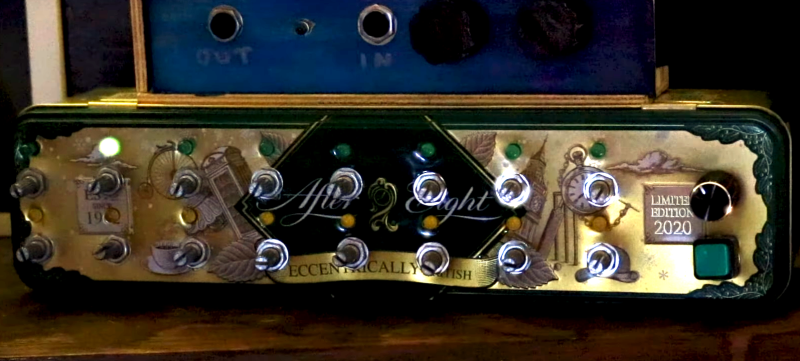
Enter our old friend machine learning. If we introduce a certain variability on each step of the loop, the instrument can help the musician out a bit here, making the final product a bit more interesting. Such an instrument is exactly what [Charis Cat] set out to make when she created the After Eight Step Sequencer.
The After Eight is an eight-step sequencer that allows the artist to set each note with a series of potentiometers (which are, of course, housed in an After Eight mint tin). The potentiometers are read by an Arduino, which passes MIDI information to a computer running the popular music-oriented visual programming language Max MSP. The software uses a series of Markov Chains to augment the musician’s inputted series of notes, effectively working with the artist to create music. The result is a fantastic piece of music that’s different every time it’s performed. Make sure to check out the video at the end for a fantastic overview of the project (and to hear the After Eight in action, of course)!
[Charis Cat]’s wonderful creation reminds us of some the work [Sara Adkins] has done, blending human performance with complex algorithms. It’s exactly the kind of thing we love to see at Hackaday- the fusion of a musician’s artistic intent with the stochastic unpredictability of a machine learning system to produce something unique.