Posts with «audio» label

Active and passive buzzer modules: KY-006 and KY-012 with Arduino

A buzzer module emits a sound to signal a danger or the end of a set time. It also serves to confirm a command. There are two types: passive, such as the KY-006 and Ks0019, and active, such as the KY-012 and Ks0018. AdriRobot tested them with an Arduino UNO, with a Multi Test Shield and with the micro:bit board.

Active and passive buzzer module: the difference

Loose buzzers and buzzer modules used in the tests (photo: AdriRobot)

The buzzer is an audio signalling device. It can be mechanical, electromechanical or piezoelectric. In the active module there is an internal oscillator: you just power it and the sound starts. The passive module has none, so the control circuit must supply it with a square wave between 2 and 5 kHz.

The piezoelectric buzzer is based on a ceramic disc with a metallic layer. It is robust and cheap. That is why it is used for narrow-band alarm signals, for example in household appliances and in medical technology. Electromagnetic buzzers, on the other hand, have a metal diaphragm set vibrating by an electromagnetic circuit, with the electronics already integrated.

The four modules compared

The KY-006 and KY-012 have the same circuit, made up of a connector and the buzzer. Only the type of buzzer changes, passive in the first and active in the second. Of the connector only GND and signal are used, so the current comes from the Arduino pin. Each module also measures 15 × 19 × 9 mm and weighs 2.4 g.

The Keyestudio Ks0018 (active) and Ks0019 (passive) modules are more elaborate. An NPN S8050 transistor acts as a switch between the control pin and the buzzer. There are two resistors: one on the base and one in series with the power supply. This way the control pin only supplies the current for the transistor. The connector therefore has three connections: GND, signal and 3.3 or 5 V power. Finally, these modules measure 30 × 20 × 10 mm and weigh 3 g.

The NPN S8050 transistor acts as a switch on the Keyestudio module (schematic: AdriRobot)

Testing with Arduino: square wave and tone()

The KY-006 module connected to an Arduino UNO for the basic test (schematic: AdriRobot)

To test a passive module you need an Arduino UNO, some Dupont jumpers and the KY-006 or the Ks0019. In the first sketch digital pin 3 goes from high to low with short pauses. This way the square wave is built by hand. Alternatively you use tone(pin, frequency, duration), which generates a square wave with a 50% duty cycle.

The command also produces only one tone at a time. If another pin is already playing, the call has no effect, while on the same pin it changes the frequency. To stop the sound you use noTone(pin). In AdriRobot’s example the buzzer sounds at 500 Hz and at 1000 Hz for one second each. Then it stays silent for five seconds.

The active module is simpler. With the KY-012 or Ks0018 a signal pin at high level makes the buzzer sound. At low level it stops it.

Multi Test Shield and micro:bit

The Multi Test Shield is a shield built by AdriRobot, compatible with the Arduino UNO R3. It is used to test the sensors of the 37-in-1 kit. The KY-012 is inserted on the JP2 connector. This way the sketch alternates sound and silence and shows the various phases on a small OLED display.

The Ks0018 and Ks0019 modules can also be connected to a micro:bit board. You need the Keyestudio Micro:bit Sensor V2 shield and three female-female Dupont cables. The program is also written with the MakeCode block editor and saved directly onto the board.

Where to find the modules

The individual modules are in the catalogue: the passive buzzer module KY-006 and the active buzzer module KY-012. Both are also part of the box of 37 sensors for Arduino, Raspberry Pi and robotics.

Source: the original article by AdriRobot includes the complete sketches, the MakeCode programs and other examples of buzzer use in projects.

Related products

The post Active and passive buzzer modules: KY-006 and KY-012 with Arduino appeared first on Open Electronics.

Arduino UNO R4: A/D and D/A Converters for Audio, from Testing to a Voice Changer

Contributor Pasquale Barrega, author of the YouTube channel Pasquale’s LAB, has published a series of four videos dedicated to the analog-to-digital (A/D) and digital-to-analog (D/A) converters built into the Arduino UNO R4 board. The journey starts from the basic concepts and arrives at the practical construction of an electronic voice changer, using just a few external passive components and a dynamic microphone.

The first experiment: digitizing the voice

In the introductory video “Audio applications with AD and DA converters”, Pasquale explains how to take the first steps in digitizing an analog signal, in particular the one coming from a microphone. The video illustrates the schematic for audio acquisition, the code based on the Arduino environment functions, and the first practical tests of reading from the A/D converter and writing to the D/A converter.

From digitized signal to sound: the D/A converter

In the second video, “Let’s listen to the voice from the DA converter”, the focus shifts to the D/A converter: the digitized human voice is played back, with an analysis of the resulting signal also on an oscilloscope. Pasquale also illustrates the changes to the schematic and the code needed to complete the acquisition-playback cycle.

Adapting the impedance with the internal op-amp

The third installment, “UNO R4: adapting the DAC impedance with the internal op-amp”, tackles a critical aspect: the output of the D/A converter has a fairly high impedance, so it is advisable to insert an adapter. Pasquale shows how to take advantage of the operational amplifier integrated into the board, both on the hardware connection side and on the firmware activation side, with a comparison of the noise before and after inserting the op-amp.

The electronic voice changer: the project synthesis

The last video, “Electronic voice changer”, puts all the previous pieces together to build a pitch shifter using the A/D and D/A converters of the UNO R4. The device can be used for audio effects or to alter the voice in situations where it must not be recognizable. Pasquale shows the updated wiring diagram, the test setup, several practical tests with voice and musical content, and finally the complete code.

The post Arduino UNO R4: A/D and D/A Converters for Audio, from Testing to a Voice Changer appeared first on Open Electronics.
A Keyboard with No Keys

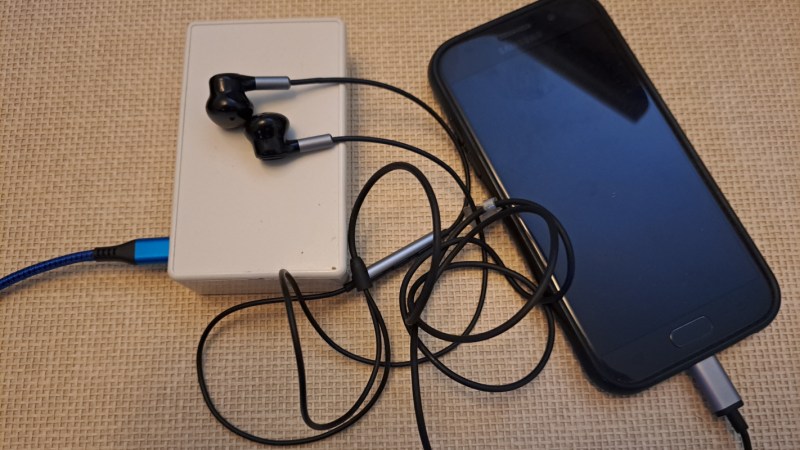
For as capable as smartphone hardware is, the software running on them can be especially restrictive and cumbersome. Unlike a single-board computer with GPIO running a standard Linux operating system and some intuitive programming language like Python, smartphones are generally walled gardens where programming major overhead, and if a custom program can be run on them at all the user still has to figure out how to interface hardware with a USB-C port. To skip past all of this, [nicolas.ma] built an audio modem that can send keyboard input to a computer with nothing more than a browser.

The “keyboard” starts off in a browser running on a standard smartphone. A user can input text into the browser, which then gets converted into a series of audible audio pulses that can be sent to the keyboard. The keyboard itself listens to those pulses, decodes them, and then sends the text through to the computer as a standard USB device thanks to an Arduino Micro at the center. Arduino Micros are excellent choices for keyboard controllers because they have a built-in USB chip.

The protocol used here is designed and built by [nicolas.ma] as well. The words allow for variable length, with the device determining message length, and a word-ending scheme that automatically sends the message to memory when it’s detected that the message is finished. There’s also integrity checking and the ability to check on the link’s state. From hardware to software it’s an impressive build, and for anyone wondering what this might be used for [nicolas.ma] has already built a password manager from it. 

Hack a Day 11 Aug 06:00

Creating a Numbers Station Of Your Very Own

Numbers stations are a weird phenomenon where odd voices read out long strings of numbers or random codewords to the confusion of the vast majority of the listening audience. If you’ve ever wanted to build one of your own, you could follow the example of [AudioWanderer].

NumberMumble, as it’s called, is a numbers station emulator. It doesn’t signal spy networks or reveal national secrets. Instead, it randomly plays audio samples using an Arduino, including characteristic bursts of white noise that make it sound more authentic. It relies on the Mozzi library to help with audio tasks, including generating white noise and playing back samples. It’s also kitted out with a filter knob for varying the tone. Audio output is via PWM.

If you want to confuse your neighbours with oddball audio, put this thing on a radio transmitter and get broadcasting. But don’t, because that’s illegal without the proper licenses or — you know — if you happen to be a real spy. Video after the break.

Hack a Day 17 Mar 12:00

A High-End Studio Multiplexer Surrenders To An Arduino

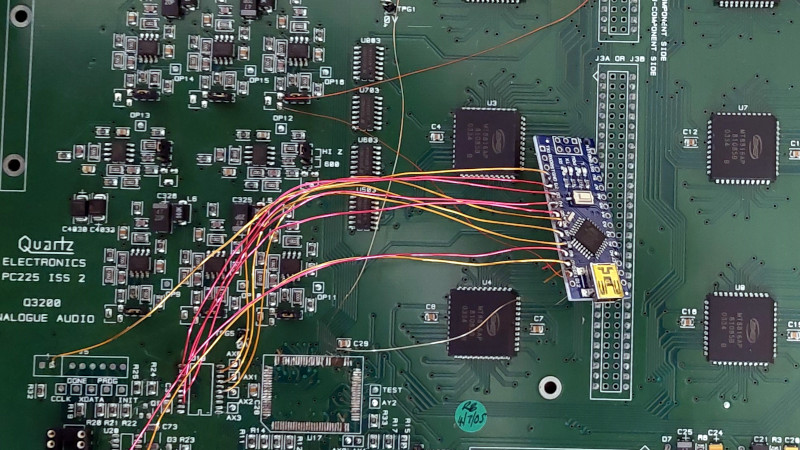
The equipment used in professional radio and TV studios is both extremely high quality and very expensive indeed, and thus out of the reach of an experimenter. Happily as studios are refurbished there’s a steady supply of second-hand equipment which can be surprisingly cheap, but as [Nathan] found out with a Quartz audio router, comes with no control software. What’s to be done with what’s essentially a piece of junk? Remove its brain and replace it with one that can be controlled, of course!

On the PCB alongside a bank of switch matrices is an FPGA which does the heavy lifting. That’s “heavy” in a limited sense, because all it does is handle the chip select lines for the matrices and write data to their registers. This is a task that can be handled by a microcontroller, so in goes an Arduino Nano, which along with a few other board modifications delivers a serial-controlled studio router.

The interesting part for us in this project comes from a look at the date codes on the board, they’re from the early 2000s. This is (roughly) contemporary with the ATmega chip on the Arduino, so we’re curious as to why the designers saw fit to use an FPGA when the microcontrollers of the day were clearly up to the task for much less outlay. We suspect a touch of millennium-era price inflation, but we can’t be sure.

Meanwhile, old broadcast kit has featured here before.

Hack a Day 28 Dec 06:00

Kids’ Jukebox Based on Arduino with RFID

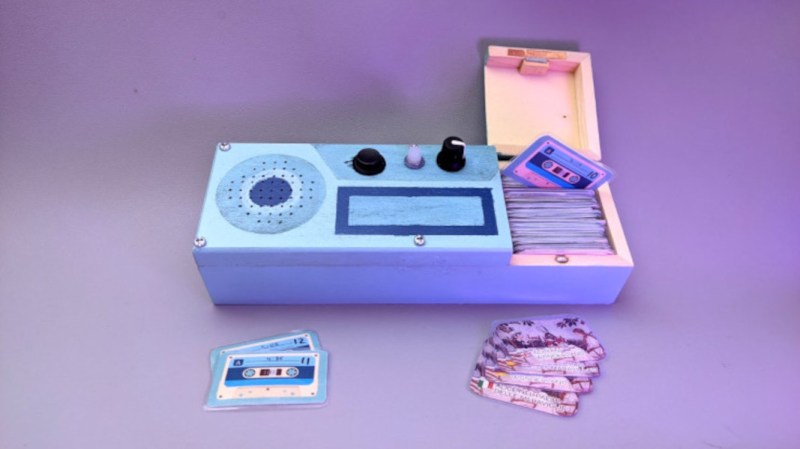
Consumer electronics aimed at young children tend to be quite janky and cheap-looking, and they often have to be to survive the extreme stress-testing normal use in this situation. You could buy a higher quality item intended for normal use, but this carries the risk of burning a hole in the pockets of the parents. To thread the needle on this dilemma for a child’s audiobook player, [Turi] built the Grimmboy for a relative of his.

Taking its name from the Brothers Grimm, the player is able of playing a number of children’s stories and fables in multiple languages, with each physically represented by a small cassette tape likeness with an RFID tag hidden in each one. A tape can be selected and placed in the player, and the Arduino at the center of it will recognize the tag and play the corresponding MP3 file stored locally on an SD card. There are simple controls and all the circuitry to support its lithium battery as well. All of the source code that [Turi] used to build this is available on the project’s GitHub page.

This was also featured at the Arudino blog as well, and we actually featured a similar project a while ago with a slightly different spin. Both are based on ideas from Tonuino, an open source project aimed at turning Arduinos into MP3 players. If you’re looking to build something with a few more features, though, take a look at this custom build based on the RP2040 microcontroller instead.

Hack a Day 17 Dec 06:00

Wearable Sensor Trained to Count Coughs

There are plenty of problems that are easy for humans to solve, but are almost impossibly difficult for computers. Even though it seems that with modern computing power being what it is we should be able to solve a lot of these problems, things like identifying objects in images remains fairly difficult. Similarly, identifying specific sounds within audio samples remains problematic, and as [Eivind] found, is holding up a lot of medical research to boot. To solve one specific problem he created a system for counting coughs of medical patients.

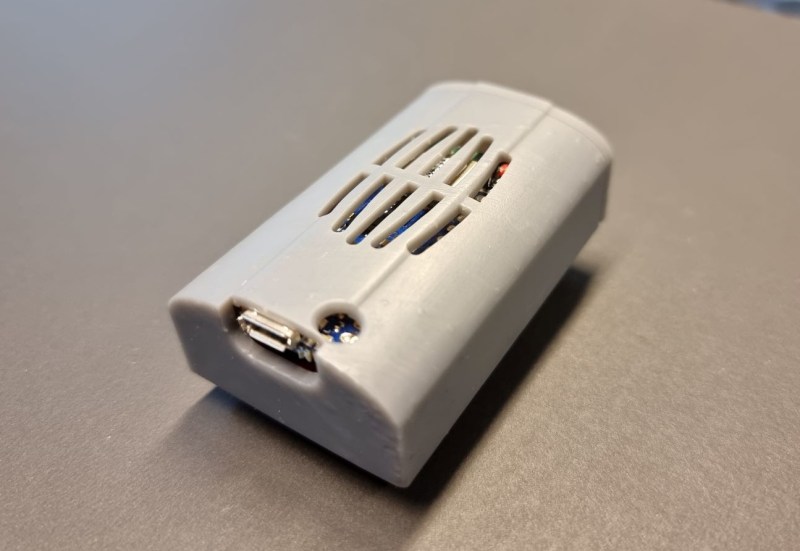
This was built with the idea of helping people with chronic obstructive pulmonary disease (COPD). Most of the existing methods for studying the disease and treating patients with it involves manually counting the number of coughs on an audio recording. While there are some software solutions to this problem to save some time, this device seeks to identify coughs in real time as they happen. It does this by training a model using tinyML to identify coughs and reject cough-like sounds. Everything runs on an Arduino Nano with BLE for communication.

While the only data the model has been trained on are sounds from [Eivind], the existing prototypes do seem to show promise. With more sound data this could be a powerful tool for patients with this disease. And, even though this uses machine learning on a small platform, we have seen before that Arudinos are plenty capable of being effective machine learning solutions with the right tools on board.

Hack a Day 16 Nov 00:00

Pocket Radio Powered By Tiny Microcontroller

Before the days of MP3 players and smartphones, and even before portable CD players, those of us of a certain age remember that our cassette players were about the only way to take music on-the-go. If we were lucky, they also had a built-in radio for when the single tape exhausted both of its sides. Compared to then, it’s much easier to build a portable radio even though cassettes are largely forgotten, as [wagiminator] shows us with this radio design based on an ATtiny.

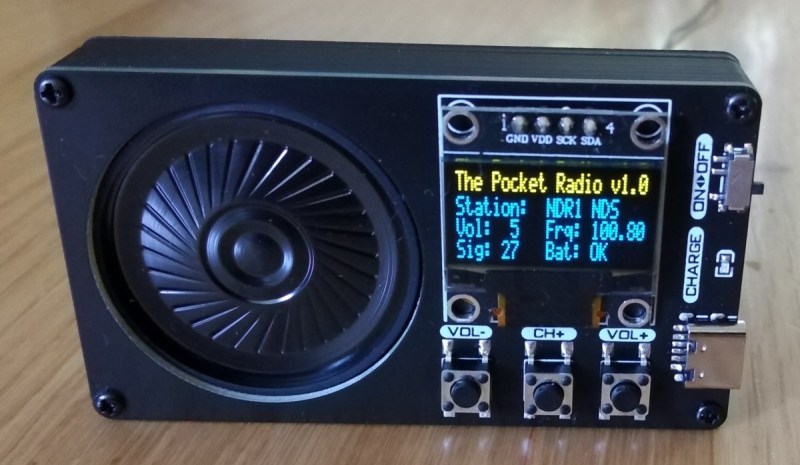
The build is about as compact as possible, with the aforementioned ATtiny 402/412 as its core, it also makes use of an integrated circuit FM tuner,  an integrated audio amplifier with its own single speaker, and a small OLED display. The unit also boasts its own lithium-polymer battery charger and its user interface consists of only three buttons, plenty for browsing radio stations and controlling volume.

The entire build fits easily in the palm of a hand and is quite capable for a mobile radio, plus all of the schematics and code is available on the project page. While it doesn’t include AM capability, just the fact that FM is this accessible nowadays when a few decades ago it was cutting-edge technology is quite remarkable. If you’re looking for an even smaller FM receiver without some of the bells and whistles of this one, take a look at this project too.

Hack a Day 06 Jul 21:00
arduino  attiny  audio  code  fm  oled  radio  radio hacks  schematics  speaker  

GGWave Sings the Songs of Your Data

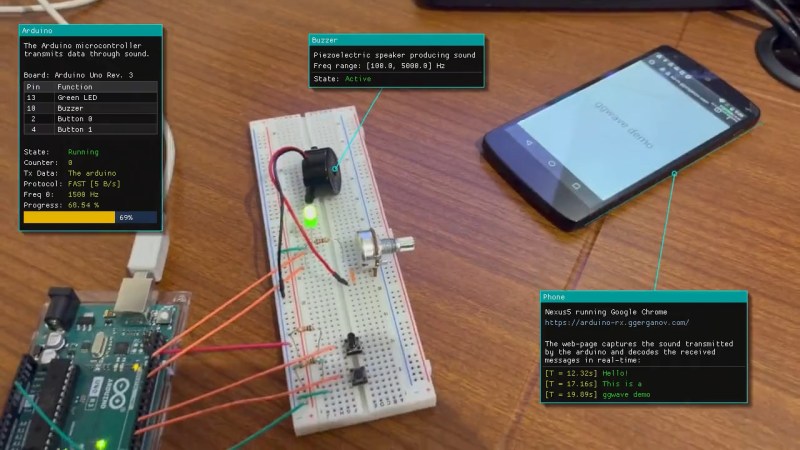
We’re suckers for alternative data transmission methods, and [Georgi Gerganov]’s ggwave made us smile. At its core, it’s doing what the phone modems of old used to do – sending data encoded as different audio tones. But GGwave does this with sophistication!

It splits the data into four-bit chunks, and uses 16 different frequency offsets to represent each possible value. But for each chunk, these offsets are added to one of six different base frequencies, which allows the receiving computer to tell which chunk it’s in. It’s like a simple framing concept, and it makes the resulting data sound charmingly like R2-D2. (It also uses begin and end markers to be double-sure of the framing.) The data is also sent with error correction, so small hiccups can get repaired automatically.

What really makes ggwave shine is that it’s ported to every platform you care about: ESP32, Arduino, Linux, Mac, Windows, Android, iOS, and anything that’ll run Python or JavaScript. So it’ll run in a browser. There’s even a GUI for playing around with alternative modulation schemes. Pshwew! This makes it easy for a minimalist microcontroller-based beeper button to control your desktop, or vice-versa. An ESP32 makes for an IoT-style WiFi-to-audio bridge. Write code on your cell phone, and you can broadcast it to any listening microcontroller. Whatever your use case, it’s probably covered.

Now the downside. The data rate is slow, around 64-160 bits per second, and the transmission is necessarily beepy-booopy, unless you pitch it up in to the ultrasound or use the radio-frequency HackRF demo. But maybe you want to hear when your devices are talking to each other? Or maybe you just think it’s cute? We do, but we wouldn’t want to have to transmit megabytes this way. But for a simple notification, a few bytes of data, a URL, or some configuration parameters, we can see this being a great software addition to any device that has a speaker and/or microphone.

Oh my god, check out this link from pre-history: a bootloader for the Arduino that runs on the line-in.

Hack a Day 06 Jul 19:30

Binaural Hearing Modeled with an Arduino

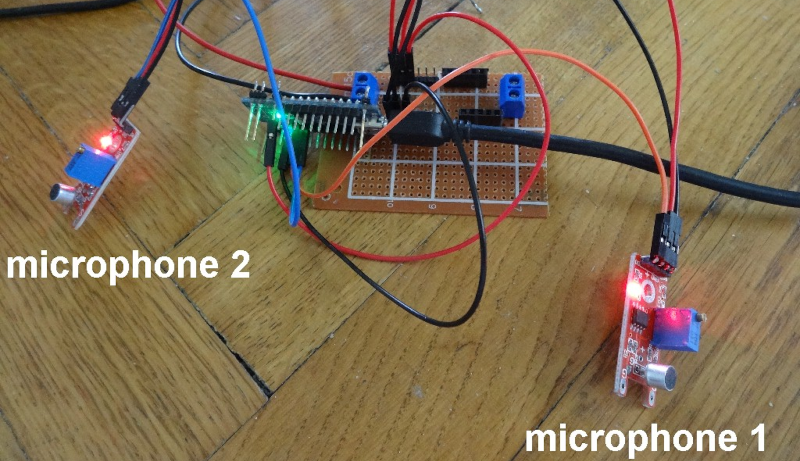
You don’t have two ears by accident. [Stoppi] has a great post about this, along with a video you can see below. (The text is in German, but that’s what translation is for.) The point to having two ears is that you receive audio information from slightly different angles and distances in each ear and your amazing brain can deduce a lot of spatial information from that data.

For the Arduino demonstration, cheap microphone boards take the place of your ears. A servo motor points to the direction of sound. This would be a good gimmick for a Halloween prop or a noise-sensitive security camera.

Math-wise, if you know the speed of sound, the distance between the sensors, and a few other pieces of data, you wind up with a fairly simple trigonometry problem. In non-math terms, it is easy to get a feel for why this works. If the sound hits both microphones at once, it must be coming from straight ahead. If it hits the left microphone first, it must be closer to that microphone and vice versa. If the sound were right in line with both microphones but closer to the left, the time delay would be exactly due to the speed of sound over the distance between the sensors. If the time is less than that, the sound must be somewhere in between.

The microphone modules have both analog outputs and digital outputs. The digital output triggers if the sound level exceeds a limit set by a potentiometer. By using these modules, the circuit is trivial. Just an Arudino, the two modules, and the servo motor.

Now imagine that you wanted all this spatial detail to come through your headphones. Recording binaural audio is a thing. You can 3D print a virtual head if you are interested. We’ve seen projects for this several times.