Posts with «children» label

3D-Printed Tactile Zoo: Young Makers Show Off Their Mistakes

A group of children aged 7 to 13 is building a tactile zoo with 3D-printed robotic animals. The creatures, more than 20 in total, are equipped with LEDs, motors, buttons, and gears. At Maker Faire Bay Area, the group will also display their printing errors and failed prototypes. The goal is to show the iteration process that leads from an idea to a working object.

The project turns 3D printing into an educational and interactive activity. Mistakes are not hidden but become an integral part of the exhibition. Visitors can thus understand that making errors is a normal step in the work, not a failure. The maker’s website details how the children faced technical difficulties and what solutions they found.

From choosing the animal to the first print

Each young maker chooses an animal, real, mythological, or completely invented. Then they decide what behavior the creature should have. Some design the animals from scratch, others start from existing 3D models and modify them, cutting or redesigning sections to make room for the electronics. Once the body is ready, they add a function such as an LED, a servo, a motor, a button, or a set of gears.

The group includes eight creatures, among them Em. To make Plate the Armadillo roll into a ball, 11 prints were needed. Each failed attempt taught something new: a joint too tight, a motor off-axis, a wall too thin. The children learned to observe the error and correct it in the next print.

An exhibition you can touch and open

The zoo is not a simple showcase. Visitors can press buttons, flip switches, and open the animals to see the wires, gears, and electronics inside. This choice makes the electronics transparent and understandable even to those who have never opened a device. Next to the finished animals, broken prints, melted parts, and earlier versions are displayed, so visitors can ask what went wrong and how it was fixed.

For those who want to recreate the project, the electronic part can be built with simple, modular components. For example, a servo motor with metal gears can move an animal’s legs, while a shield for controlling RC servos allows managing multiple movements with an Arduino board. For light effects, a WS2812 LED matrix offers endless color possibilities. Finally, a compact board like the Arduino Nano Matter can handle logic and connectivity in a small space.

Mistakes on display: the educational value of failure

The choice to display printing errors is the heart of the project. In a world that shows only perfect results, these children reveal the behind-the-scenes. The broken prints tell the real difficulties of 3D printing: material shrinkage, parts detaching from the bed, motors that don’t find space. Visitors to Maker Faire will be able to talk with the young makers and discover how each problem was tackled.

This approach also changes the way the children work. They learn that a failed prototype is not wasted time, but a step forward. Each error provides valuable information for the next version. The iteration process thus becomes a mental habit, useful not only in 3D printing but in every design activity.

Source: https://view.protectedpdf.com/portal/AMR/LogIn

Related products

The post 3D-Printed Tactile Zoo: Young Makers Show Off Their Mistakes appeared first on Open Electronics.
Kids’ Jukebox Based on Arduino with RFID

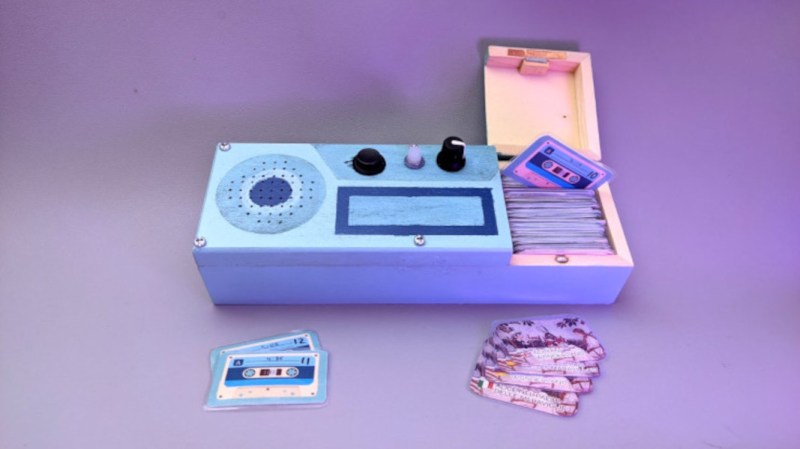
Consumer electronics aimed at young children tend to be quite janky and cheap-looking, and they often have to be to survive the extreme stress-testing normal use in this situation. You could buy a higher quality item intended for normal use, but this carries the risk of burning a hole in the pockets of the parents. To thread the needle on this dilemma for a child’s audiobook player, [Turi] built the Grimmboy for a relative of his.

Taking its name from the Brothers Grimm, the player is able of playing a number of children’s stories and fables in multiple languages, with each physically represented by a small cassette tape likeness with an RFID tag hidden in each one. A tape can be selected and placed in the player, and the Arduino at the center of it will recognize the tag and play the corresponding MP3 file stored locally on an SD card. There are simple controls and all the circuitry to support its lithium battery as well. All of the source code that [Turi] used to build this is available on the project’s GitHub page.

This was also featured at the Arudino blog as well, and we actually featured a similar project a while ago with a slightly different spin. Both are based on ideas from Tonuino, an open source project aimed at turning Arduinos into MP3 players. If you’re looking to build something with a few more features, though, take a look at this custom build based on the RP2040 microcontroller instead.

Hack a Day 17 Dec 06:00

The Lightgame Project: A Multiplayer Arduino Game

Summer is upon us. The Lightgame Project is a multiplayer reaction time based game built around the Arduino. It’s a perfect rainy day project for those restless kids (and adults!). Designed by two undergraduate students [Efstathios] and [Thodoris] for a semester long project, all the hard work has already been done for you.

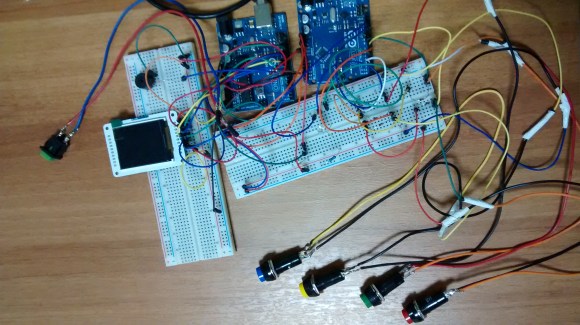
There are tons of reasons we love games that you can build yourself. For one, it’s an amazing way to get children interested in hobby electronics, making, and hacking. Especially when they can play the game with (and show off to) their friends. Another reason is that it is a perfect way to share your project with friends and family, showcasing what you have been learning. The game is based on your reaction time and whether or not you press your button when another players color is shown. The project is built around two Arduinos connected via I2C. The master handles the mechanics of the game, while the slave handles the TFT LCD and playing music through a buzzer.

I2C is a great communication protocol to be familiar with and this is a great project to give it a try. [Efstathios] and [Thodoris] did a great job writing up their post, plus they included all the code and schematics needed to build your own. It would be great to see more university professors foster open source hardware and software with their students. A special thanks goes out to [Dr. Dasygenis] for submitting his student’s work to us!


Filed under: Arduino Hacks
Hack a Day 29 May 03:00

Butlers, lunar rovers, snakes and airboats: the best of Carnegie Mellon's Robotics Institute

How was your week? We got to spend a couple of days trekking around the Carnegie Mellon campus in Pittsburgh, PA to check out some of the latest projects from the school's world renowned Robotics Institute -- a trip that culminated with the bi-annual induction ceremony from the CMU-sponsored Robot Hall of Fame. Given all the craziness of the past seven days, you might have missed some of the awesomeness, but fear not, we've got it all for you here in one handy place -- plus a couple of videos from the trip that we haven't shown you yet. Join us after the break to catch up.

Continue reading Butlers, lunar rovers, snakes and airboats: the best of Carnegie Mellon's Robotics Institute

Butlers, lunar rovers, snakes and airboats: the best of Carnegie Mellon's Robotics Institute originally appeared on Engadget on Sat, 27 Oct 2012 12:45:00 EST. Please see our terms for use of feeds.

Permalink | Email this | Comments

Bøsewicht

Primary image

What does it do?

Scares People

This is the Bøsewicht. A ghost robot custom made together with my elder son.

This little monster ghost is what you find under your bed when you sleep. The only one that can handle this monster is the Monster Catcher*.


Ingredients

2 x 9g Micro Servo
1 x Arduino Uno R3
3 x LED warm white 
1 x LED red  
1 x Speaker
1 x Ultrasonic Sensor
1 x IR Compound Eye 


The Making-Of

Cost to build

$30,00

Embedded video

Finished project

Number

Time to build

8 hours

Type

URL to more information

Weight

300 grams

read more