Posts with «featured» label

A touchless MIDI controller for your electric guitar

If guitar effects pedals aren’t really your thing, perhaps Evan Kale’s touchless MIDI controller will fit the bill.

Using an Arduino, along with a Colpitts oscillator and some other electronics, Kale has come up with a rather unique interface for his guitar. Instead of using a foot pedal, he put a strip of aluminum foil inside of a fingerless glove, then attached a homemade metal detector coil and circuit to the back.

This allows him to strum the guitar, then change the sound by moving his hand away and toward the strings as a MIDI input. Very clever, and as always, Kale outlines everything in his own zany video style!

You can find the code for this project here and check out the schematic on Imgur. On the other hand, if this looks slightly familiar, he uses the same type of circuit for this MIDI controller as the metal detector previously covered on our blog.

Square Off is a chess board with a high-tech twist

If you love chess, but aren’t thrilled about playing it on an app, the InfiVention team has just the board for you.

The origin of the game chess is a fascinating and somewhat unknown tale, stretching continents and many hundreds of years. In the last 25 or so years, however, it has gone from a game played on a beautiful board with finely crafted pieces, to something played on a computer or smartphone. Perhaps this is a good thing, since finding competition is as easy as signing into the correct game.

On the other hand, this type of play looses a lot of charm, and you can’t exactly pass the app on your beat up smartphone to your kids one day. Attempting to fill in the gap is the amazing automated board called “Square Off.” With an Arduino Mega 2560 at its core, it automatically moves the pieces, and detects where you move, allowing you to play in the real world with someone remotely–even if he or she is merely using a tablet!

Square Off is all set to redefine the world of board games, starting with chess. Bringing to you the world’s smartest, most connected and the most evolved chess board. It enables you to play your favorite game against a fellow chess enthusiast from anywhere in the world. The automated board is designed to reflect the move of your opponent with precision. Not just that, you can challenge the artificial intelligence of the board, too.

Intrigued? You can learn more about Square Off on its nearly-funded (as of this writing) Kickstarter page, as well as on the Arduino Project Hub!

Square Off is a chess board with a high-tech twist

If you love chess, but aren’t thrilled about playing it on an app, the InfiVention team has just the board for you.

The origin of the game chess is a fascinating and somewhat unknown tale, stretching continents and many hundreds of years. In the last 25 or so years, however, it has gone from a game played on a beautiful board with finely crafted pieces, to something played on a computer or smartphone. Perhaps this is a good thing, since finding competition is as easy as signing into the correct game.

On the other hand, this type of play looses a lot of charm, and you can’t exactly pass the app on your beat up smartphone to your kids one day. Attempting to fill in the gap is the amazing automated board called “Square Off.” With an Arduino Mega 2560 at its core, it automatically moves the pieces, and detects where you move, allowing you to play in the real world with someone remotely–even if he or she is merely using a tablet!

Square Off is all set to redefine the world of board games, starting with chess. Bringing to you the world’s smartest, most connected and the most evolved chess board. It enables you to play your favorite game against a fellow chess enthusiast from anywhere in the world. The automated board is designed to reflect the move of your opponent with precision. Not just that, you can challenge the artificial intelligence of the board, too.

Intrigued? You can learn more about Square Off on its nearly-funded (as of this writing) Kickstarter page, as well as on the Arduino Project Hub!

Smartwatch prototype turns your wrist into a joystick

Although smartwatches were designed to be an easy-to-use alternative for your smartphone, interacting with their touchscreens still requires your opposite hand to be free. So what do you do when you’re carrying a bag of groceries or holding onto a bus handle?

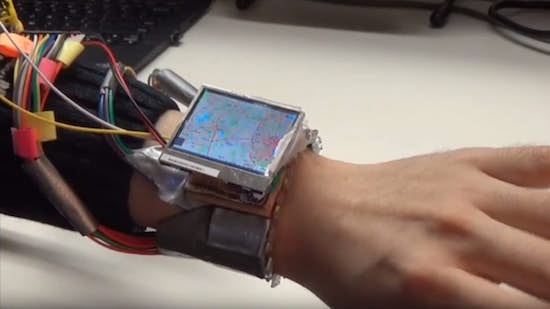
This is the problem a Dartmouth-led team set out to solve with WristWhirl, a smartwatch prototype that uses the wrist wearing the device as a joystick to perform common touchscreen gestures with one-handed continuous input, while freeing up the other hand for other tasks.

WristWhirl was built using a two-inch TFT display and a plastic watch strap equipped with a dozen infrared proximity sensors and a piezo vibration sensor, which is connected to an Arduino Due board. Commands are then made by moving the hand as if it were operating a joystick, while a finger pinch turns the sensors on/off to indicate the start or end of a gesture.

For starters, the team implemented four sample applications with off-the-shelf games and Google Maps to illustrate potential use cases.

Four usage scenarios for WristWhirl were tested: 1) a gesture shortcuts app was created, which allowed users to access shortcuts by drawing gestures; 2) a music player app was created, which allowed users to scroll through songs through wrist-swipes and play a selected song by double tapping the thumb and index fingers; 3) a map app was implemented for which 2D maps could be panned and zoomed depending on where the watch was held in relation to one’s body; and 4) game input, which often requires continuous input was tested, for which Tetris was played using a combination of wrist swipes, wrist extension and wrist flexion.

You can read more about the project on its page here, as well as see a demonstration of it below!


University of Washington develops a self-driving tricycle

Autonomous cars seem to get all of the attention, but this autonomous trike is hoping to take things in a different direction.

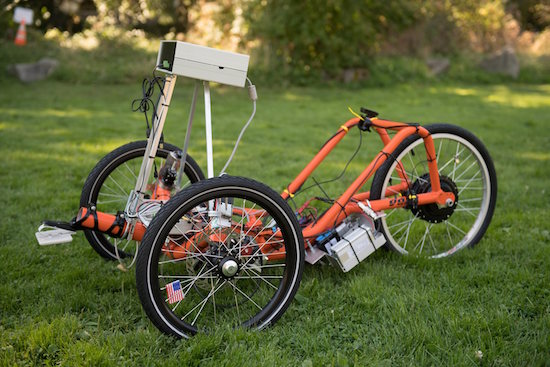
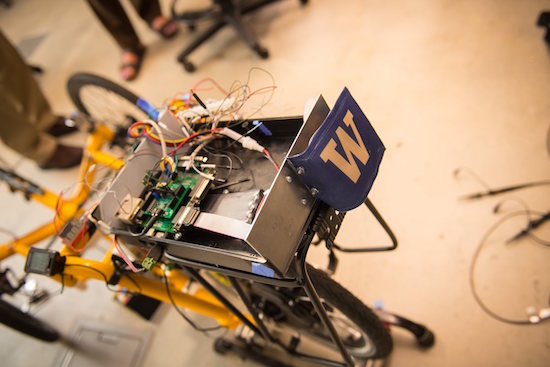
With the support of Amazon’s Catalyst program, as well as from software company Kerika, University of Washington Bothell professor Tyler Folsom’s self-driving tricycle aims to help us lessen our dependence on fossil fuels. It’s a neat platform in its current form based on a recumbent tricycle.

As seen in the video below, it’s taken one of the first steps toward driving itself, taking a command to drive in a circle without direct control by an operator.

Folsom notes that Google is tackling the challenge of driving in traffic. Once driving software is mature and can be integrated into this type of platform, perhaps we will be able to ride to work or the store in a smaller vehicle like this!

“Of course we used the Arduino microprocessor.” – Professor Folsom

You can see more details on this project in the UW Bothell’s writeup.

(Photos: University of Washington Bothell)

Collector is “a kind of reality re-mixer”

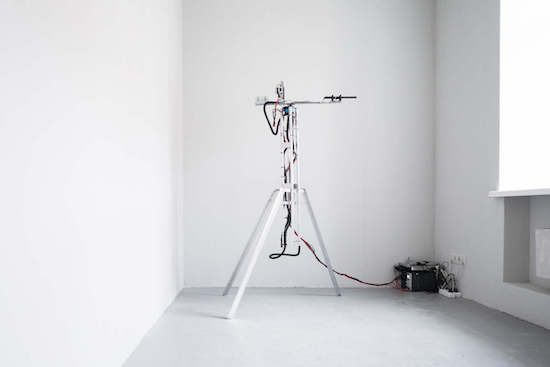
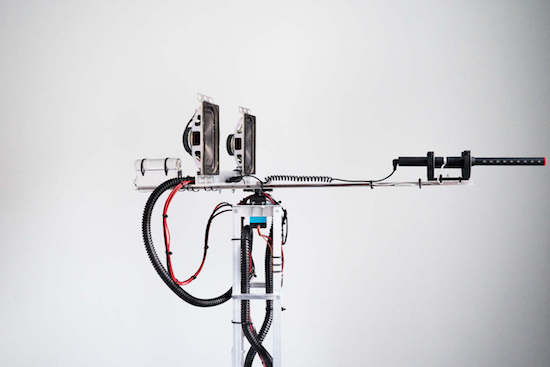
For his latest project, Dmitry Morozov (aka ::vtol::) has created a robotic machine that uses a microphone to record sounds from its surrounding environment, selecting only the loudest ones. Then, the aptly named “Collector” pieces these noises together in the order they were recorded to form an algorithmic  composition.

First, the Collector records the sounds until it has gathered 100 samples. From there, it plays the result as a loop through a pair of speakers for one minute, so they can be heard by those nearby. While this mode, the recording stops. After that, it erases everything and begins a new search.

The Collector is also equipped with an Arduino Uno for a brain, a servo motor for rotating the mic, and a flashlight to show detected sounds or indicate the sounds during playback mode.

It is a kind of reality re-mixer–by simply removing the silence and pauses between loud sounds and words, it creates the sense of very rhythmical and organized aural experience, which sounds very musical to me.

Intrigued? You can read more and see other photos of the project on its page here.

Arduino Blog 13 Oct 16:55

Ping Pong FM is a fun, musical take on table tennis

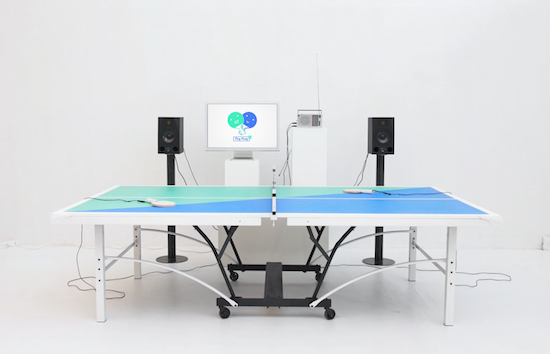
If you thought table tennis was hard enough, wait until you see what Mark Wheeler and a team of designers have come up with. Ping Pong FM puts a Guitar Hero-like spin on the classic sport.

However, unlike the actual game, Ping Pong FM is more collaborative than competitive. That’s because players must hit the ball back and forth to keep the music going. Select your paddle, choose your song, and serve. Rally too slowly, or miss the ball, and the music will wind down. Rally at the correct tempo and the party is on. As you can imagine, faster tunes like “Intergalactic” by the Beastie Boys or “Milkshake” by Kelis are more challenging.

Although it may resemble an ordinary table tennis setup, Ping Pong FM is much more high-tech. Contact microphones are placed inside each of the paddles to track gameplay, while the microphone audio is processed by an Arduino hidden in a retro radio case that listens for peaks above a threshold. When a hit is registered, the Arduino sends a Player ID via USB to a computer running the game app, which displays the song coming out of two speakers and adjusts its speed accordingly.

You can see Ping Pong FM in action below and read more about the project here.

Check the traffic autonomously on a modified clock

Using an Arduino and 1Sheeld, Integreight embedded engineer Eslam Ali set his office clock up to preview the traffic going home.

If you work in a traffic-prone area, there’s always a debate at to whether you should go home at the normal time or wait a few minutes to leave and avoid the traffic. To help make that decision, Ali likes to check the traffic before heading out. This might be fairly simply using a computer or smartphone, but doing so autonomously would be even better.

In a clever feat of automation, he embedded 12 RGB LEDs in a simple IKEA clock. These were then controlled by an Arduino Uno, using a 1Sheeld device to access the Internet through his smartphone. If traffic is bad, it displays as red, then blinks green when it’s time to go! A clever application in itself, something like this could be expanded for numerous uses, perhaps even involving animated lights.

Whenever it’s time to get off the office, I always check the traffic status to choose the best time to go home. But I couldn’t find a way to do that autonomously. So then…I was up to make a system that shows me the current traffic status with the help of a simple tool that is used probably in all the offices, a wall clock

In addition to the video below, you can see how to make one on 1Sheeld’s site or check out the discussion about this build on Reddit.

Arduino Blog 11 Oct 23:12

This Arduino G meter shows how fast your car really is!

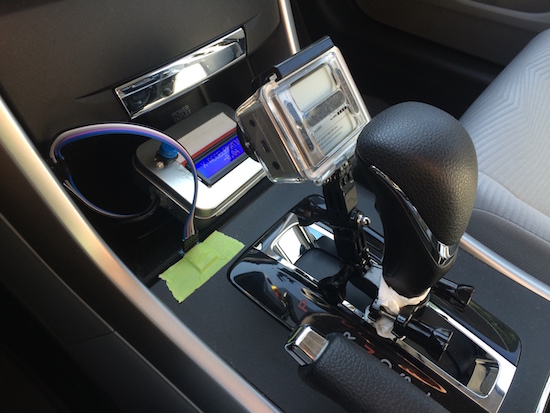
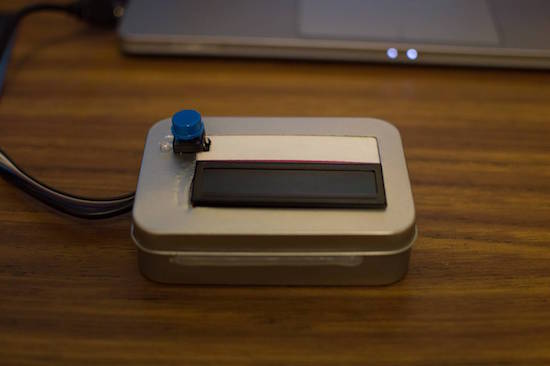
Using an Arduino with an accelerometer, this handy display lets you know how “extreme” your driving really is!

Modern cars tell us all kinds of information about how our vehicles are working and how you are driving. One thing that is generally missing is a display that tells you how many “G’s” (or how much you are pushed back into your seat) your car is pulling. With this clever setup, you can know how much force your tires are putting to the ground (neglecting body-roll factors) in both straight-line acceleration, braking, and even side-to-side turning.

As an automotive enthusiast and a mechanical engineer, I had a poor physical understanding of G’s. Sure, I’m experiencing 1g as I’m standing upright, but how many G’s did I experience as I came to a quick stop in LA traffic? To gain a better physical understanding of G’s, I built this device.

You can see more details of this simple yet very useful build on eadiec’s Imgur page.

Arduino Blog 11 Oct 19:55
arduino  featured  g meter  nano  

The AtHeart 4Duino combines Arduino, Wi-Fi and touchscreen

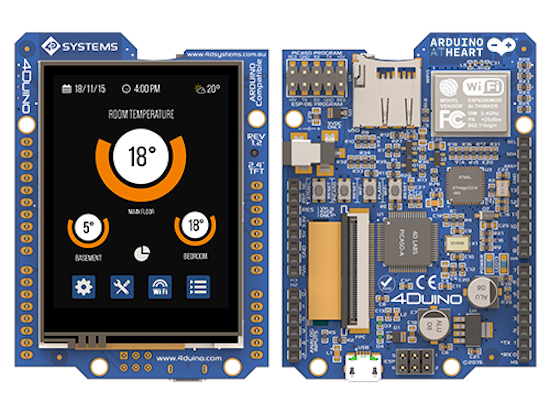
A new season, a new partner! We’ve had our sights set on 4D Systems’ touchscreen product for quite some time, and we’re excited to finally introduce that this Arduino and Genuino-compatible product is joining the AtHeart program. The 4Duino-24 is a 2.4-inch, 240×320-pixel Intelligent Display Module with Wi-Fi capabilities.

“For years Arduino/Genuino users have been taking advantage of our Intelligent Display Modules for adding graphical user interfaces with touch capability to their applications. With the 4Duino-24 we wanted to make something a bit more special and combine some of the more popular shields and the ATmega32U4 into a compact easy to use package. We are delighted to become part of the AtHeart program and very much look forward to seeing a full variety of applications running on the 4Duino-24.” – Markku Riihonen, Products and Business Development Manager, 4D Systems.

Perfect for your next creative IoT project, the 4Duino-24 runs on an ATmega32U4 MCU and is powered by the 4D Systems PICASO Graphics Processor that offers an array of display functionality and options for any designer and Maker. The 4Duino-24 also includes the popular ESP8266 module, which is pre-programmed with the AT command set firmware enabling the 4Duino to have Wi-Fi functionality right out of the box.

Beyond that, the 4Duino-24 is equipped with an onboard microSD connector and headers in the layout of an Arduino, including power pins (5V, 3.3V, GND and VIN), 20 digital I/O pins—seven of which can be used as PWM outputs, while 12 pins have analog input capabilities.
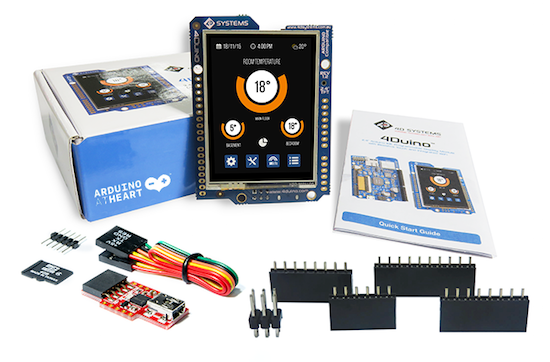
The 4Duino-24 can be programmed using the standard Arduino IDE or the 4D Workshop4 IDE and its three new 4Duino-based development environments with the added dimension of graphics. Creating Arduino GUIs doesn’t get any easier!

Ready to get started? You can watch 4D Systems’ 10-minute video below, as well as check out its product page here. The 4Duino-24 is available as starter kit and standalone module at the price of $79 USD/€69.90 (+tax).