Posts with «featured» label

The GoonieBox challenges guests to solve its riddles
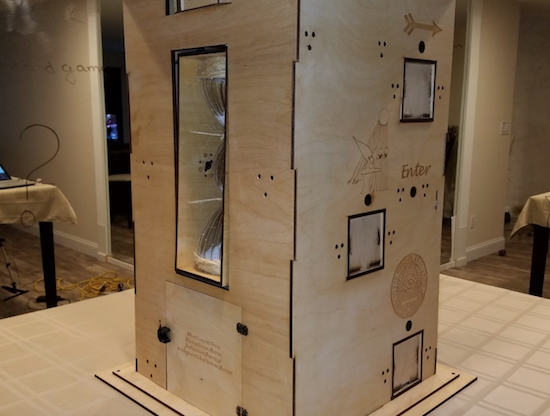
Inspired by The Goonies movie and The Room game, Guido Bonelli has constructed a piece of Arduino-controlled interactive furniture to entertain his guests.

After what appears to be a massive amount of work involving 3D printing, laser cutting, wiring, and programming, Bonelli has come up with a puzzle box that shouldn’t need any explanation. Using button presses and other interactions with it, participants are able to unlock a treasure box in the bottom, a working wooden safe!

Additionally, the box tells time in a very unique way. It has an hourglass that is automatically flipped to indicate minutes, and Roman numerals at the top to reveal hours. You can see how it works and how it was assembled in the videos below!
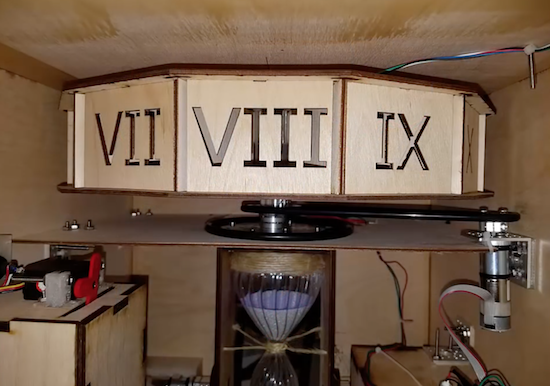
I wanted to create a unique piece of furniture for my home which my guests could interact with. This time however, I wanted it to be something which I wouldn’t have to explain how it worked. Instead, I wanted mysterious scriptures scribed all over the sculpture to intrigue my guests.

At the heart of GoonieBox is of course an Arduino… Effortlessly whisking away my artistically written 0’s and 1’s into a symphony of movement, sound and game play. Taking approximately 800 hours of build time, GoonieBox is my greatest accomplishment by far in the world of Arduino.

You can find more information on the project’s Hackster.io posting, or check out the author’s interesting Dr.Duino product page.
Cutting cable with scissors and Arduino

2PrintBeta solves the problem of cutting multiple cables with an innovative scissors setup.

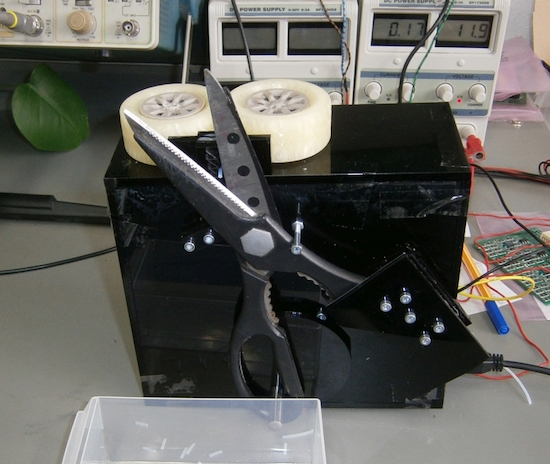
At times, the 3D printing and engineering company 2PrintBeta needs to cut wires and other assorted materials to length. Sure, they could simply cut them by hand, but that takes time and their business is growing. An industrial cable cutter is quite expensive, so being an engineering company, they decided to make their own using a rather rugged pair of scissors actuated by a bolt attached to a drive disk.

For this operation, wire feeding is done by a pair of 3D-printed wheels, and the “brains of the operation” is provided by an Arduino Mega using stepper motor drivers.

The ideas ranged from razorblades to a holder for a dremel with a cut sheet. But a short test showed: scissors are sufficient. So why not use scissors?

If you’re skeptical about how well scissors work in this application, be sure to check out their video below! You can also read more about the project here, or check out Hackaday’s writeup.


Cutting cable with scissors and Arduino

2PrintBeta solves the problem of cutting multiple cables with an innovative scissors setup.

At times, the 3D printing and engineering company 2PrintBeta needs to cut wires and other assorted materials to length. Sure, they could simply cut them by hand, but that takes time and their business is growing. An industrial cable cutter is quite expensive, so being an engineering company, they decided to make their own using a rather rugged pair of scissors actuated by a bolt attached to a drive disk.

For this operation, wire feeding is done by a pair of 3D-printed wheels, and the “brains of the operation” is provided by an Arduino Mega using stepper motor drivers.

The ideas ranged from razorblades to a holder for a dremel with a cut sheet. But a short test showed: scissors are sufficient. So why not use scissors?

If you’re skeptical about how well scissors work in this application, be sure to check out their video below! You can also read more about the project here, or check out Hackaday’s writeup.


FlipFrame is a rotating digital picture frame

With Timothy Giles’ rotating digital picture frame, you’ll never have to endure black bars around your vertical images again!

Rather than accept the poor presentation of vertical images that normal displays offer, Giles instead made his own out of a discarded 27-inch LCD TV. A Raspberry Pi displays the images sideways, then uses an Arduino with a stepper shield to rotate the TV to compensate.

Mechanically, he uses a herringbone gear set to turn the TV, while the Arduino accelerates and decelerates the TV’s rotation to give a smooth transition. It’s a very cool project, and one that makes you wonder “why didn’t I think of that?”

You can find more about Giles’ FlipFrame project at his Hackaday.io page, including code and mechanical design files if you want to build your own!

FlipFrame is a rotating digital picture frame

With Timothy Giles’ rotating digital picture frame, you’ll never have to endure black bars around your vertical images again!

Rather than accept the poor presentation of vertical images that normal displays offer, Giles instead made his own out of a discarded 27-inch LCD TV. A Raspberry Pi displays the images sideways, then uses an Arduino with a stepper shield to rotate the TV to compensate.

Mechanically, he uses a herringbone gear set to turn the TV, while the Arduino accelerates and decelerates the TV’s rotation to give a smooth transition. It’s a very cool project, and one that makes you wonder “why didn’t I think of that?”

You can find more about Giles’ FlipFrame project at his Hackaday.io page, including code and mechanical design files if you want to build your own!

Shining Back liveset blows your mind with light and sound

Last year, we featured an awesome audiovisual project from ANGLE that applied videomapping techniques to their livesets. Now, the Florence-based duo is back with their latest A/V system, “Shining Back,” which was designed in collaboration with JoinT Studio’s Stefano Bonifazi.

Essentially, it’s a grid structure consisting of LED lights that pulse in a geometric matrix to the duo’s live rhythms. The installation runs on an Arduino Uno and uses Mad Mapper and Modul8 software.

The immersive atmosphere created by the music is emphasized by a new research in the visual realm. Taking an architectural form of a kaleidoscope the lighting visually weaves and refracts the music into a surreal yet symbiotic form.

Arduino Blog 19 Oct 08:01

Shining Back liveset blows your mind with light and sound

Last year, we featured an awesome audiovisual project from ANGLE that applied videomapping techniques to their livesets. Now, the Florence-based duo is back with their latest A/V system, “Shining Back,” which was designed in collaboration with JoinT Studio’s Stefano Bonifazi.

Essentially, it’s a grid structure consisting of LED lights that pulse in a geometric matrix to the duo’s live rhythms. The installation runs on an Arduino Uno and uses Mad Mapper and Modul8 software.

The immersive atmosphere created by the music is emphasized by a new research in the visual realm. Taking an architectural form of a kaleidoscope the lighting visually weaves and refracts the music into a surreal yet symbiotic form.

Arduino Blog 19 Oct 08:01

Invent Your Future with the Arduino 101

Just days after celebrating the Arduino 101‘s first birthday at Maker Faire Rome, we’ve partnered with Hackster, Intel, and Seeed Studio to launch an exciting new contest. We’re challenging you to unleash the powers of the Intel® Curie™ Module-based board and “Invent Your Future.”

Perhaps you want to build an autonomous boat for collecting ocean pollution data, or a pair of shoes that play different sounds for different exercises, or maybe even a wireless gesture-based home automation controller? Whatever you choose, we want to see how you use the Arduino 101 as the brains behind your next creation.

For those who may not be familiar with the 101, the board combines the performance and low-power consumption of the Intel® Curie™ Module with the simplicity of Arduino. It keeps the same robust form factor and peripheral list as the Uno with the addition of Bluetooth LE capabilities and a six-axis accelerometer/gyro to help you easily expand your creativity into the connected world.

The Arduino 101 is designed with two tiny 32MHz cores: an x86 (Curie™, a Quark™ module) and a 32-bit ARC architecture core. Even with this added power, the Arduino 101 is still programmable using sketches from the Arduino IDE.

And now back to the contest… To kick off things, Hackster is giving away 150 Arduino 101 and Seeed Studio Grove Starter Kits to the best ideas submitted by November 20, 2016. But that’s not all, top entries in each category?—?smart home, environment, and healthcare—will receive a Microsoft Surface Pro 4! You have until February 26, 2017 to submit your projects!

Want to learn more? Head over to the contest’s official page on Hackster.io.

Invent Your Future with the Arduino 101

Just days after celebrating the Arduino 101‘s first birthday at Maker Faire Rome, we’ve partnered with Hackster, Intel, and Seeed Studio to launch an exciting new contest. We’re challenging you to unleash the powers of the Intel® Curie™ Module-based board and “Invent Your Future.”

Perhaps you want to build an autonomous boat for collecting ocean pollution data, or a pair of shoes that play different sounds for different exercises, or maybe even a wireless gesture-based home automation controller? Whatever you choose, we want to see how you use the Arduino 101 as the brains behind your next creation.

For those who may not be familiar with the 101, the board combines the performance and low-power consumption of the Intel® Curie™ Module with the simplicity of Arduino. It keeps the same robust form factor and peripheral list as the Uno with the addition of Bluetooth LE capabilities and a six-axis accelerometer/gyro to help you easily expand your creativity into the connected world.

The Arduino 101 is designed with two tiny 32MHz cores: an x86 (Curie™, a Quark™ module) and a 32-bit ARC architecture core. Even with this added power, the Arduino 101 is still programmable using sketches from the Arduino IDE.

And now back to the contest… To kick off things, Hackster is giving away 150 Arduino 101 and Seeed Studio Grove Starter Kits to the best ideas submitted by November 20, 2016. But that’s not all, top entries in each category?—?smart home, environment, and healthcare—will receive a Microsoft Surface Pro 4! You have until February 26, 2017 to submit your projects!

Want to learn more? Head over to the contest’s official page on Hackster.io.

A touchless MIDI controller for your electric guitar

If guitar effects pedals aren’t really your thing, perhaps Evan Kale’s touchless MIDI controller will fit the bill.

Using an Arduino, along with a Colpitts oscillator and some other electronics, Kale has come up with a rather unique interface for his guitar. Instead of using a foot pedal, he put a strip of aluminum foil inside of a fingerless glove, then attached a homemade metal detector coil and circuit to the back.

This allows him to strum the guitar, then change the sound by moving his hand away and toward the strings as a MIDI input. Very clever, and as always, Kale outlines everything in his own zany video style!

You can find the code for this project here and check out the schematic on Imgur. On the other hand, if this looks slightly familiar, he uses the same type of circuit for this MIDI controller as the metal detector previously covered on our blog.