Posts with «featured» label

Measuring AC power with the Industruino PROTO
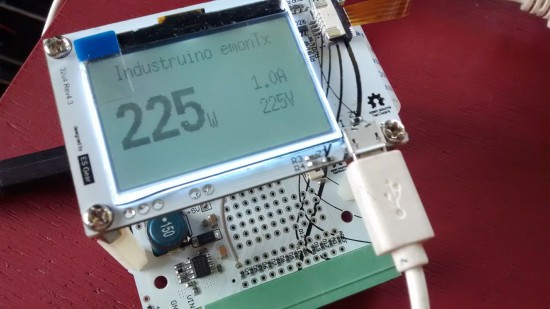
Industruino PROTO–now available on our online store–joined the AtHeart Program back in 2015 with hopes of combining industrial automation components and the simplicity of Arduino.

This robust DIN-rail mountable, Leonardo-compatible controller enables you to take your existing Arduino projects and swiftly transform them into permanent installations. The prototyping area and screw connectors allow you to install your own circuitry and reliably connect to accessories.

In the video below, Industruino co-founder Loic De Buck discusses these key features and more with Davide Gomba. (You can also find an extended version here.)

The team recently created an excellent tutorial showing how you to build an Arduino-based electricity consumption monitor with the Industruino PROTO platform. You can use it to measure AC power of your appliances, including a water cooker, TV, laptop charger, or anything else plugged into a wall socket. Alternatively, you can even use it in your electricity cabinet to evaluate the power consumption throughout your entire house (at least one phase).
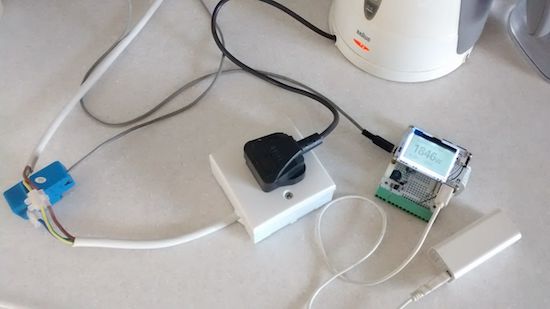
The challenge is to measure an AC of a relatively high voltage (220-240V) with a direct current 5V Arduino MCU.

This may seem dangerous, but we will use a non-invasive Current Transformer (CT),  so our Arduino remains galvanically isolated from the high voltage AC.

This prototype is based on the excellent open source project OpenEnergyMonitor. It uses parts of the its standard emonTx hardware and software to report the AC apparent power consumption, based on measurements of a Current Transformer as in the picture on the left. The original project also allows to measure 3 phase and/or real power, but for our prototype here we are only measuring the current of one phase, not its voltage which would require an AC/AC adaptor.

Want to make one yourself using the Industruino PROTO? You can find all the necessary documentation, including schematics and code, on the Industruino blog!
 

Building a “laser sky” effect generator with Arduino

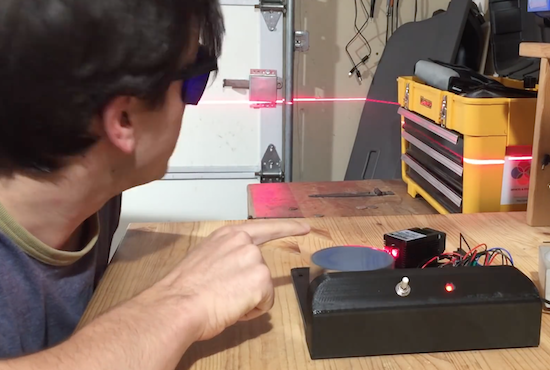
Bouncing a laser off of a spinning mirror creates an amazing effect with smoke and fog, but YouTuber “Normal Universe” made it even better with an Arduino.

This video starts out by introducing the concept of “laser sky,” which seems like a fun idea. There is, however, a chance that the mirrors wouldn’t spin, potentially pointing a laser continuously at a bystander, possibly damaging his or her eyes. To prevent this, the YouTuber added a photoresistor and LED to sense the spinning mirrors, then programmed an Arduino Uno to cut off the laser if it’s stopped for whatever reason.

Normal Universe goes on to explain the electronic concept behind it as well as the Arduino code involved, so even if this effect isn’t your cup of tea, the photoresistor/voltage divider setup could still be quite useful.

You can find a detailed breakdown of the project in the video below!

Teslapathic! Hackers build a brain-controlled Tesla

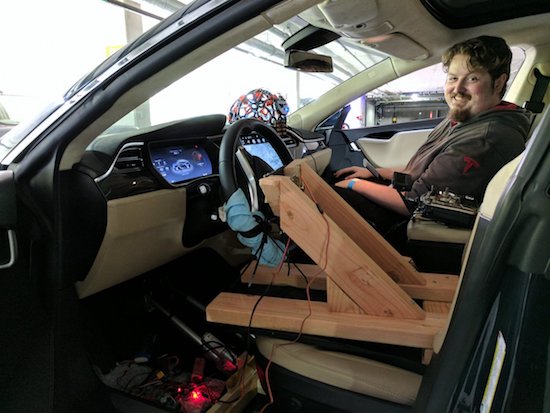
Using an electroencephalography (EEG) headset and gyroscopic tracking, researchers have created a mind-controlled Tesla Model S.

Self-driving cars seem to be all the rage these days in technology circles, but, as part of Cal Hacks 3.0, researchers have instead figured out how to drive a car using brain waves. This hack takes the form of an EEG headset that translates brain signals into “stop” and “go” commands, with a head-mounted gyroscopic sensor used to tell the steering wheel how to turn.

A radio link using an Arduino transmits these signals to the car’s new physical controls. This takes the form of linear actuators for the brake and accelerator pedal, and a windshield wiper motor for the steering wheel.

As seen in the video below, it works, but looks slightly terrifying! You can find out more about this particular project here.

(Photos: Devpost)

Teen helps friend with a brain injury communicate again

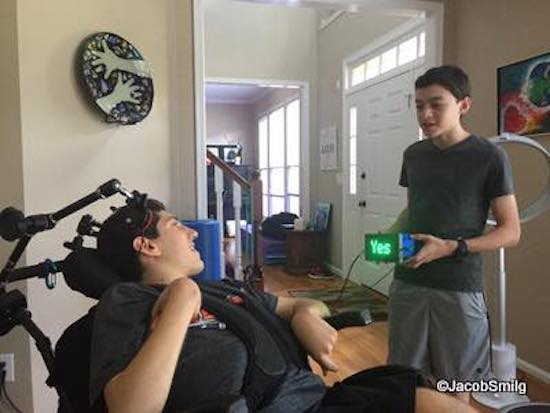
After an accident, Ethan Kadish was paralyzed. His friend, 14-year-old Jacob Smilg, came up with a simple device to help him communicate.

Several years ago, Kadish was struck by lightning, and lost control over his body. Communication with the world took the form of eye blinks for “yes” and “no,” which gave Smilg an idea for a revolutionary, Arduino Uno-based gadget that could help him communicate with people not familiar with this method.

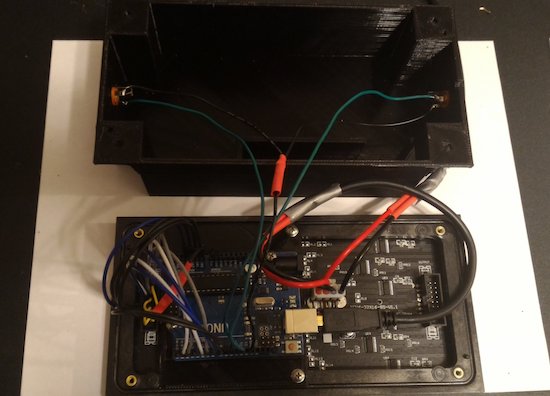
It uses two pads, which Kadish can press with his head. When pressed, the device displays “yes” or “no” on a small LED screen. This allows him to have conversations in a more natural way, which, as seen in the video below around 4:00 it appears to make him very happy!

You can read more about the project on Make:, and keep up with Kadish’s story and progress on the Team Ethan blog. More pictures and videos can be found on Smilg’s Facebook page.

Arduino Blog 17 Nov 19:38

A wakeup light for kids

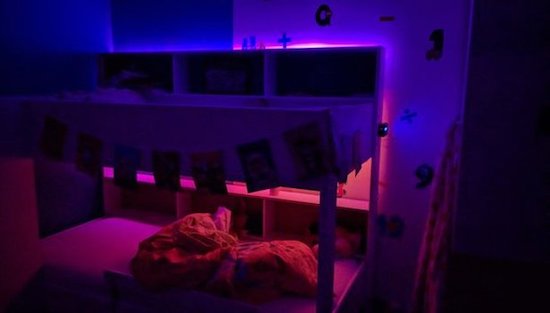
In order to convince his kids to stay in bed just a little longer, Maker Ralph Crutzen has created a “wakeup light” using an Arduino Mega and an RGB LED strip.

Those of us that have toddlers know that they can wake up very early. If you’d like to get some more sleep without leaving them unsupervised to dangerously play with your electronics and power tools, then a “wakeup light” could be a good solution.

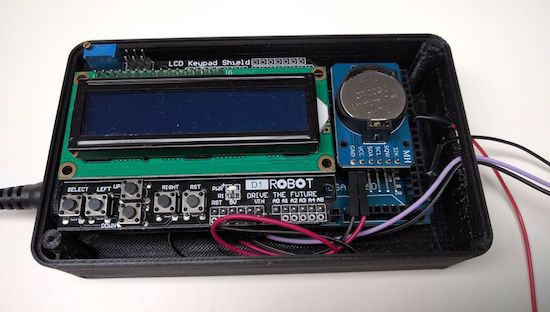
Crutzen’s system uses an Arduino Mega with a real-time clock to control a strip of LEDs, along with an LCD display to change settings. Besides a reminder to kids to “please stay in bed a few minutes longer,” perhaps a similar setup could be used as alternative alarm clock for adults as well.

You can find instructions for this build on Instructables, or check out the project’s code on GitHub. Finally, if you’d like to print an enclosure to protect humans and electronics, Crutzen used this design.

This machine sends messages using common chemicals

Stanford researchers led by post-doctoral fellow Nariman Farsad have built a machine that sends text messages using common chemicals.

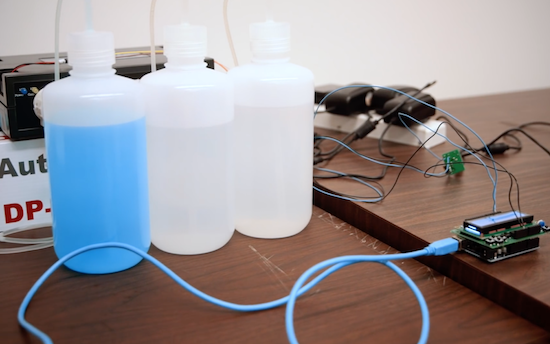
If you’re building a project, and need to send a signal from one component to another, solutions generally involve wiring them together, or some sort of radio, perhaps Bluetooth or Wi-Fi. Farsad, however, has been working on something entirely different. His system uses commonly-available chemicals to turn a liquid, either basic or acidic, in sequence as a binary communication protocol.

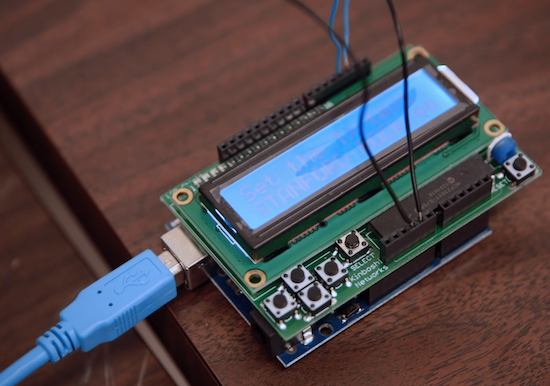
But instead of zeros and ones, it sends pulses of acid (vinegar) or base (glass cleaner). The researchers type their desired message in a small computer, which  sends a signal to a machine that pumps out the corresponding “bits” of chemicals. The liquids travel through plastic tubes to a small container that reads the solution’s pH. Changes in pH are then transmitted to a computer that deciphers the encoded message.

Once perfected, a messaging system like this could be used by devices inside of a human body or by tiny robots communicating with a chemical trail like ants. It can even leave secret messages that others wouldn’t even know to look for. Though still in its infancy, this method could open up an exciting array of possibilities!

You can read all about the fascinating system on Stanford’s page and see more below!

Arduino Blog 16 Nov 15:07

Skintillates: Temporary tattoos with embedded electronics

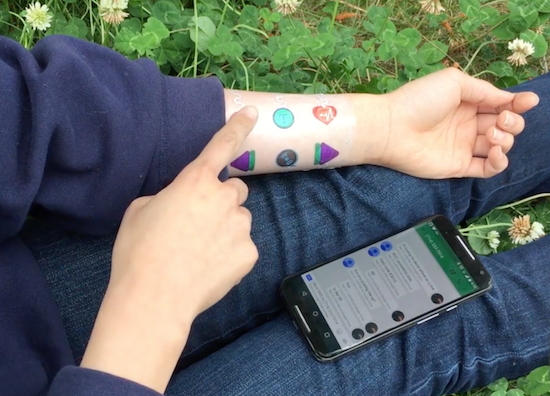
Developed by a team of UC Berkeley students, Skintillates is a wearable technology that mimics tattoos.

When you think of temporary tattoos, you likely think of something that comes out of a gumball dispenser, or perhaps “art” that you got on a spring break trip. As interesting as those may be, Skintillates is taking things to the next level.

These “epidermal wearable interactive devices” can serve as everything from passive and active on-skin displays, to capacitive and resistive sensors for controlling gadgets, to strain gauges for posture detection.

Using several layers allows these designs to stick to the skin, integrate various electronics, and have visible art for others to see. Electronics can mean that the tattoos can integrate sensors, or perhaps even LEDs. In at least one case, these lights are programmed to flash along with the beat of music, driven by an Arduino hidden under the wearer’s clothing.

Just like the traditional temporary tattoos often worn by children and adults alike, Skintillates flex naturally with the user’s skin. Our simple fabrication technique also enables users to freely design and print with a full range of colors to create application-specific customized designs.

You can find more on this project on the Hybrid Ecologies Lab page and read the team’s entire paper here.

(Photos: Eric Paulos)

PolySync launches open-source kit for autonomous car development

If you’re tired of waiting around to get an autonomous vehicle, PolySync’s Open Source Car Control Project (OSCC) development kit can be had for under $1000.

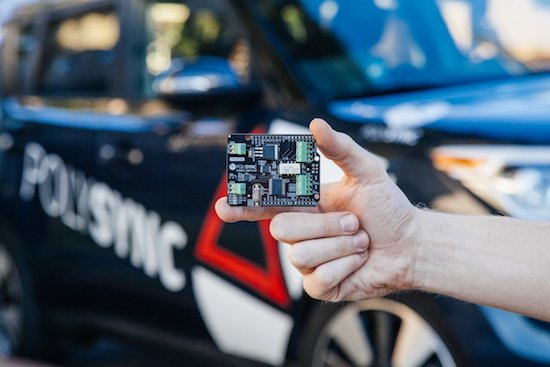
Autonomous cars are still in their infancy, and can cost upwards of $100,000. If you’re willing to do some of the work yourself—and trust a machine you modified to drive you around—PolySync has an Arduino-based kit (nearly) available to help you build your own.

You can pre-order a kit right now for $649, and you’ll have program each Arduino module yourself when you receive it. You’ll also need a 2014-or-later Kia Soul on which to install it, chosen for its combination of drive-by-wire controls as well as relatively low price. Keep in mind, however, the project is intended for R&D and off-road use only.

The OSCC Project is built around a number of individual modules that interoperate to create a fully controllable vehicle. These modules are built from Arduinos and Arduino shields designed specifically for interfacing with various vehicle components. Once these modules have been programmed with the accompanying firmware and installed into the vehicle, the vehicle is ready to receive control commands sent over a CAN bus from a computer running a control program.

You can find the full press release for this project here and more info on its GitHub page.

(Photos: PolySync)

An awesome 3D-printed Daft Punk helmet

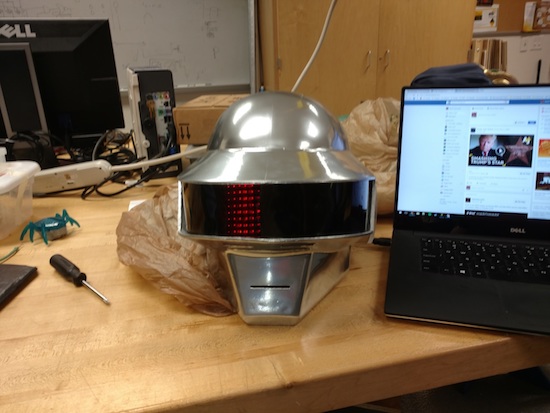
Though it’s been done before, this 3D-printed Thomas Bangalter helmet is absolutely amazing!

Daft Punk hasn’t toured in over a decade, but their music and general look seems to be becoming more and more popular. Perhaps this is due, in some small part, to the fact that Makers can now build a very good replica of their iconic helmets. Though the design for this helmet is available for download, looking at a design and building it are two different things.

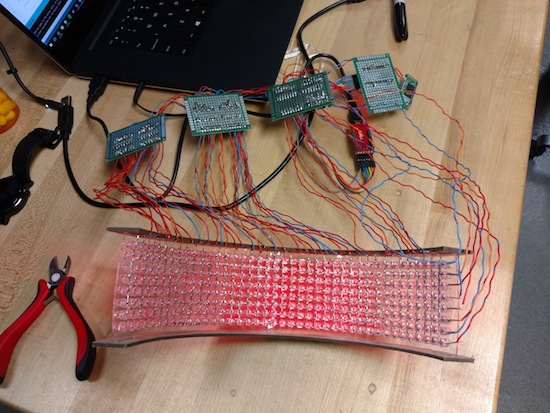
In addition to printing and finishing this prop (no small task), redditor “CrazyElectrum” did quite a bit of soldering. Getting all the electronic components to “play nice” with each other certainly took a good amount of work as well!

The helmet consists of 326 LEDS with 10 programmed displays, all controlled via Bluetooth and a custom smartphone app. Meanwhile, the ears are equipped with a pair of WS2812B strips. CrazyElectrum originally employed an Arduino Uno for its brains, but later moved to a Pro Mini due to its smaller form factor, and used six 74HC595 8-bit serial to parallel shift registers.

You can find more pictures of this build on Imgur, and read more about the project on 3Ders. 3D printing files are available on Thingiverse, and code on GitHub.

Roast coffee to perfection with an Arduino and Android app

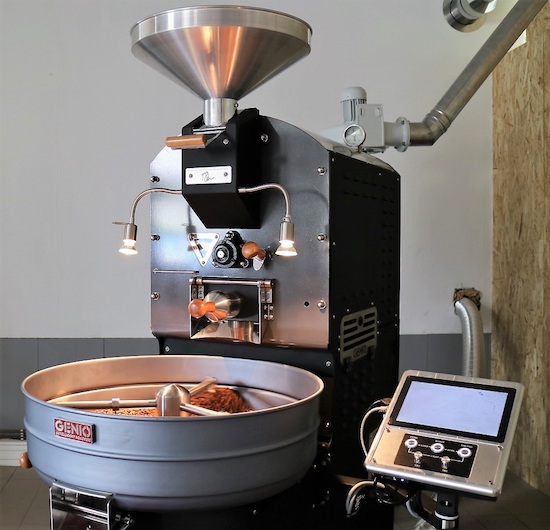
After winning the South African National Barista Championship in 2009, Neil Maree decided to actually start a company to make coffee roasting equipment. Genio was the result, and after some work, his machines can now roast coffee to perfection using recipe input via an Android app.

Once instructions are transferred, a heavily modified Arduino Due controls the roaster depending on user preferences. Maree first tried an analog solution, then used a PLC before deciding that the Arduino was what he needed.

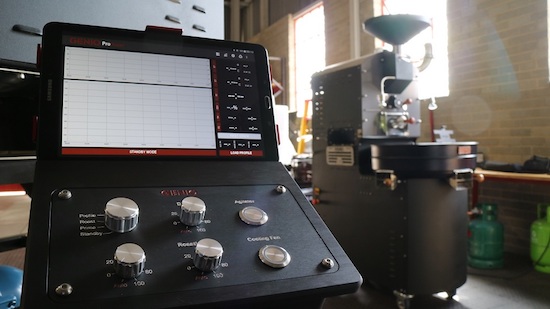
All of Genio’s roasters have a control panel with a variety of traditional switches and knobs, and then a not-so-traditional tablet mount. The app sends a “roast profile” to the roaster over a Bluetooth connection.

Perk your interest? You can take an inside look at the roasting machine factory on htxt.africa here.

Arduino Blog 14 Nov 18:24