Posts with «featured» label

New IDE for all Arduino boards!

Following the announcement at this year’s World Maker Faire, we’re excited to reveal the release of Arduino IDE 1.8.0—the new official desktop editor for all Arduino boards, both .org and .cc alike.

This should come as great news to the entire Arduino community, representing a key milestone in our journey moving forward.

You will now be able to use the desktop IDE 1.8.0 when working with any Arduino board from .org or .cc family. The latest and greatest unified Arduino Software can be downloaded here.

Arduino IDE 1.8.0 works out of the box with AVR boards, like the Uno, Mega, Yun, and Micro, among the most popular. Additionally, it supports the Leonardo Ethernet, Yun Mini, Industrial 101, and Uno WiFi.

The updated SAMD core will provide support for the M0, M0 PRO, and Tian, completing the product line that includes the Zero, MKR1000, and the newly-launched Primo and MKRZero.

More tech notes: You can run the IDE on Linux directly in command line, no longer requiring the X11 display. Also on the Arduino Builder paths with strange UTF8 chars are now correctly handled.

Release after release, the community continues to play an integral role in our development. Be sure to check the entire revision log for a complete list of changes and credits. As always, don’t forget to report any issues you may find, either on the Arduino Forum or by writing to support@arduino.cc and support@arduino.org. Your help is very much appreciated. And while in the holiday giving spirit, please consider supporting the Arduino Software by contributing to its progress!

A special thanks to all developers and management team for their efforts in making this big step forward. Happy Holidays!
A DIY hexagonal Bluetooth speaker with sound-reactive LEDs

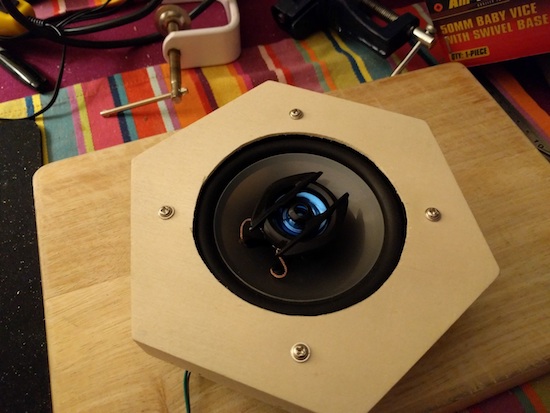
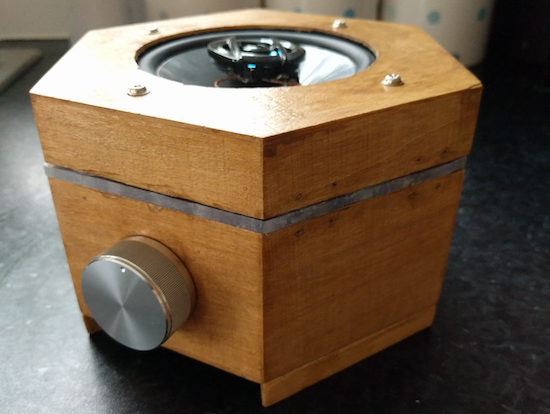
Imgur user Peter Clough recently created his own colorful “Magic Box” Bluetooth speaker assembly with a NeoPixel visual display.

If you need a speaker (or rather a speaker with an enclosure) the easiest way is usually to just buy one. On the other hand, if you want something really awesome and unique, why not build it yourself? Clough did just that using an Arduino Pro Mini and a Bluetooth receiver along with a strip of programmable LEDs that react to the emitted sounds–made possible by an electret microphone amp.

Cleverly, the case was sourced from a hobby supplies store, while neodymium magnets were used to keep the lid in place. Clough also employed a “really beefy” 20W 4Ohm speaker, as well as a rotary encoder with push button for volume and play/pause control.

You can find more details, including a schematic, on the project’s Imgur page.

Hack your Teddy Ruxpin with Alexa, Arduino and Raspberry Pi

If you had a Teddy Ruxpin in the ’80s and ’90s, you probably remember inserting special tapes and hearing him read stories to you. Whether you loved or hated the little bear, it was hard to forget his weirdly moving mouth and eyes. Today though, with small and cheap development boards readily available, this mechanical system is just begging for a retrofit.

In this project, hacker “Tinkernut” employed an Arduino to sense the intensity of a sound input, and in turn used it to allow Ruxpin to lip sync to any audio source. This could be a song, story, or even output from a virtual assistant.

He chose the latter option, and after installing Alexa on a Raspberry Pi, used the two boards in tandem to control the retro toy. With this setup, he can ask it such questions as “how tall is the empire state building?” and have it answer back with audio and a semi-synced bear mouth.

Have an old Ruxpin lying around? Give new life to it by following Tinkernut’s instructions here.

Control this Ohio home’s Christmas lights over the Internet

If you don’t want to bother putting up your own lights this year, you can just control Tom Hammond’s!

As seen on Good Morning America, Hammond recently put up a Christmas display that can be controlled via a simple online interface between the hours of 5pm and midnight (EST). The setup consists of an Arduino Mega along with a Raspberry Pi running Falcon Player, while the animations were created using xLights.

The website offers nine lighting options that anyone can select and play. Thanks to a webcam on Hammond’s property, the page even features a live stream that lets users see the animation they chose in real-time. However, due to the number of people trying to access it, the video is not always available.

Hammond, who lives in Akron, Ohio, told ABC News:

“I wanted people outside of my community to enjoy it. The nicest thing I got was an email from an older lady who lives with her mother who said they couldn’t decorate their house this year and she showed her mom my website and said that was one of the best gifts, that she got to decorate.”

Want a fun holiday distraction? Check out the Internet-connected lights here! You can also look at these other Arduino-powered dazzling displays to help get you in the festive spirit!

Turn an old microscope into a live cell imaging device

Microscopes are common pieces of equipment in laboratories (or even high school science classes for that matter), but making movies of living cells usually requires more expensive and specialized tools… until now. With a 3D-printed mount for a smartphone and an Arduino, researchers at Sweden’s Uppsala University have been able to retrofit ordinary microscopes to take time-lapse sequences.

To accomplish this, an Arduino was used to control a shutter for the smartphone to minimize light exposure when capturing intermittent images, while a heating unit was employed to maintain a constant temperature for the tiny organisms.

The control unit was built using an Arduino Nano, a Bluetooth communication module, a power transistor, and a voltage regulator. The control unit was connected to a standard computer power supply unit and then used to provide power at the appropriate voltages to the other components of system, i.e. the heating element (12V), the fan (12V), the temperature sensors (5V) and finally the shutter’s servo motor (5V). The control unit was used to operate the shutter’s servo motor via Bluetooth, and also to control the temperature inside the incubator by adjusting the power supplied to the heating element.

In the future, this modular and affordable system, called ATLIS, could increase the accessibility of time-lapse microscopy for the wider research community. The total cost for all of its components (excluding the phone and microscope) was only $277, a mere fraction of the price for commercially available equipment.

You can read more about the project on Phys.org and find the team’s full study here.

(Photo: Linda Koffmar / Phys.org)

Control this Rock ‘em Sock ‘em Robots match with your tweets

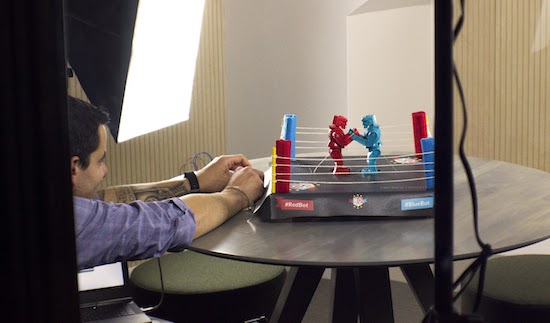
Los Angeles-based interactive agency Friendly Vengeance is putting up its dukes to “Knock Out Injustice” with the five-day social media fundraising campaign “KO Bots” to benefit L.A. Kitchen.

A pair of Rock ‘em Sock ‘em Robots are ingeniously employed for this charity boxing match, in which the action is entirely decided by Twitter. Participants tweet @KO_Bots with the hashtags #RedBot or #BlueBot to prompt the robot of that color to take a symbolic swing at issues including ageism, food waste and recidivism, then watch the impact of their post by following along in real-time online.

Punches are thrown using a set of servo motors connected to an Arduino Mega capable of reading simple inputs (such as a tweet) and generating an output (in this case, a punch). Friendly Vengeance CEO Steve Tiseo tell us:

To detect a popped up head, we attached a photoresistor below the chin and set a threshold for determining when the bot is “knocked out.” A Python script searches for #RedBot and #BlueBot, and then sends integers to the Arduino to randomize punches via USB serial communication. If a bot’s knocked out, it sends a number back to the Python script to tally a KO on the site.

After playing, users receive a thank you tweet and a link to make a donation. To learn more about the project and its cause, head over to the KO Bots page. The fight will be streaming from December 19 to December 23.

Control a Rock ‘em Sock ‘em Robots match with tweets

Los Angeles-based interactive agency Friendly Vengeance is putting up its dukes to “Knock Out Injustice” with the five-day social media fundraising campaign “KO Bots” to benefit L.A. Kitchen.

A pair of Rock ‘em Sock ‘em Robots are ingeniously employed for this charity boxing match, in which the action is entirely decided by Twitter. Participants tweet @KO_Bots with the hashtags #RedBot or #BlueBot to prompt the robot of that color to take a symbolic swing at issues including ageism, food waste and recidivism, then watch the impact of their post by following along in real-time online.

Punches are thrown using a set of servo motors connected to an Arduino Mega capable of reading simple inputs (such as a tweet) and generating an output (in this case, a punch). Friendly Vengeance CEO Steve Tiseo tell us:

To detect a popped up head, we attached a photoresistor below the chin and set a threshold for determining when the bot is “knocked out.” A Python script searches for #RedBot and #BlueBot, and then sends integers to the Arduino to randomize punches via USB serial communication. If a bot’s knocked out, it sends a number back to the Python script to tally a KO on the site.

After playing, users receive a thank you tweet and a link to make a donation. To learn more about the project and its cause, head over to the KO Bots page. The fight will be streaming from December 19 to December 23, though tweets can be sent to the robots at any time during the event.

An Arduino-powered Christmas card game controller

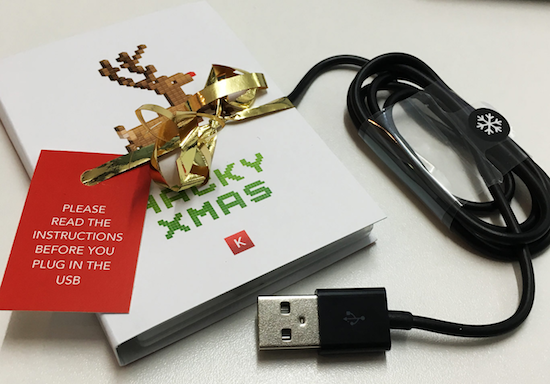
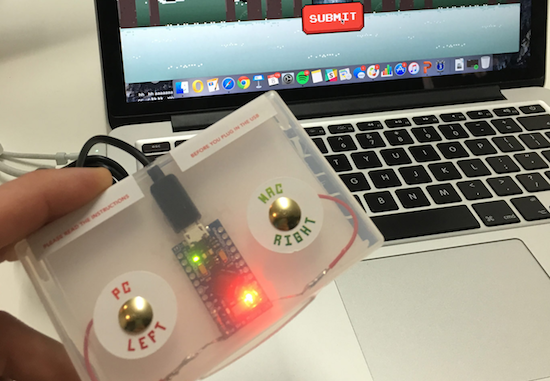
Last December, to wish their clients a Merry Christmas, UK-based agency Kerve Creative decided to do something a bit different than just the traditional holiday card. Instead, they created an interactive one with Arduino that transforms into a fully-functional game controller.

The card invited recipients with a “little ditty” to play the retro-style Hacky Xmas game. After plugging it into your computer’s USB port and pressing either the Mac or PC button (PC may’ve needed to wait for the drivers to update), they could then use the controller to help Santa hack down a Christmas tree, while dodging falling decorations and collecting as many points as they could.

To make things even more merry, the highest scores also won a special prize from the Kerve team which included a lumberjack hat and a bottle of champagne.

You can read more about the awesome project here.

A four-factor lockbox

If you really don’t want someone messing with your valuables, a programmable box may be just what you need!

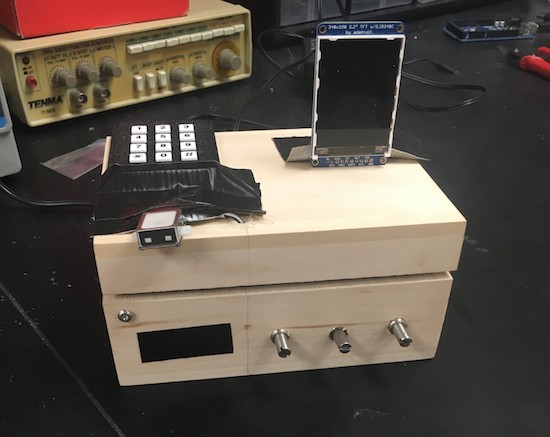
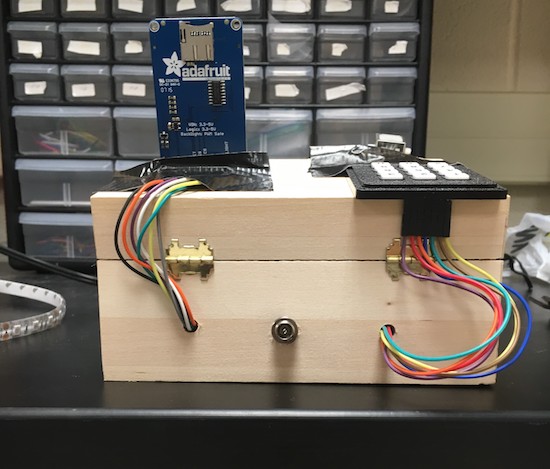
Locking mechanisms generally work using one method—a key, for example—to keep them secure, or perhaps two in certain circumstances. This box, designed as a final project for an electrical and computer engineering class at Cornell, instead makes the user go through four steps to get to the “treasures” inside.

Once the user has input the correct code, set potentiometers to the correct position, knocked on the box in the correct sequence, and finally scanned his or her fingerprint, a solenoid unlatches the box’s. It seems like a great project for an ECE class. On the other hand, the unit is wooden, so if you did forget the authentication procedure, it wouldn’t be too hard to manufacture a literal back door!

A cool idea nevertheless, and certainly something that could help protect your snacks or other items from a sneaky roommate. You can see more about this lockbox on the Cornell-hosted project page.

Dad builds an Arduino Hot Wheels drag strip for son

If you want to eliminate arguments about which toy car is fastest, we’ve got just the project for you.

When one’s kid has a birthday, most people go to the store and buy a gift. Phil Tucker instead decided to build something unique for his two-year-old, an automated Hot Wheels drag strip with an electronic start gate and timer. Like many other gravity race setups, when released, the cars roll to the bottom of a slope.

Tucker’s design, however, releases the cars automatically using a servo and hinge at the press of a button. It then detects the winner using infrared LEDs and light dependent resistors, displaying the results on a miniature marquee. The entire system is controlled by an Arduino Uno.

You can find more on this DIY drag strip here, and see it in action below!