Posts with «featured» label

Turn an Atari 2600 into an electronic drink racer and timer

The next time you and your friends want to see who can chug beer (or a non-alcoholic beverage for the younger crowd) the fastest, you may want to try building your own Cider Racer 2600–an electronic racing platform and timer for competitive drinking.

Created by YouTuber “MonkeyBOX Entertainment” for an annual Christmas party, the project consists of a broken Atari 2600 retrofitted with an Arduino Mega, two 4-digit 7-segment displays, some LEDs, wires, and other miscellaneous parts. A pair of custom coasters were constructed using force-sensitive resistors, soft springs, rubber actuators, and three layers of CNC-cut materials: acrylic bottom plate, brushed aluminum center, and acrylic spacer to make it level with top of the old gaming console.

In drag race mode, two drinks are placed on the Cider Racer 2600’s pressure-sensing coasters. When ready to get things underway, both competitors press a red button on the side, prompting LEDs begin to countdown from red to green as if they were cars waiting at the starting line. Time is shown on a 7-segment display above each coaster, which stops as soon as someone puts down their empty glass. The winner’s time will then flash.

The clock can be cleared using the Atari’s old ‘game reset’ switch. But that’s not all. The Cider Racer 2600 is capable of detecting false starts and if a drink is placed back prematurely. You can read more about the project in the video’s description below, and check out its popular reddit thread here.

Turn an Atari 20600 into an electronic drink racer and timer

The next time you and your friends want to see who can chug beer (or a non-alcoholic beverage for the younger crowd) the fastest, you may want to try building your own Cider Racer 2600–an electronic racing platform and timer for competitive drinking.

Created by YouTuber “MonkeyBOX Entertainment” for an annual Christmas party, the project consists of a broken Atari 2600 retrofitted with an Arduino Mega, two 4-digit 7-segment displays, some LEDs, wires, and other miscellaneous parts. A pair of custom coasters were constructed using force-sensitive resistors, soft springs, rubber actuators, and three layers of CNC-cut materials: acrylic bottom plate, brushed aluminum center, and acrylic spacer to make it level with top of the old gaming console.

In drag race mode, two drinks are placed on the Cider Racer 2600’s pressure-sensing coasters. When ready to get things underway, both competitors press a red button on the side, prompting LEDs begin to countdown from red to green as if they were cars waiting at the starting line. Time is shown on a 7-segment display above each coaster, which stops as soon as someone puts down their empty glass. The winner’s time will then flash.

The clock can be cleared using the Atari’s old ‘game reset’ switch. But that’s not all. The Cider Racer 2600 is capable of detecting false starts and if a drink is placed back prematurely. You can read more about the project in the video’s description below, and check out its popular reddit thread here.
This guitar-playing robot performs American folk music

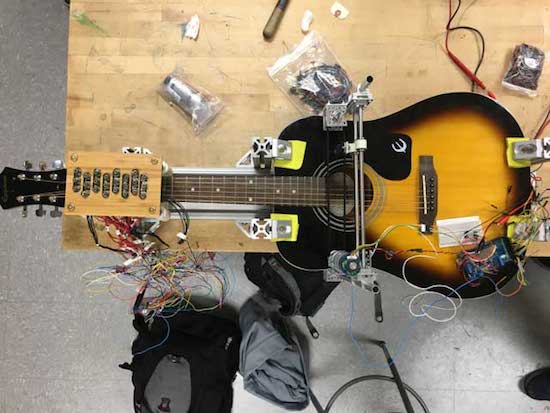
Inspired by a statement written on Woody Guthrie’s guitar, This Machine Kills Fascists (TMKF) is an Arduino Mega-based, guitar-playing robot that performs traditional American folk music on a portable stage. Sheet music with the song lyrics are printed and left on the benches set up in front of the stage, while audience members are encouraged to sing along to the tunes.

Developed by engineer Dustyn Roberts, artist Troy Richards, and designer Ashley Pigford, TMKF is combines the analog tradition of folk music and digital technology of robotics.

Our project is inherently positive and seeks to bring people together through music. It uses a strategy of generating empathy and goodwill with an artificial intelligence to make us ask questions of the kind of community we may or may not be making with actual humans. With TMKF we hope to create a compelling experience that starts conversations.

You can read more about TMKF here, and see an early test of the strumming robot below!

(Photos:  Dustyn Roberts / Troy Richards)

Play digital music on this analog interface

“I’m a big fan of digital music, especially Spotify. The ability to dial-up a much loved song I’ve not heard for ages or discover new music are just some of the benefits I never tire of,” writes UK-based designer Brendan Dawes. “Yet the lack of physicality to this digital medium has always left me wanting. I still own vinyl and a turntable and I love the ritual of physically flicking through what to place on the platter and then wait for the needle to drop on the spinning vinyl.”

To bridge the gap between the digital and analog worlds, Dawes decided to create what he calls the “Plastic Player.” The playful interface features a Raspberry Pi running Pi MusicBox connected to his 50-year-old B&O stereo, and an Arduino Yún with an NFC shield.

The “albums” themselves are made from a box of slide mounts with tiny NFC stickers on the back. When Dawes drops one in place, the Arduino identifies the tag, matches it to a specific record, turns on a backlight, and then communicates via WiFi with the Pi MusicBox API to play the tunes.

Removing the cartridge from the device pauses the track. But that’s not all. There are also three buttons on top, which can be used to skip, go back, or stop a song.

It’s often easy to romanticise the past, convincing ourselves that things were better back then when really I think that’s just not the case. I’ve discovered way more music since moving to Spotify then I ever did in record shops. What I do like though is the physicality of choosing an album to play and this system is an attempt to blend the good parts of both worlds. The future will continue to be digitised and I embrace that, but I think there’s a space in between the digital and the analog to create interactions that are filled with the inconvenience of what it is to be human.

You can read more about the Plastic Player on Dawes’ website, and see it in action below!

(Photos: Brendan Dawes)

Build an FM radio with an Arduino and other spare parts

After not having an FM radio to listen to NPR, electrical engineer Kevin Darrah decided to build his own from spare parts.

Like many electronics hackers, Darrah tends to buy random components off of eBay. After all, you may need them at some point, and while cheap, sometimes they take a very long time to arrive. Unlike many of us, however, he actually found a use for several of these items, turning them into an FM radio controlled by an Arduino.

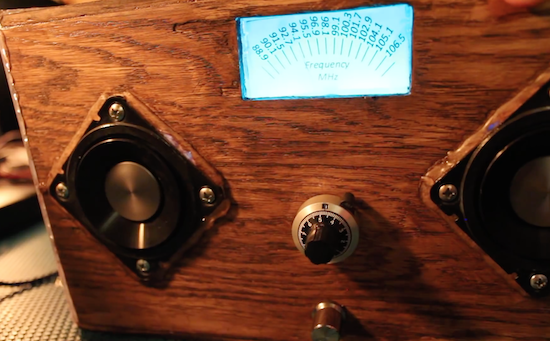
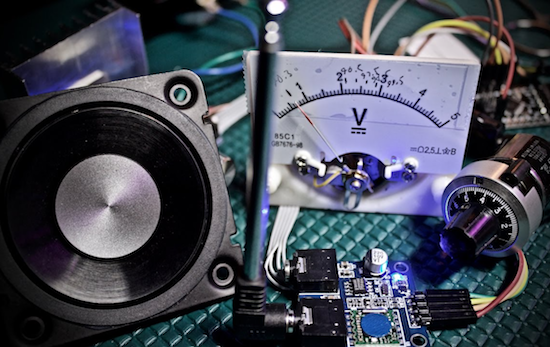
His DIY device uses an ATmega328-based board to communicate with a TEA5767 FM radio module I²C., a 10-turn potentiometer to set the station, and a 15W amp to power the speakers. Although it mostly works like a normal radio, one fun trick he implemented is that the station display lighting flickers if the audio drops out.

Also, since it has a microcontroller inside, there are lots of possibilities for expansion, such as adding a Bluetooth module for remote control, or perhaps a “seek” function to help set the channel. You can check out the code for this project here, or follow Darrah on Twitter if you’d like to know what he’s up to!

Make your own 3D-printed sonic tractor beam with Arduino

From magic to science, man has long dreamed about being able to manipulate objects from a distance. People have been able to push something using air or even sound waves for a while, but University of Bristol researcher Asier Marzo and colleagues have come up with a 3D-printable device that can not only repel small items, but can also attract them to the source.

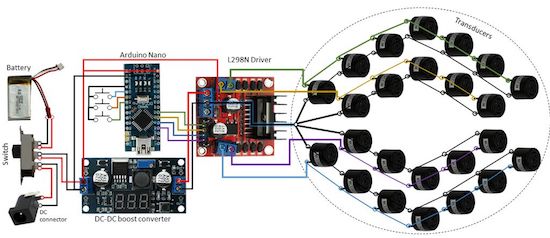
It does this using an array of sound transducers arranged in a dome shape at the end of a wand. The acoustic tractor beam is also equipped with an Arduino Nano, a motor controller board, a DC-DC converter, and a LiPo battery, among some other easily accessible components.

Basically, an Arduino will generate 4 half-square signals at 5Vpp 40kHz with different phases. These signals get amplified to 25Vpp by the motor driver and fed into the transducers. A button pad can be used to change the phases so that the particle moves up and down. A battery (7.3V) powers the Arduino and the logic part of the motor driver. A DC-DC converter steps-up the 7.3V to 25V for the motor driver.

Aside from entertaining friends by levitating small pieces of plastic, the DIY tractor beams have many possible use cases, particularly in biological research. However, there are some limitations. Given the challenge of suspending objects more than half the wavelength of sound, the gadget can only trap things around a few millimeters in size.

Marzo and his team have published their project in the journal Applied Physics Letters, and shared step-by-step instructions so you could get started on building your own beam. You can read more on Phys.org as well.

Measure a magnet’s strength with this DIY Gauss Meter

You may know that a neodymium magnet is more powerful than something you usually find on a refrigerator, but by how much?

Most people, even those willing to harvest magnets from disk drives, accept that some magnets are stronger than others. This, however, wasn’t quite good enough for Anthony Garofalo, who instead converted a prototype voltmeter he made using an Arduino Uno and a tiny OLED display into something that displays the magnetic, or Gauss level. It also shows whether it’s observing the north or south pole of the magnet, which certainly could be useful in some situations.

Though full documentation isn’t available right now, Garofalo says that he’ll make it available once he repackages everything in a smaller format with an enclosure. If you’d like to see more of his work, including the voltmeter he based this off of, be sure to check out his Instructables page and some other neat stuff on his YouTube channel!

This 3D-printed bionic hand can replace or support a limb

3D-printed appendages are, as one might suspect, generally meant for those that are missing a limb. Moreover, there are many other people that might retain partial functionality of a hand, but could still use assistance.

Youbionic’s beautifully 3D-printed, myoelectric prosthesis is envisioned for either application, capable of being controlled by muscle contraction as if it were a real body part.

As seen in the video below, the Youbionic hand can manipulate many different items, including a small box, a water bottle, and a set of keys. Functionality aside, the movement is extremely fluid and the smooth black finish really makes it look great.

The device is currently equipped with an Arduino Micro, servos, various sensors, a battery pack, and a few switches. Even the breadboard appears to be very neat, though one would suspect the final version will use some sort of PCB.

You can learn more and order yours on Youbionic’s website.

Bett 2017: Call for volunteers in London!

Arduino Education empowers educators with the necessary hardware and software tools to create more hands-on, innovative learning experience.

Later this month, we’ll be exhibiting our latest STEAM program for upper secondary education at Bett 2017 in London: CTC 101 – Creative Technology in the Classroom 101.

We’re looking for volunteers to join our team during the event, from staffing tables and displays, to helping with one-on-one demos, to providing technical assistance. Water and snacks will be provided, of course, and we’ve even prepared a small gift to show our appreciation at the end of your shift!

Interested? Please fill out this questionnaire and we’ll get back to you soon! 

  • When: Wednesday-Saturday, January 25-28, 2017
  • Location: ExCeL London, Royal Victoria Dock, 1 Western Gateway, London E16 1XL, United Kingdom

RooBee One is an open-source SLA/DLP 3D printer

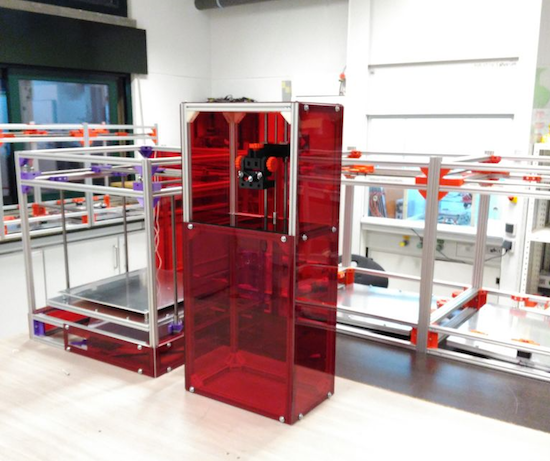
Aldric Negrier, a Portuguese Maker and owner of RepRap Algarve, has created an SLA 3D printer named RooBee One.

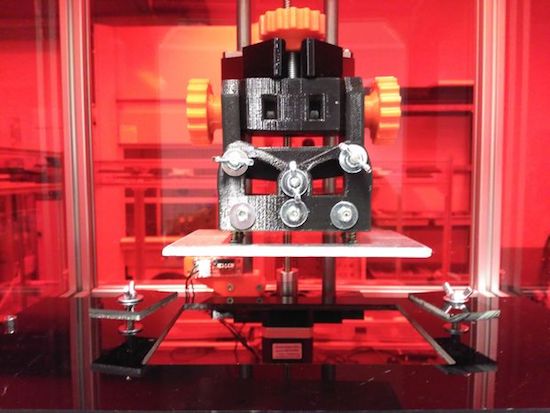
Most desktop 3D printers that you’ll see in Makerspaces or advertised for home use drop material onto a bed using a hot extrusion head. The open-source RooBee One, however, employs a DLP projector along with an Arduino Mega to light up each layer in a vat of resin. This causes each layer to solidify, thus making a complete object. You can see this process at around 0:30 in the video below.

RooBee One features an aluminum frame with an adjustable print area of 80x60x200 mm, with up to a 150x105x200mm build volume. Aside from the Arduino, additional electronics consist of a RAMPS 1.4 shield, a NEMA 17 stepper motor, a microstepping driver, an endstop, and a 12V transformer. Negrier also installed a fan on top of the printer to help guide the toxic vapors outside and away from the machine’s operator.

This process may be unfamiliar to those used to “normal” 3D printers, as it “magically” pulls a complete part out of a bath. The project is fairly involved, but the resulting ruby-red machine looks quite impressive. You can find out how to build one on its Instructables page.