Posts with «featured» label

Emulate a Commodore 64 keyboard with a modern PC and an Arduino

Using an Arduino, Adam Podstawczynski is able to translate keystrokes on his notebook to character inputs on a C64.

If you enjoy using a Commodore 64, but either don’t like (or perhaps don’t have) its keyboard, Podstawczynski’s project could be a great solution. His build runs a Python script on a PC, Mac, or Linux computer, which maps Commodore keys to a series of binary digits. It then sends this data over USB to an Arduino Mega, which in turn uses an MT8088 crosspoint switch to interface with the mainboard of a C64, allowing for hardware keyboard emulation.

This setup can act as a simple keyboard interface from the computer, or could be employed as a macro generator for demonstration purposes. It could even enable you to input an entire BASIC program on your PC, then send it to the C64 as desired!

Check out Podstawczynski’s page for more info on this work in progress.

Control a tracked robot with your mind (or joystick)

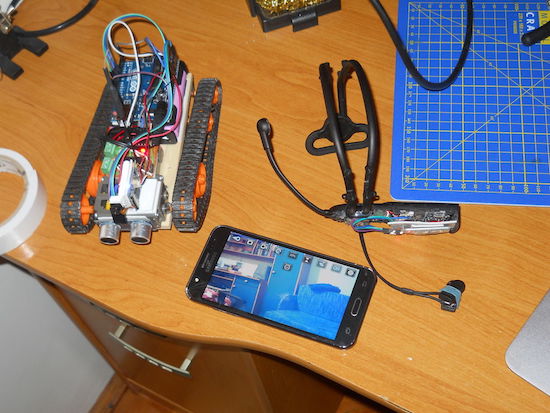
Whether you choose to control this vehicle with your mind or a joystick, the camera mounted on it will give you a new view of the world.

Maker “Imetomi” was inspired to create a tracked robot after he was able to salvage a camera off of a cheap drone. This became the basis of his FPV setup, which he fitted onto a little tracked vehicle. Although this would have been enough for most people, in addition to building a joystick-based controller, he also made it work with a brainwave headset.

Imetomi now has something that he can drive around virtually, spying on passersby, as long as it stays within the VR transmitter’s 50-meter range. Be sure to check out the video below, where the small bot shows of its impressive all-terrain capabilities, and read his Instructables write-up here.


An Arduino-powered automatic guitar footswitch

If remembering to hit your foot pedal at the right time during shows is a challenge, this device will take care of it for you.

As creator Franco Molina points out, there’s a lot to worry about when playing guitar in front of an audience. Actually playing is one thing, but you have to pay attention to the crowd, move around on stage, make sure you don’t have any wardrobe malfunctions, and… hit a footswitch to change between clean and distorted channels when appropriate.

Molina’s device may not be able to help you with everything on that list, but by listing to a specially encoded ‘click track’ from a computer or MP3 player, it can automatically switch amplifier modes when appropriate. It does this by using an Arduino Uno along with an amp to listen to the track, then switch a relay to simulate a footswitch.

If you’d like to build your own, check out Molina’s Instructables project page!

These students created their own Overwatch VR rig

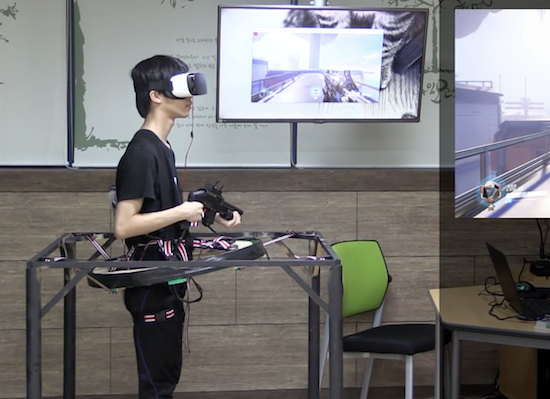
A group of high school students in South Korea have created a multi-part rig that lets them play Overwatch in virtual reality.

Their console, which resembles somewhat of a Virtuix Omni treadmill, enables users to move around the battlefield by leaning in whichever direction they want to go, to fire and reload their weapon with a custom toy gun controller, and even to hit things by punching the air.

As you can see in the video below, the setup consists of a Samsung Gear VR headset, a smartphone, Arduino boards, an IMB sensor, a button, a ball bearing, a PC, a motion detection device, and a copy of Overwatch.

Although there’s a bit of input lag, it’s still an incredible project by a team of young Makers. You can read more on PC Gamer.

Attachment is like a modern-day message in a bottle

If you want to reach out to someone, you could always pick up your phone and send a text. But if you’re seeking something a bit more random and indirect, one idea would be to write and attach a message to a biodegradable balloon using Swiss designer David Colombini’s “poetic machine.”

Colombini’s Attachment project allows you to do just that, by dispatching digital notes, images or videos gleaned from the Internet into the atmosphere. Once the Arduino Mega-driven device receives this input, the message is laser-etched on a thin piece of balsa wood, then released into the air (though a human has to ‘reload’ after five launches). Word space is limited to a Twitter-esque 120 characters, but the finder of the balloon can access any additional content that you include through a code on the project’s website.

According to Creative Applications:

Software includes PHP / MySQL database, vvvv (take the message from web database, layout of the message, transform it and stream it to the engraver) and Arduino IDE (controlling all the mechanisms). Hardware includes an Arduino Mega, NEMA 23 motors + drivers, linear actuators, a Bambi air compressor, helium cylinder, Festo pneumatic components (helium + air valves, helium and air pressure sensors, pneumatic cylinders, DHEB) and MicroSlice engraver (based on Arduino Uno).

You can read more on this project as well as its previous version. Additionally, visit the Attachment.cc page to input your own message!

(Photos: David Colombini)

Scare away unwanted guests with an eye-moving portrait

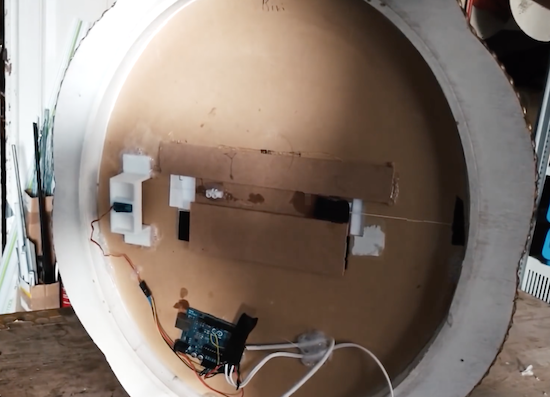
There are certainly many ways to generate an old-looking portrait with moving eyes, but this method from Sonic Robots is simple and seems quite effective. The basic formula is to buy a Victorian-like frame, get a picture of a loved/hated/random person (preferably tweaked to resemble an antique oil painting), then put a strip of paper with eyes printed on it behind the person’s eye sockets.

This eyeball strip is pulled by a servo via a fishing line, and importantly, a rubber band keeps tension on it from the other side. This allows it to quickly snap back into place, creating an effect where the eyes randomly move then stay in place for a while, hopefully causing someone to question his or her sanity.

Since everything is Arduino Uno-based, this could be expanded to include sensors for eye control, or even lighting effects as desired.

You can find more details on the project on SonicRobots.com and its code on GitHub.

Watch an Arduino Mega-based robot play the bagpipes

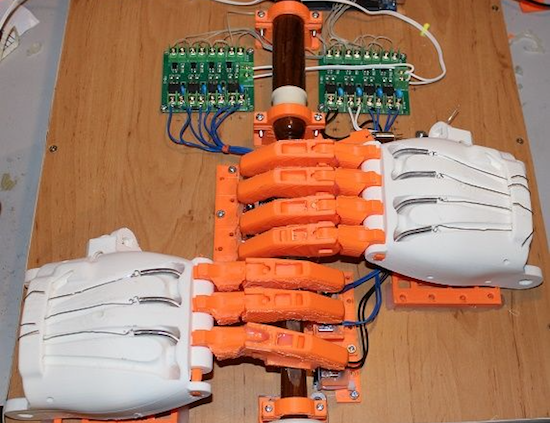
Using gigantic hands scaled up from a prosthetic design, “XenonJohn” can now hear the sweet sounds of Scotland whenever he wants.

Seeing this invention, you might note to yourself that most instrument-playing robots don’t actually bother to have realistic—if huge, at 171% normal print size—hands attached. Then again, you probably haven’t seen a robot configured to play the bagpipes.

The robot named Ardu McDuino plays the bagpipes, or rather the chanter part that is manipulated with one’s fingers, using actual prosthetic fingers to cover the holes. It also has a less-realistic “thumb” to cover a hole on the back.

Everything is controlled using an Arduino Mega via a bank of opto-isolated MOSFETs, along with solenoids to let it grip the individual air holes for music generation. You can read more about this project on its Instructables page!

Cozy Coupe toy car retrofitted with Arduino

Using an Arduino Uno along with an Adafruit Wave Shield, Brent Chapman added more features to the Little Tikes Cozy Coupe including a push-to-start ignition and a sound system.

Although Chapman notes that the Coupe comes with some onboard entertainment options, he thought “his client” deserved something a bit more high-tech. This meant that he retrofitted the classic toy with several pushbuttons that allow him to select a fun song to play and replaced the key with a giant arcade button. He also 3D-printed a replacement hood for the car to cover the electronics, since the original was modified to fit them inside.

Per the second video on the project’s page, his little client seems to be hesitant at first, but eventually starts happily car-dancing along to Mickey Mouse Clubhouse’s  “Hot Dog Dance” tune that parents will probably be familiar with.

You can see the entire build, including videos and code, here or follow Chapman on Twitter to see what he’s up to next!

The Cozy Coupe gets a much needed upgrade thanks to @arduino and the wave shield from @adafruit – https://t.co/9Y4UE5Z4Vu #ArduinoMonday pic.twitter.com/U1xWwQF9Bx

— Brent Chapman (@brentmore) January 9, 2017

SmartPID is a smart temperature and process controller

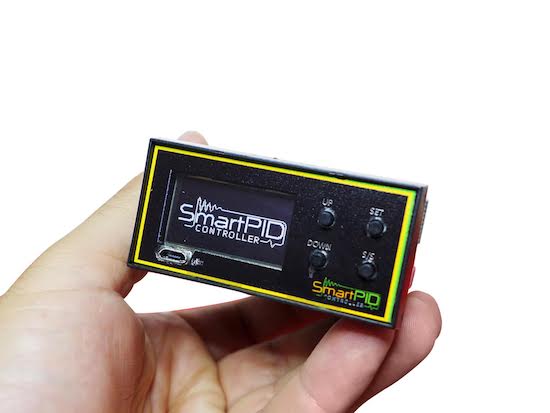
Professionally engineered, SmartPID is a high-tech, programmable temperature and process controller for the DIY community.

Compared to a basic on/off thermostat, SmartPID is an “open platform” that can collect temperature from multiple sensors, apply programmable control logic, and drive different loads with a precise PID algorithm.

Not only can SmartPID control any thermos-regulated process, heating or cooling, it can be used for a number of applications throughout your home, both locally and remotely. You can easily access your process and log data from the web browser on a desktop over Wi-Fi or a smartphone via a dedicated app, which is ideal in case of critical situations that involve alarms and triggers.
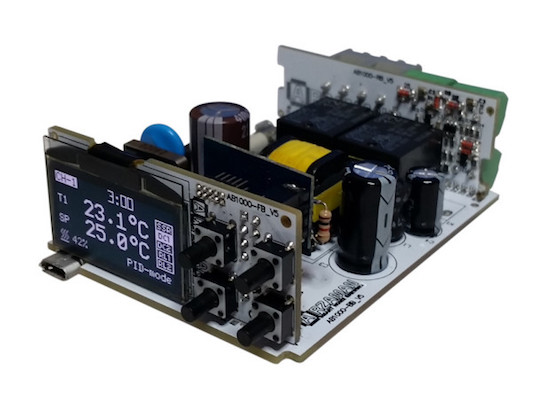
The brainchild of Davide Arzarello, SmartPID is a must-have for Makers, do-it-yourselfers, tech enthusiasts, as well as professional engineers seeking an affordable process controller. It’s 100% Arduino-compatible: just plug the SmartPID USB port into your computer and program the board using the Arduino IDE.

SmartPID is neither a simple controller nor a thermostat: it is an “open platform” in which the resources and I/O can be used for a variety of applications and in a variety of environments. The idea behind SmartPID is to develop an ecosystem of “vertical” applications on top of a common set of features, providing tools for people who would like to develop their own applications or hack existing ones. The two main apps included are the smart thermostat and smart brewing app, with a successful crowdfunding campaign, the company hopes to expand the controllers versatility into a number of vertical applications on top of the SmartPID platform.

With its process automation, SmartPID makes everything from homebrewing and winemaking to aquarium maintenance to oven temperature more precise, powerful, and flexible. Want to learn more? Check out Arzarello’s campaign on Indiegogo!


Arduino car alarm honks for help!

Sure, if you’re going to get a new ride, a model from the twenty-teens would be nice, but for hacking purposes, the simplicity of an older cars makes modification fairly simple. It also makes hot-wiring easy, and as they don’t generally have an alarm system, these vehicles are often targets for theft.

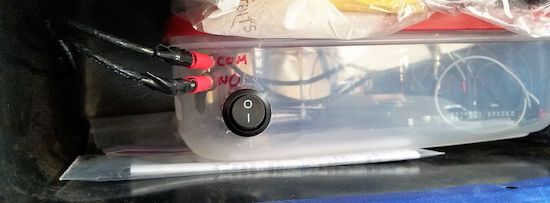
After his friend’s VW Beetle was stolen, Instructables user Ben Schroeder (aka “Pantopush”) decided that he needed to protect his 1966 Bug. So, as any Maker would do, he took matters into his own hands with a GPS-enabled Arduino Uno in a locked glove compartment.

Now, unless the unit is turned off, if it detects that the car is moving, it uses a relay to switch the horn on. Simple, effective (hopefully), and could be expanded to flash the lights or even text the owner with the location of the car.

Need a low-cost anti-theft system of your own? You can find the full writeup on Schroeder’s project page.